
Watercare Bill Tracker Excel – Free Template (2026)
Personal Finance
Home Renovation Budget Excel - Free Template
Track renovation budgets, actual costs, contractors, variances and completion dates across your New Zealand home project.
2026-07-26
360 downloads
4.8/5 average rating
Download template
A home renovation budget Excel spreadsheet is used to plan and monitor renovation costs by room, category and contractor. This template contains a Renovation Budget sheet for budgeted and actual costs, a Contractor Payments sheet, a Dashboard and an Instructions sheet.
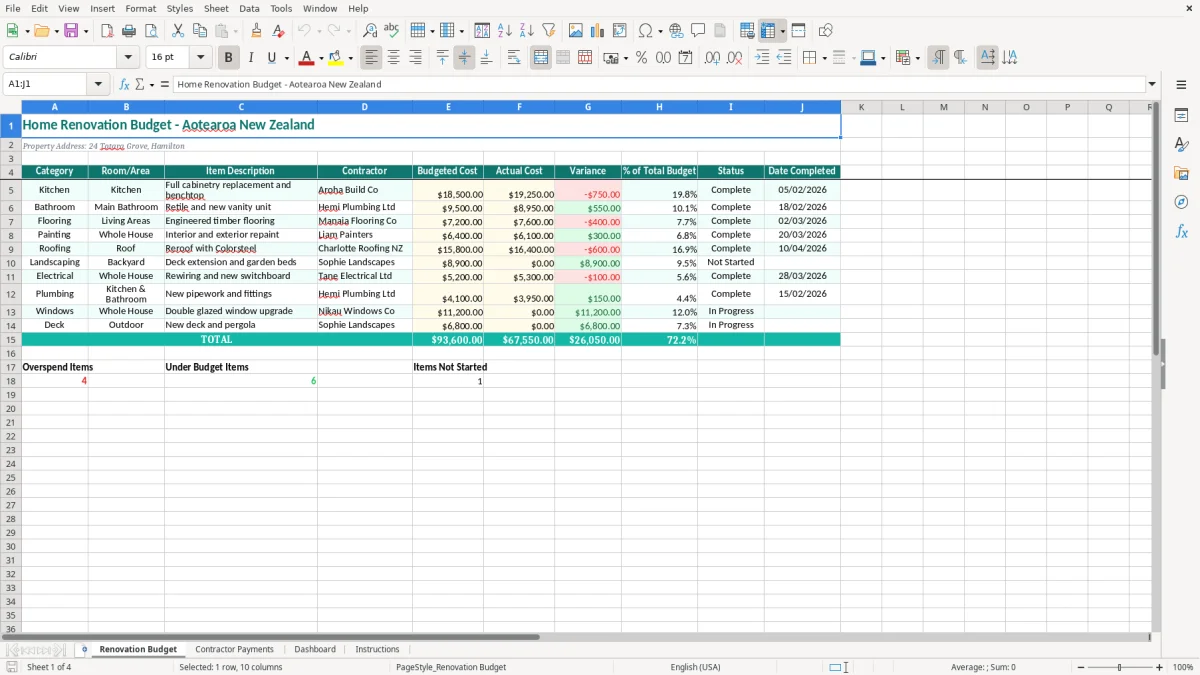
Enter your project details in the pale yellow input cells and use the teal headings to work through each area. The Renovation Budget sheet includes categories such as Kitchen, Bathroom, Flooring, Painting and Roofing, with room, item, contractor, cost, status and completion-date fields.
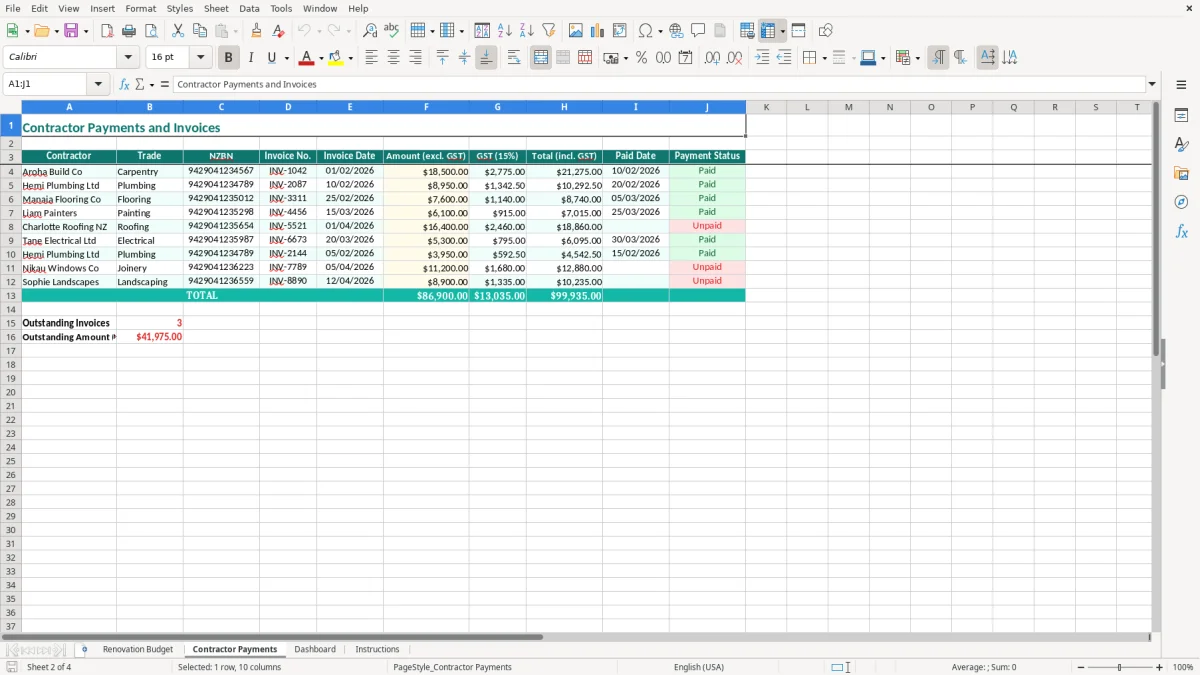
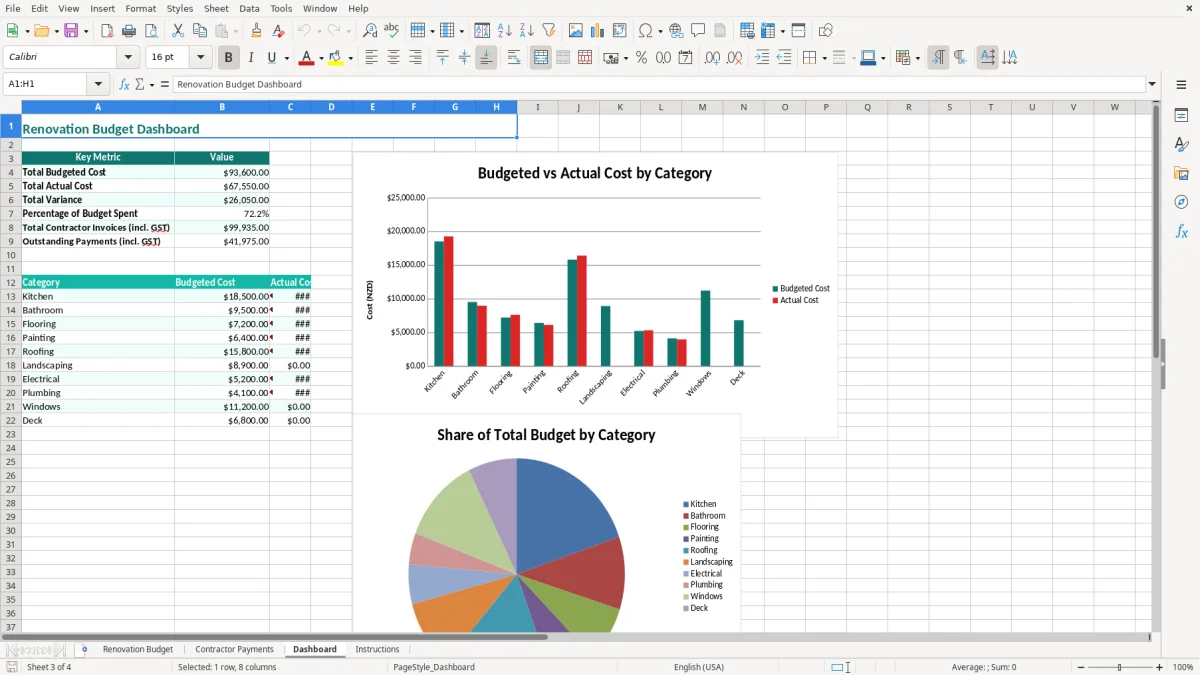
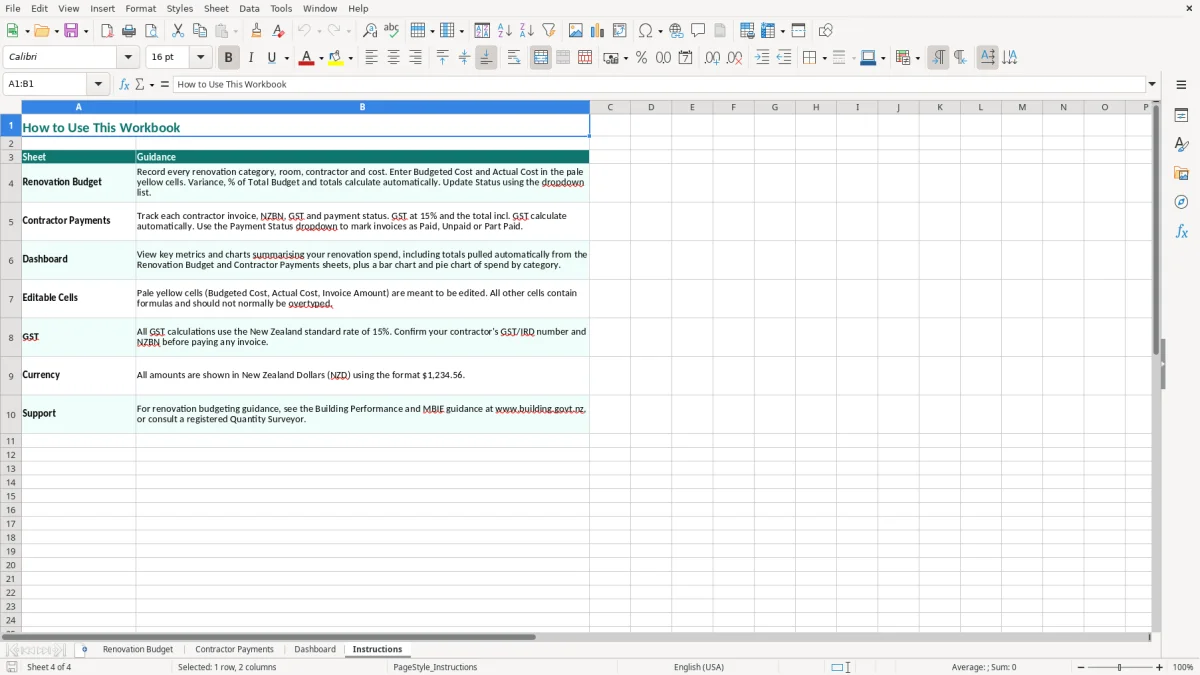
Image 1 shows the main budget layout, while image 2 shows the contractor payment area. The Dashboard in image 3 gives you a quick visual view of the project, and image 4 explains how to use the workbook.
The key benefits of this Excel template
- Compare budgeted and actual costs for every renovation item, from an $18,500 kitchen allowance to a $6,400 painting job.
- See the variance on each line so overspends are found before they spread across the project.
- Group work by category and room or area, making it easier to review a kitchen, bathroom, roof or whole-house project.
- Keep contractor names beside the work they are completing, reducing the chance of paying the wrong supplier.
- Record the date each item was completed so your budget also acts as a practical project history.
- Use the Dashboard to review the overall position without scanning every row in the detailed budget.
- Keep renovation planning and contractor payment information together in one workbook rather than a mixture of emails, notebooks and receipts.
Step-by-step guide
- Open the Instructions sheet first and read the notes about entering and reviewing the workbook.
- Go to Renovation Budget and replace the sample property address with your own address or project reference.
- Enter one line for each item of work, selecting a category and room or area and describing exactly what is included.
- Add the contractor name, then enter the agreed budgeted cost and update the actual cost as invoices arrive.
- Update the status and date completed when work is finished. Keep the wording consistent, such as Planned, In Progress and Complete.
- Record relevant payments on Contractor Payments and match them to invoices, deposits or progress claims before marking accounts as paid.
- Review the Dashboard at least weekly. Investigate unfavourable variances before approving the next variation or progress payment.
Included features
Renovation Budget columns for Category, Room/Area, Item Description and Contractor.
Separate Budgeted Cost and Actual Cost fields with a Variance column for cost control.
% of Total Budget column to show how much each line contributes to the planned project.
Status and Date Completed fields for following work from planning through to completion.
A dedicated Contractor Payments sheet for keeping payment information alongside the budget.
A Dashboard sheet with visual project information, including chart-based summaries created in Excel.
Teal headers, pale yellow input cells, currency formatting and bordered tables that are easy to read when printed or shared.
How homeowners and tradies use a renovation budget in New Zealand
Planning before the first invoice
A homeowner planning a Hamilton kitchen and bathroom renovation can list cabinetry, plumbing, tiling, appliances and painting before accepting quotes. Breaking a $65,000 project into 20 or 30 lines is more useful than keeping one figure called renovation costs. You can see whether the kitchen is taking $18,500 or $25,000, and whether there is still room for flooring and electrical work.
The spreadsheet also suits an office manager helping a small building firm prepare a client variation schedule. A Christchurch builder with four staff might use one line for each quoted trade package, then enter the actual invoice when the subcontractor claims payment. That creates a usable record of the original allowance and the final cost.
During the work
Renovation decisions arrive quickly: a rotten bearer is found, the selected tap is unavailable, or the client chooses a more expensive benchtop. Enter the change as a separate item rather than quietly replacing the original amount. A $2,400 variation is visible immediately, and the Dashboard can be reviewed before another commitment is made.
For a household, a weekly review on Sunday night works well. For a contractor, the natural point is after the Friday site meeting or before the Monday payment run. The key is to update actual costs from invoices and receipts, not from memory after six weeks of work.
One workbook for the project team
Image 1 shows the detailed Renovation Budget sheet with ten practical columns, including costs, status and completion date. Image 2 focuses on Contractor Payments, while image 3 provides a higher-level view for someone who does not need every item description. The Instructions sheet in image 4 gives the workbook a clear starting point for a couple, project manager or bookkeeper.
GST, building consent and records for New Zealand renovations
GST in a renovation budget
New Zealand’s standard GST rate is 15%. If a registered contractor quotes $10,000 plus GST, the invoice total is $11,500; if the quote is $10,000 GST-inclusive, the GST component is $1,304.35. Confirm whether each quote and allowance is GST-inclusive before comparing suppliers, because mixing the two bases can create a $1,500 error on a $10,000 job.
For a private homeowner, GST on renovation costs is generally a project cost rather than a personal claim. A GST-registered property business may have different treatment for taxable supplies, but the workbook should preserve the actual invoice figures and GST information rather than guessing. Registered businesses must keep taxable supply information and supporting records.
Consent and qualified work
Before work starts, check with the local council whether a building consent is required under the Building Act 2004. Some restricted building work must be carried out or supervised by a Licensed Building Practitioner, and plumbing, gasfitting and electrical work have their own licensing requirements. Put consent fees, inspection costs and professional reports into the budget as separate lines.
A $3,000 consent and design allowance is not the same as a builder’s labour cost. Separating it makes the final cost easier to explain and helps you spot a missing approval cost before construction begins.
Keeping evidence
Businesses should retain financial records for 7 years under Inland Revenue requirements. Keep quotes, contracts, invoices, receipts, payment confirmations and variation approvals with the workbook. The spreadsheet is a control tool, not a replacement for source documents.
For a rental or business property, speak with your tax adviser about depreciation, repairs versus capital improvements and the correct treatment in the profit and loss records. A new $24,000 kitchen is not automatically the same tax category as a $450 repair, so do not use the budget variance as a tax classification.
Where renovation budgets fall over and what it costs
The quote and invoice are not on the same basis
One of the most expensive errors I see is comparing a $30,000 GST-inclusive quote with a $30,000 plus-GST quote. The second commitment becomes $34,500. On a project with five trades, that misunderstanding can consume $7,500 of cash before anyone has changed the design.
Use the Item Description field to state GST-inclusive, GST-exclusive or estimated, and keep the original quote available. Do not overwrite the first budget when a variation is agreed; add a clearly described line so the movement remains explainable.
Allowances disappear into vague descriptions
A line called bathroom renovation for $12,000 hides the decisions that cause overruns. If waterproofing is $2,100, tiling is $3,400, the vanity is $1,250 and plumbing is $2,800, the remaining allowance is much easier to test. A $900 tap upgrade then has a visible home instead of becoming an unexplained final bill.
The same issue affects contractor payments. A deposit, progress claim and retention may all relate to one job, but entering only the total paid makes it hard to identify a duplicated invoice. Match each payment to the contractor and work description before marking it complete.
Actual costs are entered too late
Waiting until the renovation is finished turns cost control into archaeology. A Christchurch bathroom project budgeted at $22,000 can look fine for a month, then jump to $26,800 when four invoices and two variations are entered together. By then the tile order may already be committed.
Another trap is marking work Complete because the contractor has left site while the final invoice is still outstanding. Keep the status and actual cost honest. A missing $1,200 final claim is still a liability, even when the room looks finished.
Turning the spreadsheet into a renovation control routine
Choose one weekly review point
Attach the workbook to an existing habit rather than relying on motivation. Sunday evening suits a household; Friday after the site meeting suits a builder. Spend 15 minutes entering invoices, checking payment records and reviewing any red or unfavourable variance.
For example, if the budget is $48,000 and actual commitments have reached $51,600, the $3,600 gap should trigger a decision this week. You might defer $2,000 of landscaping rather than discover the shortfall after the final progress claim.
Keep entries consistent
- Use the same category names, such as Kitchen, Bathroom, Flooring and Painting, so the Dashboard remains useful.
- Copy the wording from the quote into Item Description, then add variation numbers or dates instead of shortening everything to miscellaneous.
- Enter costs as soon as invoices arrive and save the invoice PDF using the same contractor and project description.
- Keep a backup after each major payment run and protect formula cells if several people edit the file.
Know when Excel has reached its limit
This template is a sensible choice for one renovation with a manageable number of items and contractors. Move to Xero or MYOB when you have regular supplier bills, GST returns, multiple properties, payroll or more than one person needing a live ledger.
Excel remains useful as the project plan even then, but accounting software should hold the source transactions. A $120,000 renovation with 80 invoices and 15 variations needs stronger document matching than a simple spreadsheet can comfortably provide.
Common questions about this template
It includes four sheets: Renovation Budget, Contractor Payments, Dashboard and Instructions. The main budget records category, room or area, item description, contractor, budgeted cost, actual cost, variance, percentage of total budget, status and date completed.
Yes. It is set up for New Zealand projects and uses dollar currency formatting. Before entering quotes, check whether each amount includes the standard 15% GST, and add consent, inspection and professional fees where they apply.
Add a separate row for each approved variation and describe the change clearly in Item Description. Enter the revised or additional actual cost when invoiced rather than deleting the original budget, so the variance shows what changed.
Use one consistent basis throughout the workbook. For a private homeowner, GST-inclusive amounts usually reflect the cash you must pay; a GST-registered business should retain the invoice details and use the basis appropriate for its accounting records.
Yes. Use the Contractor Payments sheet for payment information and compare it with invoices and the actual costs in Renovation Budget. Keep bank confirmations, receipts and invoices separately because Inland Revenue requires businesses to retain records for 7 years.
Excel works well for a single project with a manageable number of items. Consider Xero or MYOB when the project has dozens of invoices and variations, or when you also need GST returns, supplier ledgers, multiple properties or payroll.
Download
File format
Excel (.xlsx)
Compatible software
Excel, Google Sheets, LibreOffice
Price
Free