
Queenstown Short Stay Income Tracker
Accounting & GST
IR3 Income Tax Return Excel - Free Template
IR3 income tax return workbook with tax calculation, rates and instructions for New Zealand sole traders and individuals.
2026-06-18
131 downloads
4.8/5 average rating
Download template
This IR3 income tax return Excel spreadsheet helps you work out taxable income, tax payable, and the key figures you need for your New Zealand individual return. It includes four sheets: IR3_Return, Tax_Calculation, Tax_Rates_and_Assumptions, and Instructions.
Use it to pull together the numbers before you file with Inland Revenue. It is built for people who want a clear worksheet for the return, a separate tax calculation page, and a simple reference sheet for rates and assumptions.
The key benefits of this Excel template
- Pulls your return figures into one place so you can see taxable income and tax payable without juggling scraps of paper.
- Separates entry, calculation, rates, and instructions across 4 sheets, which makes the workbook easier to check before you file.
- Helps you compare gross income, expenses, and net result quickly, so you can spot a missing deduction before it turns into extra tax.
- Reduces manual arithmetic with built-in SUM style calculations across the workbook, which cuts down on spreadsheet errors.
- Gives you a cleaner prep file for your IR3 than a single untidy worksheet, especially if you have rental, business, or side-hustle income.
- Useful for sole traders and contractors who want a working tax estimate before the 31 March balance date and final filing.
- Makes it easier to save a complete record for your files, supporting the 7-year Inland Revenue record-keeping rule.
Step-by-step guide
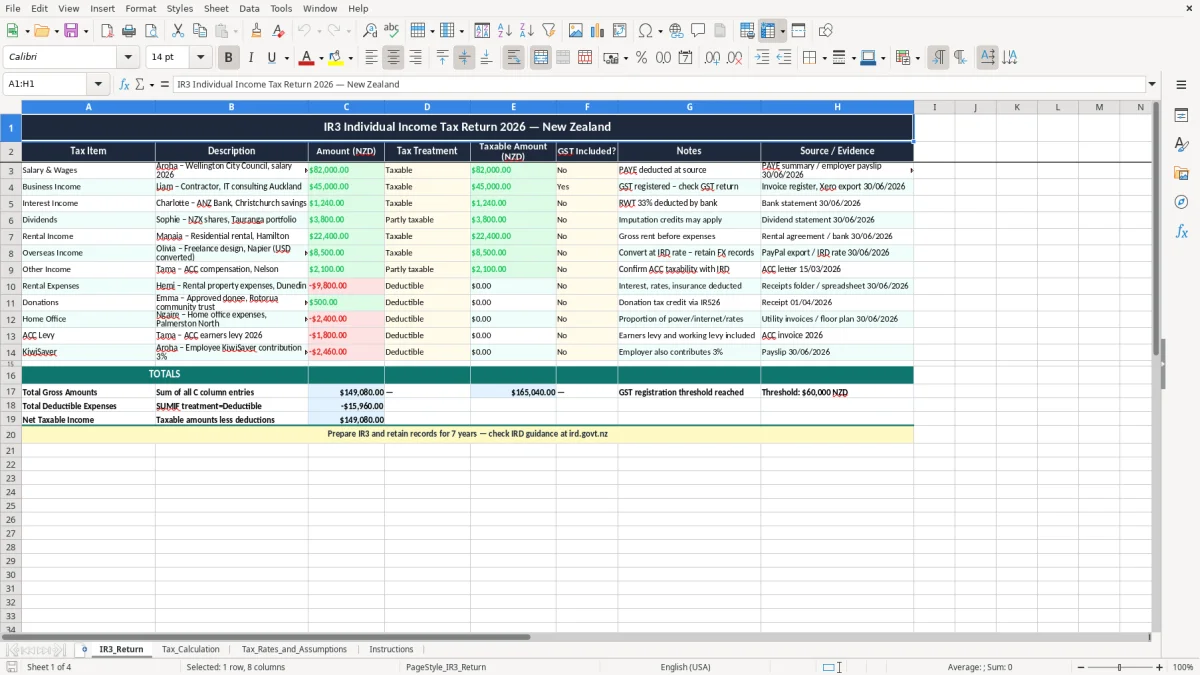
- Open the IR3_Return sheet and enter your income and expense figures in the input areas shown in the workbook. Start with your business or self-employed totals, then add any other income lines that apply.
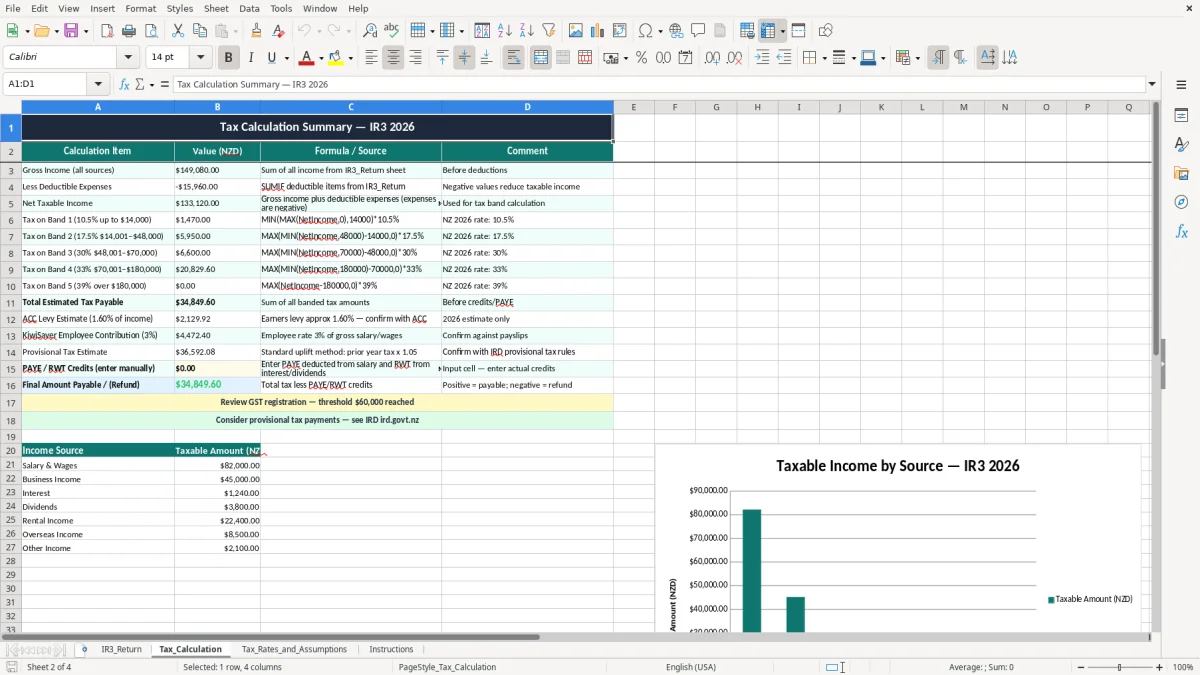
- Check the Tax_Calculation sheet to see how the workbook turns your inputs into taxable income and estimated tax. This is where you can spot whether the result looks sensible before you rely on it.
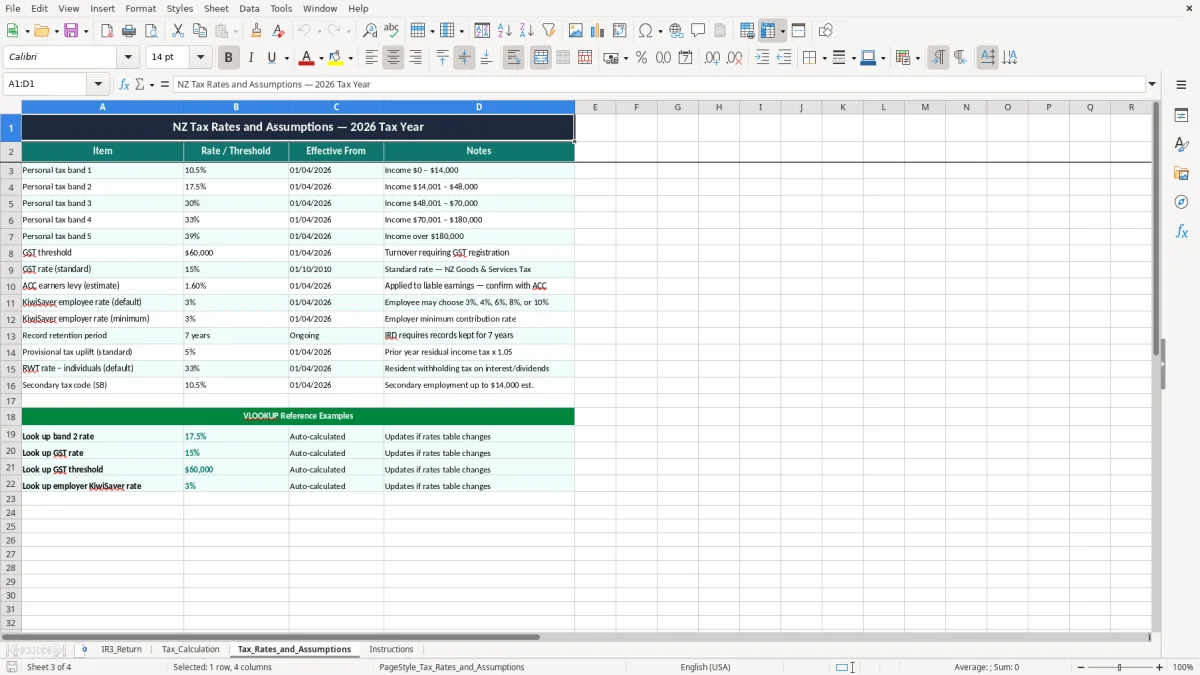
- Review the Tax_Rates_and_Assumptions sheet and confirm the rates used in the file. If your return relates to a different tax year or a special situation, update the assumptions before you finalise anything.
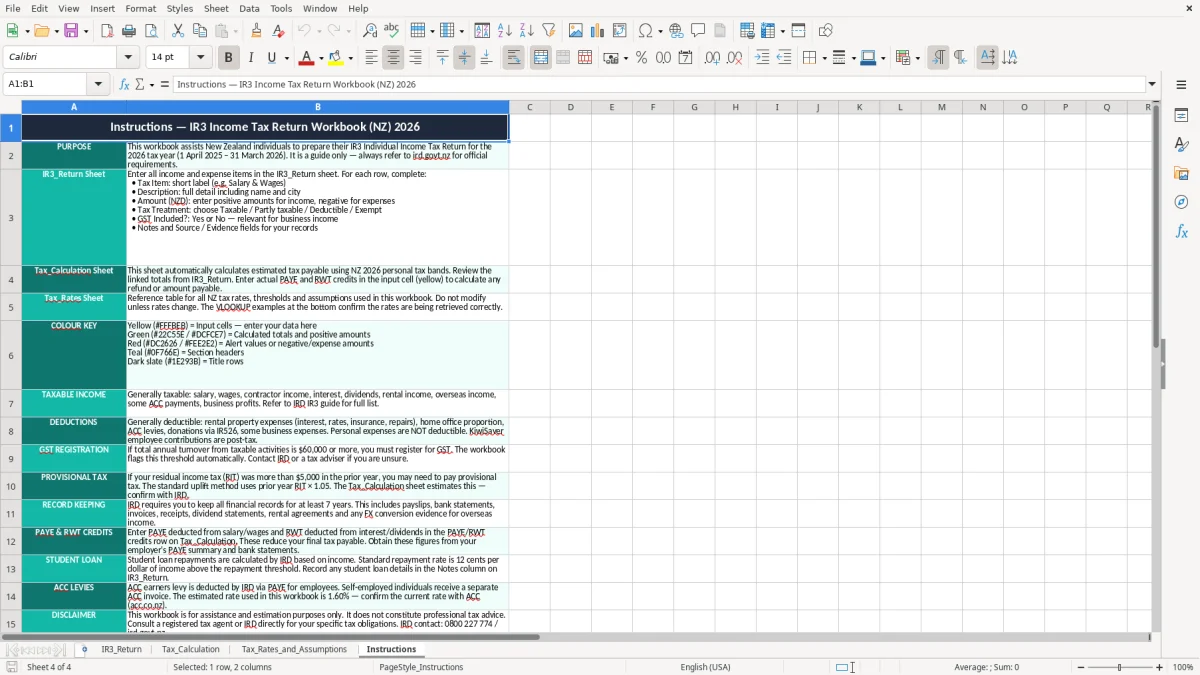
- Read the Instructions sheet before you start if you want the quickest path through the workbook. It is there to save time if you are using the template for the first time or coming back after a busy season.
- Print or save the completed workbook with your supporting records. Keep bank statements, invoices, mileage records, and other working papers with it so your numbers are easy to back up.
- Use the finished figures as your prep step before you log in to myIR and file the actual IR3. If you are close to provisional tax territory, use the result to plan cash flow as well.
Included features
Four-sheet workbook: IR3_Return, Tax_Calculation, Tax_Rates_and_Assumptions, and Instructions.
Separate calculation area for taxable income and tax estimates, so you can test the numbers before filing.
Rates and assumptions tab that keeps the tax logic away from your data entry.
Clear formatting with highlighted input areas, total rows, and bordered cells for easier checking.
Designed for New Zealand return prep, including common IR3 working steps used by sole traders and individuals.
Suitable as a back-up working paper if you want to keep an audit trail alongside your accounting software.
Built in Excel using standard formulas and simple layouts that are easy to update.
Who uses an IR3 spreadsheet in New Zealand
This workbook suits the person who needs to get an IR3 together without guessing at the totals. In practice that is often a sole trader, a contractor, or someone with side income who wants the numbers clean before filing with Inland Revenue.
Image 1, the IR3_Return sheet, is the place to enter the income and expense lines you want to include in the return. If you earned $84,000 from contracting and had $19,500 of deductible expenses, you want the workbook to show the net figure clearly before you even think about the tax rate.
Typical filing situations
A Hamilton sparky with 3 invoices a week, a rental owner with a handful of interest and repairs claims, or a casual side business with $12,000 of extra income can all use the same structure. The point is to have one tidy place for the return numbers instead of scrolling through bank feeds and old PDFs.
Because the workbook separates the return sheet from the calculation sheet, you can check the logic before you commit. That is especially handy when you are working near the 31 March balance date and trying to finish everything in one sitting.
Why a workbook beats a messy notebook
A paper list with income on one page and expenses on another usually breaks down once you add a refund, a motor vehicle claim, or a late bank fee. A simple Excel file keeps the figures together, and the layout in image 1 makes it easier to see what still needs filling in.
What IRD requires for your IR3 records and calculations
For an IR3, the key discipline is record-keeping. Inland Revenue expects you to keep business and tax records for 7 years, and that includes the source documents behind the numbers you put into the workbook.
The workbook itself does not replace those records. It is the working paper that helps you summarise them into taxable income, tax payable, and assumptions you can follow later if the return is queried.
Rates and timing that matter
If your self-employed income pushes you toward provisional tax, the estimate from the Tax_Calculation sheet gives you a starting point for cash flow planning. For example, if your profit estimate is $68,000 and your average tax on that profit works out to around $14,400, you can set money aside instead of being caught short later.
The standard New Zealand financial year ends on 31 March, so your workbook should be aligned to that period unless you have a different approved balance date. If you operate through a company with an NZBN, you are normally dealing with an IR4 instead of an individual IR3, so the template is aimed at people filing personally.
Keeping the assumptions straight
Image 3, the Tax_Rates_and_Assumptions sheet, is there so the numbers used in the calculation are visible rather than buried in formulas. That matters when you need to check whether the tax result came from the right rate, the right threshold, and the right tax year.
Where IR3 spreadsheets go wrong and what it costs
The biggest mistake is mixing personal and business numbers, then wondering why the return does not agree with the bank account. If you claim $6,800 of expenses but cannot back them with statements or invoices, you spend time rebuilding the file and may still lose the deduction.
Another common problem is entering totals without checking whether they are GST-inclusive or GST-exclusive. A contractor with $46,000 of income can be out by $6,000 or more if the spreadsheet is fed the wrong base amounts, which then distorts the tax estimate.
Errors that show up late
Late surprises are expensive. If you rely on a rough estimate and end up $5,000 short at terminal tax time, that is money you should have kept aside months earlier, not something you want to find after the due date.
Some people also treat the workbook like a filing cabinet and stop checking the source records. That creates messy work at year end, especially if you have to find mileage logs, bank deposits, and private-use adjustments after the fact.
When the spreadsheet is not enough
If you are running multiple bank accounts, rental properties, payroll, and regular provisional tax estimates, the workbook can still help, but it stops being the whole system. At that point the spreadsheet should sit alongside proper accounting software rather than trying to replace it.
Multiple bank accounts, rental properties, payroll, and provisional tax estimates usually mean the spreadsheet becomes part of a wider workflow. The IR4 company tax return workings template fits that next step by keeping company return calculations organised alongside accounting software.
How to make the IR3 spreadsheet part of your routine
The easiest way to keep this template alive is to use it on a fixed day, not whenever you remember. A lot of people make it part of their month-end or a Sunday night admin slot, then update it before bank reconciliation or before they look at provisional tax.
Simple habits that work
- Copy the previous period’s completed file and start from there, so the layout stays consistent.
- Enter figures while the source documents are fresh, before receipts and statements pile up.
- Use the Instructions sheet as a checklist, so you do not miss a section when you are tired.
- Keep the Tax_Rates_and_Assumptions tab visible, so you notice when a rate or threshold needs checking.
Small shortcuts that save time
If you are updating the workbook every month, even a 15-minute routine saves hours by the end of the year. For example, 15 minutes a month is only 3 hours across 12 months, which is far easier than rebuilding a whole return in one panic session.
Once you have more than a few trading lines, multiple staff, or recurring GST and payroll, it is usually time to move the live bookkeeping into Xero or MYOB and keep the spreadsheet as your summary tool. That way the file stays useful without becoming a second accounting system.
When recurring GST and payroll start pushing the workbook toward summary use, the IR526 donation tax credit claim spreadsheet fits neatly alongside the return for separating deductible claims from day-to-day bookkeeping.
Common questions about this template
It is for people filing a New Zealand IR3 who want to organise their income tax figures before they submit the return. That usually includes sole traders, contractors, and individuals with extra income such as rentals or side work.
No. It is a working spreadsheet to help you prepare the numbers, but you still need to file the actual return through Inland Revenue or your tax agent. Think of it as the prep sheet, not the filing portal.
The file includes IR3_Return, Tax_Calculation, Tax_Rates_and_Assumptions, and Instructions. That split keeps data entry, calculations, and guidance separate so the workbook is easier to check.
Keep invoices, bank statements, mileage logs, receipts, and any other source documents that support the numbers in the workbook. Inland Revenue expects you to keep tax records for 7 years.
Yes. If your profit is high enough to bring provisional tax into play, the calculation sheet helps you estimate the amount sooner so you can set money aside and avoid a cash flow squeeze.
Use it as a prep and checking tool if your tax affairs are fairly straightforward. If you have lots of transactions, payroll, GST, and multiple entities, software such as Xero or MYOB is the better live system.
Download
File format
Excel (.xlsx)
Compatible software
Excel, Google Sheets, LibreOffice
Price
Free