
Rugby Subs Fees Tracker Excel – Free Template (2026)
Accounting & GST
Rent Ledger Excel - Free Template
Track residential rent due, payments, balances and tenant details with a practical New Zealand rent ledger Excel template.
2026-07-29
433 downloads
4.8/5 average rating
Download template
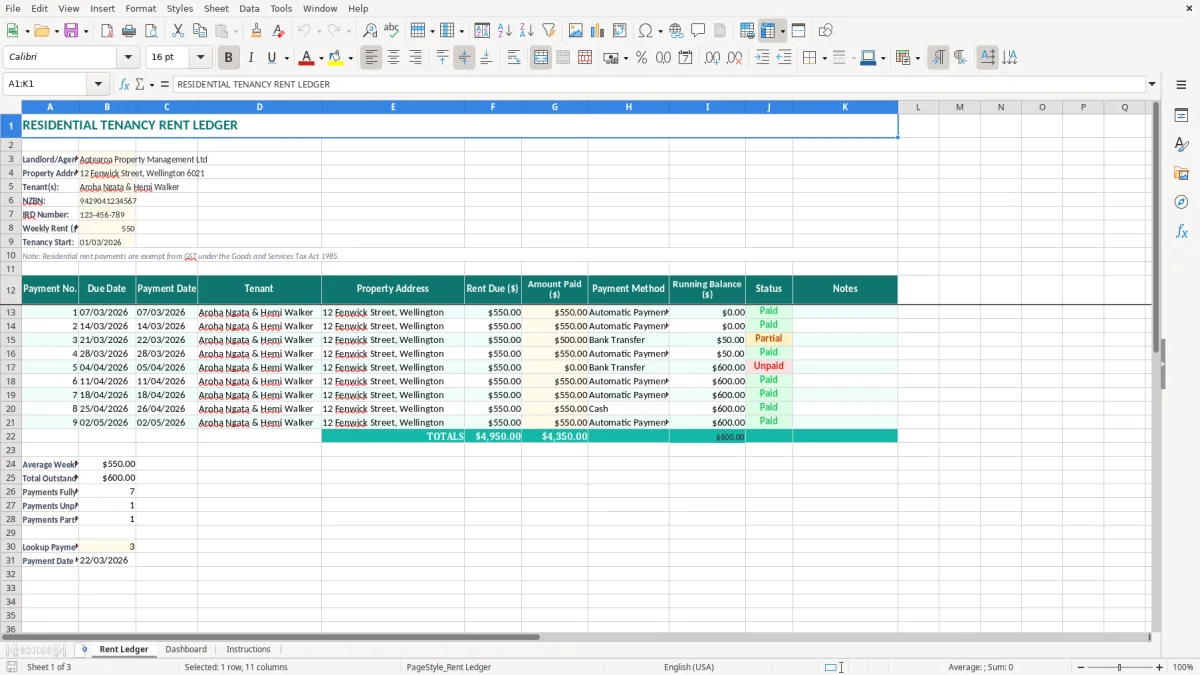
This residential tenancy rent ledger Excel template records rent due, payment dates, amounts paid, payment methods, running balances and payment status. It also stores the landlord or agent, property, tenant, weekly rent and tenancy start date, with Dashboard and Instructions sheets for managing the file.
It is set up for a New Zealand tenancy, with fields for an NZBN and IRD number. The Rent Ledger sheet also includes the important reminder that residential rent is exempt from GST.
Use it for one property or keep a separate copy for each tenancy. The clear teal headings and pale input cells make it obvious where to enter information without disturbing the layout.
The key benefits of this Excel template
- Record every rent charge and payment against a payment number, due date and payment date.
- See the running balance so arrears are easier to identify early.
- Keep tenant, property and weekly rent details at the top of the ledger.
- Record whether each payment was made by bank transfer, cash or another method.
- Use the Status and Notes columns to explain late payments, part-payments or adjustments.
- Keep a practical written rent history for landlord, agent and tenant discussions.
- Use the separate Dashboard and Instructions sheets to review the workbook and understand the setup.
Step-by-step guide
- Enter the landlord or agent name, property address, tenant names, NZBN and IRD number in the pale input cells at the top of Rent Ledger.
- Enter the agreed weekly rent and tenancy start date. For example, type $550.00 and 01/03/2026 for a tenancy starting on 1 March 2026.
- Add each rent charge in a new row, including the payment number, due date, tenant, property address and Rent Due ($).
- When money arrives, enter the payment date, Amount Paid ($) and Payment Method. Check the Running Balance ($) and Status columns after each entry.
- Use Notes for useful evidence such as part-payment arrangements, bank reference numbers, rent-free periods or corrections.
- Review the Dashboard sheet for the workbook summary and use the Instructions sheet when you need a reminder about the intended workflow.
- Save a dated copy at month-end and keep the supporting bank records, correspondence and tenancy documents with the ledger.
Included features
Rent Ledger sheet with columns for Payment No., Due Date, Payment Date, Tenant and Property Address.
Separate Rent Due ($), Amount Paid ($) and Running Balance ($) columns for clear payment tracking.
Payment Method, Status and Notes fields for explaining how a payment was received and what happened.
Property setup area containing landlord or agent, address, tenant(s), NZBN, IRD number, weekly rent and tenancy start date.
Currency formatting for the weekly rent and payment amounts, including two decimal places.
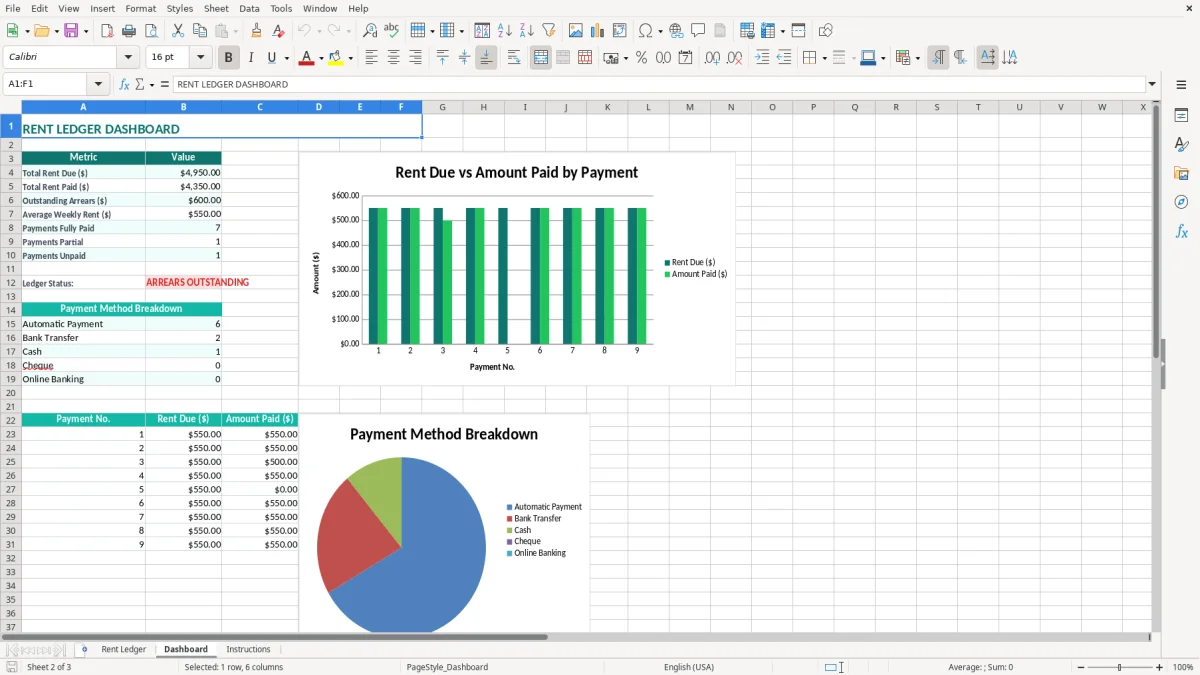
Dashboard sheet for reviewing the workbook information and Instructions sheet for operating guidance.
Teal headings, bordered cells, wrapped text and pale input shading that make the ledger readable when printed or viewed on screen.
Who uses a residential rent ledger in New Zealand
A residential rent ledger is useful wherever rent needs to be checked against an agreed tenancy record. A private landlord managing one Wellington unit may update it when the weekly bank payment arrives, while a property manager may maintain a separate workbook for each owner or property.
The example already in the template shows Aotearoa Property Management Ltd, 12 Fenwick Street, Wellington 6021, Aroha Ngata and Hemi Walker, weekly rent of $550.00 and a tenancy start date of 01/03/2026. That gives you a sensible starting point rather than a blank grid.
For landlords checking the bank account
Suppose rent is due at $550.00 each week. Four weekly charges total $2,200.00; if the tenant pays $500.00 in week three, the ledger should make the $50.00 shortfall visible instead of leaving you to reconstruct it from bank transactions. The Payment Date and Amount Paid ($) columns also distinguish a late payment from a missing payment.
A sole landlord often updates the file on the same day as the weekly bank reconciliation. That takes a few minutes and is much easier than searching through 20 weeks of statements at the end of a tenancy.
For agents and property owners
An office manager at a small property management firm can use the Tenant and Property Address columns to avoid confusing two homes with similar weekly rents. The landlord or agent, NZBN and IRD number fields keep the administrative identity with the tenancy record, while Status and Notes provide a place to explain a payment plan or an agreed correction.
At month-end, a landlord can compare the ledger total with the bank statement and pass the figures to a bookkeeper for the property’s rental income records. The Dashboard and Instructions sheets are useful when another person takes over the workbook or needs to understand how the Rent Ledger has been maintained.
What New Zealand rules apply to residential rent records
Residential rent is generally exempt from GST under the Goods and Services Tax Act 1985. That means you do not add the standard 15% GST to ordinary residential rent, and the template’s note is there to prevent a common mistake. A $550.00 weekly residential charge remains $550.00, not $632.50.
Income tax and record keeping
Residential rental income still needs to be included in the landlord’s income tax records. A landlord completing an IR3 normally records rental income and allowable rental expenses, while a company may report through an IR4. The ledger is evidence of rent received; it is not a replacement for mortgage interest records, rates, insurance, repairs, depreciation treatment or other supporting documents.
Keep rental and tenancy records for at least 7 years to meet the usual Inland Revenue record-keeping requirement. A practical approach is to retain the Excel file, bank statements, inspection records, invoices and relevant messages together, using a file name such as RentLedger_FenwickStreet_2026.xlsx.
Tenancy administration
The Residential Tenancies Act 1986 governs residential tenancy obligations. Rent increases generally require at least 60 days’ written notice and cannot normally occur more than once in any 12-month period. Do not use a rent ledger as a substitute for the tenancy agreement or a legally required notice.
If a bond is taken, the landlord must lodge it with Tenancy Services within 23 working days. Keep the bond record separately from rent payments so a bond is not accidentally treated as rent received. Where a tenant requests a rent record, the ledger can help you produce a clear payment history, provided the entries agree with your bank evidence.
The strongest practice is to record the due date and actual payment date separately. For example, a payment due on 08/03/2026 but received on 10/03/2026 should not be entered as though it arrived on the due date.
That same separation becomes important when you need to identify income that counts for tax timing, so the next step is a safe harbour calculation.
Where rent ledgers fall over and create disputes
The most expensive problems I see are not usually difficult Excel errors. They are missing dates, unexplained part-payments and a ledger total that does not agree with the bank account. Once a tenant disputes arrears, a vague list of deposits can take hours to untangle and may not show which week each payment was meant to cover.
Part-payments and wrong allocations
Assume four weekly payments of $550.00 are due, but the bank shows $500.00, $550.00, $550.00 and $600.00. The total received is $2,200.00, yet the first payment is $50.00 short and the final payment is $50.00 over. If the overpayment is silently netted off, the tenant and landlord may have different views of which week is in arrears.
Enter the actual Amount Paid ($), keep the original Rent Due ($), and explain the arrangement in Notes. Do not overwrite an old amount just to make the running balance reach zero.
Duplicate rows and missing evidence
A landlord may enter a bank transaction twice after checking the account on a phone and then again at month-end. At $550.00 per week, one duplicate entry inflates the annual record by $550.00; four duplicates create a $2,200.00 discrepancy. Payment No., Payment Date and bank references in Notes give you a simple way to spot duplicates.
The opposite problem is a row showing rent due but no payment date or amount. That may be a genuine arrear, a payment still clearing, or an entry not yet updated. Leaving the Status field accurate is better than guessing.
Confusing rent with other money
Do not mix a $300.00 bond, a $75.00 appliance reimbursement or a tenant-paid repair with ordinary rent. Those transactions have different tax and tenancy treatment. Keep them outside the rent rows or clearly describe them in Notes, and reconcile the ledger to the bank before discussing a balance with the tenant.
How to make the rent ledger a reliable routine
A spreadsheet works when updating it is attached to something you already do. For a private landlord, the best trigger is usually the weekly bank check; for an agent, it may be the daily trust-account reconciliation. Set aside 10 minutes on Friday or the next working day and enter every payment while the bank description is still familiar.
Use a short checking routine
- Match each deposit to the tenant and property address before entering it.
- Check the due date, payment date and Amount Paid ($) independently.
- Review any non-zero Running Balance ($) and explain it in Notes.
- At month-end, compare the four- or five-week rent total with the bank statement.
Do not copy last month’s payment rows and leave old dates behind. Instead, copy the workbook as a new dated file, then check every due date and tenant detail before adding new entries. This is slower than blindly extending rows but far safer for a tenancy record.
Protect the useful information
Keep the original template untouched and save working copies with the property and period in the file name. Back up the file securely because tenant names, addresses and payment history are personal information covered by the Privacy Act 2020. Limit access to the landlord, authorised agent and bookkeeper, and do not email an unprotected file casually.
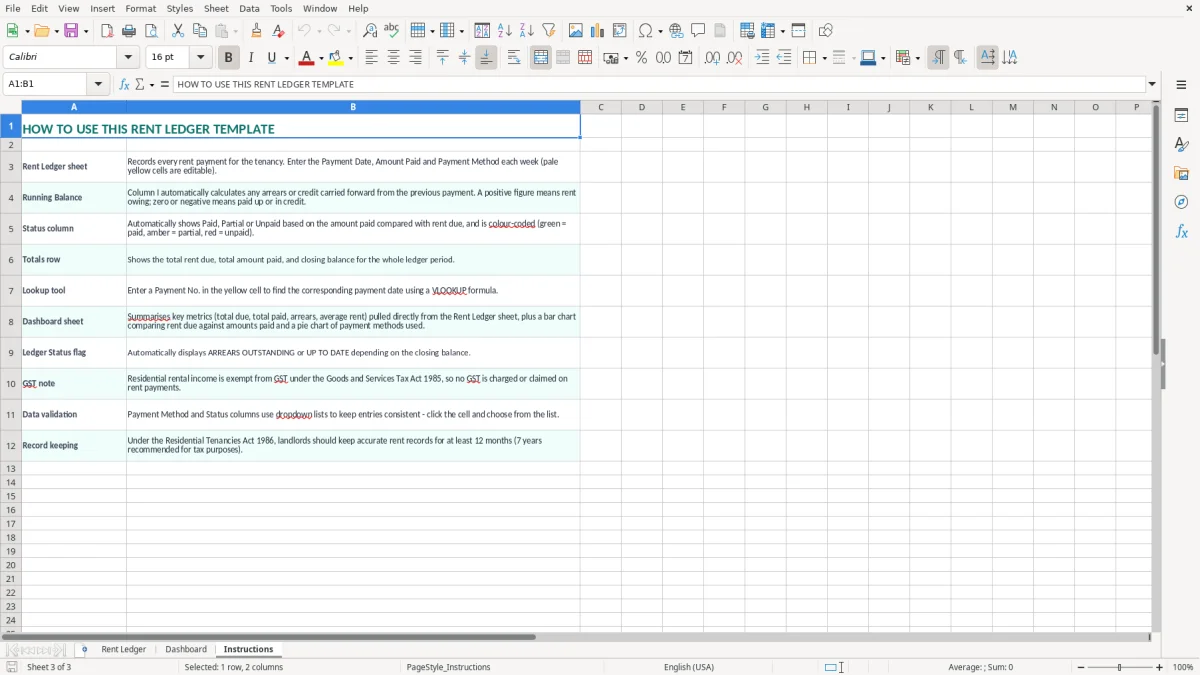
Use the Instructions sheet when handing the workbook to someone else, and review the Dashboard after updating the Rent Ledger. If you manage 20 properties, process hundreds of payments a month, or need automated arrears notices and trust-account controls, move to property-management software or an accounting system such as Xero or MYOB. A spreadsheet is a good ledger for a small portfolio, not a substitute for controlled multi-user records.
Common questions about this template
Ordinary residential rent is exempt from GST under the Goods and Services Tax Act 1985. The $550.00 weekly example in this template is recorded as $550.00, with no 15% GST added. Commercial accommodation and other arrangements can have different treatment.
Record the rent due, due date, actual payment date, amount paid, tenant, property, payment method, running balance, status and notes. This template also includes landlord or agent details, weekly rent, tenancy start date, NZBN and IRD number fields.
Yes. Enter the agreed Rent Due ($) and the actual Amount Paid ($), then check the Running Balance ($) and Status columns. Use Notes to record a part-payment or payment plan, but confirm the balance against bank evidence before issuing an arrears notice.
Keep rental income and expense records for at least 7 years to meet the usual Inland Revenue record-keeping requirement. Retain the Excel ledger with bank statements, invoices, tenancy documents and other evidence supporting the landlord’s IR3 or company IR4 records.
No. It records payment history only. The tenancy agreement, rent increase notices, bond documents and communications remain separate records, and the Residential Tenancies Act 1986 still applies to the tenancy.
Use a separate copy for each tenancy so payments are not mixed between properties. For a small portfolio this is manageable, but an agent handling many properties or a high volume of transactions should use property-management software with user access, audit trails and trust-account controls.
Download
File format
Excel (.xlsx)
Compatible software
Excel, Google Sheets, LibreOffice
Price
Free