
Rugby Subs Fees Tracker Excel – Free Template (2026)
Accounting & GST
Rugby Treasurer Report Excel - Free Template
NZ rugby club cashbook with GST tracking, monthly cash movement, budget variance, reconciliation fields and committee reporting.
2026-10-03
471 downloads
4.8/5 average rating
Download template
This rugby club treasurer report Excel spreadsheet is a cashbook and committee reporting workbook for a New Zealand sports club. It contains transaction entry, GST calculations, monthly income and expense summaries, budget variance analysis and an instructions sheet for the treasurer.
Enter one payment or receipt per row on Transactions, then review Treasurer Summary before the committee meeting. Budget compares planned spending with actual expenses, while the workbook’s 2026 reporting period ends on 31/03/2026.
The key benefits of this Excel template
- Record membership fees, sponsorship, grants, fundraising and match fees in one transaction register.
- Separate income from expenses and calculate the GST component from the editable 15% rate assumption.
- See total income, total expenses and net surplus or deficit without manually adding the cashbook.
- Track monthly cash movement across January to December and identify months with negative net movement.
- Measure the percentage of transactions marked as reconciled to the club bank statement.
- Compare annual category budgets with actual expenses excluding GST and flag categories that are over budget.
- Give the committee a consistent NZD report supported by receipt, invoice and reconciliation references.
Step-by-step guide
- Open Instructions first and read the guidance on transaction entry, GST, reconciliation, receipts, privacy and financial records.
- Go to Transactions and enter one receipt or payment per row in the pale yellow input cells. Complete the date, description, category, income or expense type, payer or supplier and amount inclusive of GST where applicable.
- Choose the available list options for category, payment method, GST Applicable? and Reconciled? rather than typing inconsistent alternatives.
- Enter the receipt, invoice or other supporting reference in Receipt/Invoice Ref, then reconcile the row to the bank statement before changing Reconciled? to Yes.
- Check Treasurer Summary before each committee meeting. Review cash movement, GST collected and paid, the estimated net GST position and the budget variance section.
- Enter the club’s annual expense budget in the Budget sheet’s budget column. Review actual expense, variance, variance percentage and the Within budget or Over budget status.
- Save a dated copy after month-end and retain the supporting receipts, invoices, grant correspondence and bank reconciliation records.
Included features
Transactions sheet with 100 prepared rows, freeze panes at row 5 and an auto-filter across 16 columns.
Fields for Transaction ID, date, month, description, category, income or expense, payer or supplier and payment method.
GST Applicable? selection and automatic GST Component and Amount excl. GST calculations based on Treasurer Summary cell B15.
Bank Account, Receipt/Invoice Ref, Reconciled? and Notes fields to support audit trails and committee questions.
Treasurer Summary metrics calculated with SUMIF, SUMIFS, COUNTIF, AVERAGE and IFERROR formulas.
Three summary charts covering monthly cash movement and budget-versus-actual category information.
Budget sheet with 100 prepared category rows, automatic variance calculations, status indicators and notes.
How a New Zealand rugby club uses the treasurer spreadsheet
A volunteer treasurer usually opens this workbook after the monthly bank reconciliation and again before the club committee meeting. It suits a community rugby club handling senior and junior memberships, sponsor instalments, grants, match fees, merchandise, ground costs and team travel without a full accounting system.
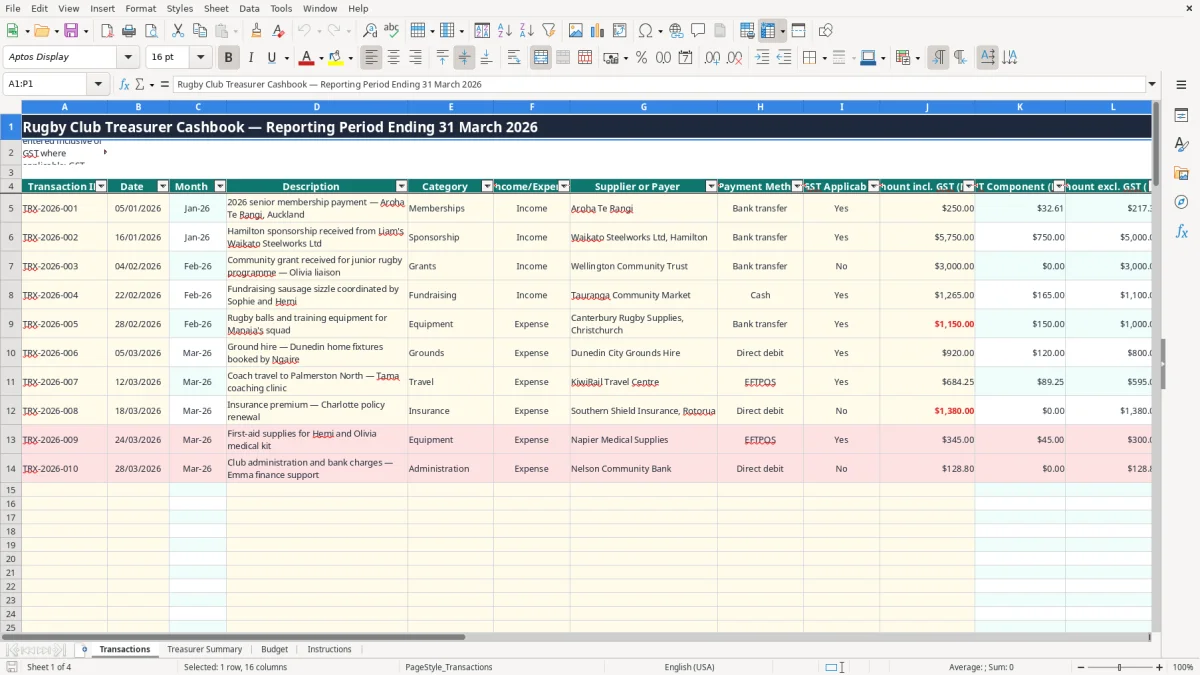
Image 1 shows the Transactions sheet. Its columns run from Transaction ID and Date through Month, Description, Category, Income/Expense, Supplier or Payer, Payment Method, GST Applicable?, amount inclusive of GST, calculated GST component, calculated amount excluding GST, Bank Account, Receipt/Invoice Ref, Reconciled? and Notes. The 100 prepared rows run from row 5 to row 104.
Entering a realistic club month
Suppose a Hamilton club receives a $5,750 sponsor instalment, $3,000 community grant and twenty $250 memberships. The treasurer records each receipt separately, rather than entering one unexplained total. A $250 membership marked Yes for GST produces a $32.61 GST component at 15%, leaving $217.39 excluding GST.
Expenses are entered in the same register. A $1,150 equipment invoice is marked Expense and categorised as Equipment, so the summary can distinguish playing gear from coaching, grounds, travel and administration. Cash and bank transfer are available payment methods, which is useful when a club still handles canteen or match-day cash.
Preparing for the committee
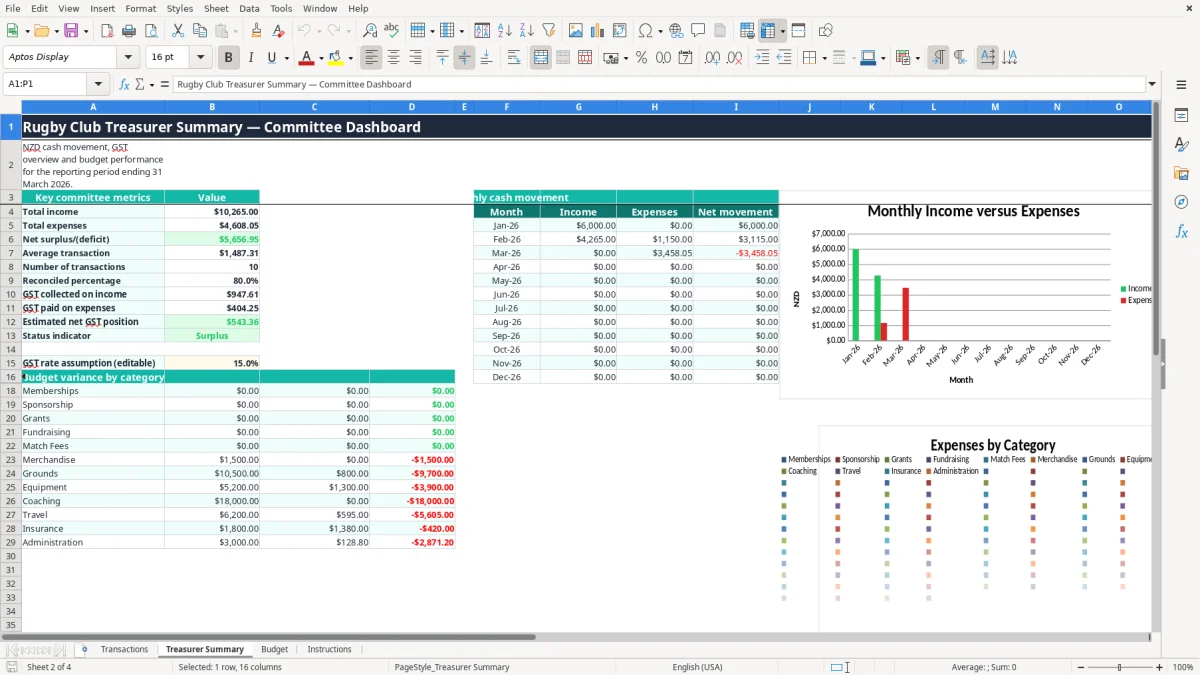
Image 2 shows Treasurer Summary. The left-hand metrics cover total income, total expenses, net surplus or deficit, average transaction, transaction count, reconciliation percentage and GST figures. The monthly cash movement area uses January to December rows, while the budget variance area links categories to the Budget sheet.
The treasurer can print or screen-share this summary instead of explaining a long bank statement. The report is a cashbook aid, not a replacement for source documents or a formal set of financial statements.
What IRD requires for a rugby club’s GST records
GST is charged at the standard 15% rate in New Zealand, although some club receipts may be exempt, zero-rated or outside the club’s taxable activity. GST registration becomes compulsory when taxable turnover exceeds $60,000 in any 12-month period. A club must establish whether it is registered before relying on the workbook’s GST calculations.
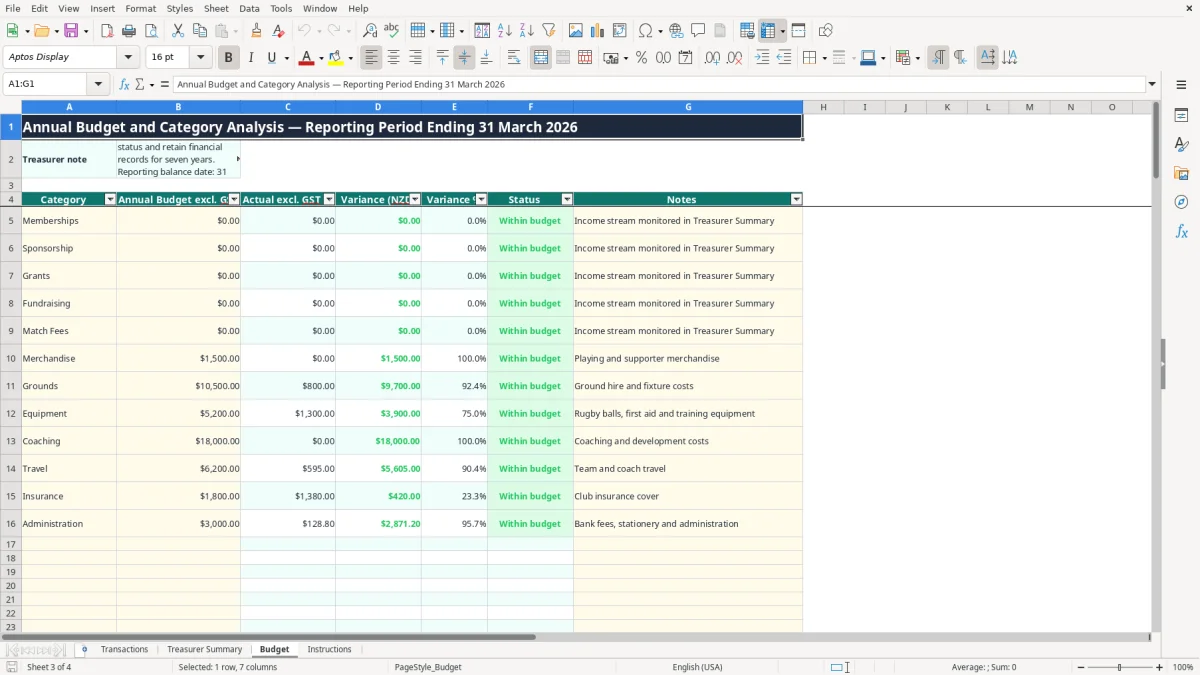
Image 3 shows the Budget sheet, where annual budgets are entered excluding GST. The workbook assumes amounts are entered inclusive of GST on Transactions and calculates the GST component using the editable 15% assumption in Treasurer Summary cell B15. For a $1,150 GST-inclusive expense, the calculation is $1,150 × 15% ÷ 115% = $150 GST, with $1,000 excluding GST.
Records behind the spreadsheet
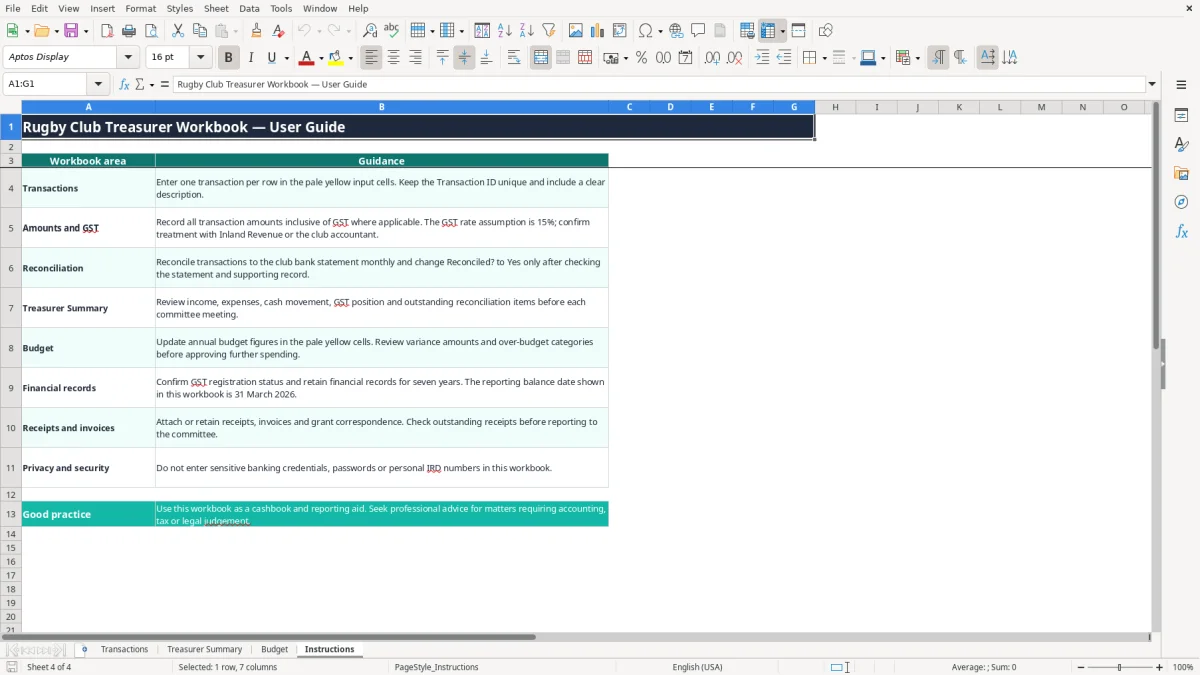
Inland Revenue requires business and taxable activity records to be kept for 7 years. Keep bank statements, receipts, invoices, grant correspondence, sponsorship documentation and evidence supporting GST treatment with the workbook. The Instructions sheet specifically tells you to retain those records and not enter passwords, banking credentials or personal IRD numbers.
For GST purposes, taxable supply information replaced the old tax invoice terminology. Records should support the supplier, date, description, amount and GST treatment; for supplies over $1,000, buyer details may also be required. The workbook’s Receipt/Invoice Ref column helps you locate the supporting document but does not create taxable supply information by itself.
Balance date and reporting discipline
The workbook is labelled for the 31 March 2026 reporting balance date. That date is common for New Zealand clubs and matters when the treasurer prepares annual accounts, grant reports or information for an IR3 or IR4 filing where relevant.
For most small clubs, monthly reconciliation is better than waiting until 31 March. If the register contains 120 transactions and only 90 are marked reconciled, the summary’s reconciliation percentage is 75%; that is a clear committee action before approving the annual report.
The cashbook errors that create trouble for club committees
The most expensive problem is often not a formula error but a missing source document. A treasurer may enter a $2,400 sponsorship receipt with no invoice reference, then struggle months later to prove whether it was one instalment, a donation or part of a sponsorship agreement. The figure remains in the summary, but the committee cannot easily explain it.
Mixed categories hide spending
Putting new tackle bags, first-aid supplies and coach travel under Administration makes the annual budget less useful. The Budget sheet calculates actual expenses by the category written in Transactions, so a wrongly categorised $2,000 equipment purchase will not appear against Equipment. The result can show Equipment within budget while Administration looks overstated.
Another common error is entering a GST-inclusive amount as if it were GST-exclusive. At 15%, a genuine $1,150 inclusive invoice contains $150 GST. If you enter $1,000 instead, the cashbook is $150 short and the GST position is understated by $19.57 if the formula then treats the entry as inclusive.
Unreconciled cash is not available cash
A club can report a positive surplus while its bank account is lower because an EFTPOS receipt, cash takings or direct debit has been omitted. If 18 of 20 rows show Reconciled? as Yes, the summary reports 90%, but the two unchecked transactions may include a $1,800 insurance debit or a $3,000 grant receipt.
Do not mark a transaction Yes merely because it looks familiar. Match the date and amount to the bank statement, locate the receipt or invoice, and investigate duplicates before changing the field. This is especially important around tournament weekends, when several cash payments may have similar descriptions.
Budget figures that mislead
A zero budget is not the same as no spending plan. The Budget formula returns a zero percentage where the budget is zero, so a category can show an apparently tidy percentage even though actual spending exists. Enter realistic annual figures for grounds, coaching, equipment, travel and insurance before the season starts, then use the Over budget status to prompt a decision rather than quietly editing the actual figure.
How the spreadsheet becomes part of the club’s monthly routine
The workbook works best when attached to an existing club habit rather than treated as an annual project. Set a fixed reconciliation time, such as the first Tuesday after the bank statement arrives, and complete Transactions before preparing the treasurer’s report. A 30-minute weekly entry habit is far easier than reconstructing 100 rows before the annual meeting.
A simple Friday and month-end rhythm
- After each match day, count cash and retain the deposit record; enter the receipt with the correct category and payment method.
- Each Friday, enter new sponsor, membership, grant and supplier transactions while the supporting documents are still available.
- At month-end, match every row to the bank statement and change Reconciled? to Yes only after checking it.
- Before the committee meeting, review Treasurer Summary and investigate negative monthly net movement or an Over budget status.
Use the pale yellow input areas for new information and leave calculated columns alone. The Transactions sheet has dropdown validation for income or expense, category, payment method, GST Applicable? and Reconciled?, which prevents variations such as Expenses, expense and EXPENSE from splitting the formulas.
Keep the file controlled
Save a copy such as ClubCashbook_2026-06-30.xlsx after each month-end. Keep the workbook with the bank reconciliation and source documents, restrict editing access to the treasurer and chairperson, and remove obsolete personal information securely under the Privacy Act 2020.
This file has 100 prepared transaction rows. If the club regularly exceeds that, or needs multiple bank reconciliations, supplier bills, payroll, asset registers or grant-specific reporting, move to software such as Xero or MYOB rather than continually extending formulas. For a club with 300 transactions a year, proper accounting software will usually reduce duplicate entry and improve user access; this workbook remains useful for a small club wanting a straightforward cashbook.
Common questions about this template
It supports GST record-keeping by separating GST-applicable transactions and calculating the GST component from the editable 15% rate in Treasurer Summary cell B15. It does not decide whether a receipt is taxable or prepare and file a GST return, so keep the underlying records and confirm the club’s registration and treatment with Inland Revenue.
The Transactions sheet has prepared rows 5 to 104, giving 100 operational rows. The Budget sheet also has 100 prepared rows. If the club regularly needs more than this, use accounting software or extend the formulas carefully so summary ranges continue to include every transaction.
Enter one receipt or payment per row, including the date, clear description, category, Income or Expense, supplier or payer, payment method, GST selection, inclusive amount, bank account, reference and reconciliation status. Use references such as REC-260105 or INV-SPON-26-01 to connect the row to the supporting document.
Yes. Budget includes categories such as Memberships, Sponsorship, Grants, Fundraising, Match Fees, Merchandise, Grounds, Equipment, Coaching, Travel, Insurance and Administration. Enter annual budget figures in the budget column; the sheet calculates actual expenses excluding GST, variance, variance percentage and Within budget or Over budget status.
Treasurer Summary uses the transaction dates to calculate monthly income, expenses and net movement for January to December. It also displays key committee metrics, GST collected on income, GST paid on expenses, estimated net GST position, reconciliation percentage and budget variance information, with three charts linked to the summary data.
This workbook suits a small club that wants a simple cashbook and committee report with 100 prepared transaction rows. If the club has several hundred transactions, payroll, complex grants, multiple bank accounts or regular access by several volunteers, Xero or MYOB will generally provide stronger controls and less manual maintenance.
Download
File format
Excel (.xlsx)
Compatible software
Excel, Google Sheets, LibreOffice
Price
Free