
Rugby Subs Fees Tracker Excel – Free Template (2026)
Accounting & GST
PTA sausage sizzle takings Excel - Free Template
Track PTA sausage sizzle sales, costs, GST treatment, payment methods and net fundraising across events with a practical New Zealand Excel template.
2026-09-30
466 downloads
4.8/5 average rating
Download template
This PTA sausage sizzle takings Excel template records each product and payment line for a school fundraising event. It contains a Takings register for sales, costs, GST treatment and volunteers, a Dashboard for totals and charts, and a Setup sheet for prices, payment methods and guidance.
Enter one product and payment record per line. The Takings sheet calculates gross takings, net fundraising, GST component and margin percentage, while the Dashboard brings the results together for the PTA committee.
The key benefits of this Excel template
- Record up to 100 product and payment lines on the Takings sheet, covering several school events in one workbook.
- Calculate gross takings automatically from unit price multiplied by quantity sold.
- Subtract EFTPOS fees and direct costs to show net fundraising rather than relying on sales totals alone.
- Use the 15% GST rate in Setup as an editable reference for taxable lines, with a calculated GST component.
- Compare cash, EFTPOS and online payment entries and identify the products selling most units.
- Track the event date, school or PTA event, city, coordinator, volunteer lead and notes for a useful audit trail.
- Give the treasurer a dashboard showing total income, costs, fees, net fundraising and net margin percentage.
Step-by-step guide
- Open the Setup sheet and review the 15% GST rate, product prices, default GST treatments, payment methods and guidance. Change the product reference prices to match your stall.
- Go to the Takings sheet and enter one line for each product and payment record. Pale yellow cells are for entries; grey calculated cells fill from your inputs.
- Enter the event date, school or PTA event, city, coordinator and product. Choose the product from the list so the unit price is looked up from Setup.
- Enter quantity sold, payment method, EFTPOS fees and direct costs. Leave fees at zero for cash sales, and include sausage meat, bread, drinks or other direct stall costs in the appropriate line.
- Select the GST treatment for each line, then add the volunteer lead and any useful notes such as pre-paid orders or a family picnic stall.
- Review the calculated gross takings, net fundraising, GST component and margin percentage on each line. Reconcile the cash, EFTPOS and online amounts against the event's cash-up records.
- Open Dashboard for the fundraising summary, payment method percentages, product quantities and charts before reporting the result to the PTA committee.
Included features
Takings sheet with columns for event date, PTA event, city, coordinator, product, price, quantity, payment method, costs, GST, volunteer lead and notes.
Product prices are looked up with VLOOKUP from the Setup reference list, while gross takings use price multiplied by quantity.
Calculated net fundraising subtracts EFTPOS fees and direct costs from gross takings on every populated line.
Editable GST rate and selectable Taxable, Zero-rated or Exempt treatment, with GST component calculated for taxable sales.
Dashboard formulas use SUM, AVERAGE, COUNTIF and SUMIF for the committee summary.
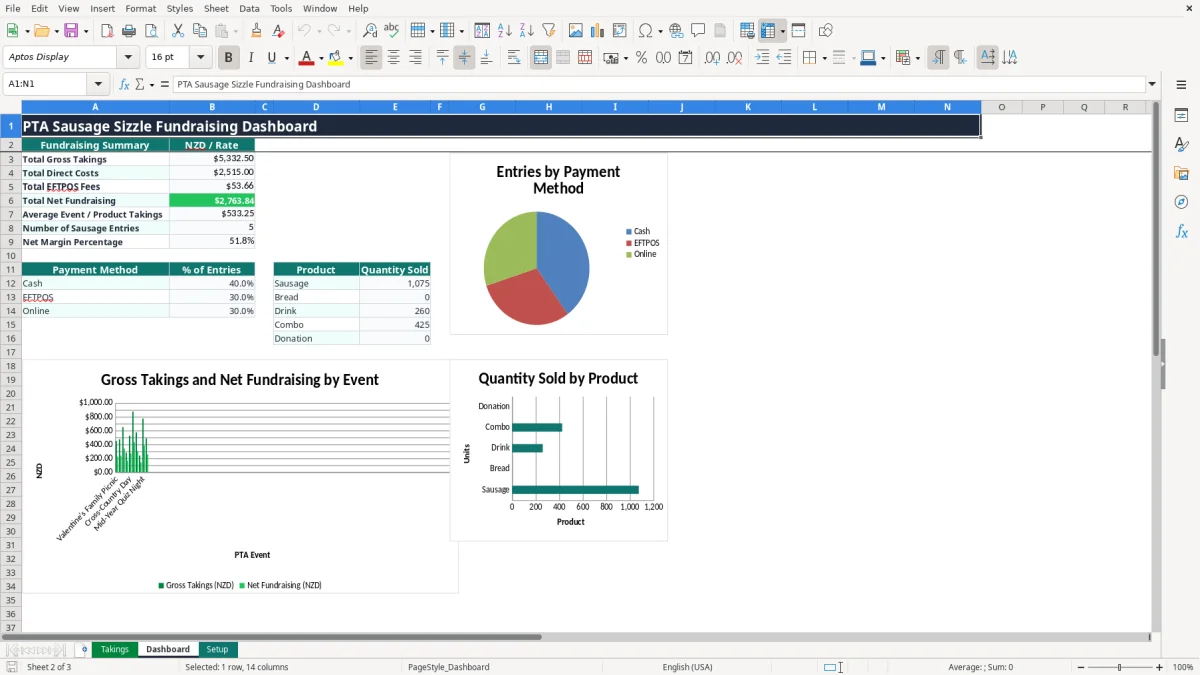
Three Dashboard charts show event gross and net results, payment method proportions and product quantities sold.
Data validation lists, whole-number quantity checks, non-negative cost checks, frozen headers and filters reduce entry errors.
Who uses a PTA sausage sizzle takings spreadsheet in New Zealand
A school PTA treasurer, fundraising coordinator or volunteer usually needs this register straight after a Saturday sports day, working bee, gala or school fair. The person doing the cash-up may not be the person who bought the sausages, so recording the coordinator, volunteer lead and event location prevents a mystery total at the next committee meeting.
Useful during the event season
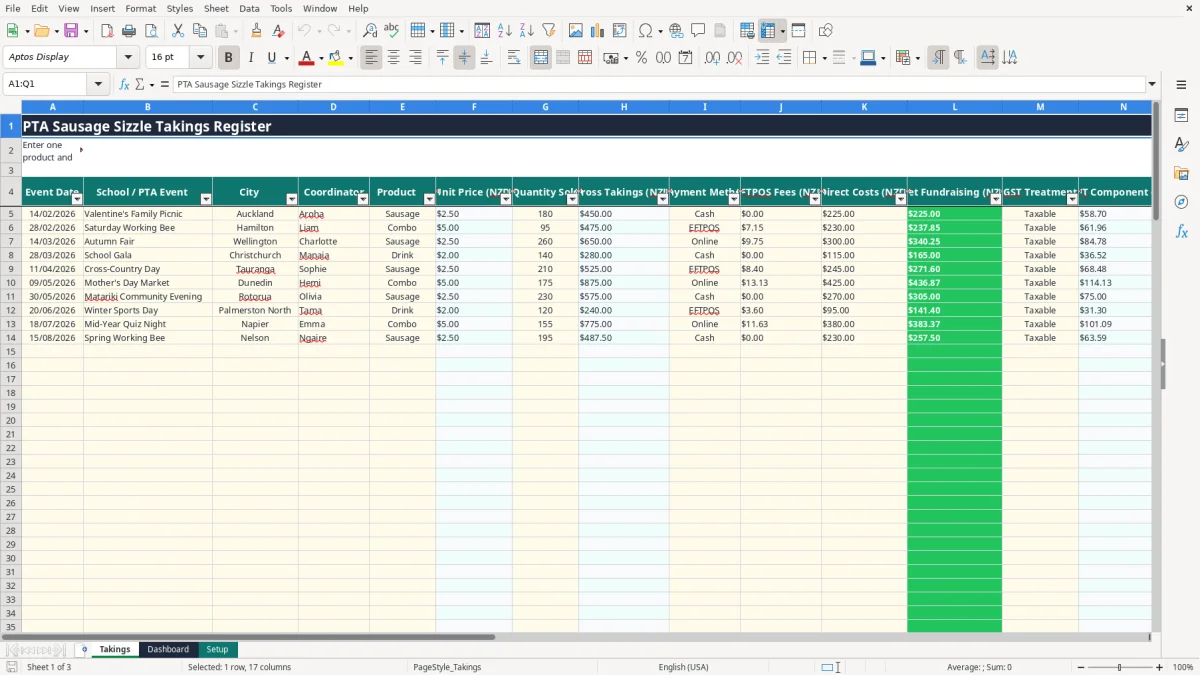
One line can represent 180 sausages at $2.50, giving $450 gross takings. Another line might record 95 combos at $5, giving $475. The Takings sheet keeps those products separate, so you can see whether the stall sold more single sausages, combo deals, drinks or donations.
Image 1 shows the Takings sheet layout. The editable fields include Event Date, School / PTA Event, City, Coordinator, Product, Quantity Sold, Payment Method, EFTPOS Fees, Direct Costs, GST Treatment, Volunteer Lead and Notes. Unit Price, Gross Takings, Net Fundraising, GST Component and Margin % are calculated fields.
For the treasurer and event coordinator
A Hamilton school office manager might enter cash sales during the afternoon, then add the EFTPOS fee once the settlement report arrives. A Christchurch PTA treasurer can use the same file for three fairs and compare net fundraising after costs rather than celebrating a large gross figure that produced little surplus.
Image 2 shows the Dashboard with total gross takings, direct costs, EFTPOS fees, net fundraising, average event or product takings, sausage entries and net margin percentage. The payment and product summaries help the committee decide whether a $2.50 sausage or a $5 combo deserves more prominent pricing next time.
GST and record keeping for PTA fundraising takings
New Zealand's standard GST rate is 15%, and the Setup sheet starts with 0.15 as an editable rate. That setting is a calculation aid, not a decision that the PTA is registered or that every fundraising sale is taxable. Confirm the PTA's registration and treatment with the treasurer and Inland Revenue guidance before using the GST figures in a return.
What the workbook calculates
For a taxable GST-inclusive sale of $450, the GST component calculated by the workbook is $450 × 15 ÷ 115 = $58.70. The Takings sheet applies that calculation only when GST Treatment is Taxable; Zero-rated and Exempt selections calculate no GST component.
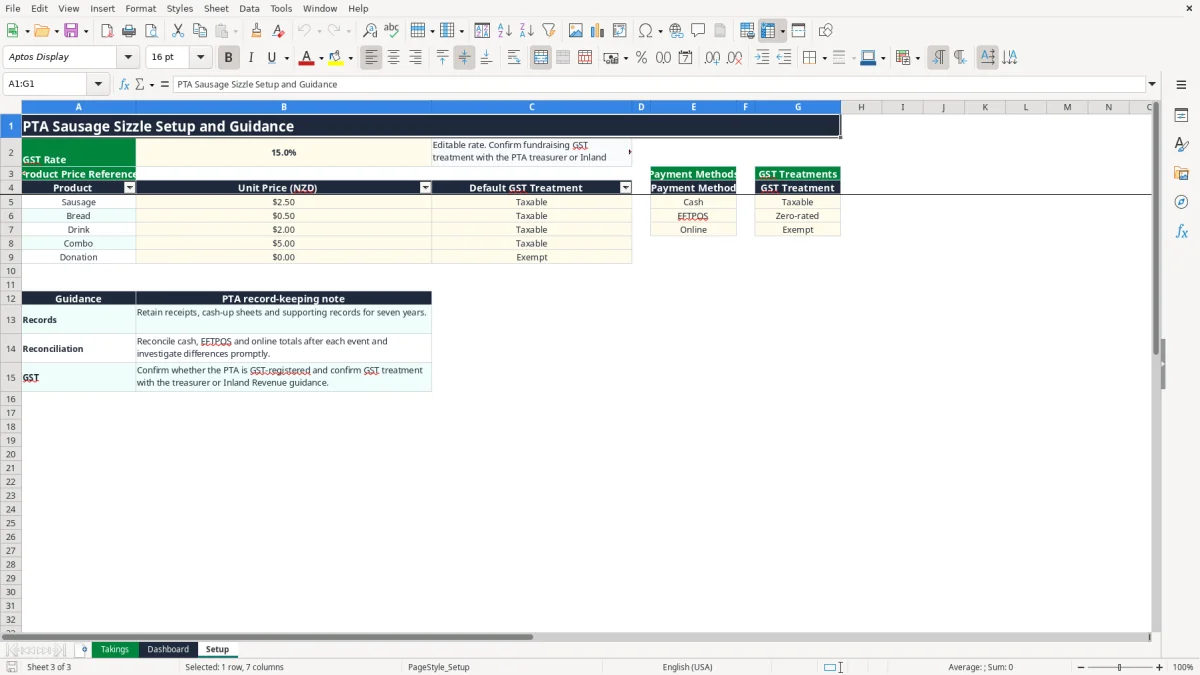
The Setup sheet includes Taxable, Zero-rated and Exempt options, plus Cash, EFTPOS and Online payment methods. Do not treat an EFTPOS payment method as a GST category: the sample list happens to show EFTPOS beside Zero-rated, but payment channel and tax treatment are separate choices.
Records the PTA should retain
Inland Revenue record keeping generally requires business and tax records to be retained for 7 years. Keep the workbook with supplier receipts, invoices, bank or EFTPOS settlement reports, cash-up sheets and evidence supporting direct costs. If the PTA is registered, taxable supply information requirements also matter for its sales and purchases.
Image 3 shows Setup, where the product reference contains Sausage at $2.50, Bread at $0.50, Drink at $2, Combo at $5 and Donation at $0. A PTA selling $1,200 across an event should not simply assume $156 GST; first establish which supplies are taxable and whether the PTA's activities fall within its registered GST arrangements.
Where sausage sizzle takings go wrong for school PTAs
The costly errors I see at PTA cash-ups are usually small omissions repeated across a busy afternoon. A volunteer records 200 sausages sold but forgets $18.40 of EFTPOS fees, or the treasurer enters the bank settlement as income without recording the $260 of meat and bread bought for the stall.
Gross sales are not the fundraising result
Suppose a gala takes $1,450, incurs $32.50 of EFTPOS fees and uses $610 of direct food and drink costs. The net fundraising result is $807.50, not $1,450. Reporting the gross number can make the committee overestimate what is available for library books, sports equipment or camp subsidies by $642.50.
A second problem is mixing events in one total without event names. If the autumn fair shows $2,800 and the working bee shows $430, a missing date or school event name makes it hard to match the figures to separate cash-up sheets. The Takings columns for Event Date and School / PTA Event are there for that reconciliation.
Input errors that distort the summary
Typing a price directly into every row creates inconsistent pricing: 180 sausages at $2.50 produce $450, but one accidental $25 entry produces $4,500. Selecting the product from the Setup list lets VLOOKUP return the reference price instead.
Also check quantity and cost fields before reporting. A negative cost, a missing GST treatment or a duplicate EFTPOS settlement can change the margin percentage. If a $900 sale has $700 of costs, the margin is 22.2%; if the same $700 is entered twice, the dashboard suggests a loss and sends the committee chasing an error that is really a duplicate line.
Make the takings workbook part of the PTA cash-up routine
The spreadsheet works best when it is tied to a fixed PTA job rather than left until the monthly meeting. Nominate one person to enter the event lines and another to check the totals against cash, EFTPOS and online evidence. A 10-minute close-out on the event day is far easier than reconstructing 300 transactions three weeks later.
A simple after-event routine
- Save a copy with the event date in the file name, then enter the products while the stall team still remembers what was sold.
- Match cash counted to the Cash lines, EFTPOS settlement to EFTPOS lines and payment-provider evidence to Online lines.
- Enter direct costs from receipts and keep those receipts with the workbook for the PTA's records.
- Review the Dashboard before the next committee meeting and record the agreed net fundraising figure in the minutes.
For example, if the event closes at 4 pm, make the data entry the final duty of the volunteer lead. By 4:15 pm the treasurer can see whether $1,000 gross takings became $650 or $800 of net fundraising after costs and fees.
When to move beyond Excel
This workbook has prepared entry rows from 5 to 104, so it suits a modest PTA register rather than a high-volume ticketing system. If several volunteers edit it at once, the PTA runs weekly stalls with thousands of lines, or it needs bank feeds, user permissions and formal GST reporting, move the accounting records into Xero or MYOB and retain this file as an event-level cash-up tool.
Keep the Setup sheet controlled by the treasurer. Changing the $2.50 sausage reference to $3 without telling the stall team can make the calculated totals look tidy but disagree with the price board. A short price check before every event is the best safeguard.
Common questions about this template
It records event date, school or PTA event, city, coordinator, product, unit price, quantity sold, payment method, EFTPOS fees, direct costs, GST treatment, volunteer lead and notes. It calculates gross takings, net fundraising, GST component and margin percentage.
Yes. Change the product prices on the Setup sheet. The Takings sheet uses VLOOKUP to bring the selected product's reference price into the Unit Price column for up to 100 prepared entry rows.
It calculates a reference GST component using the editable 15% rate when a line is marked Taxable. It does not determine whether the PTA is GST-registered, so confirm the treatment with the treasurer and Inland Revenue before using the figures for a GST return.
Net Fundraising equals Gross Takings less EFTPOS Fees less Direct Costs. For example, $1,450 gross takings less $32.50 fees and $610 costs gives $807.50 net fundraising.
The Dashboard shows total gross takings, total direct costs, total EFTPOS fees, total net fundraising, average event or product takings, the number of sausage entries and net margin percentage. It also summarises payment methods and quantities by product, with three charts.
Inland Revenue generally requires relevant tax and business records to be retained for 7 years. Keep the workbook with receipts, cash-up sheets, EFTPOS reports and other supporting records, particularly if the PTA is GST-registered.
Download
File format
Excel (.xlsx)
Compatible software
Excel, Google Sheets, LibreOffice
Price
Free