
Rugby Subs Fees Tracker Excel – Free Template (2026)
Accounting & GST
Decile funding allocation Excel - Free Template
Model legacy NZ school decile allocations using roll, rates, programme costs, status checks and dashboard summaries. For indicative analysis only.
2026-09-27
464 downloads
4.8/5 average rating
Download template
This decile funding allocation Excel template models indicative historical school funding from a school’s decile, student roll and rate assumptions. It contains School Allocations, Rate Table and Dashboard sheets, with formulas for estimated funding, programme-cost variance, status and data-quality checks.
Use it for legacy analysis, comparison work or scenario modelling rather than as an official entitlement calculator. The Instructions sheet explains the assumptions, input colours and limitations, while the workbook is set up for the 2026 modelling period in New Zealand dollars.
The key benefits of this Excel template
- Model up to 100 school allocation rows using school details, funding year, decile, student roll and review date.
- Calculate estimated funding per student from a base rate and decile adjustment rather than doing each calculation manually.
- Compare gross estimated allocation with a target programme cost and show the resulting net funding available.
- Identify Surplus, On target and Shortfall results for each school through formula-driven status labels.
- Review total schools, student roll, average roll, estimated allocation, target cost and net funding on one Dashboard.
- Group net funding by decile and count schools by status using SUMIF and COUNTIF formulas.
- Keep legacy assumptions visible and clearly separated from current New Zealand Equity Index policy.
Step-by-step guide
- Read the Instructions sheet first. It explains that the workbook is for indicative historical decile modelling and is not an official Ministry of Education entitlement calculator.
- On School Allocations, enter the School ID, School Name, City, Region, Funding Year, Decile, Student Roll, Target Programme Cost and Review Date in the input cells.
- Check the calculated columns. VLOOKUP retrieves the base funding and adjustment rate, then the workbook calculates estimated funding per student and gross estimated allocation.
- Enter or review the assumptions on Rate Table. Replace the illustrative base funding and adjustment rates with verified Ministry of Education settings before relying on any scenario.
- Compare Net Funding Available and Variance to Target. A negative result produces Shortfall, zero produces On target and a positive result produces Surplus.
- Open Dashboard to review the portfolio totals, decile-level net funding and school counts by status. The three charts provide visual summaries of the populated ranges.
- Review any Review inputs result and the review dates before sharing the model. Save a dated copy when you change rate assumptions so earlier scenarios remain traceable.
Included features
School Allocations input columns for School ID, School Name, City, Region, Funding Year, Decile, Student Roll, Target Programme Cost and Review Date.
Calculated Base Funding per Student, Decile Adjustment Rate, Estimated Funding per Student and Gross Estimated Allocation columns.
Net Funding Available, Allocation per Student, Variance to Target, Status and Data Quality Check outputs.
Rate Table covering deciles 1 to 10 with editable base funding, adjustment rates, calculated indicative funding and notes.
Dashboard metrics for total schools, total and average student roll, estimated allocation, target programme cost, net funding and shortfalls.
Data validation for funding year, decile, student roll, programme cost and review date, plus red and green input indicators.
Three Dashboard charts covering school allocations, net funding by decile and school counts by status.
Who uses a decile allocation spreadsheet in New Zealand
A school business manager, Kāhui Ako administrator, Ministry of Education analyst or board treasurer may need a consistent way to compare legacy decile-based scenarios. This workbook is particularly useful when reviewing archived funding papers, testing a programme budget or comparing schools before the Equity Index replaced historical decile funding.
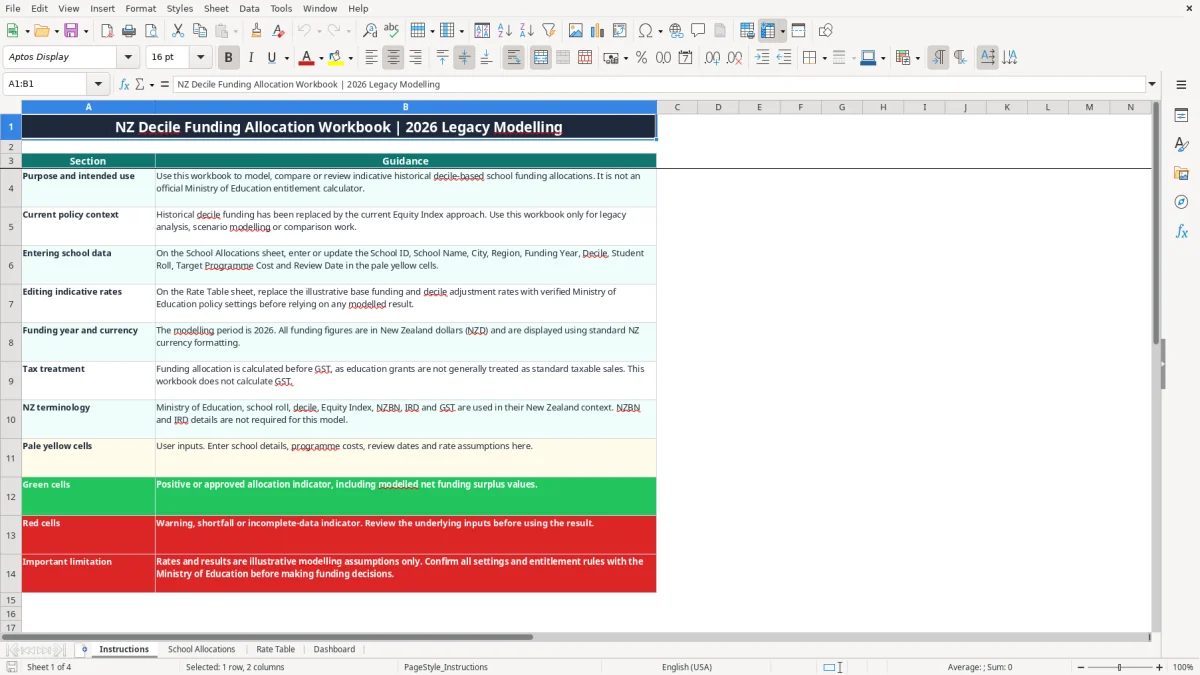
Image 1 shows the Instructions sheet. It sets out the intended use, confirms that the modelling period is 2026, and explains the pale yellow input cells, green positive indicators and red warning indicators. It also makes the important distinction between an indicative model and an official entitlement calculation.
Entering a school scenario
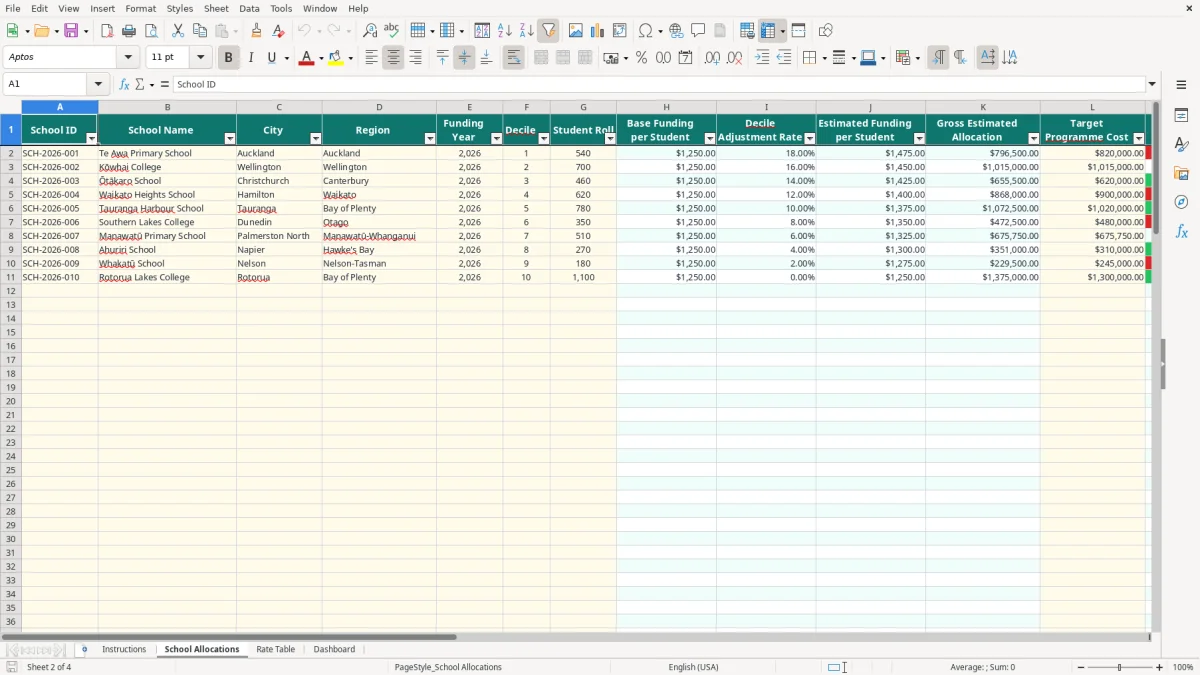
Image 2 shows School Allocations with 18 columns, from School ID through Review Date. For example, the populated Te Awa Primary School row has a 540-student roll, decile 1 and a target programme cost of $820,000. The model then looks up the rate assumptions and calculates the allocation rather than requiring a separate calculator.
The prepared range runs from rows 2 to 101, so a team can compare up to 100 rows in the supplied layout. A Christchurch school with 460 students and a $620,000 target cost can sit beside Auckland and Wellington examples without changing the formula structure.
Reviewing the portfolio
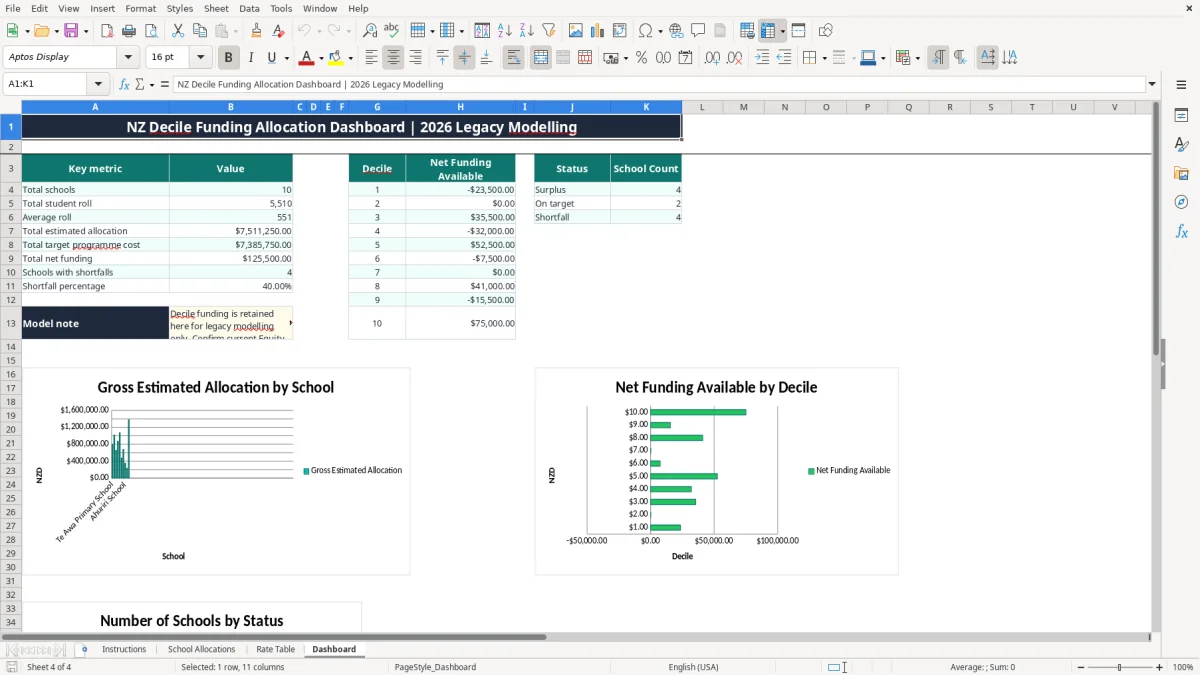
Image 4, the Dashboard, summarises the populated rows. It reports total schools, total student roll, average roll, total estimated allocation, target programme cost, net funding, schools with shortfalls and the shortfall percentage. It also groups net funding across deciles 1 to 10 and counts Surplus, On target and Shortfall statuses.
What the Ministry of Education policy context means
Historical decile funding is not the current New Zealand policy basis for school equity funding. The workbook’s own Instructions sheet states that the historical approach has been replaced by the Equity Index, so the figures must be treated as legacy modelling assumptions rather than current Ministry of Education entitlements.
How the illustrative rate calculation works
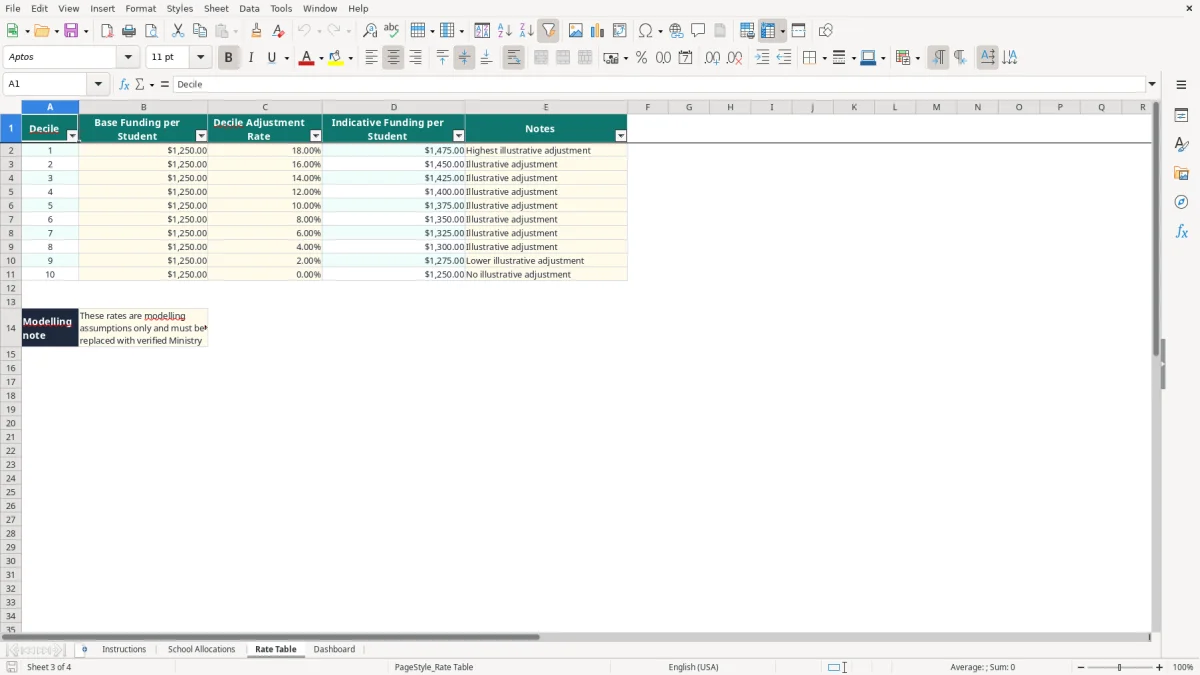
Image 3 shows Rate Table with deciles 1 to 10. Each row contains Base Funding per Student, Decile Adjustment Rate, Indicative Funding per Student and Notes. The supplied illustrative base is $1,250 per student. A decile 1 adjustment of 18% produces $1,475: $1,250 × (1 + 0.18).
At a 540-student roll, that illustrative rate gives $796,500 of gross estimated allocation before comparison with the target programme cost. A decile 10 row has a 0% illustrative adjustment, producing $1,250 per student. These are workbook assumptions, not rates published as current policy.
Tax and record treatment
The Instructions sheet says the allocation is calculated before GST and that the workbook does not calculate GST. Do not treat the output as a GST return, IRD filing or school accounting ledger. Funding income and expenditure still need to be recorded under the organisation’s normal accounting and reporting processes.
Keep the source policy paper, approval email and rate version with the workbook. The 31 March financial year-end is common in New Zealand, but this spreadsheet uses a Funding Year field and a Review Date, so those dates should not be confused with an official entitlement period or balance date.
Where legacy funding models go wrong
The most expensive mistake is treating the illustrative Rate Table as an approved Ministry of Education rate schedule. The supplied table uses a $1,250 base and adjustments from 18% for decile 1 down to 0% for decile 10. If a rate is wrong by $100 across 700 students, the model moves by $70,000.
Wrong roll or decile
A copied student roll can distort every downstream result. A school entered with 700 students instead of 650 and an indicative rate of $1,450 would show $72,500 too much gross allocation. The Data Quality Check flags a roll at zero and a decile outside 1 to 10, but it cannot confirm whether a valid-looking number came from the right roll report.
Decile is also a legacy classification, not a current Equity Index value. Do not replace one with the other in the Decile column and assume the formulas remain meaningful.
Misreading the target comparison
Net Funding Available is calculated as gross estimated allocation less Target Programme Cost. Variance to Target is then calculated from the net result less the target cost again, so users should inspect the column labels carefully rather than assuming every difference is the same measure. With gross allocation of $796,500 and a target cost of $820,000, net funding is negative $23,500 and Status is Shortfall.
Another common error is leaving a stale review date after changing the school’s inputs. That creates a tidy-looking workbook with no clear evidence of when the scenario was checked. The red warning and Review inputs indicators are prompts for investigation, not proof that the underlying policy or school data is correct.
Making the allocation workbook part of a review routine
Give the workbook a fixed owner and a fixed review point. A practical routine is to update school rolls and programme costs after the monthly management pack, then review the Dashboard before the next board finance meeting. Do not wait until the end of the financial year to discover that a rate assumption was never verified.
A simple monthly process
- Keep an untouched master copy and save each scenario with the funding year, review date and rate-source reference.
- Update input cells only on School Allocations and Rate Table; leave calculated columns alone.
- Filter or scan for Review inputs and Shortfall before discussing totals.
- Compare the Dashboard with the underlying school rows, especially when the shortfall percentage changes sharply.
For example, if 12 schools are loaded and 3 show Shortfall, the Dashboard should show a shortfall percentage of 25%. If a new row is added but its school name is blank, it will not be counted in Total schools even if other cells contain values.
When Excel is no longer enough
This template is suitable for controlled scenario work and a prepared range of 100 schools. It is not a replacement for a governed funding system, source-of-truth database or current Ministry calculator. Once several people are editing rates, approvals and historical versions, move the authoritative data into a system with permissions and audit history, then export a clean summary to Excel for committee reporting.
Keep the legacy model clearly labelled. The strongest practice is to show the assumption date, policy source and reviewer beside the saved workbook, rather than presenting a historical decile result as a 2026 Equity Index decision.
Common questions about this template
No. The workbook is an indicative legacy model only. Its Instructions sheet states that historical decile funding has been replaced by the current Equity Index approach, so verify current settings with the Ministry of Education before making funding decisions.
Enter the School ID, School Name, City, Region, Funding Year, Decile, Student Roll, Target Programme Cost and Review Date on School Allocations. The funding and status columns are calculated from those inputs and the Rate Table.
The workbook uses the Rate Table to retrieve the base funding and decile adjustment. For example, a $1,250 base with an 18% adjustment gives $1,475 per student: $1,250 × 1.18.
It means the calculated Net Funding Available is below zero after the target programme cost is deducted from the gross estimated allocation. It is a modelling result, not confirmation of an actual Ministry funding shortfall.
No. The Instructions sheet says allocations are calculated before GST and that the workbook does not calculate GST. It is not a GST return, IRD schedule or general ledger.
School Allocations has prepared formula and input rows 2 to 101, giving space for 100 school rows. The Dashboard formulas refer to that range, so extend the formulas and dashboard references carefully if you change the layout.
Download
File format
Excel (.xlsx)
Compatible software
Excel, Google Sheets, LibreOffice
Price
Free