
Rugby Subs Fees Tracker Excel – Free Template (2026)
Accounting & GST
School gala takings Excel - Free Template
Track school gala stall sales, donations, costs, profit, GST estimates and targets in one Excel workbook for NZ schools and PTAs.
2026-09-21
450 downloads
4.8/5 average rating
Download template
This school gala takings Excel spreadsheet records each stall's gross sales, donations or sponsorship, direct costs, total revenue, net profit, margin, target and payment method. It includes a 100-row Stall Takings sheet, a linked Summary Dashboard and an Instructions sheet.
Enter one row for each stall, such as a sausage sizzle, home baking, book stall or craft table. The workbook calculates the key results, flags whether a target was reached and provides an indicative GST component where you select Yes.
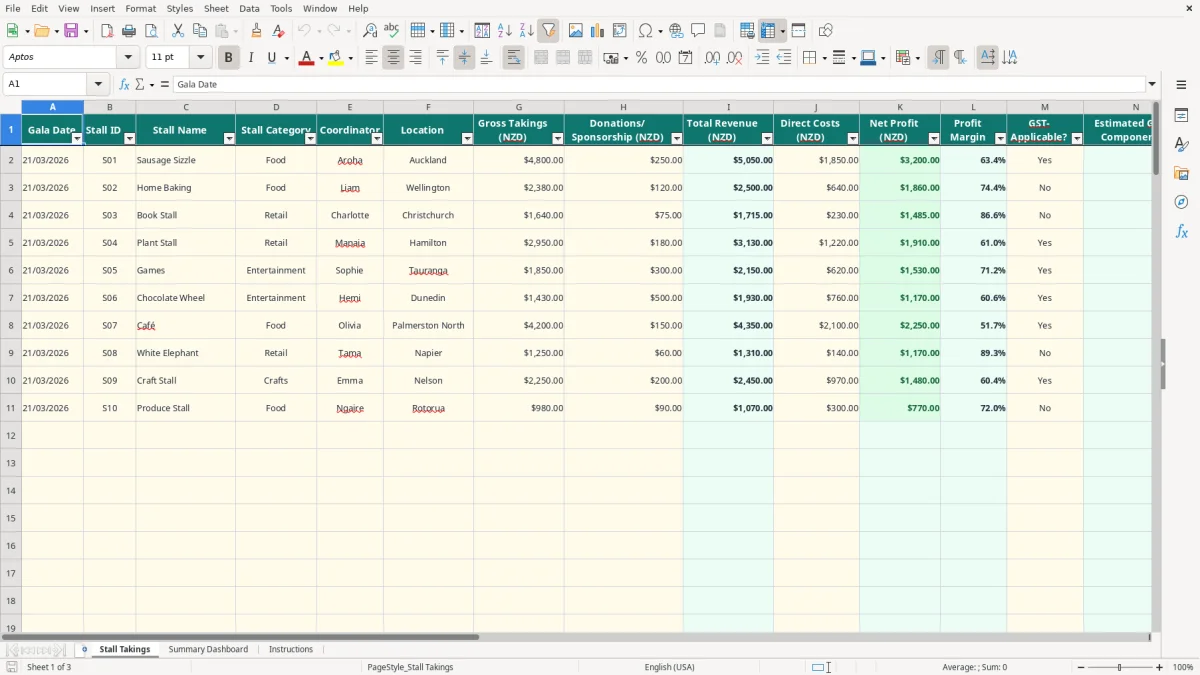
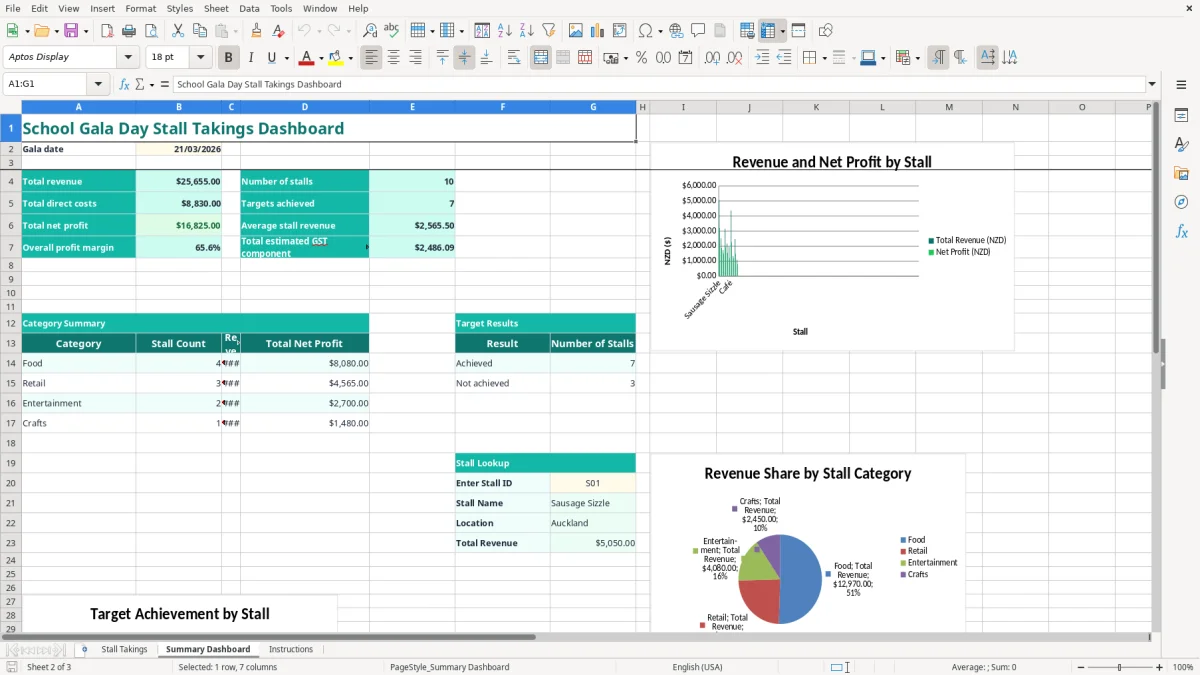
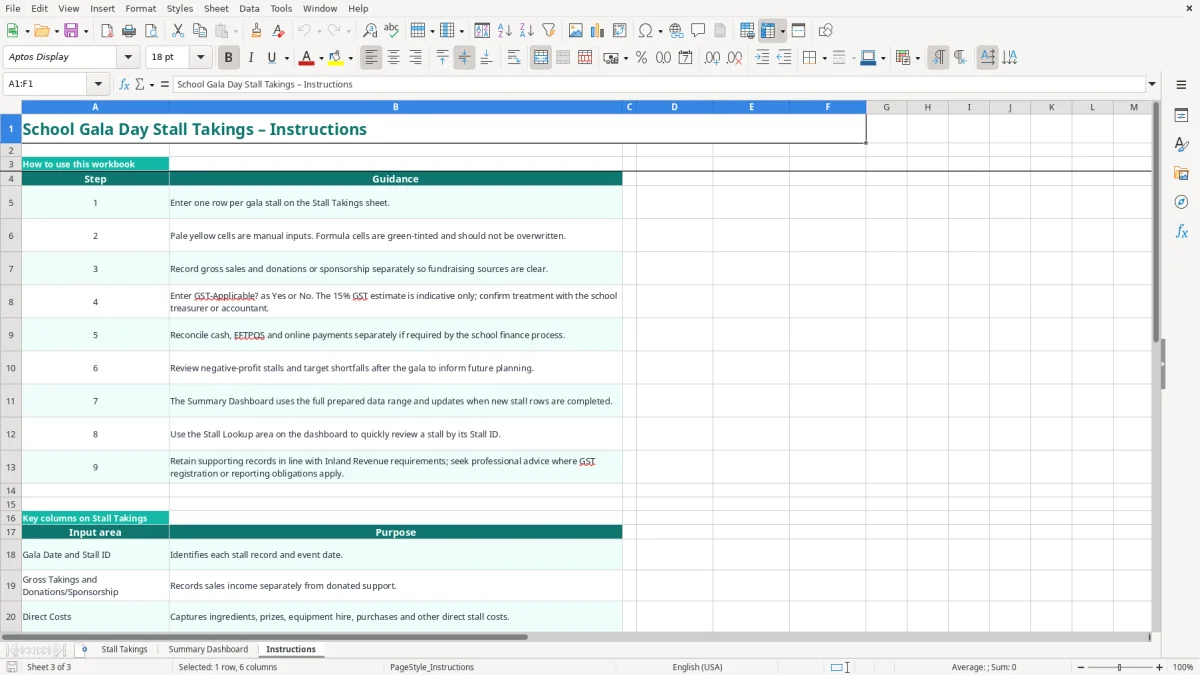
Image 1 shows the input sheet with columns from Gala Date and Stall ID through to Notes. Image 2 shows the dashboard, including totals, category summaries, target results, three charts and a Stall Lookup area; image 3 contains the step-by-step guidance.
The key benefits of this Excel template
- Capture up to 100 prepared stall rows, with one record per gala stall.
- Keep gross takings separate from donations and sponsorship so fundraising sources are clear.
- Calculate total revenue, direct costs, net profit and profit margin automatically.
- Compare each stall with its target takings and count achieved targets on the dashboard.
- Estimate the GST component at 15/115 when GST-Applicable? is set to Yes.
- Review revenue and profit by Food, Retail, Entertainment and Crafts categories.
- Use Stall ID lookup to quickly check a stall's name, location and total revenue after the event.
Step-by-step guide
- Open the Instructions sheet first and identify the pale yellow manual-input cells and green-tinted formula cells.
- On Stall Takings, enter one row per stall. Add the gala date, Stall ID, stall name, category, coordinator and location.
- Enter Gross Takings, Donations/Sponsorship and Direct Costs as dollar amounts. Keep donated support separate from money collected through sales.
- Select Yes or No in GST-Applicable? and record the payment methods used. Add useful reconciliation details in Notes.
- Enter a Target Takings figure for each stall. Target Achieved? will show Yes when total revenue meets or exceeds that target.
- Check the calculated Total Revenue, Net Profit, Profit Margin and Estimated GST Component columns rather than overwriting them.
- Review Summary Dashboard after the rows are completed. Select a Stall ID in the Stall Lookup area to inspect an individual stall.
Included features
Stall Takings input sheet with columns for event date, stall identity, coordinator, location and financial results.
Formula-driven Total Revenue using gross takings plus donations or sponsorship.
Automatic Net Profit and Profit Margin calculations based on total revenue and direct costs.
Indicative GST component calculation using 15/115 for rows marked Yes.
Drop-down lists for stall category, GST status and payment method.
Dashboard totals for revenue, direct costs, net profit, overall margin, stall count, achieved targets and estimated GST.
Three dashboard charts covering stall results, category revenue and target results.
Who uses a school gala takings spreadsheet in New Zealand
A school gala treasurer usually needs this spreadsheet after the last sausage has been sold and volunteers are counting cash in the staffroom. It is also useful for a PTA committee, a fundraising lead or an office manager who needs to turn separate stall handovers into one clean result before the next meeting.
From stall handover to one event result
Give every stall a short ID such as S01, S02 and S03. A Christchurch primary school might record a sausage sizzle, book stall and home baking separately, with each coordinator entering sales, donated support and direct purchases. The spreadsheet then adds the figures instead of making the treasurer combine scraps of paper and EFTPOS reports.
For example, if a sausage stall records $4,800 of gross takings, $250 of sponsorship and $1,850 of direct costs, Total Revenue is $5,050 and Net Profit is $3,200. Its profit margin is 63.4%, calculated as $3,200 divided by $5,050.
Useful at committee review time
The Summary Dashboard brings the event into a short set of figures: total revenue, total direct costs, total net profit, average stall revenue and the number of stalls. Category totals show whether Food, Retail, Entertainment or Crafts produced the strongest return.
That distinction matters when planning the next gala. A stall with $3,000 of sales may only make $400 after hired equipment and purchased stock, while a donated home-baking stall may make $2,000 with $250 of costs. Comparing net profit, rather than sales alone, gives the committee a better basis for deciding which stalls to repeat.
Keeping the detail available
The Stall Takings sheet has an auto-filter and frozen header row, so a volunteer can filter by category or coordinator without losing the column headings. The Notes column also gives the next organiser context, such as stock selling out early or a stall relying mainly on donated goods.
What GST and record rules apply to school gala takings
The workbook's GST figure is an estimate, not a determination that a school or stall is registered for GST. New Zealand's standard GST rate is 15%, and the formula estimates the GST component of a GST-inclusive amount by multiplying Total Revenue by 15/115 when GST-Applicable? is Yes.
Use the estimate carefully
If a stall has total revenue of $5,050 and you mark it Yes, the indicative GST component is $658.70: $5,050 × 15 ÷ 115. If you mark the same row No, the workbook returns $0.00. That calculation does not subtract GST on purchases and does not replace a proper GST return.
GST registration is generally compulsory when taxable turnover exceeds $60,000 in a 12-month period. A school fundraising event may involve supplies with different treatment, donations, volunteers and an organisation's wider activities, so use the row-level estimate as a planning prompt rather than a tax liability.
Keep a proper supporting trail
Inland Revenue requires business tax records to be kept for 7 years. Retain stall handover sheets, till or EFTPOS summaries, bank deposits, receipts, supplier invoices and records supporting donations or sponsorship alongside the workbook.
Record the gala date in DD/MM/YYYY format and keep the event documentation together with the school's accounting records. If the school is GST-registered, taxable supply information must support sales and expense claims; the workbook itself does not create that information.
Reconcile the money, not just the totals
The Payment Methods Recorded field offers Cash, EFTPOS, Online or Mixed. For instance, $1,200 cash, $2,900 EFTPOS and $950 online should be checked against the bank deposit, terminal settlement and online payment report. The workbook records which methods were used, but it does not split or reconcile those amounts automatically.
For most volunteer committees, completing the sheet immediately after each cash count is safer than waiting until the next meeting. It preserves the link between the coordinator's handover and the final figure before receipts and memories disappear.
The school gala errors that distort the final fundraising result
The biggest problems I see in gala spreadsheets are not usually difficult formulas. They are classification and handover errors: a donation is included twice, direct costs are missed, or the treasurer enters a bank deposit as if it were a stall's sales figure.
Sales and donations get mixed together
Suppose families sponsor $500 of a cake stall and the stall also sells $2,000 of baking. If the coordinator reports $2,500 as sales and the treasurer adds the $500 sponsorship again, revenue is overstated by $500. Keeping Gross Takings and Donations/Sponsorship in separate columns makes that double count visible.
The reverse error is just as common. A cash tin may contain $2,300, but $300 belongs to a float returned to the office. Entering the full amount as takings overstates revenue and can make a target appear achieved when it was not.
Costs vanish when volunteers donate their time
Volunteer labour is normally not entered as a direct cost, but purchased ingredients, prizes, venue hire, gas bottles and equipment hire still reduce the stall's result. A stall showing $1,800 revenue and $1,100 profit because $700 of food supplies were left off is not a successful comparison; its reported profit is overstated by $700.
Negative Net Profit is a useful warning, not a formula failure. If a game stall takes $900 but costs $1,050 in prizes and hire, the workbook correctly shows a $150 loss. That result may be acceptable for variety, but the committee should know it before repeating the setup.
Targets and GST choices can mislead
A blank Target Takings cell leaves Target Achieved? blank, while a target of $0 can show Yes once revenue is entered. Use a real target, such as $2,300, if you want a meaningful result. Also, selecting Yes for GST simply applies the indicative 15/115 calculation; it does not prove the income is taxable.
Do not type over green formula cells. Overwriting Total Revenue or Net Profit with a hand calculation can leave one stall looking correct while the dashboard still relies on a different formula range.
How the spreadsheet becomes part of your gala close-off routine
The workbook works best when it is attached to an existing event routine rather than saved for a rushed committee meeting. Set a clear handover point: once each stall's cash, EFTPOS result and receipts are counted, one named person completes or checks that row.
Use a simple close-off sequence
- Give each coordinator their Stall ID before the gala and write it on the handover envelope.
- Enter sales, donations and direct costs on the same day, while the figures are still traceable.
- Use the Notes field for exceptions, such as a missing receipt or a float returned to the office.
- Review rows with negative profit, a target marked No or an unexpectedly low margin.
For a 20-stall gala, a five-minute check per stall takes about 100 minutes. That is far less painful than reconstructing 20 handovers three weeks later, particularly when several volunteers used mixed payment methods.
Make errors noticeable
Keep the pale yellow input cells for manual entry and leave the green-tinted calculated cells alone. The workbook already uses conditional formatting and drop-down validation for key fields; use the supplied Yes/No and payment-method choices consistently so the dashboard counts remain meaningful.
After the first review, use the dashboard figures in the committee close-off: total net profit, average stall revenue, category totals and target results. Save a final copy with the event records, then keep the supporting documents for 7 years where Inland Revenue record-keeping rules apply.
Know when Excel is no longer enough
This template suits a single event with up to 100 prepared rows. Move to Xero or MYOB when the school needs bank feeds, user permissions, supplier bills, GST returns, an audit trail or repeated events with a proper accounting ledger.
Until then, a fixed close-off time and one person responsible for checking each row will do more for accuracy than adding extra columns. Keep the spreadsheet as the event summary, and retain the original payment and receipt records as evidence.
Common questions about this template
The Stall Takings sheet has prepared rows 2 to 101, allowing up to 100 stall records. Add one row for each stall and use a unique Stall ID such as S01 or S02.
Total Revenue is calculated as Gross Takings plus Donations/Sponsorship. For example, $2,000 of sales and $150 of sponsorship produces Total Revenue of $2,150.
Net Profit is Total Revenue less Direct Costs. A stall with $2,150 revenue and $650 of direct costs shows $1,500 net profit.
It provides an indicative GST component only. When GST-Applicable? is Yes, it calculates Total Revenue × 15 ÷ 115; confirm the school's actual GST treatment and reporting obligations before using the figure in a GST return.
The Payment Methods Recorded column lets you select Cash, EFTPOS, Online or Mixed, but it does not calculate separate payment totals. Keep the terminal reports, online records and cash-count sheets for the detailed reconciliation.
It summarises total revenue, direct costs, net profit, overall profit margin, number of stalls, targets achieved, average stall revenue and estimated GST. It also provides category summaries, three charts and a Stall Lookup area based on Stall ID.
Download
File format
Excel (.xlsx)
Compatible software
Excel, Google Sheets, LibreOffice
Price
Free