
Rugby Subs Fees Tracker Excel – Free Template (2026)
Accounting & GST
Provisional Tax Excel - Free Template
Tracks prior-year RIT, 80% safe harbour, instalments and terminal tax for NZ provisional tax planning.
2026-06-23
158 downloads
4.8/5 average rating
Download template
This provisional tax spreadsheet helps you check the 80% safe harbour, track instalments paid, and estimate whether you are heading for terminal tax or a refund. It includes three sheets: Tax Data, Summary and Instructions.
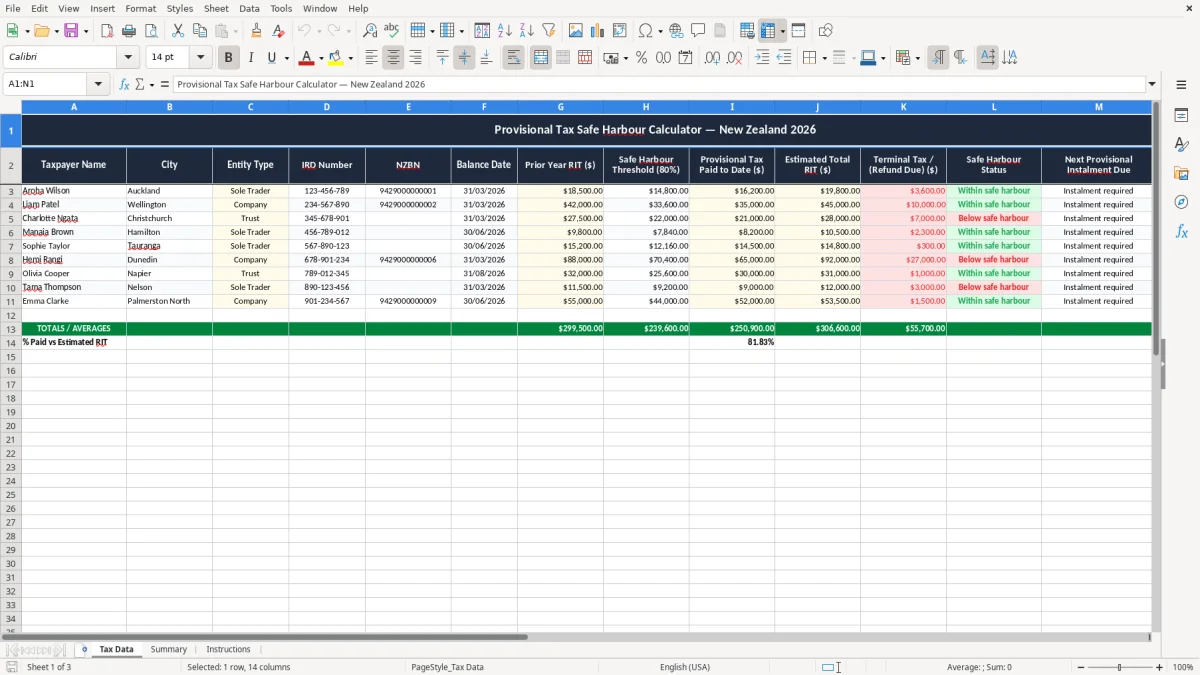
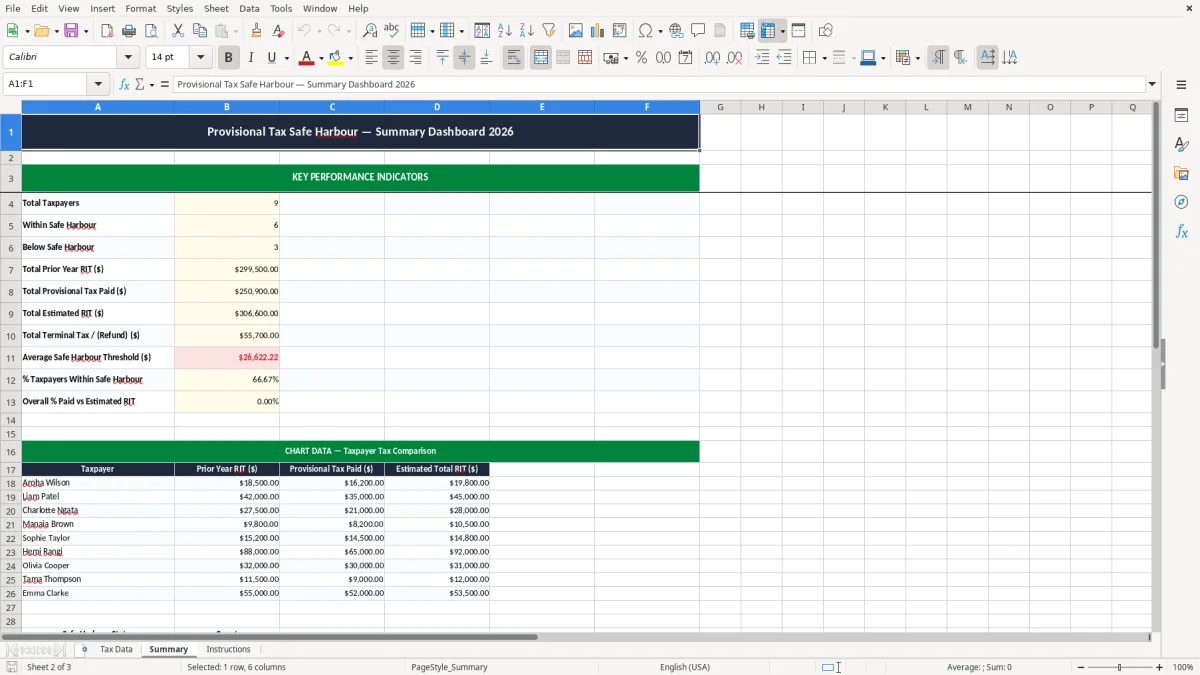
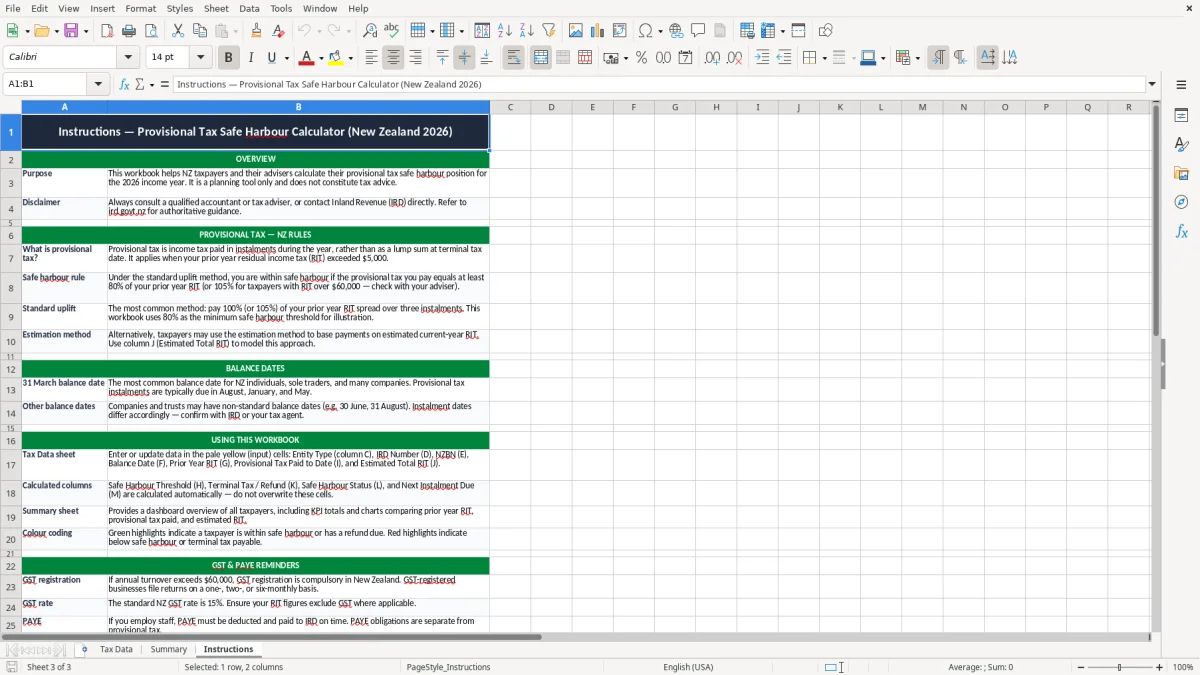
Use it when you want a quick NZ view of each taxpayer’s prior year RIT, estimated total tax, next instalment due and a simple status flag. The Tax Data sheet in image 1 is where you enter the numbers; image 2 shows the summary; image 3 gives the setup notes.
The key benefits of this Excel template
- Checks the 80% safe harbour against prior year RIT, so you can see exposure at a glance.
- Tracks provisional tax paid to date and estimated total RIT in one place.
- Shows terminal tax or refund due, so you can plan cash flow before 31 March.
- Works for sole traders, companies and trusts with the same layout.
- Helps you time the next instalment instead of waiting until the due date lands.
- Uses a clear status field, so you can spot who is above or below the safe harbour fast.
- Keeps basic client details together, including IRD number, NZBN and balance date.
Step-by-step guide
- Open the Tax Data sheet and replace the sample records with your own taxpayer details. Enter the IRD number, NZBN if relevant, balance date and prior year RIT.
- Check the 80% safe harbour threshold. For example, if prior year RIT was $40,000, the threshold is $32,000.
- Enter provisional tax paid to date and your current estimate of total RIT. The sheet will show whether you are likely to face terminal tax or a refund.
- Use the next provisional instalment due field to line up the payment with your provisional tax schedule and avoid a late surprise.
- Review the Summary sheet to compare taxpayers side by side. That is useful if you manage several entities or a family group.
- Update the file after each payment or forecast change. A 10-minute monthly update is usually enough to keep it useful.
- Read the Instructions sheet if you want the setup order, and save one copy per balance date so last year’s figures stay intact.
Included features
Tax Data sheet with columns for taxpayer name, city, entity type, IRD number, NZBN and balance date.
Built-in fields for prior year RIT, 80% safe harbour threshold, provisional tax paid to date and estimated total RIT.
Terminal tax / refund due column to show the likely year-end position.
Safe Harbour Status column to flag whether the taxpayer is within the threshold.
Next Provisional Instalment Due and Notes columns for payment planning and reminders.
Summary sheet for a clean view of the sample records and key totals.
Instructions sheet to help you set up the workbook without guessing.
Who uses a provisional tax spreadsheet in New Zealand
This is the sort of file you use when the provisional tax bills are coming and you want to know where you stand before the next instalment lands. A sole trader, a company owner, or a bookkeeper for a small trust can use it to compare prior year RIT with the 80% safe harbour and the amount already paid.
Take a Christchurch builder with 4 staff and a $42,000 prior year RIT. If the year is tracking at $50,000, the spreadsheet quickly shows whether the gap is small enough to manage or large enough to plan for a bigger terminal tax hit.
Useful at the same points in the year
You will reach for it after the 31 March balance date, when the first estimates are coming together, and again before each instalment due date. That is usually when the numbers matter most: you are either deciding whether to pay, change the estimate, or hold cash back for the next round.
Good for more than one taxpayer
The layout also suits an office manager or external bookkeeper who looks after several entities. One row per taxpayer means you can line up an individual, a company and a trust without rebuilding the spreadsheet each time.
What Inland Revenue expects for safe harbour and records
Inland Revenue uses the 80% safe harbour test as a practical check on whether your provisional tax position is being managed properly. If your prior year RIT was $25,000, the safe harbour amount is $20,000; if you stay at or below that level, the file makes it obvious.
The other hard rule is record keeping. Keep the working papers and source records for 7 years, and make sure the figures tie back to the IRD return, not just the rough note on your phone.
Balance date and payment timing matter
The standard NZ balance date is 31 March, and that date drives the clean split between one year and the next. If your estimate lifts from $28,000 to $36,000 during the year, the spreadsheet gives you the comparison you need before terminal tax is finalised.
Use the right entity details
For a sole trader, the IRD number is the key identifier. For a company, include the NZBN as well, because that helps keep the file aligned with the registered entity and the records you keep for Inland Revenue and your own year-end review.
Where provisional tax slips up and what that costs
The common mistake is leaving the estimate too high or too low for months at a time. If you think your tax will be $30,000 but it lands at $45,000, you may have left $15,000 too little aside, which is enough to hurt cash flow when the bill arrives.
Small errors become real money
Another trap is forgetting one instalment and assuming the year will sort itself out later. On a $40,000 safe harbour position, missing a $10,000 payment can move you from comfortably covered to scrambling for terminal tax at year end.
Bad source data makes the forecast useless
If the prior year RIT is wrong, the whole worksheet is built on sand. I have seen people use the wrong balance date, copy the wrong entity row, or enter payments net of bank fees and then wonder why the totals do not match the profit and loss.
That is not a small nuisance. One mistaken estimate can lead to a few hundred dollars of interest and penalties, plus the time spent untangling it across the next return cycle.
Once the year-end numbers are straight, the next tax task is often a donation tax credit claim to capture any eligible gifts before the return is lodged.
How to turn the spreadsheet into a monthly habit
The easiest way to keep this file alive is to link it to the same job every month, usually the bookkeeping review or the GST check-in. If you update it the same day you look at bank balances, it becomes part of the routine instead of another file to ignore.
Make the update quick
- Copy the prior month’s row and overwrite the new payment figure.
- Use the Notes field for reminders like “installment due 28/08/2026”.
- Keep one workbook per balance date so you are not mixing years.
Know when spreadsheet control is enough
If you are only tracking a few taxpayers, this workbook is usually plenty. Once you are juggling dozens of forecasts, recurring journals and monthly reports, move the bookkeeping itself into Xero or MYOB and keep Excel for the planning view.
That is also the point where a provisional tax schedule becomes the natural planning sheet for each balance date.
Common questions about this template
It is the point where your provisional tax estimate is 80% of your prior year RIT. For example, if prior year RIT was $50,000, the safe harbour amount is $40,000.
Sole traders, company directors, trustees and bookkeepers can use it when they need a simple NZ view of prior year RIT, instalments paid and the likely terminal tax or refund.
No. It is a planning tool. You still file the actual IRD return through the right channel and keep your records for 7 years.
Start with the taxpayer name, entity type, balance date, prior year RIT, provisional tax paid to date and your estimate of total RIT. Those numbers drive the safe harbour check.
Monthly is usually enough, and it lines up well with your banking, payroll or GST review. If trading is changing quickly, update it after each provisional payment.
Yes. Each row is set up for a separate taxpayer, so you can track a sole trader, a company and a trust in the same workbook.
Download
File format
Excel (.xlsx)
Compatible software
Excel, Google Sheets, LibreOffice
Price
Free