
Rugby Subs Fees Tracker Excel – Free Template (2026)
Accounting & GST
Provisional Tax Instalments Tracker Excel - Free Template
Track provisional tax instalments, due dates, payments and balances for NZ sole traders and companies.
2026-06-22
151 downloads
4.8/5 average rating
Download template
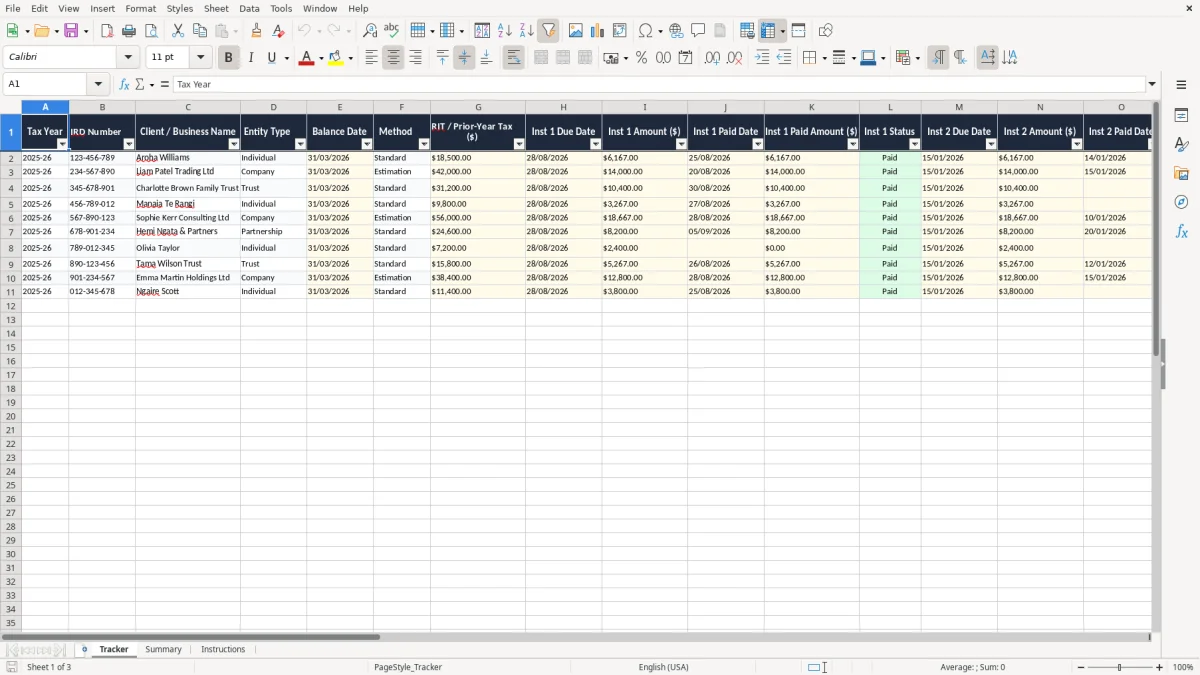
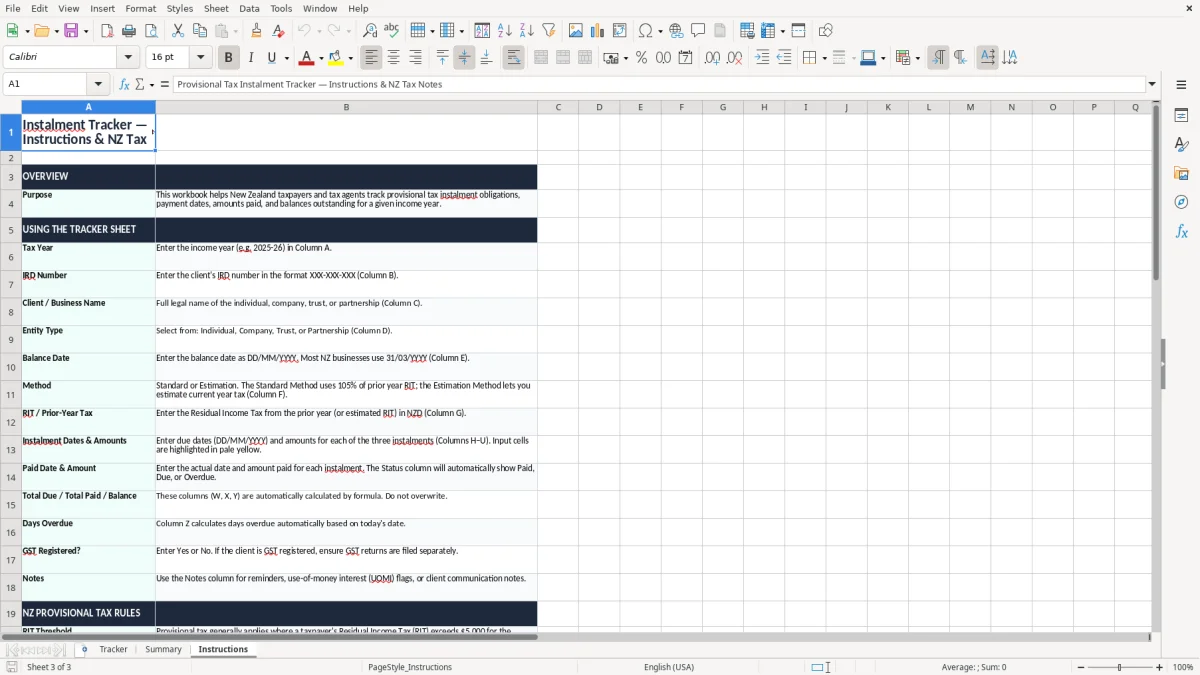
This provisional tax instalments tracker Excel template helps you follow each provisional tax instalment for a New Zealand business or sole trader, with due dates, amounts paid, balances outstanding and days overdue in one place. It includes a Tracker sheet, a Summary sheet and Instructions.
Use it when you want a clean record for each tax year, especially if you are lining up payments around the 31 March balance date or checking what still needs to be paid before the next instalment falls due.
The key benefits of this Excel template
- Shows all 3 provisional tax instalments on one line, so you can see the full year at a glance.
- Tracks due date, paid date, paid amount and status for each instalment, reducing missed payments.
- Calculates total due, total paid and balance outstanding, so you know the exact cash flow position.
- Flags days overdue, which helps you chase missing payments before penalties build up.
- Stores the IRD number, entity type and tax year, which makes the record usable for more than one client or business.
- Works well for a sole trader, a company with an NZBN, or a bookkeeper managing several entities.
- The Summary sheet turns raw payment data into a quick check before you lodge the next return.
Step-by-step guide
- Step 1 — Open the Tracker sheet and enter the tax year, IRD number, client or business name, entity type, balance date and method. This sets the record up properly before you add any payment details.
- Step 2 — Fill in the 3 instalment due dates and amounts. If you are using the standard method, the amounts should tie back to the prior-year tax or RIT figure shown in your records.
- Step 3 — Add each payment as it is made. Enter the paid date and paid amount so the sheet can show the balance outstanding straight away.
- Step 4 — Check the status and days overdue columns. If an instalment is only partly paid, you can see the shortfall without doing the maths by hand.
- Step 5 — Review the Summary sheet before each due date or when you are planning cash flow. This gives you a quick view of what is still due for the year.
- Step 6 — Use the notes field for reminders such as instalment arrangements, client instructions, or a change from standard to estimation or AIM for the next year.
Included features
One row per tax year and entity, which keeps the record tidy for repeated annual use.
Separate columns for 3 instalments, with due date, amount, paid date, paid amount and status for each one.
Total due, total paid and balance outstanding columns for instant reconciliation.
Days overdue field to highlight late payments without manual counting.
Compact details section for IRD number, entity type, balance date, method and GST registration status.
Notes column for call-backs, instalment plans, or changes in provisional tax method.
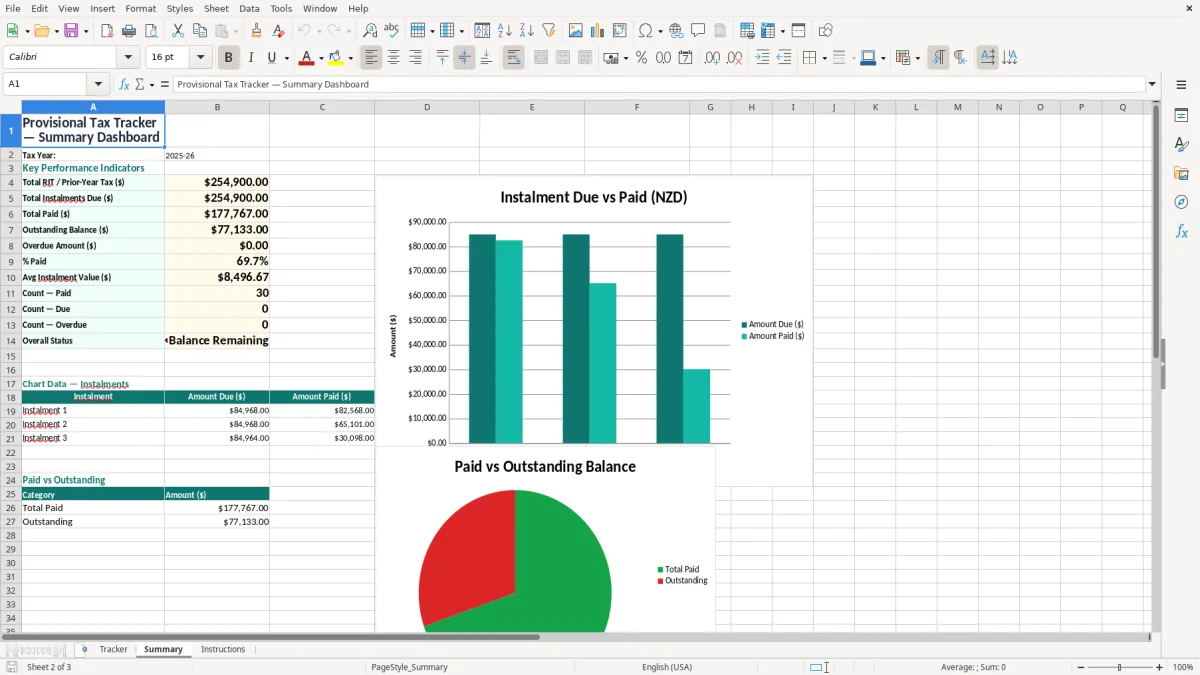
A Summary sheet that gives a clean snapshot of the year’s position before your next payment.
Who uses a provisional tax instalments tracker in New Zealand
New Zealand provisional tax sits alongside the standard tax calendar, so the people using this sheet are usually the same ones handling GST, PAYE or year-end returns. For a company with an NZBN, it is a quick internal control; for a sole trader, it is a way to avoid a surprise bill when terminal tax lands after the IR3 is filed.
The Summary sheet is handy when you need to explain the position fast. If the first instalment has been paid in full, the second is 40% paid and the third is still untouched, you can see the total outstanding immediately instead of piecing it together from bank statements.
Image 2: the Summary sheet
Image 2 shows the Summary sheet, which is there for a quick check rather than data entry. That is useful when you are sitting with a client at month-end and want to know, for example, whether there is still $3,200 owing before the next due date.
When this is most useful
You will reach for it at the end of the financial year, before a provisional tax due date, or when a business has just had a strong quarter and you want to keep the cash aside. It is also useful if you are managing several businesses on the same spreadsheet and need one clean place to compare the year’s tax position.
What Inland Revenue expects for provisional tax records
Inland Revenue expects you to keep enough records to support the amount due, the payment dates and how you worked out each instalment. In practice that means keeping the IRD number, tax year, balance date, method used and proof of each payment for at least 7 years, because that is the standard record-keeping period for Inland Revenue.
The standard New Zealand tax year is built around the 31 March balance date, and provisional tax is generally paid in instalments across the year. If your prior-year tax or RIT is $30,000, a rough standard split gives you $10,000 per instalment before interest and any adjustment from estimation or AIM.
Standard method versus estimation
The standard method is the easiest to track in a spreadsheet because the amounts are fixed once the base figure is known. Estimation is better when your profit drops sharply, because paying $10,000 three times when your current-year tax is closer to $21,000 leaves too much sitting with Inland Revenue until the next terminal assessment.
GST and payment context
If the client is GST-registered, the tracker also helps you keep provisional tax separate from GST cash. That matters because GST is still paid at the standard 15% rate, and the two obligations should not be mixed together in the same bank bucket when you are trying to protect working capital.
The mistakes that turn a tax payment into a cash flow problem
The biggest mistake is treating provisional tax like a single annual bill instead of 3 separate instalments. If you miss one $6,000 payment and only notice after the next due date, you are suddenly juggling $12,000 plus any penalty or use-of-money cost, which can sting a small business budget.
Another common problem is paying the right amount but not recording the date. Without the paid date and paid amount, you cannot prove what cleared before the due date, and that leaves you hunting through bank feeds when you should be preparing the next return or the next pay run.
Where the numbers get messy
A client on variable income can easily overpay if they stick to the standard figure after a slow winter. For example, if last year’s tax was $24,000 but this year’s likely bill is only $15,000, the standard route locks up $9,000 too much cash until the final assessment catches up.
What usually costs time
The time cost is often bigger than the tax cost. I have seen people spend 45 minutes checking bank statements, then another 20 minutes trying to match one payment that was made from a personal account instead of the business account, which is exactly the sort of thing this tracker stops if you keep it current.
That same record-keeping also makes the company return workings much quicker when the final assessment needs every payment matched back to the right period.
How to make the tracker part of your regular routine
The easiest way to keep this spreadsheet alive is to tie it to an existing job you already do. Most people update it on the same day they do the bank reconciliation, the pay run or the GST return, because that is when the numbers are already in front of them.
Simple habits that work
- Copy last year’s row into the new tax year, then overwrite only the due dates and amounts.
- Set a fixed weekly or fortnightly check-in so you are not relying on memory at the due date.
- Use the notes field for payment plans, penalties, or a change from standard to estimation.
- Colour anything overdue in red so it stands out before you get to month-end.
When to move on
If you are tracking more than about 10 entities, or if you need live bank feeds and automated reminders, spreadsheet control starts to get clunky. That is the point where Xero or MYOB usually saves time, but for a sole trader or small firm this template gives you a simple weekly routine without extra software cost.
For a sole trader, the next step is usually the income tax return form, where those totals and notes feed into the annual filing.
Common questions about this template
It suits sole traders, small companies, and bookkeepers who need to follow 3 instalments across the tax year. If you are managing one business or a small client list, the sheet keeps the due dates, amounts and payments in one place.
Yes. You can record the instalments, then use the notes field to show that the amounts were based on an estimate rather than the standard prior-year tax calculation.
Yes. It calculates total due, total paid and balance outstanding, so you can see the shortfall without doing the maths by hand.
Keep the spreadsheet and supporting payment records for at least 7 years, which matches the standard Inland Revenue record-keeping requirement.
This file is for provisional tax instalments, but it works well alongside your GST and PAYE records. You can use the notes to remind yourself when the next GST return or IR348 filing is due.
Move to software when you are tracking enough entities that manual updates start taking too long, or when you need bank feeds, reminders and real-time reporting. For a small number of clients, this template is still the quicker option.
Download
File format
Excel (.xlsx)
Compatible software
Excel, Google Sheets, LibreOffice
Price
Free