
Watercare Bill Tracker Excel – Free Template (2026)
Personal Finance
Working for Families Tax Credit Excel - Free Template
Estimate Working for Families support using income, children and hours in a simple NZ spreadsheet.
2026-07-01
190 downloads
4.8/5 average rating
Download template
This Working for Families tax credit Excel spreadsheet helps you estimate a household’s likely entitlement from income, children and in-work hours. It includes an input sheet, a household summary, rates and assumptions, and instructions so you can check the numbers before you apply or review support.
Use it when you want a quick estimate for a family, a client or your own household. The template brings the key fields into one place: household details, weekly and annual income, child ages, eligibility flags and total estimated support.
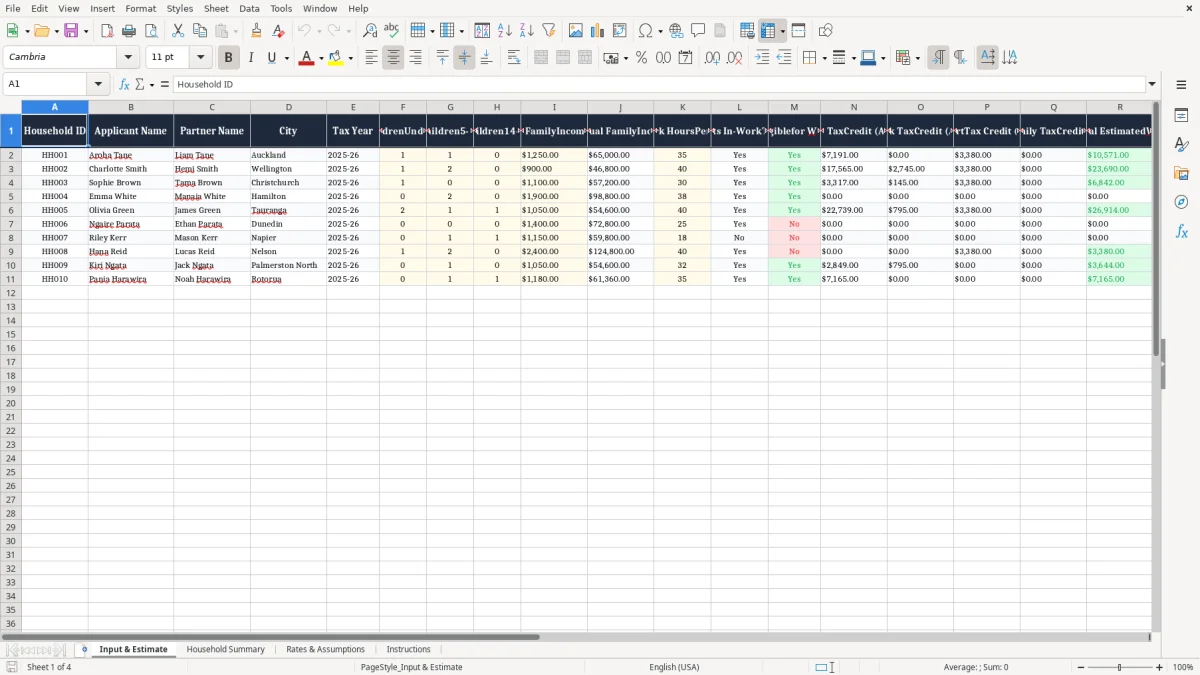
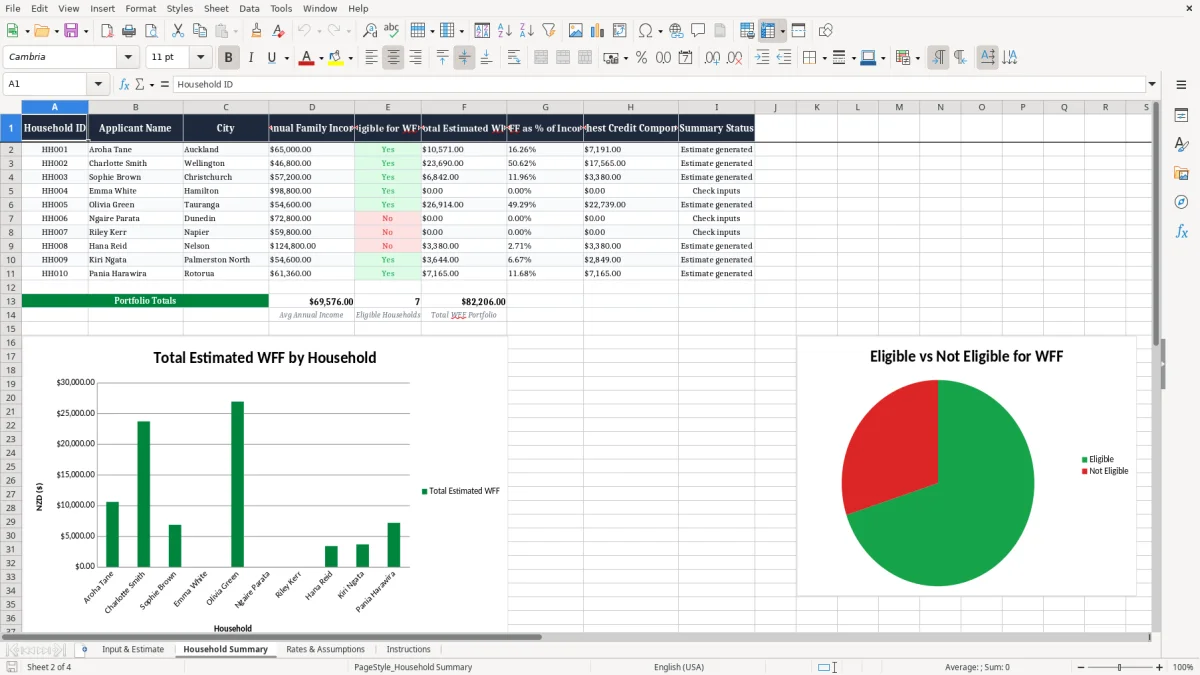
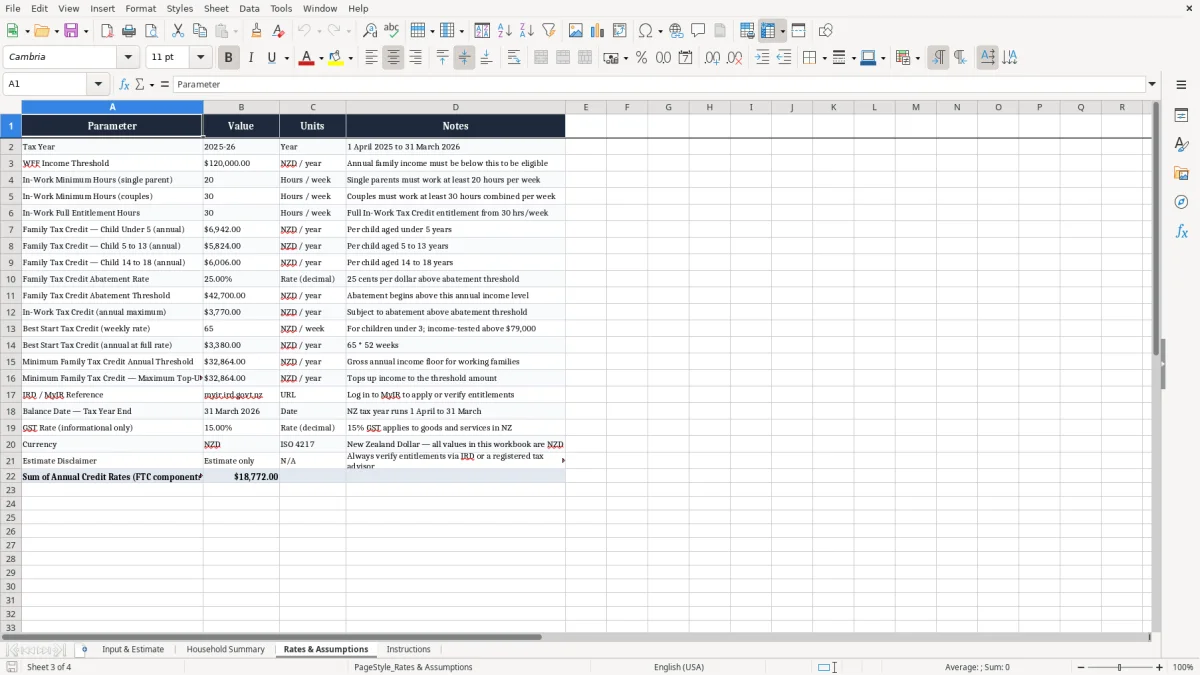
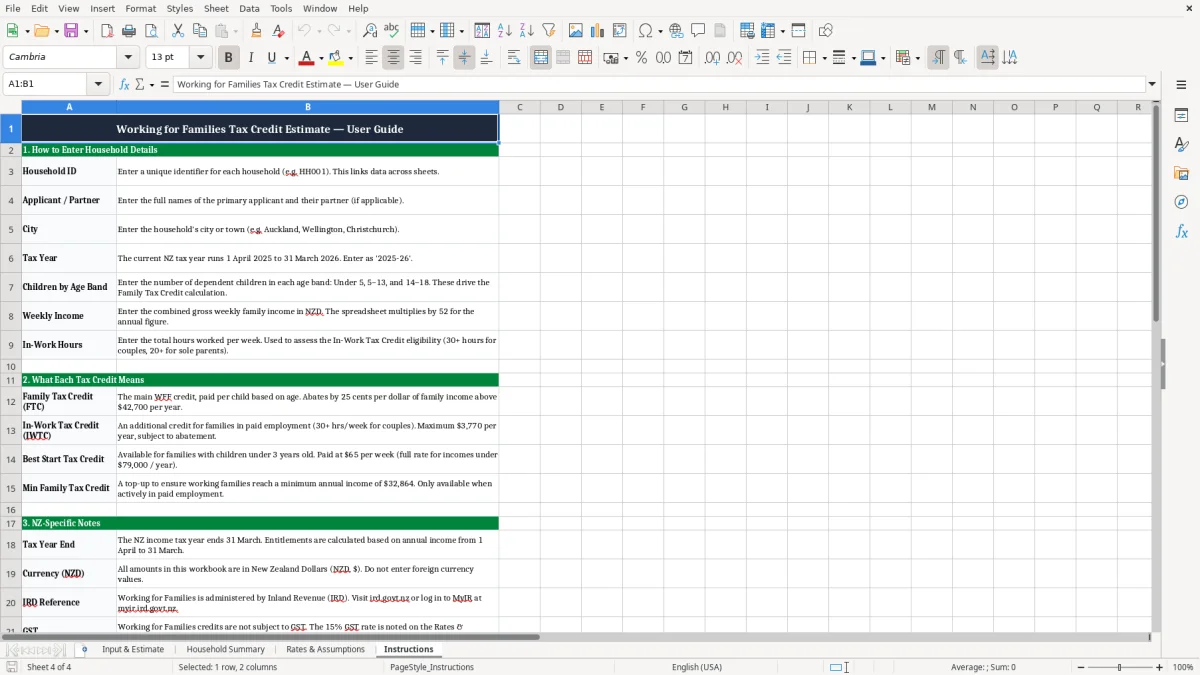
Image 1 shows the data-entry sheet with one row per household, Image 2 shows the summary view, Image 3 lists the rates and assumptions, and Image 4 explains how to use the spreadsheet step by step.
The key benefits of this Excel template
- Checks one household at a time with a clear row layout, so you can estimate support without hunting through notes.
- Converts weekly income to annual income, which makes it easier to compare households on the same basis.
- Shows child counts by age band, including under 5, 5–13 and 14–18, so you can test the right family mix.
- Flags whether the household meets the in-work test based on weekly hours, which is the usual filter for Working for Families support.
- Calculates a single Total Estimated WFF amount, so you can see the full support picture in one figure.
- Helps you compare cases quickly, for example a family on $900 a week with 3 children versus one on $1,250 a week with 1 child.
- Gives you a tidy record for follow-up questions, with a notes column for assumptions or missing details.
Step-by-step guide
- Enter the household ID, names, city and tax year on Input & Estimate. Start with the basics so each family stays easy to track later.
- Add the number of children in each age band and the household’s weekly family income. If income changes, update the row before you compare cases.
- Record the in-work hours per week. The sheet then shows whether the household meets the in-work test and whether it appears eligible for Working for Families.
- Check the estimated amounts for Family Tax Credit, In-Work Tax Credit, Best Start Tax Credit and any minimum family tax credit top-up. Use the total as your working estimate only.
- Review the Household Summary sheet for a cleaner snapshot. That is the version you can print, share or talk through with a client or family member.
- Open Rates & Assumptions before you rely on the result. If a rate changes for 2026, update the assumptions first so every estimate stays aligned.
- Use the notes field to capture anything unusual, such as shared care, missing income details or a case you want to check again before filing.
Included features
Input & Estimate sheet with 19 columns for household details, child ages, income, hours and estimated credits.
Built-in fields for Meets In-Work Test? and Eligible for WFF? so you can screen cases fast.
Separate annual estimate columns for Family Tax Credit, In-Work Tax Credit, Best Start Tax Credit and Total Estimated WFF.
A notes column for comments, missing documents or follow-up questions.
Household Summary sheet for a cleaner view of the figures after data entry.
Rates & Assumptions sheet for the thresholds and settings used in the estimate model.
Instructions sheet that explains the workflow from input to review.
Who uses a working for families estimate spreadsheet in New Zealand
This is the kind of sheet you use when you want a fast estimate before a payday, a family tax review or a budget reset. A sole trader with two children, a payroll person at a small Ltd company, or a support worker helping a whānau can all use the same layout to test the numbers.
Image 1 shows the Input & Estimate sheet with one row per household. In practice, that means you can compare a couple on $900 a week with three children against a household on $1,250 a week with one child under 5 and see the difference in support straight away.
Why the household layout matters
The layout is built around the things that actually change the result: weekly income, annual income, child ages and in-work hours. That is better than a free-form notes page, because you can scan 10 households in 10 minutes and spot the ones that need a proper check.
How it helps in real work
A bookkeeper checking client data before year-end can use the sheet to prepare questions before the client calls. A community worker can also use it to estimate whether a family with $48,000 of annual income and two school-age children is likely to be in range for support.
The New Zealand settings and thresholds behind the estimate
Working for Families is tied to family income, the number of dependent children and whether the household meets the in-work test. For 2026, the estimate still needs to be built from annual income, even if you start with weekly figures and convert them across the sheet.
The workbook sits alongside Inland Revenue rules, so keep the assumptions sheet current. If a household is just below a threshold, even a $20 a week change moves the annual figure by $1,040, which can change the estimate.
What to keep an eye on
The result is only as good as the inputs. If the household has 40 hours of combined paid work, two children aged 5–13 and weekly family income of $900, the sheet can produce a very different result from a family on the same income but only 20 hours of work.
How the sheet fits with your records
Keep the workbook with your usual family support notes and use it as a working paper, not a final decision. That way, if you revisit a case later in the year, you can see exactly which income and child counts produced the original estimate.
Where working for families estimates usually go wrong
The usual mistake is using stale income numbers. If last month’s pay has gone up by $150 a week and you forget to update the sheet, the annual estimate is off by $7,800 and the support result can shift enough to matter.
Another common problem is counting the children correctly but missing the age band. A child turning 5 changes the age bucket in the workbook, and a family with one under 5 and one aged 6 does not look the same as a family with two under 5s.
Hours and eligibility errors
The in-work test also causes trouble when people enter contracted hours instead of actual paid hours. If someone averages 18 hours but the workbook is set to 20, the eligibility flag can show the wrong result and waste time later.
Why a neat spreadsheet saves hassle
When the row is messy, people re-enter the same family three times and then cannot tell which figure is current. That leads to double-handling, awkward follow-up and avoidable errors when you are trying to answer a client or family member quickly.
That same kind of double-handling often appears in payroll paperwork, where a tax code record keeps each declaration easy to trace.
How to make the spreadsheet part of your monthly routine
The easiest way to keep this sheet useful is to tie it to a fixed check-in, like the first payroll run of the month or your regular family budget review. If you update it at the same time each month, it becomes part of the routine instead of another file that gets ignored.
Simple habits that keep it current
- Copy last month’s household row and change only the numbers that moved.
- Use the Notes column for anything unusual so you do not have to remember it later.
- Review the Rates & Assumptions sheet whenever a new tax year starts.
- Highlight incomplete rows so missing hours or income stand out straight away.
When to move on from a spreadsheet
If you are handling dozens of households, or you need live links to payroll or client management software, a spreadsheet will start to feel clunky. That is the point where a proper system like Xero, MYOB or a dedicated client record tool makes more sense than another manual workbook.
Common questions about this template
It gives you a practical estimate of likely Working for Families support using household income, child ages and in-work hours. You can see the main credits and a total figure in one workbook instead of doing the calculation by hand.
The workbook includes Input & Estimate, Household Summary, Rates & Assumptions and Instructions. That gives you a place to enter the details, review the result, check the settings and follow the steps.
You need the household ID, names, city, tax year, child numbers by age band, weekly family income and in-work hours. The notes field is useful if the case has shared care, missing pay details or another point you want to check later.
Yes. Each household sits on its own row, so you can compare several families side by side and keep the same format for every estimate.
No. It is a working estimate for planning and checking, not a final entitlement decision. You should still compare it with the current IRD guidance and any updated family circumstances before relying on it.
Update it whenever income changes, a child moves into a new age band, or the household’s work hours change. It is also worth reviewing the rates and assumptions at the start of the 2026 tax year so the estimate stays current.
Download
File format
Excel (.xlsx)
Compatible software
Excel, Google Sheets, LibreOffice
Price
Free