
Queenstown Short Stay Income Tracker
Accounting & GST
IR4 Company Tax Return Workings Excel - Free Template
IR4 company tax return workings template with provisional tax, summary dashboard and cover sheet for New Zealand companies.
2026-06-18
131 downloads
4.8/5 average rating
Download template
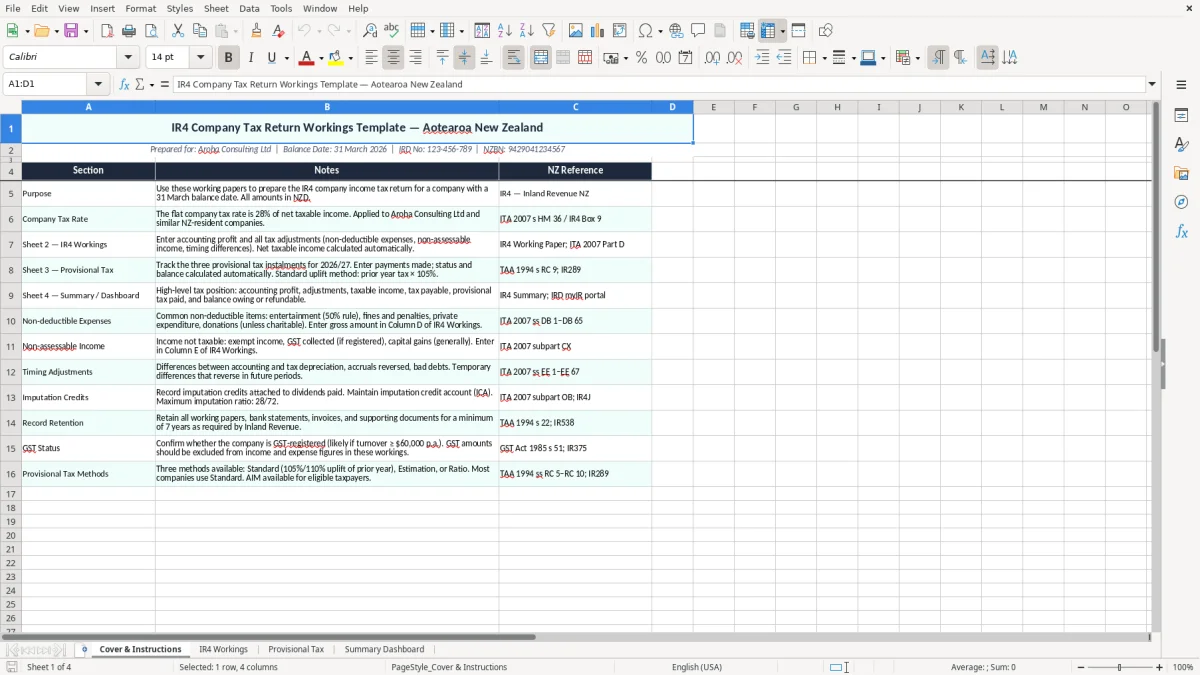
This IR4 company tax return workings Excel template helps you pull together company tax figures for a 31 March balance date in one place. It includes a cover and instructions sheet, an IR4 workings sheet, a provisional tax sheet, and a summary dashboard.
It is built for a New Zealand company with a real filing trail, so you can trace the numbers from adjustments through to the final taxable income. The workbook is set up for working papers, not just a pretty summary, and it is handy when you are preparing figures for Inland Revenue or checking them before you file.
The example company on the cover is Aroha Consulting Ltd, with IRD number and NZBN shown on the front sheet. That makes the template practical for a small company, a bookkeeper, or a director who wants the tax work laid out clearly before handing it to the accountant.
The key benefits of this Excel template
- Keeps your company tax adjustments, tax payable and summary figures in one workbook instead of scattered notes.
- Helps you work from a proper balance date flow, with 31/03/2026 shown on the cover sheet example.
- Gives you a clean trail from taxable profit to final IR4-style figures, which saves time at review stage.
- Makes it easier to spot missing adjustments before filing, especially depreciation, entertainment or non-deductible expenses.
- Supports planning for provisional tax by separating current-year and forward-looking amounts.
- Lets you present figures neatly to the director, accountant or Inland Revenue without rebuilding the workbook each time.
- Reduces rework by keeping the company identity details, reference notes and summary dashboard in the same file.
Step-by-step guide
- Start on the Cover & Instructions sheet and check the company details, IRD number, NZBN and balance date are correct. The example file is set up for Aroha Consulting Ltd, so replace those fields before you do anything else.
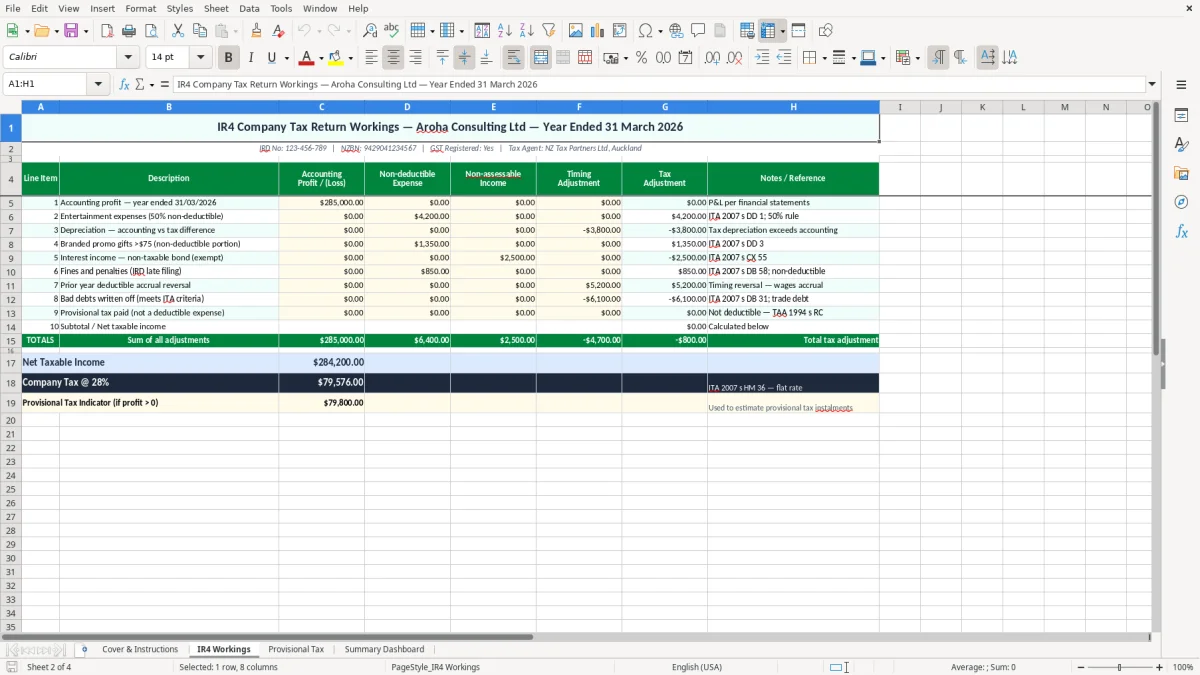
- Move to the IR4 Workings sheet and enter the accounting result plus any tax adjustments. Add items such as non-deductible expenses, depreciation changes, and any income that needs to be treated differently for tax.
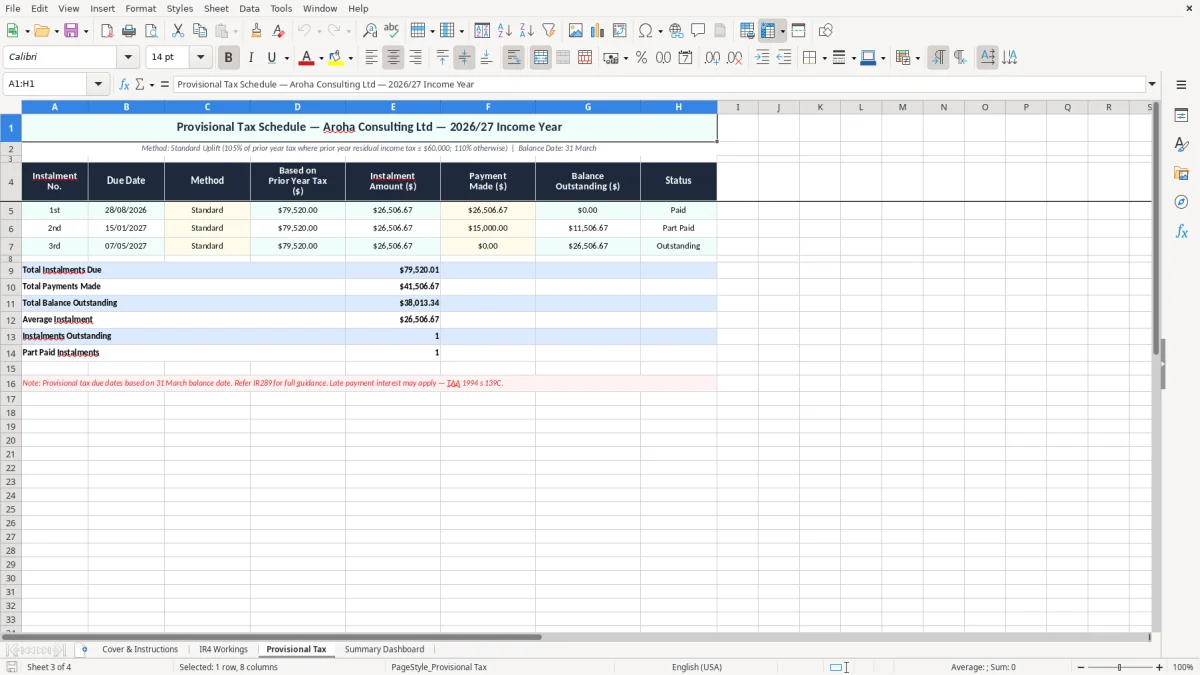
- Use the Provisional Tax sheet if you need to test the next instalment or compare current-year figures with the prior year. This is useful when you want to see whether the company is likely to have a payable amount or a refund position.
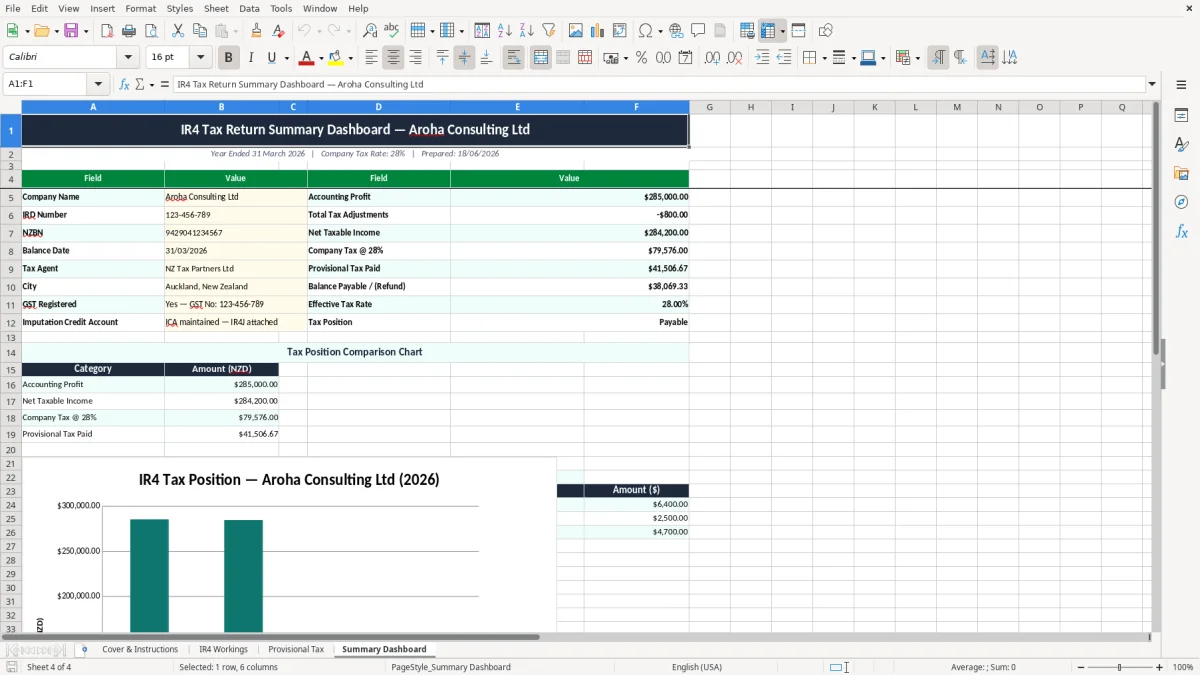
- Check the Summary Dashboard for the final position and any key totals you want to review quickly. The dashboard is there for a fast read, so you do not need to scan the whole worksheet when you are pressed for time.
- Cross-check the tax result against your source reports, such as the trial balance, depreciation schedule and year-end journals. A clean set of workings is only useful if it ties back to the numbers in your accounts.
- Save a fresh copy for each year and keep the old file with your records. Inland Revenue expects records to be kept for 7 years, so do not overwrite the prior working paper.
Included features
Cover & Instructions sheet with company name, balance date, IRD number and NZBN fields.
IR4 Workings sheet for tax adjustments and company return calculations.
Provisional Tax sheet for comparing instalments and projected tax positions.
Summary Dashboard sheet for a quick view of the final result.
Designed for New Zealand company tax workflow, not a generic profit summary.
Clear presentation for review meetings, year-end packs and filing support.
Suitable for saving as a separate working paper for each financial year.
Who uses an IR4 workings spreadsheet in New Zealand
This is the sort of file you use when a company has reached year-end and somebody has to turn the accounts into a tax position. In practice, that is often a bookkeeper at a small Ltd company, a director doing the first review, or an accountant helping a client with a 31 March balance date.
On a real job, you might be dealing with a Christchurch consulting company turning over $420,000 a year, or a Hamilton tradie company with 4 staff and a ute fleet. You need a place to park the accounting profit, then layer on the tax adjustments so the final IR4 figure is traceable.
Why the workbook matters at filing time
The biggest win is control. If the company has $18,000 of accounting profit, $4,200 of non-deductible expenses and $6,500 of depreciation adjustments, you can see the tax picture without rebuilding the numbers from scratch in a note or email chain.
That matters when you are reviewing the return before sending it on to Inland Revenue. A clear workings file also makes it easier to explain why the final taxable income is different from the profit and loss.
Where it fits in your year-end process
You would normally open it when the draft accounts are ready, not halfway through the year. It is also useful if you are comparing the current year with last year’s result, because the pattern of adjustments often repeats.
For a small company, that is a lot faster than hunting through old PDFs. One workbook with the workings, the provisional tax view and the dashboard gives you a cleaner review pack.
What IRD expects for a company return
A company files an IR4 rather than an IR3, and the working papers should support the tax result shown in the return. Inland Revenue expects records to be kept for 7 years, so the workbook should be saved with the source reports that back it up.
If the company is GST-registered, that does not change the company tax return itself, but the underlying accounting figures need to tie to the books. For a standard company, the taxable year usually follows the 31 March balance date unless a different approved date is used.
Rates and deadlines that matter in practice
Company tax planning often starts with provisional tax. If the company’s residual income tax is high enough, you need to budget for instalments during the year rather than waiting for the final return.
For example, if the return shows $36,000 of residual income tax, that cash will usually be easier to handle if you have been setting aside $3,000 a month than if you leave it until year-end. That is why a workings sheet with a provisional tax view is so useful.
Why the structure needs to be tidy
The template includes a cover sheet with company details like the IRD number and NZBN, which is useful for audit trail and filing support. That is not just admin fluff — it helps you match the file to the right entity when you are dealing with multiple companies.
For a two-company group, that can save an ugly mistake. A working paper labelled clearly at the front is far safer than a loose spreadsheet called “final tax v6”.
The errors that make company tax work messy
The most common mistake is starting from the profit and loss and forgetting the tax adjustments. That can leave you overstating deductions by thousands of dollars, especially where entertainment, private use or non-deductible costs are sitting in expenses.
Another one is depreciation. If a company buys a $28,000 ute and the depreciation schedule is not updated, the tax result can be wrong by hundreds or even a few thousand dollars depending on the asset mix and timing.
Missing links between the reports
I have seen jobs where the accounts say one thing, the tax working paper says another, and the figures do not reconcile by $1,240 or $8,900. Once that happens, every check after that takes longer, because nobody trusts the starting point.
The fix is not more talking — it is a proper workings file that keeps the adjustment lines visible. If you can see the add-backs and deductions in one place, review becomes much quicker.
Provisional tax surprises
Another pain point is leaving provisional tax until the last minute. If the company earned $54,000 more taxable income than expected, the tax bill can feel brutal if no money was parked aside during the year.
That is why the provisional tax sheet matters. It turns a year-end shock into a number you can plan around, which is much easier on cash flow.
That planned amount then needs to flow into the income tax return file, where the final taxable figure and provisional tax paid can be reconciled cleanly.
How to turn the workbook into a year-end habit
The easiest way to keep this useful is to tie it to the same routine every year. Most small companies will get the best result if the workbook is updated as soon as the draft accounts are ready, rather than waiting until someone chases the return.
For a March balance date, that usually means a fixed block in April or May, before the file gets buried under GST returns and payroll work. If you leave it for three months, you spend more time re-checking the source numbers than actually doing the tax work.
Simple habits that keep it alive
- Copy the prior-year file and change the dates, company details and year labels first.
- Use the same source reports each year so the adjustment pattern stays familiar.
- Keep the depreciation schedule, trial balance and journals in the same folder as the workbook.
- Use cell formatting and simple checks so unusual figures stand out before filing.
When to move on from a spreadsheet
If the company has multiple entities, lots of intercompany entries, or a complex tax position, the spreadsheet may stop being enough on its own. At that point, you are usually better off doing the accounting in Xero or MYOB and using the workbook only as a review layer.
For a straightforward small company, though, this template is often enough. It gives you a clean working paper without forcing you into software you do not need yet.
For a straightforward small company, this IR526 donation tax credit claim spreadsheet sits neatly alongside the workbook approach, giving you another clean paper trail for a separate NZ tax task without extra software.
Common questions about this template
It is a spreadsheet for building the tax result for a New Zealand company before the IR4 is filed. This template includes a cover and instructions sheet, an IR4 workings sheet, a provisional tax sheet and a summary dashboard.
It suits a company director, bookkeeper or accountant who needs to prepare or check year-end tax figures. It is especially handy for a small Ltd company with a simple structure and a 31 March balance date.
No. It is a working paper, not a filing portal. You still need to submit the company return through the normal Inland Revenue process, but the workbook helps you get the numbers right first.
Keep the trial balance, depreciation schedule, journals, draft financial statements and any support for tax adjustments. Inland Revenue expects business records to be kept for 7 years, so save the workbook with the source files.
Update it when the draft accounts are close to final and again if anything material changes during the year. If the company is heading toward a larger tax bill, the sheet helps you plan cash flow instead of getting surprised at year-end.
Yes, but save a separate copy for each entity so the company name, IRD number and NZBN stay clear. That avoids mixing figures between related companies and makes review much safer.
Download
File format
Excel (.xlsx)
Compatible software
Excel, Google Sheets, LibreOffice
Price
Free