
Queenstown Short Stay Income Tracker
Accounting & GST
IR526 Excel - Free Template
Track donations, estimate tax credits and prepare an IR526 claim with a Donations Log, summary and instructions.
2026-06-18
126 downloads
4.8/5 average rating
Download template
This IR526 Excel template helps you track charitable donations, estimate the donation tax credit, and pull the figures into a simple summary for your claim. It includes a Donations Log, an IR526 Summary, and Instructions, so you can keep the records together instead of chasing receipts at tax time.
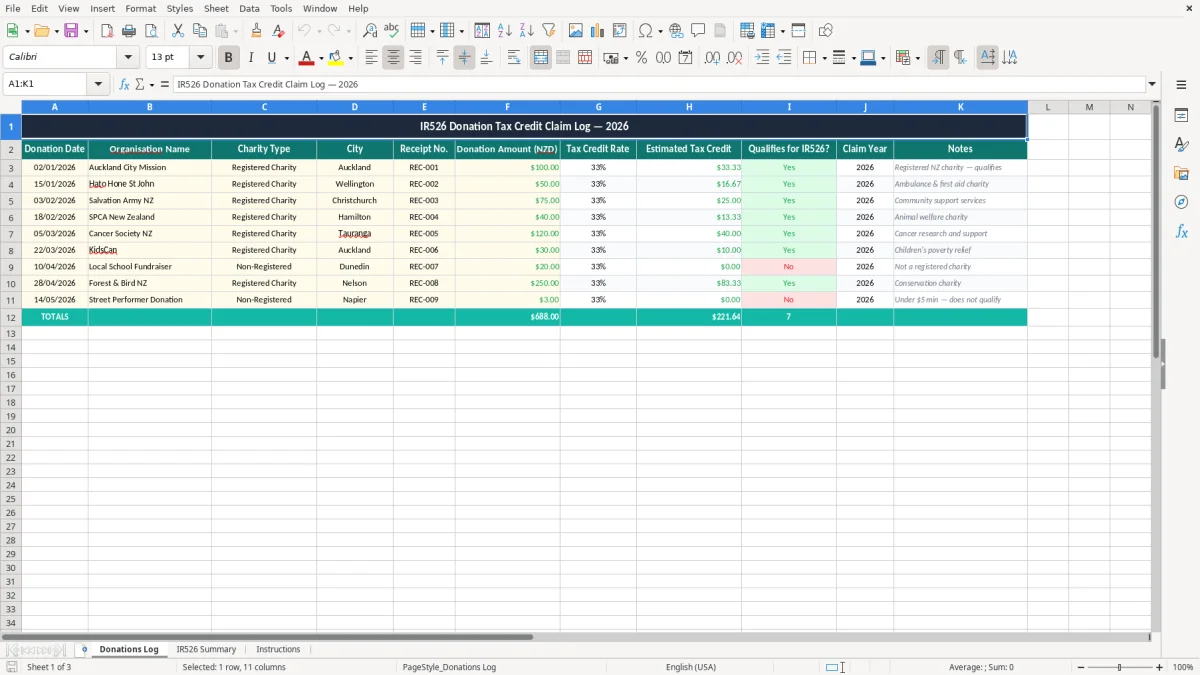
Use it when you make eligible cash donations during the year and want a clear working file before you lodge with Inland Revenue. The log is set up to capture the donation date, organisation, receipt number, amount, estimated tax credit, and whether it qualifies.
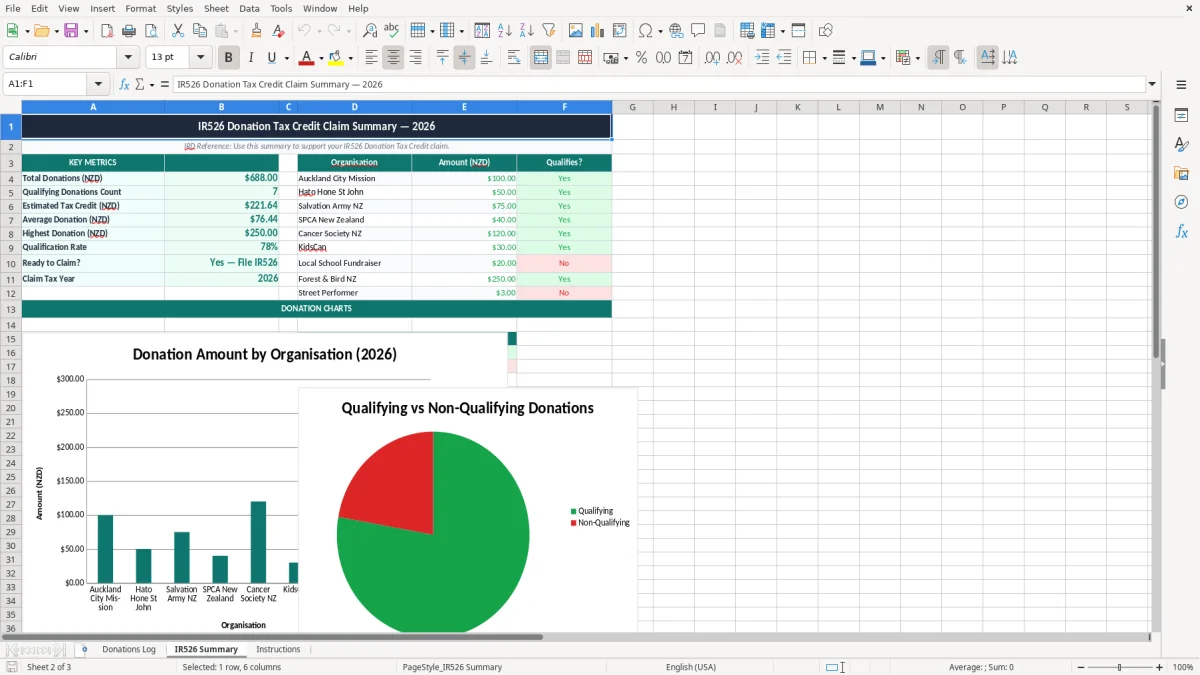
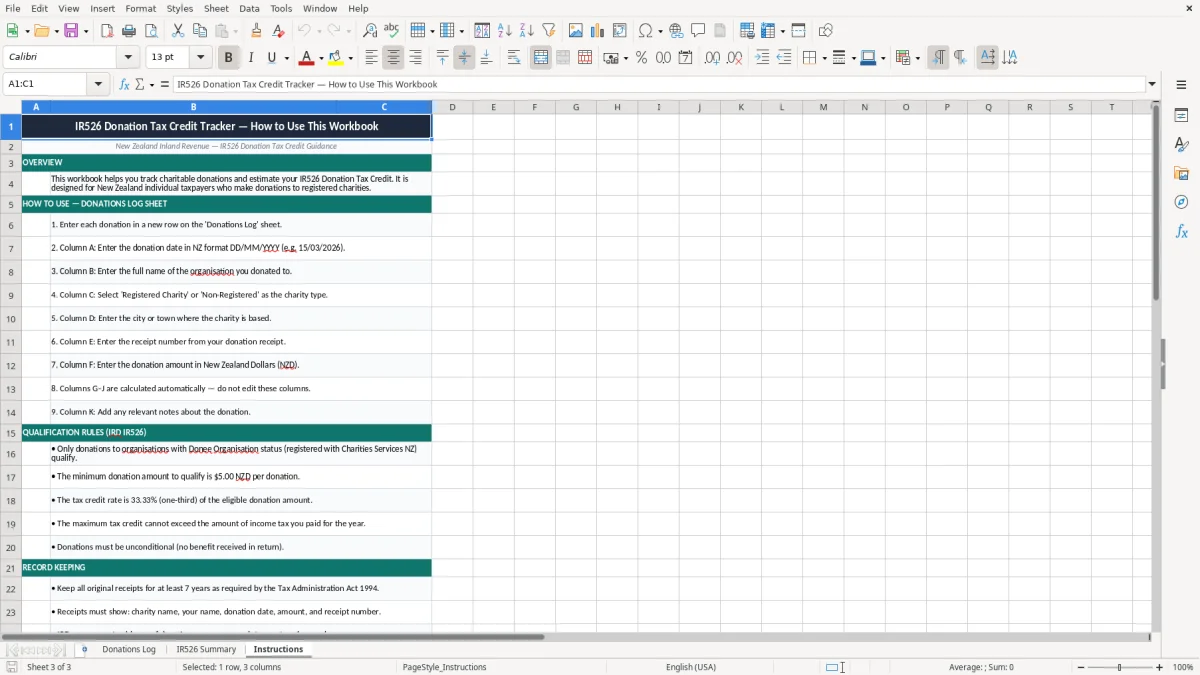
Image 1 shows the Donations Log sheet with a clean entry table. Image 2 shows the summary sheet for your claim total, and image 3 contains the step-by-step guidance for using the workbook.
The key benefits of this Excel template
- Keeps every donation in one place, with date, receipt number and organisation name visible at a glance.
- Helps you estimate the donation tax credit before you submit the claim, so you know the likely refund amount earlier.
- Reduces missed claims by flagging whether each donation qualifies for IR526.
- Saves time at year end by giving you a ready-made summary instead of rebuilding totals from receipts.
- Makes it easier to check donation records against your bank statement and receipt folder.
- Works well for households, volunteers and small clubs that make several donations through the year.
- Supports tidy records for the 7 years Inland Revenue expects you to keep tax evidence.
Step-by-step guide
- Enter each donation on the Donations Log as soon as you pay it. Add the date, organisation, amount, receipt number and any notes while the details are still fresh.
- Check the charity type and qualification field. If a donation does not meet the IR526 rules, mark it clearly so it does not end up in your claim total.
- Review the estimated tax credit column. A $50 qualifying donation at a 33.33% credit rate gives an estimated credit of about $16.67.
- Use the IR526 Summary sheet to total your claim for the year. That keeps your figures in one place when you are ready to submit to IRD.
- Match the workbook back to your receipt file or bank statement. That is the quickest way to catch duplicates, missing dates or a donation entered twice.
- Keep the Instructions sheet handy if more than one person helps with the records. It gives you a simple process to follow every time a new donation comes in.
Included features
Donations Log sheet with columns for donation date, organisation name, charity type, city, receipt number and amount.
Estimated tax credit field to help you work out the likely claim value before you lodge.
Qualifies for IR526? column so you can separate eligible and ineligible donations quickly.
Claim year column to group donations by year and keep the filing period tidy.
Summary sheet for pulling together the claim total in one place.
Instructions sheet for a simple repeatable process when you update the file.
Clean Excel formatting with clear headers, currency cells and space for notes.
Who uses an IR526 donation spreadsheet in New Zealand
This template is for anyone who gives to approved charities and wants to keep the paperwork straight for a donation tax credit claim. A household that gives $20 a week ends up with 52 entries a year, so a simple log is easier than digging through bank screenshots in April.
A volunteer treasurer, a sole trader who makes regular gifts, or a parent sorting family donations can all use the same sheet. If you donate $600 across the year at a 33.33% credit rate, the working estimate is about $200 back, so the numbers are worth recording properly.
Why the log matters
The Donations Log gives you one line per donation, which is much better than trying to rebuild a claim from memory. You can see the amount, receipt number and qualifying status in the same place, then hand the total to the IR526 Summary sheet when you are ready.
When the file gets used
Most people touch this workbook after each donation, then again near the end of the tax year when they are collecting receipts. That is the right time to check the totals and make sure every eligible donation is included once only.
What Inland Revenue expects for donation records
For a donation tax credit claim, you need enough evidence to show the date, amount and recipient of the gift. Inland Revenue can ask for support later, so keeping the receipt number and charity name in the spreadsheet is practical, not just neat.
The record-keeping rule is simple: keep tax records for 7 years. If you donate $75 three times in a year, that is $225 of claims that should still be traceable back to the receipt and bank record long after the filing date.
How the credit works
The donation tax credit is calculated at 33.33% of eligible cash donations above the minimum claim rules. A $120 qualifying donation gives an estimated credit of about $40.00, while a $300 total gives about $100.00 in credit.
What to keep in the workbook
Use the claim year column to separate years cleanly, especially if you give around 31/03/2026 and want your records tidy for the next return cycle. If you are claiming as part of a wider tax file, the spreadsheet sits alongside your other Inland Revenue working papers, not instead of them.
The mistakes that cost you a donation tax credit
The biggest problem is simple: the donation is real, but the evidence is not. If you misplace a receipt for a $250 gift, that is about $83.33 of credit at risk, and you may have to leave the claim out if you cannot support it.
Duplicate entries and wrong years
Another common issue is entering the same donation twice, especially when you copy last month’s lines forward. Two duplicate $100 entries can inflate your claim by about $66.66, which is exactly the sort of error that creates an awkward correction later.
Ineligible gifts mixed in with real donations
People also forget that not every payment qualifies as a donation tax credit claim. A subscription, raffle ticket or auction item is not the same as a cash gift, so the qualifying column is there to stop you putting the wrong amount into the IR526 total.
Missing the audit trail
If your notes are thin and the receipt file is messy, it takes ages to prove what happened. A tidy log saves you from spending an evening on old emails, bank statements and paper slips just to reconstruct $40 or $50 worth of credits.
How to make the workbook part of your year-end routine
The best way to keep using this spreadsheet is to tie it to something you already do. For most people that means updating it on the same day as the bank feed, the monthly bookkeeping tidy-up, or the annual tax file review.
Simple habits that stick
- Enter each donation within 24 hours so the receipt number and amount are still in front of you.
- Keep a single folder for receipts, then match the file name to the spreadsheet line.
- Use the qualifying column straight away so you do not need to re-check old entries in March.
- Copy last year’s workbook structure instead of starting from scratch each time.
When to move on from Excel
If you are handling dozens of donations each week, or you need shared access and live bank feeds, you may be better off with accounting software rather than a spreadsheet. For a small club or household with a few dozen gifts a year, this Excel file is usually the faster and cheaper option.
Common questions about this template
It is the claim you use to get a tax credit for eligible cash donations to approved donees. This template helps you keep the donation details together so the claim is easier to prepare.
Yes. You can add as many lines as you need, which is useful if you give weekly, monthly or through workplace fundraising during the year.
Keep the donation date, organisation name, receipt number, amount, and whether it qualifies. That gives you a clear trail if you need to check the claim later.
The sheet uses the donation amount and the tax credit rate to estimate the credit. For example, a $150 qualifying donation produces an estimated credit of about $50.00.
Keep your donation records for 7 years. That lines up with Inland Revenue’s record-keeping requirement for tax documents.
Yes. It suits clubs, schools, families and sole traders who want a simple working file for donation records and a clear summary for the claim.
Download
File format
Excel (.xlsx)
Compatible software
Excel, Google Sheets, LibreOffice
Price
Free