
Watercare Bill Tracker Excel – Free Template (2026)
Personal Finance
Bach Holiday Home Running Costs Excel Template NZ
Track NZ bach income, running costs, GST, rental use and budgets with this practical holiday home Excel template.
2026-08-03
386 downloads
4.8/5 average rating
Download template
Managing a New Zealand bach or holiday home involves more than recording booking income. Electricity, rates, insurance, cleaning, repairs, linen, internet, guest supplies and booking platform fees can quickly add up. This Excel template provides a practical place to record income and expenses for one or more holiday properties.
Use it to organise transactions by date, property, location, category and supplier, while keeping GST information and rental-use percentages visible. The workbook is designed for owners, hosts and property managers who want clearer records for budgeting, monthly reviews and discussions with an accountant.
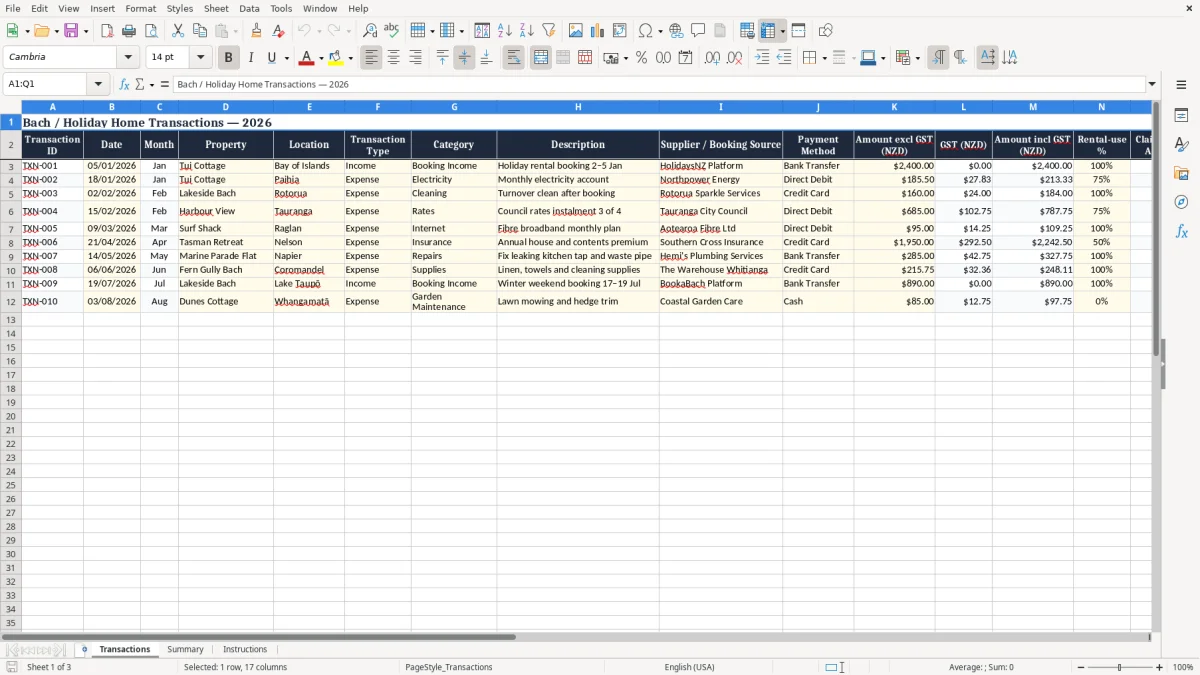
The key benefits of this Excel template
- Track holiday rental income and operating expenses in one organised workbook.
- Separate private use from rental use with a dedicated rental-use percentage field.
- Record amounts excluding GST, GST and amounts including GST in New Zealand dollars.
- Review costs by property, month, category, supplier or payment method.
- Compare actual spending with planned budget categories and identify overspending early.
- Keep useful notes about guests, bookings, invoices, contractors and maintenance work.
Step-by-step guide
Start by entering each booking receipt, supplier bill, purchase, refund or other transaction on a separate row. Add the date, property, location, transaction type and category so that your records can be filtered consistently later. Enter the amount excluding GST and the GST component where applicable, then use the rental-use percentage field when an expense relates partly to private use and partly to income-earning use.
Select a budget category for recurring costs such as electricity, rates, insurance, cleaning or repairs. Include the supplier, booking source and payment method wherever possible, and use the notes column for invoice numbers, booking details or explanations. Review the sheet regularly rather than waiting until the end of the financial year.
Filters can help you analyse a particular bach, month, expense type or booking source. Keep receipts, tax invoices, booking statements and bank records with your workbook.
GST and income tax treatment can depend on your individual circumstances, including private use, rental activity and registration status. Use this template as an organising and budgeting tool, and ask a qualified New Zealand accountant or tax adviser to confirm how your records should be used for tax purposes.
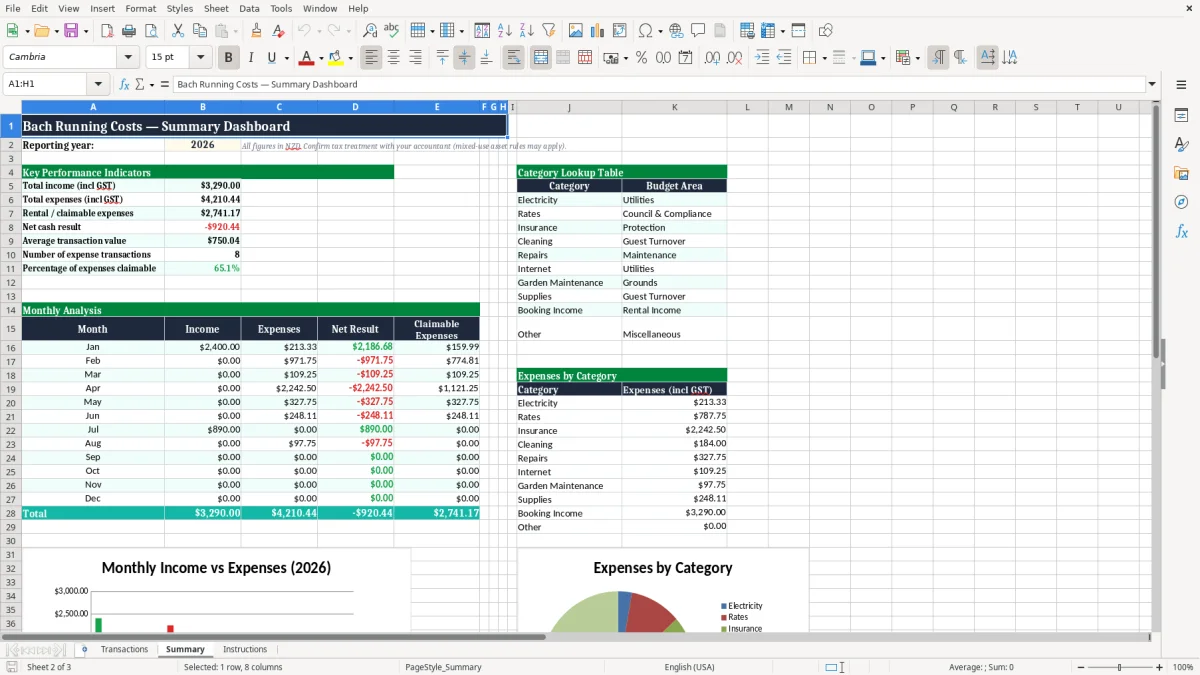
Included features
Transaction ID, date and month fields for consistent record keeping.
Property and location columns for managing several New Zealand holiday homes.
Income and expense transaction types for separating money received from money spent.
Detailed category, description, supplier and booking-source fields.
GST-exclusive, GST-inclusive and rental-related amount columns in NZD.
Budget category and notes fields for planning, review and supporting detail.
Why use a bach holiday home running costs template?
A bach can generate income while also creating a steady stream of operating costs. Without a consistent record, it is easy to overlook smaller purchases, duplicate entries or seasonal changes in spending. A bach holiday home running costs Excel template gives you a simple system for recording the financial activity connected with your property.
You can enter booking income, electricity, water, internet, rates, insurance, cleaning, maintenance, garden care, linen, guest supplies and platform charges in one transaction list. Because each row includes a date, property and category, you can later filter the information to understand your actual running costs.
This is particularly useful when a property is rented during peak summer periods but used privately at other times. The template also helps you keep a distinction between income and expenses, which makes regular reviews easier.
Instead of searching through bank statements and emails, you can add notes about the supplier, booking source, invoice or reason for a transaction as it occurs. A clear record may also make conversations with your accountant more efficient, although the spreadsheet does not decide whether an amount is deductible.
Use the template for budgeting as well as record keeping. Set expectations for recurring costs, monitor unusual repairs and identify months where utilities or cleaning charges are higher. Owners of several baches can use the property field to keep separate records while retaining an overall view.
This practical approach can improve visibility and help you make informed decisions about pricing, maintenance and future improvements. Keep receipts, invoices, booking statements and bank records with the workbook for reliable reference.
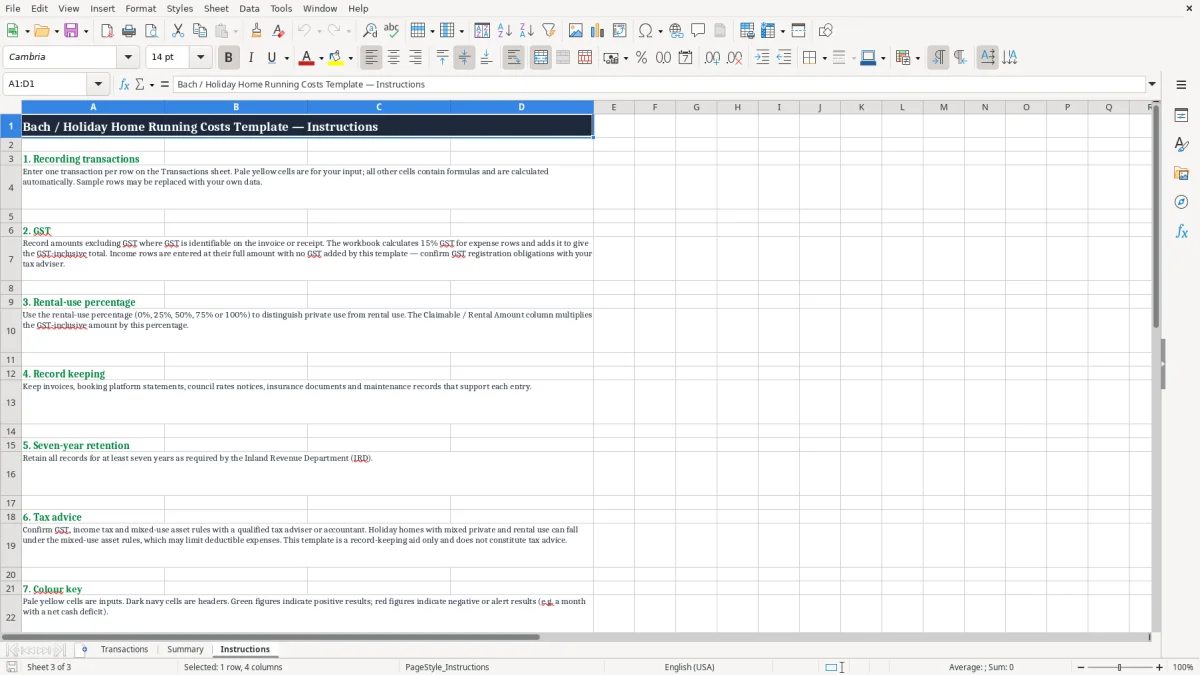
Track New Zealand bach expenses and rental income
New Zealand holiday home owners often need to manage many different types of transactions. A booking may produce rental income, while the same property may incur a cleaner’s invoice, a council rates instalment, an electricity account and a replacement appliance within the same month. Recording these items in a structured Excel workbook helps create a complete picture of how the bach operates.
The template includes fields for transaction type, category, description, supplier or booking source and payment method. This means you can distinguish a booking received through an online platform from a direct bank transfer, and separate routine expenses from one-off purchases.
The date and month fields support seasonal analysis. Reviewing summer income against winter costs can help you understand cash flow patterns and plan for quieter periods.
You can also filter by category to discover whether cleaning, utilities, repairs or guest supplies are taking up more of the budget than expected. If you manage multiple holiday homes, the property and location fields provide a straightforward way to compare activity without creating a separate workbook for every bach.
Add notes when a cost relates to a particular booking, maintenance job or supplier contact. Keep the Excel file supported by receipts, invoices, bank statements and booking records. The workbook is not a substitute for professional accounting advice, but it can give your adviser better organised information.
It is also useful for owners who want a practical monthly routine rather than a complicated accounting system. Enter transactions promptly, use consistent categories and review unusual amounts before they are forgotten.
GST and rental-use records for a holiday home
GST and mixed private use can make holiday home records more complex. This template includes separate columns for the amount excluding GST, GST and amount including GST, allowing you to record the information shown on relevant invoices or statements.
Enter figures carefully and retain the underlying documents so that every important amount can be checked later. Booking platforms and suppliers may present GST information differently, so do not assume that every payment or fee should be treated in the same way.
Your GST obligations depend on your circumstances, including whether you are registered and the nature and scale of your taxable activity. A second useful field is rental-use percentage. Some costs may relate entirely to guests, while others may be shared with private use of the bach.
Recording a percentage creates a visible audit trail for your own review, but it does not determine the legally correct apportionment. New Zealand rules can be specific for holiday homes and short-stay accommodation, including the treatment of mixed-use assets and expenses.
Ask a qualified accountant or tax adviser to confirm the appropriate approach for your situation. The template can still be valuable before that discussion because it keeps the full transaction, tax information and use percentage together. Use the notes column to explain how an estimate was calculated or why a cost was allocated to a particular property.
Regularly compare entries with invoices and bank statements. Good supporting records reduce confusion and help you identify missing documents before preparing GST returns, management reports or year-end information. Keep personal and rental explanations clear so later reviews are easier.
Budgeting and managing bach operating costs
A running-cost spreadsheet is most useful when it supports decisions, not just historical record keeping. Assign transactions to clear budget categories such as utilities, rates, insurance, cleaning, repairs, supplies, management fees and platform charges. Once several months of information have been entered, review the totals by month and property.
This can show whether a rise in costs is seasonal, connected with increased bookings or caused by an unexpected repair. You can then plan a maintenance reserve, review guest charges or adjust your operating budget with better information.
The notes column is helpful for recording details that will matter later, such as a rates instalment number, a contractor’s name, a booking reference or an appliance replacement. Consistent descriptions also make searches and filtering more effective.
If you own multiple baches, use the same categories and payment-method labels across all properties so comparisons remain meaningful. Consider setting a regular weekly or monthly time to enter transactions and reconcile the workbook with your bank account.
Save copies of receipts, supplier invoices, booking statements and relevant correspondence in a matching folder structure. The spreadsheet can help you prepare information for an accountant, but it should not be treated as a complete tax calculation or a replacement for professional advice. New Zealand tax, GST and expense-apportionment rules can change and may apply differently depending on your ownership, rental activity and private use.
Used consistently, this template provides a clear, flexible starting point for understanding your bach’s financial performance and planning future costs. A regular review also helps identify missing invoices, unusual supplier charges and upcoming seasonal expenses before they affect cash flow.
A regular review also helps identify missing invoices, unusual supplier charges and upcoming seasonal expenses before they affect cash flow, while a bond tracking record keeps tenant deposits and refunds organised when the bach is rented out.
Common questions about this template
You can record booking income, electricity, water, internet, rates, insurance, cleaning, repairs, garden care, linen, guest supplies, management fees, platform charges and other running costs.
Yes. Enter each bach in the Property column and use the location, filters and categories to review individual properties or the overall portfolio.
It provides separate fields for amounts excluding GST, GST and amounts including GST. Enter the figures supported by your invoices and booking records, and confirm the treatment with your adviser.
Enter the transaction and record the percentage you consider related to rental activity in the Rental-use % field. Obtain professional advice about the correct apportionment for your circumstances.
Yes. Record booking income and relevant platform fees as clearly described transactions, using the booking source and notes fields to retain useful supporting information.
No. It is a budgeting and record-keeping tool. New Zealand income tax, GST and mixed-use holiday home rules can be detailed, so consult a qualified accountant or tax adviser.
Download
File format
Excel (.xlsx)
Compatible software
Excel, Google Sheets, LibreOffice
Price
Free