
Watercare Bill Tracker Excel – Free Template (2026)
Personal Finance
Bond Lodgement Excel - Free Template
Record residential tenancy bonds, lodge dates, MBIE numbers and compliance for New Zealand rental properties in one Excel spreadsheet.
2026-07-30
362 downloads
4.8/5 average rating
Download template
This bond lodgement record Excel spreadsheet tracks residential tenancy bonds from receipt through to lodging with Tenancy Services, part of MBIE. It contains fields for tenants, properties, rent, bond amounts, dates, the 23-working-day compliance check, MBIE bond numbers, status, refunds and notes.
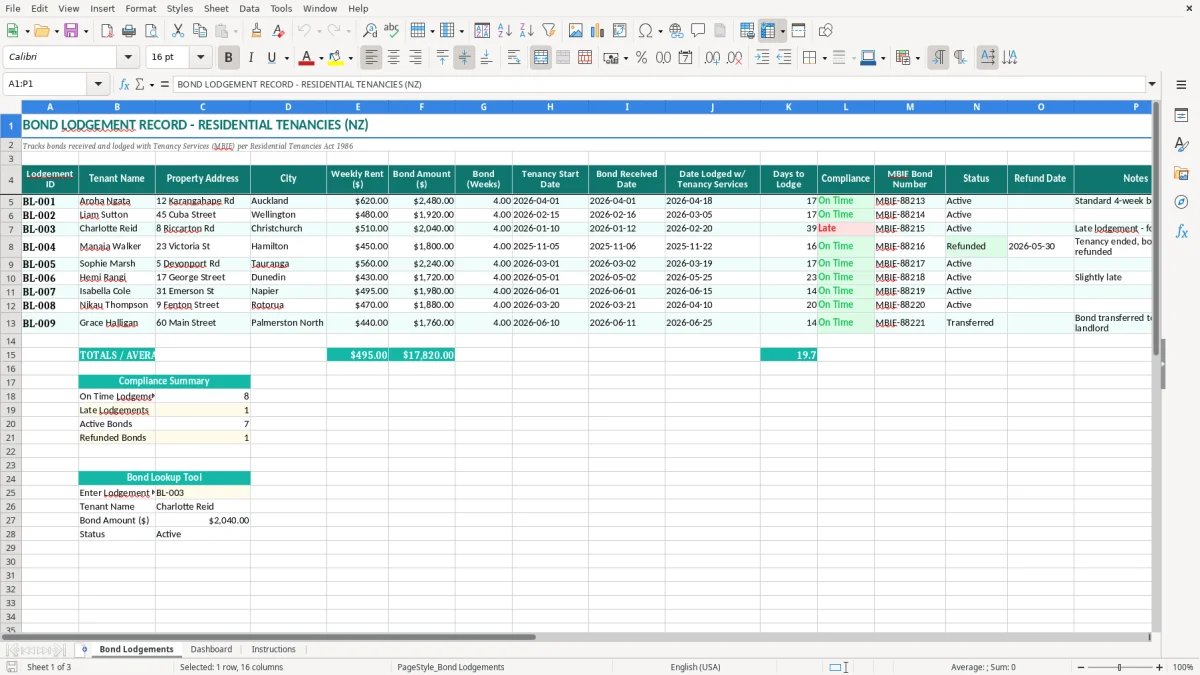
It suits a private landlord, property manager or small rental business handling several tenancies. Image 1 shows the Bond Lodgements sheet, with one row per bond and columns from Lodgement ID through to Notes; the pale yellow cells identify the areas intended for your entries.
The workbook also includes a Dashboard sheet and an Instructions sheet. Enter each bond once, keep the MBIE reference with the tenancy record, and use the date fields to spot a lodgement that needs attention before it becomes a compliance problem.
The key benefits of this Excel template
- Record the complete bond trail from the date money is received to the date it is lodged with Tenancy Services.
- Compare the bond amount with weekly rent and the recorded number of weeks, such as $2,480 against $620 weekly rent for a four-week bond.
- Calculate or review Days to Lodge so a 23-working-day deadline does not disappear in an email inbox.
- Keep the MBIE bond number beside the tenant and property, making refunds and follow-up much quicker.
- Filter active, refunded or follow-up records without searching through separate files for each rental.
- Maintain a clear audit trail for inspections, owner reporting and questions from tenants or Tenancy Services.
- Use the Dashboard and Instructions sheets alongside the main register instead of building a separate tracking system.
Step-by-step guide
- Open the Bond Lodgements sheet and read the column headings before entering a tenancy. Image 1 shows the layout from Lodgement ID in column A to Notes in column P.
- Give each record a unique Lodgement ID, such as BL-005, then enter the tenant name, property address and city exactly as they appear in your tenancy records.
- Enter the weekly rent and bond amount in dollars. Check the Bond (Weeks) figure against the agreement; a $600 weekly rent and $2,400 bond is a standard four-week example.
- Enter the tenancy start date, bond received date and Date Lodged w/ Tenancy Services using the date format DD/MM/YYYY. Do not substitute the tenancy start date for the date you actually received the bond.
- Add the MBIE Bond Number when Tenancy Services confirms the lodgement. Select or enter the current Status, and use Notes for a late-lodgement explanation or follow-up action.
- Complete the Refund Date when the bond is returned or otherwise finalised. Leave it blank for an active tenancy rather than entering an estimated date.
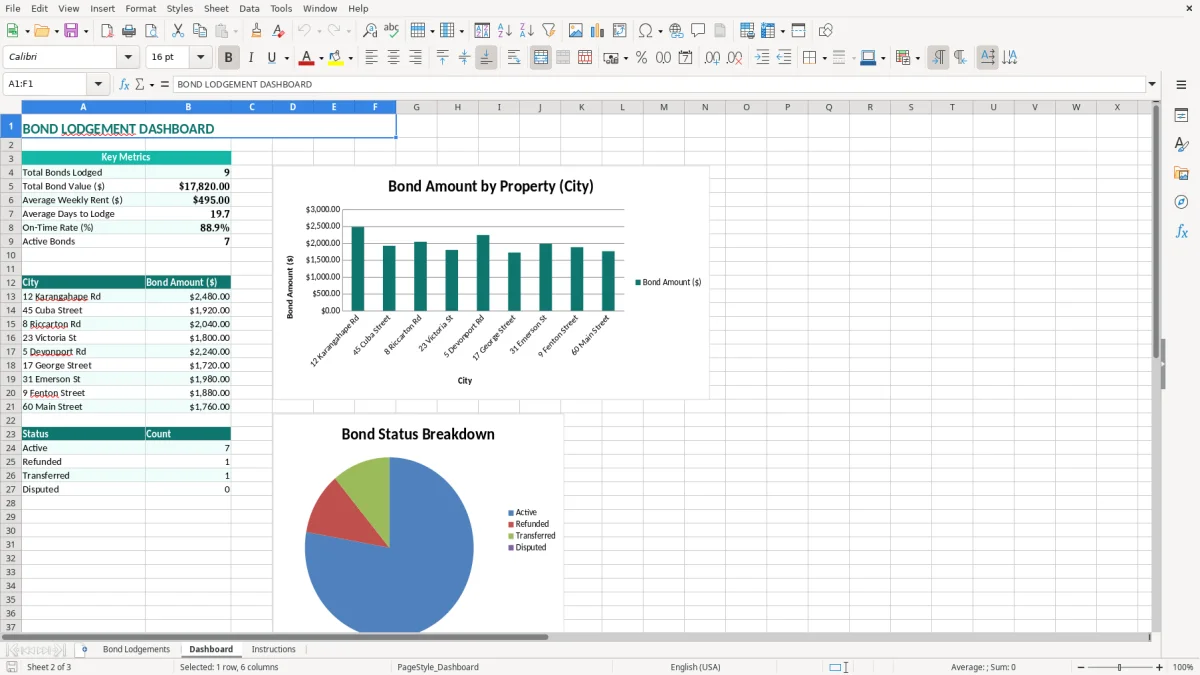
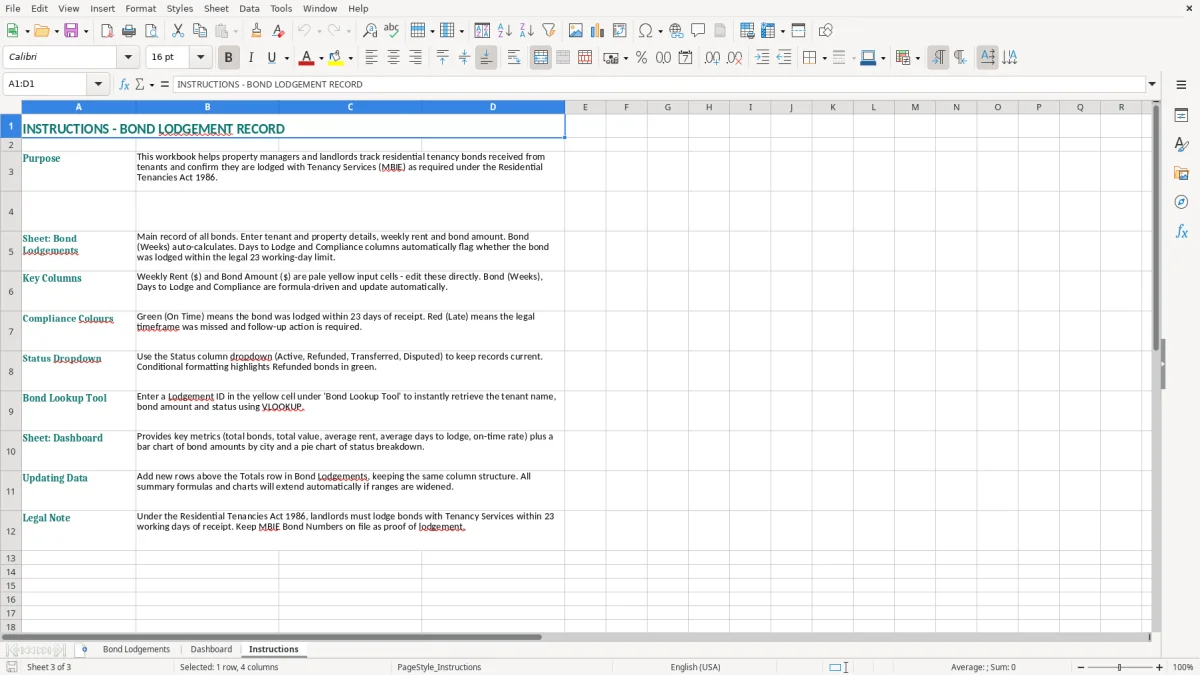
- Review the Dashboard sheet, shown in image 2, and the Instructions sheet, shown in image 3, before sending an owner report or closing the month. Save a dated copy after material updates.
Included features
Bond Lodgements sheet with 16 practical fields covering identification, tenant, property, rent, dates, compliance and outcome.
Preformatted table headings with teal fills, white text, borders and wrapped labels for fields such as Date Lodged w/ Tenancy Services.
Days to Lodge and Compliance columns positioned beside the lodgement date for quick deadline review.
Dedicated MBIE Bond Number and Status columns for matching your internal record to the Tenancy Services record.
Separate Refund Date and Notes fields for completed bonds, disputes, reminders and exceptions.
Dashboard sheet for reviewing the workbook information, plus an Instructions sheet to guide setup and use.
Pale yellow input formatting, alternating light worksheet styling and clear currency and date areas for more consistent data entry.
Who uses a bond register across New Zealand rentals
A private landlord with two Hamilton homes may only receive a few bonds each year, while a property manager can be handling 50 or more at once. Both need the same basic control: when the bond arrived, when it was lodged, which property it belongs to and what Tenancy Services reference came back.
A practical record for landlords and managers
Imagine a Dunedin landlord receiving $2,200 for a tenancy with weekly rent of $550. The Bond Lodgements sheet lets you record the $550 rent, $2,200 bond, four bond weeks, the 06/04/2026 receipt date and the eventual MBIE bond number in one row. That is much easier to check than a bank statement, email confirmation and tenancy agreement kept in three places.
A property manager at a Tauranga agency might enter bonds during the Monday administration block, then review the Days to Lodge and Compliance columns before Friday. The tenant and property address make the row identifiable when six similar payments arrive in the trust account.
Useful at handover and year-end
The register is also useful when a portfolio changes hands. A new manager can see which bonds are Active, which have a Refund Date, and which notes say follow up. At 31 March, a landlord can export or print the relevant records for their files rather than reconstructing the year from old messages.
Use image 1 as a visual check before adding rows: the visible fields run from Lodgement ID, Tenant Name and Property Address through City, Weekly Rent ($), Bond Amount ($), Bond (Weeks), three key dates, Days to Lodge, Compliance, MBIE Bond Number, Status, Refund Date and Notes. The Dashboard in image 2 is a review point, not a replacement for the underlying tenancy documents.
What New Zealand bond rules require you to record
Under the Residential Tenancies Act 1986, a landlord may generally require a bond of up to 4 weeks’ rent. If weekly rent is $650, the maximum four-week bond is $2,600. The Bond (Weeks) column gives you a quick reasonableness check against the Weekly Rent ($) and Bond Amount ($) columns.
The 23-working-day lodgement deadline
The bond must be lodged with Tenancy Services, the bond service operated by MBIE, within 23 working days of receiving it. The date that matters is Bond Received Date, not simply the tenancy start date. For example, a bond received on 07/04/2026 must be tracked from that receipt date; entering 01/04/2026 would make your internal control misleading.
The tenant and landlord can use the prescribed bond process, and Tenancy Services issues a bond acknowledgement or bond number after processing. Enter that reference in MBIE Bond Number and keep the acknowledgement with the agreement. The spreadsheet is a management record; it does not itself lodge the bond or prove that payment was accepted.
Keep records with the spreadsheet
Inland Revenue record-keeping requirements generally mean business records should be retained for 7 years. Keep the workbook with the tenancy agreement, payment evidence, bond form or online confirmation, and refund documentation. A spreadsheet row without source documents is not a complete file.
Use the Status and Refund Date fields carefully. Active does not mean the bond has been lodged, and a blank Refund Date should not be treated as evidence of a dispute. For a late entry, explain the reason in Notes and record the actual lodgement date; do not alter dates to make a deadline appear met.
The bond record failures that create expensive follow-up
The costly errors I see are usually small data-entry failures rather than complicated Excel problems. A manager copies the tenant name but not the address, records the payment date instead of the date the bond was received, or leaves the MBIE reference in an email that nobody can find six months later.
One payment, two records
Suppose a tenant pays $1,920 for a $480 weekly rent, but the office enters $1,290 in the register. The four-week comparison is now wrong, and a later owner report may show a $630 unexplained difference. That can take an hour of bank and email checking to resolve, even though the original mistake took seconds.
Another common failure is treating the tenancy start date as the lodgement date. A tenancy beginning on 01/05/2026 may have its bond received on 29/04/2026. If the register uses 01/05/2026, the Days to Lodge control starts too late and the 23-working-day review is unreliable.
Missing references and stale status
Leaving MBIE Bond Number blank after confirmation makes a refund harder to match. Conversely, marking a row Refunded while leaving Refund Date empty creates an incomplete outcome record. Tenants then contact the office, the office searches the bank, and someone repeats work that should have been settled in one row.
Do not delete a late or cancelled record to keep the Dashboard tidy. Add a clear note, retain the original dates and use the Status field to show the current position. A clean-looking register that omits exceptions is more dangerous than a longer register that explains them.
A complete register still leaves the household side unresolved, so the next calculation is often a family tax credit estimate.
Make bond tracking a fixed property-management routine
The spreadsheet works best when it is attached to an existing event, not treated as an occasional tidy-up. Add the row when you reconcile the bond payment, then review dates in a short Friday check. For a manager handling 12 new tenancies a month, 12 immediate entries are far easier than rebuilding a quarter of records in one sitting.
A simple weekly control
- Match new bond payments to the tenant and property before entering the amount.
- Check every blank Date Lodged w/ Tenancy Services and follow up before the 23-working-day limit.
- Add the MBIE Bond Number as soon as the confirmation arrives, rather than leaving it in an inbox.
- Update Status and Refund Date at the point the tenancy ends and the bond is finalised.
Keep one controlled master workbook. Use a dated backup after each weekly review, and avoid creating separate files called Final, Final2 and Final3. If several staff enter records, agree that dates use DD/MM/YYYY, amounts are entered as dollars, and Lodgement IDs run sequentially from BL-001.
Know when Excel has reached its limit
For a landlord with 10 properties, this workbook may be perfectly manageable. Once a team is tracking 300 tenancies, multiple users, trust-account transactions and tenant communications, Excel becomes vulnerable to duplicate rows and conflicting copies. At that point, a property-management system or software such as Xero or MYOB connected to an appropriate tenancy workflow is the better control.
Use the Dashboard as a review screen and the Instructions sheet as the handover note. It should support your process, not replace the official Tenancy Services confirmation or your document-retention system.
Common questions about this template
It is a register for recording residential tenancy bonds received and lodged with Tenancy Services. This template includes tenant and property details, weekly rent, bond amount, bond weeks, key dates, Days to Lodge, Compliance, the MBIE Bond Number, Status, Refund Date and Notes.
Under the Residential Tenancies Act 1986, the bond must generally be lodged with Tenancy Services within 23 working days of the landlord receiving it. Record the actual Bond Received Date and Date Lodged w/ Tenancy Services so the timing can be checked accurately.
A residential tenancy bond is generally limited to 4 weeks’ rent. For weekly rent of $600, a four-week bond is $2,400. Enter both figures in the spreadsheet and use Bond (Weeks) to identify an amount that needs checking.
No. The workbook records and monitors the process, but it does not submit a bond or generate an official acknowledgement. Lodge the bond through the approved Tenancy Services process and enter the resulting MBIE Bond Number in the register.
Enter the bond reference provided by Tenancy Services after the lodgement has been processed. Keep it with the tenant and property record so a future refund, transfer or enquiry can be matched without searching through email.
Yes. Add one row for each bond and use the Lodgement ID, Tenant Name and Property Address to distinguish records. A small landlord may manage a handful of properties comfortably; a larger portfolio should protect the master file and consider dedicated property-management software when multiple users need simultaneous access.
Download
File format
Excel (.xlsx)
Compatible software
Excel, Google Sheets, LibreOffice
Price
Free