
Watercare Bill Tracker Excel – Free Template (2026)
Personal Finance
WOF rego reminder Excel - Free Template
Track NZ vehicle WOF and rego dates, costs, status and renewal actions across 110 prepared rows with a dashboard for small fleets.
2026-08-26
440 downloads
4.8/5 average rating
Download template
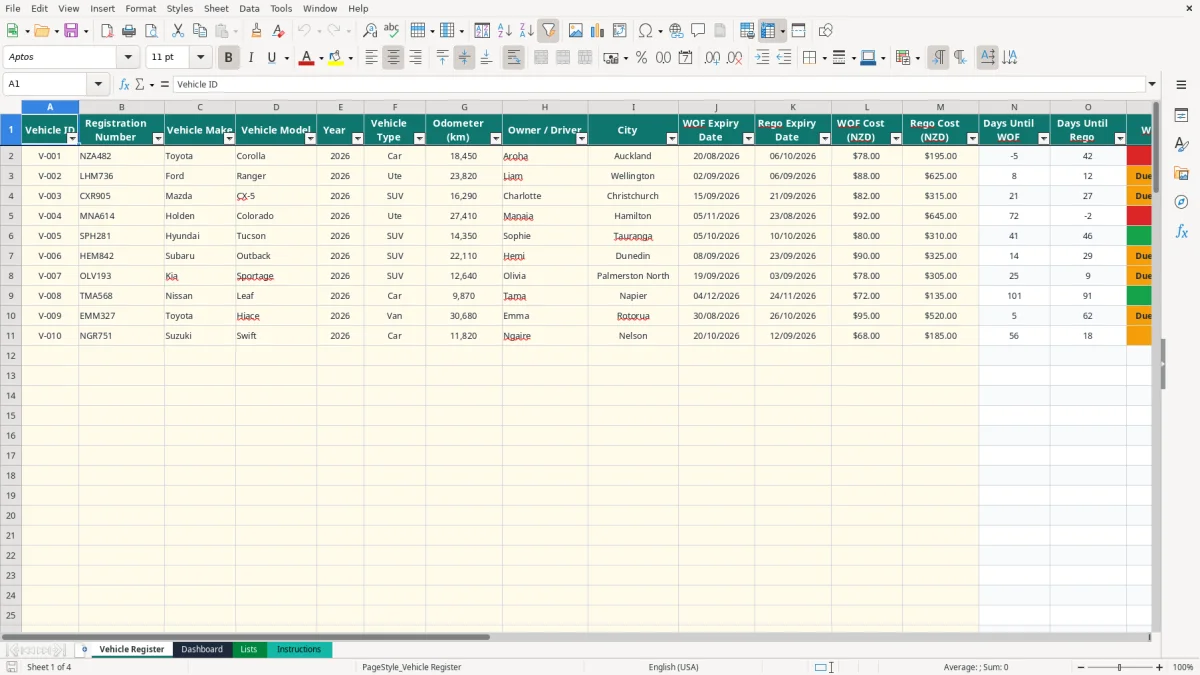
A WOF and rego reminder Excel spreadsheet records each vehicle's expiry dates, calculates days remaining, and flags overdue or upcoming renewals. This workbook contains a Vehicle Register for up to 110 prepared rows, a Dashboard, dropdown Lists and an Instructions sheet.
Enter your fleet details once, including registration number, vehicle type, driver, city, odometer, WOF and rego dates, plus expected costs. The formulas then show WOF status, rego status, the next action and a WOF guidance note, while the Dashboard summarises the whole fleet.
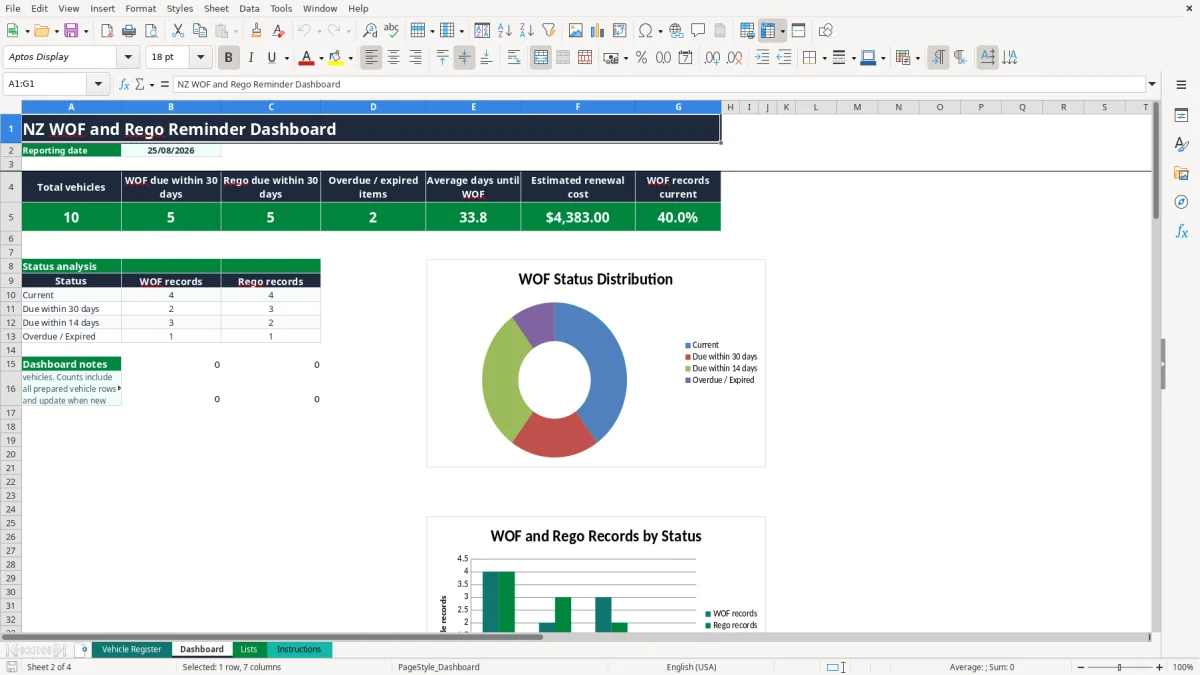
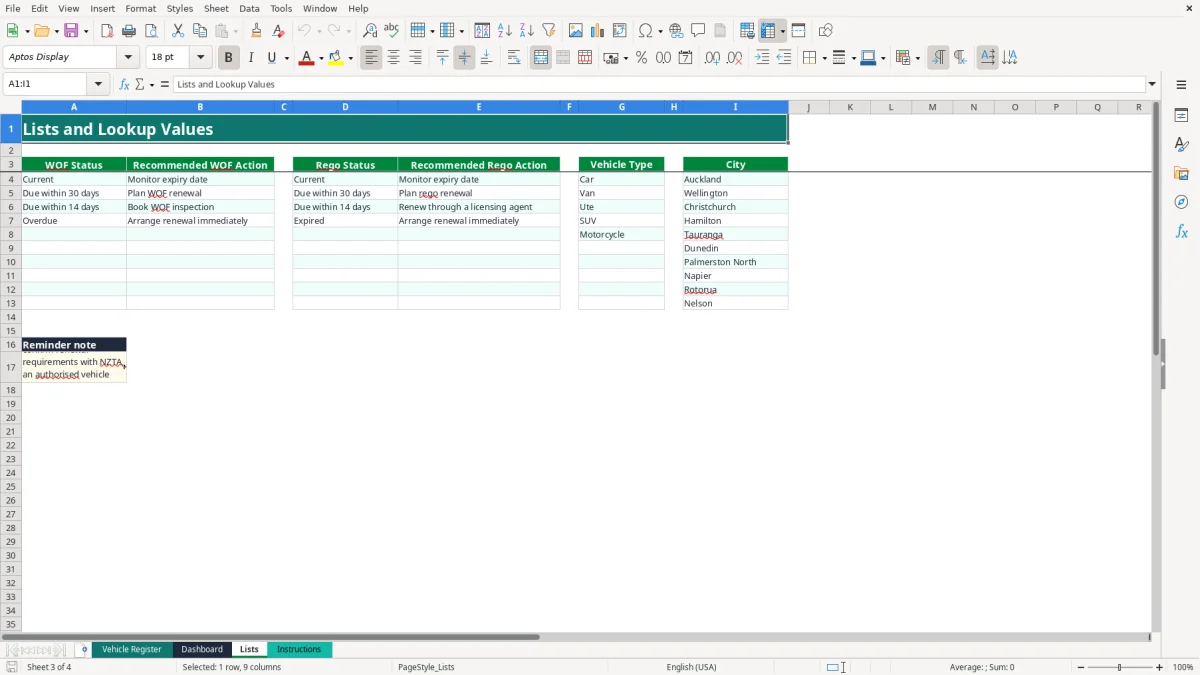
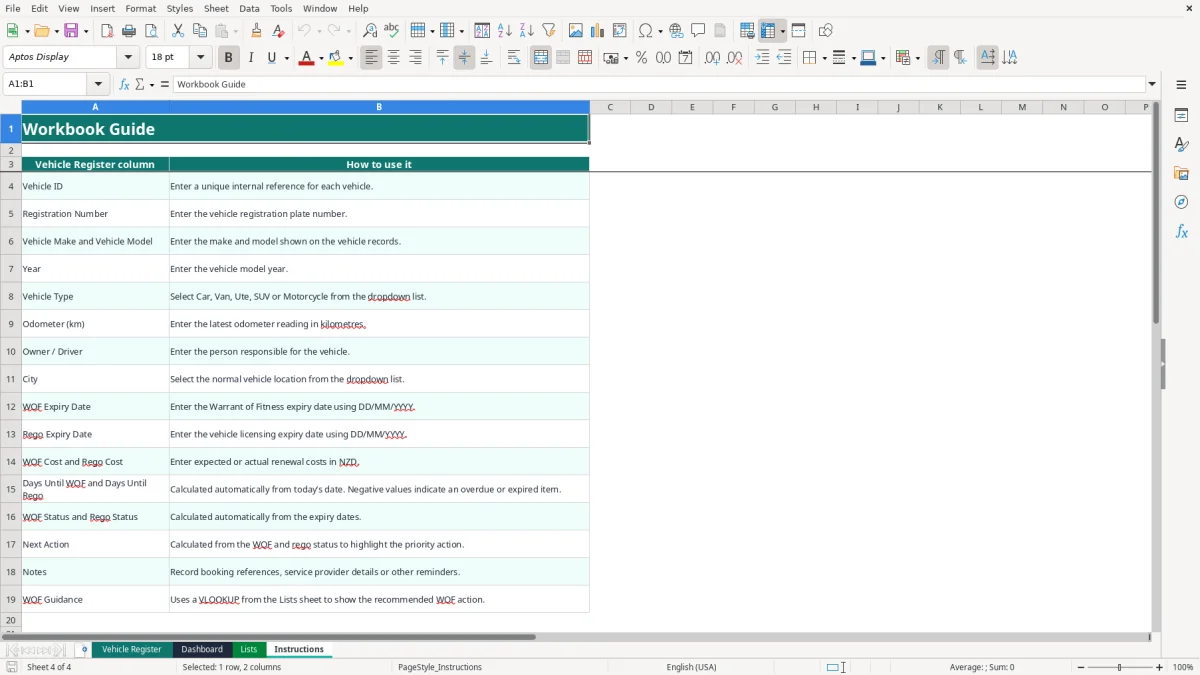
Image 1 shows the Vehicle Register with input columns from Vehicle ID through Notes and calculated fields through WOF Guidance. Image 2 shows the dashboard totals and status charts; images 3 and 4 show the lookup values and workbook guide.
The key benefits of this Excel template
- See WOF and rego dates for every vehicle in one filtered register.
- Calculate days until each renewal automatically using TODAY().
- Separate Current, Due within 30 days, Due within 14 days and Overdue or Expired statuses.
- Prioritise work with Next Action, including Arrange renewal immediately and Schedule renewal.
- Estimate fleet renewal spending by combining WOF Cost and Rego Cost in the Dashboard.
- Use dropdowns for vehicle type and city to keep entries consistent.
- Review a prepared fleet structure with 110 vehicle rows rather than building the register from scratch.
Step-by-step guide
- Open Vehicle Register and replace the sample vehicle details with your own fleet records. The pale yellow cells are the data-entry areas described on Instructions.
- Enter a unique Vehicle ID and the registration number, make, model, year, latest odometer reading and owner or driver.
- Select the vehicle type and city from the available dropdown lists. The prepared choices include Car, Van, Ute, SUV, Motorcycle and New Zealand cities.
- Enter WOF Expiry Date and Rego Expiry Date in DD/MM/YYYY format. Leave a date blank only when you genuinely do not have that record yet.
- Enter expected or actual WOF and rego costs in NZD, then add booking references, provider details or other useful information in Notes.
- Check Days Until WOF, Days Until Rego, WOF Status, Rego Status and Next Action. These are calculated outputs and should not be overwritten.
- Open Dashboard for the reporting date, fleet totals, upcoming renewals, overdue or expired items, estimated cost and status charts. Use the Vehicle Register filter to investigate individual vehicles.
Included features
Vehicle Register columns for Vehicle ID, registration number, make, model, year, type, odometer, driver, city and Notes.
Separate WOF Expiry Date and Rego Expiry Date fields formatted as DD/MM/YYYY.
Automatic Days Until WOF and Days Until Rego calculations based on TODAY().
Automatic status bands using 14-day and 30-day thresholds.
Next Action formula that escalates overdue or expired items.
WOF Guidance lookup powered by VLOOKUP from the Lists sheet.
Dashboard formulas using COUNTIF, AVERAGE and SUM, plus two status charts.
Who uses a WOF and rego spreadsheet in New Zealand
A small business fleet often has the same problem as a large one: expiry dates sit in gloveboxes, emails and licensing receipts, while someone still has to get the vehicle booked in. A Christchurch building company with four utes might have one vehicle due for a WOF in 10 days, another due in 26 days and a third with rego expiring next week.
Useful for tradies and office managers
The office manager can enter each registration number, driver, city and expiry date in Vehicle Register, then filter the rows before the weekly vehicle check. The spreadsheet calculates the remaining days and labels the renewal priority, so the manager does not need to count calendar days manually.
It also suits a sole trader with a van and personal car, a landscaping firm moving vehicles between Hamilton and Tauranga, or a community organisation responsible for a minibus. Three vehicles with WOF costs of $78, $88 and $82 produce an estimated WOF total of $248 before any other fleet costs are added.
What the dashboard answers
Dashboard shows total vehicles, WOF due within 30 days, rego due within 30 days, overdue or expired items, average days until WOF, estimated renewal cost and the percentage of WOF records currently marked Current. Its status analysis counts WOF and rego records in Current, Due within 30 days, Due within 14 days and Overdue / Expired groups.
That makes it suitable for a Monday fleet review or the Friday admin routine. The workbook has 110 prepared Vehicle Register rows, but the Dashboard counts the prepared vehicle range, so clear unused sample rows and enter vehicle IDs consistently before relying on management totals.
What NZTA records your WOF and rego reminder should support
A spreadsheet is an internal reminder, not proof that a vehicle is legally licensed or roadworthy. For the current expiry position and renewal requirements, confirm the record with NZTA, an authorised vehicle inspector or a licensing agent, as the workbook's Lists sheet also instructs you to do.
WOF dates and inspection timing
A WOF, or Warrant of Fitness, is an inspection outcome with an expiry date. The Vehicle Register stores that date and calculates a negative number when it has passed. A value of 0 means the recorded expiry date is today; a value of 12 places the row in Due within 14 days, while a value of 25 places it in Due within 30 days.
Do not treat the 14-day and 30-day bands as legal grace periods. They are practical planning thresholds built into the formulas. The Lists sheet maps Current to Monitor expiry date, Due within 30 days to Plan WOF renewal, Due within 14 days to Book WOF inspection and Overdue to Arrange renewal immediately.
Rego and licensing records
Rego is the vehicle licensing record. Enter its expiry separately from the WOF because the two dates can differ: the sample Ford Ranger has a WOF date of 02/09/2026 and a rego date of 06/09/2026. The workbook labels a passed rego date Expired and points to Arrange renewal immediately.
Keep the official renewal notice, inspection result and licensing receipt with your business records. A $625 rego cost and an $88 WOF cost for one ute would show $713 in estimated renewal costs, but the Dashboard simply sums the amounts entered; it does not verify fees, eligibility or compliance. Use the recorded date as a prompt to check the official NZTA position before the vehicle is used.
The fleet reminder errors that leave vehicles off the road
The costliest mistake is usually not an Excel error. It is an old expiry date copied from last year, followed by a driver using the vehicle because nobody noticed the status had changed. A Christchurch builder with four vehicles can lose a full day's work if the only available ute cannot be used for a job.
Dates entered as text
If 15/09/2026 is typed as text rather than a real Excel date, the Days Until WOF formula may not calculate correctly. Check that the cell displays as a date and that the result in column N is a number. The Instructions sheet specifies DD/MM/YYYY, so use that format rather than mixing dates such as 9/15/2026 into the register.
Another frequent issue is entering the renewal date in the wrong column. WOF belongs in J and rego in K; swapping them can make the Dashboard report the wrong work queue. For a vehicle with WOF due in 8 days but rego current for 70 days, the correct priority is a WOF booking, not a licensing renewal.
Blank and stale vehicle rows
The formulas cover rows 2 to 111, but Dashboard totals use vehicle IDs across that prepared range. If you leave sample IDs in unused rows, the total can say 110 vehicles even when you operate only six. Conversely, a new record outside row 111 will not be included in the existing calculations.
Do not type over calculated columns N, O, P, Q, R or T. A manually changed Current status can hide an expired date, while deleting a formula removes the reminder logic. Enter $78.00 rather than a combined text note such as WOF $78, and put booking details in Notes so SUM and the cost summary continue to work.
How to make the spreadsheet part of your fleet routine
The best reminder spreadsheet is checked at a fixed time, not when somebody happens to remember. Make Vehicle Register part of the Friday vehicle check: compare the next 30 days, contact the driver and record the booking reference in Notes.
A simple weekly process
- Open Dashboard and note the WOF due, rego due and overdue or expired counts.
- Filter Vehicle Register by the relevant status and work from the most urgent rows first.
- Confirm the appointment or licensing transaction with the driver, then update the date and cost after completion.
- Review blank dates and unusual costs before closing the file.
The formulas refresh from TODAY(), so the reporting date moves as the workbook is opened. If you are preparing a month-end cost forecast, enter expected WOF and rego amounts; after payment, replace them with actual amounts and retain the receipt elsewhere in your normal records.
Keep entries controlled
Use the Vehicle Type and City dropdowns instead of free-typing alternatives such as Van, van and Commercial van. The Lists sheet supplies five vehicle types and ten city choices, including Auckland, Wellington, Christchurch and Hamilton. If your fleet needs another choice, update the source list carefully and test the validation range before using it.
For a fleet of six vehicles, this routine should take only a few minutes each week. When you have several hundred vehicles, multiple users, automatic email alerts or a need to retain renewal history, move to fleet software or a system such as Xero or MYOB alongside proper vehicle records; this workbook is a current-status register, not a transaction history.
Common questions about this template
Vehicle Register has prepared rows 2 to 111, giving you 110 rows for vehicle details. Dashboard formulas also use that range, so records entered below row 111 will not be included unless you extend the formulas yourself.
It calculates Current, Due within 30 days, Due within 14 days and Overdue. The status is based on the WOF expiry date compared with TODAY(), with a negative number of days treated as Overdue.
Rego Status shows Current, Due within 30 days, Due within 14 days or Expired. The Dashboard groups Expired rego records with Overdue WOF records in its Overdue / Expired count.
Yes. Enter the amounts in WOF Cost (NZD) and Rego Cost (NZD). Dashboard adds both columns with SUM, so a $88 WOF and $625 rego appear as $713 of estimated renewal cost.
No. It calculates dates, statuses and Next Action, and the Dashboard includes two status charts, but the manifest contains no email, pop-up or calendar notification feature. Use the spreadsheet during a scheduled fleet check.
No. Treat the spreadsheet as an internal planning tool. Confirm the current renewal requirements and expiry position with NZTA, an authorised vehicle inspector or a licensing agent before relying on the vehicle record.
Download
File format
Excel (.xlsx)
Compatible software
Excel, Google Sheets, LibreOffice
Price
Free