
Rugby Subs Fees Tracker Excel – Free Template (2026)
Accounting & GST
FBT Excel - Free Template
Quarterly FBT ledger template with dashboard, benefit tracking and notes for New Zealand employers.
2026-06-28
189 downloads
4.8/5 average rating
Download template
This FBT Excel template is a quarterly fringe benefit tax workbook for New Zealand employers. It includes an FBT Ledger for each benefit, a Summary Dashboard to total liability, and an Instructions sheet to keep the process tidy.
Use it to record benefit date, quarter, employee, location, type, description, supplier, GST values, employee contribution, taxable value, FBT rate, liability, GST credit claim, and notes. It is set up for the sort of regular reporting you need when you are working through the quarter, not trying to reconstruct it at the end.
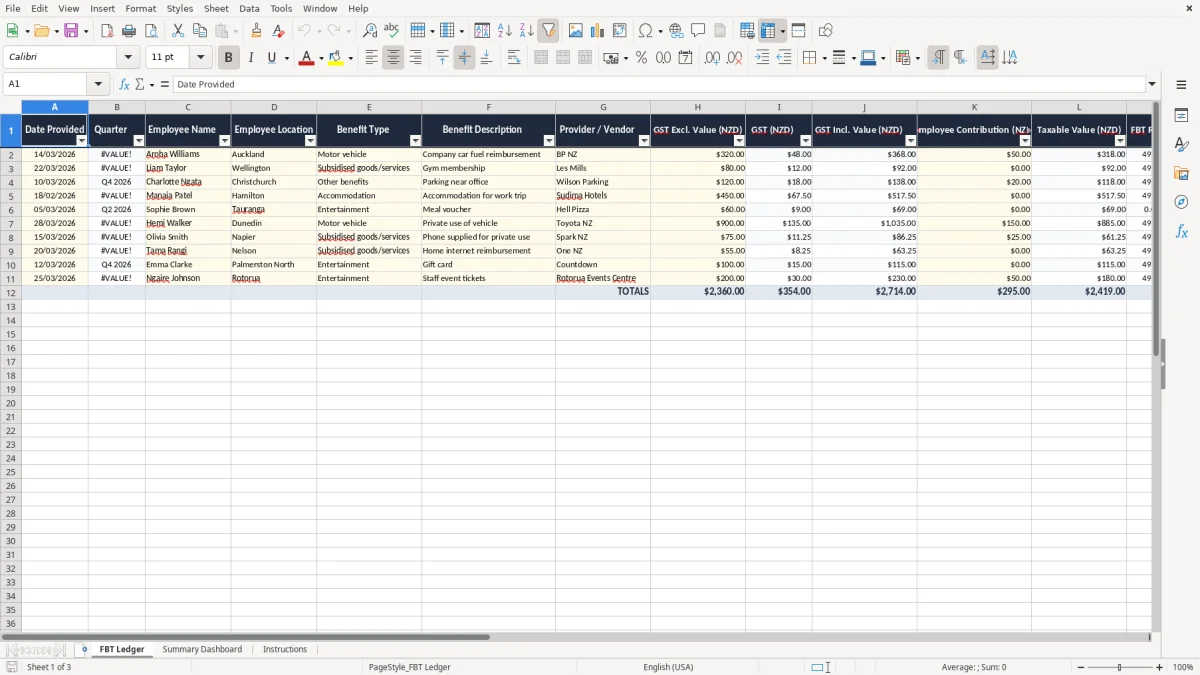
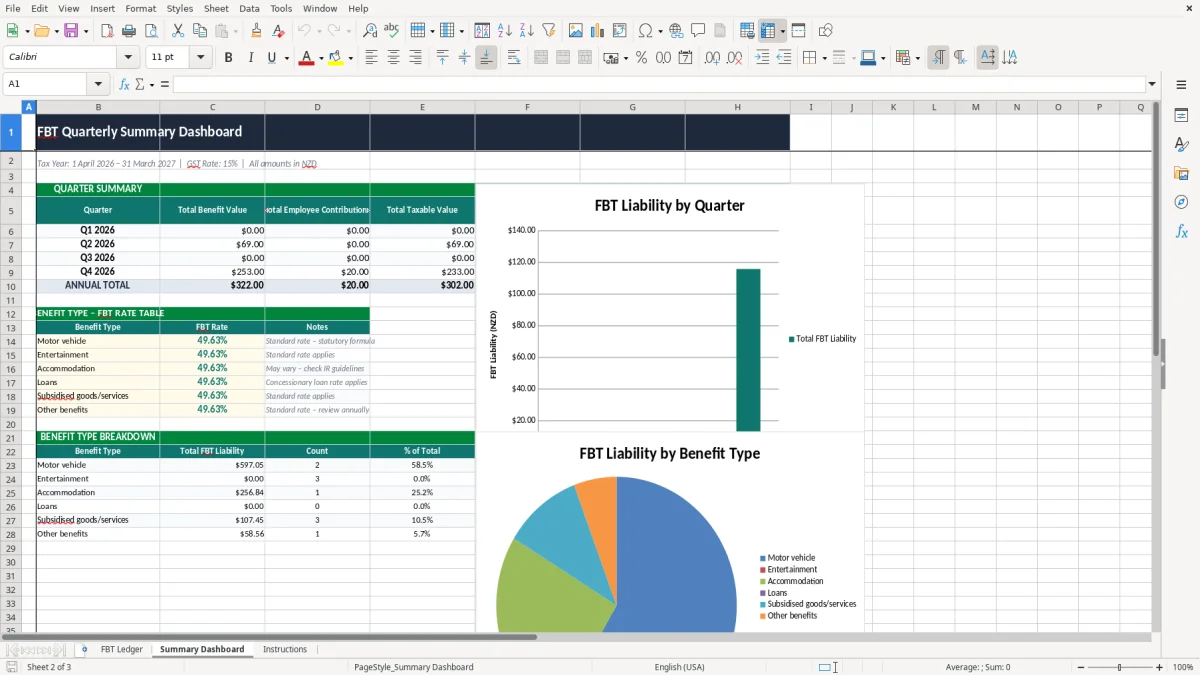
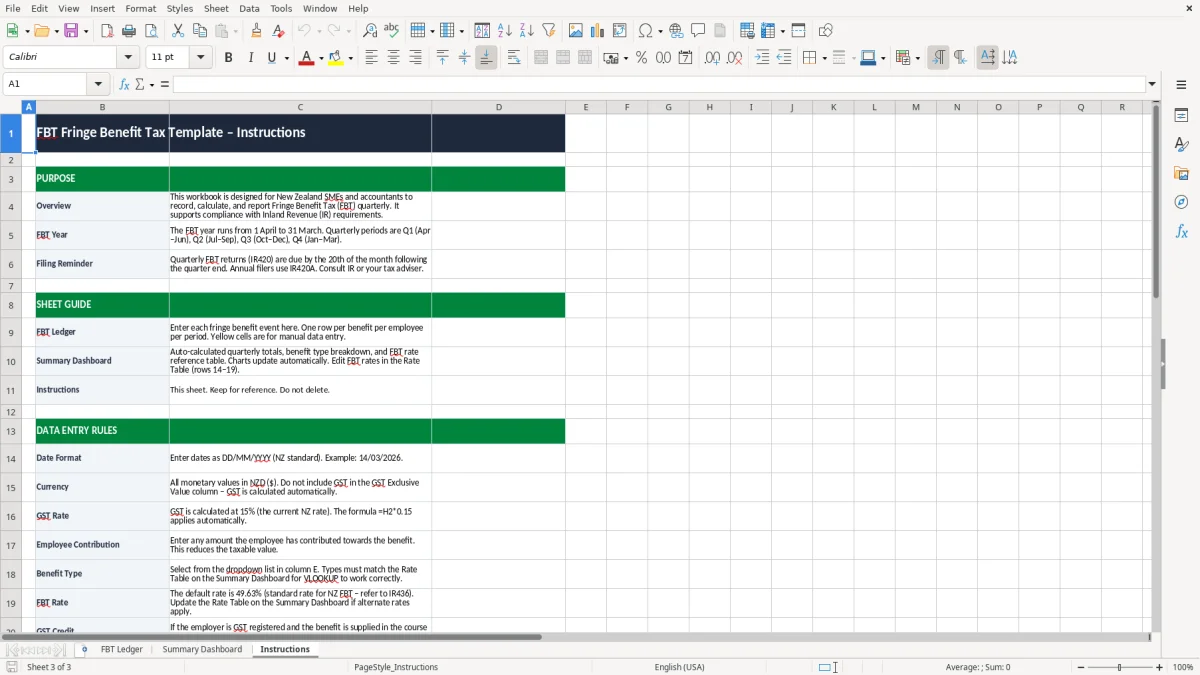
The first sheet shown in image 1 is the ledger. Image 2 shows the dashboard, and image 3 is the instructions page for setting up and using the file.
The key benefits of this Excel template
- Tracks each benefit in one line, so you can see the full FBT position without hunting through invoices and emails.
- Helps you calculate FBT by quarter, which suits employers who want the job under control before the return is due.
- Separates GST exclusive, GST, and GST inclusive values, so you can see exactly what part of the benefit value sits in each layer.
- Shows employee contributions against the taxable value, which makes it easier to spot when a benefit has been partly paid back.
- Summarises the liability on a Summary Dashboard, so you can check totals fast instead of adding rows by hand.
- Includes a notes column for odd cases, such as mixed-use vehicles, subsidised gym memberships, or supplier-backed vouchers.
- Gives you a clean quarterly record that is easier to keep for the Inland Revenue 7-year record-keeping period.
Step-by-step guide
- Start on the FBT Ledger sheet and enter each benefit as it is provided. Use one row per employee benefit so the quarter stays clean.
- Fill in the date, quarter, employee name, location, benefit type, description, and supplier. If the benefit has a GST component, record the GST exclusive amount, GST, and GST inclusive value.
- Enter any employee contribution and the taxable value. This is the key step if you are part-charging staff for private use or recoveries.
- Check the FBT rate and resulting liability fields. For example, a $1,000 taxable value at 49.25% gives $492.50 of FBT.
- Use the Summary Dashboard to review quarterly totals before you file or pass the numbers into your payroll or accounting software.
- Keep the Instructions sheet handy if more than one person enters data. It helps you stay consistent with naming, dates, and quarter selection.
- At quarter end, print or save the workbook and file it with your supporting records so the calculations are easy to explain if you need them later.
Included features
FBT Ledger sheet with 16 columns covering date, quarter, employee, location, benefit details, values, rate, liability, and notes.
Summary Dashboard sheet for quick quarterly review of totals and overall FBT position.
Instructions sheet to guide setup and data entry for small business users and bookkeepers.
Clear separation of GST exclusive, GST, and GST inclusive amounts for benefits with supplier invoices.
Employee contribution and taxable value fields to help you see the net amount subject to tax.
Notes field for exceptions, reminders, and audit trail comments.
Quarterly structure that suits employers reviewing benefits every 3 months instead of trying to fix a whole year at once.
Who uses an FBT workbook in New Zealand
A quarterly FBT workbook is for the people who actually have to keep the benefits straight: a practice manager with a company car, an office manager in a tradie business, or the bookkeeper at a small Ltd company with staff perks. It is also handy for a sole director who has a vehicle, gym, or accommodation benefit to sort out before the quarter gets away.
The ledger in image 1 is built for that kind of day-to-day work. You can log one benefit at a time, with the quarter, employee name, location, benefit type, supplier, values, contribution, and notes all in the same row.
Why quarterly works better than a year-end scramble
If you have 12 staff and 40 benefit entries across the year, quarterly tracking means about 10 lines per quarter, which is easy to check against supplier invoices and payroll records. Leave it until year end and you are reconstructing March, June, September, and December all at once.
Where the dashboard helps
Image 2 shows the summary view. That gives you a quick read on the liability before you send figures to your accountant or load them into payroll.
What Inland Revenue expects for fbt records
Inland Revenue expects you to keep business records for 7 years, so the FBT ledger needs to be clear enough to stand on its own. For a GST-registered employer, that means recording the supplier name, date, description, amounts, and any employee contribution so the tax treatment can be traced later.
The file is set up around practical quarterly reporting. If you have a $320 company car fuel reimbursement with $50 GST and a $1,000 taxable value on another perk, you can see the calculation trail rather than just a final total.
Rates and reporting points that matter
The current standard GST rate is 15%, and FBT is commonly calculated at quarterly intervals for employers who want to keep the workload spread through the year. A benefit with a $1,000 taxable value at 49.25% gives $492.50 of FBT, which is why clean source data matters.
Keep the file tied to payroll and company records
If your business uses a company with an NZBN, the ledger should line up with your payroll, supplier invoices, and any contribution records. That way the workbook supports the return rather than becoming a separate version of the truth.
The mistakes that make fbt expensive
The biggest problem I see is not the rate itself. It is the missing detail: a staff perk entered with no supplier name, a vehicle benefit logged without the date, or a lunch subsidy mixed up with a personal contribution.
That creates two costs. First, you spend time re-checking invoices and emails, and second, you risk under- or over-stating the taxable value. On a small file with 25 benefits, fixing just 5 bad rows can easily take an hour or two at $60 to $100 an hour.
Small gaps turn into messy quarter ends
If one line is missing the GST exclusive amount and GST amount, the total can be wrong by 15% of the supplier invoice. On a $460 benefit, that is $60 of GST and a GST inclusive value of $460, so one bad field changes the whole calculation trail.
Why notes matter more than you think
The notes column in image 1 is there for the awkward cases: mixed private use, partial reimbursements, or a benefit that has been part-paid by the employee. Without that note, you end up guessing why the value changed between quarters.
How to make the spreadsheet part of your quarter
The way to keep an FBT workbook alive is to tie it to a fixed event, not to a vague intention. Most small firms do better when they update it at the same time as the payroll close or the end-of-quarter GST check.
Simple habits that keep it moving
- Enter new benefits every Friday, while the invoice and payroll details are still fresh.
- Copy the prior quarter rows forward if you have repeating benefits, then update the date and amount.
- Use the quarter field consistently so your dashboard stays useful.
- Review the notes column before quarter end so the odd items do not get missed.
If your business is getting beyond a dozen staff and a steady stream of benefits, that is usually the point to move the numbers into Xero or MYOB and use the spreadsheet as a check rather than the main system. For a smaller employer, though, this workbook is enough to keep quarterly FBT under control without adding another piece of software.
Common questions about this template
It is used to track fringe benefits by quarter, calculate the taxable value, and keep a clear record of the FBT liability. You enter each benefit once, then use the dashboard to review totals before reporting.
The template has three sheets: FBT Ledger, Summary Dashboard, and Instructions. The ledger holds the transactions, the dashboard shows totals, and the instructions sheet explains how to use the file.
Yes. It is built for quarterly tracking, so you can keep up with the work as benefits are provided instead of trying to rebuild a full year at once. That makes review time much easier at each quarter end.
Enter the date provided, quarter, employee name, location, benefit type, description, supplier, GST exclusive value, GST, GST inclusive value, employee contribution, taxable value, FBT rate, FBT liability, GST credit claim status, and notes.
You should keep the supporting records for 7 years to meet Inland Revenue record-keeping expectations. That includes invoices, payroll support, and any notes that explain the benefit treatment.
If you have a growing staff count, repeated benefit types, or enough entries that quarterly checking takes more than a couple of hours, it is usually time to move the transaction flow into Xero or MYOB. The spreadsheet can still work as a review sheet after that.
Download
File format
Excel (.xlsx)
Compatible software
Excel, Google Sheets, LibreOffice
Price
Free