
Rugby Subs Fees Tracker Excel – Free Template (2026)
Accounting & GST
Plumber Invoice Excel - Free Template
Create New Zealand plumbing invoices for labour and materials with rate lookups, GST calculations and a summary for sole traders and small firms.
2026-07-23
302 downloads
4.8/5 average rating
Download template
This plumber labour and materials invoice Excel template helps you prepare itemised New Zealand plumbing invoices. It includes a Rates sheet for labour and material prices, an Invoice sheet that uses code lookups, a Summary sheet and Instructions sheet.
It suits a sole trader, plumbing business or office manager billing for callouts, installation work, hours worked and parts supplied. Update your rates once, then select the relevant codes on each invoice rather than retyping descriptions and prices.
The key benefits of this Excel template
- Separate labour from materials so a customer can see exactly what was supplied and charged.
- Use the Rates sheet to maintain standard, emergency and apprentice rates in one place.
- Reduce typing errors with code-based lookups using VLOOKUP on the Invoice sheet.
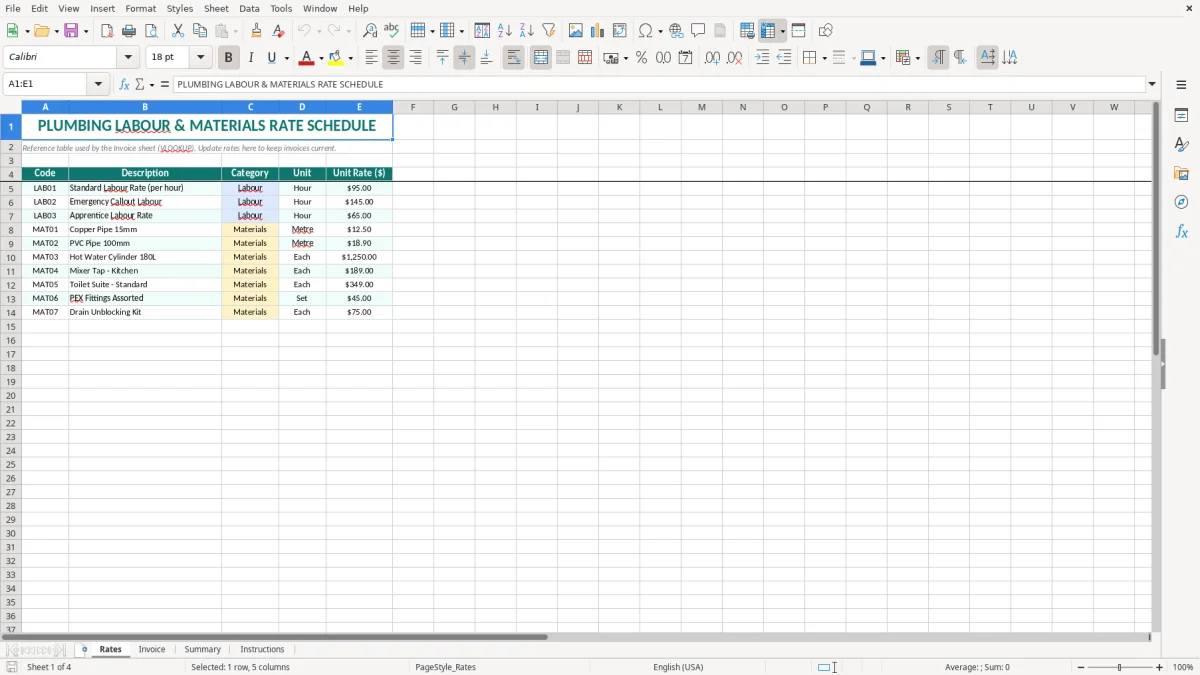
- Record realistic plumbing items such as standard labour at $95.00 per hour, emergency callout labour at $145.00 and a 180L hot water cylinder at $1,250.00.
- Prepare invoices with dates in New Zealand format, DD/MM/YYYY, and amounts in dollars and cents.
- Review invoice information through the Summary sheet before sending it to a customer.
- Give your bookkeeper a clearer audit trail for GST, materials and labour revenue.
Step-by-step guide
- Open the Rates sheet and replace the sample codes, descriptions, categories, units and unit rates with your current plumbing prices.
- Check that every code is unique, such as LAB01 for standard labour or MAT03 for a hot water cylinder, because the Invoice sheet uses the code to find the matching rate.
- Go to the Invoice sheet and enter the invoice date, customer details, job description and the relevant labour and material codes.
- Enter the quantity for each line. For example, record 4 hours against LAB01 and 2 metres against a pipe material code rather than combining everything into one vague charge.
- Check the returned description, unit and rate, then review the line extensions, subtotal, GST and invoice total before issuing the invoice.
- Use the Summary sheet to review the completed figures and follow the Instructions sheet if you need to change the rate table or invoice setup.
- Save a separate copy using the invoice number and customer name, then retain the final invoice with the job records.
Included features
Rates sheet with Code, Description, Category, Unit and Unit Rate ($) columns.
Preloaded labour examples covering standard, emergency callout and apprentice hourly work.
Preloaded materials examples including 15mm copper pipe, 100mm PVC pipe, a 180L hot water cylinder and a kitchen mixer tap.
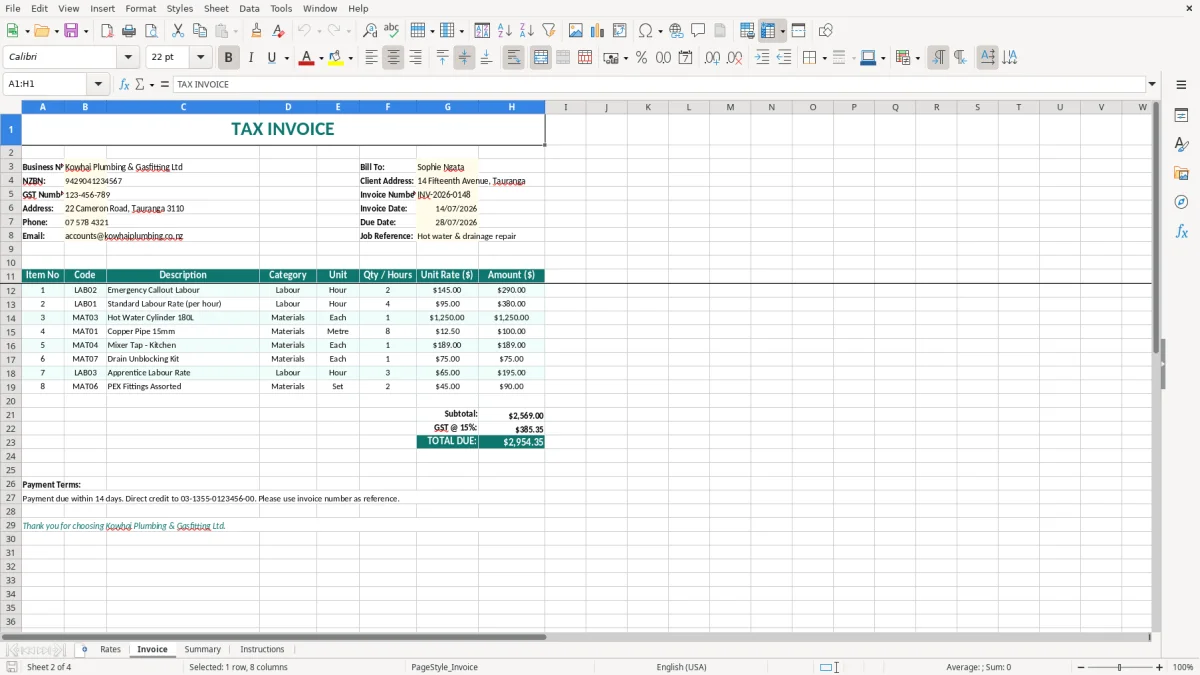
Invoice sheet linked to the rate schedule through VLOOKUP, helping keep descriptions and unit rates consistent.
Currency formatting in $#,##0.00 and date formatting in DD/MM/YYYY for New Zealand paperwork.
Teal headers, highlighted input areas, borders and wrapped text to make the worksheet practical at the desk or on a laptop.
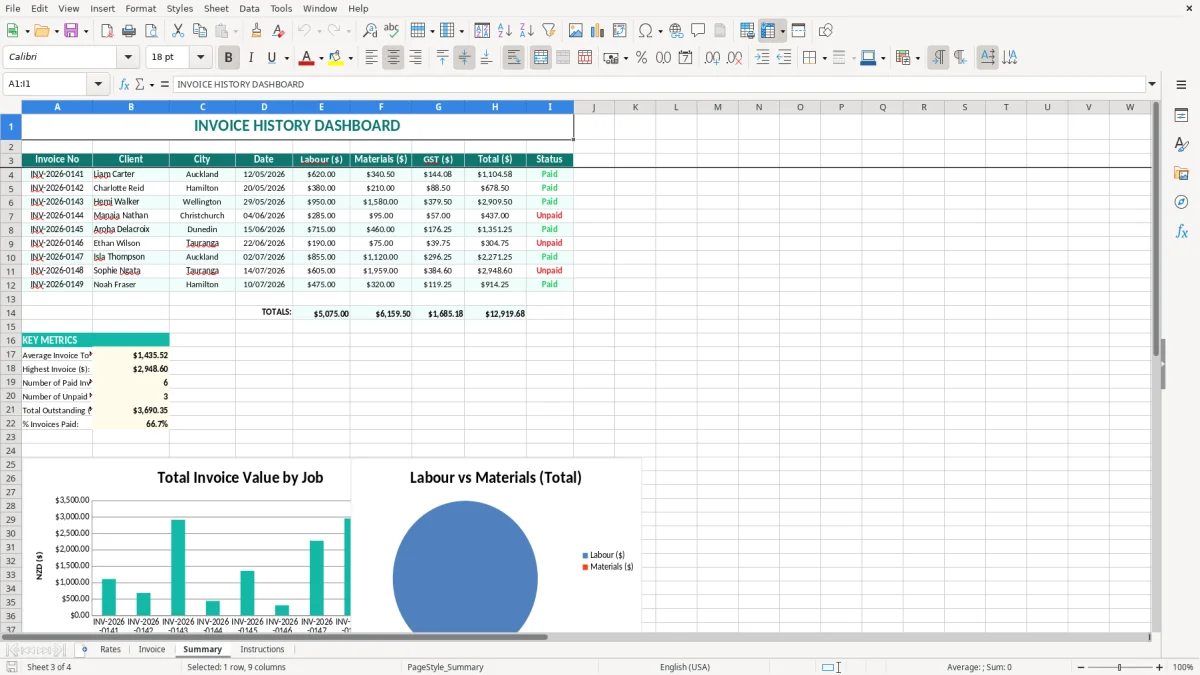
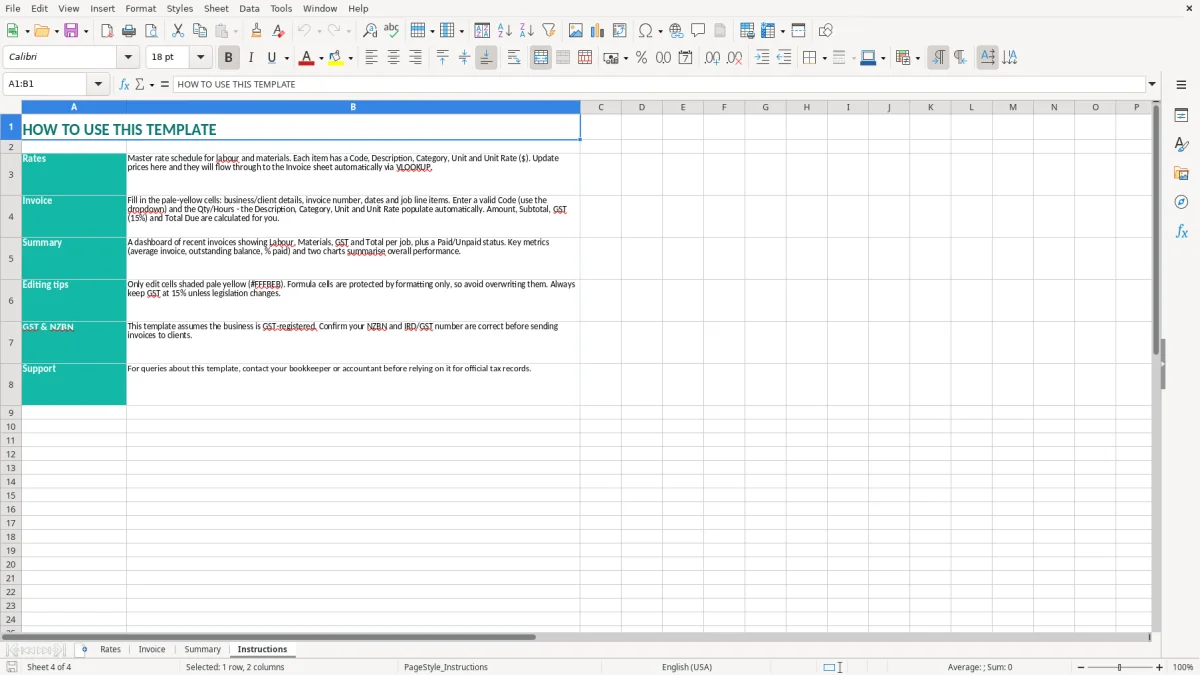
Separate Summary and Instructions sheets for checking totals and understanding the workbook workflow.
Who uses a plumber invoice spreadsheet in New Zealand
A plumbing sole trader often opens the workbook at the end of a job, when the van is back at the yard and the timesheet and supplier docket are in front of them. A Christchurch plumber who spent 4 hours on a blocked drain, used $86.40 of fittings and charges $95.00 an hour can enter 4 against LAB01, add the materials line and produce a much clearer invoice than a single $466.40 lump sum.
The same approach works for a small Ltd company with an office manager handling invoices for several technicians. The manager can keep the standard rates on the Rates sheet and add an emergency callout at $145.00 per hour without changing every existing invoice. Image 1 shows this reference table, with Code, Description, Category, Unit and Unit Rate ($) columns.
Callouts, maintenance and installation work
Plumbing invoices are usually a mixture of time and physical items. A maintenance visit might include 1.5 hours of labour, a replacement valve charged by each and 3 metres of pipe charged by the metre. Keeping the unit visible prevents the customer from wondering whether a $189.00 tap price is per tap, per box or part of the labour charge.
For a hot water installation, the invoice can show the cylinder separately from labour and smaller fittings. A $1,250.00 cylinder, 6 hours at $95.00 and $210.00 of other materials gives a pre-GST total of $2,030.00. That detail is useful when a customer queries the job and when the bookkeeper posts materials and labour to the right accounts.
What each sheet contributes
Image 2 shows the Invoice sheet, where the job is turned into charge lines using the rate codes. Image 3 shows the Summary sheet for reviewing the workbook's calculated information, while image 4 shows the Instructions sheet. The key practical choice is to update the Rates sheet first; changing a price in the invoice by hand defeats the control that the code lookup provides.
What Inland Revenue requires on a New Zealand plumbing invoice
If the plumbing business is GST-registered, the standard New Zealand GST rate is 15%. Registration becomes compulsory when taxable turnover exceeds $60,000 in any 12-month period. At $2,030.00 of taxable work, GST at 15% is $304.50 and the GST-inclusive customer total is $2,334.50, unless a particular supply has a different treatment.
For a GST-registered supplier, the invoice needs to support the required taxable supply information. That includes the supplier's name and GST number, the date, a description of the plumbing work or goods and the GST-inclusive amount. For supplies over $1,000, include the buyer's details required by the taxable supply information rules. Keep the invoice and supporting records for 7 years, as required by Inland Revenue.
GST treatment of labour, parts and deposits
Labour and ordinary plumbing materials supplied by a GST-registered business will generally be taxable supplies at 15%. Do not assume that a supplier's cost price is your customer price: record the sale at the amount you charge, and retain the supplier invoice for your purchase claim.
A deposit or progress payment also needs to be recorded correctly for the chosen GST accounting basis. The spreadsheet helps you calculate and present the charge, but it does not decide whether a transaction is taxable, zero-rated or exempt. Use the invoice date and job records consistently with your GST return cycle, whether you file monthly, 2-monthly or 6-monthly.
Business details and year-end records
Put the legal trading name, physical or electronic contact details and NZBN or company details on the final invoice where appropriate. A sole trader uses their personal legal structure and IRD number; an Ltd company is a separate entity and should issue invoices in the company's name.
At the 31 March balance date, unpaid plumbing invoices remain part of the business records and affect the chosen accounting method. A sole trader also needs the invoices when preparing an IR3, while a company uses an IR4. The workbook is an invoicing aid, not a replacement for the GST return, job costing records or accounting ledger.
The plumbing invoice errors that create rework and disputes
The costliest errors I see are usually not complicated accounting errors. They are small line-entry mistakes: 8 hours entered as 18, a material charged twice, or an emergency rate used for a routine maintenance visit. On a $95.00 hourly rate, one extra hour adds $95.00 before GST and $109.25 to a GST-inclusive bill.
Where labour and materials get mixed up
A vague line such as plumbing work — $1,800.00 may be quick, but it gives the customer no way to check the charge. It also makes a later margin review difficult because you cannot tell whether the job earned money through labour or through the parts markup. A Christchurch job with $570.00 of labour and $430.00 of materials should show those amounts separately, even if they appear on the same invoice.
Another common problem is changing a unit rate only on the current invoice. The next emergency callout then uses the old $130.00 price instead of the current $145.00 rate. Updating the Rates sheet first gives one controlled source for the codes used by new invoices.
GST and customer-detail mistakes
Some tradespeople add 15% to a figure that already includes GST. A $1,150.00 GST-inclusive charge contains $150.00 of GST, not $172.50. Confirm whether the price you enter is the rate you intend to charge and inspect the calculated subtotal, GST and total before sending.
Leaving off the supplier's GST number, invoice date or a proper description can mean a customer has to come back for usable taxable supply information. If the work is for a commercial property manager and the supply exceeds $1,000, missing buyer details can create another round of emails and delay payment.
Job records that do not support the invoice
A customer may query 6.5 hours of labour three months later. Without the technician's job notes, arrival and departure times, parts docket and approval for extra work, the office has to reconstruct the visit from memory. At 20 disputed invoices a month, only 10 minutes of chasing each one costs more than 3 hours of admin.
Use the workbook to present the charge clearly, but attach or retain the underlying job evidence. That is the difference between an invoice that merely asks for money and a record that supports the amount billed.
How to make invoice preparation a fixed plumbing routine
The workbook works best when invoice preparation is attached to an existing event rather than left until Friday afternoon. For a small plumbing firm, make the final job-card check part of the daily vehicle or dispatch close-out: no job is marked complete until hours, materials and customer approval are recorded.
A simple weekly process
- At the start of the week, check the Rates sheet against current supplier costs and approved charge-out rates.
- After each completed job, enter the invoice while the technician's notes and parts docket are still available.
- Before the weekly payment run, review the Summary sheet and filter the office's invoice list for missing numbers or incomplete customer details.
- At month-end, compare billed labour hours and material charges with the accounting ledger and investigate large differences.
Do not overwrite the original workbook each time. Save a clean master, then create a dated copy for each invoice or billing period, using a filename such as INV-1048-Smith-14-07-2026. This gives you a practical trail when a customer asks for a copy or when the 31 March records are assembled.
Small controls that save time
Keep codes short and unique, and avoid inserting random rows inside the rate table if the lookup range has been set up for a fixed area. If you add 10 new material codes, test one labour and one materials line afterwards: a $12.50 fitting must not return a $95.00 labour rate.
Use a consistent invoice-number sequence and set a fixed 15-minute Friday check for unpaid or unsent invoices. If four staff generate 12 jobs each per week, that small routine checks up to 48 job records before they become month-end detective work.
Knowing when Excel is no longer enough
Excel is a sensible starting point for one plumber or a small office with straightforward billing. Once several people edit the file, stock is held across vans, or you are sending more than about 100 invoices a month, move the process into software such as Xero or MYOB and keep this template as a rate and job-costing reference.
Common questions about this template
Yes. The Rates sheet separates labour and materials through the Category column, and each line also has a unit such as Hour, Metre or Each. You can therefore show 4 hours of labour, 3 metres of pipe and one tap as separate invoice lines.
The Invoice sheet uses VLOOKUP to find the description, category, unit and unit rate matching the code on the Rates sheet. Keep each code unique and update the rate schedule before preparing a new invoice.
The invoice is designed to present the calculated invoice amounts and GST information, but you remain responsible for checking the GST treatment. A GST-registered New Zealand business generally charges 15% on taxable plumbing labour and materials, and must meet taxable supply information requirements.
Include your trading or legal name, contact details, invoice number, date, customer details, a clear description of the work and materials, quantities, rates, total and payment terms. If GST-registered, include your GST number and the information required for taxable supplies; supplies over $1,000 require additional buyer details.
Yes. Replace the sample codes, descriptions, categories, units and unit rates on the Rates sheet with your own charge-out schedule. For example, change LAB01 from $95.00 if your approved standard rate is different, then test that the Invoice sheet returns the new amount.
Keep invoices and supporting business records for 7 years to meet the standard Inland Revenue record-keeping requirement. Save the final workbook or PDF with the invoice number and retain job sheets, supplier dockets and customer approvals with it.
Download
File format
Excel (.xlsx)
Compatible software
Excel, Google Sheets, LibreOffice
Price
Free