
Job Quote Excel – Free Template (2026)
Sales & Customers
Electrician Callout Excel - Free Template
Track electrician callouts, technicians, labour, parts, GST, payment status and job totals in a practical New Zealand Excel spreadsheet.
2026-07-22
295 downloads
4.8/5 average rating
Download template
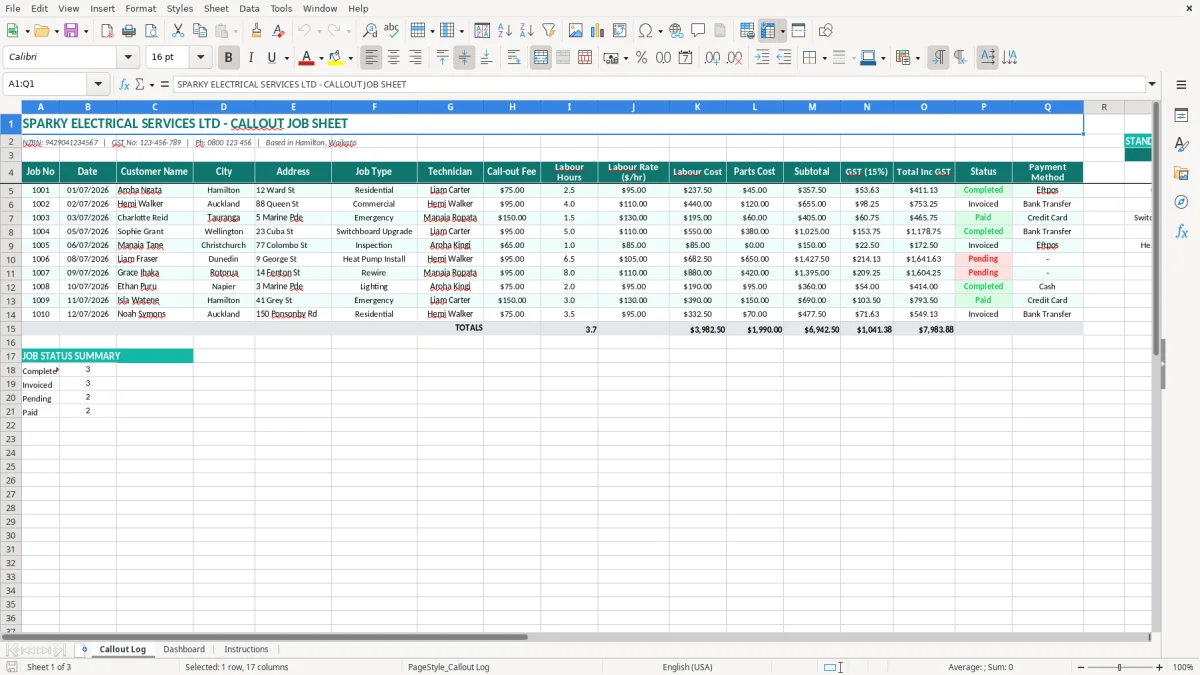
This electrician callout Excel spreadsheet records each electrical job from first visit to payment. It includes a Callout Log with 17 columns for customer, address, technician, fees, labour, parts, GST, status and payment method, plus a Dashboard and Instructions sheet.
It suits a Hamilton sparky, a small electrical company or an office manager who needs one clear record of residential, commercial and emergency work. The layout gives you a practical job-by-job view without needing a full field-service system.
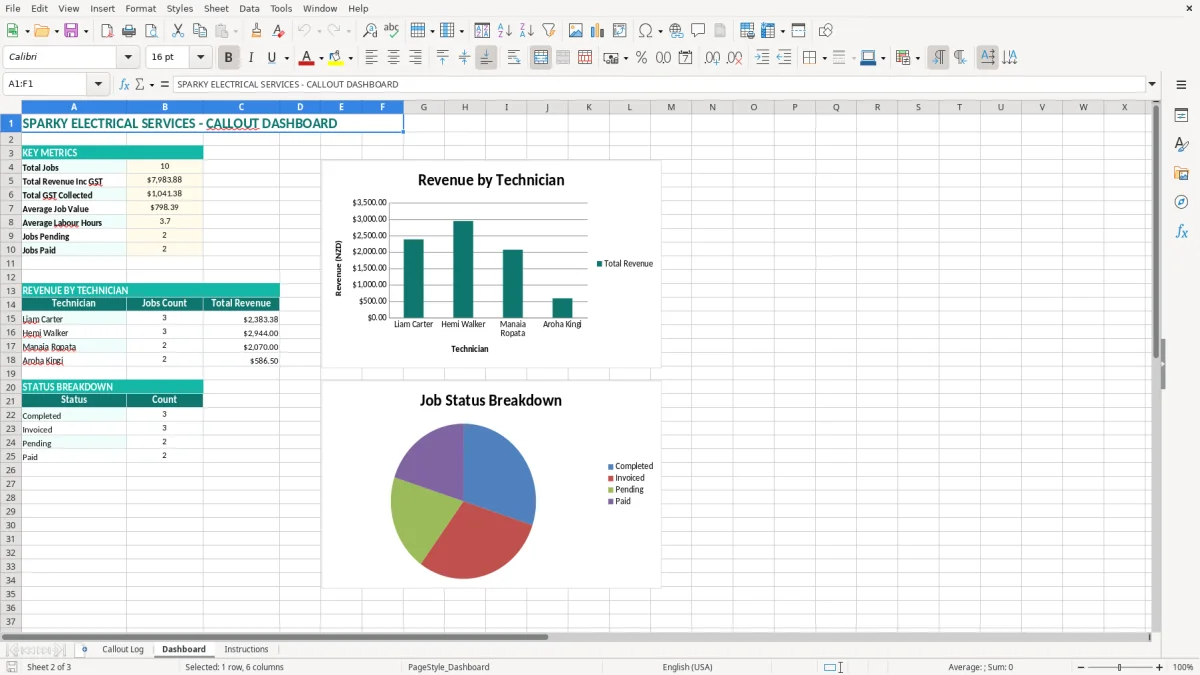
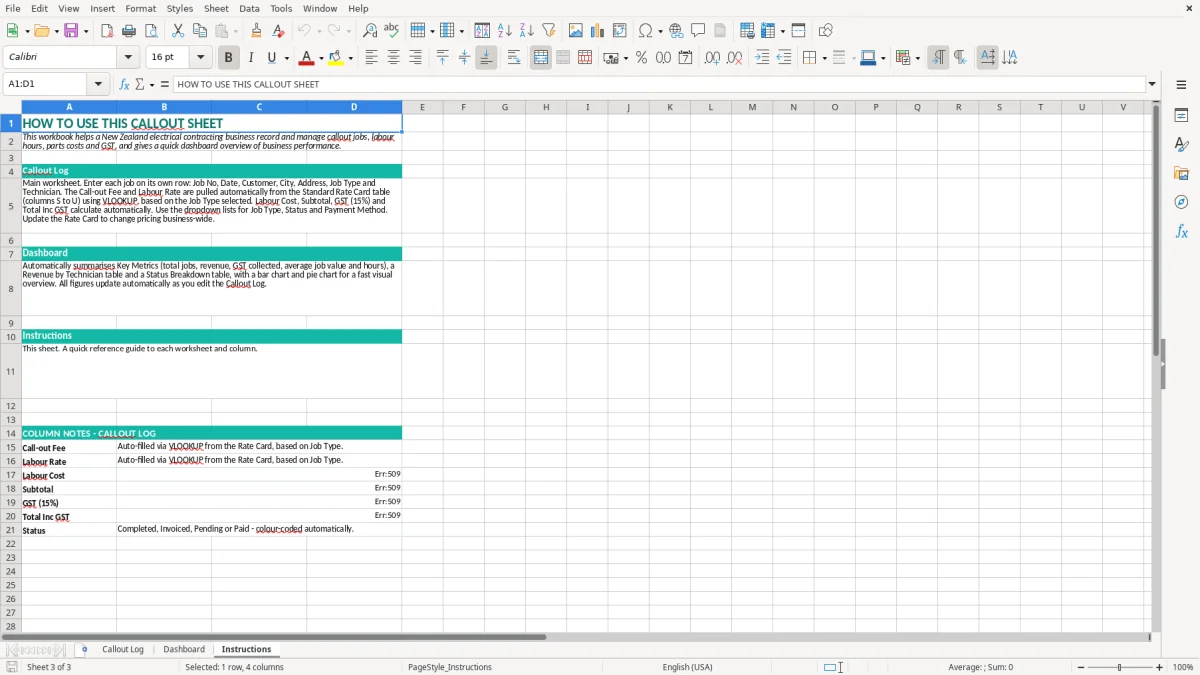
Image 1 shows the Callout Log with teal headings and pale input cells. Image 2 shows the Dashboard, while image 3 contains the Instructions sheet to help you get started.
The key benefits of this Excel template
- Record every job number, date, customer, city and full site address in one searchable log.
- See which technician handled each callout and separate residential, commercial and emergency work.
- Capture call-out fees, labour hours, hourly rates and parts costs for a clearer job result.
- Calculate the 15% GST component and total including GST for each completed job.
- Track whether work is completed, invoiced or paid so unpaid callouts do not disappear.
- Compare payment methods such as Eftpos, bank transfer and credit card across your jobs.
- Use the Dashboard for a quick visual review instead of checking 17 columns row by row.
Step-by-step guide
- Open the Callout Log and start on the next empty row beneath the existing sample jobs. Keep the sample rows while you learn the layout, then replace them with your own records.
- Enter a unique Job No, the date in DD/MM/YYYY format, the customer name, city and complete electrical job address.
- Choose the Job Type, such as Residential, Commercial or Emergency, and enter the Technician who attended the site.
- Add the Call-out Fee, Labour Hours, Labour Rate ($/hr) and Parts Cost. For example, enter 2.5 hours and a $95.00 rate for a two-and-a-half-hour visit.
- Check the Labour Cost, Subtotal, GST (15%) and Total Inc GST columns before sending the invoice. Confirm that parts and labour have been entered in the correct rows.
- Update Status as the job moves from Completed to Invoiced and then Paid. Add the actual Payment Method when money arrives.
- Review the Dashboard weekly, then save a dated copy before making major changes or clearing old callouts.
Included features
A 17-column Callout Log covering Job No, Date, Customer Name, City, Address and Job Type.
Technician assignment alongside Call-out Fee, Labour Hours and Labour Rate ($/hr).
Separate Labour Cost and Parts Cost fields for checking the chargeable work.
Subtotal, GST (15%) and Total Inc GST columns for New Zealand billing.
Status and Payment Method fields for following jobs through invoicing and collection.
A Dashboard sheet with visual reporting generated from the callout records.
An Instructions sheet and consistent teal headings, borders and shaded entry areas.
Where New Zealand sparkies use a callout log
A working record for the office and the van
A sole trader often needs this sheet open beside the phone when a customer calls about a tripping switchboard or a failed hot-water cylinder. The office manager at a Hamilton electrical firm can enter the booking while the electrician is on the road, then complete labour and parts after the job.
The Callout Log is set up for the details that matter later: Job No, date, customer, city, address, job type and technician. That is more useful than a notebook entry saying only emergency callout. A job such as 1003 for Charlotte Reid in Tauranga can be identified, priced and followed through to Paid.
Residential, commercial and emergency work
Use Job Type to separate a normal residential repair from commercial maintenance and urgent work. A small firm completing 60 callouts a month can filter or review the records by technician and job type rather than relying on memory at month-end.
For a Christchurch electrician completing four jobs in a day, the record can show 1.5 hours on one callout, 4 hours on another and the parts used on each site. That gives you a useful starting point when preparing invoices and checking whether the quoted work matched the actual visit.
Useful at invoicing time
At the end of the week, move through the Status column and identify jobs still marked Completed. If 12 completed jobs average $180.00 including GST, that is $2,160.00 of work that should be either invoiced or clearly explained.
The Dashboard is useful for a quick visual check, while image 1 remains the detailed source record. Keep the customer address and Job No together so an invoice, technician note and payment can be matched without hunting through messages.
GST and records for an electrical callout business
Apply the New Zealand GST rate correctly
New Zealand's standard GST rate is 15%. If a taxable callout has a subtotal of $200.00, the GST is $30.00 and the total including GST is $230.00. The sheet's GST (15%) and Total Inc GST columns make that split visible for each job.
GST registration is compulsory once taxable turnover exceeds $60,000 in any 12-month period. A registered electrician must include taxable sales in the relevant GST return, usually monthly, 2-monthly or 6-monthly according to the filing arrangement.
Keep taxable supply information with the job
Since the old tax invoice terminology was replaced, keep the required taxable supply information with your invoice records. For a supply over $1,000, this includes the supplier's details and GST number, issue date, description, GST-inclusive amount and the buyer's details. The template's customer, address, date, parts and labour fields help you assemble that evidence, but the spreadsheet is not itself a substitute for the invoice.
For example, a $1,150 GST-inclusive switchboard repair contains $150.00 GST and $1,000.00 before GST. Check the calculation against the invoice before filing the return.
Record retention and year-end
Inland Revenue requires business records to be kept for 7 years. Save the workbook with a sensible file name and retain supporting invoices, receipts, job sheets and payment evidence. The standard New Zealand balance date is 31 March, so review open jobs and unpaid callouts around year-end rather than leaving them in an unfinished state.
A sole trader reports business income in an IR3; a company generally files an IR4. The Callout Log supports the bookkeeping, but totals still need to agree with your accounting records and bank transactions.
The callout recording errors that cost electrical firms
Lost labour and parts
The most expensive mistake I see is a technician entering only the parts cost after a late-night visit. A job with $85.00 of parts and 2 hours at $110.00 per hour has $305.00 before GST if there is no call-out fee. Leave the labour blank and the invoice can be short by $253.00 including GST.
Use separate Labour Hours, Labour Rate ($/hr) and Parts Cost fields. Do not bury cable, breakers or fittings in a free-text note where the person invoicing the work may miss them.
Wrong status and duplicate jobs
Two people can create a second row for the same customer when a job is rebooked. If Job No 1048 appears twice, the business may send two invoices or pay a technician twice. Assign the number when the call is accepted and search the customer, address and date before adding another row.
Status errors create a different problem. A job left as Completed may look like outstanding work even though the customer paid by Eftpos. Conversely, marking a job Paid before the bank transaction clears hides a real debtor. Update Status only after checking the payment record.
GST and date mistakes
Typing a GST-inclusive amount into Parts Cost when the sheet expects a pre-GST cost distorts the subtotal and GST. For $115.00 of parts including GST, the pre-GST cost is $100.00 and GST is $15.00; entering $115.00 as the pre-GST cost overstates the job by $17.25 including the extra GST.
A wrong date can put a callout in the wrong GST period. The difference matters when a 30 June job is entered as 01/07 and the invoice falls into the next return. Check DD/MM/YYYY dates and reconcile the log to invoices before submitting figures.
Turn the spreadsheet into a weekly office routine
Use an existing trigger
Do not wait until the end of the month. Make the Callout Log part of the daily dispatch routine: enter the customer and address when the booking is accepted, then finish hours and parts before the technician closes the job. A five-minute update after each of 10 daily callouts is easier than reconstructing 50 jobs on Friday.
Set a fixed Friday review for Status and Payment Method. For example, a firm with 25 completed jobs can sort the log, identify the 6 still marked Completed and send the matching invoices before the weekend.
Keep entries consistent
- Use one Job No sequence and never reuse a number after cancelling a callout.
- Keep job types to consistent labels such as Residential, Commercial and Emergency.
- Enter labour as hours and a rate, not as one unexplained total, so the office can check the charge.
- Save a monthly copy after reconciling invoices and payments, using the workbook date in the file name.
Know when Excel has reached its limit
This template is a sensible fit for a small electrical business with a manageable number of callouts and one person maintaining the records. It becomes less suitable when several staff edit it at once, technicians need mobile access, stock must be tracked across vehicles, or 500-plus jobs need automated reminders.
At that point, move the operational workflow to Xero, MYOB or field-service software and keep the spreadsheet as an export or review tool. The right time to move is when manual checking takes 2 hours every week, not after a duplicated invoice or missed GST return has already cost money.
That same threshold is usually when a job quoting sheet becomes the next spreadsheet to standardise, so estimates stay aligned with the records before you move the workflow into Xero, MYOB or field-service software.
Common questions about this template
It records Job No, Date, Customer Name, City, Address, Job Type, Technician, Call-out Fee, Labour Hours, Labour Rate ($/hr), Labour Cost, Parts Cost, Subtotal, GST (15%), Total Inc GST, Status and Payment Method. It also includes a Dashboard and Instructions sheet.
Yes. The Callout Log includes GST (15%), Subtotal and Total Inc GST columns for standard taxable supplies. Check each result against your invoice and accounting records, particularly where a job includes zero-rated or exempt items.
The sample records show Residential, Commercial and Emergency work. You can use those labels consistently for reporting, or replace them with categories that match your electrical business, such as Maintenance, Fault Finding or New Build.
Enter the time in Labour Hours and the applicable amount in Labour Rate ($/hr). For example, 2.5 hours at $95.00 per hour gives $237.50 labour before GST, separate from the call-out fee and parts cost.
Set Status to Completed when the work is finished, Invoiced after the invoice is sent and Paid only after payment has been confirmed. Use Payment Method for Eftpos, Bank Transfer, Credit Card or another consistent label.
Move to Xero, MYOB or field-service software when multiple people need to edit live records, you need automated reminders or mobile job updates, or manual checking is taking around 2 hours a week. For a small firm with a manageable callout list, this workbook can remain a practical job register.
Download
File format
Excel (.xlsx)
Compatible software
Excel, Google Sheets, LibreOffice
Price
Free