
Electrician Callout Excel – Free Template (2026)
Sales & Customers
Job Quote Excel - Free Template
NZ tradie job quote Excel template with business, client, site, pricing and validity fields, plus Rates, Dashboard and Instructions sheets.
2026-07-21
293 downloads
4.8/5 average rating
Download template
A tradie job quote Excel template is a structured spreadsheet for pricing and presenting work to a New Zealand customer. This file contains a formatted Job Quote sheet with business, client, job site, quote number, dates and GST details, supported by Rates, Dashboard and Instructions sheets.
It suits builders, plumbers, electricians, painters, landscapers and other small trade businesses that want a consistent quote before work starts. The teal headings, pale input cells and clear business and client blocks make the sheet practical to complete and print.
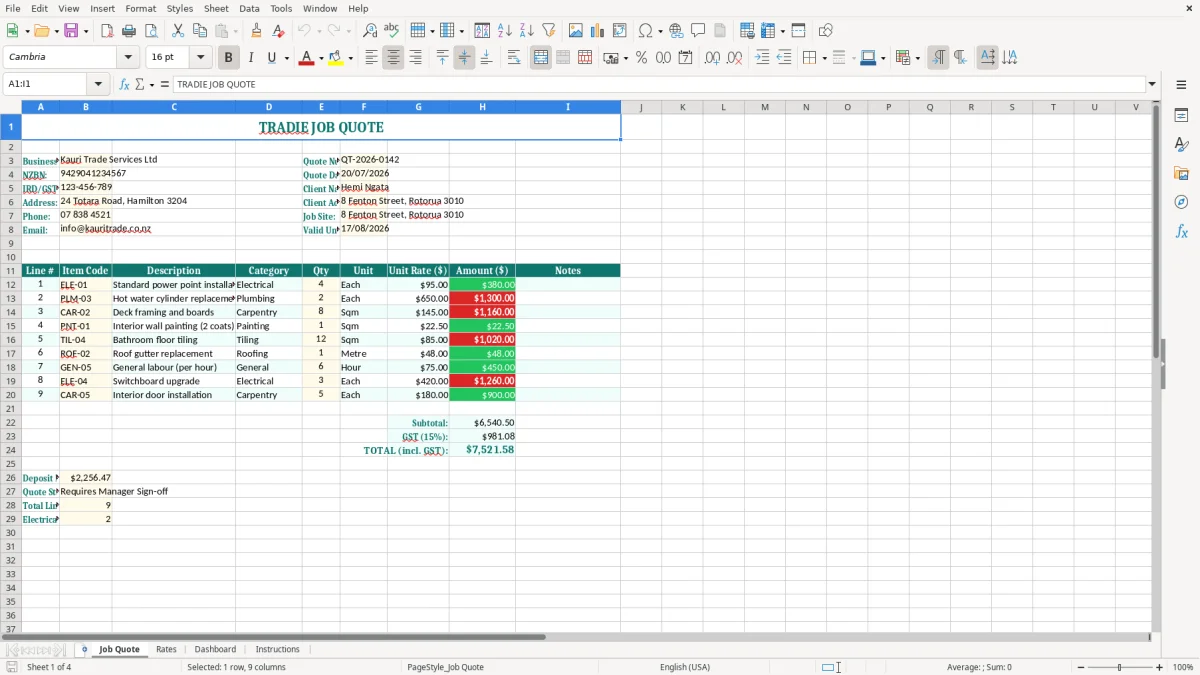
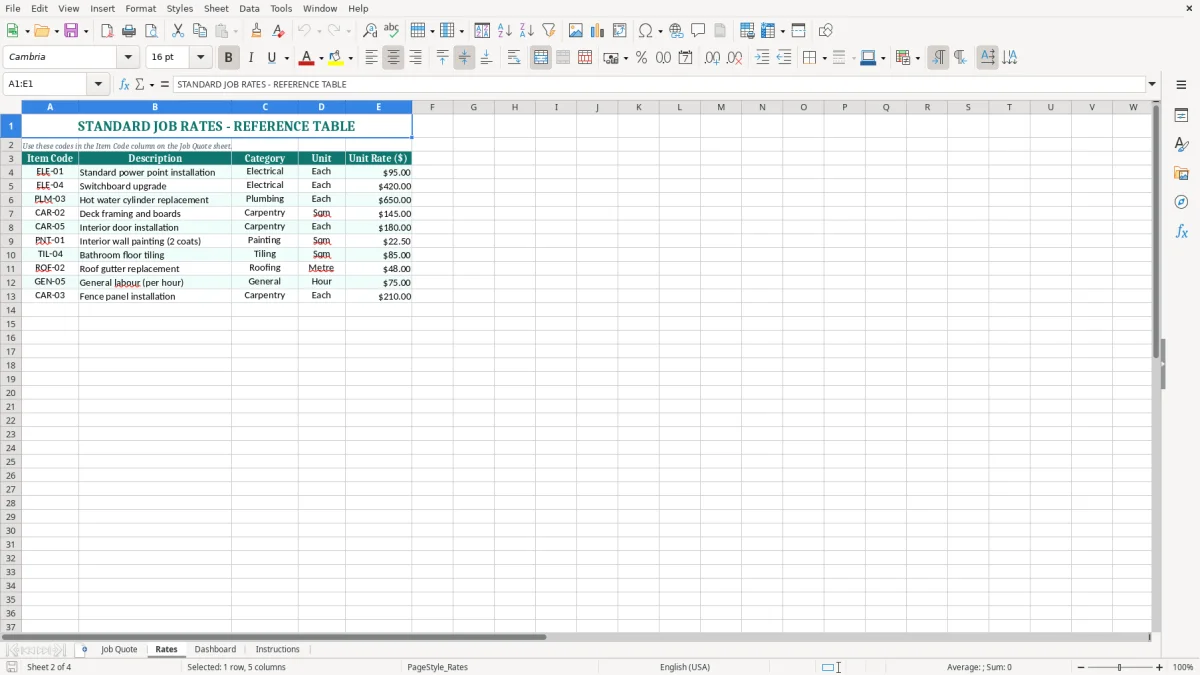
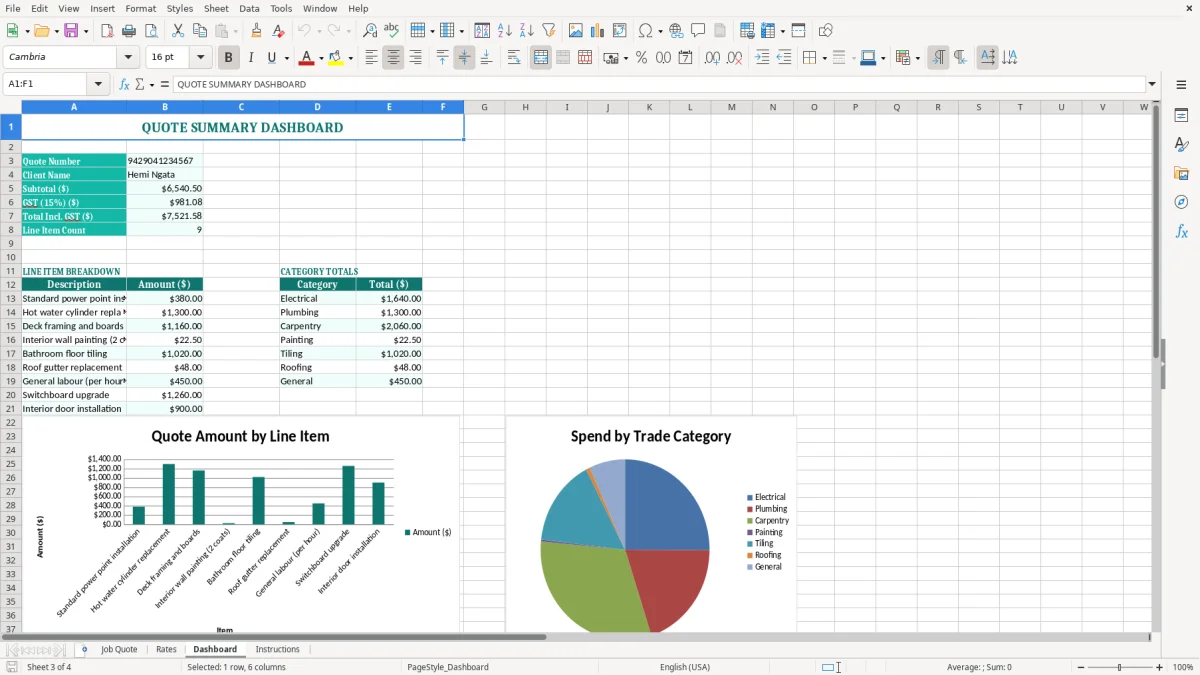
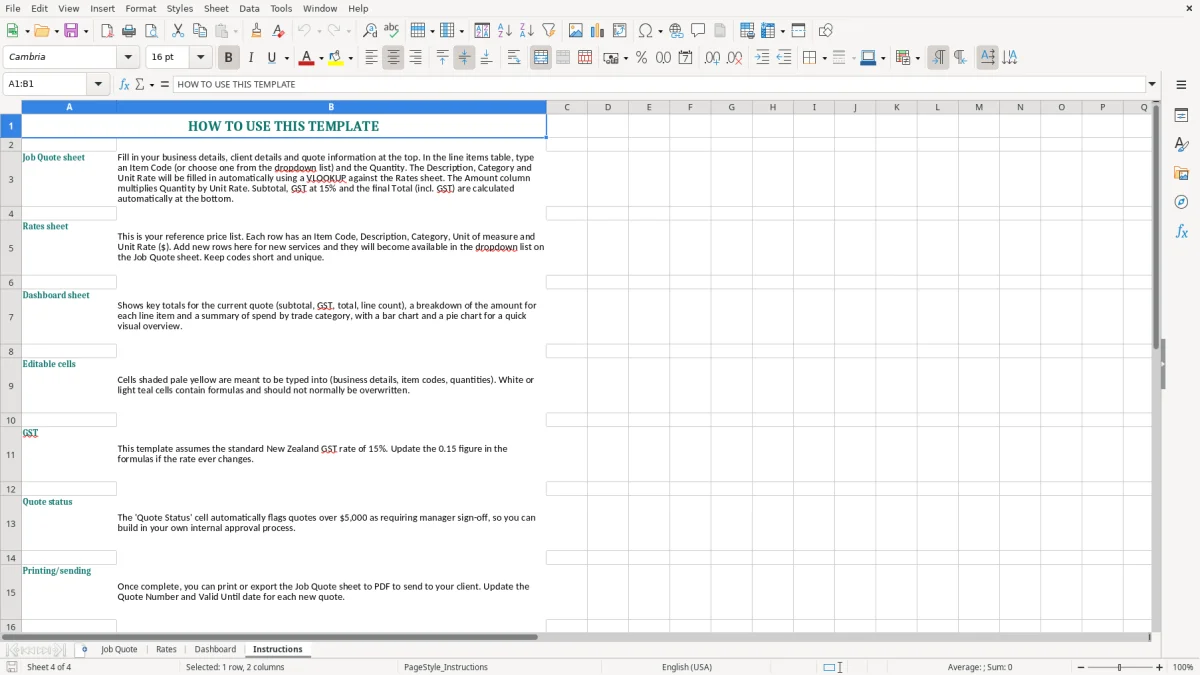
Image 1 shows the Job Quote sheet, including the business details on the left and customer details on the right. Image 2 shows the Rates sheet, while images 3 and 4 show the Dashboard and Instructions sheets.
The key benefits of this Excel template
- Create a professional quote number such as QT-2026-0142 without starting a document from scratch.
- Keep your business name, NZBN, IRD/GST number, address, phone and email together in one visible block.
- Record the client name, client address and job site separately, which helps when the work location differs from the billing address.
- Set a quote date and valid-until date using the DD/MM/YYYY format used in New Zealand.
- Use the Rates sheet to keep your charge-out pricing in one place instead of retyping rates for every job.
- Review quote information through the Dashboard before sending it to a customer.
- Give your office manager or subcontractor clear Instructions so quotes are prepared consistently.
Step-by-step guide
- Open the Job Quote sheet and replace the sample business details with your trading name, NZBN, IRD/GST number, address, phone and email.
- Enter a unique quote number, then check the quote date and valid-until date. Keep the dates in DD/MM/YYYY format, for example 20/07/2026 and 17/08/2026.
- Fill in the client name, client address and job site. Confirm the site address carefully before pricing travel, delivery or site-specific work.
- Open the Rates sheet and update the rates your business actually charges. Use your normal labour, material or service pricing rather than copying a competitor's figures.
- Complete the quote details on the Job Quote sheet, checking quantities, descriptions, rates and any GST treatment before presenting the total.
- Review the Dashboard for a quick check of the quote information, then read the Instructions sheet if a field or workflow is unclear.
- Save a separate copy using the quote number, such as QT-2026-0142 - Ngata bathroom work.xlsx, before emailing or printing the quote.
Included features
Job Quote sheet with a prominent TRADIE JOB QUOTE heading and a clean, print-friendly layout.
Business details block for business name, NZBN, IRD/GST number, address, phone and email.
Client details block for quote number, quote date, client name, client address, job site and valid-until date.
Pale input cells that visually distinguish information you need to replace from the surrounding labels.
DD/MM/YYYY date formatting for the quote date and valid-until date fields.
Separate Rates sheet for maintaining the pricing information used when preparing trade work.
Dashboard and Instructions sheets to support checking and consistent use of the workbook.
When a New Zealand tradie needs a job quote spreadsheet
A sole trader often prepares a quote from the ute between jobs, while an office manager at a Hamilton plumbing firm may handle 20 or 30 enquiries in a week. A fixed Excel layout stops each quote becoming a different mix of handwritten notes, text messages and copied Word documents.
From site visit to customer approval
Take the site measurements and scope notes with you, then enter the customer and job site details on the Job Quote sheet when you return. For example, a Rotorua bathroom renovation might include 18 hours of labour at $95.00, $2,400.00 of materials and a $180.00 waste charge. The quote needs to show exactly which property and scope those figures relate to.
The separate quote number and valid-until date are especially useful when a customer has several jobs underway. QT-2026-0142 can be referred to in an email, purchase order and later invoice, while a 28-day validity period protects you from an unexpected rise in copper, timber or merchant pricing.
Useful for small teams
A Christchurch builder with four staff can use the same workbook whether the estimator prepares the quote or the owner does it after hours. The business block keeps the firm's NZBN and GST details consistent, and the client block separates the billing address from the job site.
This is also useful for a lawn-care operator quoting several properties, an electrician pricing a switchboard upgrade, or a painter comparing two preparation options. The point is not to create a complicated estimating system; it is to give every customer a complete, readable starting document.
Checking the number before sending
Use the Dashboard as a final review point rather than relying on memory. If the quote shows $8,000.00 excluding GST, the standard 15% GST amount is $1,200.00 and the customer-facing total is $9,200.00. Check that the scope, site and price all belong to the same quote before pressing send.
GST and quote details for New Zealand trade work
Most registered trade businesses quote using the standard GST rate of 15%. GST registration becomes compulsory when your taxable turnover exceeds $60,000 in any 12-month period, although a business below that threshold can register voluntarily. The quote should make clear whether the figures are GST-inclusive or exclusive.
Getting the GST number right
The Job Quote sheet has an IRD/GST Number field in the business details block. Enter your real number rather than leaving the sample 123-456-789 in place. A GST-registered supplier must provide correct taxable supply information, including the supplier's name and GST number, date, description and GST-inclusive amount; buyer details are required for supplies over $1,000.
For a $4,600.00 GST-exclusive job, 15% GST is $690.00 and the total is $5,290.00. If the $4,600.00 is already GST-inclusive, the GST component is $600.00, calculated as $4,600.00 × 3 ÷ 23. Decide which basis you use before entering rates, because mixing the two creates an avoidable $90.00 difference in this example.
Quote dates are not tax dates
A quote date of 20/07/2026 and valid-until date of 17/08/2026 show when your offer was made and how long the price stands. They do not by themselves determine the GST return period. GST is generally returned monthly, 2-monthly or 6-monthly, and the tax point follows the taxable supply rules when the work is performed or payment is received.
Keep the accepted quote, variations, invoices and payment records together for at least 7 years, as required by Inland Revenue. If the customer changes the scope after acceptance, document the variation and its GST-inclusive price rather than silently editing the original quote.
Business identity and structure
A sole trader normally uses their personal IRD number and may also have an NZBN. A company such as Kauri Trade Services Ltd is a separate legal entity and should quote its registered business details consistently. The spreadsheet records those details, but it does not decide whether your business is a sole trader, partnership or company.
The same separation of entities matters when you reach tax payments, where a tax instalments tracker keeps provisional due dates distinct from the quote details you store in the spreadsheet.
The quoting errors that cost tradies margin
The expensive mistakes in trade quoting are usually small omissions repeated across jobs: a missing travel charge, a rate copied from an old workbook, or a GST total that was assumed rather than checked. A $35.00 error on each of 40 jobs is $1,400.00 of lost revenue before you have paid wages or materials.
Wrong customer or job site
One common failure is copying the last customer's details and changing only the name. The Job Quote layout puts the client address and job site in separate fields, so use both. If a Hamilton property is billed to a Rotorua landlord, sending the crew to the wrong address can cost two hours at $95.00 per hour for two people: $380.00 before fuel or the customer's frustration.
Check the quote number as well. Two documents both called Quote 14 are difficult to trace when a customer approves one by phone and the bookkeeper later raises an invoice. A structured number such as QT-2026-0142 gives the job a reliable reference.
GST and rate confusion
Another regular problem is entering a GST-inclusive merchant price into a GST-exclusive labour schedule. A $1,150.00 materials figure may be $1,000.00 plus GST, not $1,150.00 plus GST. On a $10,000.00 job, that sort of error can overstate the quote by $150.00 or leave the business absorbing the difference.
Do not use a generic hourly rate for every task. A qualified electrician, apprentice and specialist subcontractor have different costs, and a $10.00 hourly shortfall over 80 labour hours removes $800.00 from the job's gross margin. Review the Rates sheet when wages, supplier prices or vehicle costs change.
Scope that is too vague
Painting a house is not a sufficient scope if the customer expects roof repairs, mould treatment and three coats. Vague wording produces unpaid extras and arguments over whether disposal, access equipment or travel was included. Put exclusions and assumptions into the quote wording, then issue a dated variation when the customer asks for additional work.
Finally, never send the sample business details or sample customer information. The workbook contains example values, including a Hamilton address and QT-2026-0142, so replace every sample field and save the completed file under the correct quote number.
Making quoting part of the weekly trade routine
A spreadsheet works when it is attached to a habit, not when it is left open-ended. Set a fixed quoting block after the last site visit each day, or reserve 30 minutes before Friday's pay run to finish outstanding estimates. For a small firm receiving eight enquiries a week, that routine prevents quotes sitting in text messages until the customer has chosen someone else.
Use the workbook in a repeatable order
- Copy the blank workbook before starting a new job and name it with the quote number and customer.
- Update the Rates sheet once when a supplier price or charge-out rate changes; do not alter rates casually inside old completed quotes.
- Complete the Job Quote sheet from top to bottom, then use the Dashboard as a final sense check.
- Read the Instructions sheet when training an office manager or handing quoting to a new estimator.
Use Excel's built-in filters and consistent labels where the workbook provides them, and avoid inserting rows or renaming sheets without checking the Dashboard. If you later add your own calculations, use English function names such as SUM and IF, with commas between arguments.
Keep approvals and follow-up visible
Record the customer's acceptance date in your job-management notes or accounting system, because a quote is not the same as an invoice. A simple Friday check of quotes expiring within 7 days is worthwhile: follow up QT-2026-0142 before 17/08/2026 rather than discovering the date after buying materials.
Know when Excel has reached its limit
For a sole trader with 10 active jobs, this workbook is usually manageable. Once a company has 50 open jobs, several staff editing files, staged invoices and frequent variations, move the live workflow into Xero or MYOB and keep the template for straightforward one-off estimates. Software becomes the better choice when version control and approval history matter more than the flexibility of a local spreadsheet.
That same point about moving the live workflow into software also applies to payroll, where a contributions tracker keeps deductions and approvals clearer than a shared spreadsheet.
Common questions about this template
Builders, plumbers, electricians, painters, landscapers, mechanics and other New Zealand trade businesses can use it. It suits sole traders and small Ltd companies that need a consistent quote layout with business, customer and job site details.
The visible business block includes business name, NZBN, IRD/GST number, address, phone and email. The client block includes quote number, quote date, client name, client address, job site and valid-until date.
Check the workbook's pricing area and Dashboard before relying on any total. For New Zealand's standard GST rate, 15% of a $2,000.00 GST-exclusive amount is $300.00, making the GST-inclusive total $2,300.00. Enter rates consistently as either inclusive or exclusive.
Use DD/MM/YYYY, such as 20/07/2026 for the quote date and 17/08/2026 for the valid-until date. A clear expiry date helps you avoid honouring old prices after supplier or labour costs have changed.
No. A quote is an offer to do work, while an invoice records a taxable supply and payment request. After acceptance and supply, issue the appropriate taxable supply information, including the supplier details, date, description, GST-inclusive amount and other details required by the GST rules.
Keep completed quotes with related invoices, variations and payment records for at least 7 years, consistent with Inland Revenue record-keeping requirements. Save each workbook using its quote number so you can find the supporting record for a GST return or year-end review.
Download
File format
Excel (.xlsx)
Compatible software
Excel, Google Sheets, LibreOffice
Price
Free