
Rugby Subs Fees Tracker Excel – Free Template (2026)
Accounting & GST
Chattels Depreciation Excel - Free Template
NZ rental property chattels register with DV rates, $1,000 threshold, property details and dashboard for depreciation records.
2026-07-28
364 downloads
4.8/5 average rating
Download template
A rental property chattels depreciation Excel spreadsheet records depreciable items such as carpet, stoves and ovens, and calculates the information you need for your New Zealand rental accounts. This template contains a Chattels Register, Summary Dashboard and Instructions sheet.
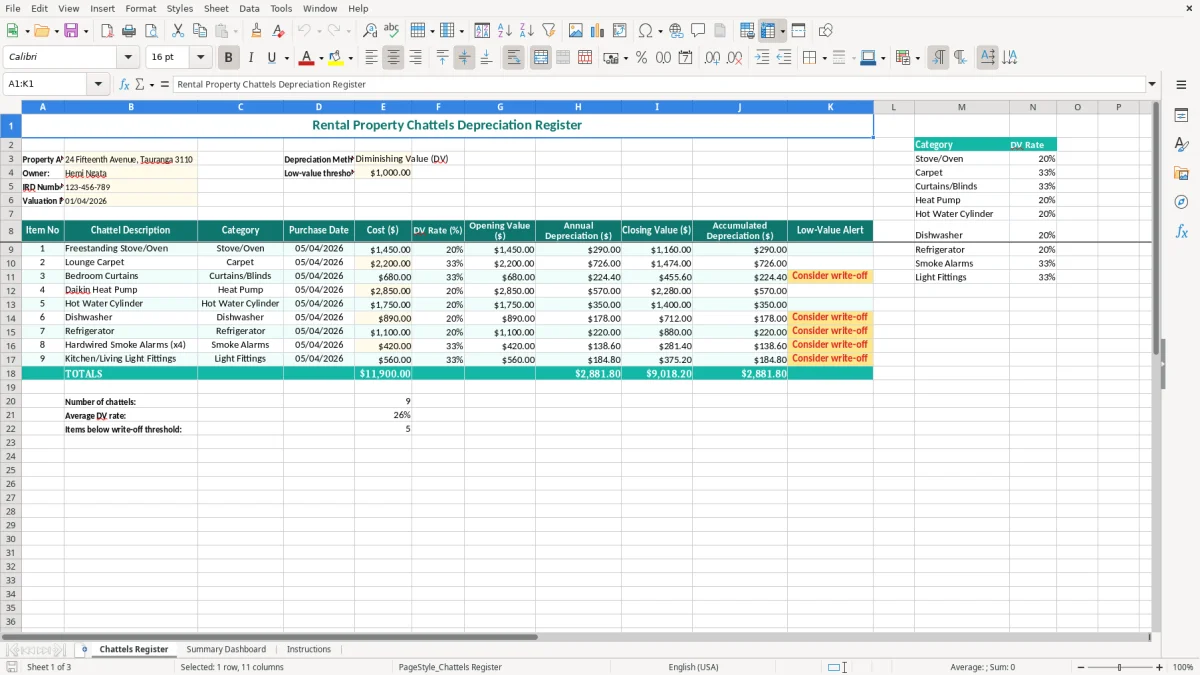
Enter the property details, owner, IRD number, valuation date, depreciation method and low-value threshold in the highlighted input cells. The register includes a lookup table with category rates, including 20% diminishing value for stoves and ovens and 33% for carpet.
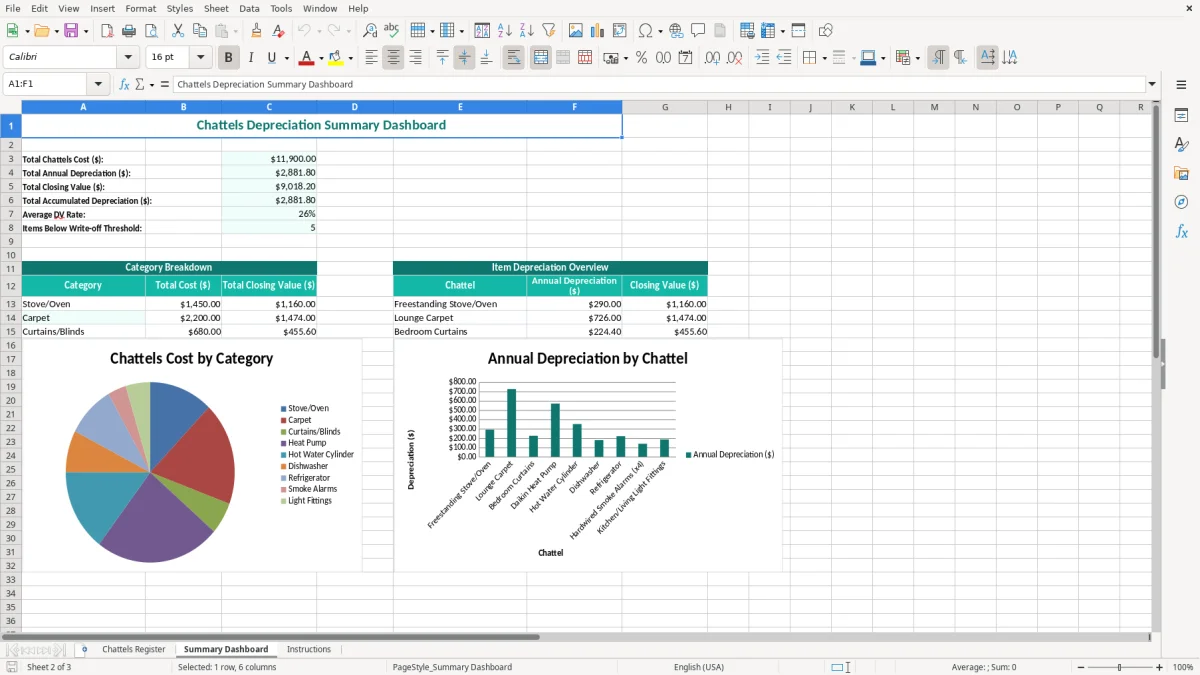
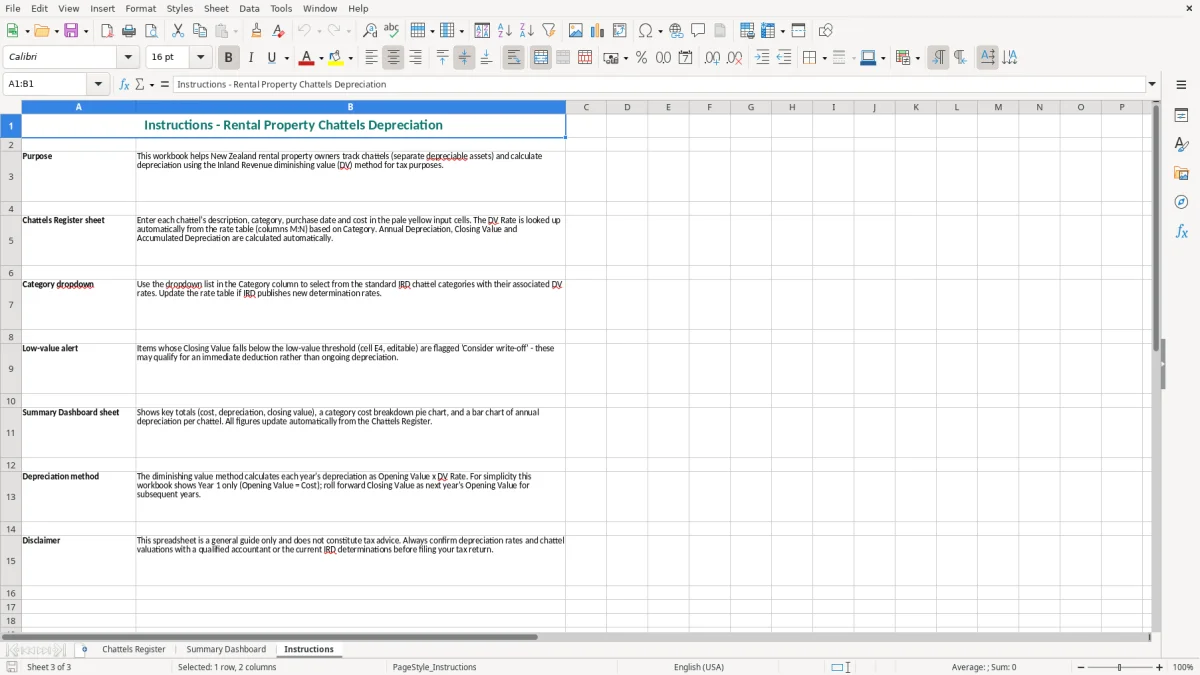
Image 1 shows the Chattels Register with the rental property information block, DV method, $1,000 threshold and category rate table. Image 2 shows the Summary Dashboard, while image 3 provides the Instructions sheet to help you complete the workbook.
The key benefits of this Excel template
- Keeps each rental property's chattels information in one register instead of scattered invoices and notes.
- Uses a clearly labelled Diminishing Value (DV) method field for a consistent depreciation approach.
- Includes a $1,000 low-value threshold input that matches the standard New Zealand threshold used for many depreciable assets.
- Provides visible category rates for items such as stoves, ovens and carpet, making rate selection easier.
- Records the property address, owner, IRD number and valuation date alongside the chattels information.
- Gives you a Summary Dashboard for a quicker view of the register and depreciation information.
- Includes an Instructions sheet so a landlord or bookkeeper can follow the same process each year.
Step-by-step guide
- Step 1 — Open the Chattels Register and replace the sample property address, owner, IRD number and valuation date with your own details.
- Step 2 — Check the depreciation method shown in the property information block. The template is set up for Diminishing Value (DV), so confirm that this is the method you intend to use.
- Step 3 — Review the low-value threshold field. It is pre-filled at $1,000; change it only when an updated tax rule or your tax adviser’s instructions require a different setting.
- Step 4 — Enter each rental chattel from your purchase records, using a clear description and the correct category. Keep the original invoice or settlement documentation with your tax records.
- Step 5 — Match the chattel to the category rate table on the right-hand side of the register. The visible examples include Stove/Oven at 20% DV and Carpet at 33% DV.
- Step 6 — Review the Summary Dashboard for an overall check, then read the Instructions sheet before making year-end adjustments or sending the figures to your bookkeeper.
- Step 7 — Save a dated copy after each annual review and retain the workbook with the supporting records for at least 7 years, as required for Inland Revenue records.
Included features
Three dedicated sheets: Chattels Register, Summary Dashboard and Instructions.
A property information block for address, owner, IRD number and valuation date.
A Diminishing Value (DV) depreciation method field with an editable low-value threshold.
Highlighted input cells in pale yellow to distinguish information you enter from supporting tables.
A category and DV rate lookup table positioned to the right of the register.
Currency formatting displayed as $1,234.56 and dates formatted as DD/MM/YYYY.
Teal headers, borders, wrapped labels and dashboard presentation designed for practical printing and review.
Who uses a rental chattels register in New Zealand
Landlords and property managers
A private landlord usually opens this spreadsheet when buying a rental, taking over an existing property, or preparing the year ended 31 March accounts. The Chattels Register keeps the property address, owner, IRD number and valuation date beside the asset information, which is much easier to follow than a pile of settlement papers.
For example, a Tauranga landlord with a $420,000 rental may have $7,800 of depreciable chattels: $2,400 of carpet, a $1,600 stove and $3,800 of other qualifying items. The building itself is generally not depreciable for a standard residential rental, but separately identifiable chattels can still need their own records and rates.
Bookkeepers at small property businesses
A bookkeeper looking after six rentals can use one workbook per owner or property group, then review the register during the annual accounts process. The visible property block in image 1 makes it clear whose records you are looking at, while the category rate table helps prevent a carpet purchase being treated as a stove or an item being given an arbitrary rate.
The Summary Dashboard is useful when checking several entries before posting depreciation to the rental profit and loss. It gives the owner a quick review point, while the register remains the detailed working record.
When the information is needed
The busiest time is normally after the 31 March balance date, when rental income, interest, repairs and depreciation are being assembled for the tax return. It also matters when a chattel is replaced, sold or removed from the property, because the original cost and accumulated depreciation should not simply remain untouched.
My practical preference is to update the register when an item is purchased rather than wait until year-end. Five minutes after buying a $1,250 oven is safer than trying to remember the details 11 months later.
That same purchase-date habit also keeps a herd budget anchored to real costs instead of year-end guesswork.
What Inland Revenue requires for chattel depreciation records
Separate the building from the chattels
For most residential rental properties, the building depreciation rate is 0% under New Zealand income tax rules. That does not mean every item at the property is written off: separately identifiable depreciable property, such as carpet, appliances and some furnishings, needs its own cost, category, depreciation rate and disposal record.
The template uses diminishing value (DV) as the selected method. Under DV, depreciation is calculated by applying the relevant rate to the asset's adjusted tax book value, so the dollar deduction generally reduces as the value falls. A $2,000 asset at a 20% DV rate would produce $400 in the first full year before considering private use, part-year ownership or other tax adjustments.
The $1,000 low-value threshold
The workbook shows a $1,000 low-value threshold. Since 17 March 2021, the increased threshold has generally allowed qualifying low-value assets costing $1,000 or less to be treated differently from ordinary depreciable assets, subject to the associated-asset rules and the precise tax treatment for the purchase.
Do not use the threshold as a reason to combine unrelated purchases or split one asset into several invoices. Three separate $900 purchases may not have the same treatment as a single $2,700 fitted asset. Record what was actually bought and retain the invoice.
Records, rates and the annual return
Inland Revenue requires business and rental tax records to be kept for 7 years. Keep invoices, settlement statements, valuation evidence, disposal details and the workbook together. The category table in image 1 includes visible examples of Stove/Oven at 20% DV and Carpet at 33% DV, but it is not a substitute for checking the current IRD depreciation rate for an unusual item.
Depreciation normally flows into the rental accounts and then the owner's IR3 individual income tax return, or the relevant company return. The spreadsheet is a working register, not a complete tax calculation: ownership, private use, disposals and chattel allocation at purchase still need to be handled correctly.
The depreciation errors that create trouble at year end
Using the wrong starting value
The most common problem I see is an owner copying the advertised property price into the chattels register without evidence. A $650,000 purchase price is not automatically $12,000 of depreciable chattels. The chattel allocation should be supported by the sale and purchase documents, a valuation or another defensible basis, rather than a number chosen simply to increase the deduction.
For example, allocating $25,000 instead of $10,000 to depreciable chattels creates a $15,000 difference in the asset pool. At a 20% DV rate, that can change the first-year deduction by about $3,000 before other adjustments. It is a tax risk, not just a spreadsheet preference.
Leaving replaced assets in the register
A landlord replaces a $1,800 oven but leaves the old oven active and adds the new one as another line. The register then claims depreciation on an asset that no longer exists. The mistake can continue for several years, especially when the property changes hands or a new bookkeeper takes over.
Record the disposal date and supporting details when the old item is removed. If an asset is sold, scrapped or abandoned, its tax treatment may involve a balancing adjustment, so do not delete the line and lose the history.
Applying a convenient rate
Another costly shortcut is applying 20% DV to every appliance because it is already visible in the rate table. Carpet at 33% and Stove/Oven at 20% are examples, not permission to classify every chattel as one of those categories. A $4,000 item at 20% rather than 33% produces a first-year difference of $520, before part-year rules and tax treatment are considered.
Finally, check that the valuation date is entered as DD/MM/YYYY. A date such as 01/04/2026 is clear in this workbook; an unlabelled 04/01/2026 can be read as either 4 January or 1 April, which is an avoidable year-end reconciliation headache.
How to make the chattels spreadsheet part of month-end
Attach it to an existing property routine
The spreadsheet will last if you connect it to something you already do. For a landlord, that might be the monthly bank reconciliation; for a bookkeeper, it might be the rental management statement review. Check purchases, replacements and disposals on the same day rather than creating a separate task that gets postponed until 31 March.
A simple routine works well: file the invoice, enter the item, check its category and save the workbook. A $1,250 oven entered in April takes less than five minutes; reconstructing 12 months of purchases in March can take half a day.
Use the workbook consistently
- Keep one naming convention for descriptions, such as Kitchen — Stove/Oven — Fisher & Paykel, rather than vague entries such as New appliance.
- Save a dated copy after the annual review, for example Rental Chattels — Tauranga — 31-03-2027, so the prior calculation remains auditable.
- Use the Instructions sheet before handing the file to another person, and compare the Summary Dashboard with the total posted to the rental accounts.
- Do not overwrite the original template. Keep a clean master copy and use a separate workbook for each property or owner.
Know when Excel is no longer enough
This template is a sensible fit for one landlord with a manageable number of assets. If you are tracking 30 properties, hundreds of disposals, or frequent ownership changes, move the underlying records into Xero, MYOB or a fixed-asset system and keep the source invoices linked.
Excel remains useful as a review schedule, but it should not become the only control when several people edit the same file. My preference is to keep the register simple, reconcile it annually, and move to software before the workbook becomes a second full-time job.
Common questions about this template
It is a register for recording depreciable items in a rental property, such as carpet and appliances, along with their category, cost and depreciation information. This workbook has a Chattels Register, Summary Dashboard and Instructions sheet, with Diminishing Value selected as the depreciation method.
Yes. It is designed for New Zealand rental property records and includes fields for the property address, owner, IRD number and valuation date. Check each item's current IRD depreciation category and keep invoices and allocation evidence with the workbook.
The register shows a $1,000 low-value threshold. Qualifying assets costing $1,000 or less may receive different tax treatment, subject to the associated-asset rules and the details of the purchase. Do not split one asset or combine unrelated purchases to force a threshold outcome.
The visible rate table includes Stove/Oven at 20% DV and Carpet at 33% DV. These are category examples in the workbook. Check the current Inland Revenue depreciation rate for any item that does not clearly fit one of the listed categories.
No. It is a chattels depreciation register and review tool, not a complete rental tax return. Your rental accounts may also need rent, interest, repairs, insurance, rates, private-use adjustments, disposals and other income tax information.
Keep the completed workbook and supporting invoices, settlement records and disposal evidence for at least 7 years, consistent with Inland Revenue record-keeping requirements. Save a dated copy after each 31 March annual review so you retain the history used for the rental accounts.
Download
File format
Excel (.xlsx)
Compatible software
Excel, Google Sheets, LibreOffice
Price
Free