
Rugby Subs Fees Tracker Excel – Free Template (2026)
Accounting & GST
Herd Budget Excel - Free Template
Sharemilker herd budget workbook with budget summary, expense lookup, and instructions for planning milk income and costs.
2026-07-06
245 downloads
4.8/5 average rating
Download template
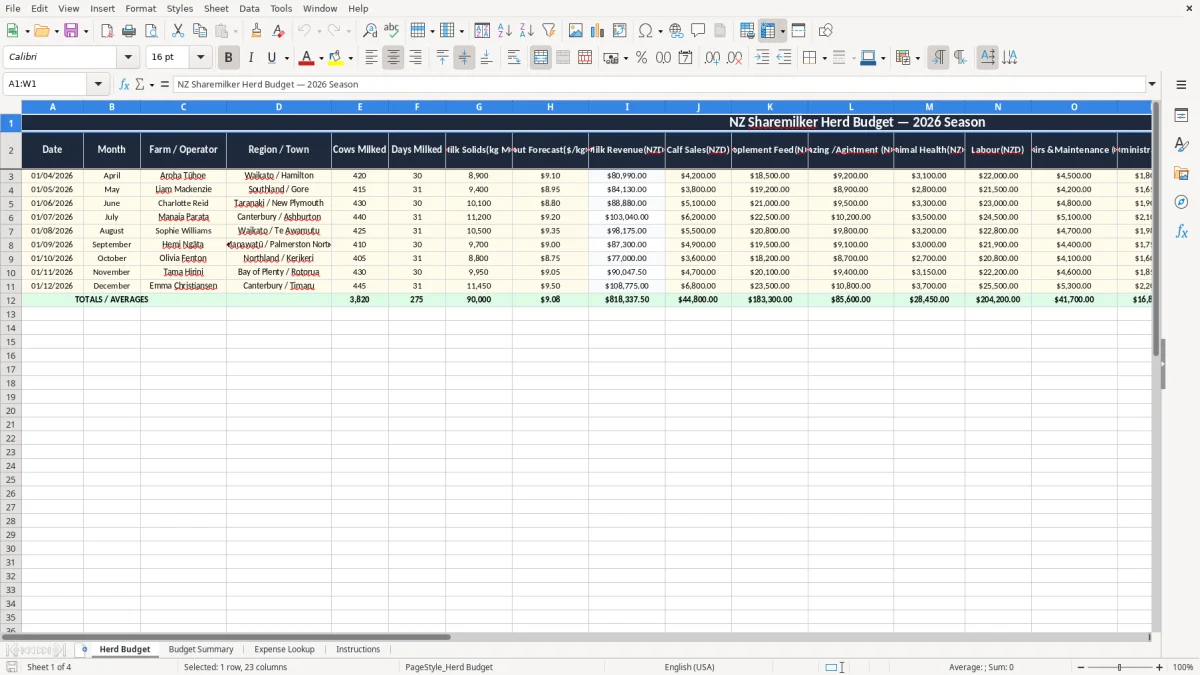
This Herd Budget Excel template is for sharemilkers who need a clear year plan for milk income, herd costs, and cash flow. It includes a Herd Budget sheet, a Budget Summary sheet, an Expense Lookup sheet, and an Instructions sheet.
You can use it to map out income against feed, animal health, labour, and other farm expenses, then check the total result in one place. The workbook is set up to help you see whether the budget works before the season gets away from you.
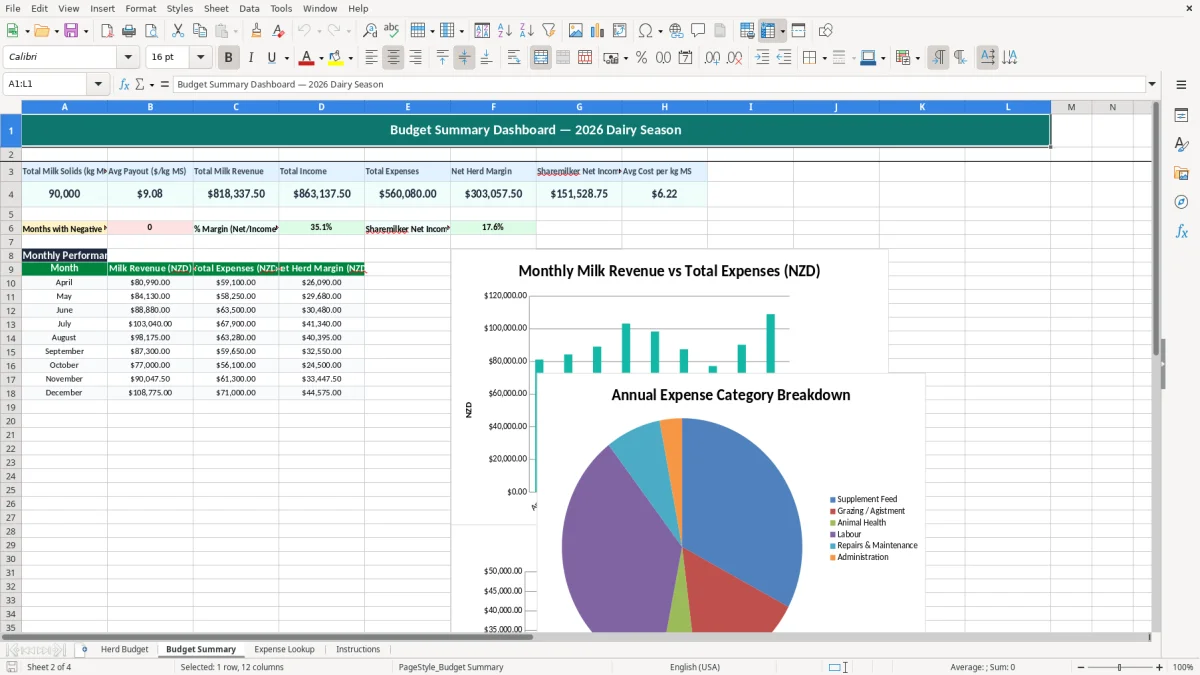
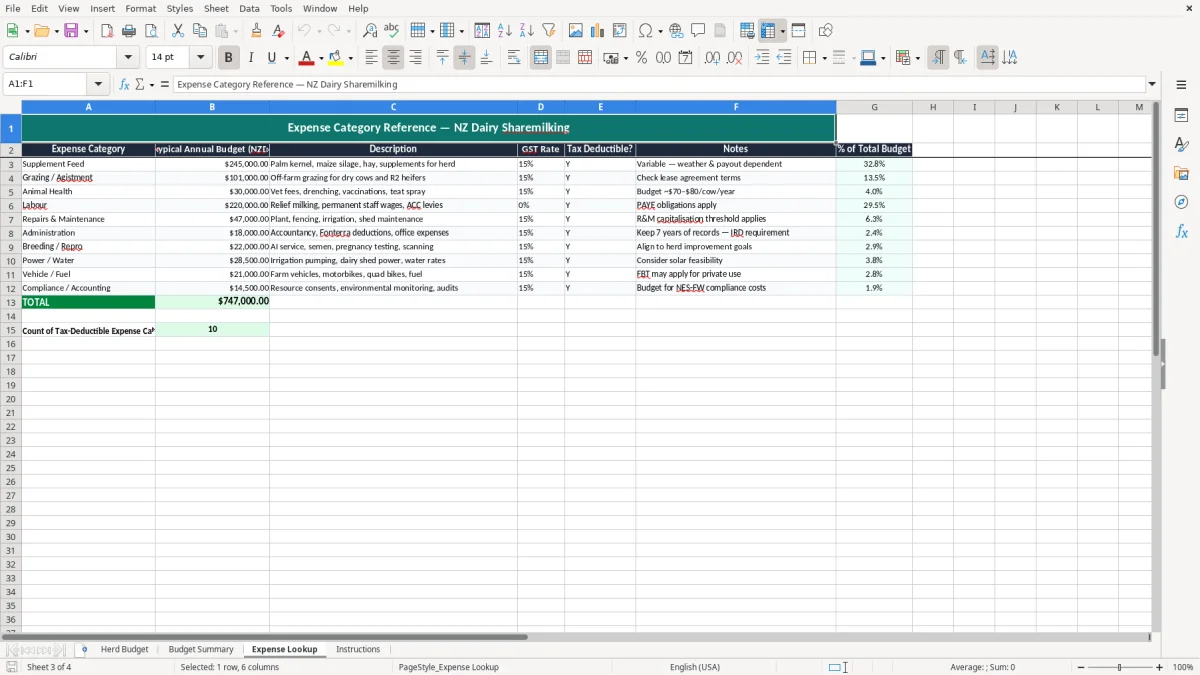
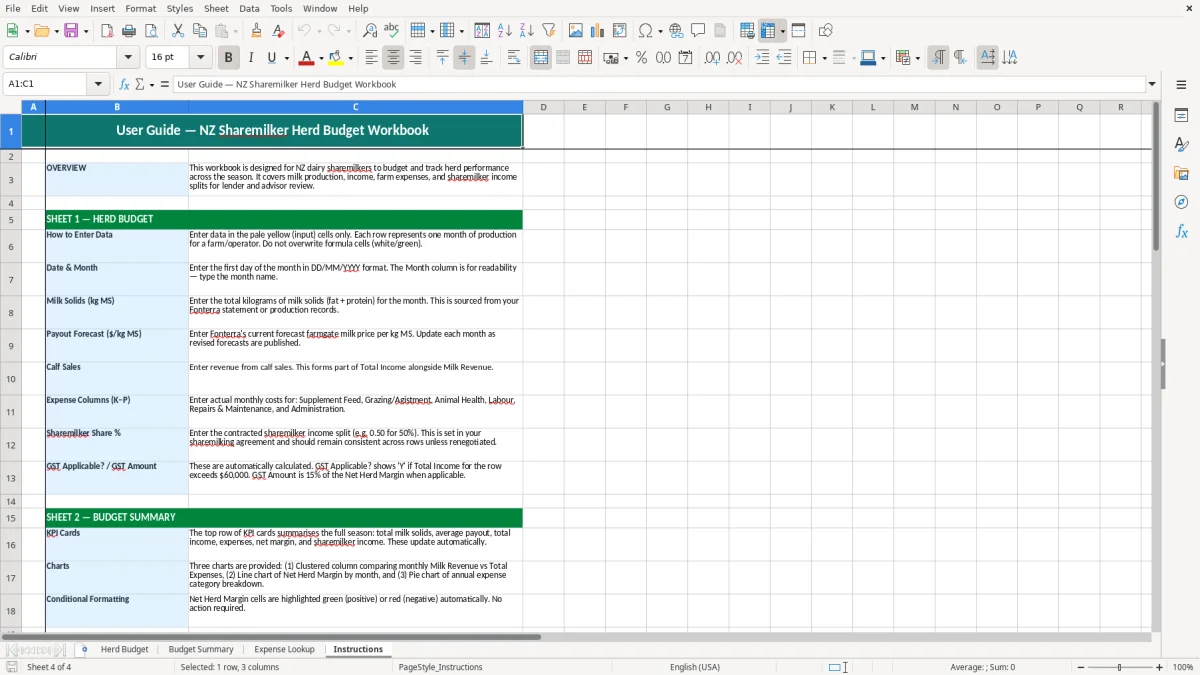
The four-sheet layout keeps the numbers in order: image 1 shows the budget input sheet, image 2 the summary dashboard, image 3 the lookup table for expenses, and image 4 the guidance sheet.
The key benefits of this Excel template
- Gives you one place to budget herd income and expenses before the season starts.
- Helps you test cash flow against expected milk returns, not just year-end profit.
- Separates key inputs from the summary so you can update figures without breaking the layout.
- Makes it easier to compare actual costs with budgeted amounts line by line.
- Reduces missed items like animal health, grazing, or feed support costs.
- Works well for a sharemilker managing a herd budget with a lender, owner, or partner.
- Saves time at monthly review by keeping the structure consistent across the whole workbook.
Step-by-step guide
- Open the Herd Budget sheet and enter your income and expense assumptions. Start with milk income, stock numbers, and the main cost lines you know will apply.
- Check the Expense Lookup sheet first if you want a clean reference list for common herd costs. Use it to keep descriptions consistent across the workbook.
- Move to the Budget Summary sheet and review the totals. This is where you check whether the planned margin leaves enough room for farm working expenses.
- Use the Instructions sheet if you want a quick reminder of what goes where. It is handy when you return to the file after a few weeks away from it.
- Update the figures whenever payout expectations, feed costs, or livestock costs change. A budget only stays useful if you keep it current.
- Save a fresh copy each season so you can compare one year with the next. That makes it easier to spot where margin moved and why.
Included features
Herd Budget sheet for entering income and farm cost assumptions.
Budget Summary sheet that brings the figures together in one view.
Expense Lookup sheet for standardising cost descriptions.
Instructions sheet to guide first-time use and reduce setup mistakes.
Simple workbook structure that suits sharemilkers and farm managers.
Clear layout for reviewing budgeted totals before the season begins.
Useful for comparing planned herd costs against actual results later on.
How a sharemilker uses a herd budget in New Zealand
A sharemilker uses a herd budget to turn a season’s milk income and farm costs into a working plan. If you are budgeting for 280 cows at 420 kgMS per cow, you can quickly test whether the expected payout covers feed, grazing, animal health, and labour before the season locks in.
The Herd Budget sheet is the place for those inputs, while the Budget Summary sheet shows the end result. That is useful when you are sitting with a farm owner, banker, or accountant and need a clear answer on whether the numbers stack up.
Where this fits in the season
Most sharemilkers start this sort of budget before the milking season kicks off, then review it after payout updates or a feed decision. A 5% change in milk income on a $420,000 budget is $21,000, so even small moves matter.
Why the split sheets help
Keeping inputs separate from the summary makes the file easier to run month by month. If a grazing cost changes from $2.10 to $2.35 per cow per day over 90 days, you can adjust one line and see the effect straight away.
New Zealand budgeting rules and records to keep
A herd budget is not a tax return, but it still needs to sit inside your wider bookkeeping. If you are a sole trader, you will still need IRD records for provisional tax, and Inland Revenue expects you to keep business records for 7 years.
If your farming structure is a company, the numbers still need to flow into the IR4 and year-end accounts. A budget that shows the season by month helps you compare cash flow against the 31 March balance date and avoid a surprise tax bill later.
GST and farm budgeting
If you are registered for GST, remember the standard rate is 15% and compulsory registration starts once turnover passes $60,000 in any 12-month period. A budget that separates GST-exclusive and GST-inclusive amounts is easier to reconcile with your GST return.
Payroll and farm staff costs
If the herd budget includes staff, build in PAYE, KiwiSaver, and ACC from the start. For example, paying a worker $26.00 an hour for 40 hours a week is $54,080 a year before employer KiwiSaver, ACC levies, and holiday pay are added.
Where herd budgets go wrong and what it costs you
The usual failure is undercooking variable costs. If feed is budgeted at $1.90 per cow per day but the season needs 100 cows over 120 days, a 30-cent miss becomes $3,600 before you have even touched health or grazing.
Missing the milk income swing
Another mistake is locking in payout assumptions too early and never revisiting them. On 320,000 kgMS, a drop of 20 cents per kgMS cuts income by $64,000, which can wipe out the margin you thought you had.
Leaving labour and on-farm jobs out
People also forget the real cost of work done by family members, contractors, or relief milkers. If you need 12 relief milkings at $180 each, that is $2,160 you cannot leave buried in a general expense line and hope to find later.
Using a messy sheet with no reference list
Without an Expense Lookup sheet, costs get entered three different ways and the summary becomes hard to trust. That wastes time at review meetings and usually means someone has to rebuild the numbers by hand.
That same level of consistency applies to IRD number records, where a simple reference list keeps details from being entered three different ways.
How to turn the herd budget into a monthly habit
The easiest way to keep this spreadsheet alive is to review it on the same day each month, right after the pay run or milk income check. If the file gets updated on the first Monday after payout, it becomes part of the routine instead of a one-off exercise.
Small habits that keep it clean
- Copy the current season tab before you make major changes, so you always have a clean comparison point.
- Use the lookup sheet for repeat expense names, so one cost is not entered under five slightly different labels.
- Highlight totals that move outside expectation, especially if a key cost rises by more than 10%.
When to move on from a spreadsheet
If you are running several blocks, multiple staff, or lots of stock movements, you may outgrow the workbook and need proper farm accounting software. That usually happens when the manual updating starts taking more than an hour each month or when the budget no longer matches the actual cash records cleanly.
Common questions about this template
It is for sharemilkers, farm managers, and bookkeeping staff who need a practical season budget for milk income and herd costs. If you are planning around 280 cows or 320,000 kgMS, it gives you a clean place to work from.
The workbook has four sheets: Herd Budget, Budget Summary, Expense Lookup, and Instructions. That structure keeps the inputs, totals, and reference list separate so the file is easier to use.
Yes. If you are GST-registered, you can use the budget to separate GST-exclusive planning from GST-inclusive cash flow. That is useful when you are preparing a GST return at 15% and want fewer surprises in the bank account.
Update it whenever milk income, feed costs, or stock costs move enough to change the season outcome. For most users, a monthly review fits well with payout changes, supplier invoices, and payroll.
No. It is a planning tool, not a ledger. If you need full invoicing, bank feeds, and reconciliations for a farm business, software like Xero or MYOB will usually be the better fit.
It keeps cost names consistent, so you do not end up with the same expense entered three different ways. That makes the summary easier to read and cuts down the time needed to review the budget later.
Download
File format
Excel (.xlsx)
Compatible software
Excel, Google Sheets, LibreOffice
Price
Free