
Rugby Subs Fees Tracker Excel – Free Template (2026)
Accounting & GST
IRD Number Record Keeping Excel - Free Template
Track IRD numbers, NZBNs, verification dates, tax types and update status in one NZ compliance register.
2026-06-30
195 downloads
4.8/5 average rating
Download template
This Excel template is an IRD number record keeping register for New Zealand businesses, contractors and clubs. It helps you store names, NZBN, IRD numbers, verification dates, tax type, update status and notes in one file.
The workbook has three sheets: IRD Register for the data entry table, Summary Dashboard for the key counts and status view, and Instructions for setup help. It is built for tidy compliance records, not just a list of names.
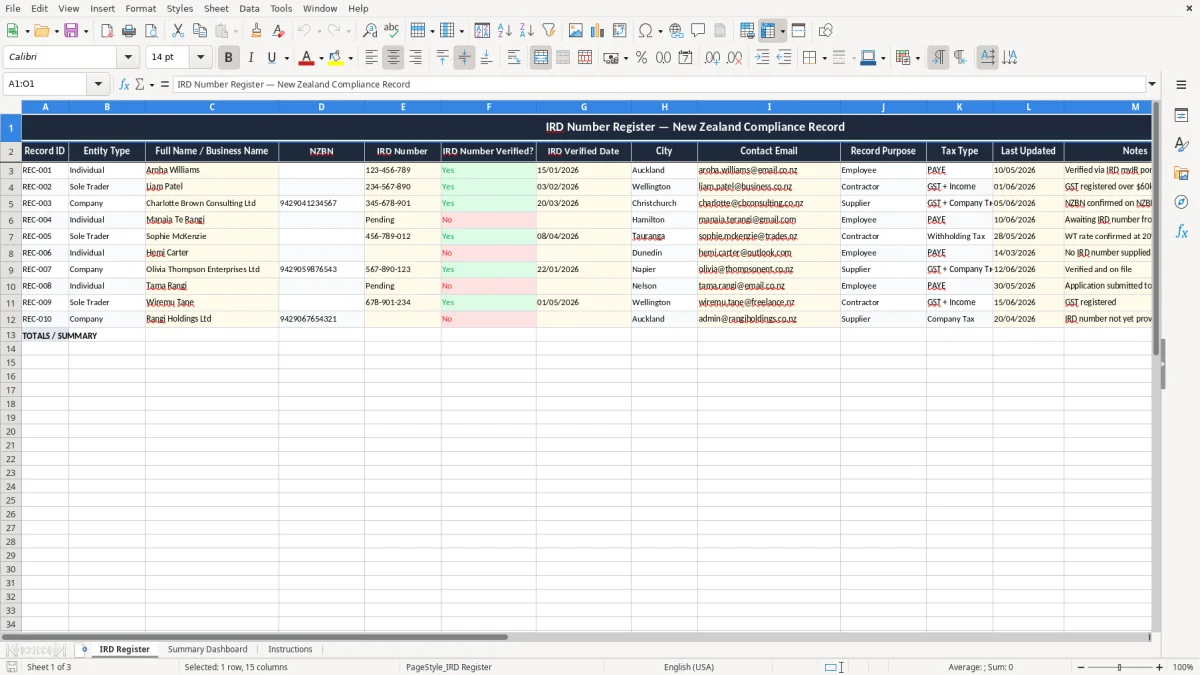
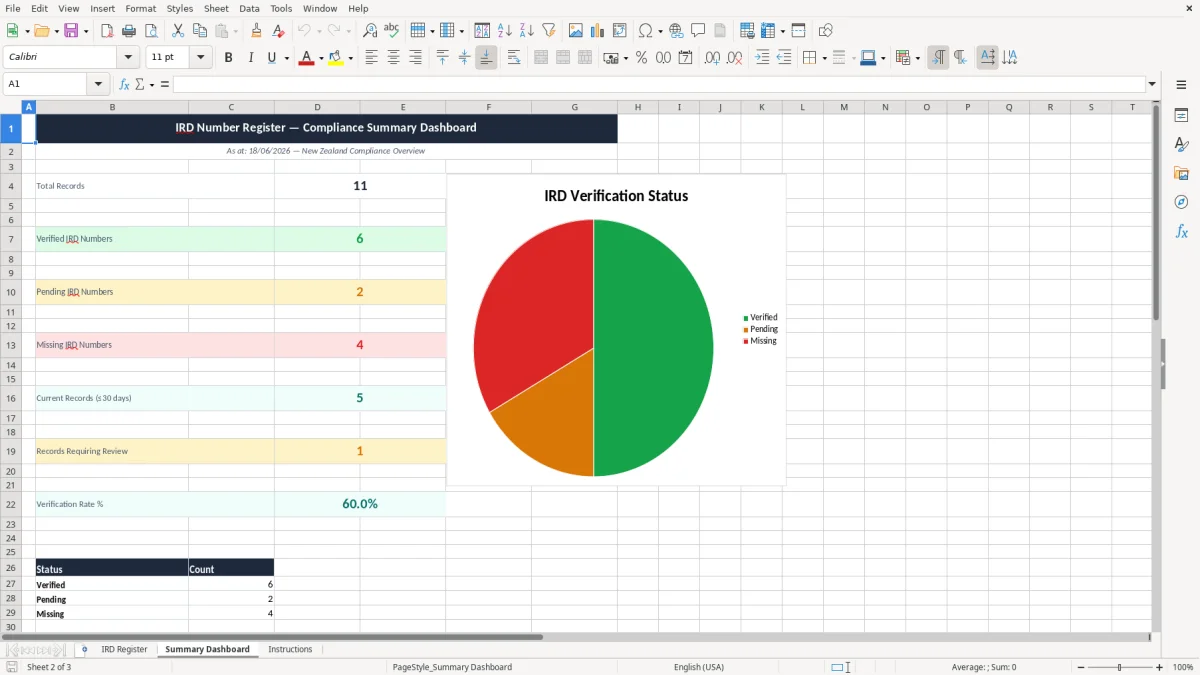
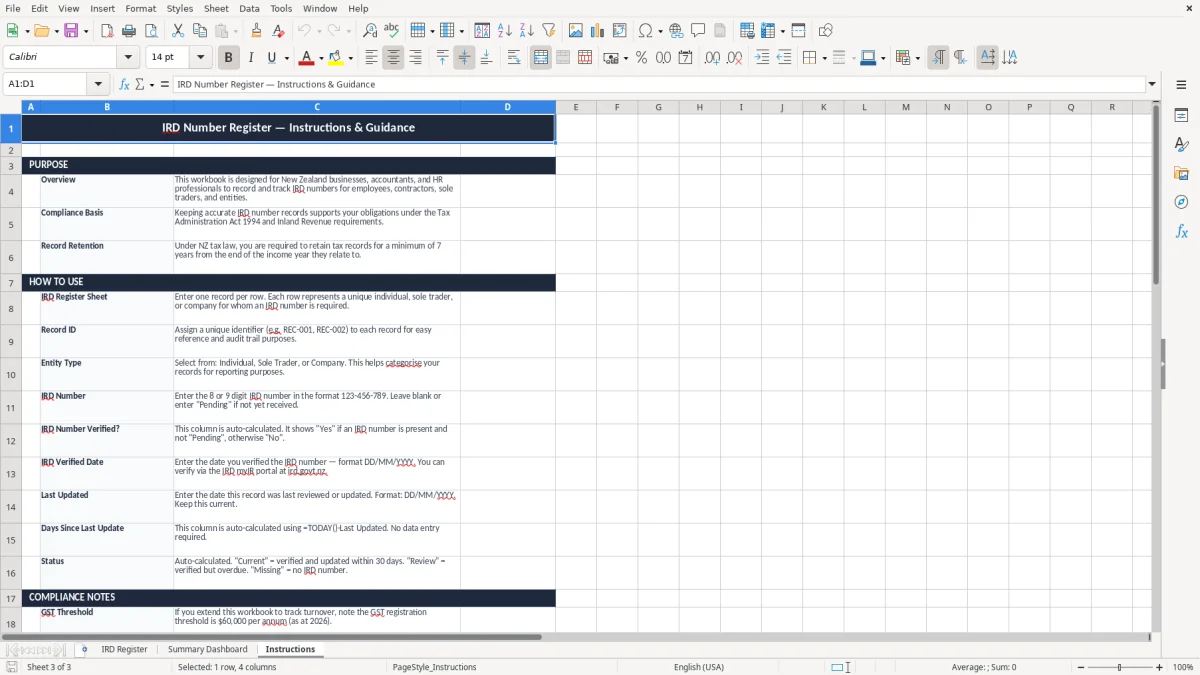
Image 1 shows the register table with clear headers, highlighted input rows and a status column. Image 2 shows the dashboard summary, while image 3 gives you the steps to keep the file current.
The key benefits of this Excel template
- Keeps all IRD numbers, NZBN details and contact records in one place instead of scattered across emails and notes.
- Tracks verification dates and last-updated dates so you can see stale records before they become a problem.
- Shows days since last update so you can spot records that have not been checked for 30, 60 or 90 days.
- Separates entity type, tax type and record purpose, which makes it easier to find the right client, contractor or employee record fast.
- Helps a sole trader, bookkeeper or office manager maintain a clean compliance trail for Inland Revenue checks.
- Summary Dashboard gives a quick count of verified versus unverified records without having to filter the table.
- Works as a simple monthly control: update 20 records in 15 minutes, then keep moving.
Step-by-step guide
- Open the IRD Register sheet and enter each person or business on a separate row. Use the sample records as a guide for the level of detail expected.
- Fill in the core fields first: record ID, entity type, full name or business name, IRD number, and NZBN where relevant. Add contact details and the purpose of the record so you can find it later.
- Mark whether the IRD number has been verified and record the date you checked it. If you verified 12 records on 15/01/2026, put that date against each one you confirmed.
- Update the Last Updated field whenever you change a record. The Days Since Last Update and status columns then help you see which lines need attention.
- Use the Summary Dashboard to review how many records are active, verified or overdue. If 8 out of 50 records are overdue, you know where to start.
- Check the file on a fixed routine, such as the first week after each GST return or payroll run. That keeps the register current instead of letting it drift for months.
- Read the Instructions sheet whenever you hand the file to someone new. It explains the layout so a new admin person can take over without guessing.
Included features
15-column register with fields for record ID, entity type, name, NZBN, IRD number, verification, dates, tax type and notes.
Built-in Summary Dashboard to show the overall record count and status split at a glance.
Separate Instructions sheet so a new staff member can use the workbook without training.
Status tracking based on the age of the last update, which helps you prioritise stale records first.
Clean, colour-coded layout with clear headers, input shading and a readable one-row-per-record structure.
Sample data already included to show how an individual, company or contractor record should be entered.
Suitable for PAYE, contractor, employee and other compliance records where you need the IRD number on file.
Who uses an IRD number register in New Zealand
This register is for the people who have to prove they have the right number on file, not for theory. A bookkeeper at a small Ltd company might be checking 40 supplier or contractor records before the GST return, while a tradie office manager may only need 12 active people but needs them right every time.
The workbook suits a sole trader who keeps a few staff and casuals, a club treasurer who handles reimbursements, or a contractor admin person who wants one clean list before payday filing. If you have 25 contractors and each record takes 3 minutes to confirm, that is only about 75 minutes of tidy work instead of hunting through old emails.
When the file saves time
It is most useful when records change often: a new employee starts, a subcontractor updates their contact details, or you need to confirm an IRD number before you load a pay run. In a small Christchurch builder with 4 staff and 6 regular subcontractors, a single register stops the office from chasing the same details twice.
Why a spreadsheet still works
For small teams, a spreadsheet beats a scattered inbox because you can sort, filter and update the whole set in one screen. The template gives you the basic controls without making you buy software you do not need yet.
What IRD expects you to keep on file
Inland Revenue expects you to keep business records for 7 years, so this register is built as a long-term compliance file rather than a one-month checklist. If you are storing IRD numbers for employees, contractors or suppliers, the practical job is to keep enough detail to show who the record belongs to, when it was checked, and why you hold it.
This template captures the useful identifiers: full name or business name, IRD number, NZBN, tax type, contact email, and verification date. That gives you a clear audit trail if you ever need to match a payment, contractor file or payroll record back to the correct person.
Useful distinctions in the register
An individual record is not the same as a company record, so the entity type matters. A sole trader may use their personal IRD number, while a company will usually also have an NZBN and separate payroll or supplier records, especially if PAYE is running through every fortnightly or monthly pay cycle.
Keeping the dates straight
The Last Updated and verified date fields are there for a reason: a record checked 18 months ago is not the same as one confirmed last week. If you update 10 records on 01/06/2026 and 4 more on 15/06/2026, the register shows exactly what was checked and when.
Where the register goes wrong and what it costs
The usual failure is simple: the number exists somewhere, but not in one place you can trust. Then someone re-enters the wrong IRD number, pays a contractor under the wrong record, or leaves an old address in place and the paper trail gets messy fast.
One wrong record can cost you more than embarrassment. If a bookkeeper spends 20 minutes per search across 18 records, that is 6 hours of admin in a month; at $35 an hour, that is $210 of avoidable time before you even count the risk of an incorrect payment or a delayed GST claim.
The mistakes I see most often
Common mistakes include using a blank NZBN field for a company, leaving verification dates empty, or failing to update the file after someone changes name or email. I have seen payroll teams chase the same contractor twice because the old record sat in a different folder and nobody knew which one was current.
Why stale records become a real problem
If 5 out of 30 records have not been updated in over 90 days, you are already carrying avoidable risk. By the time year end comes around on 31/03, those old records can slow down reporting, payment checks and any clean-up you need before final accounts are locked.
Those stale files also make withholding reconciliations harder, which is exactly where a withholding tax tracker keeps the current record tied to each payment.
How to make the register part of your routine
The easiest way to keep this alive is to tie it to something you already do. Update the register straight after the pay run, the GST return, or the first Monday of the month, and it stops being a special job that gets forgotten.
Simple habits that stick
- Review new records once a week so you never build up a backlog of unknown names.
- Copy the last month’s checked date forward only after you have confirmed the details again.
- Use the status field to flag anything over 30 or 60 days old so stale lines are obvious.
- Keep one person responsible for updates, even if more than one person can view the file.
If your register grows past a few hundred contacts, or multiple people need to edit it at once, you may be ready for proper bookkeeping or payroll software such as Xero or MYOB. For a small firm, though, this spreadsheet is usually enough to keep the basics under control without adding another system.
Once the records start feeding into tax time, the next step is the income tax return form.
Common questions about this template
It is used to store and track IRD numbers, NZBN details, verification dates, tax type and update status in one New Zealand compliance register. That makes it easier to manage employees, contractors, suppliers and other records in a single file.
Yes. The workbook includes a Summary Dashboard sheet that gives you a quick view of the record set, including overall status so you can see which lines need attention first.
The register includes Record ID, Entity Type, Full Name / Business Name, NZBN, IRD Number, Verified status, Verified Date, City, Contact Email, Record Purpose, Tax Type, Last Updated, Notes, Days Since Last Update and Status.
A monthly check is a good practical routine, and it is even better to update the register after each pay run or GST return. If you leave records untouched for 60 or 90 days, the status flags are there to show you where the file is going stale.
Yes. A sole trader can use it for their own records and contractors, while a company can use it for payroll, supplier and compliance records. The entity type field helps you separate individual and business entries cleanly.
Inland Revenue requires business records to be kept for 7 years. This template is set up to help you hold the key details in one place for that period without relying on memory or scattered files.
Download
File format
Excel (.xlsx)
Compatible software
Excel, Google Sheets, LibreOffice
Price
Free