
Rugby Subs Fees Tracker Excel – Free Template (2026)
Accounting & GST
RWT Tracker Excel - Free Template
Track resident withholding tax payments, rates and payer details with RWT Tracker, Summary Dashboard and Setup & Guide sheets.
2026-06-27
177 downloads
4.8/5 average rating
Download template
This RWT Resident Withholding Tax Tracker Excel spreadsheet records resident withholding tax payments, the rate used, and the net amount paid. It includes RWT Tracker, Summary Dashboard, and Setup & Guide sheets so you can keep payer details, amounts, and compliance status in one place.
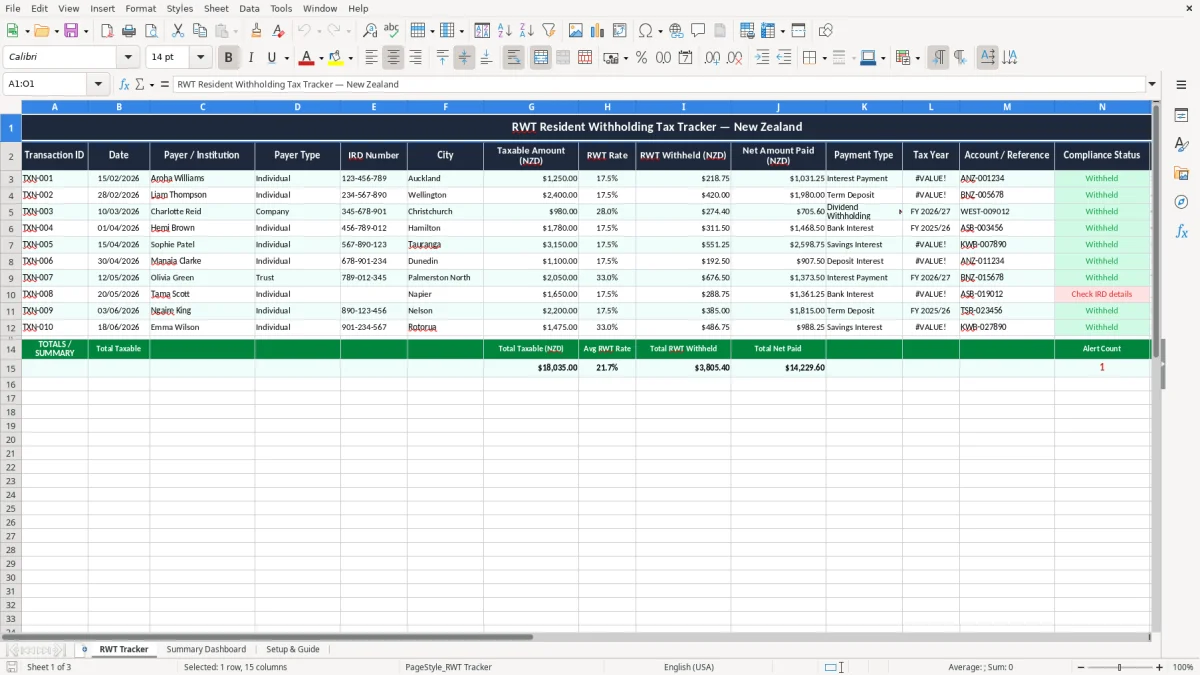
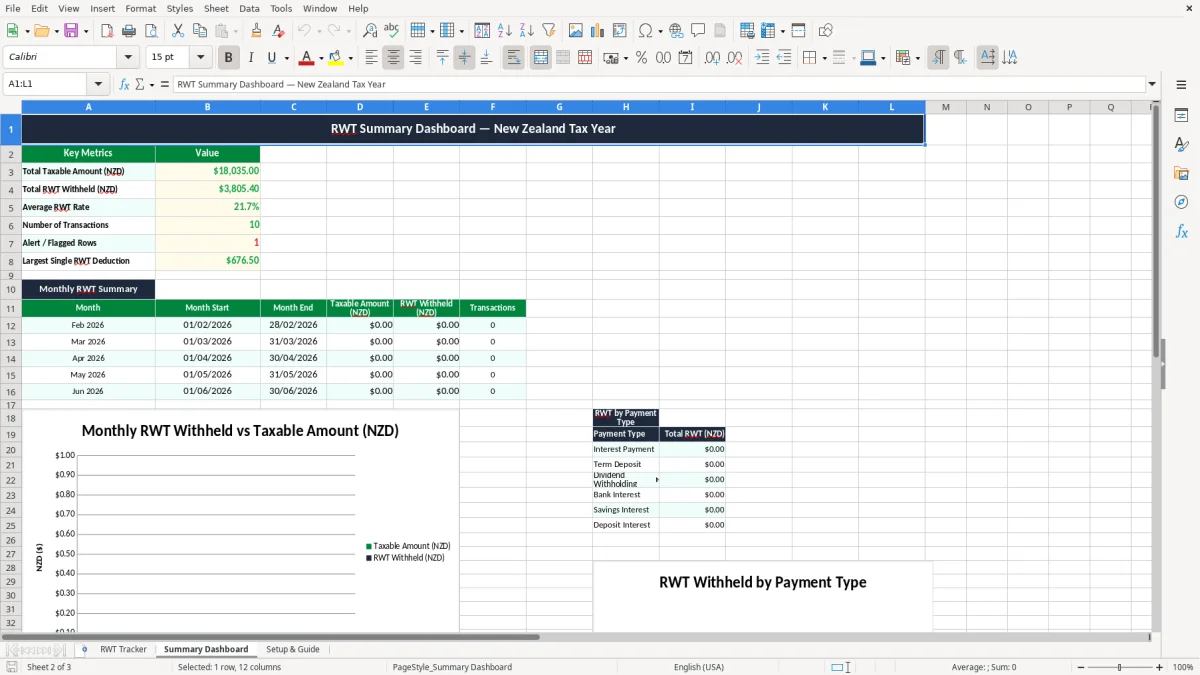
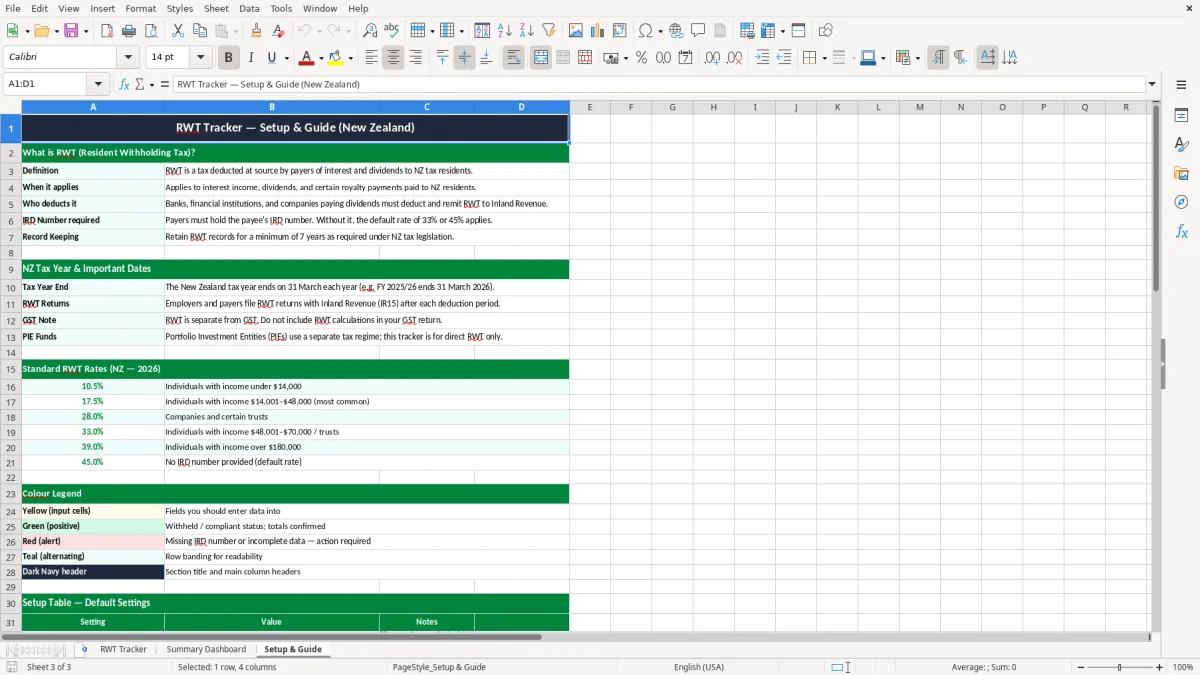
Image 1 shows the data entry sheet with columns for transaction ID, date, payer name, IRD number, taxable amount, RWT rate, withheld amount, net paid, and notes. Image 2 shows the dashboard summary, while image 3 gives you the setup notes so you can start fast without guessing the layout.
The key benefits of this Excel template
- Keeps each RWT transaction in one row so you can check totals at a glance.
- Shows taxable amount, rate, and withheld tax separately, which helps you spot mismatches fast.
- Helps you match payments to a payer, IRD number, and reference code without digging through bank statements.
- Makes it easier to reconcile interest, dividends, and other withholding income at year end.
- Gives you a clear compliance status column so you can see what still needs checking.
- Saves time when you are preparing records for Inland Revenue or your accountant.
- Works well for a sole trader, trustee, or small company that processes regular withholding payments.
Step-by-step guide
- Start on the RWT Tracker sheet and enter each payment on its own line. Use a fresh transaction ID, the payment date, and the payer name so your records stay easy to sort.
- Enter the taxable amount, the RWT rate, and let the withheld amount logic follow the template setup. For example, a $2,400 payment at 17.5% gives $420.00 withheld and $1,980.00 net paid.
- Check the payer type, IRD number, city, and account reference fields. These details matter when you need to trace a payment back to a bank deposit or a client ledger.
- Use the compliance status and notes columns to flag anything that needs review. If a payment is missing its IRD number or has the wrong rate, mark it before month end.
- Open the Summary Dashboard to review totals by year, rate, or payment type. This gives you a quick view before you file or reconcile.
- Read the Setup & Guide sheet before your first entry if you want a clean starting point. It helps you keep the same format every time you update the file.
Included features
15-column tracker covering transaction ID, date, payer details, amount, rate, and notes.
Built for New Zealand resident withholding tax tracking, not a generic cashbook.
Separate fields for taxable amount, withheld amount, and net amount paid.
Compliance status column for review and follow-up.
Summary Dashboard sheet for quick totals and trend checks.
Setup & Guide sheet for simple onboarding and consistent entry.
Clean colour coding that makes input cells and status fields easy to spot.
Who uses an RWT tracker in New Zealand
If you pay resident withholding tax on interest or other investment income, this spreadsheet keeps the numbers straight before you file anything or hand records to your adviser. It suits a small company paying a director-shareholder loan account, a trustee handling family trust interest, or a sole trader checking a bank deposit against a statement.
The sheet is practical when you have a handful of payments each month and do not want to lose the IRD number, payer reference, or rate used. For example, 18 payments at $1,250 each with 17.5% RWT means $3,937.50 withheld in total, which is exactly the sort of figure you want ready before year end.
For the people doing the actual reconciliation
An office manager in a Hamilton trade business might only touch this at month end, when the bank feed shows three investment payments and one needs checking. A volunteer treasurer at a sports club can use it to keep the club’s interest income tidy without building a full accounting system.
Why the detail matters
When you have one row per payment, you can sort by payer, city, tax year, or compliance status in seconds. That is much easier than trying to decode a bank statement two months later, especially if you are juggling GST, PAYE, and the rest of the books.
What IRD expects for resident withholding tax records
For NZ tax records, keep enough detail to show who paid you, how much was taxable, what rate was applied, and how much was withheld. Inland Revenue expects business records to be kept for 7 years, so this file should stay with your other tax working papers and bank support.
RWT itself is commonly applied at 17.5%, 30%, or 33% depending on the payer and income type, so the rate column is not just decoration. If you receive $10,000 of interest at 17.5%, the withheld tax is $1,750.00 and the net cash paid is $8,250.00.
Why the template uses separate fields
Keeping the taxable amount, RWT rate, and withheld amount in separate columns makes checking easier at tax time and reduces simple entry mistakes. If you only store the net payment, you have to back-calculate the gross figure later, and that is where errors creep in.
Where it fits with the rest of your returns
This tracker helps you line up the figures that feed your return and your year-end working papers, including any interest income you report on an IR3. If you run a company, it also gives you cleaner backup for the profit and loss and the supporting account reconciliations.
The mistakes that create messy RWT records
The most common slip is entering only the bank deposit and forgetting the gross amount, so the withheld tax never gets recorded properly. If a $2,400 payment is entered as $1,980 net only, you lose the $420.00 trail that should tie back to the payer and the tax rate.
Another one is using the wrong rate because the payer changed or the account opened on a different basis. That can mean a difference of hundreds of dollars over a year; five payments of $1,250 at the wrong rate can leave you short by enough to create a messy adjustment later.
What that costs you in practice
When the IRD number is missing, you spend time hunting through emails, statements, and old invoices just to prove the source of the income. That is a real loss of time, and in a busy month it can also delay your bank reconciliation or your adviser’s year-end work.
Where spreadsheet errors usually start
People also mix up tax years, especially around March and April, because one payer’s February and March amounts can land in different reporting periods. If you rely on memory instead of a dated log, you can end up with totals that do not match the bank by the time you finish the balance date files.
That same dated log also makes it easier to pull the figures into company tax return workings when the balance date files need reconciling.
How to make this tracker part of your month end
The trick is to use it on the same day each month, not whenever you remember. Most small businesses do well tying it to the bank reconciliation or the GST filing routine, because those are already fixed calendar jobs.
Simple habits that keep it alive
- Update the sheet on the first working day after your bank statement arrives.
- Copy the prior month’s lines and clear only the values that need changing.
- Use the compliance status column to flag anything you still need to check.
- Keep one folder for statements and one for your RWT workbook so the backup is easy to find.
When to move on from a spreadsheet
If you are tracking dozens of payers, multiple accounts, or high-volume distributions, a spreadsheet can start to feel clumsy. At that point, Xero or MYOB will usually be better for audit trail, bank feeds, and fewer manual corrections.
For smaller records, though, this file is enough to keep the numbers tidy and the year-end clean. A 10-minute monthly habit is a lot cheaper than spending two hours untangling one missed rate entry after 31 March.
At year end, those tidy totals can flow straight into an income tax return without rechecking every line item.
Common questions about this template
RWT means resident withholding tax. It is tax withheld from certain payments, commonly interest, so you need to record the gross amount, rate, and net amount paid.
It suits anyone in New Zealand who receives or pays withholding tax amounts and wants a simple record by transaction. That includes sole traders, trustees, small companies, and club treasurers.
The RWT Tracker sheet includes transaction ID, date, payer or institution, payer type, IRD number, city, taxable amount, RWT rate, withheld amount, net amount paid, payment type, tax year, account or reference, compliance status, and notes.
The Summary Dashboard gives you a quick view of totals so you can see what has been recorded without scrolling through every line. That makes month-end checking faster and helps you spot missing entries.
Keep your tax and business records for 7 years. That includes the spreadsheet itself, bank statements, and any backup that shows how you calculated the withholding tax.
Yes. It works alongside your cashbook, bank reconciliation, and year-end working papers, and it is a handy support file when you prepare figures for Inland Revenue or your accountant.
Download
File format
Excel (.xlsx)
Compatible software
Excel, Google Sheets, LibreOffice
Price
Free