
Watercare Bill Tracker Excel – Free Template (2026)
Personal Finance
ACC CoverPlus Levy Estimate Excel - Free Template
Estimate ACC CoverPlus levy, GST and total payable with a simple NZ spreadsheet for sole traders and small businesses.
2026-06-25
173 downloads
4.8/5 average rating
Download template
This ACC CoverPlus levy estimate Excel template helps you work out an estimated annual levy, the GST at 15%, and the total payable from your insured earnings. It includes three sheets: CoverPlus Estimate, Levy Summary, and Notes & Assumptions.
Use it if you want a quick estimate before you renew, budget for the year, or compare different earnings levels. The layout is built for New Zealand users, with simple input fields and a summary you can check at a glance.
The first sheet is where you enter policy details and earnings, the second sheet is a summary view, and the third sheet keeps the assumptions together in one place. That makes it easier to track the numbers you used if you revisit the estimate later.
The key benefits of this Excel template
- Estimates your annual ACC CoverPlus levy from your insured earnings, so you can budget before the bill lands.
- Adds GST at 15% automatically, which gives you the total cash outlay rather than just the levy amount.
- Shows policy-level detail for each client or trade, useful if you run more than one CoverPlus arrangement.
- Helps you compare different earning scenarios, such as $72,000 versus $95,000, before you lock in your cover.
- Keeps your assumptions in one workbook, which is easier to review than a rough note in a diary or inbox.
- Gives you a clean summary for planning cash flow across the year, especially if you pay levies out of operating account funds.
Step-by-step guide
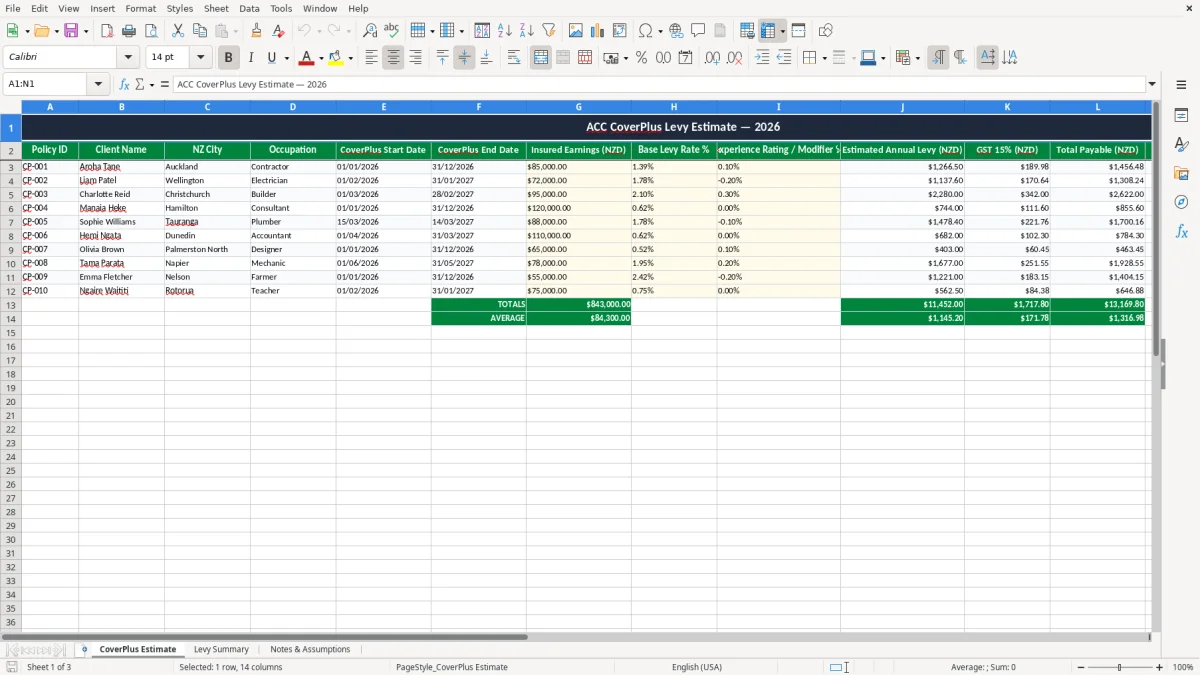
- Open the CoverPlus Estimate sheet and check the sample rows first. You will see fields for policy ID, client name, city, occupation, dates, earnings, rates, and notes.
- Replace the sample details with your own figures. Enter your insured earnings, the base levy rate, and any experience rating or modifier you have been given.
- Review the estimated annual levy and the GST 15% line. For example, if insured earnings are $85,000 and the combined rate is 1.49%, the levy is about $1,266.50 before GST.
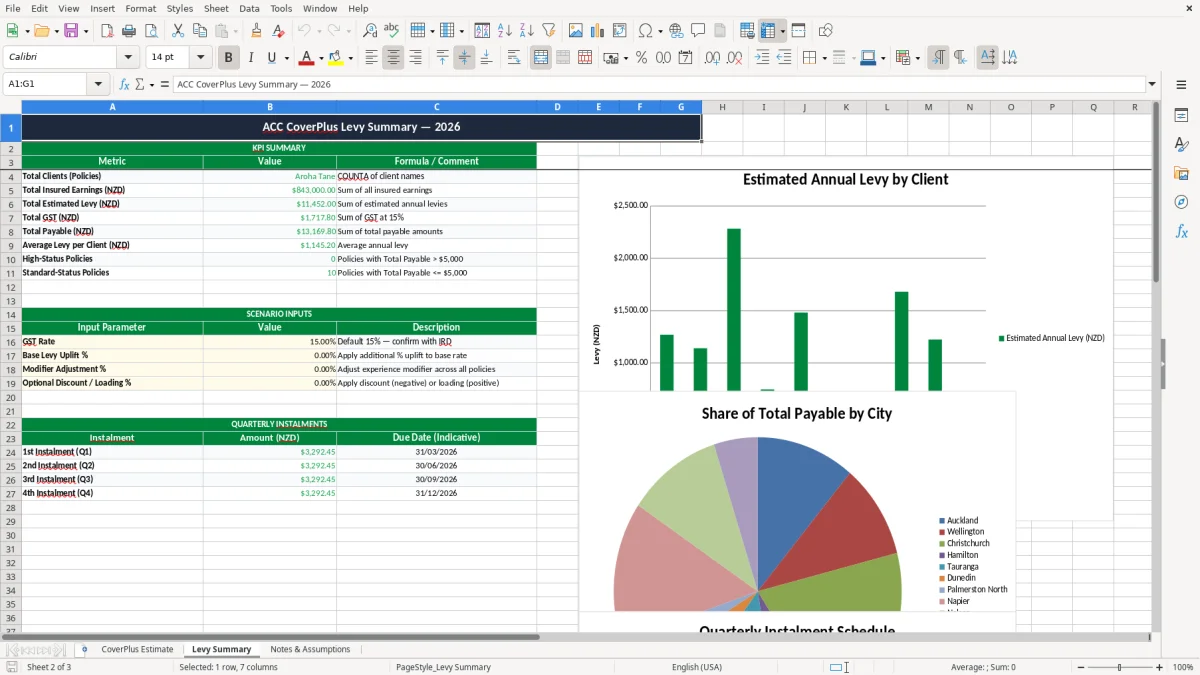
- Use the Levy Summary sheet to compare policies or clients. This is handy if you want one place to check totals rather than scanning every row.
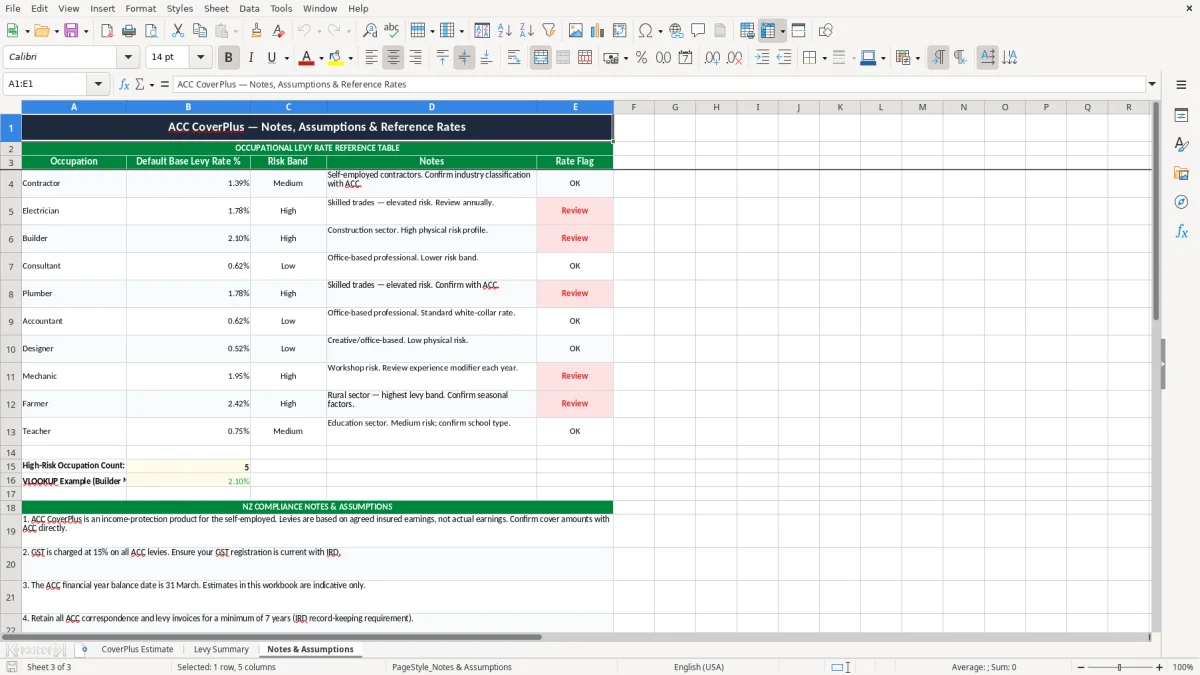
- Keep the Notes & Assumptions sheet up to date. Record where the rates came from, the date you checked them, and any special assumptions.
- Save a copy before each renewal or change in earnings. That gives you a clean record of what you estimated at the time.
Included features
Three-sheet workbook: CoverPlus Estimate, Levy Summary, and Notes & Assumptions.
Input columns for Policy ID, client name, city, occupation, start date, end date, insured earnings, base levy rate, modifier, and notes.
Estimated annual levy column that helps you see the pre-GST cost of CoverPlus cover.
GST 15% and total payable columns for a more realistic payment estimate.
Status and notes columns for tracking whether an estimate is draft, checked, or ready to use.
Formatted currency, percentage, and date cells that make entries easier to read and less error-prone.
Who uses an ACC CoverPlus levy estimate Excel sheet
This template is for sole traders, contractors, and small business owners who want a quick view of what ACC CoverPlus might cost before the renewal date or a new job starts. A builder on $95,000 of insured earnings, a sparky on $72,000, and a contractor with two policy lines can all use the same sheet and compare the numbers side by side.
The first sheet, CoverPlus Estimate, is set up for real-world planning, not theory. You enter a policy ID, client name, city, occupation, start and end dates, earnings, and rates, then the workbook estimates the levy and the GST on top.
Why the timing matters
You usually want this open when earnings change, before renewal, or when you are deciding whether the cover is still in line with your actual income. If your insured earnings move from $68,000 to $88,000, a 1.40% levy jumps from $952.00 to $1,232.00 before GST, so the difference is worth checking early.
What the summary sheet is for
The Levy Summary sheet gives you a cleaner view after the data entry work is done. That is useful for a bookkeeper at a small Ltd company or an office manager at a tradie firm who needs one page to review several policies without digging through every line.
What ACC and Inland Revenue expect you to keep on file
For levy planning, the key rule is not a special ACC form — it is keeping enough support for the figures you used. Inland Revenue expects business records to be kept for 7 years, and that is the right discipline here too: keep the rate notice, the earnings basis, and any assumption you used to build the estimate.
If you are a sole trader, the estimate sits alongside your tax records, provisional tax planning, and your year-end return. A $1,200 levy estimate is not just a random number; it becomes part of your cash flow forecast and your profit and loss planning for the year ending 31/03/2026.
GST and the payable amount
This workbook includes GST at 15% because the cash you need to set aside is the total payable, not just the levy. For example, a $1,500 levy becomes $1,725.00 once GST is added, which is the number that matters when you are checking what leaves the bank account.
Structure and use
If you trade through a company with an NZBN, you can still use the sheet the same way, but you will normally want the policy and earnings basis written down cleanly in the notes. That makes it easier to reconcile the estimate later if the actual levy or cover changes after renewal.
Where levy estimates go wrong in small business
The biggest mistake is using the wrong earnings figure. If you estimate on $60,000 when the cover should be based on $84,000, you are short by 40% before you even get to the rate, and that can leave a nasty gap in your budget.
Missing the GST on top
People often stop at the levy amount and forget the 15% GST. On a $1,800 levy, that is another $270.00, which is enough to throw off a monthly transfer if you are already tight on cash flow.
Using stale rates
Another trap is carrying forward last year’s rate into a new estimate. If the base rate or modifier changes by even 0.30 percentage points, a $90,000 earnings base shifts by $270.00 a year, and that is before you factor in GST.
How the notes sheet protects you
The Notes & Assumptions sheet is there to stop you guessing later. If you write down that the estimate was built on an 01/02/2026 start date, a 1.78% base rate, and a -0.20% modifier, you can see exactly why the total came out the way it did when the bill arrives.
That same rate trail also matters when you prepare the GST return record, because the filing figures need to match the assumptions behind the estimate.
How to make levy checking part of your month-end
The easiest way to keep this spreadsheet useful is to tie it to another routine you already do. For many New Zealand businesses, that means checking it at pay run time, when you review GST, or when you sit down for month-end.
Simple habits that keep it alive
- Copy the prior policy row before you change any rates, so you can compare like with like.
- Update the notes each time you check a new rate or renewal date.
- Set one fixed review day, such as the first Friday after month-end, so the file does not get forgotten.
- Use the summary sheet to flag any estimate that has moved by more than $250.00 since the last check.
When spreadsheet work becomes software work
If you are tracking dozens of policies, multiple staff, or changing premiums every week, a spreadsheet starts to creak. That is usually the point where you move the billing or levy workflow into Xero, MYOB, or another system and keep Excel for review only.
For a one-person operation or a small contractor file, though, this workbook is often enough. It gives you a quick number, a record of the assumptions, and a cleaner way to plan your next payment.
For a one-person operation or a small contractor file, though, this workbook is often enough, while a PAYE deductions calculator is the next step for estimating take-home pay alongside each payment.
Common questions about this template
It estimates the annual CoverPlus levy from your insured earnings, adds GST at 15%, and shows the total payable. The workbook has three sheets: CoverPlus Estimate, Levy Summary, and Notes & Assumptions.
It suits sole traders, contractors, and small businesses that want a simple planning tool for ACC costs. It is especially handy if you need to compare multiple policies or budget for a renewal.
You need a policy ID, client name, city, occupation, start and end dates, insured earnings, the base levy rate, any experience modifier, and notes. Once those are in, the sheet calculates the levy and GST total.
Yes. The sheet includes a separate GST 15% line so you can see the total amount you may need to pay, not just the levy before tax.
Keep your records for 7 years to match Inland Revenue practice. That includes the rate basis, renewal details, and any notes showing how you built the estimate.
If you are managing many policies, recurring billing, or frequent rate changes, Excel can become clunky. At that point, a system like Xero or MYOB is usually a better home for the live numbers, with Excel kept for checking and planning.
Download
File format
Excel (.xlsx)
Compatible software
Excel, Google Sheets, LibreOffice
Price
Free