
Patrol Roster Excel – Free Template (2026)
Payroll & HR
PAYE Deductions Calculator Excel - Free Template
NZ PAYE calculator with employee deductions, net pay, employer costs, tax tables, and a summary dashboard.
2026-06-24
180 downloads
4.8/5 average rating
Download template
This PAYE deductions calculator Excel template is a New Zealand pay run workbook for working out gross pay, PAYE, KiwiSaver, ACC, student loan deductions, net pay, and total employer cost. It includes a PAYE Calculator sheet, tax tables, a summary dashboard, and instructions.
Use it when you are running wages for a small team, checking a manual payroll, or teaching someone how the numbers fit together. The template shows each employee line by line and then rolls the results into a simple summary you can read at a glance.
The sample data and layout are built for NZ payroll work, with dates, pay frequency, deductions, and status fields already set out. It is a practical way to keep the pay run tidy before you move the numbers into your payroll system or IR348 filing workflow.
The key benefits of this Excel template
- Calculates gross pay, deductions, net pay, and total employer cost in one sheet.
- Shows employee-by-employee results for up to 20 columns of payroll data.
- Helps you check KiwiSaver contributions at employee and employer level.
- Keeps PAYE, ACC, and student loan deductions visible on the same line.
- Uses a dashboard to summarise payroll totals without manual counting.
- Reduces pay-run errors by separating input cells from formula cells.
- Gives you a clear starting point for weekly, fortnightly, and monthly pay runs.
Step-by-step guide
- Open the PAYE Calculator sheet and replace the sample rows with your own pay run. Enter the pay date, employee name, city, pay frequency, and gross pay first.
- Check the deduction fields against your payroll settings. Use the tax code, KiwiSaver percentage, ACC levy rate, and student loan flag that apply to each employee.
- Review the calculated net pay and employer cost columns. For example, a $1,650 weekly gross pay with 3% KiwiSaver will not produce the same result as a $5,800 monthly salary.
- Use the Tax Tables sheet to confirm the rates you are applying. That is the sheet you lean on when you want the payroll maths to stay consistent across the whole pay run.
- Look at the Summary Dashboard after you enter the pay lines. It gives you a quick total for deductions and employer costs so you can spot anything that looks out of line.
- Read the Instructions sheet before your first run if you are handing the file to someone else. It helps a bookkeeper, office manager, or payroll admin use the workbook the same way every time.
Included features
PAYE Calculator sheet with 20 visible columns for payroll entry and results.
Tax Tables sheet for rate reference and payroll checking.
Summary Dashboard sheet for a quick view of totals and payroll status.
Instructions sheet for setup notes and step-by-step use.
Colour-coded input and output cells to separate what you type from what Excel calculates.
Built for NZ pay run work with fields for PAYE, KiwiSaver, ACC, and student loan deductions.
Sample employee rows to show how the workbook should be filled in.
Who uses a paye deductions calculator excel template in New Zealand
This is the sort of workbook you pull out when you are running a small pay run and need the numbers right before money leaves the bank. A Christchurch builder with 4 staff, a Hamilton office manager doing weekly wages, or a charity treasurer paying a part-time coordinator can all use it to check gross pay, deductions, and net pay line by line.
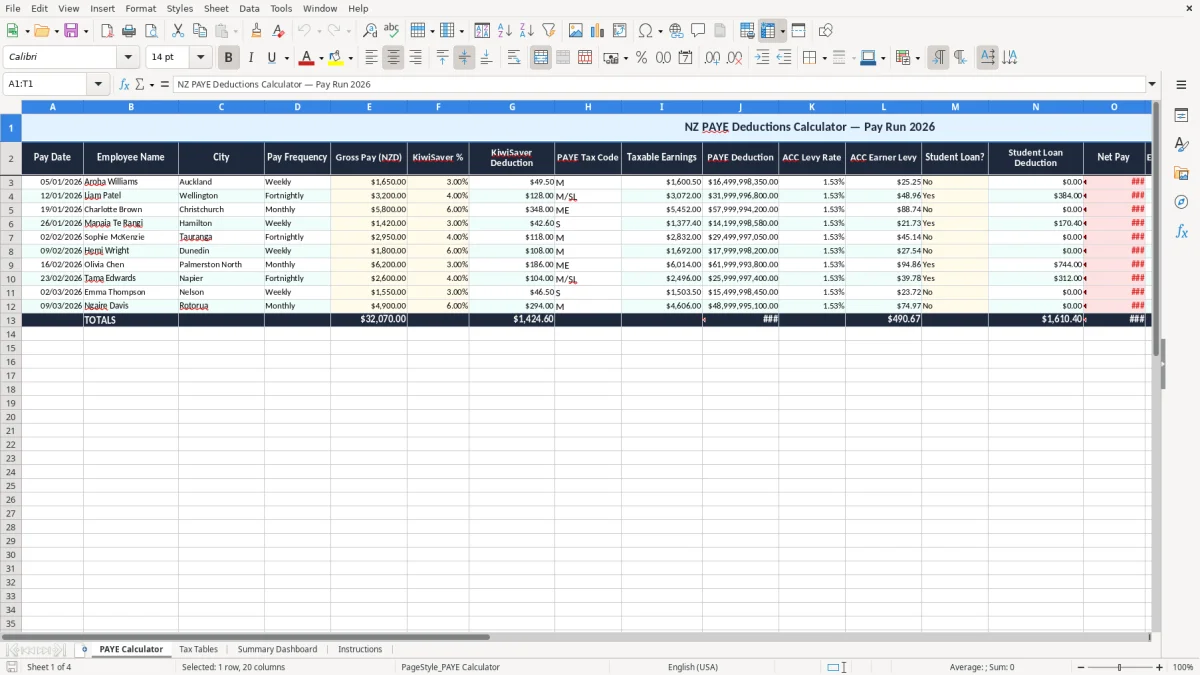
Image 1 shows the PAYE Calculator sheet with a wide table across 20 columns. The first columns capture the pay date, employee name, city, pay frequency, and gross pay; the later columns calculate KiwiSaver, PAYE, ACC, student loan deductions, net pay, and total employer cost.
Why the layout matters in a real pay run
When you are paying 6 staff on a Friday, you do not want to hunt through emails or a separate note pad for the tax code or KiwiSaver rate. A sheet like this keeps the pay run together, so if one worker is on $1,420 weekly and another is on $5,800 monthly, you can compare the effect immediately.
What the dashboard is for
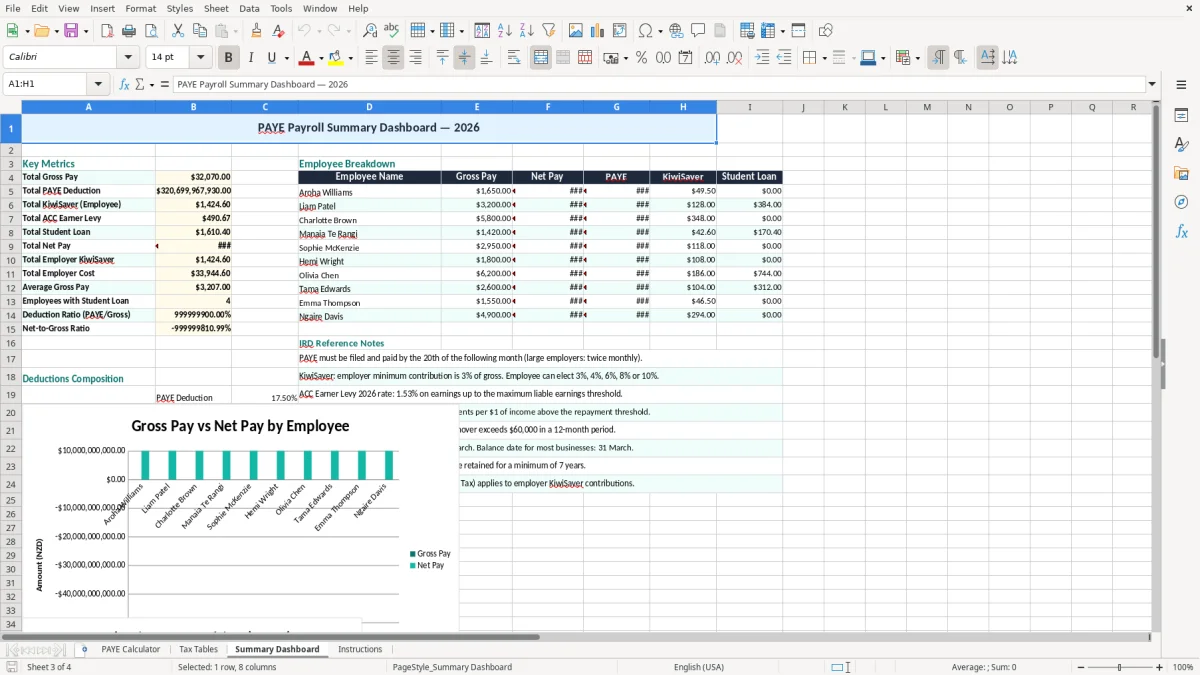
Image 3 shows the Summary Dashboard, which is useful when you want the totals without scanning every row. That is handy at month end, or when you are checking whether the employer cost is still sitting inside the cash flow you planned for the week.
What inland revenue expects for paye and payroll records
For NZ payroll, the main compliance anchor is Inland Revenue and the filing trail that sits behind each pay run. You need the employee details, pay dates, gross earnings, deductions, and payroll records kept for 7 years, because that is the period Inland Revenue expects you to retain business records.
The usual payroll pieces also matter: PAYE, KiwiSaver, and ACC deductions, plus student loan deductions where relevant. Employer superannuation contributions are generally 3% for KiwiSaver, and those amounts need to be shown clearly so you can reconcile them to the pay run and the bank payment.
The rates and filings that sit around the workbook
In practical terms, this workbook helps you line up the numbers that feed your payday filing and payroll records. If you have an employee on $1,650 gross pay at 3% KiwiSaver, the employee contribution is $49.50 before tax calculations are even finished, so having the spreadsheet do that consistently saves time and mistakes.
The template also suits teams that still reconcile payroll manually before pushing figures into software. If you are the sole trader with one apprentice, or the office manager at a small company with an NZBN, this gives you a clean check before you finalise the pay run.
Using the tax tables sheet properly
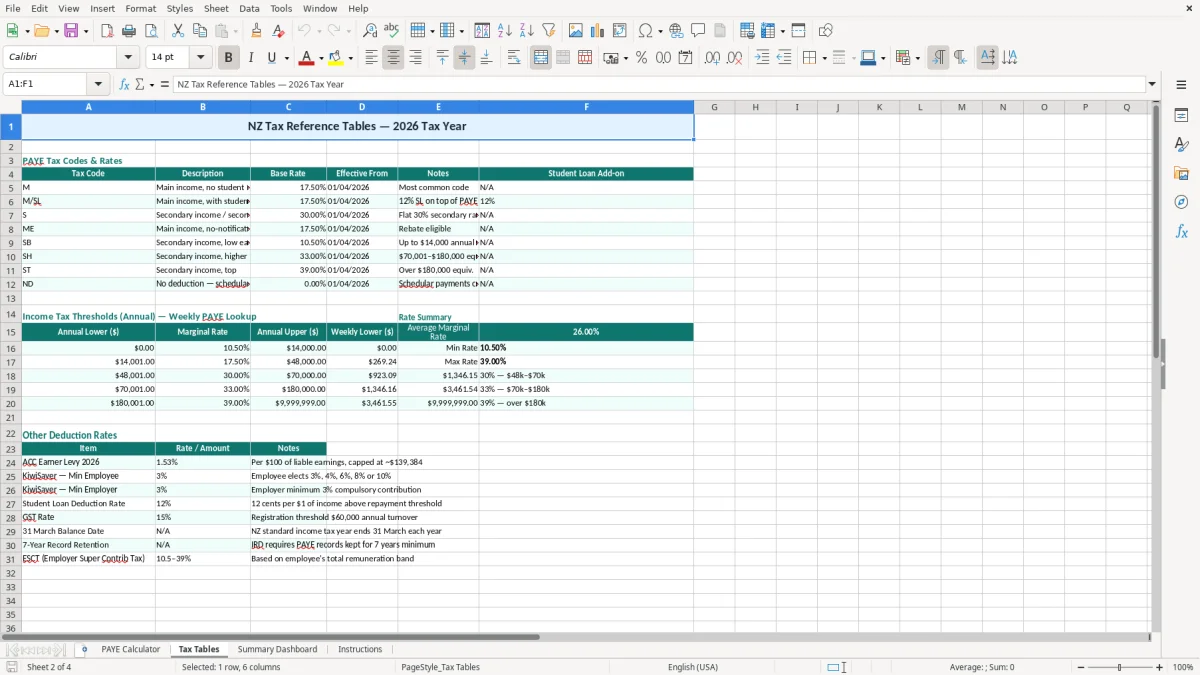
Image 2 shows the Tax Tables sheet, which is there so you can check the rates beside the pay line instead of guessing. That is useful when you are comparing weekly, fortnightly, and monthly wages in the same workbook and need one place to confirm the settings.
Where paye calculations go wrong and what it costs
The biggest errors in payroll are usually small and expensive: the wrong KiwiSaver percentage, a missed student loan flag, or using the wrong tax code for one employee. A mistake of $25 a week does not sound huge, but across 10 pay runs it is $250, and that is before you count the time spent fixing the employee record and reversing the payment.
A common slip is forgetting that the employer cost is more than gross wages. If you pay a staff member $3,200 fortnightly and only budget for the gross amount, you can be short once you add employer KiwiSaver, ACC, and any allowance or super contribution, which is how cash flow gets tight fast.
Examples from the workshop table
I have seen small firms enter student loan deductions on one employee but not another because the status was recorded in a phone note rather than the payroll sheet. That sort of miss can turn into a correction run, an awkward chat with staff, and a second bank transaction that should never have been needed.
Image 1 makes the status and notes columns obvious, which is helpful when one worker is on leave, one is a casual, and one is getting a fixed allowance. Those little labels matter because they stop you treating every line as if it were the same kind of pay.
Why manual checking still pays off
Even if you use payroll software, a spreadsheet check can catch outliers before the pay goes out. If one line shows net pay that is too close to gross pay, or an employer cost that looks too low for a full-time worker, you know to stop and check the deduction columns first.
That kind of close checking usually leads straight into confirming each worker’s tax code, so the next useful step is an IR330 declaration tracker for keeping those details aligned with the payroll lines.
How this spreadsheet becomes part of your regular pay run
The easiest way to make this work is to tie it to a fixed payroll habit, not to your memory. For many small businesses that means loading it every Thursday before the Friday pay run, or every second Tuesday if you pay fortnightly, so the sheet becomes part of the routine rather than a separate job.
Simple habits that keep it moving
- Copy the previous pay period and update only the changing lines, so you are not rebuilding the sheet from scratch.
- Use the same pay date format every time, such as 05/01/2026, so the records stay neat and sortable.
- Check the dashboard before you pay, not after, so you spot odd totals while there is still time to fix them.
- Keep the instructions tab open for anyone who fills the file in while you are away.
If you are entering more than a few staff each pay cycle, use the workbook as a front-end check and then move the final numbers into payroll software such as Xero or MYOB. Once you are handling multiple allowances, leave types, or frequent changes to tax settings, the spreadsheet is still useful — but the software should become the main system.
When to move on from the template
If your team is growing past a simple weekly or fortnightly pay run, or you need automatic payday filing and leave tracking, that is the point to upgrade. The spreadsheet is still excellent for checking and training, but software is the better home once the payroll starts carrying more rules than columns.
Once payroll starts carrying more rules than columns, the next tidy handoff is an employer schedule reconciliation to confirm the totals line up before you file.
Common questions about this template
It calculates the main payroll numbers for a New Zealand pay run: gross pay, PAYE, KiwiSaver, ACC, student loan deductions, net pay, and total employer cost. It also includes a tax tables sheet, a summary dashboard, and instructions.
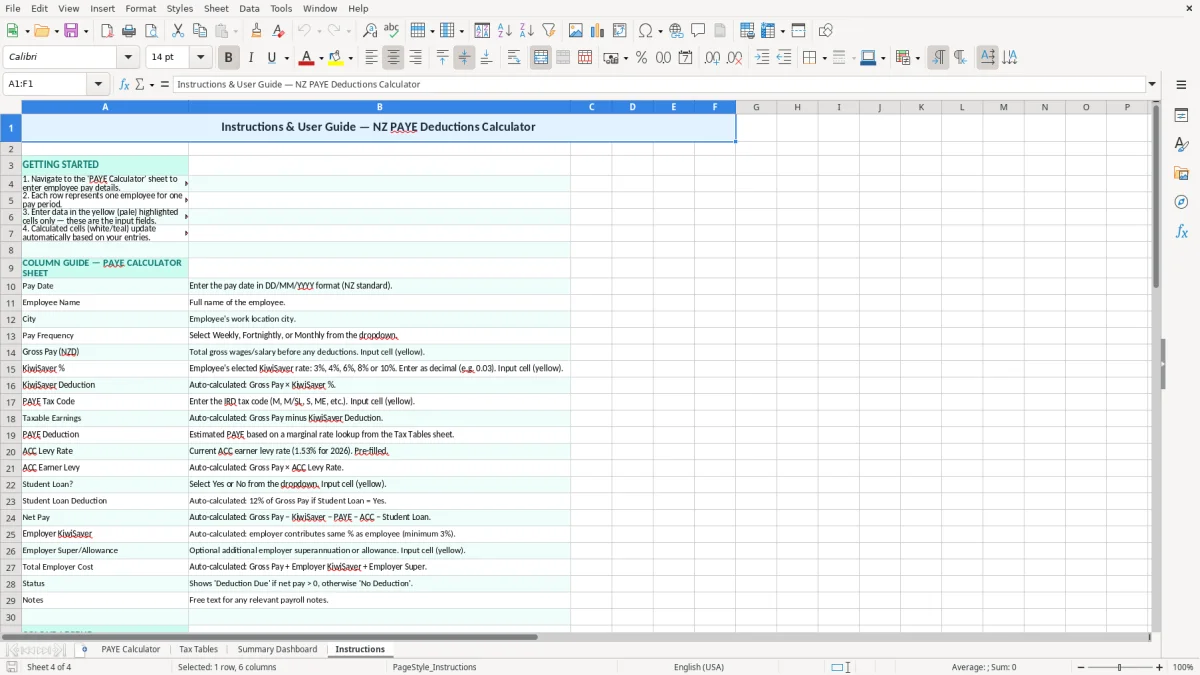
The workbook has 4 sheets: PAYE Calculator, Tax Tables, Summary Dashboard, and Instructions. Image 1 is the calculator, image 2 is the tax table reference, image 3 is the dashboard, and image 4 is the instructions tab.
Yes. The PAYE Calculator sheet includes pay frequency, so you can use it for weekly, fortnightly, or monthly pay runs and keep the payroll records in one place.
Yes. The template calculates employer KiwiSaver and total employer cost, which is the number you need when you are checking cash flow before a pay run. That helps you see the real cost of each employee, not just the gross wage.
Keep payroll records for 7 years. That includes the pay details, deductions, and supporting information behind each pay period, so you can back up your numbers if Inland Revenue asks for them later.
Move on when the pay run starts carrying too many variables for a simple workbook, such as leave tracking, automatic filing, multiple allowances, or frequent staff changes. The spreadsheet is best as a clear check and starter system; software is better once payroll becomes a regular operational job.
Download
File format
Excel (.xlsx)
Compatible software
Excel, Google Sheets, LibreOffice
Price
Free
Category
Payroll & HR
7 templates available