
Patrol Roster Excel – Free Template (2026)
Payroll & HR
IR348 Reconciliation Excel - Free Template
Track PAYE, KiwiSaver, ESCT and deductions against your IR348 employer schedule in one workbook.
2026-06-19
141 downloads
4.8/5 average rating
Download template
This IR348 employer schedule reconciliation Excel spreadsheet helps you match each pay run to what was submitted to Inland Revenue, line by line. It includes an IR348_Reconciliation sheet for employee detail, a Summary_Dashboard sheet for totals and variances, and a Lookups_And_Notes sheet for reference items.
Use it when you want a clean check between gross pay, PAYE, KiwiSaver, ACC, student loan and child support deductions, and the IR348 figures you filed. It is built for NZ payroll teams who need a quick way to spot a mismatch before it turns into a correction job.
The workbook is set up for a pay-period view, with employee rows, reconciled status, notes, and a dashboard that pulls the totals together. If you are running payroll for a small company, a trades crew, or a club with part-time staff, this keeps the filing trail easy to follow.
The key benefits of this Excel template
- Checks each employee line against the IR348 so you can catch differences before the month-end filing is locked in.
- Keeps gross earnings, PAYE, KiwiSaver employee, KiwiSaver employer, ESCT, ACC, student loan and child support in one place.
- Flags a variance amount so you can see the exact dollar gap, not just a yes/no result.
- Helps you reconcile one pay period at a time, which is easier than chasing errors across the whole year.
- Gives you a simple dashboard view for totals, so the payroll summary is visible at a glance.
- Creates a clearer audit trail for your payroll records and Inland Revenue queries.
- Saves time when a pay run changes because you only need to update the affected rows and refresh the totals.
Step-by-step guide
- Enter the pay period end date, employee name and IRD or NZBN reference on the IR348_Reconciliation sheet. Then fill in the pay figures for gross earnings and each deduction column.
- Compare the submitted PAYE amount with the payroll calculation for each employee. If the variance is not zero, check the pay run, any manual adjustment, and the filed IR348.
- Use the Reconciled? field to mark rows that match. This gives you a quick list of anything still needing a fix before you move on.
- Review the Summary_Dashboard sheet for totals by pay period. That is where you spot whether the issue is one employee, one deduction type, or the whole filing.
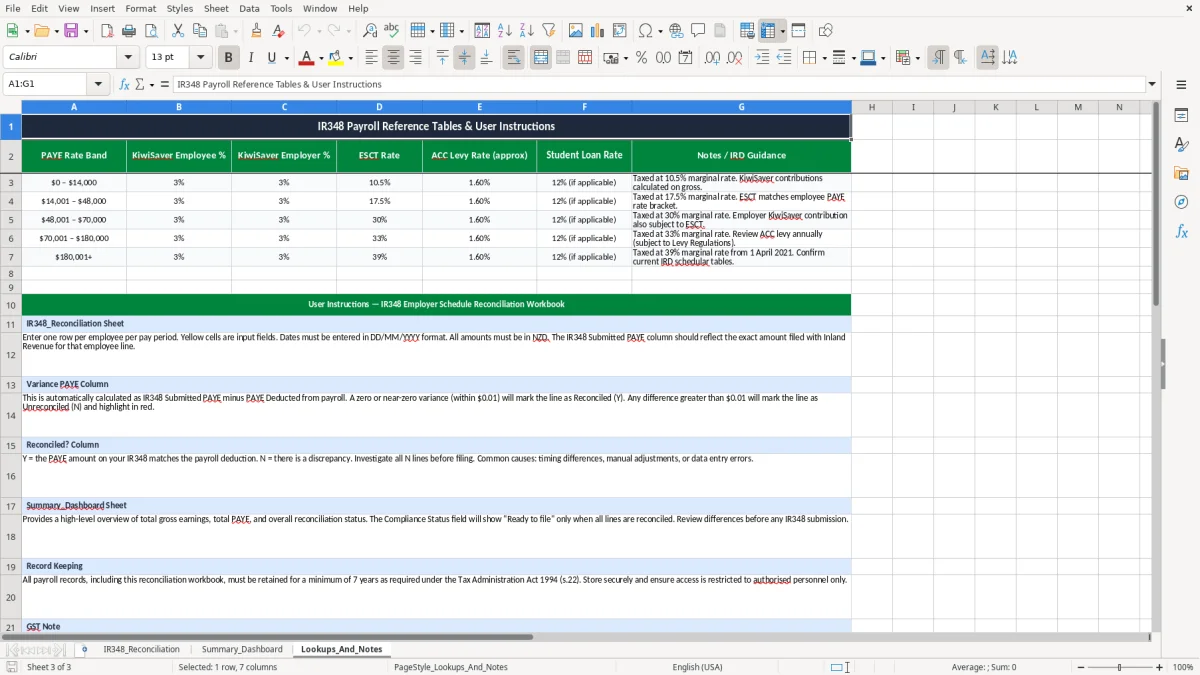
- Keep the Lookups_And_Notes sheet up to date with payroll references, rate notes and any changes to setup. That way the next pay run starts with the right defaults.
- Once the period is balanced, save the workbook with the filing date and keep it with your payroll records for your seven-year retention trail.
Included features
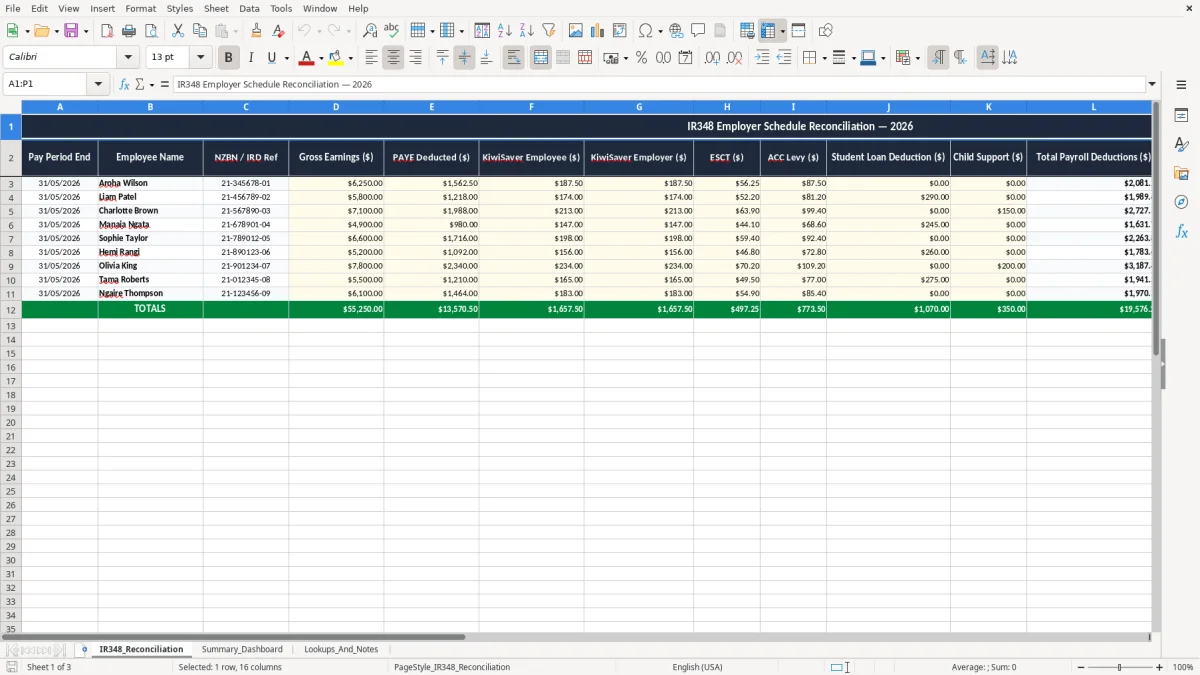
16-column reconciliation table on the main sheet, with space for pay period end, employee, deductions, submitted PAYE, variance, reconciled status and notes.
Currency formatting in dollar columns so the numbers are easy to read at a glance.
Date formatting set to DD/MM/YYYY for pay period tracking.
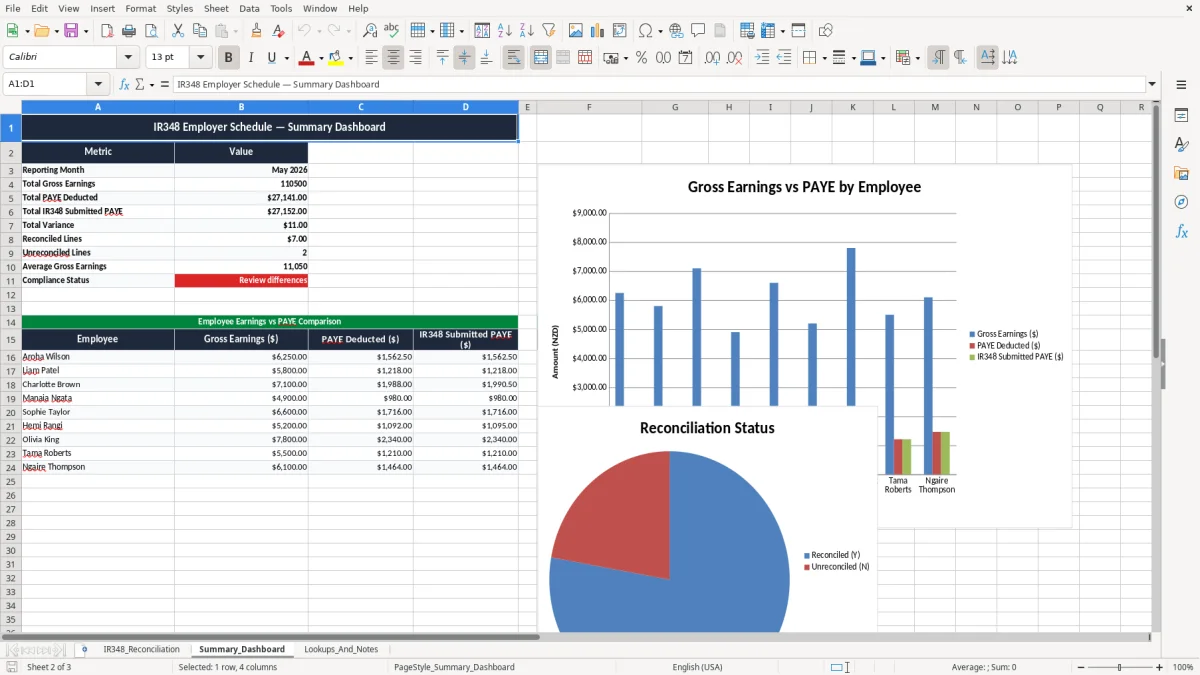
Dashboard sheet for summary totals and quick review of payroll movement.
Notes area for explaining one-off adjustments, refunds or filing differences.
Reference sheet for lookup notes and supporting payroll information.
Designed around NZ payroll fields, including PAYE, KiwiSaver, ESCT, ACC, student loan and child support.
How an IR348 reconciliation spreadsheet fits into your payroll run
This workbook suits the person who actually closes the pay run: the office manager in a 12-person plumbing firm, the bookkeeper in a small Ltd company, or the sole trader who has added a first employee and now has to file payroll properly. If you pay staff fortnightly, monthly or on an off-cycle top-up, the gap usually shows up when the numbers are already in myIR and you need a tidy check.
The template follows the same rhythm as a real payroll job. On IR348_Reconciliation, image 1 shows columns for Pay Period End, employee name, NZBN / IRD ref, gross earnings, PAYE, employee and employer KiwiSaver, ESCT, ACC, student loan, child support, total deductions, submitted PAYE, variance, reconciled status and notes.
Where this helps most
Say you run payroll for 4 staff and one person had a $250 overtime adjustment. A small change like that can shift PAYE by $37.50 and KiwiSaver by another $7.50, so the filed schedule no longer ties to the payroll report. This sheet lets you see the mismatch immediately instead of hunting through bank payments and payslips.
What the dashboard gives you
Image 2, the Summary_Dashboard, is for the totals view. You can keep an eye on how much PAYE and deductions have been recorded for the period, which is useful when you are checking a $28,000 monthly payroll or confirming a final pay before a public holiday.
The design suits NZ payroll because the key fields are the ones you are actually asked to explain. You are not trying to manage a general ledger here; you are matching the schedule you filed against the payroll you paid.
What Inland Revenue expects in your payroll records
Inland Revenue expects payroll records to be complete enough to support the return you filed, and you need to keep them for 7 years. That means the worksheet should show the pay period end, employee detail, the amounts deducted, and any variance that explains why the filed IR348 changed.
The main payroll rules behind the numbers are straightforward: PAYE is withheld from wages, employee KiwiSaver can be 3%, 4%, 6%, 8% or 10%, and the employer contribution is generally 3% plus ESCT on that employer contribution. ACC levies may also sit in the pay run, while student loan and child support deductions are separate statutory deductions.
Why the schedule has all those columns
The reason the template separates each deduction is practical. If gross pay is $6,250 and PAYE is $1,562.50, but your filed IR348 shows $1,540.00, you can see the $22.50 gap without opening three different reports. If the issue is KiwiSaver, you can test whether the employee contribution or the employer side was posted wrong.
For a small company with an NZBN, this workbook also gives you a clean support file if Inland Revenue queries a filing. If you are a sole trader with your first employee, it is a simple way to build a proper audit trail from day one rather than trying to reconstruct everything at year end.
There is no need to overcomplicate the structure. The point is to keep the payroll source data, the filed schedule and the explanatory notes together so you can prove what happened on the day the pay run was done.
Where payroll mismatches usually happen and what they cost
The usual problem is not the big mistake; it is the small one that slips through. A $12.75 difference in PAYE on one employee might look harmless, but if you have 18 staff and the same coding error repeats for a month, you can be $229.50 out before you even add employer KiwiSaver or ACC.
Common failure points
One common issue is leaving a manual adjustment out of the IR348 but still paying it through the bank. Another is using the wrong deduction code for student loan or child support, which creates a mismatch between the payroll software and the filed return. A third is forgetting that a final pay with annual leave, holiday pay and a bonus can move the numbers enough to upset the whole period.
The cost is usually time first, then money. If you spend 45 minutes tracing a mismatch across the pay run, the bank file and the filed schedule, that is a real labour cost, and if you miss the filing window you may have to fix the return after the fact in myIR.
Why the notes column matters
The Notes column is there for the bits software never explains properly. Write down things like a one-off overtime correction, a reimbursed deduction, or a retrospective rate change so the next person does not have to guess why the figures moved.
In a real workshop, this is where the lightbulb goes on for payroll admins: the spreadsheet is not just a checker, it is the memory of the pay run. If you have 3 pay periods with similar errors, the notes help you see the pattern and stop paying to fix the same issue twice.
Those repeated corrections also point to the year-end paperwork, where an income tax return workbook captures the same adjustments for filing rather than payroll.
How to keep the reconciliation as a weekly payroll habit
The best way to use this workbook is to tie it to the job you already do. If you run payroll on Friday, open the file straight after the bank file is sent, while the numbers are still fresh and before the email trail gets buried.
Simple habits that stick
- Copy the prior pay period and update only the new rows, so you are not rebuilding the sheet from scratch each time.
- Use the Reconciled? field as a hard stop: nothing is marked done until the variance is zero or explained.
- Keep the notes short and specific, such as “manual bonus included” or “student loan added after starter form”.
- Review the dashboard before you file so you can see whether the mismatch is one employee or the whole payroll.
That routine is usually enough for a small team. If you are running 30 or more employees, handling multiple cost centres, or reprocessing backdated leave every fortnight, you are probably past spreadsheet-only territory and should be looking at payroll software like Xero or MYOB.
The handover point is usually when the file starts taking longer than the pay run itself. At that point, the workbook can still be a check, but it should not be the engine.
At that point, the workbook can still be a check, but it should not be the engine; a tax code declaration tracker becomes the place to keep those starter-form changes aligned before the next pay run.
Common questions about this template
It checks the main payroll deductions against the filed employer schedule: gross earnings, PAYE, employee and employer KiwiSaver, ESCT, ACC, student loan and child support. You can see the variance amount for each row, which makes it easier to find the exact mismatch.
Yes. The sheet is built around a pay-period end date, so you can use it for weekly, fortnightly or monthly payroll. If you pay 12 staff fortnightly, you just enter each fortnight’s rows and compare them with the IR348 filed for that period.
No. It is a reconciliation tool, not a payroll engine. Use it to check the numbers coming out of Xero, MYOB or another payroll system before or after filing, especially when you want a paper trail for a correction.
Keep the workbook with the payslips, payroll reports, bank file confirmation and the filed return. Inland Revenue record keeping runs for 7 years, so save the file in a place where you can still find it after year end and after staff turnover.
That field helps identify the business or payroll entity the schedule belongs to. If you are a company with an NZBN, or a payroll contact working across more than one employer, it reduces the chance of mixing up records between entities.
Check whether the difference comes from a manual payment, a late adjustment, a reversed deduction or a wrong rate in the source payroll file. If the numbers still do not tie, note the reason in the workbook and correct the filed figures before you treat the pay run as complete.
Download
File format
Excel (.xlsx)
Compatible software
Excel, Google Sheets, LibreOffice
Price
Free
Category
Payroll & HR
7 templates available