
Patrol Roster Excel – Free Template (2026)
Payroll & HR
Grape Picking Wages Excel - Free Template
Track vineyard picker hours, bins, rates, gross pay, KiwiSaver, PAYE estimates, net pay and payment status across the 2026 season.
2026-07-15
259 downloads
4.8/5 average rating
Download template
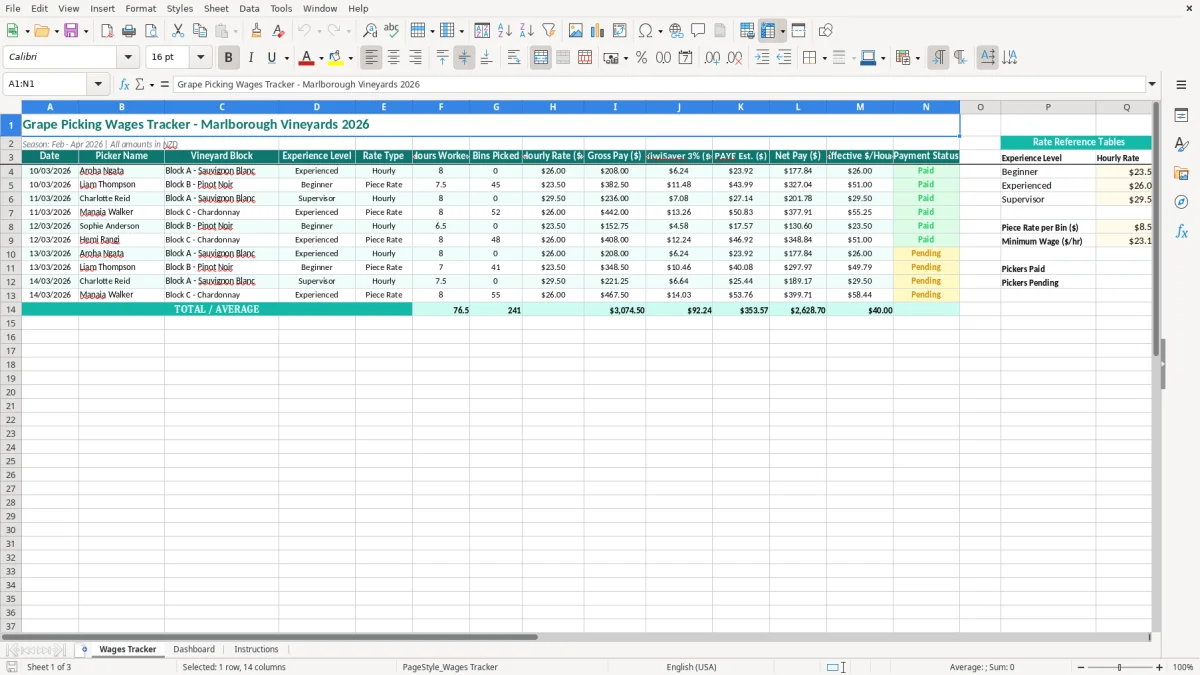
This grape picking wages Excel template records each picker’s date, vineyard block, experience level, rate type, hours, bins and hourly rate. It calculates gross pay, an estimated KiwiSaver contribution, estimated PAYE, net pay and effective hourly earnings for a New Zealand vintage season.
It is set up for a Marlborough vineyard season from February to April 2026, with amounts in NZD. The Wages Tracker sheet is the working register, while the Dashboard gives you a quick view of the wage data and the Instructions sheet explains the setup.
Image 1 shows the teal table layout, with yellow input cells and columns running from Date through Payment Status. Enter one row for each picker and work session rather than trying to reconstruct the season from paper timesheets at payday.
The key benefits of this Excel template
- Record daily hours and bins picked for hourly and piece-rate vineyard work.
- Compare gross pay and effective $/hour across different picking arrangements.
- Keep picker names, vineyard blocks and experience levels together in one register.
- See estimated KiwiSaver 3% and PAYE amounts before preparing the pay run.
- Track whether each wage entry is still outstanding or has been paid.
- Review seasonal wage information through the Dashboard rather than checking every row.
- Use the 2026 Marlborough season dates and NZD currency format as a practical starting point.
Step-by-step guide
- Open the Wages Tracker sheet and read the column headings before entering the first pay record.
- Enter the date, picker name, vineyard block, experience level and rate type for each shift. Use DD/MM/YYYY dates, such as 10/03/2026.
- Enter hours worked and bins picked. For an hourly shift, bins may be zero; for piece-rate work, record the actual number of bins.
- Enter the applicable hourly rate in the Hourly Rate ($) column. Check the agreed employment terms and make sure a piece-rate arrangement still meets New Zealand minimum employment requirements for the hours worked.
- Review the calculated Gross Pay, KiwiSaver 3%, PAYE Est., Net Pay and Effective $/Hour columns. Treat PAYE Est. as a planning figure, not a replacement for payday filing software or an IRD calculation.
- Update Payment Status after each pay run so unpaid rows are easy to find and reconcile with your bank payment list.
- Open the Dashboard for the season overview, then use Instructions if you need to confirm how the workbook is intended to be completed.
Included features
Wages Tracker sheet with Date, Picker Name, Vineyard Block, Experience Level and Rate Type columns.
Separate Hours Worked and Bins Picked fields for hourly and piece-rate harvesting.
Hourly Rate ($), Gross Pay ($), KiwiSaver 3%, PAYE Est. ($) and Net Pay ($) columns.
Effective $/Hour column to expose whether output-based pay is producing the expected return.
Payment Status column for following each wage entry through to payment.
Dashboard sheet for reviewing the workbook's wage information visually.
Instructions sheet, teal headers, yellow entry cells, NZD currency formatting and DD/MM/YYYY dates.
Who uses a grape picking wages spreadsheet in New Zealand
Vintage creates a short, intense pay administration job. A Marlborough vineyard manager may have 30 pickers spread across several blocks, while an office manager at a smaller winery may be collecting handwritten hours from supervisors each afternoon. This workbook gives both of them one row per person and work session.
During the harvest rush
Use the Wages Tracker after the daily tally, while the block information and bin count are still fresh. For example, Liam works 7.5 hours in Block B and picks 45 bins on 10/03/2026. Manaia works 8 hours in Block C and picks 52 bins the next day. Recording those entries immediately is far safer than entering 20 shifts from memory on Friday.
The Experience Level field is useful when the vineyard has beginners, experienced pickers and supervisors working different arrangements. The Rate Type column also keeps hourly and piece-rate records visibly separate, which helps when a supervisor queries why two people on the same block have different pay calculations.
Before the pay run
A vineyard administrator can filter or scan the rows by date, picker or Payment Status before preparing wages. At a $25 hourly rate, an 8-hour shift produces $200 gross before deductions; the effective $/Hour column gives you another check when the work is measured by bins rather than time.
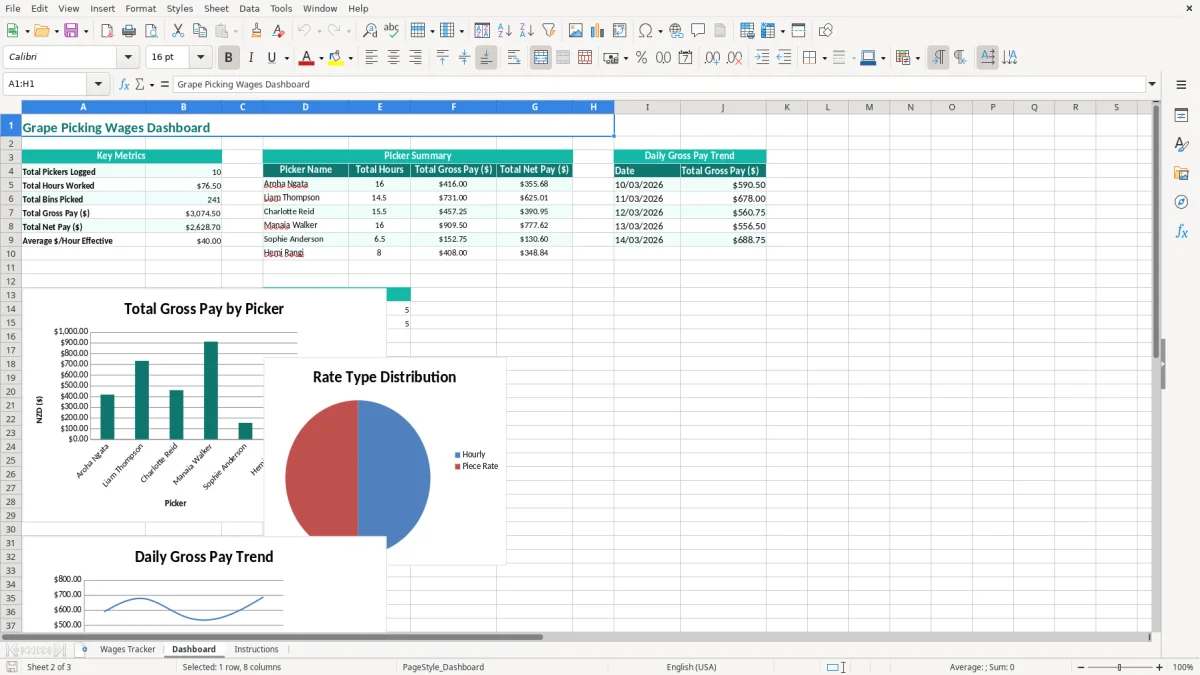
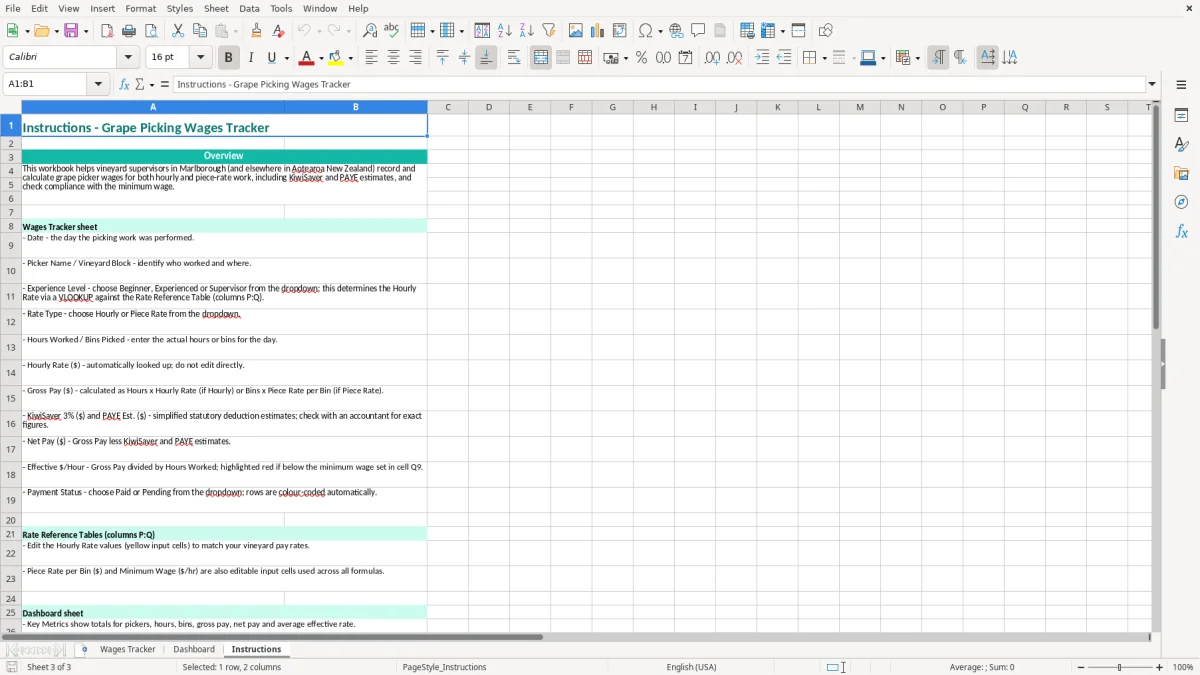
Image 2 shows the Dashboard view for stepping back from individual entries and checking the overall picture. Image 3 is the Instructions sheet, which is useful when a seasonal supervisor takes over data entry halfway through the vintage.
New Zealand payroll rules for vineyard picker wages
This spreadsheet is a tracking aid, not a complete payroll system. In New Zealand, the employer remains responsible for correct PAYE, payday filing, employment agreements and wage records. A piece-rate picker must still receive at least the applicable minimum wage for the hours worked; check the 2026 adult, starting-out or other relevant minimum wage before approving the rate.
KiwiSaver and PAYE checks
The template displays a 3% KiwiSaver estimate. Three per cent of $200 gross is $6, but the actual employee deduction depends on the worker's contribution rate and eligibility, while the compulsory employer contribution has its own treatment and ESCT calculation. Do not assume every picker has the same rate or is enrolled.
The PAYE Est. column is useful for forecasting the net amount, but PAYE depends on the employee's tax code, pay frequency, student loan status and other deductions. Confirm the final result through your payroll process and include the payment in the employer's payday filing to Inland Revenue.
Records and seasonal employment
Employment records should show hours, wages and leave entitlements, and Inland Revenue requires business records to be kept for 7 years. The Holidays Act 2003 also applies to seasonal employees; eligible employees receive 4 weeks of annual holidays after 12 months, with the 8% pay-as-you-go method available only where its legal conditions are met.
Keep the picker’s employment agreement, rate evidence and timesheet support with this workbook. If the business is registered for GST, wages themselves are not subject to GST, although GST may apply to other vineyard costs such as contractor services or equipment hire.
Where vineyard wage records fall over during vintage
The expensive mistakes I see are usually small data errors repeated across a large picking crew. One missing half-hour for 18 workers at $25 an hour is $225 of gross wages. Add a few days of incorrect entries and the correction takes longer than the original daily recording would have.
Mixing bins with hours
A common problem is entering a bin count in the hours column, or leaving hours blank for a piece-rate shift. That makes the effective $/Hour figure meaningless and can hide a minimum-wage shortfall. A picker who receives $180 for 8 hours is effectively on $22.50 an hour, even if the piece rate looked reasonable when the season started.
Another issue is using one rate for every person. Beginners, experienced pickers and supervisors may have different agreed rates, and a rate change mid-season needs a new entry or a clearly documented update. Otherwise the Friday pay run becomes a debate about which verbal instruction was current.
Leaving payment status behind
When Payment Status is not updated, the same row can be included twice in a bank payment batch. Ten duplicate $200 payments would put $2,000 at risk before anyone notices. Match the spreadsheet to the bank file or payslip summary after every pay run, not at the end of the three-month season.
Finally, do not rely on the PAYE Est. column as the final tax answer. A worker with a student loan or a different tax code may have a different deduction, and a tidy-looking net pay number does not prove that the employer's payroll obligations have been met.
That final check leads naturally to an employer schedule reconciliation when the pay run needs to be matched against the bank file and payslip summary before any duplicate payment slips through.
Turn daily picking figures into a reliable pay routine
The best time to update this workbook is at the end of each picking day, before the supervisor leaves the vineyard. Set a fixed 15-minute routine: collect signed or approved hours, confirm bins against the block tally, enter the rows and investigate anything that does not match the day's harvest report.
Use a simple vintage rhythm
- Daily: enter each picker, block, rate type, hours and bins while the information is current.
- Before payday: check gross pay, estimated deductions and Payment Status against the approved payroll list.
- Weekly: review unusual effective $/Hour results and ask the block supervisor about outliers.
- At season end: save a read-only copy and retain the supporting employment and wage records for 7 years.
Use the yellow input areas consistently and avoid typing over calculated cells. If you make a correction, keep the original approval or timesheet rather than silently changing a historical number. A short note in your normal payroll file can explain the adjustment.
Know when Excel has reached its limit
This template suits a small or medium seasonal team where one person can check the entries. If you have 100 pickers, multiple pay rates, daily imports or more than 1,000 rows, a payroll system such as Xero or MYOB will reduce duplicate entry and calculate PAYE, KiwiSaver, leave and payday filing more safely.
Keep the spreadsheet as a daily production check if it helps, but make one system the official wage record. That prevents the Dashboard and the payroll file drifting apart after several weeks of vintage.
That shift also means keeping a separate PAYE deductions calculator on hand for checking tax withholdings before the payroll file drifts out of sync.
Common questions about this template
Yes. Enter Piece Rate in Rate Type, record the hours worked and enter the bins picked. Check that the resulting pay meets the applicable 2026 New Zealand minimum wage for the actual hours worked.
It provides a 3% estimate against gross pay. For example, $200 gross produces a $6 estimate. The final deduction depends on the employee's contribution rate, eligibility and payroll settings, so confirm it through your payroll process.
No. It is a planning estimate in the tracker. Final PAYE depends on the employee's tax code, pay frequency, student loan and other details, and the employer must use its payroll process for payday filing.
Use DD/MM/YYYY, such as 10/03/2026. This avoids confusion between New Zealand dates and US month-first dates when you review the season or share the file with another administrator.
Yes. Enter the relevant block in Vineyard Block for each row, such as Block A - Sauvignon Blanc or Block C - Chardonnay. This lets you review picking activity alongside the picker, date and rate information.
No. It records wage inputs and shows estimated calculations, but it does not replace payroll software, employment agreements, leave calculations or payday filing with Inland Revenue. Use it as a controlled tracker and reconcile it to the final payroll.
Download
File format
Excel (.xlsx)
Compatible software
Excel, Google Sheets, LibreOffice
Price
Free
Category
Payroll & HR
7 templates available