
Patrol Roster Excel – Free Template (2026)
Payroll & HR
Shearing Gang Tally Excel - Free Template
Track shearer runs, daily tallies, piece rates, pay and targets with a practical New Zealand shearing gang Excel spreadsheet.
2026-07-18
274 downloads
4.8/5 average rating
Download template
This shearing gang tally Excel spreadsheet records each shearer's date, stand, sheep type, four run tallies, total tally, rate per 100, daily pay and target status. It gives a shearing contractor a consistent daily record for checking production and preparing payment information across a New Zealand station run.
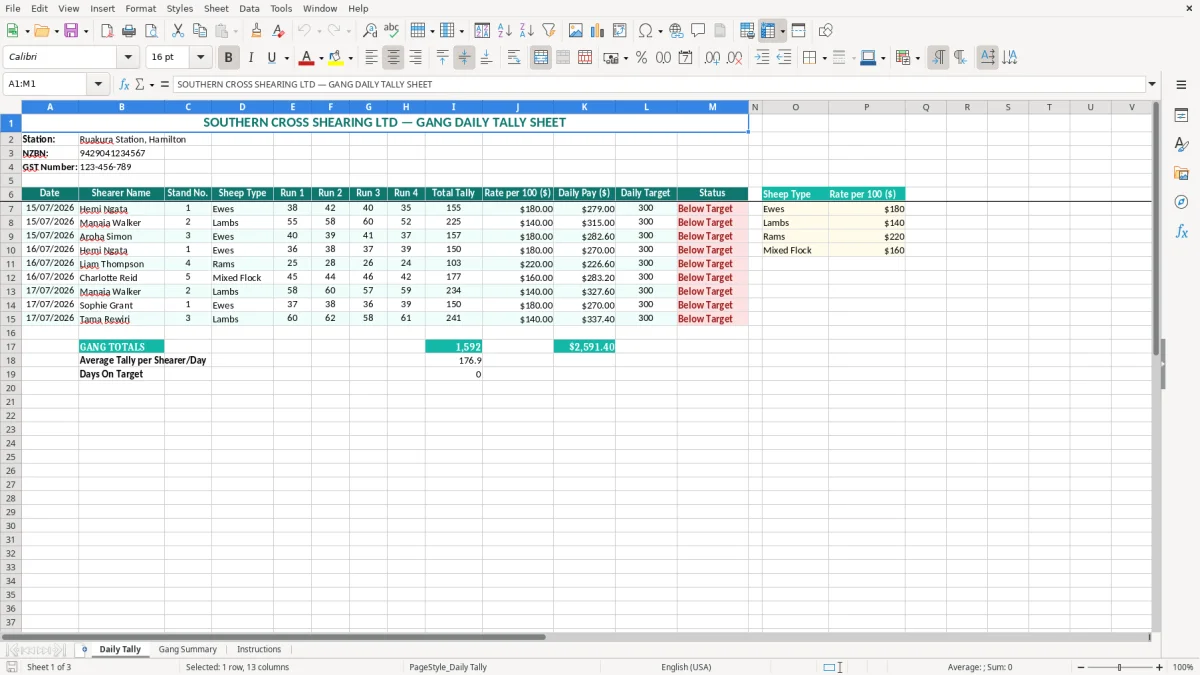
The workbook has three sheets: Daily Tally, Gang Summary and Instructions. Image 1 shows the main entry sheet, with yellow input cells, teal headings and a row for each shearer and day; the other sheets help you review the gang's results and follow the intended process.
The key benefits of this Excel template
- Adds four runs into a Total Tally for each shearer, reducing manual arithmetic at the end of a long day.
- Calculates Daily Pay from the tally and the Rate per 100 ($), making piece-rate checks quicker.
- Keeps the date, stand number and Sheep Type beside the production figures, so you can trace a result back to the correct shed or mob.
- Shows Daily Target and Status for quick conversations about production, weather delays or a difficult flock.
- Provides a consistent record for a contractor managing several shearers across different stations and dates.
- Gives the bookkeeper a clearer source for checking payment figures before payroll, contractor invoices or gang settlements.
- Separates daily entry, gang-level review and operating guidance across three named sheets.
Step-by-step guide
- Open Daily Tally and check the Station, NZBN and GST Number details in the top section. Replace the example business information with your own records before entering live figures.
- Enter one row for each shearer and working date. Complete Date, Shearer Name, Stand No. and Sheep Type so the tally can be identified later.
- Record the number shorn in Run 1, Run 2, Run 3 and Run 4. Use zero where a run was not completed rather than leaving an unclear blank.
- Enter the agreed Rate per 100 ($) and the Daily Target for that shearer or gang arrangement. Confirm whether your agreement uses the same rate for ewes, lambs, rams and mixed flocks.
- Check Total Tally, Daily Pay ($) and Status after each row is complete. Investigate an unexpected result before using the figures for payment.
- Review Gang Summary after the day's entries are in. Compare the displayed results with the physical tally sheet or shed records while the numbers are still easy to verify.
- Use Instructions as the reference for the workbook, then save a dated copy after each day or station. Keep the original blank template unchanged for the next run.
Included features
Daily Tally sheet with Date, Shearer Name, Stand No. and Sheep Type fields.
Four separate run columns: Run 1, Run 2, Run 3 and Run 4.
Calculated Total Tally column for each shearer's combined daily runs.
Rate per 100 ($) and Daily Pay ($) fields for piece-rate payment checking.
Daily Target and Status columns to flag production against the expected result.
Gang Summary sheet for reviewing the entered gang information away from the row-by-row detail.
Instructions sheet, with colour-coded formatting that distinguishes headings, inputs and supporting information.
Who uses a shearing tally spreadsheet on New Zealand stations
A practical record in the shed
A shearing contractor or gang manager usually needs the tally recorded while the numbers are fresh, not reconstructed on Sunday night from scraps of paper. The Daily Tally sheet (image 1) gives each entry a date, shearer name, stand number and sheep type before the four run figures are added.
Take a Hamilton station with four stands operating on a busy day. Hemi might record 38, 42, 40 and 35 ewes, giving a total of 155; Manaia might record 55, 58, 60 and 52 lambs, giving 225. Those figures are more useful when the stand and sheep type stay attached to them.
When the office needs the numbers
The office manager may use the spreadsheet at the end of every day to check the gang's production, while the contractor uses it before preparing a pay run or settlement. A bookkeeper at a small Ltd company can also use the Daily Pay column as a checking schedule against the actual payment file, rather than treating the workbook as the payroll system itself.
It is particularly useful when a gang moves between properties and the same shearer appears on several dates. Instead of one running total with no context, you can see that a result belongs to Ruakura Station, stand 1, on 15/07/2026, or to another station and flock on a later day.
Use the summary without losing the detail
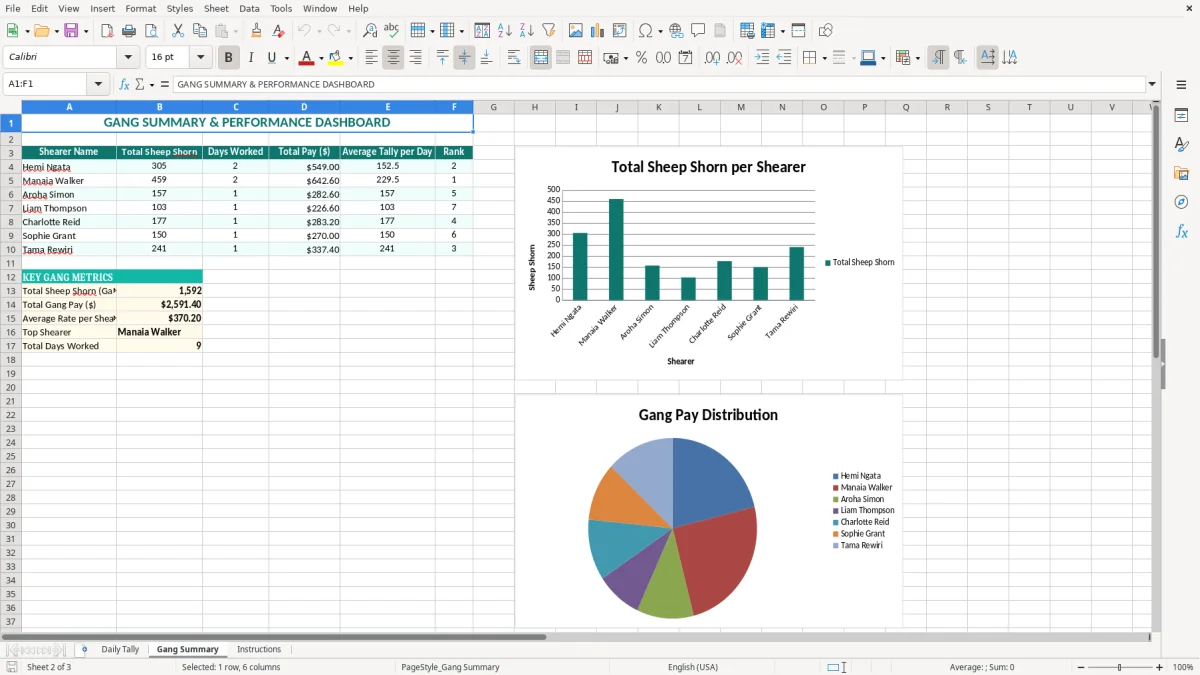
Image 2 shows the Gang Summary sheet, which is intended for a quick review of the entered results. Use it after checking the individual rows, because a summary can tell you that the gang produced 1,000 sheep but cannot explain a surprising stand-level figure on its own.
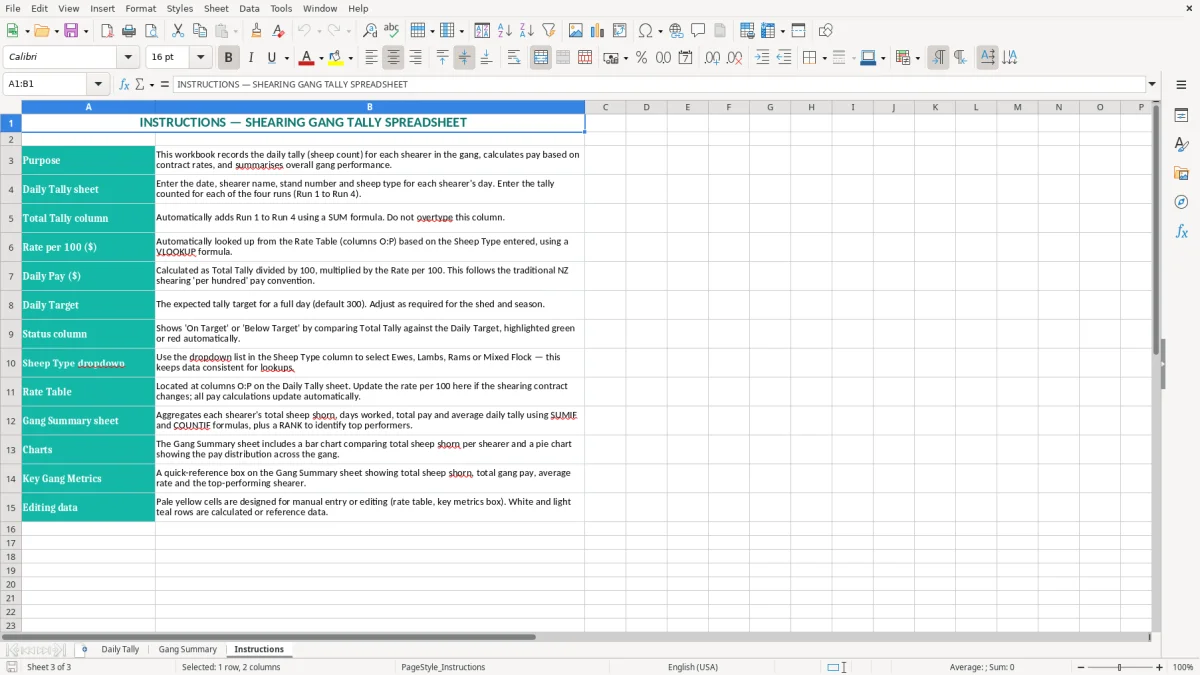
Image 3 is the Instructions sheet. Keep it in the workbook when sharing the file with a relief tally person or office administrator; it gives them a consistent starting point instead of relying on verbal instructions during a wet, rushed shearing day.
New Zealand rules for shearing pay and records
Separate tally evidence from payroll obligations
A tally spreadsheet is evidence for checking production; it does not decide whether a shearer is an employee or a genuine contractor. For employees, the business must handle PAYE, payday filing and the IR348 employer schedule, along with employment agreement terms. A piece rate must still be structured so the worker receives at least the applicable minimum entitlement for the hours worked.
If the shearer is an employee, KiwiSaver deductions and the compulsory minimum 3% employer contribution may also apply for an eligible member. Holiday pay, sick leave and other entitlements under the Holidays Act 2003 are separate from the tally calculation. Do not use Daily Pay ($) as a substitute for a complete payroll calculation.
GST and the business record
A shearing operator must register for GST when taxable turnover reaches $60,000 in any 12-month period, or when registration is chosen earlier. The standard GST rate is 15%. For example, a $1,000 taxable service invoice contains $130.43 GST if the amount is GST-inclusive, while $1,000 plus GST is invoiced at $1,150.
The station details in the workbook include an NZBN and GST Number area. Keep those details accurate, but do not assume the example values are yours. The tally itself normally records production and payment information; GST treatment belongs in your invoices, accounting records and GST return.
Keep a defensible trail
Inland Revenue requires business records to be kept for 7 years. Save the workbook with the station and date in the filename, retain the original shed tally or signed confirmation where available, and reconcile the total to the payroll or supplier payment record.
For a business with a standard 31 March balance date, the daily files become supporting records for year-end reconciliation. My practical preference is to save one locked, dated copy per station or pay period rather than repeatedly overwriting a single file; finding a $420 discrepancy is much easier when the source day is identifiable.
Where a shearing gang tally falls over and what it costs
Run figures entered against the wrong person
The most common failure I see is not a complex Excel error. It is a tally entered on the wrong row after a shearer changes stands, or a run number copied from the previous day. If 40 sheep are put against a shearer on a $12-per-100 rate, the immediate payment difference is $4.80, but the real cost is the time spent reopening the shed record and explaining the correction.
The Daily Tally layout reduces that risk by keeping Shearer Name, Stand No. and Date beside Run 1 to Run 4. Still, check the identity fields before entering numbers, particularly when two people have similar names or when the gang starts a new property.
Wrong unit or rate creates a false pay figure
A rate per 100 is not the same as a dollar-per-sheep rate. With a total tally of 225 and a rate of $12.00 per 100, the calculation is 225 ÷ 100 × $12.00 = $27.00. Entering 225 as though it were 2.25, or typing $1,200 instead of $12.00, can turn a small daily payment into an obviously wrong result.
Decide in writing whether the rate is per 100 sheep, whether different sheep types attract different rates, and whether the figure is gross pay or a contractor charge. The Sheep Type column is useful evidence, but it will not automatically apply a different rate unless you set up that logic yourself.
Targets hide operational problems
A low Status result can be caused by a heavy ewe flock, wet wool, machine trouble or a late start, not poor effort. Conversely, a target can be set too low and make a poor day look acceptable. A four-stand gang averaging 180 sheep per stand has 720 for the day; if the target was 800, the shortfall is 80 sheep and should be explained while the reason is still known.
Another costly mistake is treating a blank run as zero without checking. A missing entry can understate the day by 50 sheep, which at $12 per 100 is $6.00 for one shearer but much more across a full gang and several days. Review unusual totals before the figures flow into payment records.
That same review is where deduction totals should be checked before the day’s figures are carried into payment records.
How to make the tally part of the daily shed routine
Attach entry to an existing handover
Do not wait until the end of the week. Set a fixed five-minute handover after the last run: the tally person enters the four run figures, the gang manager checks the names and stands, and the contractor signs off the day. For a six-day run, that routine takes about 30 minutes in total and is far cheaper than rebuilding six days of missing records.
Save files using a consistent name such as 2026-07-17_Ruakura_Gang-Tally.xlsx. Keep a read-only or backed-up copy after sign-off, and retain the blank workbook separately so tomorrow's entries do not overwrite today's evidence.
Use the workbook without making it fragile
- Enter values only in the intended input cells, leaving calculated columns such as Total Tally and Daily Pay untouched.
- Use the same spelling for each Shearer Name and Sheep Type; inconsistent names make a gang summary harder to review.
- Check the four run totals against the physical tally before changing a rate or target.
- Print or export a signed daily copy when the crew works in an area with unreliable reception.
The yellow input fill in image 1 is a useful visual cue: work through those fields from left to right, then review the calculated and status columns. The teal headers and alternating row formatting make a printed copy easier to scan in the office.
Know when Excel has reached its limit
This template suits a small gang and a manageable number of daily rows. If you are entering 20 shearers over 100 days, handling multiple rate agreements, or needing automatic payroll, leave balances and audit history, move the approved figures into Xero, MYOB or a dedicated payroll system.
My preferred approach is to keep this sheet as a source check even after moving systems. A 900-sheep day can still be reconciled from the shed tally, while the accounting software handles employee records, PAYE and payment reporting properly.
For seasonal labour, the next step is to use a wages tracker to reconcile the approved figures against each picker’s daily total.
Common questions about this template
Daily Tally combines Run 1, Run 2, Run 3 and Run 4 into Total Tally. It also uses the entered Rate per 100 ($) to calculate Daily Pay ($), while Daily Target and Status help you review production against the expected result.
Yes. The Sheep Type column can identify Ewes, Lambs, Rams, Mixed Flock or another description you use. The template records the type beside the tally, but you must enter the correct rate manually where different sheep types have different payment rates.
No. Daily Pay is a tally-based checking figure. If the shearer is an employee, final pay may also involve PAYE, KiwiSaver, holiday pay, sick leave, ACC-related employer costs and other payroll requirements.
Enter the actual number shorn. If no sheep were shorn in a run, enter 0 rather than leaving the cell ambiguous. Check the result against the shed record and add an explanation in your supporting notes or daily sign-off record.
No. It includes a GST Number field in the station details, but the tally is focused on sheep numbers, rates, pay and targets. GST registration applies once taxable turnover reaches $60,000 in 12 months, and the standard New Zealand GST rate is 15%; record GST in your invoicing and accounting system.
Keep business records for 7 years to meet Inland Revenue record-keeping requirements. Save dated copies with the station and work date, and retain the original tally or sign-off evidence so the spreadsheet can be reconciled to payment records later.
Download
File format
Excel (.xlsx)
Compatible software
Excel, Google Sheets, LibreOffice
Price
Free
Category
Payroll & HR
7 templates available