
Rugby Subs Fees Tracker Excel – Free Template (2026)
Accounting & GST
Builder progress claim Excel - Free Template
NZ progress payment claim spreadsheet for builders, with claim details, contract value, GST, retention and a summary dashboard.
2026-07-24
314 downloads
4.8/5 average rating
Download template
This builder progress payment claim Excel spreadsheet records what you are claiming from your client for work completed, including the contract value, claim number, GST and retention. It includes a formatted Progress Claim sheet, Summary Dashboard and Instructions sheet for preparing a clear New Zealand building claim.
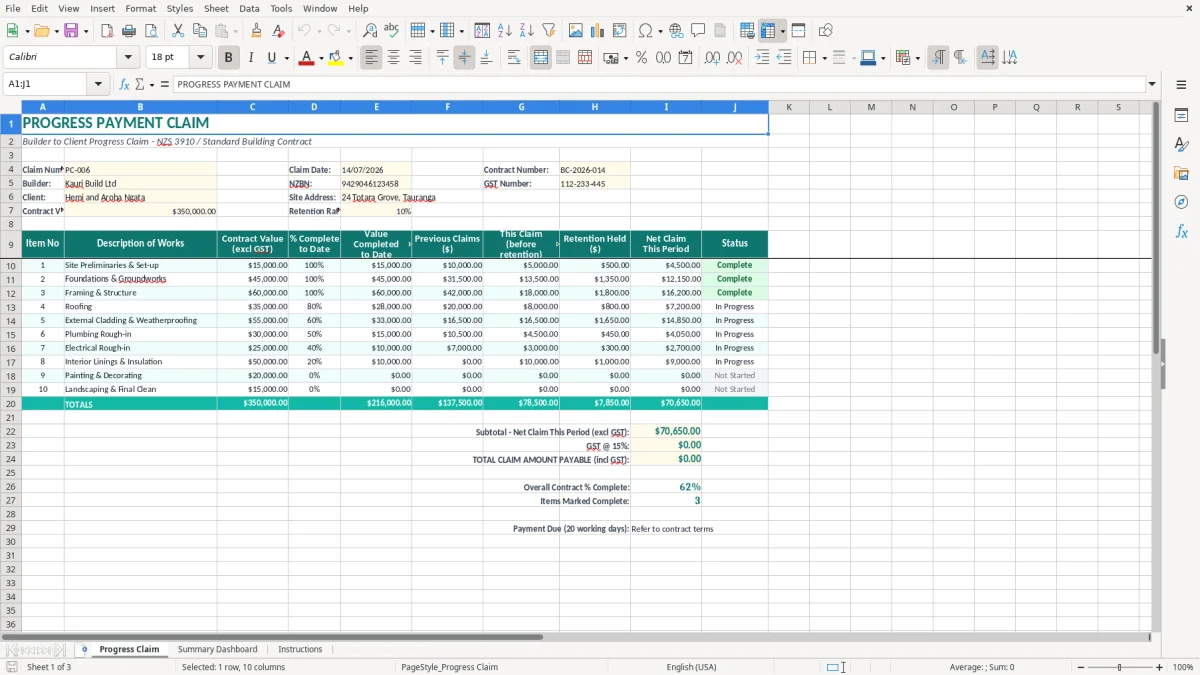
Enter the project and claim details in the yellow input cells. The first sheet includes fields for the builder, client, site address, NZBN, GST number, contract number, contract value and retention rate, while the other sheets help you review the claim before sending it.
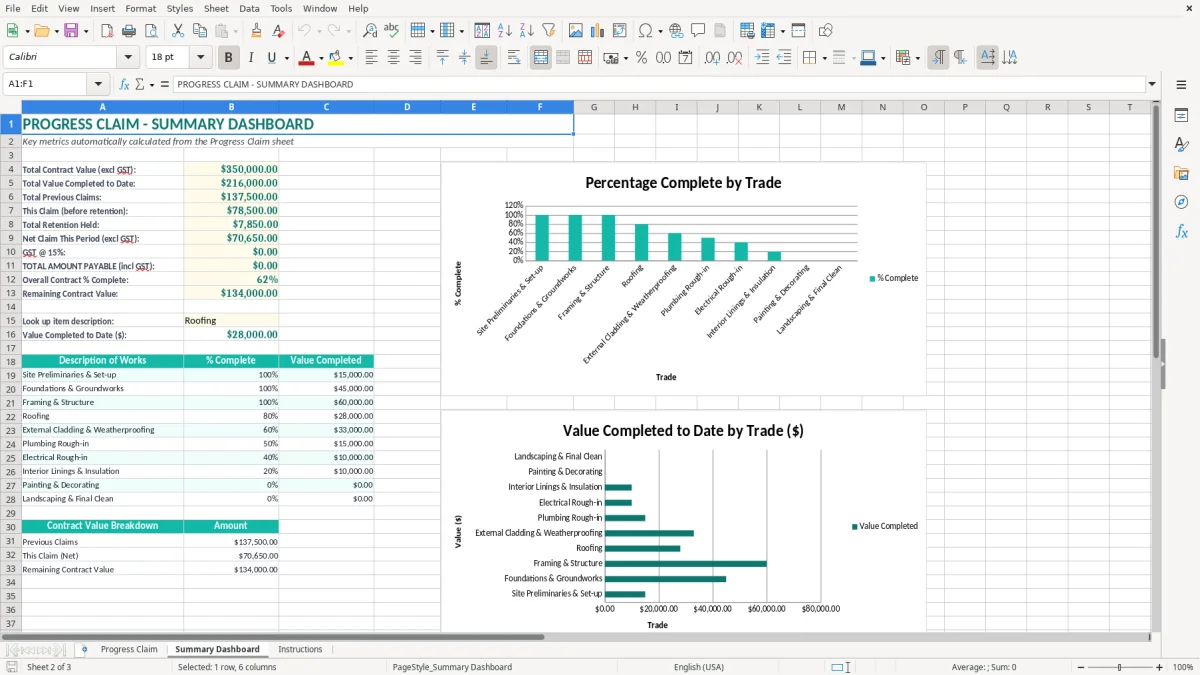
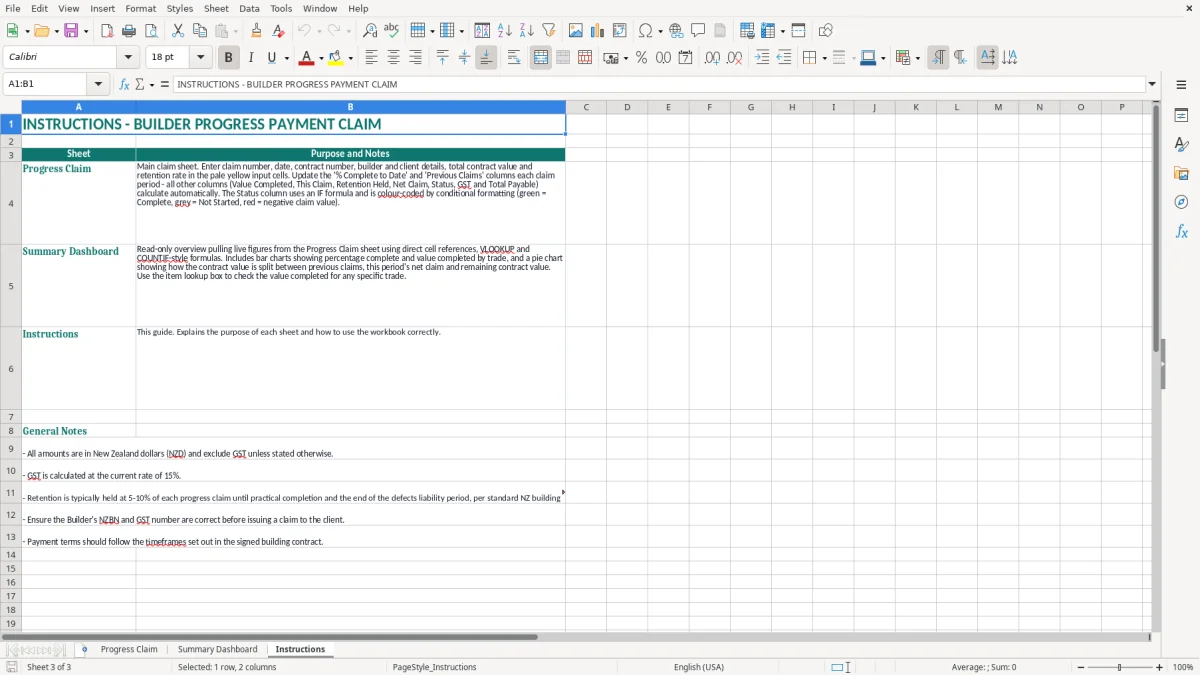
Image 1 shows the Progress Claim layout, with the claim heading and project details arranged across columns A to J. Image 2 shows the Summary Dashboard, and image 3 contains the instructions for using the workbook.
The key benefits of this Excel template
- Creates a professional progress payment claim with a claim number, claim date and contract number.
- Keeps the builder's NZBN and GST number beside the project details for easy checking.
- Shows the contract value excluding GST, such as $350,000.00 in the worked example.
- Applies a visible retention rate, including the 10% example in the Progress Claim sheet.
- Separates builder, client and site address information so the claim is easier to identify.
- Uses currency formatting with two decimal places for clearer payment figures.
- Provides a Summary Dashboard and Instructions sheet alongside the main claim form.
Step-by-step guide
- Open the Progress Claim sheet and check the example information before replacing it with your own project details.
- Enter the claim number, claim date and contract number in the claim details block. Use a sequence such as PC-001, PC-002 and PC-003 so every claim can be traced.
- Replace the builder, client and site address information. Check the builder's NZBN and GST number against your current business records.
- Enter the contract value excluding GST in the highlighted input cell. For a $350,000.00 contract, do not enter the GST-inclusive value unless the label specifically asks for it.
- Enter the agreed retention rate, such as 10%, and check the resulting claim figures against the building contract and any payment schedule requirements.
- Review the Summary Dashboard for the overall claim position, then read the Instructions sheet before finalising the document.
- Save a dated copy, export or print the completed claim, and retain supporting records such as measurements, variations, invoices and site records with the project file.
Included features
Progress Claim sheet with a merged PROGRESS PAYMENT CLAIM heading across columns A to J.
Claim details block for claim number, claim date and contract number.
Builder and client fields with a separate site address field.
NZBN and GST number fields for New Zealand business identification.
Contract value field labelled Contract Value (excl GST).
Retention Rate field with percentage formatting and highlighted input cells.
Summary Dashboard and Instructions sheets for review and guidance.
Who uses a builder progress claim in New Zealand
A builder progress claim is used when a contractor wants payment for work completed during a defined period rather than waiting until practical completion. A residential builder, commercial main contractor or subcontractor can use the Progress Claim sheet to identify the contract, project and amount being claimed before sending it to the client or head contractor.
For example, a Tauranga builder with a $350,000.00 contract might submit claim PC-006 after completing foundations, framing and part of the roof. The project details block records Kauri Build Ltd, the client, the site address, contract number BC-2026-014, NZBN and GST number, so the claim is not confused with another job.
Useful at each construction milestone
The sheet suits monthly claims, staged residential work and commercial contracts with regular valuation dates. An office manager can prepare the claim after the quantity surveyor or site manager confirms the work completed, while the director checks the figures before the claim goes to the client.
It is also useful for a subcontractor claiming against a main contractor. The claim number and contract number provide a simple audit trail, particularly when several jobs are running at once and emails contain similar attachments.
What to check before sending it
Compare the claim with the signed contract, approved variations, previous payment schedules and amounts already paid. If the contract permits a 10% retention, a $20,000.00 progress amount would normally have $2,000.00 retained before GST treatment is checked against the contract and the invoice or payment claim.
Do not treat the spreadsheet as evidence that work is complete by itself. Keep the supporting measure, photos, delivery dockets and variation approvals with the saved workbook. The spreadsheet is the clear summary; the project records support the numbers behind it.
Those same GST figures then carry through to the 15% GST return when the claim is posted to the accounts record.
What New Zealand rules apply to building claims
The Construction Contracts Act 2002 sets the payment claim and payment schedule framework for many New Zealand construction contracts. A valid payment claim should identify the construction work, the amount claimed and the relevant due date or payment period. If the contract does not specify when a payment schedule is due, the statutory timing is generally 5 working days after the payment claim is served.
Read the actual contract before relying on that default. NZS 3910 or another standard building contract may set its own payment claim, engineer's certification, payment schedule and due-date process. The Progress Claim sheet records the claim number and contract number, but it does not replace a required payment schedule or contractual certificate.
GST and taxable supply information
The standard GST rate in New Zealand is 15%. A GST-registered builder should distinguish the construction amount from GST and issue the correct taxable supply information. For supplies over $1,000, the information normally includes the supplier's name and GST number, date, description, GST-inclusive amount and the buyer's details.
For example, a $20,000.00 construction claim excluding GST produces $3,000.00 GST at 15%, making $23,000.00 including GST before any agreed deductions. Retention wording and GST treatment need to follow the contract and current Inland Revenue guidance rather than being guessed from the spreadsheet.
Retention money
Where the statutory retention regime applies, the Construction Contracts (Retention Money) Amendment Act 2023 requires retention money to be held on trust for the benefit of the contractor. The regime applies to commercial construction contracts entered into on or after 5 October 2023, subject to its scope and exclusions. A 10% retention on $50,000.00 is $5,000.00, but the trust, release and record requirements are separate from calculating that amount.
Keep claim records for at least 7 years where they support tax records, and retain the signed contract, payment schedules and correspondence together. Use the claim date in DD/MM/YYYY format and make sure the claim sequence matches your project register and accounting records.
The claim errors that delay payment on building jobs
The most expensive errors are often simple identification mistakes. I have seen a claim sent with the wrong contract number, an old site address or PC-006 used twice. The client then spends time checking whether the claim belongs to the right project, and a payment that could have been processed on Friday sits in an inbox until the following week.
Wrong basis for the amount claimed
A common problem is mixing contract value, work completed and amount due. A builder may enter $35,000.00 of work completed but forget that $10,000.00 was already claimed in the previous period. The new claim then appears overstated by $10,000.00 and invites a payment schedule dispute.
Variations cause another recurring issue. If a $6,500.00 kitchen variation was discussed on site but not approved or listed separately, the client may reject the whole line rather than debate only the variation. Keep approved variations and contract work distinguishable in your supporting records.
GST and retention mistakes
Entering a GST-inclusive contract value into the field labelled Contract Value (excl GST) inflates the base figure. A $115,000.00 GST-inclusive amount is $100,000.00 excluding GST, not $115,000.00 plus another 15%.
Retention is also frequently deducted twice: once in the spreadsheet and again in the accounting system. On a $40,000.00 progress amount with 10% retention, the deduction is $4,000.00. If the accounts clerk enters the net claim as though it were the gross construction value, the project ledger can be understated by that same $4,000.00.
Missing supporting information
A bare claim with no valuation, photos, delivery records or approved variation schedule is harder to defend. Under the Construction Contracts Act 2002, a payment claim must describe the construction work and amount claimed clearly; a vague description can create avoidable arguments about whether the claim is valid.
Finally, never change a saved claim after a dispute without marking the revision. Keep the original PC-006, save a corrected version as PC-006R1 and note what changed. That small discipline can save hours when the client, project manager and bookkeeper are comparing different files.
Turn the spreadsheet into a reliable claim routine
A spreadsheet only helps if the claim process has a fixed owner and deadline. Set a weekly or monthly cut-off that matches the contract valuation date, then prepare the workbook before the contractual payment claim date. For a monthly claim, a practical routine is site review on the 25th, measurement check on the 26th, director review on the 27th and issue on the 28th.
Use a short review checklist
- Check the claim number, claim date, contract number and site address against the project folder.
- Reconcile the current amount to the previous claim, approved variations and payments received.
- Recalculate GST at 15% where applicable and confirm whether the figure is excluding or including GST.
- Check the retention rate, especially where the contract uses 5%, 10% or a cap.
- Save the workbook with a useful name such as BC-2026-014_PC-006_28-07-2026.xlsx.
Make entry consistent
Keep dates in DD/MM/YYYY format and use the same claim numbering sequence across the workbook and accounting system. Copying the last claim as a starting point can save 10 minutes, but clear the old claim date, amount, client correspondence and supporting attachments before issuing the new version.
Use the Summary Dashboard as the final sense check rather than relying on memory. If the dashboard total does not agree with the valuation or ledger, stop and resolve the difference before sending the claim. A two-minute check is cheaper than correcting a $25,000.00 claim after the client has queried it.
Know when Excel has reached its limit
Excel is a sound option for one builder managing perhaps 5 to 20 active projects with a controlled claim process. Move to Xero, MYOB or construction-specific software when several people edit claims, progress valuations exceed 100 lines, retention releases need tracking across many contracts, or you need integrated debtor follow-up and audit history.
Keep the workbook as a project record even after moving systems. The best routine is not the one with the most software; it is the one where every claim is checked, issued on time and tied back to the signed contract.
Common questions about this template
A builder progress payment claim is a formal request for payment for construction work completed during a defined period or stage. It normally identifies the contract, project, work completed, amount claimed, GST and any retention, and is assessed under the contract and, where applicable, the Construction Contracts Act 2002.
Yes, the Progress Claim sheet is labelled Builder to Client Progress Claim - NZS 3910 / Standard Building Contract and includes a contract number, claim number and claim date. Check the completed claim against the particular NZS 3910 contract, engineer's certification process and payment schedule deadlines before issuing it.
The visible template fields include Contract Value (excl GST), GST Number and a retention rate, with the claim presented in a formatted workbook. Check the formulas and Instructions sheet in your copy before relying on an automatically calculated GST figure, and use the standard 15% GST rate where the supply is taxable.
Enter the agreed percentage in the Retention Rate field, such as 10%. For example, 10% of a $30,000.00 progress amount is $3,000.00. Confirm the retention cap, release conditions and trust obligations under the contract and the Construction Contracts (Retention Money) Amendment Act 2023 where that regime applies.
Include the builder and client names, site address, claim number, claim date, contract number, description or valuation of work, amount claimed, GST treatment and retention. Keep the builder's NZBN and GST number accurate. For taxable supplies over $1,000, check the taxable supply information requirements, including buyer details.
Keep claim workbooks and supporting tax records for at least 7 years to meet Inland Revenue record-keeping requirements. Retain the signed contract, payment schedules, approved variations, valuation evidence, invoices, retention records and correspondence with the workbook so the claim can be reconstructed later.
Download
File format
Excel (.xlsx)
Compatible software
Excel, Google Sheets, LibreOffice
Price
Free