
Rugby Subs Fees Tracker Excel – Free Template (2026)
Accounting & GST
GST Adjustments Excel - Free Template
GST adjustment calculator with entry lines, GST rate, summary totals and dashboard for NZ businesses.
2026-06-21
156 downloads
4.8/5 average rating
Download template
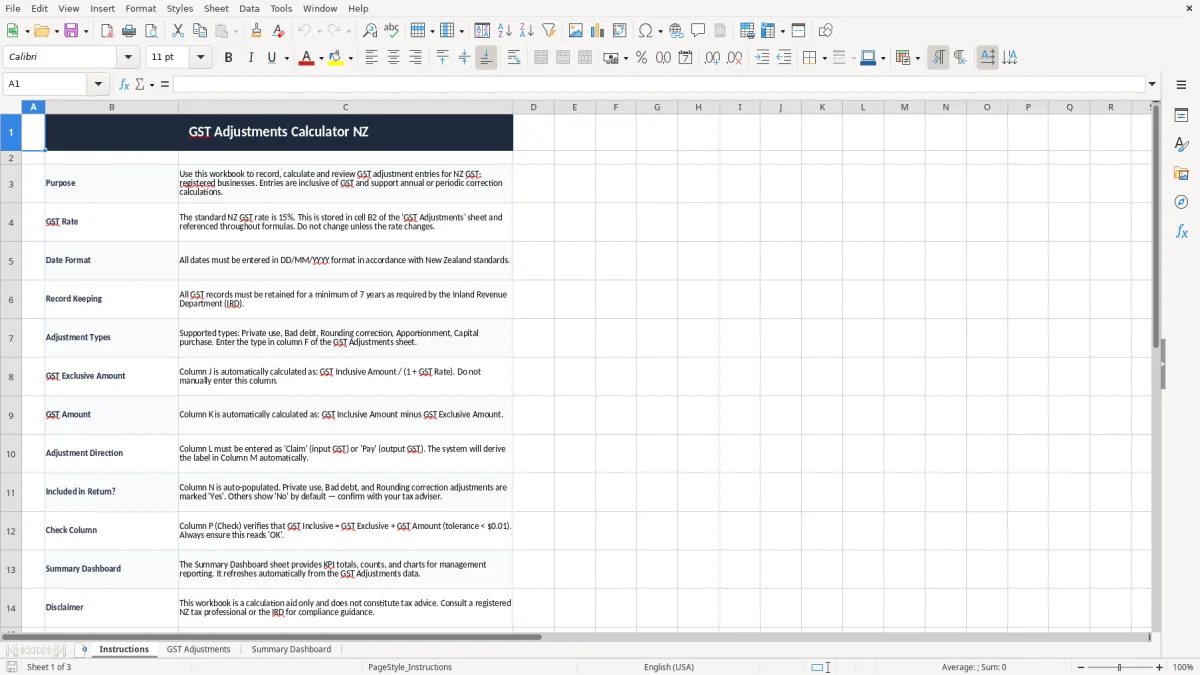
This GST adjustments Excel template helps you record adjustment entries, apply the 15% NZ GST rate and review the totals in one workbook. It includes an Instructions sheet, a GST Adjustments sheet for input, and a Summary Dashboard for a quick read on what changed.
It is set up for NZ GST-registered businesses that need to correct private use, bad debts, rounding or apportionment entries. The formulas keep the GST return maths in one place, so you can check the numbers before you post them in your books.
The workbook is simple enough for a sole trader and tidy enough for a bookkeeper handling several clients. If you are working through a period-end cleanup or an annual adjustment, you can see the movement without building the spreadsheet from scratch.
The key benefits of this Excel template
- Tracks GST adjustment entries in one place, so you are not chasing corrections across different tabs.
- Uses the NZ GST rate of 15% throughout the workbook, reducing manual calculation errors.
- Helps you separate private use, bad debt, rounding and apportionment adjustments clearly.
- Gives you a dashboard view of totals, so you can check the size of the adjustment at a glance.
- Supports period-end and annual review work, which is handy at 31 March and around filing time.
- Makes it easier to keep a clean audit trail for Inland Revenue records, which must be kept for 7 years.
- Saves time when you are reconciling a small batch of entries, such as 12 adjustments worth $8,400 before GST.
Step-by-step guide
- Open the Instructions sheet first and read the setup notes. It sets out the 15% GST rate, date format and record-keeping reminder.
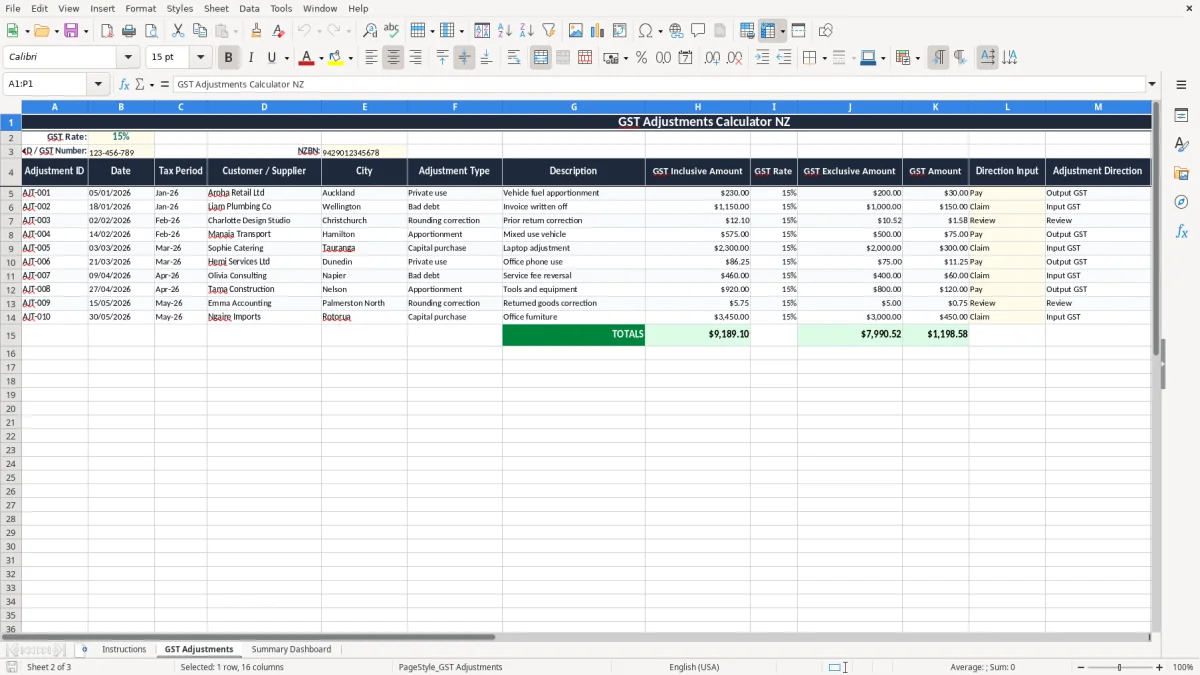
- Move to the GST Adjustments sheet and enter each adjustment line. Use DD/MM/YYYY dates and fill in the amount, type and notes as you go.
- Check the formulas beside each line. The sheet is built to calculate the GST component from GST-inclusive figures, so you can spot any odd amounts quickly.
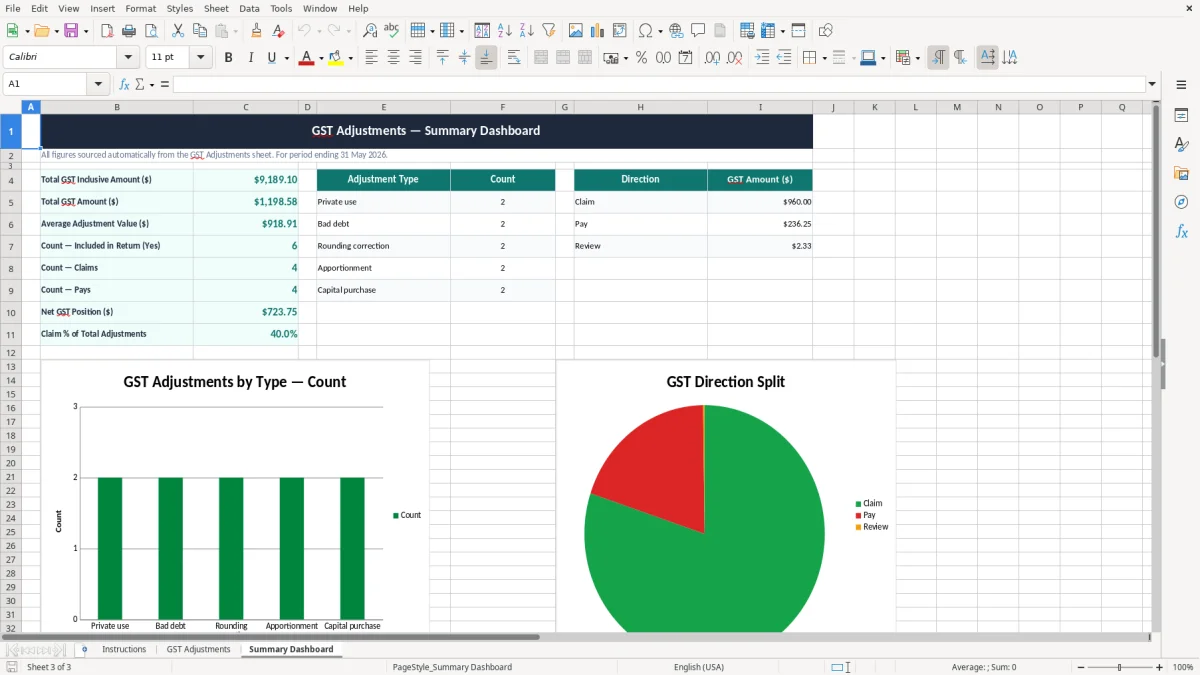
- Review the Summary Dashboard after entry. Use it to confirm the total adjustments and see whether one category is driving most of the movement.
- Compare the totals with your profit and loss or GST workpaper. If the adjustment is unusual, trace it back to the source invoice or journal before you file.
- Keep the workbook with your support documents for the required 7 years. That gives you a clean trail if you need to answer a query later.
Included features
Instructions sheet with the workbook purpose, GST rate note and record-keeping guidance.
GST Adjustments input sheet for line-by-line entry of adjustment amounts and types.
Summary Dashboard sheet for a quick view of totals and adjustment mix.
Built around the standard NZ GST rate of 15%.
Designed for GST-inclusive amounts, which suits real-world receipts and journals.
Clear NZ date handling in DD/MM/YYYY format.
Simple layout that works for small businesses, sole traders and bookkeepers handling period-end clean-ups.
Who uses a GST adjustment sheet in New Zealand
This workbook is for the people who end up fixing the messy edge cases in a NZ GST return: the sole trader who has mixed personal and business spending, the bookkeeper cleaning up a small Ltd company, or the office manager at a tradie firm who has to sort the odd private-use or bad-debt entry before filing.
A Christchurch builder with 4 staff might find $1,200 of personal fuel use inside a bigger fuel account, while an online shop doing 300 orders a month may need to adjust a handful of refunds and rounding differences. A spreadsheet like this keeps those corrections visible instead of burying them in a journal note.
Where it fits in the month
You usually reach for this at month-end, at the end of a 2-monthly GST return, or when you are clearing up year-end figures before 31 March. That is the point where small errors start to add up: a $180 adjustment here, a $94 rounding correction there, and suddenly the return is out by more than you expected.
Why a spreadsheet still works
For smaller files, Excel is often faster than jumping straight into software rules and workarounds. If you only need to track 10 or 20 adjustments a period, a clean workbook gives you the list, the maths and the review page without extra clicks.
What IRD expects for GST adjustments and records
For NZ GST, the standard rate is 15% and registration becomes compulsory once taxable turnover goes over $60,000 in any 12-month period. Most small businesses file 6-monthly, 2-monthly or monthly, and the adjustment work needs to line up with the period you are filing.
Inland Revenue expects you to keep GST records for 7 years, including the source documents behind the correction. If you are adjusting a GST-inclusive amount of $1,150, the GST portion is $150 and the net amount is $1,000, so the worksheet has to preserve enough detail to explain that split later.
Common NZ adjustment types
This kind of sheet is useful for private use, bad debt write-offs, rounding corrections and apportionment entries. A bad debt example might be a $2,300 unpaid invoice that you write off after 90 days, while a private-use adjustment might be $86 of GST on household phone charges that slipped into the business account.
How the numbers should behave
The workbook keeps the GST calculation tied to the amount entered, so you are not retyping the rate each time. That matters when you are checking a batch of 18 lines: one wrong formula can throw the whole return off by $45 or $90, which is exactly the sort of error IRD notices when the numbers do not tie out.
When those 18 lines are being checked against the return total, the next step is to use a 15 percent GST return sheet that keeps the filed figures aligned with the workbook math.
Where GST adjustment spreadsheets usually go wrong
The biggest issue is mixing GST-inclusive and GST-exclusive figures in the same column. If one line is entered as $575 inclusive and the next as $575 exclusive, the return can be wrong by $75 on a single line before you even notice.
Rounding and missing descriptions
Rounding mistakes are common when people key in cents manually instead of letting formulas do the work. A $0.01 or $0.02 difference does not sound like much, but across 50 adjustment lines it can leave you with a return that does not match the source workpaper.
Missing descriptions cause trouble later. If you cannot tell whether a $420 entry was private use, a bad debt or a rounding correction, you waste time rechecking bank statements and invoices, and that is before you get to year-end.
Bad habits that cost money
Another common problem is not separating the adjustment by type. A contractor might lump $1,800 of private use, $600 of bad debts and $90 of rounding into one journal, which makes review harder and increases the chance of claiming the wrong amount in the GST return.
When a workbook is not kept current, people rebuild it from scratch at filing time. That is how a 20-minute update turns into a two-hour cleanup, and it is usually the difference between a calm filing and a stressed one the night before the deadline.
That same last-minute rebuild often spills into company filing, where IR4 return workings keep the year-end adjustments in one place.
How to make GST adjustments part of your filing routine
The best routine is to update the sheet on the same day you do the pay run or the GST check. If you leave it until the end of the quarter, the pile of small corrections is harder to trace and you are more likely to miss something.
Simple habits that keep it alive
- Copy the prior period tab and clear the old input lines so the structure stays consistent.
- Use a fixed weekly time, such as Friday afternoon, to add new adjustments while invoices are still fresh.
- Keep source documents in the same folder as the workbook so you can match a $312 entry back to the receipt quickly.
- Use conditional formatting to flag blank dates, missing types or unusually large amounts.
When to move on from Excel
If you are processing dozens of adjustment lines every month, or several staff need to edit at once, that is when accounting software such as Xero or MYOB starts to make more sense. For a small file with 5 to 25 entries a period, Excel is usually still the quickest option because you can see the full calculation without clicking through menus.
Common questions about this template
A GST adjustment is a correction to the GST you have already claimed or returned, usually for private use, bad debts, rounding or apportionment. This template helps you list each adjustment and calculate the GST impact from GST-inclusive amounts.
Yes. The workbook instructions and formulas are built around the standard New Zealand GST rate of 15%, so you do not need to re-enter the rate for each line.
It suits sole traders, bookkeepers, office managers and small company owners who need to tidy up GST corrections before filing. It is especially handy if you only have a modest number of adjustments each period.
Inland Revenue requires GST records to be kept for 7 years. Keep the workbook, source invoices, bank support and any notes that explain the adjustment.
Yes. It works for regular filing periods and for annual cleanup work at 31 March, as long as you keep the entries matched to the right GST period.
If the adjustment list is growing fast, multiple people need access, or you are spending more time checking formulas than doing the work, it is time to move to Xero or MYOB. For a small, controlled list of entries, Excel is still efficient.
Download
File format
Excel (.xlsx)
Compatible software
Excel, Google Sheets, LibreOffice
Price
Free