
Cricket scorebook Excel – Free Template (2026)
Projects & Planning
Orchard spray diary Excel - Free Template
Record orchard sprays, products, withholding periods, harvest dates, weather, applicators and costs in a practical NZ Excel spreadsheet.
2026-07-16
277 downloads
4.8/5 average rating
Download template
An orchard spray diary Excel spreadsheet records each chemical application, including the date, block, crop, product, active ingredient, withholding period, rate, area, harvest date, weather, applicator and cost. This template includes Spray Diary, Chemical Register, Dashboard and Instructions sheets for New Zealand orchard records.
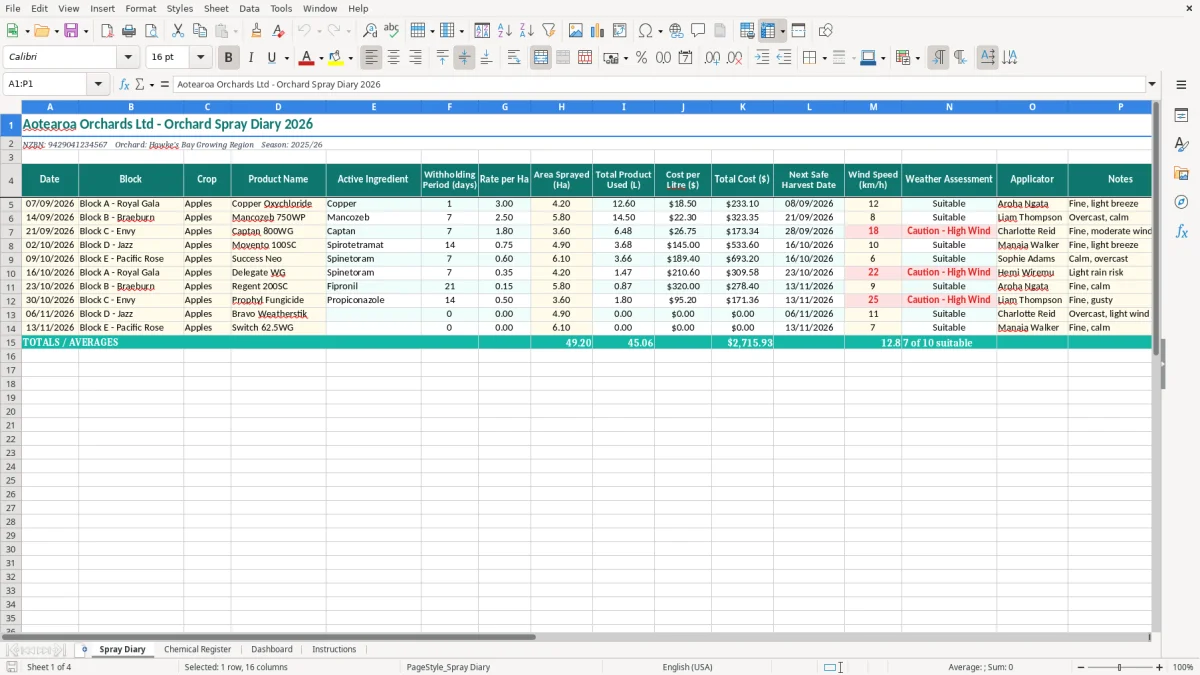
Image 1 shows the main Spray Diary with sixteen columns, from Date and Block through to Applicator and Notes. Yellow input cells, teal headings and wrapped column labels make it practical to use in the tractor cab office or packhouse.
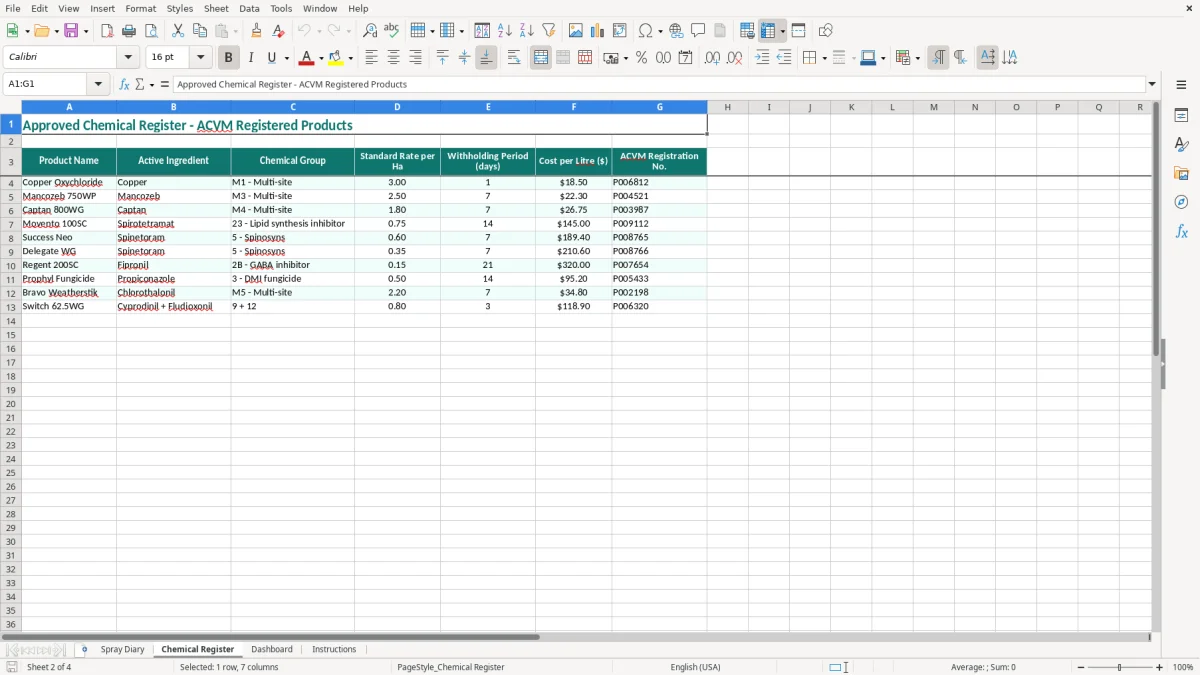
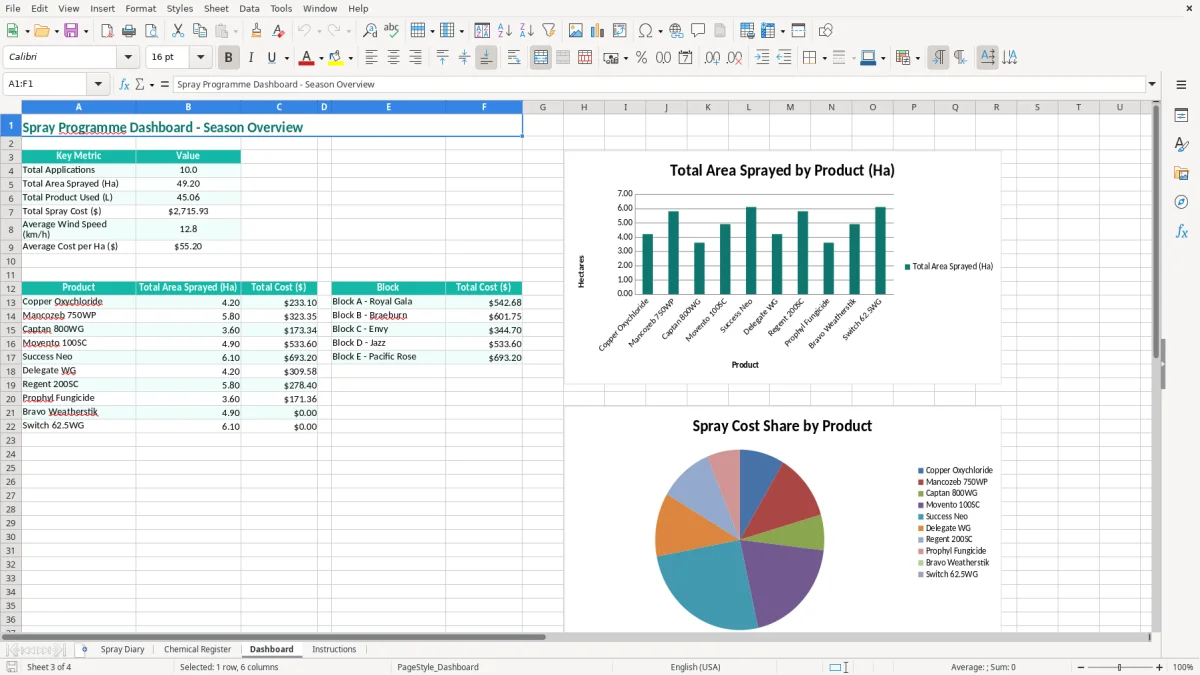
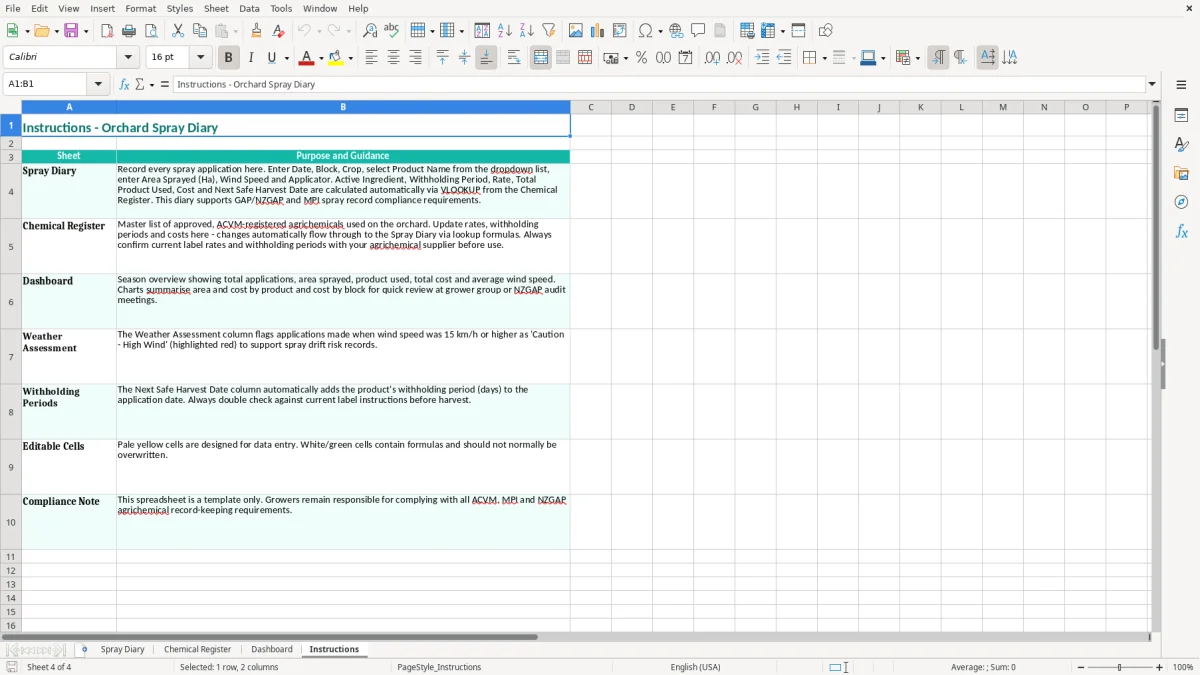
The Chemical Register in image 2 gives you a separate place to keep product information, while image 3 summarises the recorded activity on the Dashboard. Image 4 explains how to complete the workbook and keep your spray records consistent throughout the season.
The key benefits of this Excel template
- Keep the date, block, crop, product and active ingredient together for every application.
- Record withholding periods in days and the next safe harvest date beside the spray entry.
- Calculate or review product usage against the area sprayed, with Rate per Ha and Total Product Used fields.
- Track spray costs by recording Cost per Litre and Total Cost for each orchard job.
- Capture wind speed, weather assessment, applicator and notes while the information is fresh.
- Give a grower, orchard manager or auditor a readable record instead of scattered notebook pages.
- Use the Dashboard to review spray activity across the entries recorded in the workbook.
Step-by-step guide
- Open the workbook and read the Instructions sheet before entering applications. Check that the orchard details, season and product names suit your operation.
- On Spray Diary, enter the Date, Block and Crop for the job. Use the block names consistently, such as Block A - Royal Gala, so later reviews are meaningful.
- Add the Product Name and Active Ingredient, then enter the Withholding Period (days) from the product label and your approved spray programme.
- Record Rate per Ha and Area Sprayed (Ha). Check Total Product Used (L) and enter Cost per Litre ($) and Total Cost ($) so the application has a cost trail.
- Enter the Next Safe Harvest Date, Wind Speed (km/h) and Weather Assessment. Do not rely on memory at harvest time; complete these fields during or immediately after spraying.
- Record the Applicator and add useful Notes, such as water volume, tank mix, equipment issues or a reason a block was missed.
- Review the Chemical Register and Dashboard regularly. Save a dated copy at the end of the spray round and back up the completed workbook with your other orchard records.
Included features
Spray Diary sheet with Date, Block, Crop, Product Name and Active Ingredient columns.
Withholding Period (days) and Next Safe Harvest Date fields for harvest planning.
Rate per Ha, Area Sprayed (Ha) and Total Product Used (L) fields for application quantities.
Cost per Litre ($) and Total Cost ($) fields for monitoring chemical spend.
Wind Speed (km/h), Weather Assessment, Applicator and Notes fields for operational context.
Chemical Register sheet for maintaining product information separately from daily application entries.
Dashboard and Instructions sheets to support review and consistent workbook use.
Who uses an orchard spray diary in New Zealand
A spray diary is used by the grower, orchard manager and spray operator who need to connect a chemical application with a specific block and crop. A Hawke's Bay apple orchard might have Block A - Royal Gala, Block B - Braeburn and Block C - Envy, while a smaller Central Otago operation may record pears or a mixed crop in the same workbook.
The practical pressure usually arrives after a busy spray round. The person who drove the tractor remembers applying Copper Oxychloride on 07/09/2026, but the office manager still needs the product, rate, area, weather and harvest restriction recorded clearly. Entering the information straight into the Spray Diary avoids trying to reconstruct it from a chemical shed note three weeks later.
One row for each application
Image 1 shows one wide table with sixteen headings. The first group identifies the job: Date, Block, Crop, Product Name and Active Ingredient. The next fields cover Withholding Period (days), Rate per Ha, Area Sprayed (Ha) and Total Product Used (L), which gives you a useful check that the quantity applied matches the block size.
For example, if a block is 4.5 Ha and the rate is 2 L per Ha, the expected product use is 9 L. A recorded total of 19 L is a prompt to check whether the area, rate or unit has been entered incorrectly before the application disappears into the season's records.
Useful at harvest and during handover
The final columns cover Cost per Litre ($), Total Cost ($), Next Safe Harvest Date, Wind Speed (km/h), Weather Assessment, Applicator and Notes. That makes the file useful when a harvest team asks whether a block is ready, or when a relief spray operator takes over from the usual driver.
The Chemical Register in image 2 separates product reference information from daily entries. Image 3 gives the manager a quick dashboard view, while image 4 provides the workbook instructions. Keep the file available on the office computer or a shared device, but make a backup after each spray round rather than waiting until the end of the season.
New Zealand records and spray rules to check
An Excel diary is a record-keeping tool, not permission to use a product outside its label. In New Zealand, check the approved label, product registration and any relevant Agricultural Compounds and Veterinary Medicines requirements before spraying. The label controls the application rate, crops, withholding period, re-entry directions and conditions such as weather or buffer zones.
Withholding periods matter because they link the spray date to the earliest lawful harvest date. If a product has a 14-day withholding period and is applied on 07/09/2026, count the label's required 14 days and enter the resulting safe harvest date in the spreadsheet. Do not replace the label's wording with a guess, even when the crop looks ready.
Information to retain for each job
For a defensible orchard record, retain the product name, active ingredient, date, block, crop, application rate, area treated, amount used, applicator and relevant weather information. This template provides those fields, including Wind Speed (km/h) and Weather Assessment, rather than leaving weather as an afterthought.
The Chemical Register should agree with the container and label in the chemical store. Record the exact product name and active ingredient, and update the register when a product is replaced or its label changes. A product name such as Delegate WG is not enough on its own if the active ingredient or approved use has been entered incorrectly.
GST and cost records are separate checks
If the orchard is registered for GST, the standard New Zealand rate is 15%. Keep supplier invoices and code chemical purchases correctly; the Total Cost ($) column is an operational spray cost record, not by itself a complete GST return record. A $1,150 GST-inclusive chemical invoice contains $150 of GST at the standard rate, subject to the normal claim rules and the nature of the purchase.
Keep business records for 7 years under Inland Revenue requirements, including supporting invoices and the completed spray diary. A business with a standard 31 March balance date should archive the season's workbook with its accounting records, stocktake papers and chemical purchase documentation. If an NZBN or orchard name is shown at the top of the sheet, check it is current before sharing the file with a contractor or auditor.
The spray diary gaps that create trouble later
The costly failures I see are rarely caused by an inability to type into Excel. They happen when one important fact is missing: the block was written as Orchard 1 instead of Block C - Envy, the applicator was not recorded, or the withholding period was left blank because someone planned to fill it in later.
Missing dates and blocks break traceability
Suppose a 6 Ha apple block is sprayed on Monday and the diary only says Apples - Fungicide. At harvest, nobody can confidently match the crop to the product, rate or safe harvest date. The result may be a half-day spent checking tank sheets and staff messages, or a delayed pick while the manager verifies which fruit can enter the packhouse.
In a larger orchard, inconsistent block names create a second problem. Block A, A Block and Royal Gala A may look like three locations in a filter or dashboard. Use the supplied names consistently and correct a row immediately rather than adding a second spelling for the same block.
Unit and quantity errors waste chemical
A common entry error is mixing litres per hectare with total litres. If the intended rate is 1.5 L per Ha over 8 Ha, the tank should account for 12 L. Entering 8 in the rate column and 1.5 in the area column can produce a plausible-looking row while reversing the calculation. Check the result against the tank mix and the product container before closing the job.
Cost errors also add up quietly. A $42 per litre product used at 12 L costs $504; entering $504 as the cost per litre makes the row appear to cost $6,048. Review the Cost per Litre ($) and Total Cost ($) fields together, especially when comparing a contractor's chemical usage with purchase invoices.
Weather and harvest information cannot be reconstructed easily
Writing simply suitable weather in Notes is weaker than recording the actual Wind Speed (km/h) and a clear Weather Assessment. A later reviewer cannot tell whether the application conditions were checked or merely assumed. Similarly, a blank safe harvest date forces the harvest team to search through labels and spray records under time pressure.
Do not overwrite an incorrect entry without leaving a useful explanation in Notes. A short note such as tank calibration repeated - 2 L variance explains why the quantity changed and is far more valuable than a mysterious edited number.
Make the spreadsheet part of your orchard routine
The best spray diary is completed at the end of every spray job, not reconstructed at the end of the month. Set aside 10 minutes when the tractor returns: check the tank quantity, enter the block and product, and fill the weather and applicator fields while the operator still remembers them.
Attach it to an existing job
Use the same routine as the chemical shed sign-out or daily tractor check. The spray operator can write the physical container details on a job sheet, while the office manager enters the final row before the next pay run or supplier invoice batch. For a four-person orchard team, this division is quicker and produces fewer missing applicator names than asking one person to remember every job on Friday.
- Use one consistent block name from the supplied list rather than inventing abbreviations.
- Enter dates in DD/MM/YYYY format and keep rates and areas in the units shown in the headings.
- Review the Dashboard after each spray round and investigate an unexpected product or cost total.
- Save a backup with the spray-round date, such as spray-diary-14-09-2026.xlsx.
Use Excel checks without making the file hard to use
Keep the yellow input cells for new information and avoid typing over headings or existing layout. A simple check is to compare Total Product Used (L) with Rate per Ha multiplied by Area Sprayed (Ha). For example, 2 L per Ha across 3.2 Ha should be about 6.4 L; a materially different figure deserves a second look.
At the end of each month, filter the Spray Diary by Block or Crop and compare the entries with the chemical store issue records. At year-end, save a locked copy before starting a new season file. Keeping the completed file unchanged makes later review much easier.
Know when Excel has reached its limit
This workbook is a good fit for a small or medium orchard with one person maintaining the records. Move to Xero, MYOB or specialist spray-management software when several operators need simultaneous entry, you have hundreds of applications, or you need label libraries, user permissions, mobile capture and automatic compliance reporting. Software will not fix poor data entry, so establish the 10-minute routine first.
Common questions about this template
It records the Date, Block, Crop, Product Name, Active Ingredient, Withholding Period (days), Rate per Ha, Area Sprayed (Ha), Total Product Used (L), Cost per Litre ($), Total Cost ($), Next Safe Harvest Date, Wind Speed (km/h), Weather Assessment, Applicator and Notes.
The workbook contains four sheets: Spray Diary, Chemical Register, Dashboard and Instructions. Image 1 shows the main entry table, image 2 shows the product register, image 3 shows the dashboard and image 4 shows the instructions sheet.
It can support your chemical cost tracking, but it is not a complete GST accounting system. New Zealand's standard GST rate is 15%, so keep the supplier invoices and accounting records needed for your GST return alongside the spray diary.
Multiply the application rate by the area sprayed when both fields use the same units. For example, 1.5 L per Ha over 8 Ha gives 12 L. Check the result against the tank mix and product label before relying on the entry.
Enter it in Withholding Period (days), using the current product label rather than memory. Then enter the resulting date in Next Safe Harvest Date. A 14-day withholding period applied on 07/09/2026 must be counted according to the label's requirements before harvest is planned.
Keep the completed workbook and supporting business records for 7 years to meet Inland Revenue record-keeping requirements. Save a dated, unaltered copy with your invoices and other orchard records, particularly around the 31 March balance date.
Download
File format
Excel (.xlsx)
Compatible software
Excel, Google Sheets, LibreOffice
Price
Free