
Cricket scorebook Excel – Free Template (2026)
Projects & Planning
Airbnb Bach Booking Calendar Excel Spreadsheet NZ
Track NZ bach bookings, guests, cleaning, revenue, Airbnb fees and estimated GST with this practical Excel spreadsheet template.
2026-08-01
380 downloads
4.8/5 average rating
Download template
Keep your New Zealand bach bookings organised with a practical Airbnb booking calendar Excel spreadsheet. Designed for Airbnb hosts, holiday-home owners and short-term rental managers, this template brings reservations, guest details, dates, cleaning tasks and financial information into one clear workbook. Record every stay in New Zealand dollars, monitor upcoming check-ins and check-outs, and maintain useful notes about guest requirements or property preparation.
The template can also help you review gross booking revenue, estimated Airbnb fees, GST and net revenue for each reservation. Use it for a coastal bach, lake house, farm stay, ski accommodation or other short-term holiday home. It is suitable for Airbnb reservations, direct bookings, repeat guests and bookings received through other accommodation platforms.
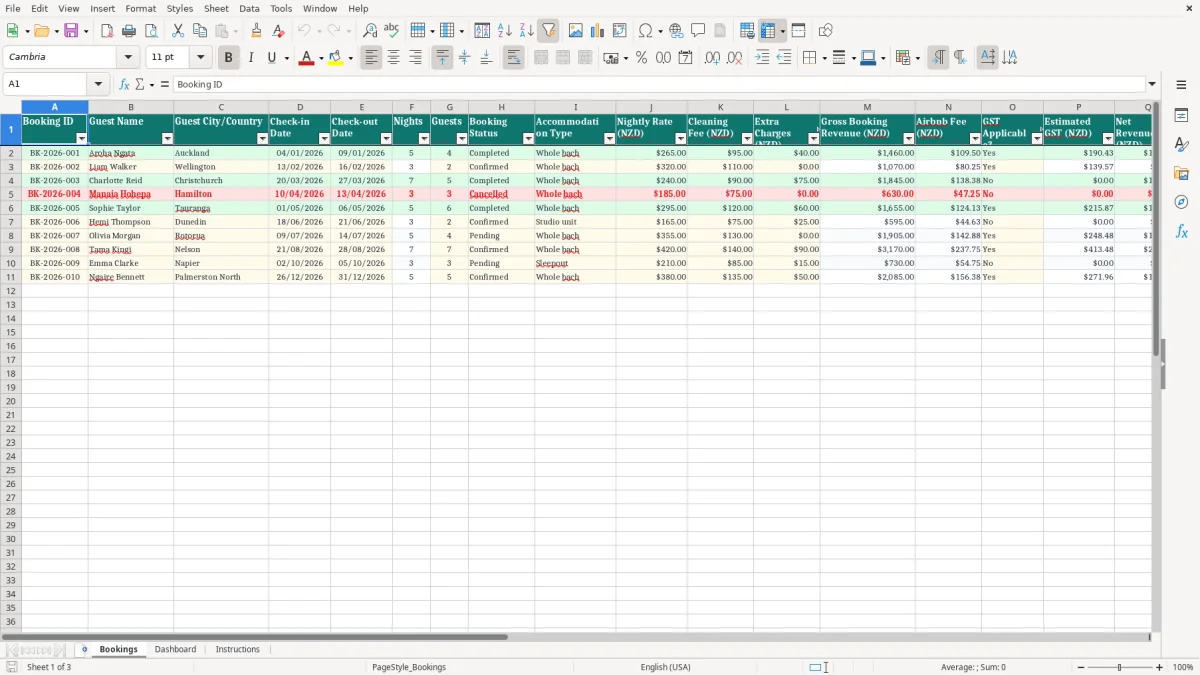
The key benefits of this Excel template
- See upcoming and completed bach bookings in one organised register.
- Reduce the risk of missed dates, double bookings and forgotten guest details.
- Track check-in, check-out and calculated nights for every stay.
- Coordinate cleaners and monitor whether each changeover is scheduled or completed.
- Review booking revenue, fees, estimated GST and net revenue in NZD.
- Keep operational notes about guest requests, maintenance and special arrangements.
Step-by-step guide
Open the Bookings worksheet and replace the sample records with your own reservations. Enter the booking ID, guest name, guest location, check-in date, check-out date, number of guests, booking status and accommodation type. Add the nightly rate, cleaning fee and any extra charges in New Zealand dollars.
Review the calculated nights and revenue fields, then record whether GST applies and check the estimated GST and net revenue figures. Assign a cleaner to each booking and update the cleaning status as the stay approaches. Use the notes column for arrival information, equipment requests, maintenance reminders, linen requirements or guest feedback.
Sort or filter the register to view confirmed bookings, completed stays, upcoming changeovers or outstanding cleaning tasks. Save a regular backup and keep the workbook secure because it contains guest and financial information.
If you manage several properties, use a separate worksheet or workbook for each bach. The template is intended for planning and record-keeping; confirm actual Airbnb fees, GST treatment and tax obligations with current provider statements, Inland Revenue guidance or a qualified New Zealand accountant.
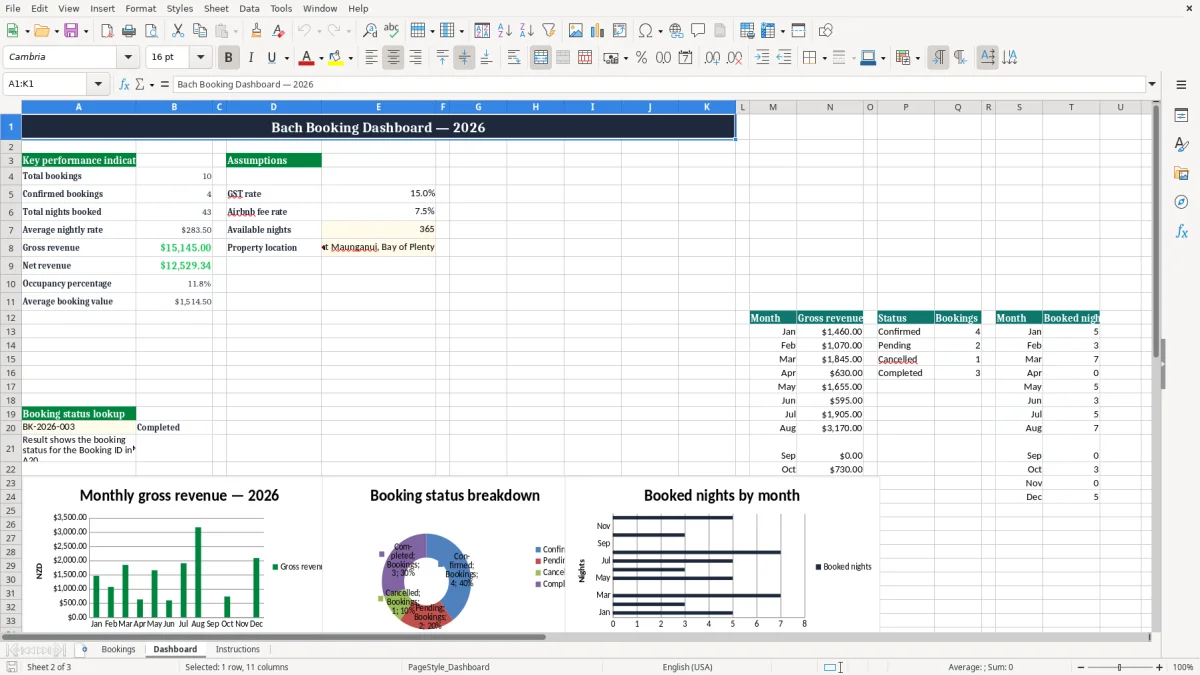
Included features
Booking ID, guest name and guest city or country fields.
Check-in and check-out dates with a nights calculation.
Guest count, booking status and accommodation type fields.
Nightly rate, cleaning fee and extra charges recorded in NZD.
Gross booking revenue, estimated Airbnb fee, GST and net revenue fields.
Cleaner assignment, cleaning status and notes for changeover management.
A simple booking calendar for your New Zealand bach
Managing a bach can become difficult when reservations, guest messages, cleaner schedules and income records are spread across emails, calendars and notebooks. This Airbnb bach booking calendar Excel spreadsheet NZ template gives you a central place to record the details that matter for each stay.
Add the guest name, location, dates, number of guests and booking status, then use the register to understand who is arriving, who is departing and which reservations have already been completed. The layout is suitable for a single holiday home and can also be adapted for a small short-term rental operation.
Because the template is prepared for the New Zealand market, financial fields are shown in NZD. You can use it for a coastal bach, lake house, rural retreat, ski accommodation or family holiday home.
It works for Airbnb stays as well as direct bookings, repeat guests and reservations from other platforms. Keeping all bookings in a consistent format makes it easier to check availability before accepting a new reservation and to find historical information when a guest returns.
The spreadsheet is a practical planning tool rather than a replacement for a connected channel manager. Update it whenever a booking is made, changed or cancelled, and compare it regularly with your Airbnb calendar. A reliable manual record can support smoother hosting, clearer communication and better preparation for busy New Zealand periods such as summer holidays, school holidays, long weekends and local events.
It can also give family members, property managers and cleaners a shared reference point when responsibilities are divided. Use clear booking IDs and consistent status updates so the record remains easy to search.
The same kind of clear, searchable record helps when you are reconciling hosting income and costs, so a sole trader expense tracker keeps the figures aligned with your booking log.
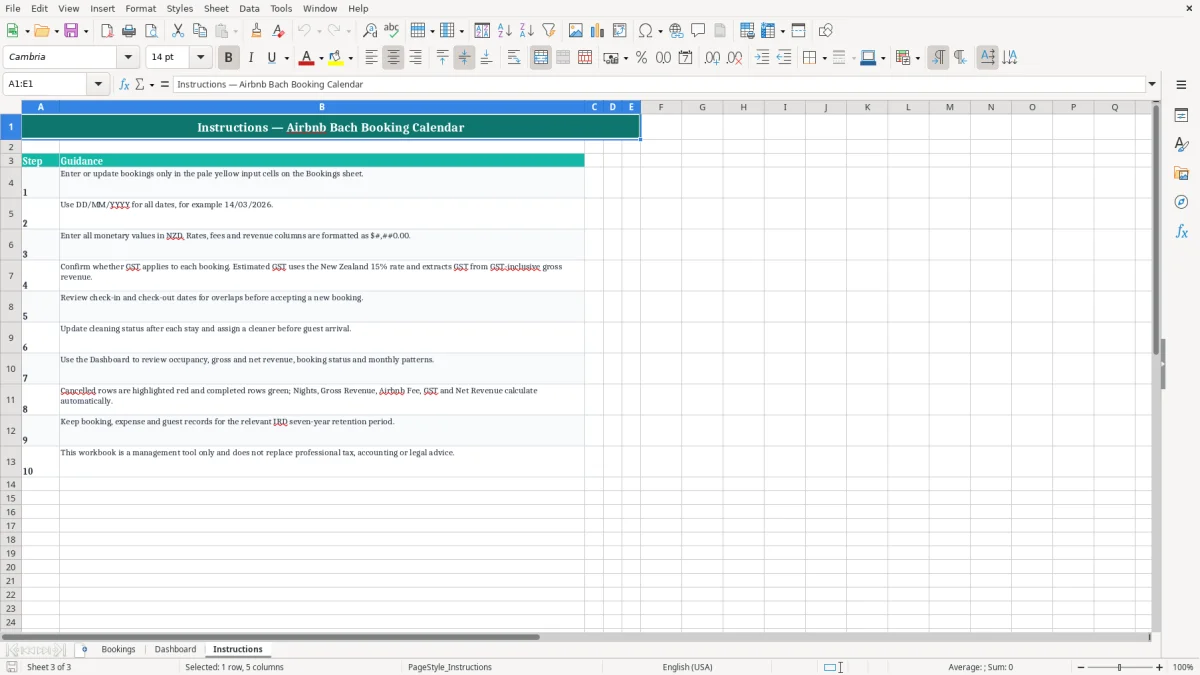
Track bach income, fees and estimated GST
Understanding the financial result of each bach booking is just as important as knowing when guests arrive. This Excel template includes fields for the nightly rate, cleaning fee and extra charges, helping you record the main amounts associated with a reservation.
It then provides a structured way to review gross booking revenue, estimated Airbnb fees, GST applicability, estimated GST and net revenue. Looking at these figures together can make it easier to compare stays, identify stronger periods and plan for property costs.
The New Zealand dollar format is useful for hosts who price their accommodation locally or need a clear record for household and business planning. Extra charges might include approved services such as kayak hire or other guest-related items, provided they are recorded accurately and supported by your booking information.
Cleaning fees can also be kept separate from the nightly rate so you have a better view of the income and costs connected with changeovers. Enter amounts consistently and compare the worksheet with platform payout reports to identify differences promptly.
GST and tax treatment can depend on your circumstances, ownership structure, turnover and the nature of your accommodation activity. The estimated fields in this template should not be treated as a tax return or professional advice. Check your actual Airbnb statements, retain supporting records and confirm the correct approach with Inland Revenue guidance or a qualified New Zealand accountant.
Used alongside those records, the spreadsheet can provide a helpful operating summary without claiming to calculate every tax obligation. It may also help you prepare questions for an adviser and organise information before reviewing your annual results.
That review is easier when your IRD number records are already organised alongside the Airbnb statements, ownership details and other supporting documents.
Organise cleaners and prepare for every guest
A successful bach stay depends on more than a confirmed reservation. Between check-out and the next check-in, the property may need cleaning, linen changes, rubbish removal, restocking, maintenance checks and preparation for special guest requests.
The cleaner and cleaning status fields in this booking spreadsheet help you connect each reservation with the practical work required before arrival. Assign a cleaner, mark the task as scheduled and update it to completed when the bach is ready.
The notes column gives you space to capture useful details that may not fit in a standard booking calendar. You can record an early arrival request, a cot requirement, pet information, a maintenance reminder, a key collection instruction or a particular cleaning issue. Keeping these notes with the booking reduces the chance that important information will be overlooked during a busy changeover period.
It can also support communication with family members, property managers and cleaning contractors. Keep instructions specific, current and appropriate for the people who need access to them.
Use filters or sorting to focus on upcoming stays, completed bookings or reservations that still need a cleaning update. Reviewing the sheet before each weekend or holiday period can help you identify back-to-back bookings and allow more time for preparation. For a bach in a remote area, this advance planning is especially useful because supplies, tradespeople and cleaners may not be immediately available.
The spreadsheet does not replace direct communication, but it provides a clear operational checklist for keeping your accommodation ready. After each departure, update the status promptly so the next person reviewing the workbook can see whether the property is prepared.
Plan seasonal demand and improve hosting records
A well-maintained booking register can help you understand how your New Zealand bach performs throughout the year. As you add reservations, the dates, nights, rates and guest numbers create a useful history of demand. You may notice patterns around summer, winter, school holidays, public holidays, festivals or local attractions.
This information can support decisions about pricing, minimum stays, cleaning capacity and when maintenance work should be scheduled. It can also help you prepare for periods when the bach is likely to be occupied frequently.
The template is designed to be approachable for hosts who want the flexibility of Excel without the complexity of specialist property software. You can adapt the sample entries, add your own notes and maintain a record that matches the way you operate. Keep a consistent booking ID for each reservation and update cancelled or changed stays promptly.
If several people help manage the property, agree on who will edit the workbook and how often it will be checked. A regular review can reveal incomplete fields, overlapping dates or reservations that need confirmation.
Protect guest privacy by storing the file securely and sharing it only with people who need access. Keep backups and retain invoices, platform statements and other supporting documents separately where appropriate. For multiple baches, a separate worksheet or workbook for each property may make the records easier to understand.
Combined with the Airbnb calendar and professional accounting advice, this spreadsheet can give you a practical overview of bookings, changeovers and revenue while supporting more organised day-to-day hosting. It is particularly useful as a simple historical record when reviewing what worked during previous seasons and planning the next one.
Common questions about this template
Yes. It is designed for New Zealand bach and short-term rental bookings, with financial amounts recorded in NZD.
Yes. Nights are calculated from the check-in and check-out dates so you can review the length of each guest stay.
Yes. Assign a cleaner, select the cleaning status and use the notes field for changeover instructions or special requirements.
Yes. The workbook includes fields for estimated Airbnb fees, GST applicability, estimated GST and net revenue. Confirm figures with actual statements and professional advice.
Yes. The register can be used for Airbnb, Bookabach, other platforms, direct website reservations and repeat guests.
No. GST and tax obligations vary. Use the estimates for planning and confirm the correct treatment with Inland Revenue guidance or a qualified New Zealand accountant.
Download
File format
Excel (.xlsx)
Compatible software
Excel, Google Sheets, LibreOffice
Price
Free