
Cricket scorebook Excel – Free Template (2026)
Projects & Planning
Healthy Homes Excel - Free Template
Track heating, insulation, ventilation, moisture, draughts and compliance statements across NZ rental properties with this Excel checklist.
2026-07-28
350 downloads
4.8/5 average rating
Download template
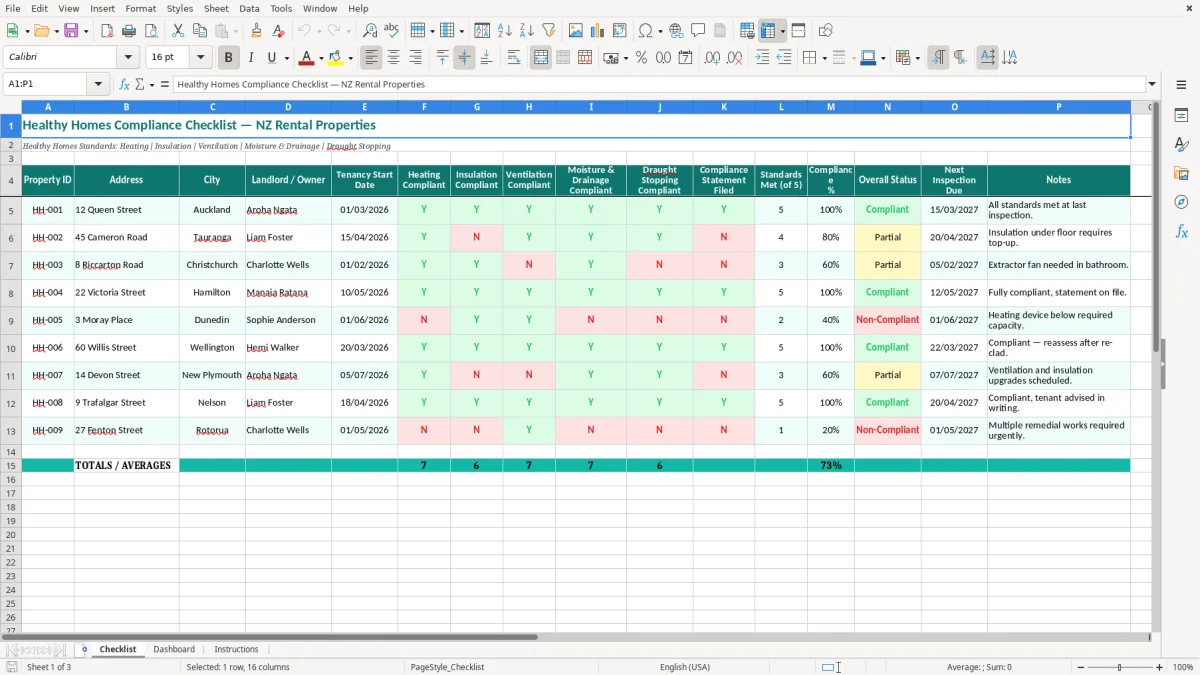
This Healthy Homes compliance checklist is an Excel spreadsheet for New Zealand landlords and property managers checking rental properties against the five Healthy Homes Standards. The Checklist sheet records each property's details, five compliance results, statement status, inspection date and notes, while the Dashboard summarises progress.
Use one row per rental property and mark Heating, Insulation, Ventilation, Moisture & Drainage and Draught Stopping as Y or N. The sheet also records the compliance statement, counts standards met out of five, shows a compliance percentage and flags the overall status.
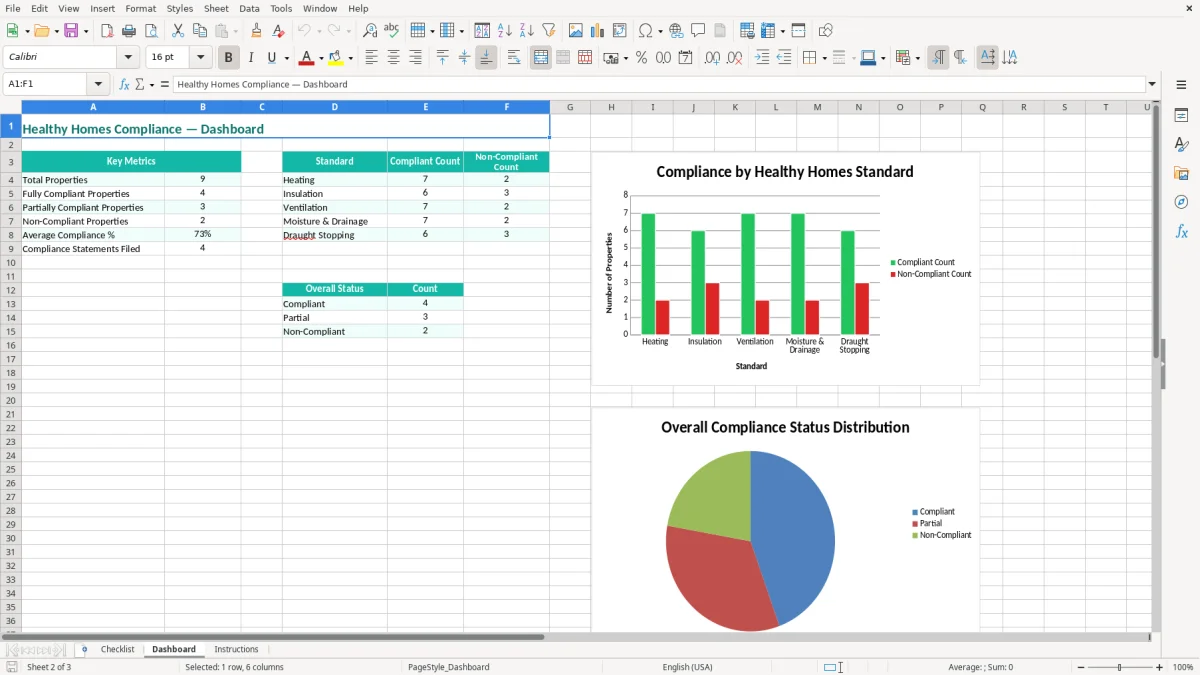
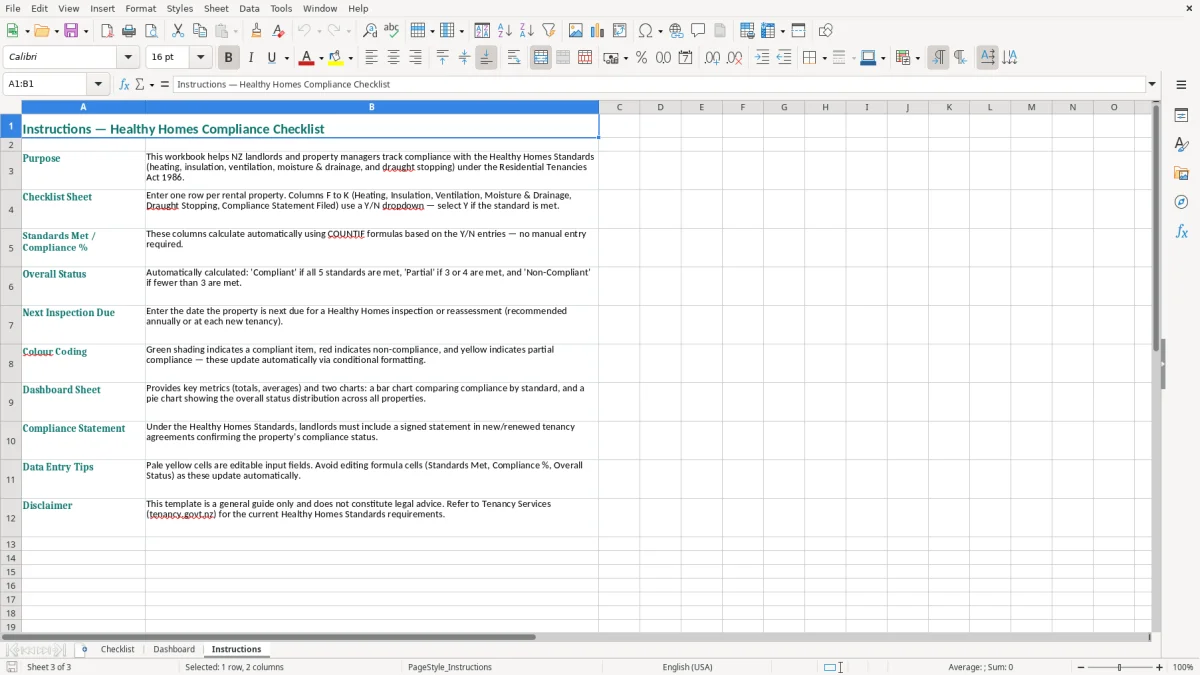
Image 1 shows the main Checklist sheet, with teal headers across columns A to P and pale yellow input cells. The Dashboard and Instructions sheets provide the supporting view and guidance for using the workbook.
The key benefits of this Excel template
- Track all five Healthy Homes Standards for each property in one row.
- See the number of standards met out of 5 and the resulting compliance percentage.
- Record whether the compliance statement has been filed for each tenancy.
- Capture the property ID, address, city, owner, tenancy start date and next inspection due date.
- Spot incomplete properties quickly when one of the five compliance columns is marked N.
- Keep practical notes such as an insulation top-up or bathroom extractor fan still required.
- Manage a portfolio including the example Auckland, Tauranga and Christchurch properties.
Step-by-step guide
- Open the Checklist sheet and start with one row for each rental property. Enter a unique Property ID, address, city and landlord or owner name.
- Enter the Tenancy Start Date using the DD/MM/YYYY format, such as 01/03/2026. Keep the date consistent with your tenancy records.
- Check the five Healthy Homes areas: Heating, Insulation, Ventilation, Moisture & Drainage and Draught Stopping. Enter Y when the relevant standard is met and N when work or evidence is still outstanding.
- Record whether the Compliance Statement Filed field is complete. This gives you a separate reminder that the statement paperwork has been dealt with, rather than assuming the property itself is compliant.
- Review Standards Met (of 5), Compliance % and Overall Status. Use these summary fields to identify properties needing attention before the next inspection.
- Enter the Next Inspection Due date and write a short action note, such as insulation under floor requires top-up. Update the row after repairs or a new inspection.
- Use the Dashboard for the portfolio-level view and read the Instructions sheet before changing the workbook layout or copying rows.
Included features
Checklist sheet with 16 columns covering property details, five standards, paperwork and follow-up.
Dedicated Y/N fields for Heating, Insulation, Ventilation, Moisture & Drainage and Draught Stopping.
Standards Met (of 5) and Compliance % summary columns for each rental property.
Compliance Statement Filed column to track tenancy documentation separately from physical work.
Next Inspection Due and Notes columns for planned checks and outstanding repairs.
Teal header formatting, wrapped labels and bordered cells make the wide checklist easier to scan.
Separate Dashboard and Instructions sheets for portfolio review and setup guidance.
Who uses a healthy homes checklist across New Zealand
Useful for landlords and property managers
A private landlord with two Hamilton rentals can use one row for each address instead of keeping heating information in one email, insulation notes in a folder and inspection dates in a phone calendar. A property manager looking after 40 homes can filter the Checklist sheet to find every row with an N in one of the five standards columns.
The workbook is particularly useful before a tenancy begins, after a repair, and when preparing records for a routine inspection. The example rows show three different locations: 12 Queen Street in Auckland, 45 Cameron Road in Tauranga and 8 Riccarton Road in Christchurch. That makes the layout practical for a mixed portfolio rather than a single house in one suburb.
What one row tells you
Start with the Property ID and address, then record the landlord or owner, city and tenancy start date. The five compliance columns cover Heating, Insulation, Ventilation, Moisture & Drainage and Draught Stopping. A row with five Y entries has all five standard areas marked as met; a row with four Y entries and one N needs a targeted follow-up rather than another full inspection.
For example, the sample Tauranga property has insulation marked N and notes that the under-floor insulation needs a top-up. The Christchurch example has ventilation and draught stopping marked N, with an extractor fan still needed in the bathroom. Those notes turn a percentage into a work list for the owner, tradesperson or property manager.
When to update it
Update the row immediately after an inspection or contractor visit, not at the end of the month when details are easy to forget. Set the Next Inspection Due date at the same time; a 12-property landlord can then review upcoming dates each Friday in under 10 minutes.
What New Zealand landlords must record for healthy homes
The five Healthy Homes Standards
The Healthy Homes Standards sit under the Residential Tenancies Act 1986 and cover heating, insulation, ventilation, moisture ingress and drainage, and draught stopping. All private rental properties were required to meet the standards by 1 July 2025, so in 2026 a new tenancy checklist is a record of current compliance and outstanding remedial work, not a future-only planning tool.
The heating standard is based on the required heating capacity for the main living room, calculated using the property's size and other prescribed factors. It is not enough to write that the house has a heater. Record the evidence behind the decision, such as the heater type, capacity and any Healthy Homes assessment, in your supporting files and use the Notes column for a short reference.
Statements and inspection evidence
Landlords must provide a compliance statement with new or renewed tenancy agreements, and tenants can request an updated statement during the tenancy. The statement identifies how the property meets each standard, so the Compliance Statement Filed column should not be treated as a substitute for the statement itself.
Keep invoices, photographs, heater specifications, insulation information and inspection notes with the spreadsheet. Inland Revenue record-keeping rules generally require business records to be kept for 7 years, while tenancy compliance evidence should remain accessible for the period needed to support the landlord's obligations and resolve disputes.
Use the official guidance for the technical test
Tenancy Services and the Ministry of Business, Innovation and Employment publish the detailed requirements and exemptions. Check the official heating calculator and current guidance for the property rather than relying on a blanket rule such as one heater per house. For example, a 120-square-metre property with a 2.4-kilowatt heater may need a different assessment from a smaller, well-insulated 70-square-metre home.
The healthy homes gaps that create expensive follow-up
A Y entry without evidence
The most common problem I see is a landlord marking every column Y because the property looks tidy. A portable heater in a bedroom does not by itself prove that the main living room meets the heating capacity requirement, and a thin layer of insulation does not prove that the required insulation level and condition are met.
If a tenant challenges the statement, the landlord may have to find the original assessment, contractor invoice or photographs months later. Three hours spent reconstructing a file can cost more than a short inspection completed properly at the start.
Missing ventilation and drainage details
Bathrooms and kitchens are frequent trouble spots. A fan that runs but does not vent outdoors, or a fan with no effective control, should not automatically be marked compliant. Likewise, a dry-looking room on inspection day does not prove that gutters, downpipes, ground moisture and drainage are dealing with water correctly.
Consider a Christchurch rental where the bathroom extractor fan is missing. A $350 fan may become a $900 job after electrical work, ceiling access and repainting are added. Leaving the row at N and recording the action in Notes is safer than marking Y and losing the issue in a general maintenance inbox.
Paperwork and dates falling out of step
Another costly error is updating the physical work but not the compliance statement. A landlord may install insulation in May, leave the statement marked as filed from the old inspection and miss the change when the tenancy is renewed. The spreadsheet separates Compliance Statement Filed from the five standards so that paperwork does not disappear behind an overall percentage.
Finally, vague notes such as check later are difficult to act on. Write the defect, responsible person and expected date: bathroom extractor fan required, electrician booked, inspection due 05/02/2027. A specific note takes minutes to write and prevents a six-month-old repair from being treated as new.
A specific note takes minutes to write and prevents a six-month-old repair from being treated as new, and the same discipline keeps a contribution log clear when dates and amounts need to be checked later.
How to turn the checklist into a regular property routine
Attach it to an existing landlord task
Do not wait for a spare afternoon to maintain the workbook. Open it immediately after each inspection, rent review or contractor visit. If you manage 18 properties, review the Next Inspection Due column every Monday and contact the relevant owner when a date is within 30 days.
Use the same Property ID on inspection photos, invoices and contractor reports. For example, HH-002 should appear in the file name for the Tauranga insulation invoice as well as in the Checklist row. That small habit makes evidence much easier to retrieve.
Keep entries consistent
- Use Y only when you have checked the relevant standard and supporting evidence; use N when work or verification remains outstanding.
- Write one clear action in Notes, including the trade or owner responsible and a date where known.
- Enter dates as DD/MM/YYYY so an inspection due on 05/02/2027 is not confused with 2 May 2027.
- Save a dated copy before making a large portfolio update, such as HH-checklist-2026-07-21.xlsx.
Keep the five standards columns unchanged when adding properties so the Standards Met (of 5), Compliance % and Overall Status calculations continue to refer to the right fields. If you copy a row, replace the old address, owner, dates and notes rather than carrying across last year's evidence.
Know when Excel is no longer enough
This template is a good fit for a small portfolio where one person completes inspections and follows up repairs. Once 50 or more properties, several staff members or hundreds of open maintenance actions are involved, use property-management software or a system such as Xero or MYOB alongside a proper tenancy platform. Excel remains useful as an export or audit checklist, but it should not be the only place where legal notices, tenant communication and contractor jobs are controlled.
Common questions about this template
It tracks the property ID, address, city, landlord or owner, tenancy start date, five Healthy Homes areas, compliance statement status, standards met out of 5, compliance percentage, overall status, next inspection due and notes.
The five areas are heating, insulation, ventilation, moisture ingress and drainage, and draught stopping. The Checklist sheet has a separate compliance column for each area.
No. Y records your checklist result; it does not replace the technical assessment, supporting evidence or compliance statement. Use Tenancy Services and MBIE guidance to confirm the property's actual requirements and any permitted exemptions.
Private rental properties were required to meet the Healthy Homes Standards by 1 July 2025. In 2026, landlords should maintain the property, keep evidence current and provide the required compliance information with new or renewed tenancy agreements.
Enter N in the relevant standard column, leave the other results accurate, and write the required action in Notes. For example: insulation under floor requires top-up, contractor booked 18/07/2026. Update the row after the work and inspection are complete.
Yes. Use one row per property and give each property a unique ID such as HH-001 or HH-002. The sample rows show properties in Auckland, Tauranga and Christchurch, and the Dashboard provides the portfolio view.
Download
File format
Excel (.xlsx)
Compatible software
Excel, Google Sheets, LibreOffice
Price
Free