
Watercare Bill Tracker Excel – Free Template (2026)
Personal Finance
KiwiSaver Reconciliation Excel - Free Template
Reconcile employer KiwiSaver contributions by employee, pay period and totals across a simple NZ workbook.
2026-07-05
223 downloads
4.8/5 average rating
Download template
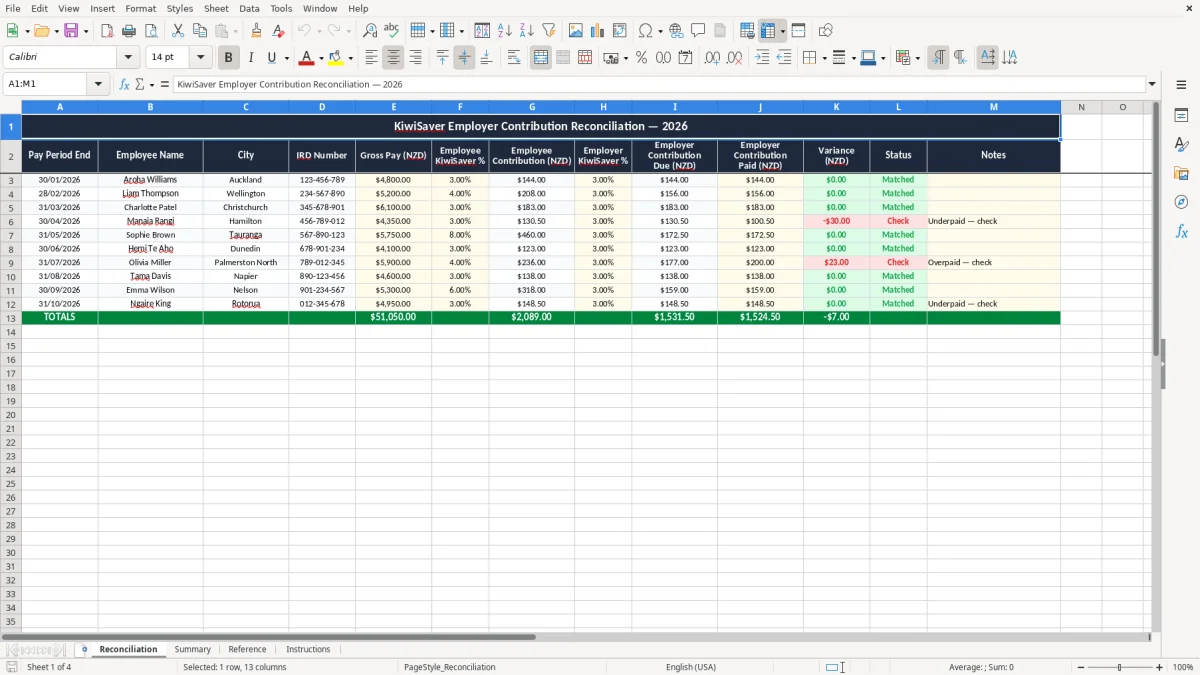
This KiwiSaver employer contribution reconciliation Excel spreadsheet helps you check employer contributions against each pay run, employee by employee, and total them back to your payroll records. It includes four sheets: Reconciliation, Summary, Reference and Instructions.
Use it when you want a clean PAYE support file for the pay run, month-end or year-end review. The layout lets you enter payroll details once, compare expected and actual employer KiwiSaver amounts, and keep the whole worksheet easy to read in Excel.
The workbook suits a payroll admin, bookkeeper or small business owner who wants a simple reconciliation before filing IRD returns or checking the next payroll payment.
The key benefits of this Excel template
- Checks employer KiwiSaver contributions line by line so you can spot underpayments before they roll into the next pay run.
- Helps you tie payroll data back to the IR348 and other payroll records without rebuilding the numbers from scratch.
- Makes it easier to see the total employer contribution cost for a pay period, a month or a full year.
- Gives you one place to compare expected, actual and difference amounts for each employee.
- Reduces payroll errors that can turn into a messy correction run, especially when a team has 5, 10 or 20 staff.
- Saves time at month-end because the Summary sheet rolls the figures up for you.
- Works well as a manual check before you move the numbers into Xero, MYOB or your own payroll system.
Step-by-step guide
- Open the Reconciliation sheet and enter each employee’s payroll details for the pay period. Use the yellow input cells for the numbers you know from the payroll run.
- Add the expected employer KiwiSaver contribution for each employee. For example, 3% of a $1,200 gross pay packet is $36.00.
- Check the difference column against what was actually paid. If one employee is short by $12.50 across 2 pays, you can fix it before the next filing.
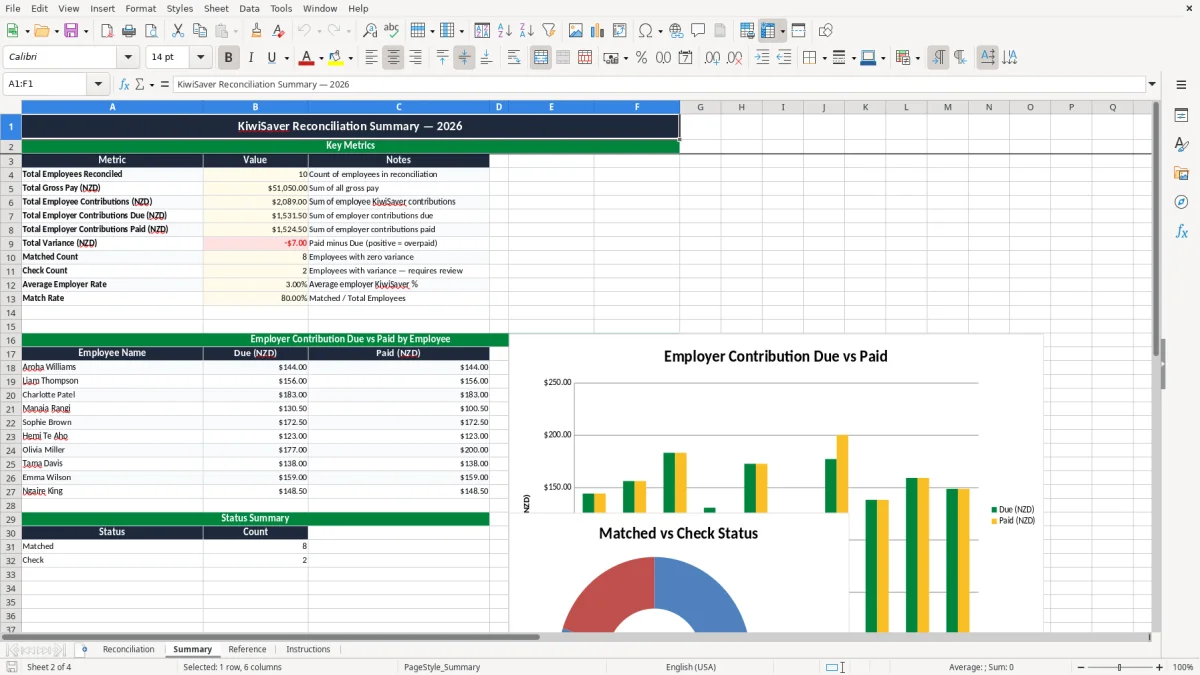
- Review the Summary sheet to see totals by pay period and the overall variance. This is the sheet you can use when you want one quick figure for the whole team.
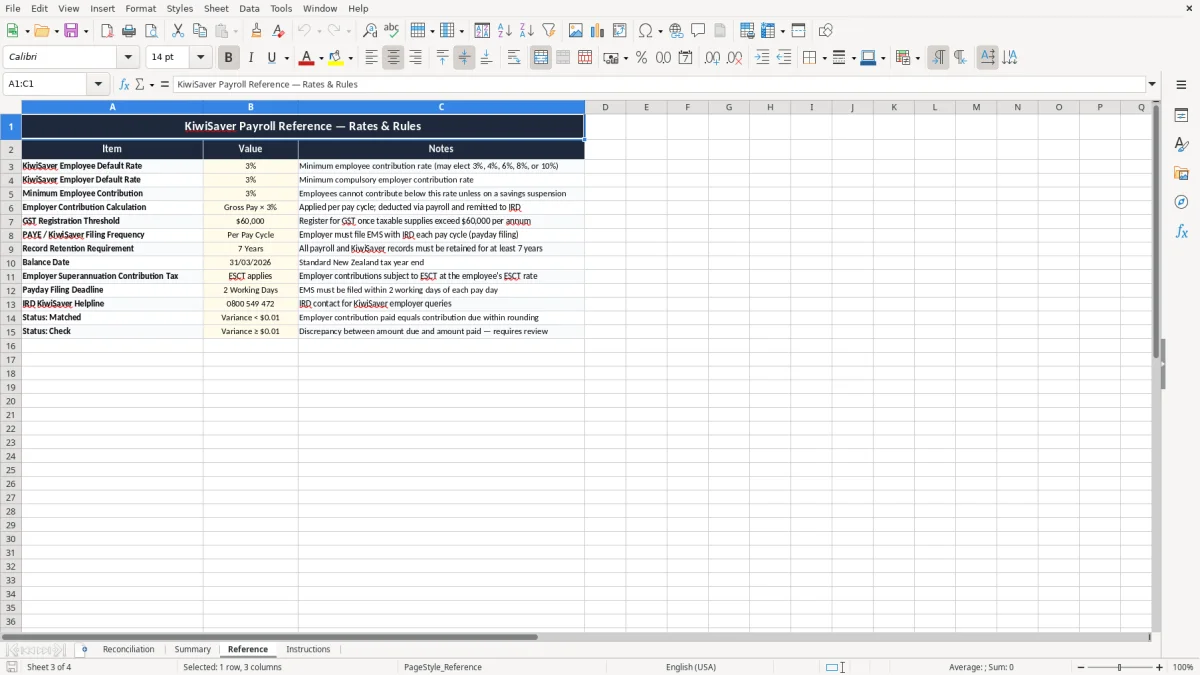
- Use the Reference sheet when you need the standard rates or a reminder of the contribution logic. It keeps the rules in one place instead of buried in email notes.
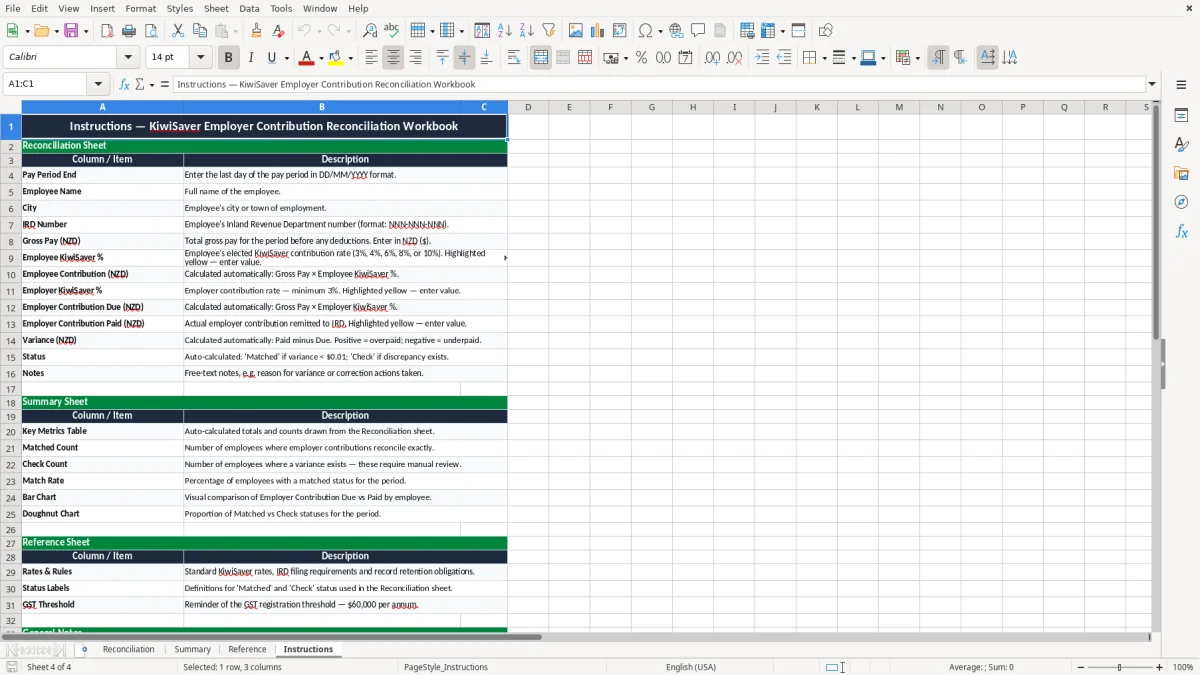
- Follow the Instructions sheet the first time you use the workbook, then copy the structure for each new pay run or month-end reconciliation.
Included features
Four-sheet workbook: Reconciliation, Summary, Reference and Instructions.
Employee-by-employee reconciliation area with clear input cells and calculated variance fields.
Totals that help you compare employer KiwiSaver contributions across a pay run or month.
Colour-coded layout that separates input, calculated values and reference information.
A reference area for the key KiwiSaver contribution rates and payroll notes.
Simple structure that is easy to print, review and file with your payroll records.
Built for NZ payroll use, so the workbook fits common small business and bookkeeping workflows.
Who uses a KiwiSaver reconciliation workbook in New Zealand
A KiwiSaver employer contribution reconciliation spreadsheet is what you reach for when you need to check payroll numbers against what should have been paid. In practice that is usually a payroll admin, office manager, bookkeeper or owner-manager looking at a pay run with 4 staff, 12 staff or 40 staff and wanting the totals to line up.
The workbook in this template is built for that job. The Reconciliation sheet is where you work through each employee, the Summary sheet gives you the totals, and the Reference and Instructions sheets keep the pay logic close at hand.
When the check matters most
You normally use it around payday filing, month-end, or when you are reviewing a payroll correction. If a Christchurch builder has 6 staff on mixed wages and salary, a $7.50 shortfall on each of 4 employees quickly becomes a $30 error before you even count any KiwiSaver top-up or adjustment.
Why a spreadsheet still helps
A payroll system can process the pay, but a spreadsheet is still handy when you want a separate control sheet. It lets you test the numbers, print a clean summary, and keep a visible trail for the person who signs off the payroll or checks the bank payment.
What Inland Revenue requires for KiwiSaver payroll checks
For employer KiwiSaver contributions, the practical rule is simple: the employer contribution is 3% of gross salary or wages for eligible employees, and it sits alongside PAYE, ACC and any KiwiSaver deductions on the payroll run. If you pay an employee $1,000 gross, the employer contribution is $30.00; at $1,250 gross, it is $37.50.
That is why reconciliation matters. If your payroll shows 8 staff and the contribution should total $320.00 for the week, but the bank payment or payroll report shows $312.50, you are $7.50 short and can fix it before the mistake rolls forward.
Records and timing
Inland Revenue expects good records to be kept for 7 years, so a payroll reconciliation sheet is useful evidence if you need to show how you checked the numbers. For employers filing under payday filing, the employer schedule is reported through the IR348, so keeping a clean support file by pay date makes the monthly workflow much easier.
Choosing the right approach
For a small team, a spreadsheet check before submitting payroll is usually better than trying to explain differences after the fact. If you are reconciling 15 employees and each one takes just 2 minutes to confirm, that is 30 minutes well spent to avoid a messy adjustment run.
That same quick check is easier to document when employee deductions are already captured in a saver contributions tracker by pay period.
Where KiwiSaver payroll errors usually show up
The most common problem is not the rate itself, it is the data around the rate. An employee with the wrong gross figure, a missed opt-in deduction, or a pay period that gets doubled up can throw the contribution total off by $10, $50 or much more before anyone notices.
Another common slip is comparing the wrong totals. If you reconcile employer contribution only but forget that the payroll report already includes a previous correction, you can think you are short when the numbers are actually right.
Small errors that become real money
Say you have 10 employees and 2 of them are underpaid by $4.20 each for 6 fortnights. That is $50.40 in total, and the correction takes time from payroll, management and possibly the employee who spots the issue on their payslip.
Why the paperwork matters
A reconciliation sheet with no date, no pay period and no employee names is almost useless when you come back to it 6 months later. If you are looking at a year-end review or a payroll audit trail, the time saved by having the numbers laid out clearly is worth more than the few minutes it takes to fill the sheet properly.
A dated levy estimate sheet keeps the figures traceable when you need to reconcile the numbers against a later payroll review or audit trail.
How to make the sheet part of your pay run routine
The easiest way to keep this spreadsheet alive is to tie it to something you already do every pay cycle. Most small firms use it straight after payroll is finalised, or on the same day they prepare the IR348 filing and bank payment.
Simple habits that stick
- Save one copy per pay period so you can compare week to week or month to month.
- Paste in the payroll totals first, then check the employer contribution line second.
- Use the Summary sheet as your sign-off page before you file or pay.
- Keep the workbook in the same folder as your payroll reports so you are not hunting for files at 5:00 pm.
When to move on from a spreadsheet
If you are dealing with 30+ staff, multiple pay rates, salary sacrifice, or frequent employee changes, the manual check will start to drag. That is the point where Xero or MYOB payroll controls may be better, with the spreadsheet kept only as a review tool for month-end or year-end.
For everyone else, a tidy workbook is often enough to catch the 1% of payroll errors that cause 90% of the grief.
Common questions about this template
It is a check sheet for comparing what your payroll should have paid in employer KiwiSaver contributions with what was actually paid. That helps you catch small differences early, such as a $6.00 shortfall on a $200 gross pay run.
Yes. The workbook has 4 sheets: Reconciliation, Summary, Reference and Instructions. That gives you one place to enter the numbers, one place to view totals, and two support sheets for rates and setup notes.
For eligible employees, the employer contribution is 3% of gross salary or wages. For example, a $900 gross pay produces a $27.00 employer contribution, while a $1,400 gross pay produces $42.00.
Keep your payroll and tax records for 7 years. That includes the reconciliation support file, because it helps explain how you got from the payroll report to the payment or filing totals.
Yes. Many small businesses run payroll in Xero, MYOB or another system and use this spreadsheet as a manual check before filing or paying. It works well when you want a second set of eyes on the numbers.
If you have a larger team, frequent staff changes or more complex payroll adjustments, a manual workbook can become slow. At that point, payroll software should do the heavy lifting and the spreadsheet can stay as a review file only.
Download
File format
Excel (.xlsx)
Compatible software
Excel, Google Sheets, LibreOffice
Price
Free