
Rugby Subs Fees Tracker Excel – Free Template (2026)
Accounting & GST
Road user charges RUC Excel - Free Template
Track NZ RUC licences, odometer readings, costs, kilometres, payments and renewal status across vehicles with this Excel workbook.
2026-08-30
433 downloads
4.8/5 average rating
Download template
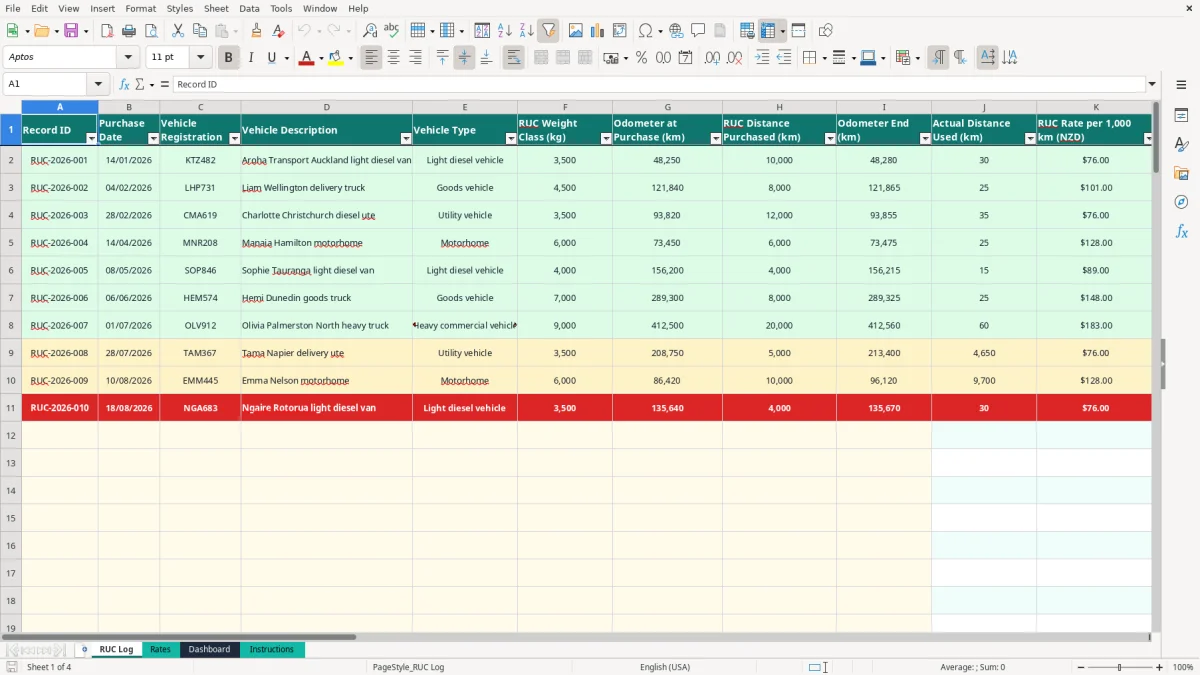
This road user charges (RUC) Excel tracker records each licence purchase, vehicle, weight class, odometer reading, distance purchased, cost, payment status and renewal information. It includes the RUC Log, Rates, Dashboard and Instructions sheets for managing up to 100 prepared licence records.
Enter the yellow cells in the RUC Log, then let the workbook calculate actual distance used, cost per kilometre, remaining kilometres, estimated licence end dates and renewal status. The Dashboard gives you a quick view of fleet spend and outstanding work.
The key benefits of this Excel template
- Record up to 100 RUC licence purchase rows in one structured log.
- Calculate licence cost automatically from the selected weight class and rate.
- Compare purchased distance with odometer readings to see actual kilometres used.
- See remaining kilometres and estimated licence end dates for each vehicle.
- Track Paid, Outstanding or Pending payment status with a controlled list.
- Review total RUC spend, kilometres purchased and kilometres remaining on the Dashboard.
- Spot licences marked Renew soon when kilometres fall to 500 or less or the estimated end date is within 30 days.
Step-by-step guide
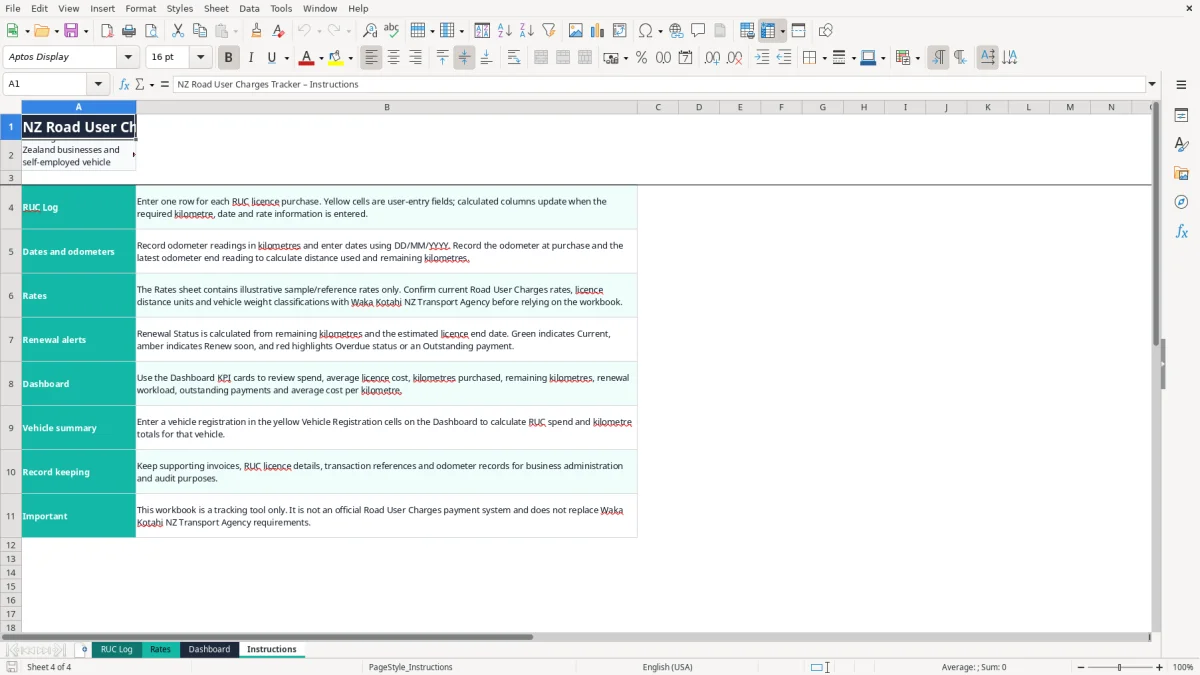
- Open the Instructions sheet first. It explains the yellow input cells, calculated columns, rate references and renewal indicators.
- Go to RUC Log and enter one row for each licence purchase. Add the record ID, purchase date, vehicle registration, description and vehicle type.
- Choose the RUC weight class from the list on the Rates sheet, then enter the odometer at purchase, distance purchased and odometer end reading in kilometres.
- Enter the licence start date, licence number, supplier or transaction reference, payment status and any notes. Use dates in DD/MM/YYYY format.
- Check the calculated columns for the rate, licence cost, cost per kilometre, estimated licence end date, remaining kilometres and days remaining.
- Review the Dashboard KPI cards and vehicle summary. Select a registration in the yellow summary cells to see that vehicle's spend and kilometre totals.
- Before relying on the figures, verify the editable sample rates against current Waka Kotahi NZ Transport Agency information and retain the supporting licence and odometer records.
Included features
RUC Log with fields for record ID, purchase date, registration, vehicle description, vehicle type and weight class.
Odometer and distance fields for purchase, actual use and remaining kilometres.
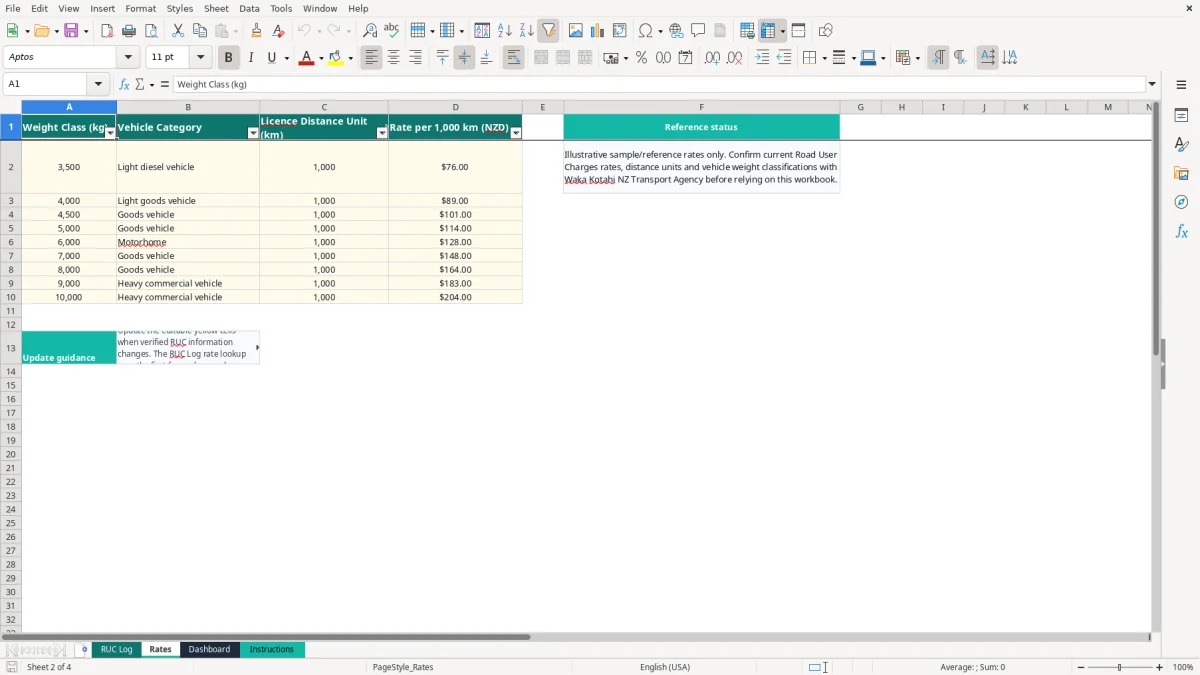
VLOOKUP-based rate matching from the Rates sheet.
Automatic licence cost and cost-per-kilometre calculations in NZD.
Estimated licence end date based on the vehicle's recorded average distance use.
Payment status and renewal status fields, with conditional highlighting for renewal attention.
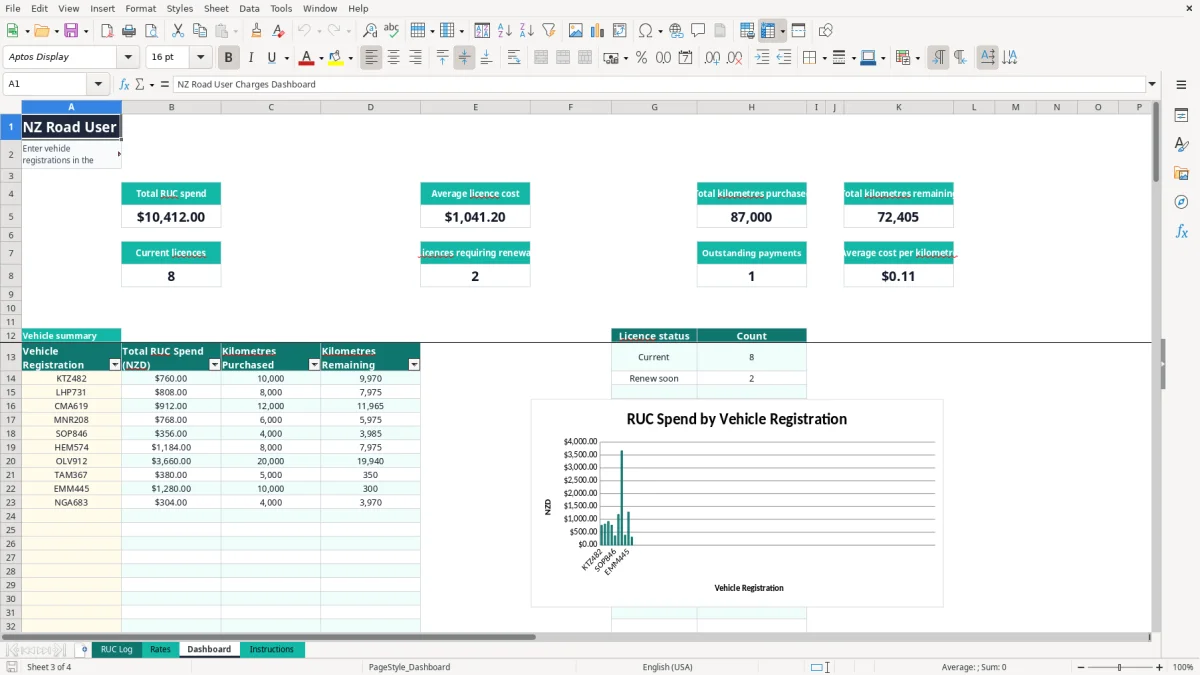
Dashboard KPI cards, vehicle summaries and two charts for spend and licence status.
Who uses a road user charges tracker in New Zealand
A sole trader with a diesel van often buys RUC in blocks and then has to remember when the distance will run out. A small transport operator, builder, courier business or rural contractor has the same problem across several registrations: the licence receipt is easy to file, but much harder to monitor against odometer readings.
This workbook suits the person who wants a practical fleet register rather than a full transport management system. The RUC Log has 100 prepared rows, with one row for each licence purchase. The sample records show a 3,500 kg light diesel vehicle, a 4,500 kg goods vehicle and a 3,500 kg utility vehicle, so you can see how the fields work before replacing them with your own data.
What goes into each record
Enter the registration, vehicle description and vehicle type, then record the odometer at purchase and the kilometres bought. When the latest odometer reading is entered, the workbook calculates actual distance used. For example, an odometer moving from 48,250 km to 48,280 km shows 30 km used against a 10,000 km purchase.
The log also holds the licence number and supplier or transaction reference. That is useful when the office manager at a Hamilton plumbing firm needs to match a bank payment or invoice to the correct ute, rather than searching through email during month-end.
When the Dashboard helps
The Dashboard is most useful during a weekly fleet check or at month-end. It shows total RUC spend, average licence cost, total kilometres purchased, kilometres remaining, current licences, licences requiring renewal, outstanding payments and average cost per kilometre.
For a fleet with four vehicles, entering each registration in the vehicle summary gives a separate total for spend, purchased kilometres and remaining kilometres. The two charts then provide a quick management view without manually adding the RUC Log.
What the RUC records need to show
RUC is a New Zealand transport charge administered through the national road-user-charges system. The workbook is a private tracking tool only: it is not an official payment system and does not replace requirements from Waka Kotahi NZ Transport Agency or the relevant licensing channel.
The Rates sheet is deliberately labelled illustrative sample/reference rates. Its examples include $76 per 1,000 km for a 3,500 kg class, $101 for 4,500 kg, $128 for 6,000 kg and $204 for 10,000 kg. These figures must be checked against the current official rate, distance unit and vehicle weight classification before you use the resulting cost for payment or reporting.
Keep the vehicle classification right
The weight class drives the rate lookup. Select the class from the list linked to Rates, rather than typing a near match. The RUC Log uses VLOOKUP against Rates A2:D10, so a missing or altered weight value can leave the rate blank or produce the wrong licence cost.
As a worked example, 12,000 km at an illustrative rate of $76 per 1,000 km produces 12 × $76 = $912. The workbook performs that calculation in the Licence Cost column, but the official rate and classification remain your responsibility to verify.
Keep evidence with the spreadsheet
Retain the RUC licence details, supplier or transaction reference, odometer readings and payment evidence. Inland Revenue record-keeping rules generally require business records to be retained for 7 years where they support tax records, while transport records may have their own practical retention needs.
RUC may form part of the operating cost of a GST-registered business, but the treatment of a particular purchase depends on the underlying document and vehicle use. Do not treat the sample rates or the Dashboard total as an official GST calculation; check whether the supplier document contains the taxable supply information needed for your accounting records.
The RUC tracking errors that create expensive surprises
The most costly mistake I see is entering the wrong weight class. A 4,500 kg vehicle matched to an illustrative $101 rate instead of a 3,500 kg rate of $76 changes a 10,000 km purchase from $760 to $1,010 — a $250 difference before you have even driven the vehicle.
Another common failure is recording the licence purchase but not updating the end odometer. Without both readings, Actual Distance Used stays blank, and the workbook cannot calculate a reliable remaining-kilometre figure. A fleet owner may think 8,000 km remains when the vehicle has already used most of the licence.
Where the numbers stop making sense
Odometer readings must be entered in kilometres and should move forward. If the end reading is lower than the purchase reading, the formula uses MAX to prevent a negative distance, but that does not correct the underlying record. Investigate a replacement odometer, data-entry error or missing starting reading instead of accepting a zero result.
Duplicate rows cause a different problem. If one licence purchase is entered twice, total RUC spend and kilometres purchased are both overstated. For example, a duplicated $912 purchase makes the Dashboard appear $1,824 higher than the actual fleet cost, and the vehicle summary will also double-count it.
Renewal warnings need human follow-up
Renewal Status is an estimate based on remaining kilometres and the calculated licence end date. It marks a record Renew soon at 500 km or less, or when the calculated date is within 30 days. It is a useful prompt, not proof that a licence has expired or that the official record is current.
Do not ignore a red or amber indication because the payment column says Paid. Payment status and licence usage are separate checks. A paid licence can still be close to its kilometre limit, leaving a driver exposed to an avoidable compliance and scheduling problem.
How to make the RUC spreadsheet part of your fleet routine
The spreadsheet works best when updating it is attached to an existing task. Make the driver or fleet coordinator enter the latest odometer reading every Friday, then have the office manager review Renewal Status and Outstanding payments before the Monday dispatch run.
For a four-vehicle Christchurch contracting business, a 10-minute Friday check is enough to compare each current odometer with the latest RUC row. If one vehicle has 650 km remaining and typically travels 300 km a week, the renewal decision should be made now rather than after the kilometres are exhausted.
Use a short, repeatable checklist
- Photograph or record the odometer when a licence is purchased and when the vehicle is reviewed.
- Enter the transaction reference on the same day as the payment, not from memory at month-end.
- Check the Rates sheet whenever official RUC information changes, and edit only the verified yellow reference cells.
- Review the Dashboard before approving the next purchase so outstanding payments and low balances are visible.
Keep the workbook in a controlled folder with a clear file name and a monthly backup. The Instructions sheet says to use DD/MM/YYYY dates, and following one format prevents dates such as 04/02/2026 being read inconsistently by different users.
Know when Excel is no longer enough
This workbook is a good fit for a small fleet and 100 prepared RUC Log rows. Move to fleet software or an accounting system such as Xero or MYOB when several people need simultaneous access, you need automated licence purchasing, GPS odometer feeds, document storage or a complete audit trail.
Until then, avoid changing formula columns J:M and O:U unless you understand the references. The safest habit is to add data in the input fields, verify the calculated outputs, and keep the original workbook as a clean backup before making structural changes.
Common questions about this template
It tracks each licence purchase by vehicle registration, purchase date, vehicle type, RUC weight class, odometer readings, distance purchased, licence cost, licence dates, licence number, payment status and notes. Calculated fields show actual distance used, cost per kilometre, remaining kilometres, days remaining and renewal status.
The RUC Log contains 100 prepared operational rows, from row 2 to row 101. The Dashboard formulas and summaries are set up for those rows, so keep entries within that prepared range unless you extend the formulas and references carefully.
No. The Rates sheet explicitly describes its figures as illustrative sample/reference rates only. Confirm current RUC rates, distance units and vehicle weight classifications with Waka Kotahi NZ Transport Agency before using the calculated licence cost to make a payment.
The workbook uses the licence start date, kilometres purchased and the vehicle's average recorded distance used for that registration. For example, if 10,000 km is purchased and the recorded average use is 500 km per day, the estimated end date is about 20 days after the start date.
Licence Cost requires both the RUC Distance Purchased and a matching RUC Weight Class. The rate is looked up from Rates A2:D10 with VLOOKUP; check that the selected weight value exactly matches a value in the Rates table.
No. It is a tracking workbook, not an official RUC payment system. Use it to organise licence, odometer and payment information, but complete purchases and meet transport requirements through the official Waka Kotahi NZ Transport Agency channels.
Download
File format
Excel (.xlsx)
Compatible software
Excel, Google Sheets, LibreOffice
Price
Free