
Rugby Subs Fees Tracker Excel – Free Template (2026)
Accounting & GST
Kapa haka fundraising Excel - Free Template
Track kapa haka fundraising income, expenses, targets, GST estimates and follow-ups across 110 activities with a dashboard for committee reporting.
2026-09-18
447 downloads
4.8/5 average rating
Download template
This kapa haka fundraising Excel spreadsheet records each activity's date, organiser, venue, payment method, gross income and expenses. It calculates net proceeds, default targets, target achievement, an indicative GST estimate and follow-up status across up to 110 prepared rows.
Use the Fundraising Tracker sheet for events such as a hāngi stall, concert performance, sausage sizzle, quiz night or online campaign. The Summary Dashboard turns those entries into committee-ready totals, activity comparisons and charts, while the Instructions sheet explains the fields and record-keeping approach.
The key benefits of this Excel template
- See gross income, expenses and net proceeds for each fundraising activity without calculating the result manually.
- Compare each event with a default target, including $2,500 for a hāngi stall and $4,000 for a concert performance.
- Track up to 110 activity rows, with prepared formulas from row 2 through row 111.
- Identify activities marked Target met, In progress or Follow up using the built-in status logic.
- Summarise total income, expenses, net proceeds and average proceeds on one dashboard.
- Record cash, EFTPOS, bank transfer, online platform or cheque payments consistently.
- Give the committee a clear view of activity performance while retaining notes about venue costs, donated kai and supplier discounts.
Step-by-step guide
- Open the Fundraising Tracker sheet and start on the first available row beneath the headings. The pale-yellow cells are intended for user-entered information.
- Enter a unique Fundraiser ID, the activity date in DD/MM/YYYY format, a description, activity type, venue or city and lead organiser.
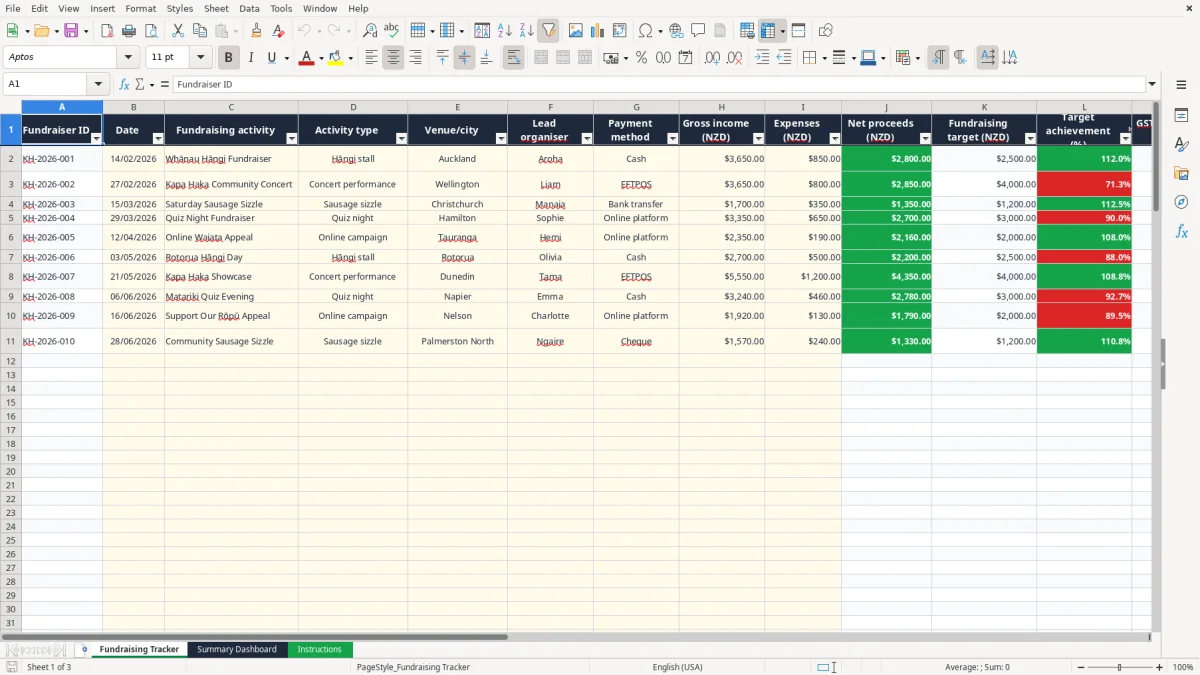
- Select the payment method and enter gross income and directly related expenses in NZD. For example, record $3,650 income and $850 expenses for a hāngi fundraiser.
- Leave the calculated columns alone. Net proceeds, target, target achievement, GST estimate and status are formula outputs.
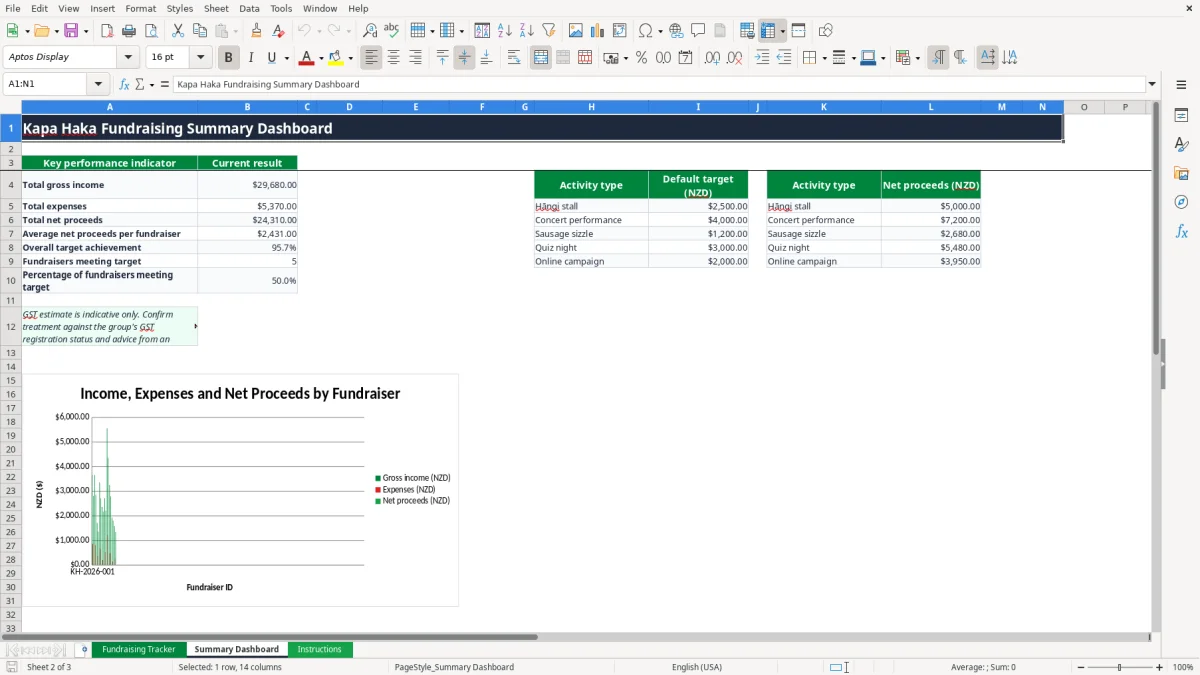
- Review the Summary Dashboard. It shows total gross income, total expenses, total net proceeds, average proceeds, overall target achievement and the number and percentage of activities meeting target.
- Use the charts to discuss income, expenses, net proceeds, activity-type results and target achievement at a committee meeting.
- Reconcile entries to bank statements and supporting records, then use the Instructions sheet to check the GST and seven-year record-keeping notes.
Included features
Fundraising Tracker sheet with 15 columns, freeze panes at row 2 and an auto-filter covering A1:O111.
Date validation for B2:B111 and drop-down lists for five activity types, 10 New Zealand cities, 10 organisers and five payment methods.
Automatic SUM-style calculations for net proceeds, including gross income less expenses.
VLOOKUP-based default targets linked to the Summary Dashboard target list.
Target achievement shown as a percentage, with zero handled safely when no target is available.
Indicative GST estimate calculated at 15% of gross income, clearly flagged for review.
Summary Dashboard with three charts and the Instructions sheet's field-by-field guidance.
Who uses a kapa haka fundraising spreadsheet in New Zealand
A kapa haka group treasurer, whānau committee member or lead organiser can use this workbook whenever the group is raising money for uniforms, travel, accommodation, kai or a competition entry. It suits a monthly committee meeting, the run-up to a regional event and the busy period before a national performance.
The Fundraising Tracker sheet is the working register. Image 1 shows columns for Fundraiser ID, Date, Fundraising activity, Activity type, Venue/city, Lead organiser and Payment method, followed by the money columns. A Christchurch sausage sizzle can be entered with $1,700 gross income and $350 expenses, giving $1,350 net proceeds.
One row for each activity
Keep each event on its own row rather than combining several weekends into one total. A Wellington concert, an Auckland hāngi stall and an online campaign may have different organisers, costs and payment methods, so separating them makes the committee discussion much clearer.
The workbook has prepared formulas through row 111, giving 110 operational entry rows. The drop-down for Activity type includes Hāngi stall, Concert performance, Sausage sizzle, Quiz night and Online campaign. Cities include Auckland, Wellington, Christchurch, Hamilton, Tauranga, Rotorua, Dunedin, Napier, Nelson and Palmerston North.
Useful before reporting night
The Summary Dashboard, shown in image 2, is designed for a quick committee view. It totals gross income, expenses and net proceeds, calculates average net proceeds, measures overall target achievement and counts activities marked Target met.
For example, three completed events with net proceeds of $2,800, $2,850 and $1,350 produce $7,000 total net proceeds and an average of $2,333.33. The activity-type summary helps you decide whether another concert or a lower-cost sausage sizzle is the better next fundraiser.
GST and record-keeping points for kapa haka fundraising
The GST estimate in this workbook is indicative only. The formula applies 15% to gross income, so $3,650 entered in Gross income produces a displayed estimate of $547.50. That is not automatically the group's GST liability: confirm whether the group is GST-registered and whether the relevant fundraising supplies are taxable.
GST registration is generally compulsory when taxable turnover exceeds $60,000 in any 12-month period. A group that is registered must account for GST through its GST return and keep suitable taxable supply information. The Summary Dashboard itself warns that the estimate needs review against the group's registration status and advice from an accountant or Inland Revenue.
Keep the source records
Use the Notes column for useful context, such as donated kai, a venue discount, sound-system hire or a refund. Keep bank statements, EFTPOS settlement reports, online-platform reports, invoices and receipts with the workbook. Inland Revenue record-keeping requirements generally mean retaining business tax records for 7 years.
A $10,000 concert with $2,000 of directly related costs has $8,000 net proceeds. Do not treat that figure as taxable income or a GST amount without checking the group's legal structure, activity and tax position.
Reconcile before filing or reporting
For a registered group, reconcile the tracker to the bank account and payment-provider records before preparing a GST return. Cash collections should be counted and deposited promptly, while EFTPOS and online receipts should be matched to settlement reports rather than relying on a volunteer's memory.
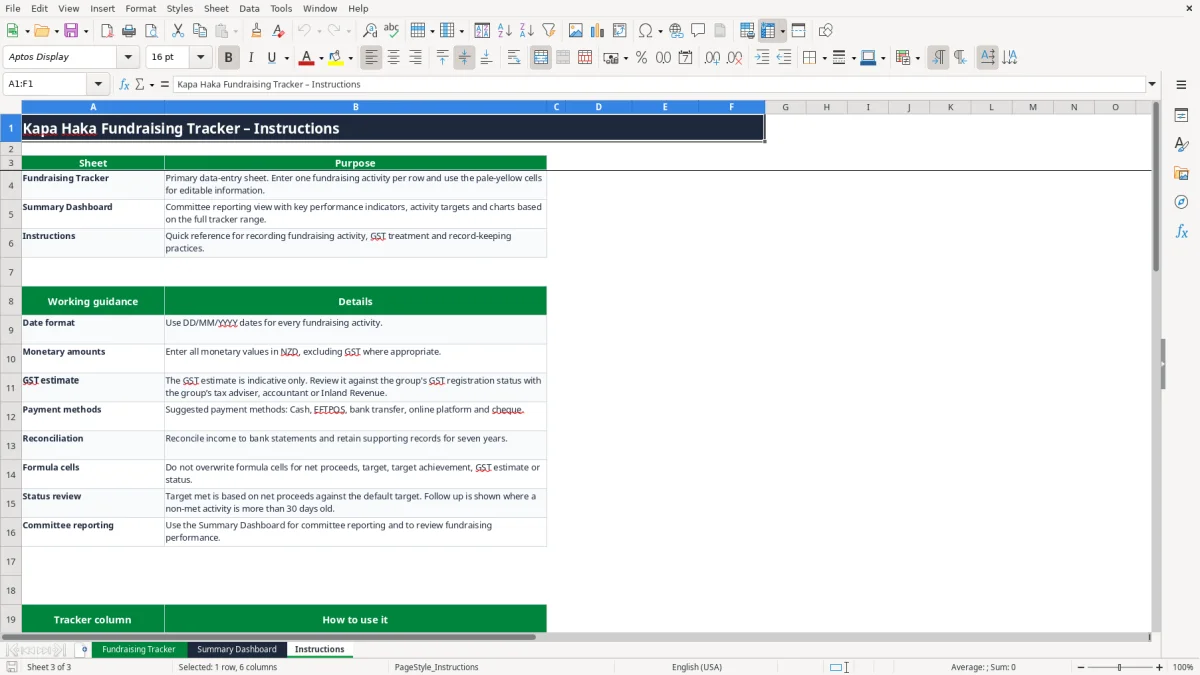
The Instructions sheet, shown in image 3, says to enter monetary values in NZD, reconcile income to bank statements and retain supporting records for seven years. The sensible approach is to use the 15% result as a prompt for review, not as a substitute for the group's GST calculation.
Where kapa haka fundraising records fall over
The most common problem I see with community fundraising is that income is recorded but the costs are not. A group may report $5,000 from a concert while forgetting $1,200 for venue hire, $450 for sound equipment and $300 for printing. The apparent result is $5,000, but the actual net proceeds are $3,050.
That difference matters when the group is deciding whether it can afford $6,000 of travel costs. The Tracker separates Gross income (NZD), Expenses (NZD) and Net proceeds (NZD), so the committee can see the amount that is genuinely available.
Mixed records create reconciliation work
Another failure is combining cash, EFTPOS and bank transfers in one unlabelled figure. If a treasurer records $2,400 but the bank shows $1,900 and the cash tin contains $300, there is a $200 gap to investigate. The Payment method field and Notes column give you a starting point for tracing it.
Duplicate rows are also costly. A concert entered once by the lead organiser and again by the treasurer can inflate income, expenses and target achievement. Use one unique Fundraiser ID for each activity, such as KH-2026-002, and search the existing rows before adding another entry.
Targets can be misunderstood
The default target is linked to Activity type, not typed separately for every event. A concert therefore retrieves the $4,000 default target, while a sausage sizzle retrieves $1,200. If the group has agreed to a different target, record that decision in the committee minutes and update the dashboard target list carefully rather than overwriting the formula column.
Status also needs a sensible reading. Target met means net proceeds have reached the target; Follow up appears when a non-met activity is more than 30 days after its date. It is a useful prompt, not proof that money is overdue or that a donor has failed to pay.
Make the tracker part of the kapa haka committee routine
A spreadsheet works when someone owns the next update. Give the treasurer or fundraising coordinator a fixed 15-minute slot after each event to enter the activity, upload or file the receipts, and match the total to the bank or payment platform. Waiting until the end of the season turns a five-minute entry into detective work.
Use a simple weekly rhythm
- On Monday, enter weekend cash, EFTPOS and bank-transfer totals while the receipts are still together.
- At the next committee meeting, filter the Tracker by Status and discuss any Follow up items.
- Before reporting night, review the dashboard totals against the bank balance and the fundraising folder.
Keep the Fundraiser ID format consistent, such as KH-2026-001, KH-2026-002 and KH-2026-003. Use the drop-down lists instead of typing new versions of the same category; Hāngi stall and hangi stall would otherwise split the analysis.
Protect the calculations
Do not type over columns J to N. Those columns calculate net proceeds, retrieve targets with VLOOKUP, calculate target achievement, apply the indicative 15% GST estimate and assign status. If a committee member needs to change a target, change the relevant value in the Summary Dashboard target list and test one known activity afterwards.
The dashboard is suitable for a group with up to 110 prepared activity rows. Once the group is processing several hundred transactions each month, needs user permissions, receipt capture, bank feeds or formal donor reporting, move to software such as Xero or MYOB and retain this workbook as a historical reference.
Image 3's Instructions sheet is a useful handover document. A new treasurer can learn the date format, payment choices, calculated fields and reconciliation expectation without relying on an informal message from the previous volunteer.
Common questions about this template
It tracks one activity per row, including the date, fundraising activity, type, venue or city, lead organiser, payment method, gross income, expenses and notes. It calculates net proceeds, a default target, target achievement, an indicative GST estimate and status.
The Fundraising Tracker has prepared formulas and entry space from row 2 through row 111, giving 110 prepared activity rows. The auto-filter covers the full A1:O111 range.
The Summary Dashboard includes targets of $2,500 for a Hāngi stall, $4,000 for a Concert performance, $1,200 for a Sausage sizzle, $3,000 for a Quiz night and $2,000 for an Online campaign.
The tracker calculates 15% of the entered gross income. For $3,650 of gross income, it displays $547.50. This is indicative only, so check the group's GST registration and treatment with Inland Revenue or a qualified adviser.
Follow up appears when an activity has not reached its target and the activity date is more than 30 days before today. Target met appears when net proceeds reach or exceed the retrieved target; otherwise the status is In progress.
Keep bank statements, cash records, EFTPOS or online settlement reports, receipts, supplier invoices and relevant committee approvals. The Instructions sheet says to reconcile income to bank statements and retain supporting records for 7 years.
Download
File format
Excel (.xlsx)
Compatible software
Excel, Google Sheets, LibreOffice
Price
Free