
Cricket scorebook Excel – Free Template (2026)
Projects & Planning
School camp cost planner Excel - Free Template
Plan school camp costs, GST, funding, family contributions and supplier payments with four practical Excel sheets for New Zealand schools.
2026-09-24
457 downloads
4.8/5 average rating
Download template
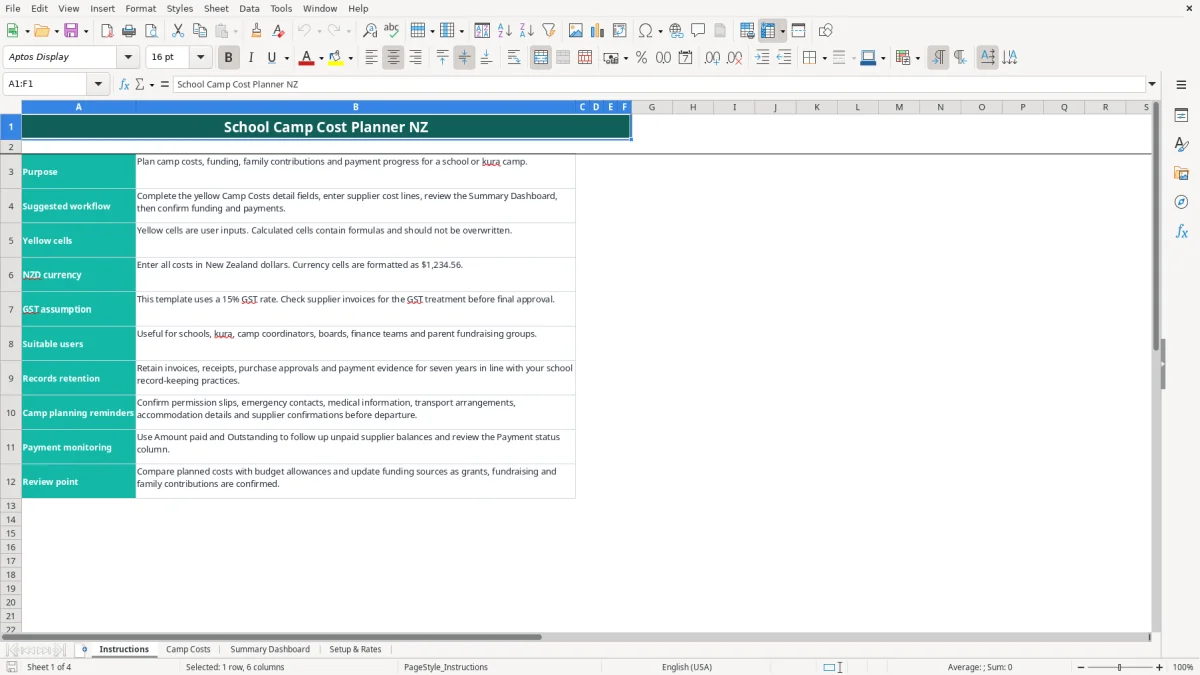
A school camp cost planner Excel template helps you budget accommodation, transport, activities, meals and other camp costs in NZD. It contains an Instructions sheet, a detailed Camp Costs table, a Summary Dashboard and editable Setup & Rates guidance.
Enter the camp details and yellow input cells, then review planned costs, GST, amounts paid, outstanding balances and funding coverage. The workbook uses a 15% GST assumption and supports up to 100 prepared cost lines, from row 16 to row 115.
The key benefits of this Excel template
- Shows total budget, planned cost including GST, total GST, amount paid and outstanding balances in one dashboard.
- Calculates cost per student, funding coverage percentage and the number of paid items automatically.
- Tracks up to 100 supplier and expense lines across accommodation, transport, activities, meals, equipment, safety, venue, insurance and contingency.
- Compares each cost line with its budget allowance and calculates the variance.
- Separates funding across family contributions, school funding, grants and fundraising.
- Uses GST-inclusive totals so a camp committee can see the amount actually payable to suppliers.
- Provides charts for category costs, funding allocation and the paid-versus-outstanding position.
Step-by-step guide
- Open Instructions and read the suggested workflow, GST assumption and record-retention reminder before entering figures.
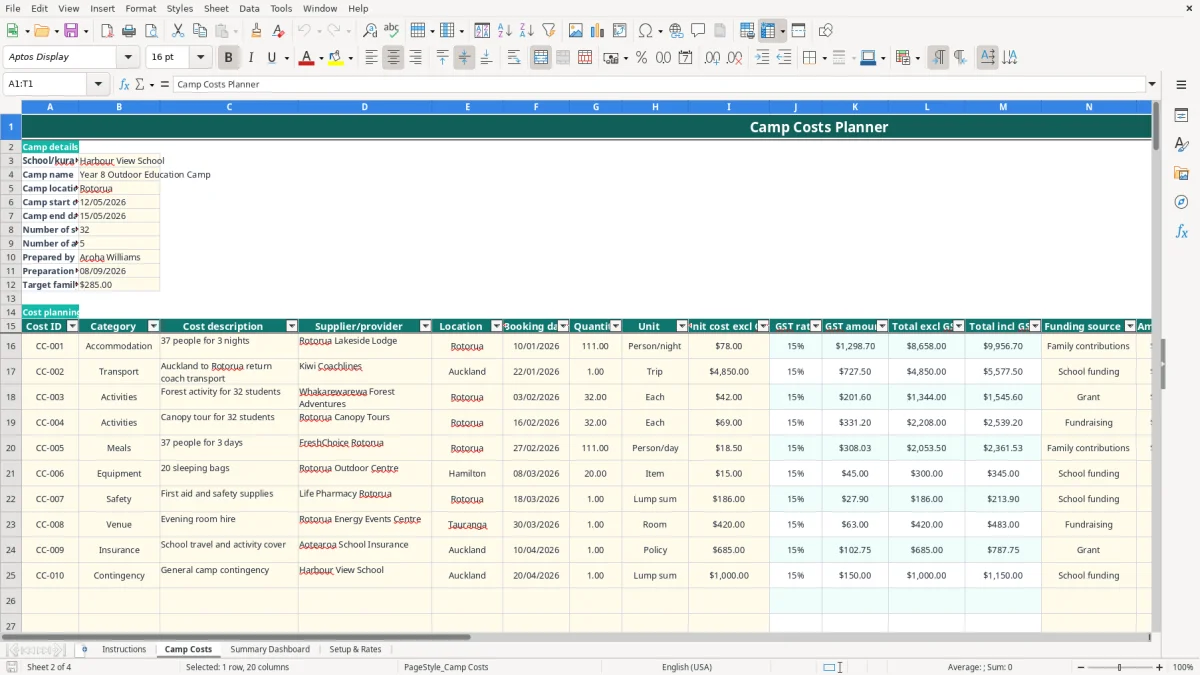
- On Camp Costs, replace the sample school, camp, location, dates, student numbers, adult numbers and target family contribution with your own details.
- Complete the cost table from row 16 onwards. Enter the category, description, supplier, quantity and unit cost excluding GST.
- Select or enter the funding source, budget allowance and amount paid. Use the available categories and units so the summary formulas group costs correctly.
- Check the calculated GST rate, GST amount, totals, outstanding amount, variance and payment status. Do not overwrite formula cells.
- Review Summary Dashboard for budget status, cost per student, funding coverage and category totals before seeking approval.
- Update payments and confirmed funding as the camp approaches, and retain invoices, receipts, approvals and payment evidence.
Included features
Camp Costs fields for cost ID, category, description, supplier/provider, location and booking date.
Quantity, unit and unit cost excluding GST fields, with units including Person/night, Trip, Each, Person/day, Item, Room, Policy and Lump sum.
Formula-driven GST rate lookup from Setup & Rates using VLOOKUP and calculated GST, exclusive and inclusive totals.
Amount paid, outstanding, budget allowance, variance and payment status fields for each cost line.
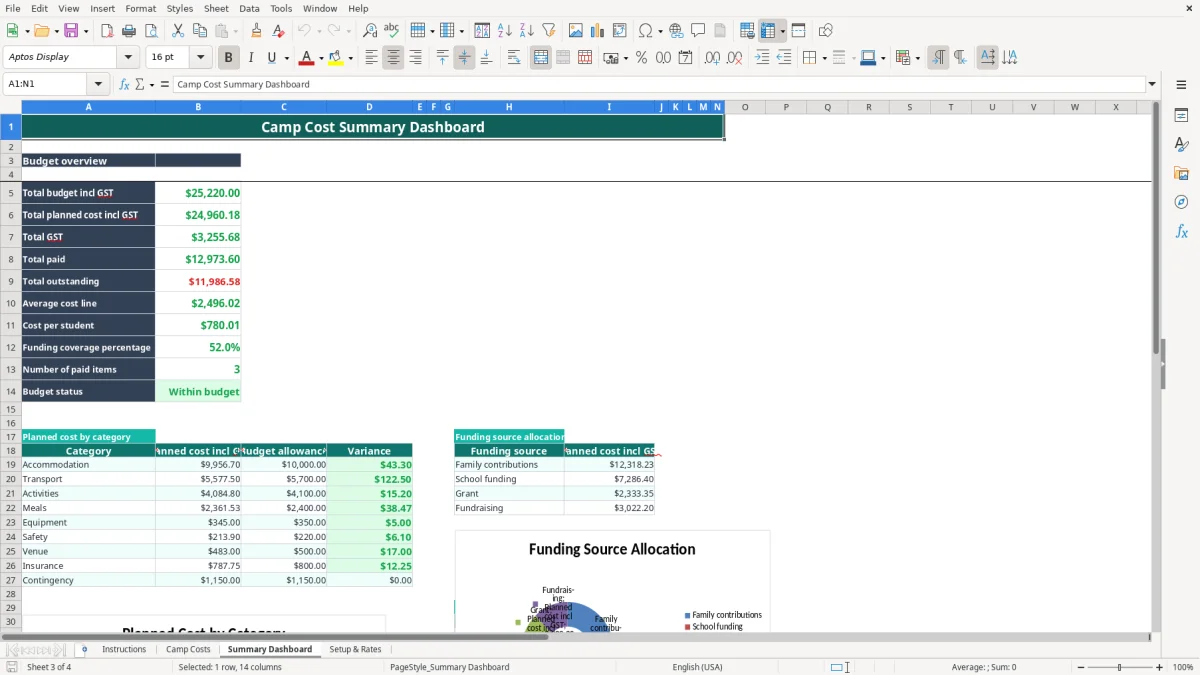
Summary Dashboard measures for total budget, total planned cost, GST, paid amount, outstanding amount, average cost line and cost per student.
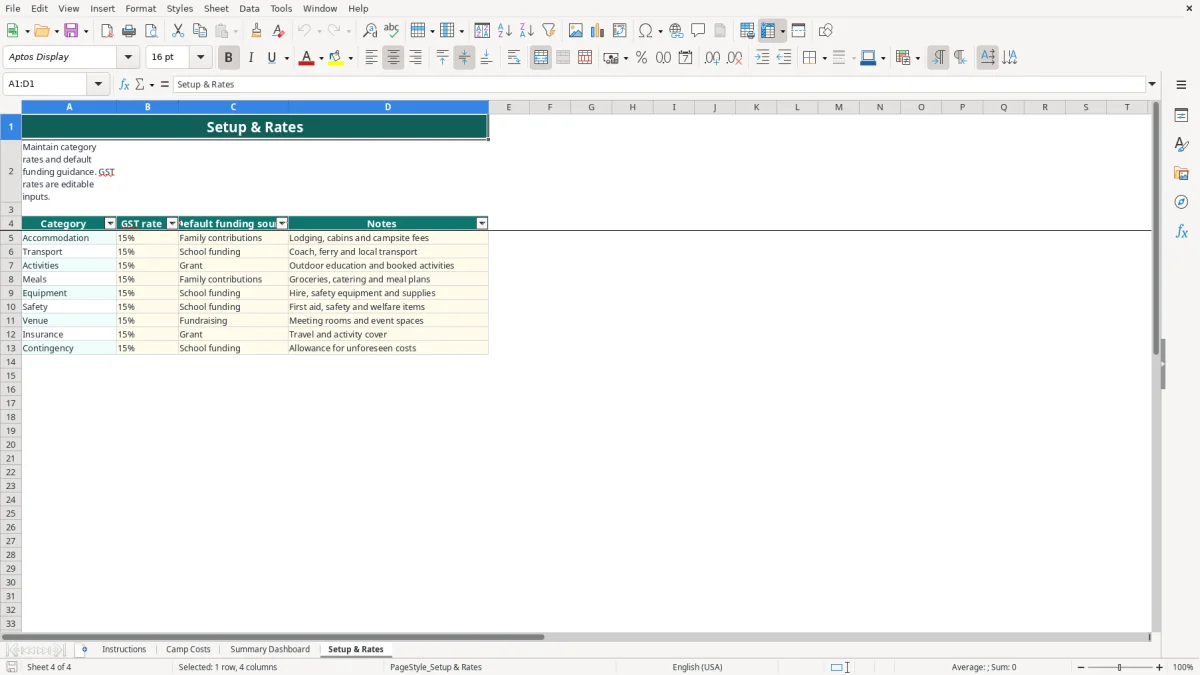
Setup & Rates table containing nine camp categories, editable GST rates, default funding sources and notes.
Three dashboard charts covering planned category cost, funding source allocation and paid versus outstanding amounts.
Who uses a school camp cost planner in New Zealand
A school camp cost planner is useful when a teacher, camp coordinator, school administrator or parent fundraising group needs one defensible view of the trip. A kura planning a four-day Rotorua camp can record accommodation, coach hire, activities, meals, safety supplies and insurance rather than leaving figures in separate emails and notebooks.
For the camp coordinator
The Camp Costs sheet (image 1) starts with school or kura name, camp name, location, start and end dates, student and adult numbers, preparer and target family contribution. The sample has 32 students, 5 adults and a $285 target contribution per student. Replace those populated examples with your own approved figures.
The detail table has 100 prepared operational rows, from CC-001 in row 16 through row 115. A Christchurch school with 48 students might enter 48 people for accommodation, one coach trip, 48 activity places and 53 meal packages, then compare each supplier's quote with the allowance.
For the office manager and board
Image 2 shows the Summary Dashboard. It brings together the planned cost including GST, amount paid, outstanding balance, cost per student and funding coverage, so the board can discuss a shortfall using actual numbers. If planned cost is $18,400 including GST and 48 students attend, the calculated cost per student is about $383.33.
The category and funding tables are particularly useful before a payment run or board meeting. Accommodation, Transport and Activities are separated from Family contributions, School funding, Grant and Fundraising, while the charts make a large accommodation quote easier to spot.
GST and record keeping for a New Zealand school camp
The workbook uses a 15% GST assumption, shown on Instructions and in Setup & Rates. That is a planning assumption, not proof that every supplier charge has the same treatment. Check each supplier invoice, especially where a provider is not GST-registered or a charge includes a different taxable supply.
How the GST calculation works
For each line, the GST rate is looked up from Setup & Rates. If a coach quote is $2,000 excluding GST, the GST amount is $300 and the total including GST is $2,300. If your school is GST-registered and the purchase is claimable, the finance team can assess the $300 input tax from the supporting taxable supply information.
New Zealand's standard GST rate is 15%, and GST registration is compulsory once taxable turnover exceeds $60,000 in a 12-month period. A school or board should apply its own GST treatment and accounting policy rather than treating the template's rate as tax advice.
Documents to retain
Inland Revenue record-keeping generally requires business tax records to be retained for 7 years. Keep supplier invoices, receipts, purchase approvals, grant confirmations, fundraising records and payment evidence with the camp file. The Instructions sheet specifically reminds users to retain invoices, receipts, approvals and payment evidence.
For example, a $6,900 accommodation invoice should be matched to the booking confirmation, approval and payment record. The Camp Costs columns record supplier, booking date, amount paid and outstanding amount, but they do not replace the original documents or the school's accounting system.
Use the right approval process
For most schools, enter costs excluding GST when that is how the supplier quote is provided, then review the inclusive total before approval. If the quote is GST-inclusive, convert it correctly before entry rather than adding 15% again; a $1,150 GST-inclusive charge contains $150 GST at 15%.
Where school camp budgets fall over
Camp budgets usually fail through small entry and follow-up errors rather than one dramatic mistake. A quote is copied as GST-inclusive into the excluding-GST column, a deposit is entered against the wrong supplier, or a family contribution is treated as funding before it has actually been received.
Double-counting GST
Suppose accommodation is quoted at $4,600 including GST. If you enter $4,600 as the exclusive amount, the template calculates $690 GST and $5,290 total. That overstates the planned cost by $690. The correct exclusive amount is $4,000, with $600 GST and $4,600 inclusive.
Ignoring the quantity field
A provider may quote $85 per person for 37 people, while another quote is a $2,400 lump sum. Entering $85 as the total instead of quantity 37 produces a $3,145 understatement before GST. Use the Quantity and Unit columns deliberately and check the resulting Total incl GST.
Calling a deposit paid in full
If a $3,200 transport invoice has a $1,000 deposit, Amount paid should be $1,000. The formula shows $2,200 outstanding and Payment status as Part-paid. Marking the line Paid can leave the camp committee short when the final invoice arrives.
The workbook's payment status is formula-driven: zero outstanding gives Paid, zero amount paid gives To be paid, and anything between gives Part-paid. That is useful, but only if payments are updated promptly and matched to the correct cost line.
Missing the budget variance
A $1,800 budget allowance against a $2,050 planned cost creates a $250 overspend. Review the Variance column and the dashboard's Within budget or Over budget result before confirming bookings. The three conditional-formatting areas can draw attention to issues, but they do not replace a person checking quotes, approvals and funding.
Make the camp spreadsheet part of your planning routine
The planner works best when one person owns the update and links it to an existing school routine. Set a fixed 20-minute review after the weekly camp meeting, then update new quotes, deposits and confirmed grants while the information is still fresh.
A simple weekly check
- Enter new supplier lines immediately, including the booking date and funding source.
- Update Amount paid from the bank record or payment approval, not from memory.
- Review Outstanding, Variance and Payment status before the next board or parent meeting.
- Save the workbook with a dated filename after each approved change.
For example, if the camp has 22 cost lines and three supplier payments arrive on Friday, spend five minutes matching the payments to those lines. A $12,000 planned camp with $8,400 paid has 70% funding coverage only if the dashboard's funding and payment inputs have been entered consistently.
Keep inputs clean
Use the list choices for Category, Funding source, Unit and Payment status. Consistent labels are important because the dashboard uses SUMIF to group category and funding totals. Typing Transport in one row and Coach in another would split the analysis, so keep transport detail in the description while retaining Transport as the category.
Do not type over calculated cells in columns GST rate, GST amount, Total excl GST, Total incl GST, Outstanding, Variance and Payment status. If a rate needs changing, review the editable GST rate in Setup & Rates and confirm the treatment with the finance process.
Know when to move on
This workbook suits a contained camp with a manageable number of lines. Move to Xero, MYOB or your school's finance system when several staff are entering transactions, approvals need an audit trail, or the 100 prepared rows are no longer enough. Keep the spreadsheet as a planning worksheet only if the accounting system is the official record.
Common questions about this template
It contains Instructions, Camp Costs, Summary Dashboard and Setup & Rates sheets. You can record camp details, supplier costs, GST, funding source, amount paid, outstanding balances, budget allowances and payment status, then review calculated totals and three dashboard charts.
The template uses a 15% GST assumption. Setup & Rates contains the editable rate for each of the nine categories, while the Camp Costs sheet looks up the rate and calculates GST. Check the actual supplier invoice and your school's GST treatment before approval.
The Camp Costs sheet has prepared operational rows 16 to 115, giving you 100 cost lines. The workbook does not contain an Excel table or automatic row expansion, so add extra rows carefully if your camp needs more capacity and preserve the formulas.
Yes. The Funding source field includes Family contributions, School funding, Grant and Fundraising. The Summary Dashboard uses these labels to show planned cost by funding source, while the target family contribution per student is entered in the camp details section.
Enter Amount paid for each cost line. The formula calculates Outstanding as the inclusive total less paid amount, prevents a negative outstanding balance, and shows Paid when nothing remains, To be paid when nothing has been paid, or Part-paid in between.
No. It is a planning and monitoring workbook. Retain invoices, receipts, approvals and payment evidence for 7 years in line with Inland Revenue record-keeping requirements and your school's policies, and use the official finance system for the accounting record.
Download
File format
Excel (.xlsx)
Compatible software
Excel, Google Sheets, LibreOffice
Price
Free