
Cricket scorebook Excel – Free Template (2026)
Projects & Planning
Netball draw roster Excel - Free Template
Netball club Excel template with match draw, player and volunteer roster, duty checks, attendance, fees and dashboard instructions for NZ clubs.
2026-10-09
485 downloads
4.8/5 average rating
Download template
This netball club draw and roster Excel template organises fixtures, player and volunteer assignments, court duties, travel and match details in one workbook. It contains Match Draw, Roster, and Dashboard & Instructions sheets, with space for up to 110 operational fixture and roster rows.
Enter each fixture once, then link people to the relevant Match ID. The workbook calculates match days, brings match dates into the roster, flags unallocated duty teams and shows fixture, attendance, availability, fee and mileage totals.
The key benefits of this Excel template
- Match draw fields keep dates, start times, venues, grades, teams, officials and notes together.
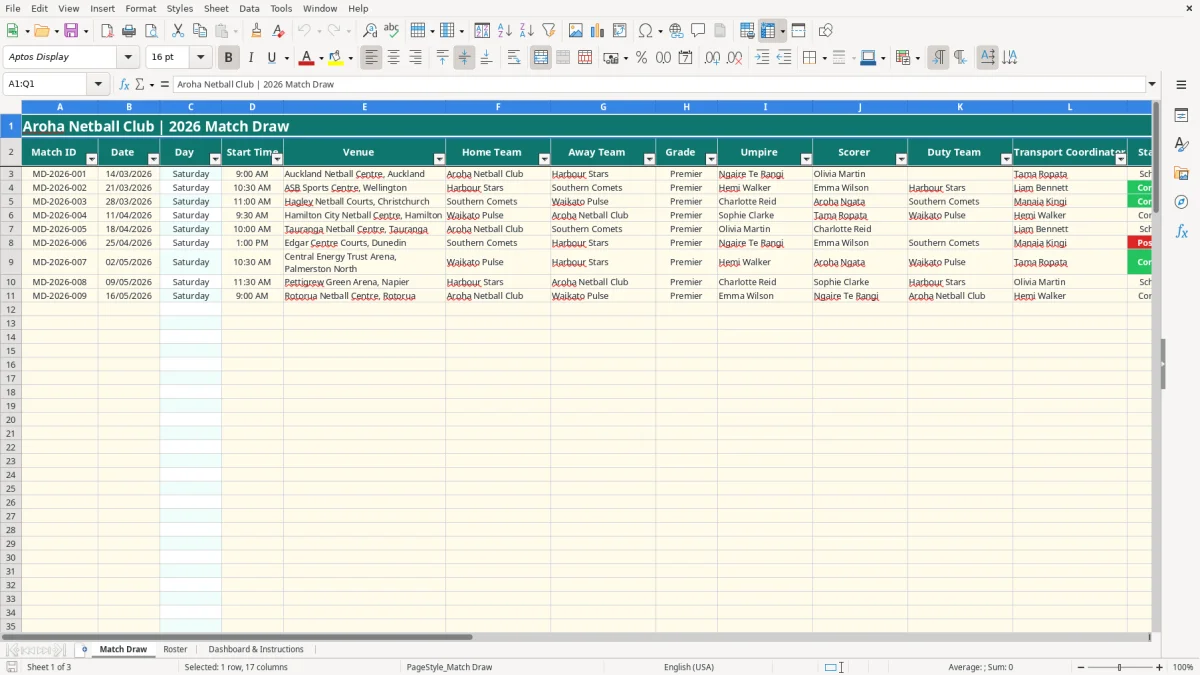
- The Duty Check column clearly shows ALLOCATE DUTY when a fixture has no duty team.
- Roster Match ID selection links each player or volunteer to the correct fixture.
- Calculated match dates reduce retyping and help prevent roster dates being entered incorrectly.
- Dashboard totals show scheduled, confirmed, postponed and completed fixtures at a glance.
- Attendance, match fees and mileage reimbursements are totalled in NZD.
- Prepared rows run from row 3 to row 112, giving 110 rows for fixtures and 110 rows for roster entries.
Step-by-step guide
- Open the Match Draw sheet and complete the pale yellow input cells for each fixture, including Match ID, date, time, venue, teams, grade and status.
- Use the Grade list to select Premier, Senior, Intermediate or Junior, and choose Scheduled, Confirmed, Postponed or Completed for Status.
- Enter the umpire, scorer, duty team, transport coordinator, match fee, estimated attendance and notes. Check the Duty Check result for any ALLOCATE DUTY alert.
- Open the Roster sheet and add one row for each player or volunteer assigned to a match. Select the Match ID from the list rather than typing an unrelated reference.
- Enter the person, role, availability, confirmation, contact details, travel requirement, mileage reimbursement and roster notes.
- Review Confirmation Check before publishing the weekly draw. A Yes confirmation returns Confirmed; No returns Follow up.
- Use Dashboard & Instructions to review fixture counts, attendance, availability, fees and mileage before the next round.
Included features
Match Draw has columns for Match ID, Date, Day, Start Time, Venue, Home Team, Away Team, Grade, Umpire, Scorer, Duty Team, Transport Coordinator, Status, Match Fee (NZD), Estimated Attendance, Notes and Duty Check.
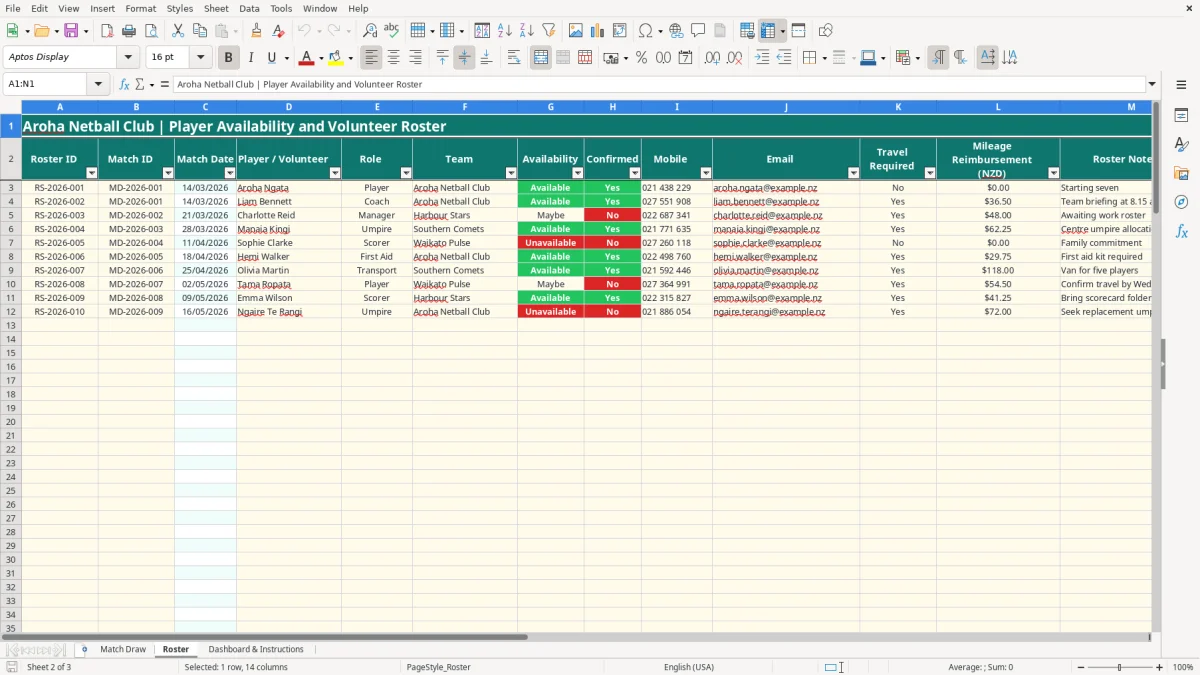
Roster records Roster ID, Match ID, Match Date, Player / Volunteer, Role, Team, Availability, Confirmed, Mobile, Email, Travel Required, Mileage Reimbursement (NZD), Roster Notes and Confirmation Check.
The Day column calculates the weekday from the fixture date using IF and TEXT.
Roster Match Date uses VLOOKUP and IFERROR to retrieve the date from Match Draw.
Dropdowns control fixture grades and statuses, roster roles, availability, confirmation, travel and Match ID selections.
Conditional formatting highlights duty and confirmation follow-ups, while Excel tables provide structured entry areas.
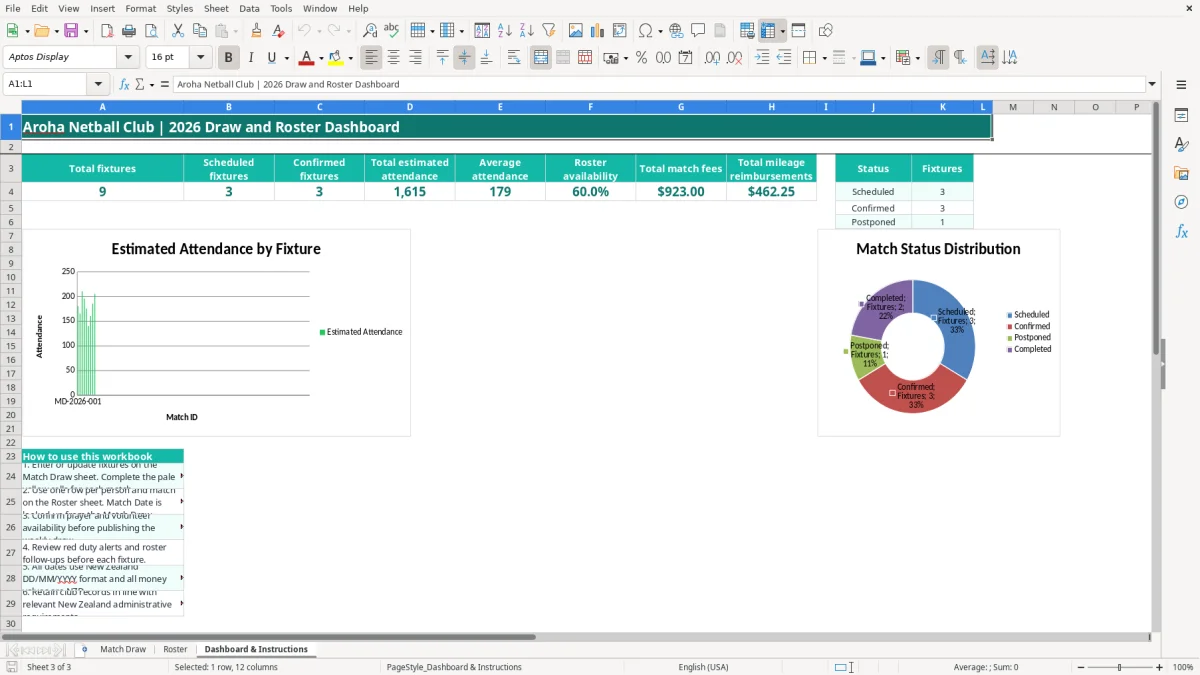
Dashboard & Instructions includes two charts: estimated attendance by Match ID and fixture numbers by status.
Who uses a netball draw and roster in New Zealand
A club secretary usually starts with the Match Draw before the season or competition round begins. The practical job is to turn league information into something players, coaches, officials and volunteers can use on Saturday morning. In this workbook, each fixture has a Match ID such as MD-2026-001, followed by the date, start time, venue, teams and grade.
From fixture list to match-day jobs
An office volunteer at a Hamilton club can enter a 10:30 am Senior match at the local courts, then record the umpire, scorer, duty team and transport coordinator in the same row. A duty team left blank is not harmless administration: the calculated Duty Check displays ALLOCATE DUTY, giving the coordinator a specific item to fix before the draw is circulated.
Use one Roster row for each person and match. If four people are needed for a fixture, enter four rows: perhaps a player, coach, manager and transport volunteer. For a Christchurch club with 8 fixtures in a fortnight and 6 people attached to each fixture, that creates 48 assignment rows, but every person remains tied to a specific Match ID.
Weekly use for clubs and volunteers
The roster suits the Friday confirmation round as much as the season setup. Availability can be Available, Unavailable or Maybe, while Confirmed is recorded separately. A manager waiting on a work roster can be marked Maybe and No, so the Confirmation Check returns Follow up rather than making an unconfirmed person look ready.
Image 1 shows the wide Match Draw table, including venue and duty fields. Image 2 shows the Roster table with contact, travel and reimbursement columns. Image 3 shows the dashboard summary and instructions that a committee member can use at a meeting.
New Zealand administration for club draw records
This workbook is an operational club schedule, not a payroll, GST or accounting return. Its money fields are labelled NZD and cover match fees and mileage reimbursements, so the treasurer should transfer approved figures into the club's accounting records rather than treating the dashboard total as a tax calculation.
Fees and reimbursements need supporting records
If a club records 12 match fees of $95.00, the Dashboard & Instructions sheet will total $1,140.00 through SUM. If roster entries contain $36.50 and $48.00 of mileage reimbursements, those amounts are also totalled. Keep the underlying receipts, approvals and payment evidence with the club records; the spreadsheet alone does not establish whether a payment is deductible, taxable or reimbursable.
Where the club is registered for GST, the standard rate is 15%. A $115.00 GST-inclusive fee contains $15.00 GST, but the workbook does not split inclusive amounts or prepare a GST return. Clubs must retain relevant Inland Revenue records for 7 years and should preserve the original supporting information alongside the workbook.
Privacy and contact details
The Roster sheet contains mobile numbers and email addresses, which are personal information under the Privacy Act 2020. Limit access to committee members who need it, avoid emailing an unrestricted workbook to a broad mailing list, and remove old contact details when the club no longer needs them.
A club with employees may also have PAYE, KiwiSaver, ACC or FBT obligations, but none of those calculations are built into this file. The 31 March balance date and 20th-of-the-month payroll filing convention do not change how fixtures are entered; they belong in the club's accounting and compliance process.
Where a club draw falls over on match day
The most expensive draw errors are usually small omissions discovered when people are already driving to the courts. A blank Duty Team does not stop Excel calculating attendance or fees, so a committee member can wrongly assume the fixture is ready unless they read the Duty Check column.
The unfilled duty row
Imagine 10 Saturday fixtures, each needing a duty team. If 2 rows remain blank, the club has 20% of its duty coverage unresolved. The red alert is useful because it turns a vague feeling that something is missing into two named fixture rows that can be assigned and checked.
A second failure is entering a roster person against the wrong Match ID. For example, Charlotte may be marked as a manager for MD-2026-002, but her Match Date is looked up from that ID. If the ID is wrong or cannot be found, VLOOKUP with IFERROR leaves the date blank, which is a prompt to correct the reference rather than guess the date.
Confirmation is not availability
Available means the person says they can attend; Confirmed means the club has completed its confirmation step. Treating those as the same can leave a coach listed as Available but still showing Follow up. For a 6-person fixture roster, even one unchecked person is roughly 17% of the assignment list and may be the person holding the keys or first-aid kit.
Travel amounts cause another practical headache. A manager who enters $48.00 without a note or approval can create a reimbursement dispute later. The workbook records the amount but does not calculate an IRD mileage rate or verify kilometres, so the club should retain its own trip evidence and approved policy.
Making the spreadsheet part of the club routine
The best time to update the workbook is immediately after the draw or venue email arrives, not on Friday night. Set a fixed 20-minute committee task each week: update fixture status, fill duty roles, add roster rows, then contact anyone whose Confirmation Check says Follow up.
A simple weekly handover
- Secretary updates Match Draw first, including any Postponed fixture and the new note.
- Roster coordinator checks Available, Unavailable and Maybe responses against each Match ID.
- Treasurer reviews match fees and mileage totals before approving payments.
- Team manager receives the relevant rows rather than an edited copy with different dates.
Use the existing dropdowns instead of inventing variations such as Maybe?, waiting or confirmed-ish. Consistent values make the Dashboard formulas work: COUNTIF counts Scheduled and Confirmed fixtures, while AVERAGE calculates average attendance. If 8 fixtures have estimated attendance totalling 1,440, the dashboard shows an average of 180.
When the club needs more than a workbook
This file is a sensible starting point for a small or medium club using up to 110 fixture rows and 110 roster rows. Move to club-management software when several people edit simultaneously, messages need automatic sending, availability must be tracked across multiple seasons, or the committee is spending more than an hour each week reconciling versions.
Xero or MYOB can handle the financial side, but they will not replace the match-day allocation process by themselves. Keep this workbook as the operational source until the replacement system can reproduce the Match ID, duty, confirmation and travel workflow reliably.
Common questions about this template
The prepared Match Draw table runs from row 3 to row 112, giving 110 rows for fixture entries. The Roster sheet has the same 110-row prepared area for player and volunteer assignments.
The Duty Check formula displays ALLOCATE DUTY when a Match ID exists but Duty Team is blank. Once you enter a duty team, it changes to Assigned.
Select a Match ID from the dropdown in the Roster sheet. The Match Date is returned from Match Draw using VLOOKUP and IFERROR.
Yes. Match Draw has a Status dropdown containing Scheduled, Confirmed, Postponed and Completed. The dashboard counts each status separately.
No. The Roster sheet records a Mileage Reimbursement (NZD) amount and the dashboard totals entered amounts. It does not calculate kilometres or apply an IRD-published mileage rate.
It calculates total, scheduled and confirmed fixtures, estimated attendance, average attendance, roster availability, match fees and mileage reimbursements. It also includes charts for attendance by Match ID and fixtures by status.
Download
File format
Excel (.xlsx)
Compatible software
Excel, Google Sheets, LibreOffice
Price
Free