
Ute Fleet Maintenance Log Excel – Free Template (2026)
Inventory & Purchasing
NZBN Supplier Register Excel - Free Template
Track supplier NZBN, IRD number, GST status, payment terms, spend, and compliance in one register.
2026-06-29
181 downloads
4.8/5 average rating
Download template
This Excel template is a supplier register for NZ businesses that need one place to store NZBN, IRD number, GST status, payment terms, contact details, and annual spend. It includes a Supplier Register sheet, a Summary Dashboard, and an Instructions sheet.
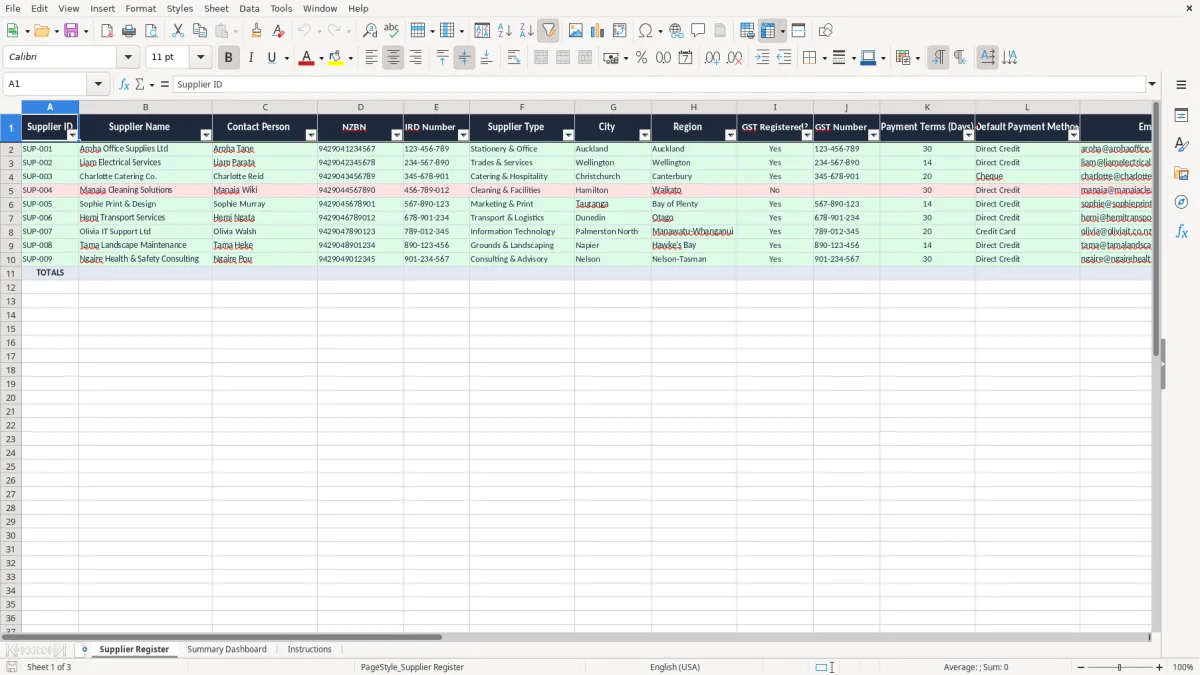
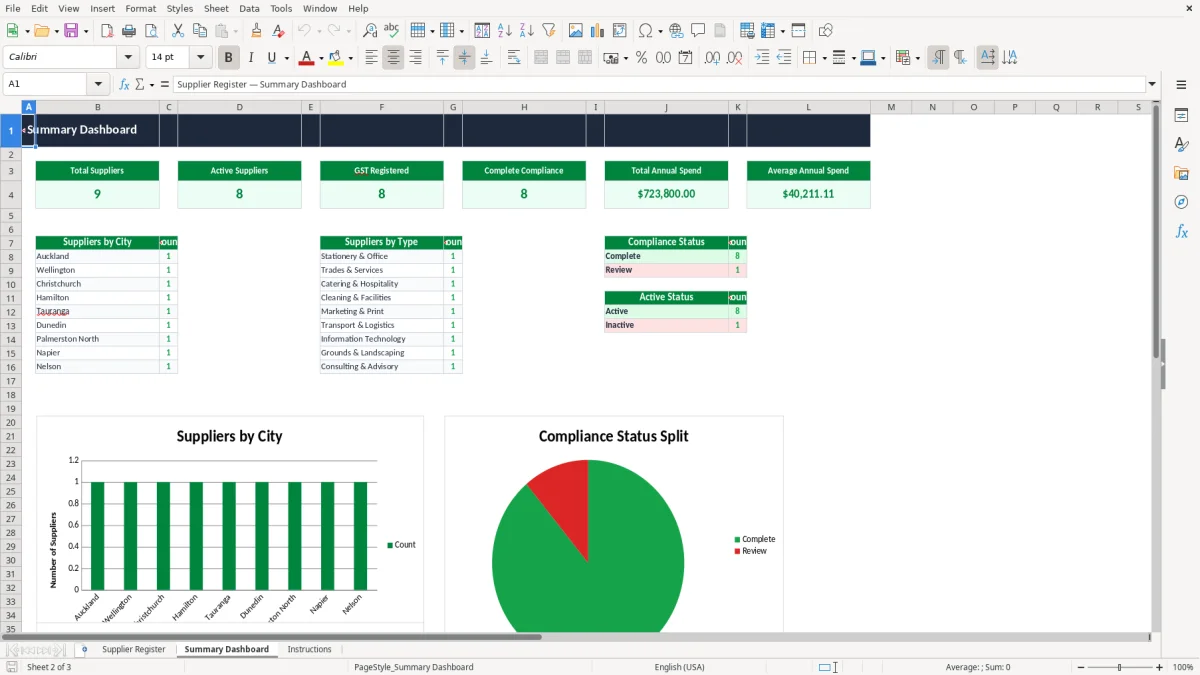
Image 1 shows the register with 19 columns for supplier details and compliance notes. Image 2 shows the dashboard that pulls the counts and totals together so you can see who is active, who is GST-registered, and where the spend is sitting.
If you are a sole trader, office manager, or bookkeeper trying to keep supplier data tidy before a GST return or month-end payment run, this gives you a clean start. It is built for practical use, not for a desk full of sticky notes and half-finished contacts lists.
The key benefits of this Excel template
- Keeps supplier NZBN, IRD number, GST number, and contact details in one register.
- Tracks annual spend per supplier so you can spot the biggest vendors fast.
- Helps you see which suppliers are GST registered before you claim input tax.
- Stores payment terms in days, which makes due dates easier to check.
- Flags active and inactive suppliers so old records do not clutter the list.
- Gives you a simple dashboard view without needing a separate reporting file.
- Reduces the risk of paying the wrong supplier because the contact details are out of date.
Step-by-step guide
- Open the Supplier Register sheet and enter each supplier on a new row. Use the existing headings so the data stays consistent.
- Fill in the core identifiers first: supplier name, NZBN, IRD number, GST registration status, and GST number if they have one.
- Set the payment terms in days, the default payment method, and the last payment date so your pay run is easier to manage.
- Use the Active? and Compliance Status fields to mark suppliers that are current, pending, or needs review. That makes the register useful at month-end, not just when you first build it.
- Check the Summary Dashboard to review the overall supplier list and total spend. Use it before a GST return or when you are tightening cash flow.
- Read the Instructions sheet if you want to hand the file to another staff member or keep the register on the same process every month.
Included features
19-column supplier register covering identity, tax, contact, and payment fields.
Separate GST Registered? and GST Number fields for cleaner supplier checks.
Annual Spend (NZD) column to identify your main suppliers quickly.
Last Payment Date field to help with payment follow-up and planning.
Active? and Compliance Status fields for easy filtering.
Summary Dashboard sheet for a quick management view.
Instructions sheet to help a new user get started without guesswork.
Who uses an NZBN supplier register in New Zealand
This register is built for the people who actually chase supplier details in New Zealand: the office manager at a plumbing firm, the bookkeeper at a small Ltd company, the volunteer treasurer, or the sole trader who wants one clean list before year end. If you have 40 suppliers and only 12 are used every month, a register like this keeps the active ones in view and the rest out of the way.
Image 1 is the working sheet. You can record Supplier ID, Supplier Name, Contact Person, NZBN, IRD number, Supplier Type, City, Region, GST status, GST Number, Payment Terms (Days), Default Payment Method, Email, Phone, Annual Spend, Last Payment Date, Active?, Compliance Status, and Notes.
Where it helps in real life
A Hamilton tradie firm with 4 staff might buy gear from 18 suppliers, but only 6 account for most of the spend. If one supplier does $24,000 a year and another only $480, the dashboard gives you a fast way to focus on the big numbers before the next pay run or stock order.
Why the dashboard matters
Image 2 gives you a summary view so you are not hunting through rows every time. That is useful when you are checking who is active, which suppliers are GST-registered, and where your cash flow is going before you approve a batch of invoices.
What Inland Revenue expects you to keep on file
The supplier register is not a legal filing, but it supports the records Inland Revenue expects you to hold for 7 years. If you are claiming GST on supplier invoices, you want the supplier name, GST number where relevant, date, description, and enough detail to back up the claim.
For GST, the standard rate is 15%, and registration becomes compulsory once taxable supplies go over $60,000 in any 12-month period. A clean register helps you spot which suppliers are GST-registered so you do not waste time chasing input tax on invoices that do not support it.
Using the right identifiers
For a company supplier, the NZBN is a practical identifier because it reduces confusion when there are several businesses with similar names. For a sole trader supplier, the IRD number and contact details often matter more, especially when you are reconciling payments or checking whether the business is still active.
Good habit for month-end
If you pay suppliers on 20-day terms and your monthly purchases average $18,000 plus GST, a register with accurate payment terms helps you avoid late fees and missed discounts. That is better than keeping details in email threads, where one missing attachment can cost you an extra $25 to $50 per invoice in avoidable admin time.
Where supplier registers usually go wrong
The most common mess is duplicates. One supplier appears as “ABC Ltd”, “A.B.C. Limited”, and “ABC Office Supplies”, and suddenly you have three records, two old GST numbers, and no clear spend total.
Bad data costs money
If a business pays 120 supplier invoices a month and even 5% are duplicated or coded to the wrong vendor, that is 6 invoices a month that can take 10 to 15 minutes each to sort out. At a modest $45 an hour, that is roughly $45 to $67.50 of avoidable admin every month, before you even count the risk of paying the wrong account.
Compliance status needs attention
Another issue is leaving GST status blank and assuming it is current. If a supplier drops off GST registration and you still code their invoices as GST-claimable, you create a messy clean-up at GST return time and waste a round of checking that should have taken 30 seconds.
Last payment date is not optional
Without the Last Payment Date field, you lose the ability to see who has not been paid for 60 or 90 days. That matters when a supplier rings asking about overdue invoices and you need to confirm whether the issue is on your side or theirs.
How the spreadsheet becomes part of your month-end
The easiest way to keep a supplier register alive is to tie it to something you already do. If you run a weekly pay run or a monthly GST return, update the register at the same time so it becomes part of the routine instead of a separate job.
Simple habits that keep it current
- Review new suppliers every Friday before you approve bills.
- Copy the previous month’s checks into your month-end workflow.
- Use the Active? field so old suppliers can be filtered out in seconds.
- Highlight blank NZBN or GST Number fields with conditional formatting.
- Lock in a standard naming rule, such as “Ltd” for companies and full trading name for sole traders.
When a spreadsheet is enough
This works well if you have a few dozen suppliers and a tidy payment process. Once you are juggling hundreds of bills, multiple approvers, or purchase orders linked to GST, PAYE, and stock control, you are probably at the point where Xero or MYOB will save you more time than Excel.
Common questions about this template
It gives you one place to store supplier identity and payment details, including NZBN, IRD number, GST status, terms, and annual spend. That makes it easier to check who you are paying and whether the records are complete.
Yes. It has GST Registered? and GST Number columns, which help you keep supplier tax details in order before you code invoices or prepare a GST return.
Yes. The Supplier Type, NZBN, and IRD number fields work for both companies and sole traders, so you can keep mixed supplier records in one file.
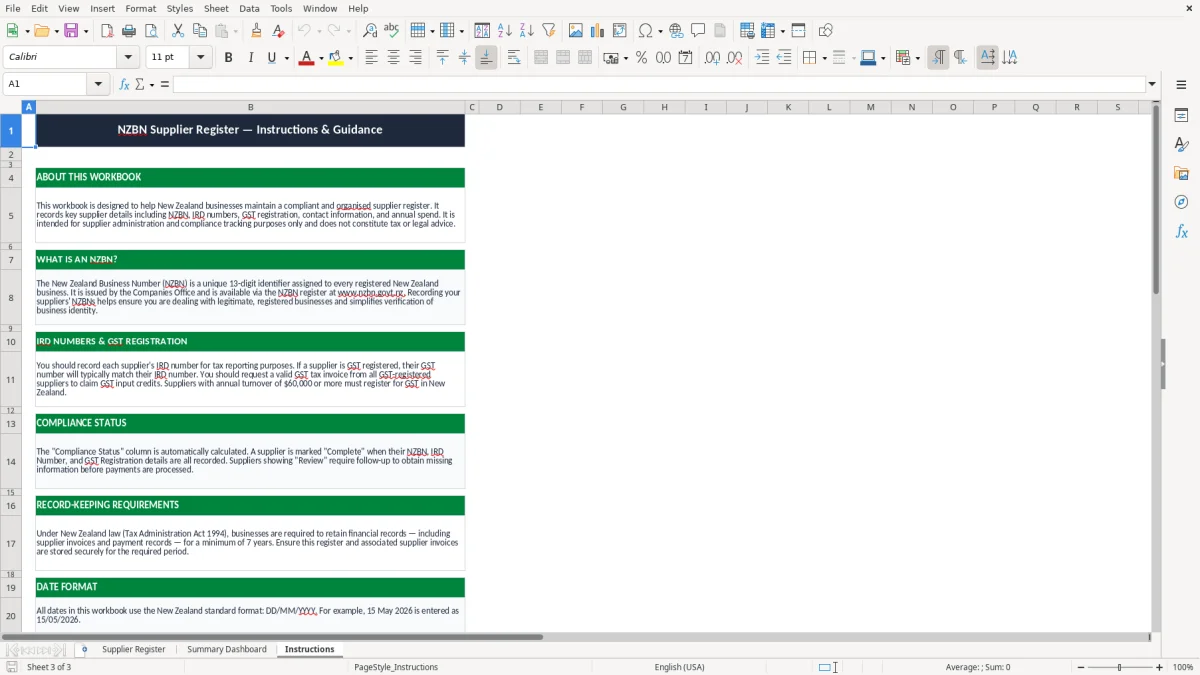
There are 3 sheets: Supplier Register, Summary Dashboard, and Instructions. The register holds the data, the dashboard shows the totals, and the instructions sheet explains the workflow.
Yes. It is useful for month-end because you can review active suppliers, payment terms, and spend before you finalise bills or check your cash flow.
If you have a high bill volume, multiple approvers, or want live links into purchasing and coding, then Xero or MYOB will usually be a better fit. For smaller supplier lists, this Excel register is usually enough.
Download
File format
Excel (.xlsx)
Compatible software
Excel, Google Sheets, LibreOffice
Price
Free