
Ute Fleet Maintenance Log Excel – Free Template (2026)
Inventory & Purchasing
Kiwifruit Bin Count Excel - Free Template
Track orchard bins, targets, weights, payments and picker status across kiwifruit blocks in a practical New Zealand Excel workbook.
2026-07-17
274 downloads
4.8/5 average rating
Download template
This kiwifruit bin count Excel template records daily picking by orchard block, variety and contractor. It includes columns for bins picked, hectares, target bins, variance, average weight, total kilograms, quality grade, rate per bin, payment and status.
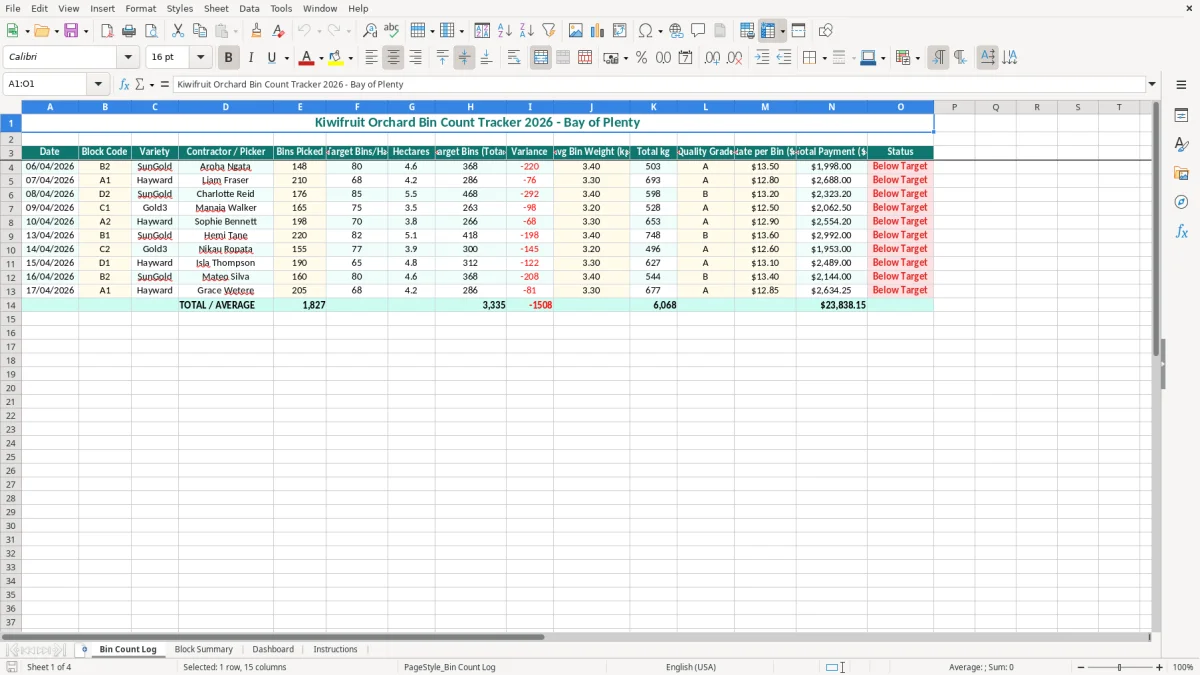
Use the Bin Count Log for daily data entry, then review the Block Summary and Dashboard sheets to see how each block and variety is tracking. The Instructions sheet explains the workbook, while image 1 shows the main log layout with the teal header row and pale-yellow input cells.
The key benefits of this Excel template
- Daily bin records show the picking date, block code, variety and contractor or picker in one row.
- Compare actual bins with the calculated target bins and see the variance for each block.
- Convert picking activity into kilograms using the recorded average bin weight.
- Calculate total payment from the bins picked and the rate per bin, such as 210 bins at $8.50 giving $1,785.00.
- Filter records by SunGold, Hayward or Gold3 to review variety performance during the harvest.
- Keep the orchard office, contractor and packhouse conversations based on the same dated figures.
- Use the summary views to spot blocks falling behind before the picking window is lost.
Step-by-step guide
- Open the Bin Count Log and start with one row per picking record. Enter the date, block code, variety and contractor or picker.
- Enter the actual Bins Picked, Target Bins/Ha and Hectares. Check the Target Bins (Total) and Variance figures before moving to the next row.
- Record the Avg Bin Weight (kg) and Quality Grade supplied by your orchard or packhouse process. The Total kg column gives you the resulting crop weight.
- Enter the agreed Rate per Bin ($). Review Total Payment ($) against the contractor tally or payroll support records.
- Set the Status for the row so the team can distinguish current, completed or attention-required work. Keep wording consistent across entries.
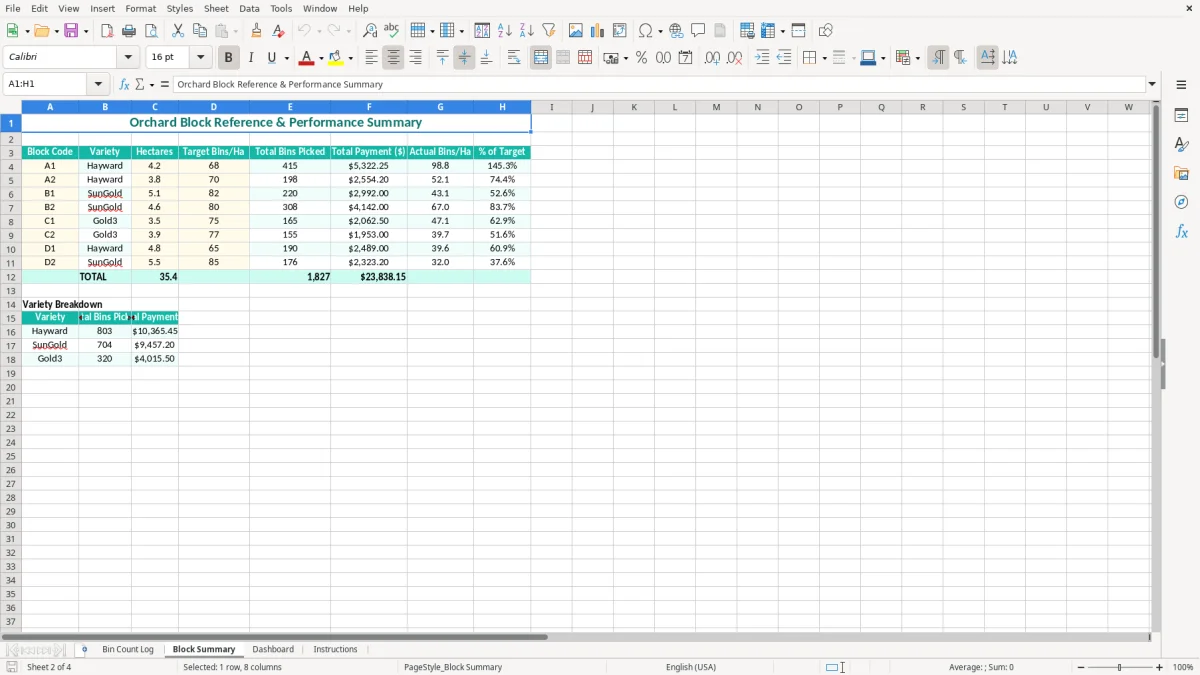
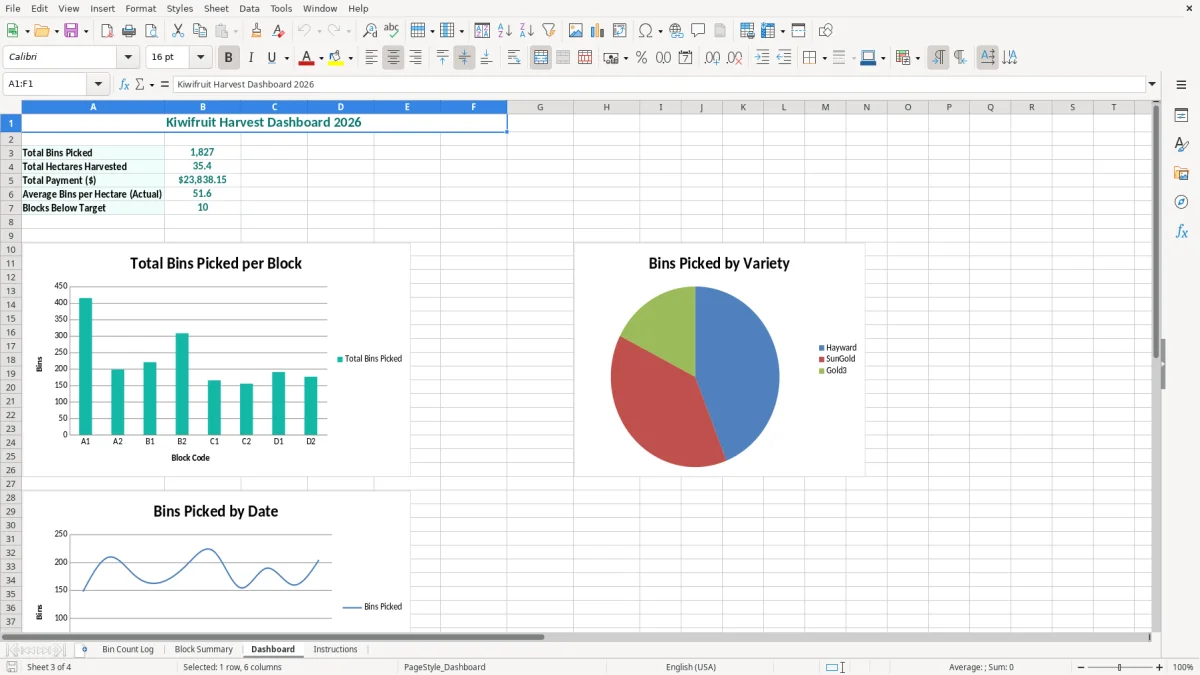
- Review Block Summary for the block-level picture and Dashboard for the visual overview. Image 2 shows the summary layout, while image 3 shows the dashboard view.
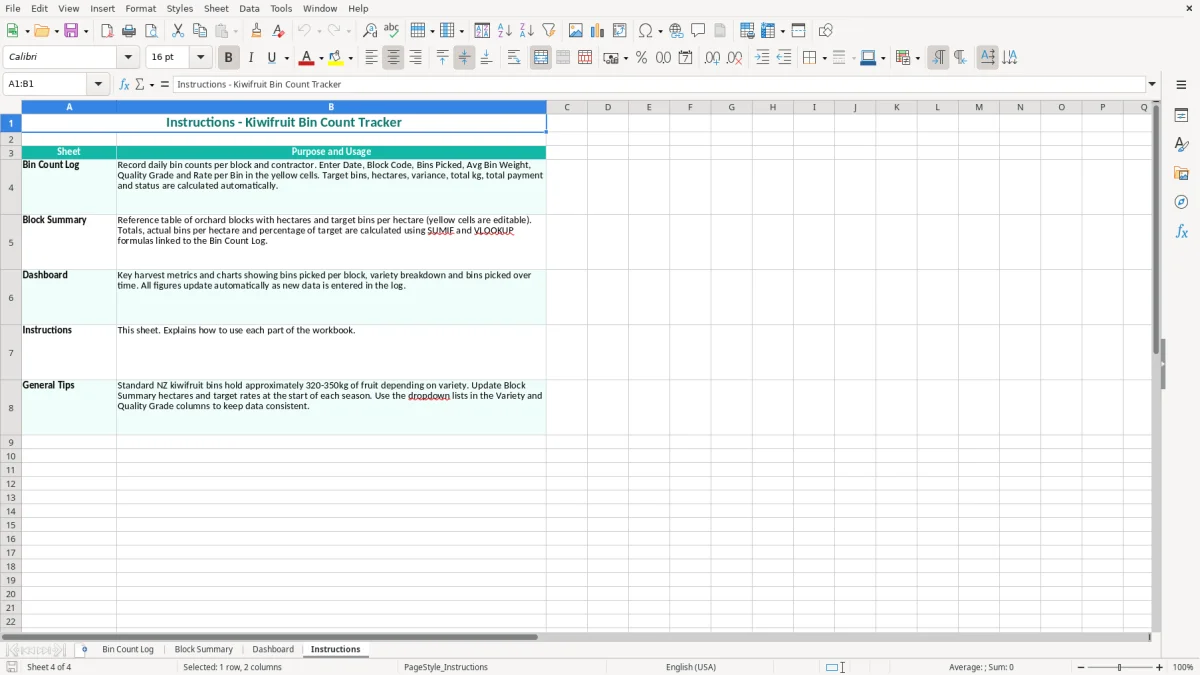
- Read the Instructions sheet in image 4 before changing headings or formulas. Save a dated copy after each significant harvest update.
Included features
A Bin Count Log sheet with Date, Block Code, Variety, Contractor / Picker and Bins Picked columns.
Production planning fields for Target Bins/Ha, Hectares, Target Bins (Total) and Variance.
Weight and quality fields for Avg Bin Weight (kg), Total kg and Quality Grade.
Payment tracking through Rate per Bin ($) and Total Payment ($).
A Status column for marking the progress of each picking record.
A Block Summary sheet for reviewing orchard activity by block.
A Dashboard and Instructions sheet, with consistent borders, teal headers, wrapped text and highlighted entry areas.
How orchard teams use a kiwifruit bin count spreadsheet
Harvest managers, orchard supervisors and contractor coordinators can use this workbook during the daily pick. A Bay of Plenty orchard might have the office manager entering tally sheets after the morning run, while the foreman checks block progress before moving crews to the next row.
Image 1 shows the Bin Count Log with one record per date and picking assignment. The visible fields run from Date and Block Code through Variety, Contractor / Picker, Bins Picked, Target Bins/Ha and Hectares, then into target, variance, weight, grade, payment and status information.
Record the pick while the numbers are fresh
Suppose block B2 is 3.4 hectares of SunGold with a target of 50 bins per hectare. The target is 170 bins; if the crew picks 148, the variance is -22 bins. That is much more useful at 3.30 pm on 6 April than trying to reconstruct the figure from text messages at the end of the week.
For a Christchurch-based orchard business managing contractors remotely, the same row can support a phone check-in: 210 Hayward bins from block A1, an average weight of 3.3 kg and the agreed rate per bin. The result is a clear production and payment conversation rather than a pile of handwritten tallies.
Use the workbook at the handover
Enter each block separately, even when the same contractor works several blocks in one day. This lets you compare varieties and locations instead of hiding everything in one daily total. Review the Block Summary after the last tally and use the Dashboard in the harvest meeting to decide where another crew or a quality check is needed.
The same block-by-block review also sets up a milk solids tracker for comparing output by variety, location, and crew before the harvest meeting.
New Zealand records behind orchard bin counts
A bin tracker is an operational record, not a substitute for your contractor agreement, packhouse statements or tax records. If the orchard business is GST-registered, the standard GST rate is 15%, and GST registration is compulsory once taxable turnover exceeds $60,000 in any 12-month period.
Picking payments need to be classified correctly. A contractor invoice may be a business expense with taxable supply information, while an employee’s pay belongs in payroll with PAYE, KiwiSaver and employment records. Do not use the Total Payment ($) column as a PAYE calculation: it is a bin-rate calculation, for example 500 bins at $8.50 equals $4,250.00 before any separate accounting treatment.
Keep evidence that agrees to the spreadsheet
Inland Revenue requires business records to be retained for 7 years. Keep the dated tally sheet, contractor invoice or timesheet, agreed rate, block allocation and packhouse or weighbridge evidence with the workbook. A row saying 148 bins is far stronger when it can be matched to a signed tally or electronic delivery record.
The normal New Zealand balance date is 31 March. Before closing the year, reconcile the log to invoices and consider whether unpaid contractor costs, crop inventory or other accruals belong in the profit and loss. The bin log itself does not calculate depreciation, provisional tax, GST or an IR3 or IR4.
Use consistent orchard definitions
Agree whether a bin means a completed orchard bin accepted for dispatch, and define how rejected, damaged or part-filled bins are treated. For example, counting 12 rejected bins as picked in one report but excluding them from the contractor invoice creates a 12-bin, or $102.00 at $8.50 each, dispute. Put the agreed treatment in the Instructions sheet and apply it every day.
Where orchard bin reporting falls over during harvest
The expensive mistakes are usually small at the time: a block code typed as B2 one day and B-2 the next, a missing variety, or a rate copied from last season. Once 15 crews have submitted tallies, those inconsistencies make a block summary unreliable and can take several hours to untangle.
Wrong targets create false alarms
Target Bins/Ha must match the block and variety being picked. If a 3.4-hectare SunGold block is accidentally given a 40-bin target instead of 50, the target falls from 170 to 136 bins. A crew picking 148 then appears 12 bins ahead when it is actually 22 bins behind. That is a management decision based on a 34-bin error.
Check the hectares as well. Entering 4.3 instead of 3.4 changes a 50-bin target from 170 to 215 bins, producing a 45-bin swing. Review unusual variances against the orchard map before telling a contractor that performance has dropped.
Payment and weight errors travel quickly
A rate of $8.50 entered as $85.00 turns a legitimate 210-bin payment of $1,785.00 into $17,850.00. Conversely, a missing zero can underpay a crew and damage trust before the error is noticed. Reconcile a sample of rows to the signed tally and invoice, especially where the contractor or rate changes.
Average bin weight is another trap. If 160 bins are recorded at 3.4 kg, the workbook reports 544 kg; entering 34 kg produces 5,440 kg. Compare exceptional weights with packhouse data, and do not treat an estimated average as a certified weighbridge result. Grade and status should also be completed before the row is considered final.
Once grade and status are finalized, a supplier register keeps those rows tied to the right contractor and rate history.
Make the bin tracker part of the harvest routine
The spreadsheet works best when it is attached to an existing harvest handover rather than treated as an extra admin job. Set one fixed entry time after the final tally each day, then have the supervisor check the totals before the next morning’s crew allocation.
Use a short daily close
- Match each paper or phone tally to a date, block code and contractor.
- Check that Bins Picked, Hectares and Rate per Bin ($) are not blank.
- Investigate a large negative variance, an unusual average weight or a payment that does not match the agreed rate.
- Save a dated backup, such as Harvest_2026-04-16.xlsx, before making corrections.
Use the pale-yellow cells for entry and leave calculated or summary areas alone. Copying a previous workbook can save time, but clear old picking rows first; retaining last week’s 220 bins in a new file is an easy way to overstate the crop.
Review the right view at the right time
Use the log for corrections, Block Summary for the daily supervisor review and Dashboard for the weekly harvest meeting. With 10 blocks and 6 picking days, a five-minute review of 60 rows is manageable; waiting until the end of the season makes the same reconciliation far harder.
Once several users are editing at once, you have more than 10,000 rows, or contractor payments need approvals and audit trails, move the process into Xero, MYOB or a dedicated orchard system. Keep this Excel file as an export or review tool, not as the only source of truth.
Common questions about this template
It tracks the date, block code, variety, contractor or picker, bins picked, target bins per hectare, hectares, total target, variance, average bin weight, total kilograms, quality grade, rate per bin, total payment and status.
Yes. The sample log includes SunGold, Hayward and Gold3, and you can enter the varieties used across your orchard. Keep the variety names consistent so the Block Summary and Dashboard remain meaningful.
The total target is based on Target Bins/Ha multiplied by Hectares. For example, 50 bins per hectare across 3.4 hectares gives a target of 170 bins; picking 148 produces a variance of -22 bins.
No. Total Payment ($) supports the bin-rate calculation only. At 210 bins and $8.50 per bin, it gives $1,785.00. Your payroll, contractor, GST and accounting records must be handled separately under the correct New Zealand treatment.
Keep the workbook with supporting tally sheets, invoices, agreements and weight or packhouse records. Inland Revenue requires business records to be kept for 7 years, and the spreadsheet should agree to the underlying evidence.
The workbook contains Bin Count Log, Block Summary, Dashboard and Instructions. Image 1 shows the data-entry log, image 2 the block summary, image 3 the dashboard and image 4 the instructions page.
Download
File format
Excel (.xlsx)
Compatible software
Excel, Google Sheets, LibreOffice
Price
Free