
Ute Fleet Maintenance Log Excel – Free Template (2026)
Inventory & Purchasing
Dairy Farm Milk Solids Tracker Excel - Free Template
Track milk solids, payouts, GST and monthly farm totals with log, summary, dashboard and instructions sheets.
2026-07-08
371 downloads
4.8/5 average rating
Download template
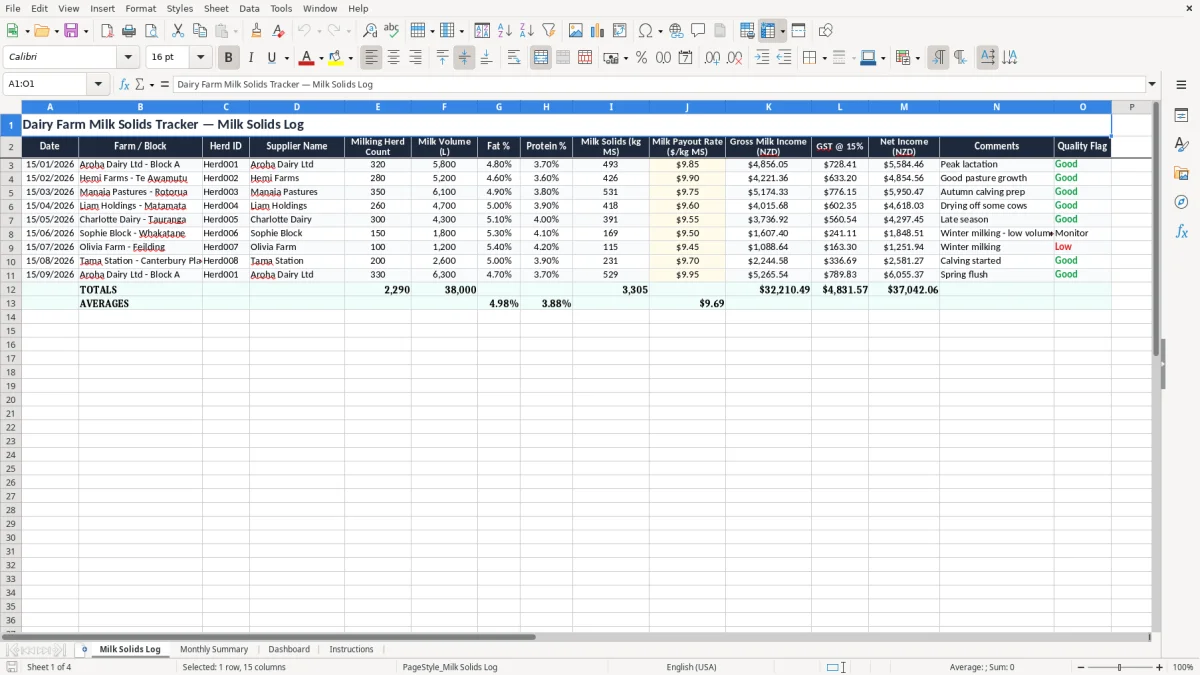
This dairy farm milk solids tracker Excel template is a simple workbook for recording milk volume, fat and protein percentages, milk solids, payout rates, GST and net income in one place. It includes a Milk Solids Log, Monthly Summary, Dashboard and Instructions sheet.
You use it to keep monthly production and payout records tidy, spot changes in milk solids performance, and have a clean summary ready for farm budgeting or end-of-month review. The layout is built for real farm admin, not a generic business spreadsheet.
The workbook suits sharemilkers, owner-operators, herd managers and farm office staff who need a quick way to line up production, income and cash flow without hunting through invoices.
The key benefits of this Excel template
- Keeps milk volume, fat %, protein % and milk solids in one log so you can see production trends at a glance.
- Shows gross milk income, GST and net income on the same line, which makes monthly review faster.
- Helps you compare herds, blocks or suppliers using consistent fields instead of handwritten notes.
- Makes it easier to spot payout swings, for example when 9.75 kg MS per cow drops to 9.60 kg MS after a dry spell.
- Supports cleaner month-end reporting for farm budgets, bank reviews and board updates.
- Gives you a simple monthly summary, so you do not have to rebuild totals every time you check results.
- Works well for a 300-cow or 350-cow operation that needs a practical record, not farm software overhead.
Step-by-step guide
- Start on the Milk Solids Log and enter each collection or monthly record using the date, farm or block, herd ID and supplier name. Keep the entries consistent so the summary stays clean.
- Fill in herd count, milk volume, fat %, protein % and milk solids (kg MS). If you are using the sheet properly, you should be able to compare one herd against another straight away.
- Enter the payout rate per kg MS and check the gross milk income, GST and net income fields. This gives you a quick view of what the milk actually returned after tax.
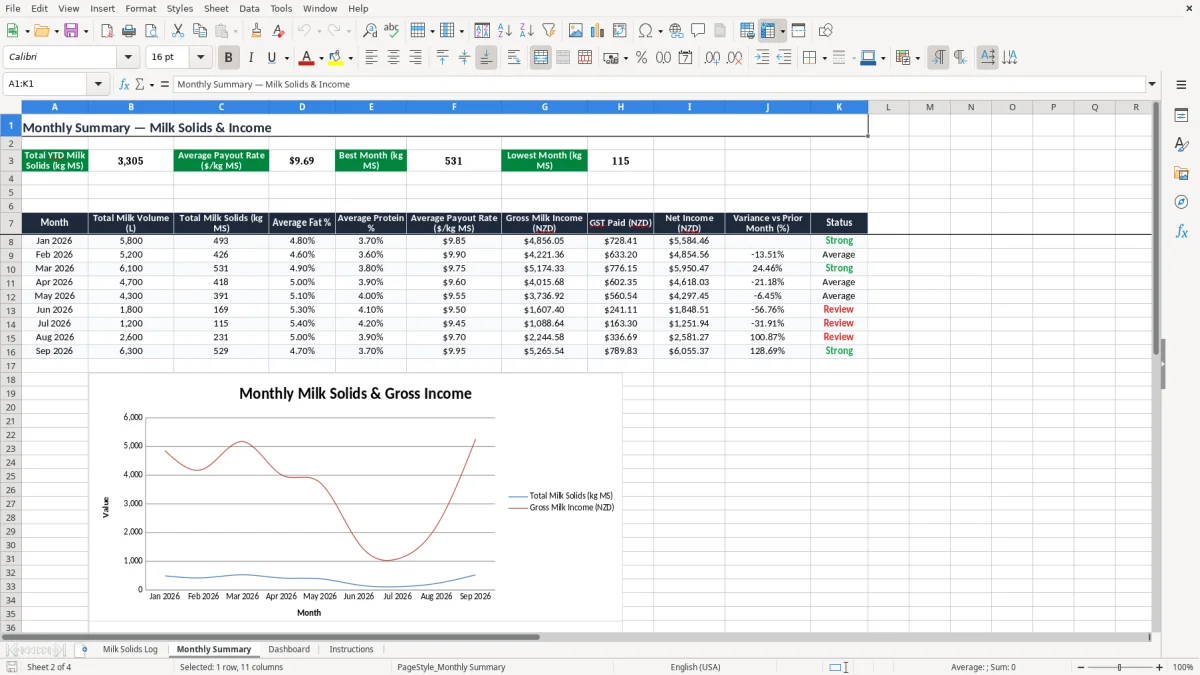
- Review the Monthly Summary sheet to see totals by month. Use it when you are preparing a farm meeting pack, monthly accounts or a season review.
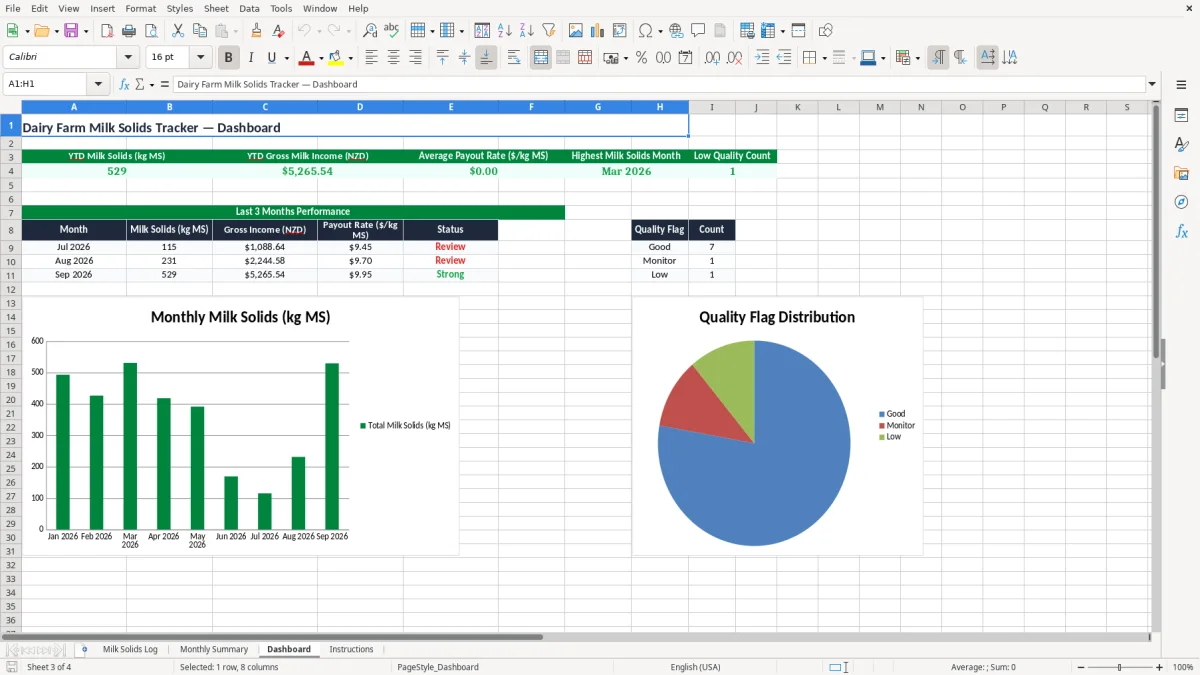
- Open the Dashboard to check the charts and spot movement in production or income. A quick visual check often catches a drop earlier than reading rows of figures.
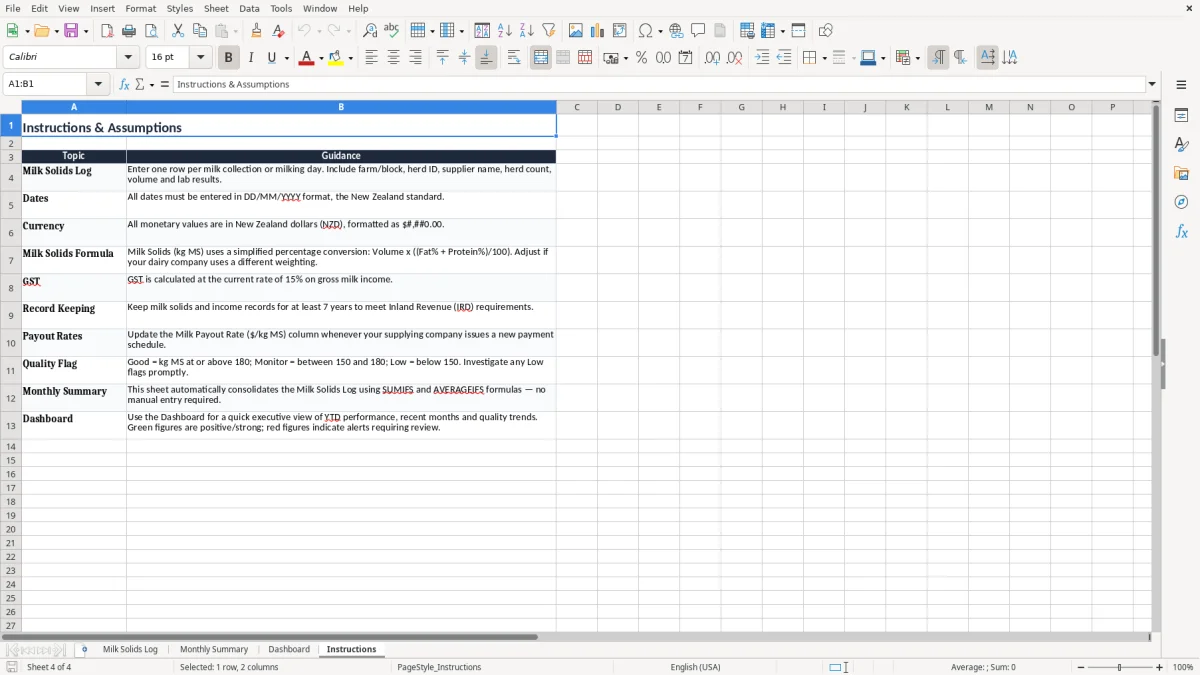
- Use the Instructions sheet if someone else is helping with the records. That keeps the process the same whether it is you, a bookkeeper or an office manager entering the data.
Included features
Milk Solids Log sheet with fields for date, farm or block, herd ID, supplier name and comments.
Input columns for milk volume, fat %, protein % and milk solids so you can record the key production drivers.
Income fields for milk payout rate, gross milk income, GST at 15% and net income.
Monthly Summary sheet for rolling up the figures into season-ready totals.
Dashboard sheet for quick visual review of trends without manual charting.
Instructions sheet to help farm staff enter data the same way every time.
Designed for New Zealand dairy reporting needs, including a clear split between payout and GST.
How dairy farms use a milk solids tracker in New Zealand
A milk solids tracker suits the people who live in the numbers every day: the sharemilker checking payout after the tanker runs, the office manager at a Waikato dairy unit, or the bookkeeper who has to line up milk income with the monthly accounts. If you have 320 cows and average 9.85 kg MS a cow, that is 3,152 kg MS to reconcile against the statement, so a tidy log saves real time.
The sheet is also handy at the start of the season and again through winter when performance shifts. A change from 4.8% fat and 3.7% protein to 5.0% and 3.9% can move the payout enough to matter, even before you look at feed costs.
What each sheet does
The Milk Solids Log is the data entry point, the Monthly Summary condenses the figures, and the Dashboard gives you a quick visual read. The Instructions sheet means you can hand it to someone else without losing the method.
Where this fits in the farm month
Use it when the milk statement arrives, when you are reviewing profit and loss, or when you want to see whether a block is carrying its share. A farm with two herds can keep each line separate and still compare them side by side.
What New Zealand dairy records need to line up with
For New Zealand farms, the milk income side of the workbook needs to sit neatly beside your GST records and annual accounts. If your business is registered for GST, the standard rate is 15%, and the gross income line should make it obvious what portion is tax inclusive and what portion is net.
Inland Revenue expects you to keep records for 7 years, so a monthly milk solids log is not just a nice-to-have. If you are using the figures to support a return, your source data should still be there when you need to explain a 15/01/2026 or 15/07/2026 entry years later.
How the numbers usually feed through
A payout of $9.80/kg MS on 3,152 kg MS gives gross milk income of $30,889.60 before GST. At GST 15%, that is $4,633.44 GST on the invoice side if the supply is taxable, leaving a net amount of $26,256.16 in the tracker.
Why the monthly summary matters
The summary helps when you are preparing the end of year figures for a 31 March balance date. If you are on provisional tax, you want the production and income trail to be clean before the instalments start landing.
The same year-end trail also makes it easier to set aside the levy cost, and an ACC levy estimate gives you a number to carry into the provisional tax review.
Where milk solids logs usually go wrong
The biggest problem is mixing up volume and milk solids. If you record 5,800 litres and forget to apply fat and protein correctly, you can overstate income and end up chasing a payout figure that was never there.
Another common issue is leaving the payout rate blank or typing it inconsistently. A missing $9.75 on one month and $9.90 on the next makes the summary useless, because one bad cell can throw off the season total by hundreds of dollars.
Data entry mistakes that cost time
If you enter one herd twice, the dashboard will make it look like production jumped when it did not. On a 350-cow unit, a duplicated monthly line can distort the season total by more than 300 kg MS, which is enough to send you down the wrong track in a budget meeting.
Why messy comments create hassle
Comments like “good” or “ok” do not help when you are trying to link production to feed, weather or drying-off dates. A note such as “drying off 40 cows from 15/04/2026” gives you something you can actually use when the figures dip next month.
How to turn the tracker into a farm routine
The easiest way to keep this spreadsheet alive is to tie it to something you already do, like the milk statement review or Monday admin. If you enter the figures every Friday after the tanker sheet arrives, you will not be trying to recreate six weeks of data on a rainy Sunday.
Three habits that keep it moving
- Copy the previous month’s rows and overwrite only the new figures, so the formatting stays intact.
- Use a fixed time each week for entry, such as 8:30am after the staff meeting or before the pay run.
- Flag odd results with conditional formatting so a low milk solids result or missing payout rate stands out immediately.
Once you are managing several herds, multiple suppliers or a full season of lines, the spreadsheet can start to creak. At that point you may still keep the tracker for review, but move the live bookkeeping into Xero or MYOB so the accounting side stays linked properly.
Once the live bookkeeping moves into Xero or MYOB, a supplier register keeps the active vendor details and account links in one place.
Common questions about this template
It is used to record milk volume, fat %, protein %, milk solids, payout rate, GST and net income in one workbook. That gives you a clean monthly record for farm review, budgeting and accounts.
The workbook includes four sheets: Milk Solids Log, Monthly Summary, Dashboard and Instructions. That means you can enter data, total it, view it and hand it to someone else without rewriting the process.
Yes. The Milk Solids Log has separate fields for Farm / Block and Herd ID, so you can compare a 280-cow herd against a 320-cow herd without mixing the figures together.
The template shows GST at 15% on the income line so you can separate tax-inclusive and net amounts. That makes it easier to line up the milk statement with your GST return and accounts.
Yes. It is useful for the 31 March balance date because you can keep a season’s production and income trail in one place and then use it for your year-end working papers.
If you are dealing with multiple staff entering data, several herds, or you need live links to bank feeds and invoicing, that is when Xero or MYOB will usually be a better fit. The spreadsheet still works well as a simple tracker, but software wins once the admin load gets bigger.
Download
File format
Excel (.xlsx)
Compatible software
Excel, Google Sheets, LibreOffice
Price
Free