
Ute Fleet Maintenance Log Excel – Free Template (2026)
Inventory & Purchasing
Sheep Tally Excel - Free Template
Track sheep and beef movements, weights, sales and stock counts with a tally register, dashboard and instructions.
2026-07-10
281 downloads
4.8/5 average rating
Download template
This sheep and beef tally Excel template is a stock register for tracking head counts, weights, sales, deaths, transfers and values across your farm blocks. It includes a Tally Register, Summary Dashboard and Reference & Instructions sheet so you can keep one clear record.
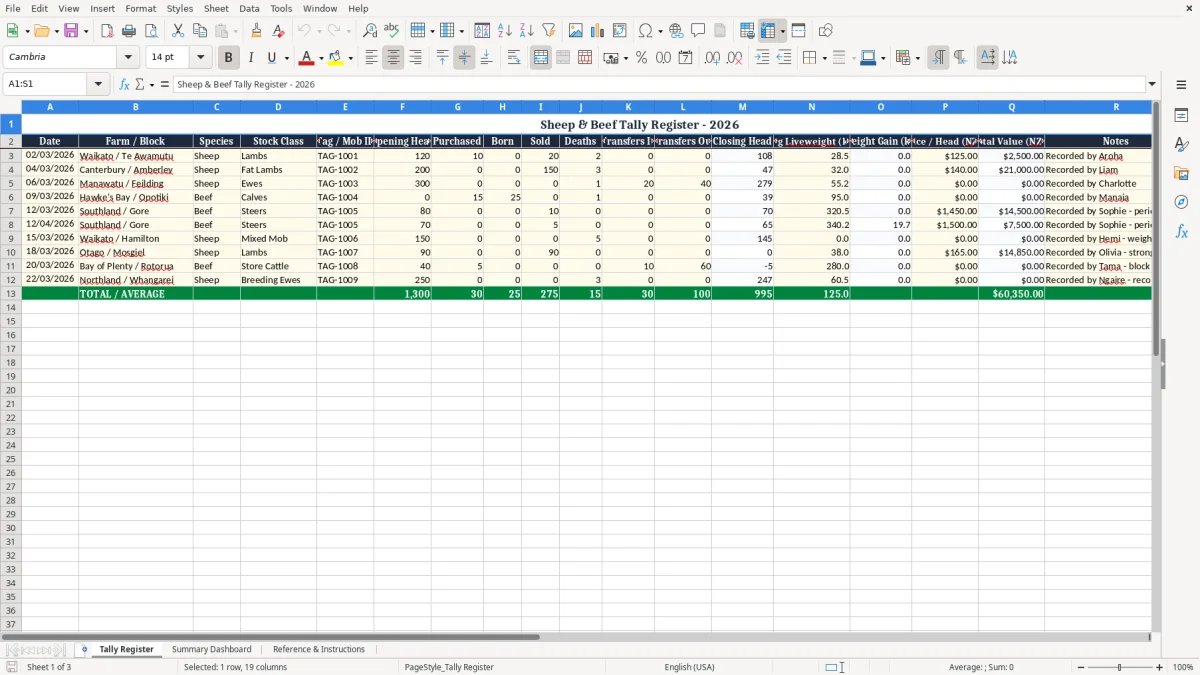
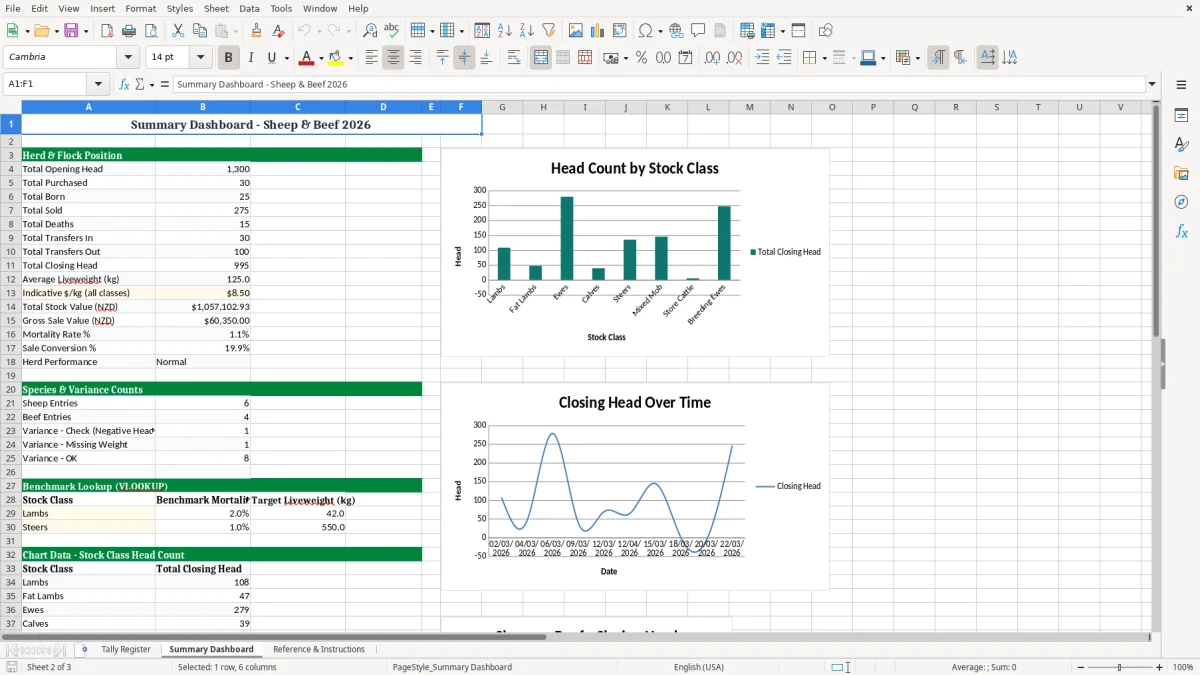
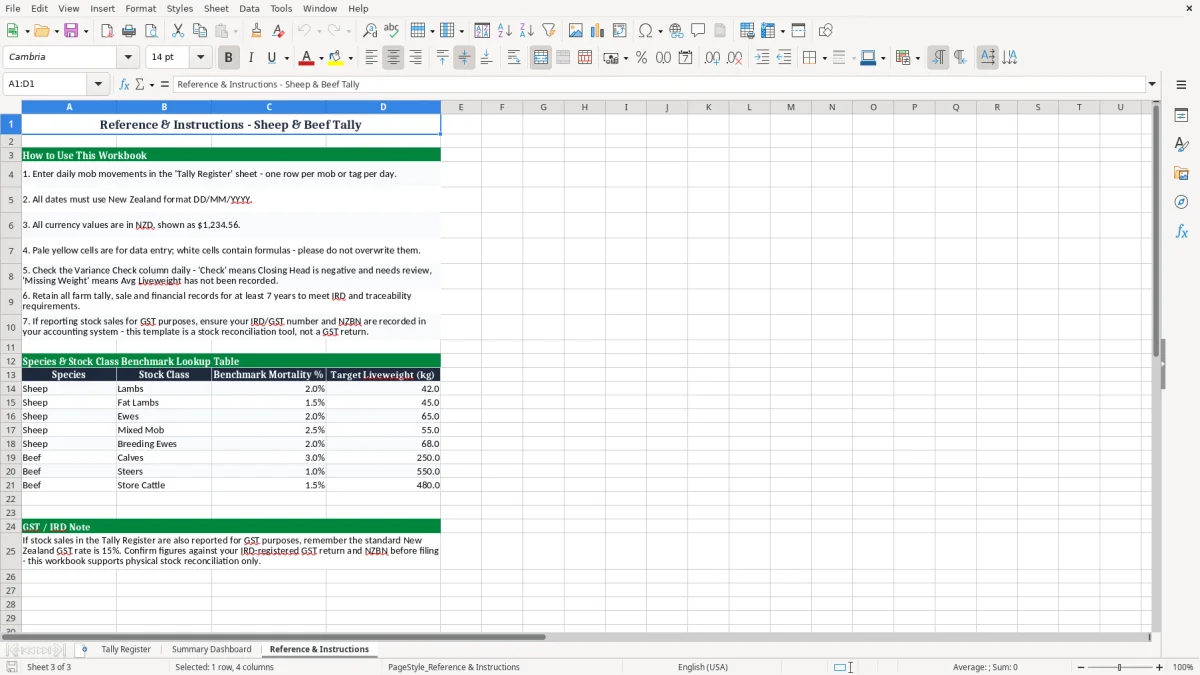
Use it when you are checking mob numbers after a sale yard run, updating liveweights after weigh day, or reconciling closing head counts at balance date. Image 1 shows the register for line-by-line entry, image 2 shows the dashboard, and image 3 holds the setup notes.
The workbook is set up for practical day-to-day use in New Zealand yards and farm offices, with dated entries, weight fields and value checks that help you spot a mismatch before it turns into a bigger stocktake job.
The key benefits of this Excel template
- Tracks opening head, purchases, births, sales, deaths and transfers in one line per tally entry.
- Shows closing head so you can check the count immediately instead of rebuilding it by hand.
- Records Avg Liveweight (kg) and Weight Gain (kg) for performance checks between weigh days.
- Calculates Total Value (NZD) so you can see stock value by mob or block at a glance.
- Helps you catch a Variance Check issue early when the numbers do not balance.
- Makes end-of-month and balance date stocktakes quicker because the history is already dated.
- Works well for a sheep-and-beef business with multiple mobs across farms such as Waikato, Canterbury or Southland.
Step-by-step guide
- Start on Tally Register and enter the date, farm or block, species and stock class for each mob. Use one row per movement or count so the history stays clean.
- Fill in the stock movement figures: opening head, purchased, born, sold, deaths, transfers in and transfers out. The closing head should then give you a quick check on the line.
- Add the liveweight and price details where you have them. For example, 140 fat lambs at 32.0 kg and $125 a head gives you a very different result from 80 steers at 320.5 kg.
- Use the notes column for yard notes, draft details or anything you will want to remember at the next weigh day. A short note now saves a lot of guesswork later.
- Review the Summary Dashboard after you update the register. That is where you can see the bigger picture across mobs without scrolling through every line.
- Check the Variance Check field before you close off the week or month. If the number looks wrong, fix it while the movement is still fresh in your head.
- Keep the Reference & Instructions sheet handy for the column meanings and the way the workbook is laid out. It is useful when someone else in the shed needs to keep it going.
Included features
Three-sheet workbook: Tally Register, Summary Dashboard and Reference & Instructions.
Date-based stock entry with clear fields for farm, block, species, stock class and tag or mob ID.
Head count movement columns for purchased, born, sold, deaths, transfers in and transfers out.
Weight and value fields including Avg Liveweight (kg), Weight Gain (kg), Price / Head (NZD) and Total Value (NZD).
A Variance Check column to help you spot when a tally does not balance.
Formatted for easy reading with coloured headers, borders and input cells that stand out.
Built for sheep and beef farm use in New Zealand, with example entries from different regions and stock classes.
Who uses a sheep and beef tally Excel template in New Zealand
A sheep and beef tally sheet is what you reach for when you are managing mob counts across paddocks, blocks and sale drafts. On a family farm, a contract shepherd, an office manager or a farm accountant may all need the same live record before the month-end review or the 31 March stocktake.
Image 1 shows the register as a line-by-line working sheet. The example rows make the job concrete: 200 fat lambs in Canterbury, 300 ewes in Manawatū, 80 steers in Southland, and each line carries its own opening head, movements and closing head.
When the register earns its keep
You feel the value most when the numbers are moving fast. A week with 150 lambs sold, 3 deaths and a transfer of 40 ewes to another block is exactly when a handwritten notebook falls behind.
With the workbook, you can keep one clean record for a 4-mob operation or a 20-mob run without retyping the whole book each time. That matters when the yard load-out is at 6.00 am and you want the tally sorted before lunch.
A practical farm example
Say you have 120 lambs, buy 10 more and sell 20, then lose 2 to deaths. The register shows the movement and the closing head in one place, so you do not have to rebuild the count from scratch.
For a sheep and beef business juggling multiple blocks, that is the difference between a quick check and a full afternoon of head-scratching.
Stock records and farm bookkeeping rules in New Zealand
This kind of register supports the records you need around profit and loss, stock valuation and the year-end count at balance date. If you are a sole trader or a partnership, the stock numbers feed directly into your farm accounts and the value you carry into the new financial year.
Inland Revenue expects you to keep business records for 7 years, so the dated lines in this workbook are useful well beyond the current season. If your farm is GST-registered, the same stock history also helps with pricing decisions when you are tracking taxable supplies and cash coming in from livestock sales.
Why the 31 March count matters
For many sheep and beef businesses, the 31 March count is the point where the register stops being just an operational tool and becomes evidence for the accounts. A stocktake that is 2% out on a herd of 500 head means 10 animals missing from the year-end valuation, which is real money.
If you are moving toward a company structure with an NZBN, the same data still matters because the farm entity needs clean records for the annual financial statements and any provisional tax planning after the year closes.
Simple technical choices that help
Keep the tally in one workbook rather than scattering it across phones and paper pads. That way you can sort by date, filter by block and carry the figures straight into the accounts file without re-keying the same 80 or 180 lines.
If you also track weights, use the same date format across every line so the numbers line up cleanly in Excel when you sort or sum the season's movements.
Where tally sheets go wrong on sheep and beef farms
The usual problem is not the formula, it is the missing movement. A sale gets written down, but the 3 deaths after a wet week do not make it onto the sheet, and suddenly the closing head is 3 off by the time you do the next yard count.
On a 200-head mob, a 5-head mismatch can mean a $750 to $1,000 valuation difference if those animals were sitting around $150 to $200 a head. That is enough to distort your stock figure and waste time checking the yards again.
Bad detail makes bad counts
Tag or mob IDs are often left blank when the day is busy. A line that just says “sheep” without a mob reference is hard to match later, especially if the same block had lambs moved out and ewes shifted in on the same week.
Another common miss is weight drift. If you write 320 kg for one beast on Tuesday and 340.2 kg on Friday, but you forget which sale draft that belonged to, the liveweight trend becomes noise instead of something you can use.
The cost of tidy-up work
A bad tally usually costs you twice: once in the original miss, and again in the time spent hunting through notes, receipts and texts. I have seen small farms spend half a day untangling 15 or 20 rows after a stocktruck move because the source entry was too vague.
That is why the variance check column matters. It gives you a quick red flag before the mistake gets baked into the month's numbers or the season-end stock valuation.
How to make the tally register part of your farm routine
The easiest way to keep this spreadsheet alive is to tie it to something you already do. For most farms, that is the weekly weigh day, the Friday office catch-up, or the yard run after a sale.
Three habits that keep it current
- Enter the row straight after the mob move, while the numbers are still in your head.
- Copy the last line when the same block or stock class repeats, then change only the movement figures.
- Check the dashboard at the end of each week so you are not waiting until the end of the month.
If you are adding a lot of entries, use the same stock class names every time so the register stays sortable. A consistent label like Lambs, Fat Lambs, Ewes or Steers is far easier to filter than six different versions of the same thing.
When the workbook starts carrying 500-plus rows, or you want it tied into invoicing, payroll or feed budgeting, that is the point to move to proper farm software such as Xero or MYOB. Until then, this spreadsheet is a solid, low-fuss way to keep the tally straight.
Common questions about this template
It is for recording stock movements, counts, weights and values for sheep and beef mobs. You use it to keep a dated history of what went in, what came out and what the closing head should be.
Yes. The example rows include both sheep and beef entries, so you can use the same workbook for lambs, ewes, calves, steers and other stock classes.
There are 3 sheets: Tally Register, Summary Dashboard and Reference & Instructions. That gives you the data entry area, the summary view and the setup notes in one file.
It is a quick check to show whether the stock movement numbers line up with the closing head you expect. If it is not right, you know to look back through the row before the error gets carried into your stocktake.
Yes. The dated rows and head counts make it useful at balance date, especially when you need a clear record for your accounts or farm adviser.
If the workbook is getting hard to maintain, you are passing a few hundred rows a season, or you want it linked with other farm jobs like invoicing or payroll, then software such as Xero or MYOB will usually be the better next step.
Download
File format
Excel (.xlsx)
Compatible software
Excel, Google Sheets, LibreOffice
Price
Free