
Ute Fleet Maintenance Log Excel – Free Template (2026)
Inventory & Purchasing
Calf Rearing Record Excel - Free Template
Track calf ID, feeds, health checks, treatments, weaning and costs in one NZ calf rearing spreadsheet.
2026-07-09
274 downloads
4.8/5 average rating
Download template
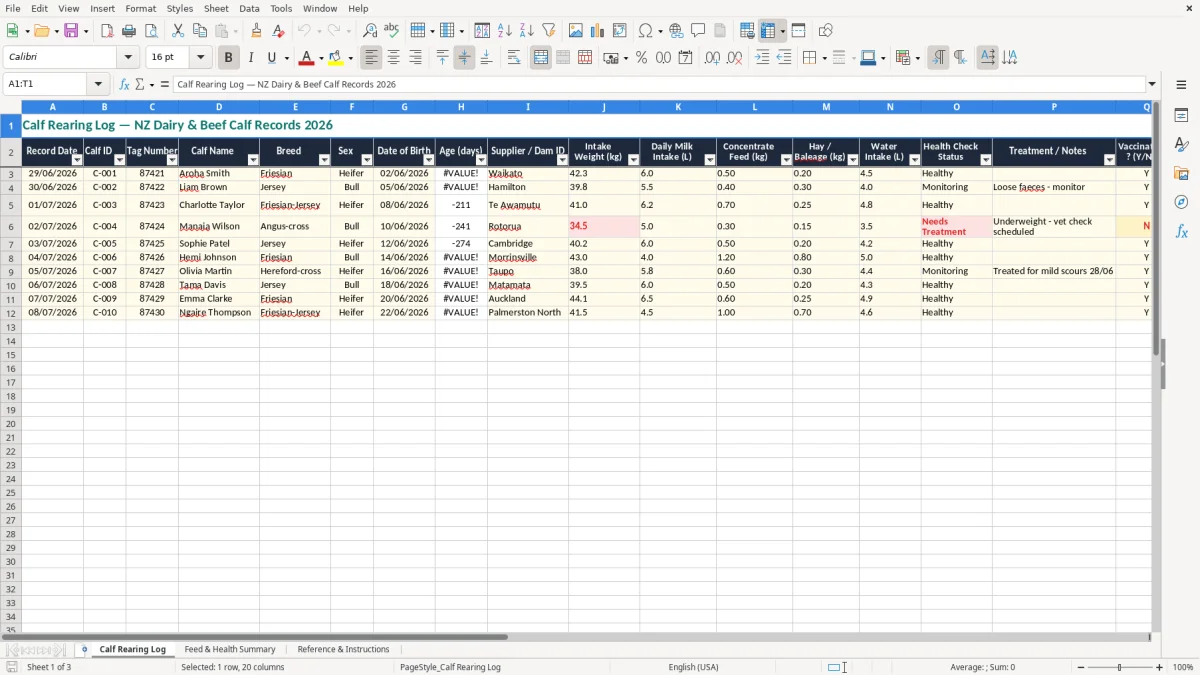
This calf rearing record Excel spreadsheet is a practical log for tracking each calf from intake to weaning. It includes a Calf Rearing Log sheet, a Feed & Health Summary sheet, and a Reference & Instructions sheet.
You can use it to record calf ID, tag number, breed, sex, date of birth, weight, feed amounts, health checks, treatments, vaccination status, weaning and cost to date. It is set up for day-to-day farm use, not paperwork for the sake of it.
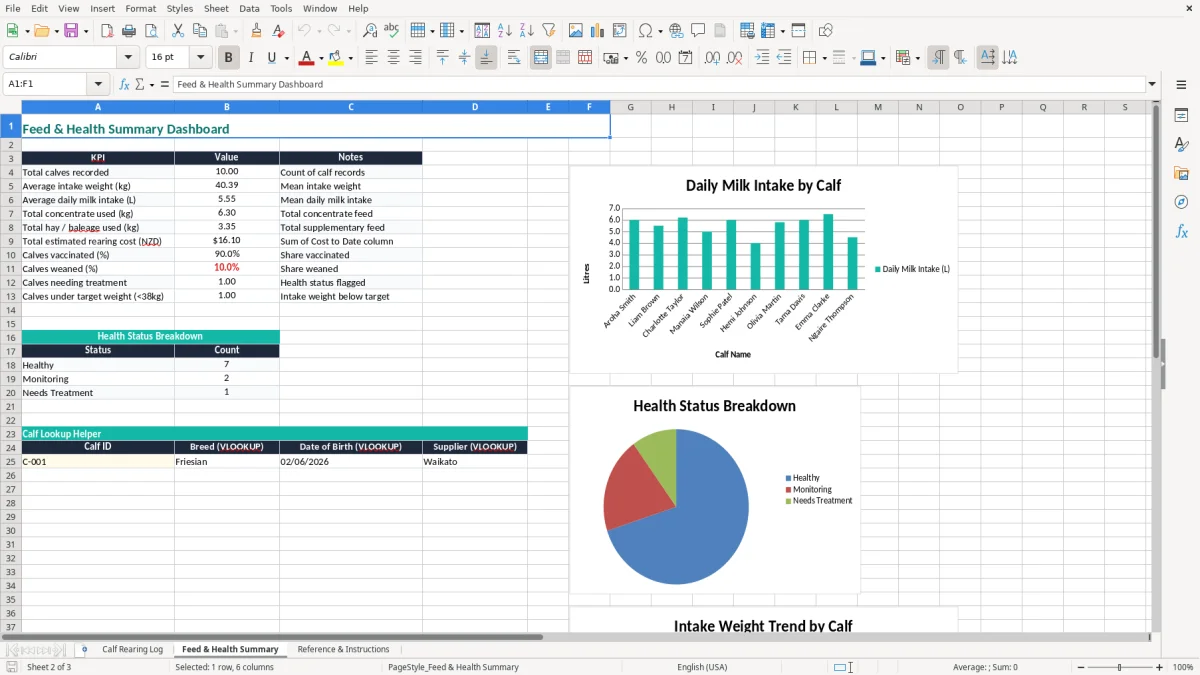
The summary sheet pulls the data together so you can see feed use, health flags and rearing progress at a glance. The reference sheet gives you a clean place to keep your notes and instructions in one workbook.
The key benefits of this Excel template
- Keeps every calf on one line, so you can scan 20 calves without flicking through paper notebooks.
- Records the main rearing details: intake weight, milk, concentrate, hay or baleage, water, health status and treatment notes.
- Helps you spot calves that are slow to drink, not gaining, or still marked as monitoring before they become a bigger problem.
- Tracks vaccination and weaning status with simple Y/N fields, which is quicker than writing the same note 30 times.
- Shows cost to date in NZD so you can compare the cheapest and most expensive calves in the mob.
- Supports a proper handover between the calf shed, relief staff and the person doing the weekend checks.
- Gives you a feed and health summary you can use at the end of the week instead of rebuilding totals by hand.
Step-by-step guide
- Start on the Calf Rearing Log sheet and enter one calf per row. Use the record date, calf ID, tag number, name, breed and sex so you can identify each animal quickly.
- Fill in the date of birth and intake weight, then update age in days as the calves move through the shed. That gives you a simple growth snapshot without needing another workbook.
- Record the daily milk intake, concentrate, hay or baleage and water intake. If you are feeding 6.0 L of milk and 0.5 kg of concentrate, that detail matters when you compare groups.
- Use the health check status and treatment notes fields to flag scours, coughs, medicines or extra monitoring. Keep the notes short but specific so the next person knows what happened.
- Mark vaccinated and weaned as Y or N when those milestones happen. That makes it easy to see which calves still need a task done.
- Review the Feed & Health Summary sheet each week to check totals and problem calves. Use the Reference & Instructions sheet for your farm rules, feeding rates and any shed reminders.
Included features
20-column calf register covering identification, feed, health and cost fields.
Date fields for record date and date of birth, which helps you track age in days properly.
Simple Y/N status fields for vaccination and weaning.
Health check status and treatment notes columns for scours, monitoring and medicine entries.
Cost to date field in NZD for quick per-calf cost tracking.
A separate Feed & Health Summary sheet for a clearer weekly overview.
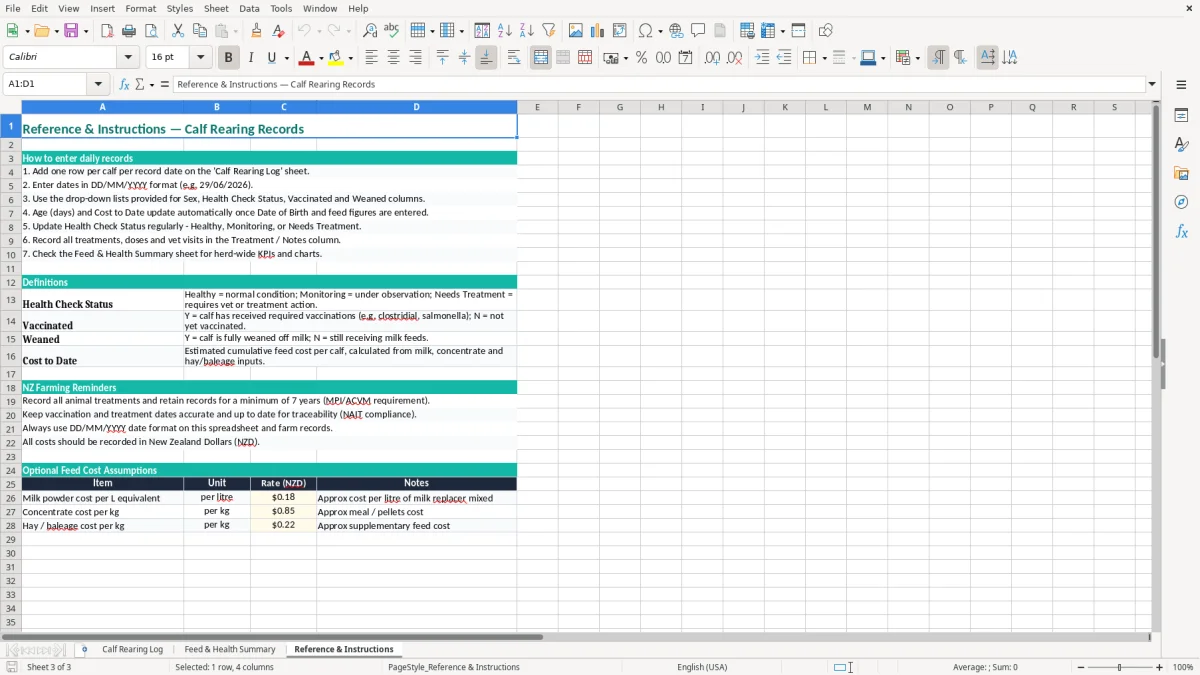
A Reference & Instructions sheet for farm notes, feeding rules and internal reminders.
Who uses a calf rearing log in New Zealand
This is the sheet you reach for when the calves are coming in fast and you need a clean record before the details blur together. A Waikato dairy farm with 40 bobbies, a beef breeder rearing replacements, or a calf rearer minding 12 spring calves all need the same thing: a row per calf with the basics filled in the day it happens.
The Calf Rearing Log sheet is set up for that job. You can record tag number, date of birth, intake weight, daily milk intake, concentrate, hay or baleage, water intake and treatment notes in one place, then check the summary sheet when you want the bigger picture.
Why this works on farm
If you are feeding 6.0 L a day to 18 calves, that is 108 L to prepare and check off. If two calves drop to 5.0 L and one has loose faeces, the log gives you a clean trail instead of relying on memory at smoko.
Where it fits in the week
Most people update it during the morning feed run or before the evening check, then use the Reference & Instructions sheet for shed rules. That keeps it tied to the routine you already have instead of becoming another job at the end of the month.
What the calf records need to line up with
This workbook is a farm management tool, not a tax form, but the records still need to be tidy enough to stand up when you are asking who got what, when, and why. If you are running the calves through the business, keep the workbook linked to your farm records and file history for at least 7 years, which matches Inland Revenue’s record-keeping expectation for business documents.
The main technical choice here is simple: record by calf, not by batch. A batch note like “10 calves drinking well” is fine for a whiteboard, but the spreadsheet works because each calf has its own row, so you can sort, filter and spot outliers like a 39.8 kg intake weight against a 42.3 kg peer.
Useful fields to keep consistent
Date format should stay DD/MM/YYYY, and Y/N should stay Y/N so the summary sheet can read it cleanly. If you decide to add your own columns, keep the naming consistent with the rest of the workbook — for example, use one field for treatment notes and one for remarks rather than mixing both into a single text block.
Simple example of clean records
If a calf is born on 02/06/2026, first weighed at 42.3 kg, then treated on 30/06/2026 for scours, you want all three dates visible in the same row. That gives you a proper timeline when you are comparing growth, feed intake and recovery later on.
That same row-by-row timeline also makes it easier to line up dates, amounts and due periods in a tax instalment record when you need a clean history of repeated events.
Where calf spreadsheets usually go wrong
The biggest mess is not the spreadsheet itself, it is the half-finished row. One missed birth date turns age in days into guesswork, and one wrong tag number means you are looking at the wrong animal when you think you are treating a sick calf.
Common farm-floor errors
People also under-record feed. If you write “milk” instead of 6.0 L, you cannot compare one calf to another, and you cannot work out whether a 0.5 kg concentrate increase lifted growth over the next fortnight.
Another common slip is forgetting to mark vaccinated or weaned. That sounds small until you have 15 calves and two staff members both assuming the other person already did the job.
What that costs
A missed treatment note can mean a calf gets checked twice or not at all. A poor record for 30 calves can easily burn 20 to 30 minutes every week just re-checking what should already be written down, and that is before you chase down the right person for the missing detail.
The cost to date field helps too. If one calf is sitting at $142.50 and another is at $97.80, you can see where extra feed, medicine or handling time is pushing the numbers.
The same habit of recording cost and activity carries over to milk solids tracking, where each cow’s output and related costs need to stay tied to the same ongoing record.
How to make the log part of the calf shed routine
The easiest way to keep this alive is to bolt it onto something you already do. Most farms will update it at the same time as the morning feed, the treatment round or the weekend weigh-in, so the record gets written while the calf is still in front of you.
Habits that keep it going
- Use one person per shift to enter the day’s changes, even if someone else did the feeding.
- Keep the workbook open on a tablet or laptop in the shed office so you are not rewriting notes later.
- Copy the previous day’s pattern for healthy calves and only change the fields that moved.
- Use the Reference & Instructions sheet for feeding rates, medicine reminders and any shed rules.
If you are still rewriting the same data into a separate system every week, you have probably outgrown the spreadsheet and should move to calf management software or farm software with syncing. Until then, this workbook is a tidy middle ground: fast enough for shed work, but structured enough to give you a useful summary.
Common questions about this template
It includes a Calf Rearing Log sheet, a Feed & Health Summary sheet, and a Reference & Instructions sheet. The log captures calf ID, tag number, breed, sex, birth date, weights, feed, health status, treatments, vaccination, weaning and cost to date.
Yes. The fields are broad enough for dairy heifer calves, bull calves and beef replacements, so you can use the same workbook across a mixed mob.
You can use the health check status column for quick flags like healthy or monitoring, then add the treatment or notes field for details such as scours, medicine, coughing or follow-up checks.
Yes. The template has simple Y/N fields for vaccinated and weaned, so you can scan the row and see the status straight away without extra notes.
Yes. It works well for a solo farmer, a sharemilker, or a small team because each calf has its own line and the summary sheet makes it easier to hand over between staff.
Yes. You can add extra fields such as paddock, dam group, medicine batch or target weight, as long as you keep the date and ID fields consistent so the summary stays readable.
Download
File format
Excel (.xlsx)
Compatible software
Excel, Google Sheets, LibreOffice
Price
Free