
Ute Fleet Maintenance Log Excel – Free Template (2026)
Inventory & Purchasing
Vineyard Harvest Yield Log Excel - Free Template
Track grape harvest dates, bins, weights, Brix and yield by block with a dashboard and instructions.
2026-07-14
263 downloads
4.8/5 average rating
Download template
This Excel template is a vineyard harvest yield log for tracking harvest dates, blocks, varieties, bins, weights, Brix, quality and yield by hectare in one place. It includes a Harvest Log, a Summary Dashboard and an Instructions sheet.
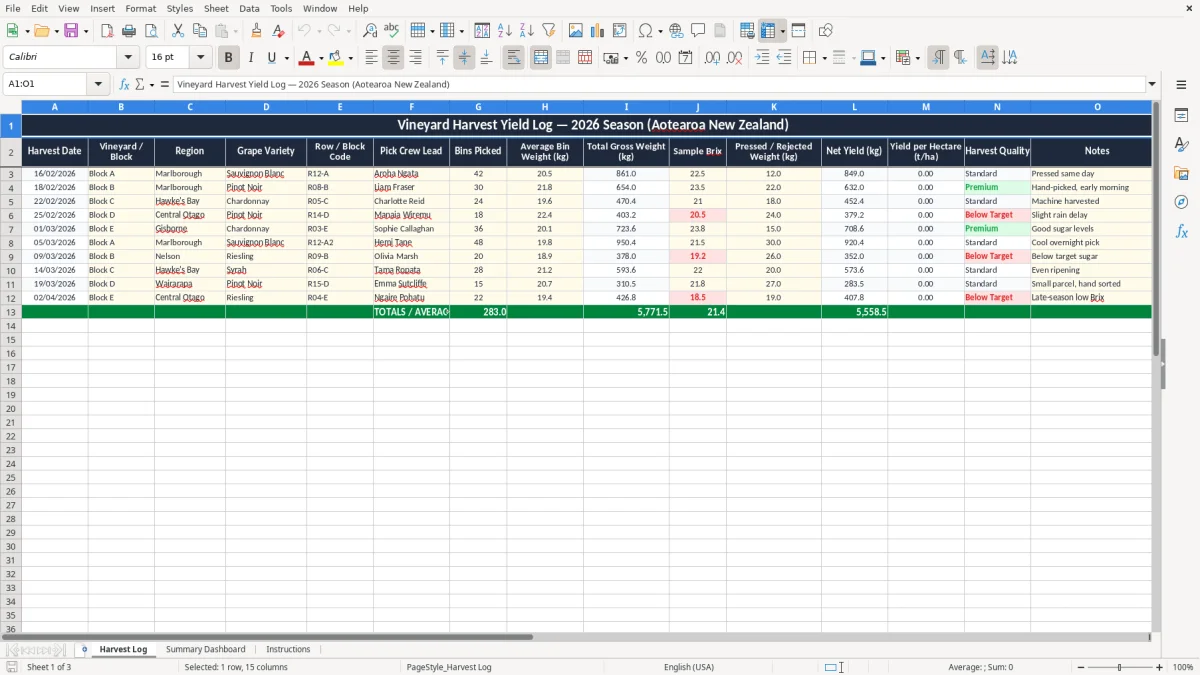
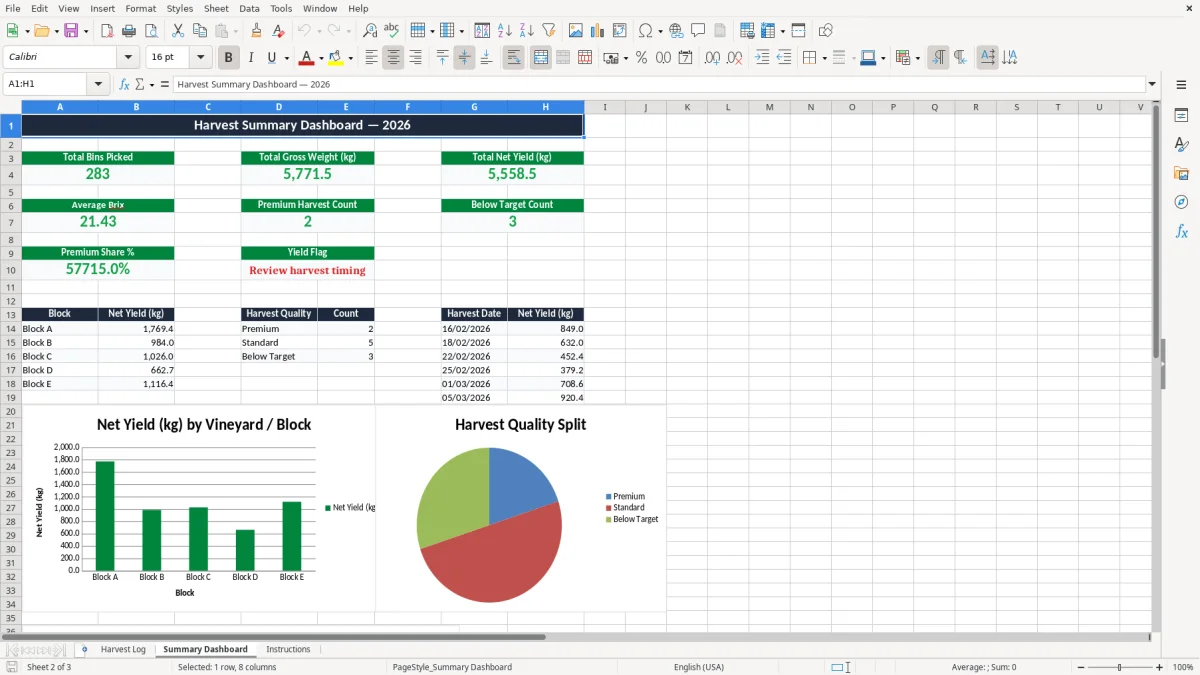
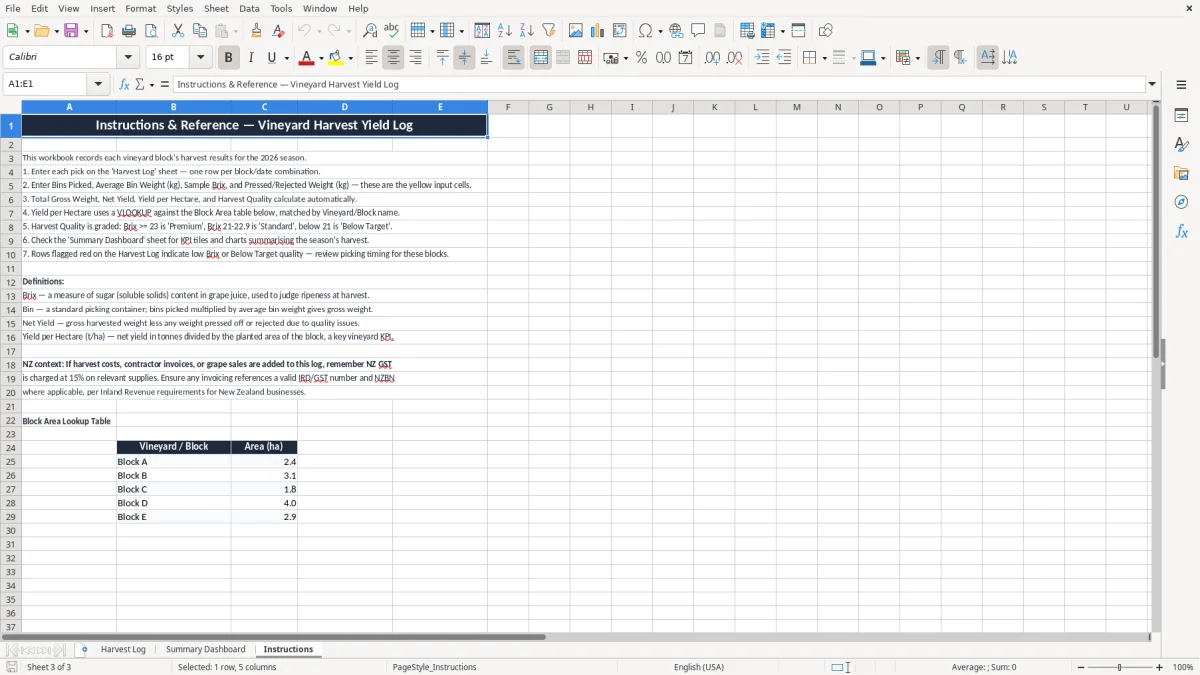
Use it when you want a clean record of each pick, from the first bin weighed to the final net yield. Image 1 shows the entry sheet, image 2 shows the dashboard, and image 3 gives you the setup steps.
It is built for vineyard owners, contract harvest crews and cellar door managers who need a simple way to compare blocks, spot weak patches and keep season data tidy for the next round of decisions.
The key benefits of this Excel template
- Tracks each harvest row by date, block, variety and crew lead so you can see exactly what came off each site.
- Calculates gross weight, net yield and yield per hectare with less manual arithmetic at the end of a long picking day.
- Captures Brix readings alongside yield so you can compare sugar levels with harvest timing.
- Helps you spot which blocks are producing better tonne-per-hectare results across the season.
- Gives you a dashboard view of totals and trends without rebuilding charts every week.
- Keeps notes on pressed or rejected fruit, which makes follow-up easier when quality dips.
- Provides a clear season record you can hand to a manager, grower or consultant without extra cleanup.
Step-by-step guide
- Open the Harvest Log sheet and enter each pick as a separate row. Use one line per block, crew and harvest date so the record stays easy to filter.
- Fill in the block details, bin count, average bin weight and Brix. The sheet is laid out so your core field data sits together, which speeds up entry at the end of the day.
- Check the weight and yield columns after each entry. If your formula cells are populated, you can see the gross and net numbers straight away instead of waiting until month-end.
- Review the Summary Dashboard to compare blocks, varieties and season totals. Image 2 is the place to look when you want the quick story, not the row-by-row detail.
- Use the notes field for anything that affects quality or timing, such as machine harvesting, hand-picking or fruit that was pressed the same day.
- Refer to the Instructions sheet before your first season use, then keep the workbook as your running harvest record for the full 2026 vintage.
Included features
Harvest Log sheet with structured columns for date, vineyard or block, region, grape variety and row code.
Fields for bins picked, average bin weight, gross weight, Brix, rejected weight and net yield.
Yield per hectare column so you can compare blocks on a like-for-like basis.
Harvest quality and notes fields for practical vineyard comments.
Summary Dashboard sheet for a quick season overview.
Instructions sheet to guide setup and daily use.
Clear formatting that makes the workbook easier to read in the shed, office or winery.
How vineyard teams use this harvest log in New Zealand
This workbook suits the people who are actually on the hook during harvest: the vineyard manager, the cellar door owner who also runs the back office, the contractor logging bins, and the bookkeeper trying to reconcile tonnage with invoices. A Marlborough block that yields 22.5 kg a bin across 42 bins is not just a number — it tells you whether the crew pace, ripeness and sorting decisions were right on the day.
For a small operation, the value is in speed and repeatability. If you are harvesting 6 blocks over 3 weeks, a consistent sheet stops you from relying on texts, whiteboard notes and memory when you are exhausted at 10 pm.
From block notes to one season record
Image 1 shows the Harvest Log with one row per pick. That gives you a clean way to compare Sauvignon Blanc in Block A against Pinot Noir in Block B without mixing the figures together.
Why the dashboard matters when the season gets busy
Image 2 shows the summary view, which is where you look when you want the pattern, not the detail. If one block sits at 18.0 t/ha and another lands at 12.4 t/ha, you can see the gap quickly and ask the right questions while the fruit is still coming in.
What IRD and New Zealand record keeping mean for harvest data
Harvest records sit inside normal business record-keeping, so keep them for 7 years as Inland Revenue expects. If your vineyard is GST-registered, the file also helps back up the figures that feed your GST return, especially where contractor costs, freight and harvesting charges need to match the season.
If you operate through a company with an NZBN, this log becomes part of the wider management record that supports your accounts, stock movements and seasonal analysis. For sole traders, it also helps when you complete your IR3 and need to understand how much of the season’s income came from each block or harvest run.
Why the numbers should be dated and specific
A line that says “good harvest” is useless later. A line that says 18/02/2026, Block B, 30 bins, 21.8 kg average, 23.5 kg gross, and hand-picked early morning gives you a proper audit trail you can use when you check fruit quality, costs and yield changes against the rest of the season.
Matching harvest data to business reporting
If you are also tracking payroll, the sheet can sit alongside your PAYE records and contractor invoices without confusion. That matters when you are balancing the season’s labour spend against the crop outcome, especially if one pick crew costs $3,600 for the week and the next block produces 1.8 tonnes more fruit because the timing was better.
That same season-by-season comparison is easier when the paperwork also captures a stock rearing log for feed, growth, and treatment details alongside the harvest figures.
Where vineyard harvest logs usually go wrong
The usual problem is not the fruit — it is the record. People skip Brix on the rushed days, write bin counts on paper, and then try to reconstruct the harvest later from three phone photos and someone’s memory of whether the trailer was half-full or full.
That gets expensive fast. If you miss 2 bins on a 42-bin pick at 20.5 kg each, you are already out by 41 kg before you even start looking at rejected fruit or press loss.
Bad weight records distort the yield story
When the gross weight is guessed instead of weighed, your yield per hectare can be off by a lot. A block recorded at 21.0 t/ha may actually be 19.6 t/ha, which can change pruning decisions, labour planning and how you talk to the grower about that block next year.
Messy notes cost time at month end
If your notes are scattered across WhatsApp, notebooks and spreadsheets, you spend hours chasing down what happened on 22/02/2026 rather than analysing the result. I have seen teams lose half a day just trying to separate pressed fruit from rejected fruit because nobody wrote it down in the same place.
Late entry makes the dashboard less useful
The dashboard only helps if the rows are current. If you leave four harvests unentered until the end of the week, the totals no longer help you decide whether to bring forward the next crew start or hold the fruit for another day.
How to make the harvest log part of your season routine
The easiest way to keep this workbook alive is to tie it to something you already do. Enter the rows after the weigh-up or before the end-of-day call, not “when you get time”, because in harvest you rarely get spare time.
Once it becomes part of the daily rhythm, the file stops feeling like admin and starts acting like the season memory. If you are tracking 3 picks a week, that is only 12 rows a month, which is very manageable if you keep the habit tight.
Simple routines that stick
- Set one person as the data owner for the day so the numbers do not get duplicated.
- Use the same order every time: date, block, bins, weight, Brix, notes.
- Check the dashboard every Friday so you catch odd yields before the next pickup.
- Keep the workbook in the same place as the scales or receipting file, not buried on a desktop.
When a spreadsheet is no longer enough
If you are running multiple crews, several regions and live weight feeds, you may outgrow a spreadsheet and need proper vineyard or inventory software. For a small or mid-sized vineyard, though, this file is often the quickest way to stay on top of harvest data without paying for a system you barely use.
For the same reason, a supplier register becomes the next step when the operation starts tracking multiple crews, regions, and live inputs in one place.
Common questions about this template
It tracks harvest date, block, region, grape variety, bins picked, average bin weight, gross weight, Brix, rejected weight, net yield, yield per hectare, harvest quality and notes. That gives you one place to see both the volume and the quality of each pick.
Use it to compare blocks on the same basis. If Block A returns 18.0 t/ha and Block B returns 12.4 t/ha, you can see which site is performing better and start asking why the result differs.
Yes. It gives you a structured record that supports your internal season reports, grower updates and year-end review, and it can sit alongside your accounts and contractor records for the full 7-year retention period.
Brix helps you connect fruit sweetness with harvest timing and quality decisions. A reading of 22 can tell you something very different from 18 when you compare it with the block, weather and picking method.
Yes. If you only have a few blocks and a small crew, a simple workbook is often easier than jumping straight to software. You can still keep clean season records without adding another system to manage.
Start by entering the current season row by row and keep the old paper notes as backup. Once the live data is in one file, it becomes much easier to compare blocks, spot losses and make better calls during the rest of the harvest.
Download
File format
Excel (.xlsx)
Compatible software
Excel, Google Sheets, LibreOffice
Price
Free