
Rugby Subs Fees Tracker Excel – Free Template (2026)
Accounting & GST
Farm GST Planner Excel - Free Template
Track farm GST transactions, GST periods and provisional tax planning in a practical New Zealand Excel spreadsheet for farmers and bookkeepers.
2026-07-19
291 downloads
4.8/5 average rating
Download template
This farm GST and provisional tax planner is an Excel workbook for recording farm transactions, calculating GST amounts and keeping upcoming income tax payments visible. It contains a GST Transactions register, Provisional Tax sheet, Dashboard and Instructions sheet for a New Zealand farm using a 31 March balance date.
Enter each sale or purchase in the GST Transactions sheet, including the farm activity, GST period, amount excluding GST, GST rate and treatment. The workbook is set up around a payments-basis, 2-monthly GST process, with input cells, dated transaction rows and clear status fields.
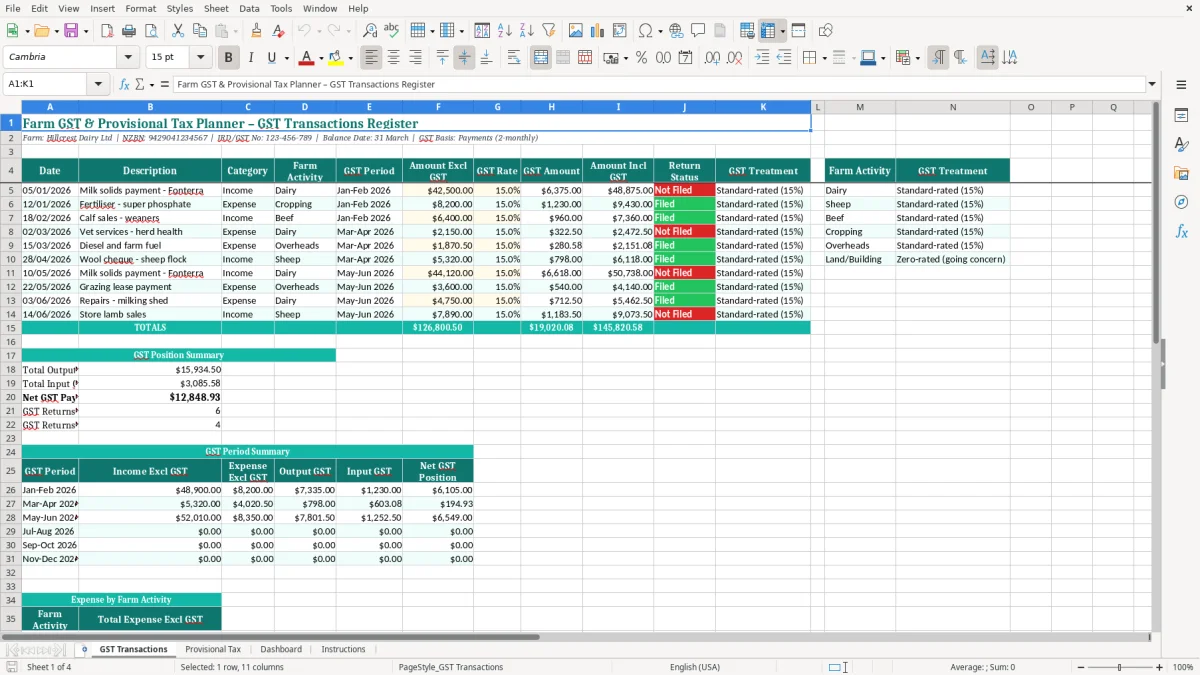
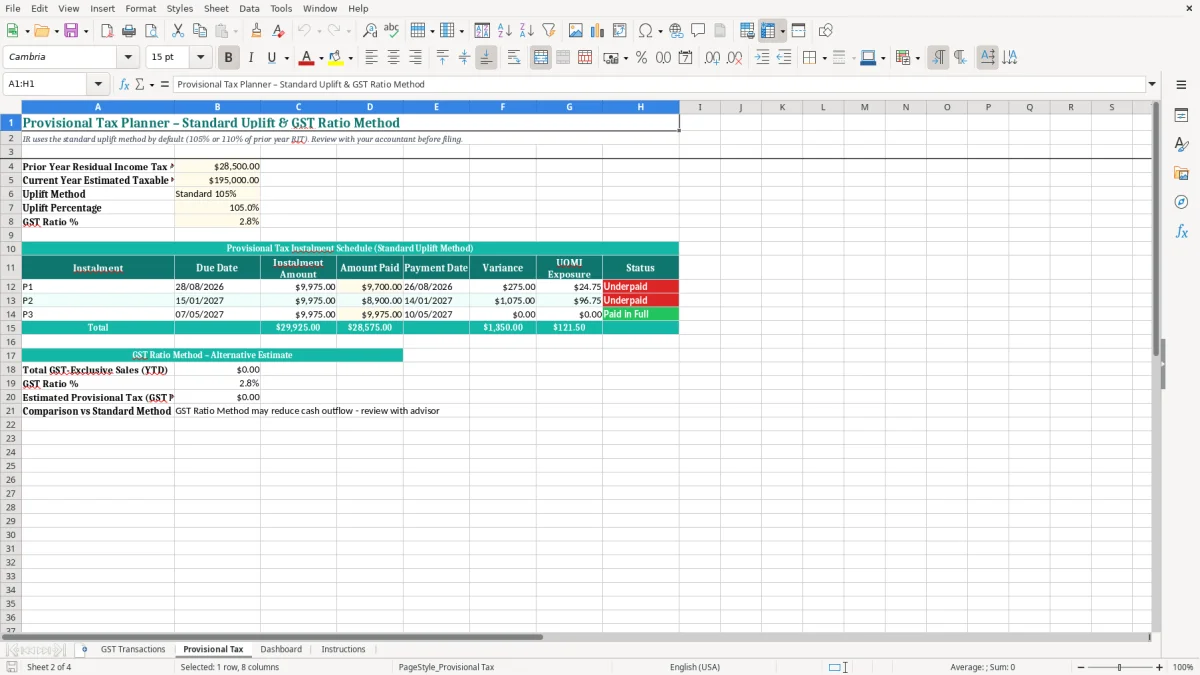
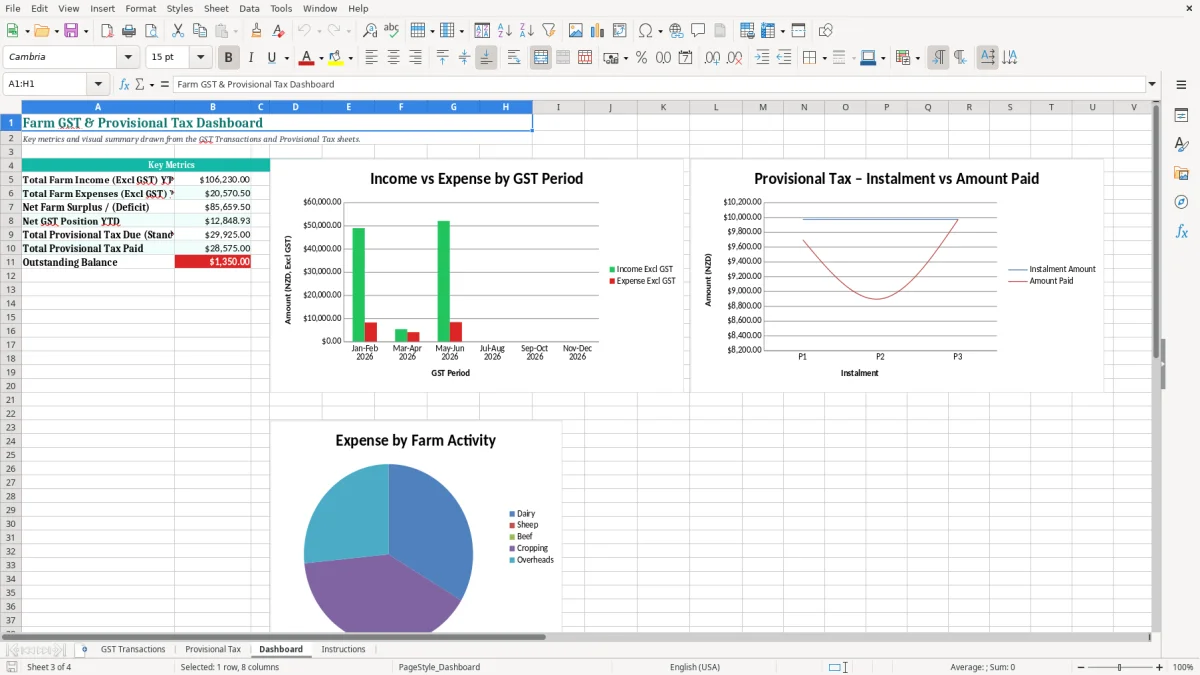
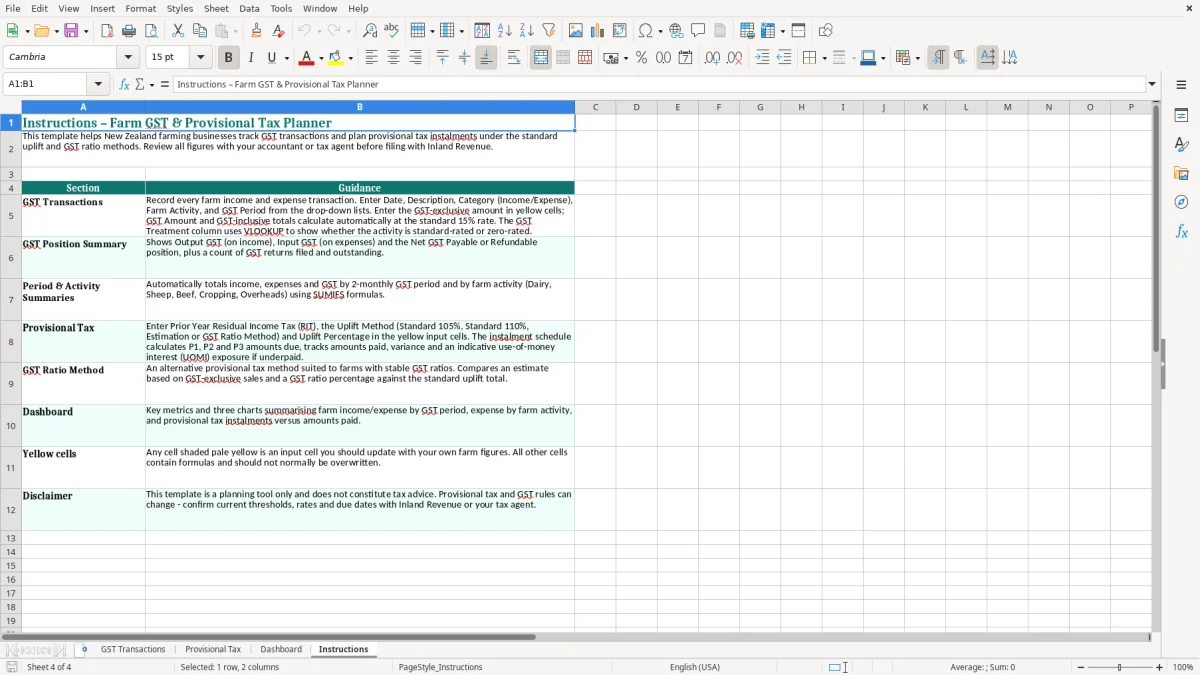
Use the Provisional Tax sheet alongside your farm records rather than waiting until the annual accounts are finished. Image 1 shows the transaction register, image 2 shows the provisional tax planning area, image 3 shows the Dashboard and image 4 contains the workbook instructions.
The key benefits of this Excel template
- Record farm sales, purchases and other transactions with separate amounts excluding GST, GST and GST-inclusive totals.
- Allocate every entry to a GST period so a 2-monthly return is easier to review before filing.
- Separate farming activities such as dairy, cropping or other farm operations in the transaction register.
- Keep GST treatment and return status visible, helping you spot entries that still need checking.
- Plan provisional tax before a large payment catches you short of cash.
- Keep farm details such as the NZBN, IRD/GST number, balance date and GST basis together in the workbook header.
- Give a farmer, farm office manager or bookkeeper one practical workbook for transaction entry, review and tax planning.
Step-by-step guide
- Open the Instructions sheet first and read the notes about entering transactions, GST treatment and provisional tax planning.
- Check the farm name, NZBN, IRD/GST number, 31 March balance date and GST basis shown at the top of the GST Transactions sheet.
- Enter one transaction per row with the date, description, category, farm activity and GST period. Use the source document, such as a sale record, supplier invoice or bank transaction, rather than relying on memory.
- Enter the amount excluding GST and GST rate, then check the GST amount and amount including GST. At the standard 15% rate, a $1,000.00 exclusive purchase should show $150.00 GST and $1,150.00 inclusive.
- Set the Return Status and GST Treatment after checking whether the transaction belongs in the return and whether it is standard-rated, zero-rated, exempt or otherwise excluded.
- Review the Provisional Tax sheet before each payment date, comparing the planned amount with the farm’s expected taxable profit and available cash.
- Use the Dashboard for a quick review, then reconcile the workbook to the bank, sales records and supplier documents before filing the GST return or giving the figures to your bookkeeper.
Included features
GST Transactions sheet with Date, Description, Category, Farm Activity and GST Period columns.
Separate Amount Excl GST, GST Rate, GST Amount and Amount Incl GST fields using New Zealand currency formatting.
Return Status and GST Treatment columns for tracking whether each entry is ready and how it is treated.
Farm header fields for the business name, NZBN, IRD/GST number, balance date and GST basis.
Provisional Tax sheet for keeping expected tax payments and planning figures together.
Dashboard sheet for an at-a-glance view of the workbook’s tax information.
Instructions sheet explaining the intended workflow and how to complete the planner.
How farmers use a GST planner through the season
A working register for busy farm offices
A dairy farmer, cropping operator or mixed farm office usually has transactions arriving from several directions: milk or livestock sales, fertiliser, feed, fuel, repairs, vet costs, contractors and machinery. The GST Transactions sheet gives you one row per item, with columns for Date, Description, Category, Farm Activity and GST Period. That is more useful than a single monthly total when you need to trace a figure back to its source.
Image 1 shows the register layout. The farm details sit in the header, including Hillcrest Dairy Ltd, its NZBN, IRD/GST number, 31 March balance date and payments-basis, 2-monthly GST setting. The coloured header row and bordered rows make it practical to print or review on screen while matching entries to bank transactions and documents.
When the 2-monthly return is due
For a farm filing 2-monthly, the office manager can enter transactions as the bank feed, sales report or supplier invoices arrive instead of rebuilding six months of activity at once. For example, a $12,000.00 exclusive fertiliser purchase at 15% creates $1,800.00 GST; recording it in the correct GST period makes that claim visible before the return is prepared.
A sole trader running a sheep farm may do the entries on Friday afternoon, while a bookkeeper at a farming company may complete them after the fortnightly bank reconciliation. The important practical choice is to keep the farm activity and GST period populated on every row. That gives you a useful filter when diesel, stock or repairs need a quick review.
Keeping provisional tax in sight
Farm income can move sharply with payout changes, livestock sales and seasonal costs. Image 2 is the Provisional Tax sheet, which sits beside the transaction register so you can review expected tax payments before cash is committed to feed, wages or machinery.
Suppose a farm expects taxable profit of $140,000.00 but has only allowed for $20,000.00 of tax from the previous year. A provisional tax review gives the owner time to reserve cash, rather than discovering the gap when the payment is due. Image 3 shows the Dashboard area for a quicker management check, while image 4 provides the workbook guidance.
What Inland Revenue requires for farm GST records
The GST settings behind the workbook
In New Zealand, the standard GST rate is 15%. Registration is compulsory when taxable turnover exceeds $60,000 in any 12-month period, or when you expect it to exceed that amount. A registered farm may file monthly, 2-monthly or 6-monthly, with the 2-monthly cycle shown in this workbook.
The Amount Excl GST, GST Rate, GST Amount and Amount Incl GST columns are deliberately separate. For a $5,750.00 GST-inclusive sale at 15%, the exclusive value is $5,000.00 and GST is $750.00. Do not enter a GST-inclusive amount as though it were exclusive, or the return will be overstated.
Taxable supply information and evidence
The old tax invoice terminology has been replaced by taxable supply information. Your records need enough information to support the supply, including the supplier’s identity and GST registration details where required, the date, a description, the GST-inclusive amount and the buyer’s details for supplies over $1,000. Keep invoices, receipts, sale records, bank evidence and adjustment notes with the workbook.
Inland Revenue requires business records to be kept for 7 years. A row saying repairs is not enough evidence on its own: retain the supplier document and make the description useful, such as tractor hydraulic repair or dairy shed pump parts.
Provisional tax and the farm balance date
A standard 31 March balance date usually means three provisional tax instalments during the following income year. The standard method uses the previous year’s residual income tax, with the uplift calculation applied under Inland Revenue’s current rules; the estimation method uses a defensible estimate of the current year’s tax. For a farm with volatile income, estimation can be accurate but risky if the final profit is higher than expected.
Use the Provisional Tax sheet to plan the amount, payment date and cash reserve, then compare it with the filed return and myIR account. GST is not income tax: a $30,000.00 GST liability from sales at 15% is money collected for Inland Revenue, while provisional tax relates to taxable profit after allowable business costs.
That $30,000.00 figure comes from the GST return calculation, which separates collected GST from the provisional tax reserve already set aside for taxable profit.
The farm tax errors that create an unexpected bill
Mixing GST-inclusive and exclusive figures
The most common farm spreadsheet error I see is entering a GST-inclusive supplier invoice into an exclusive-value column. A $2,300.00 feed invoice at 15% contains $300.00 GST and $2,000.00 before GST. If you enter $2,300.00 as the exclusive amount, the workbook treats the GST as $345.00 and creates a false $45.00 claim.
This is why the four amount columns need a quick document check. Match the GST amount to the invoice, not simply to an assumed rate, because some farm supplies can be zero-rated or outside the standard treatment.
Putting transactions in the wrong period
A late entry can land in the next GST period even though the transaction belongs to the earlier return. That matters at season end, when a $10,000.00 repair with $1,500.00 GST may be the difference between a $4,000.00 refund and a $2,000.00 payment.
Another trap is treating a private farm expense as fully claimable. A ute used 70% for business and 30% privately needs the private portion removed from the GST claim and income tax deduction. The Return Status and GST Treatment columns are useful prompts, but they cannot replace checking the business purpose and supporting records.
Planning tax from cash movement alone
Good bank balance does not necessarily mean good taxable profit. A farmer might receive $80,000.00 from a livestock sale in one month, then spend $45,000.00 on a machine deposit and feed. The cash position changes dramatically, but depreciation, private use and timing rules determine the tax result.
The reverse problem is also costly: the farm may show a strong profit while cash is tied up in stock or debtors. If provisional tax is left until the payment week, the owner may need to borrow $15,000.00 at short notice. I prefer a monthly tax reserve based on a current profit estimate, with the Provisional Tax sheet updated after major livestock sales or machinery purchases.
Ignoring the legal entity
A sole trader’s farm profit flows into the individual’s IR3, while a company generally files an IR4 and has its own tax obligations. Putting a company transaction into a personal farm record can distort both GST support and income tax reporting. Check the entity name, NZBN and IRD/GST number at the top of the register before entering a new season’s data.
How the planner becomes part of your farm month-end
Attach the workbook to an existing task
A spreadsheet survives when it has a fixed place in the farm routine. Set a Friday time after the bank reconciliation, or update it immediately after the monthly farm office meeting. For a 2-monthly GST filer, put a review date two weeks before the return deadline so missing invoices are found while suppliers can still be contacted.
Use one row for each transaction and keep the Description specific. Entries such as diesel, fertiliser and contractor – fencing are far easier to review than 30 rows labelled farm costs. Save the file with a consistent name and a month-end copy, but keep one controlled master workbook so two people are not editing separate versions.
Use a short review checklist
- Match the bank total to the transaction rows and investigate unreconciled items.
- Filter GST Period to the return being prepared and check blank Return Status cells.
- Review unusual GST rates and every large transaction over $1,000.00 against its taxable supply information.
- Update the Provisional Tax sheet after payout changes, land sales, livestock disposals or major machinery purchases.
- Compare the Dashboard figures with the GST return before submitting through myIR.
Know when Excel has reached its limit
This planner is a good fit for one farm, a modest transaction volume and an owner or bookkeeper who will review each row. It is less suitable when several users need live access, there are thousands of transactions, stock records must be integrated, or payroll, bank feeds and GST coding need automatic audit trails.
As a practical threshold, if the farm is spending more than 4 hours each GST cycle cleaning duplicate entries or chasing version conflicts, move to Xero or MYOB and retain this workbook as a planning tool. Keep the Excel file for scenario work, such as comparing a $120,000.00 machinery purchase with a lease, but let accounting software hold the source ledger.
That same planning workbook can also be paired with a property sale tax check when you need to test whether a gain on land or buildings falls inside the bright-line rules.
Common questions about this template
It suits a New Zealand farmer, farm office manager, sole trader, company director or bookkeeper who wants to record farm GST transactions and keep provisional tax planning visible. It is particularly useful for a farm using a 31 March balance date and 2-monthly payments-basis GST filing.
It includes Date, Description, Category, Farm Activity, GST Period, Amount Excl GST, GST Rate, GST Amount, Amount Incl GST, Return Status and GST Treatment. Enter the source transaction, then check the GST amount and treatment against the invoice, receipt or farm sales record.
Yes. The GST Rate column lets you record the applicable rate, but you must confirm the treatment first. New Zealand’s standard GST rate is 15%, while some supplies may be zero-rated, exempt or outside the GST claim. Keep the supporting evidence with the workbook.
No. It is a planning and record-keeping workbook, not a filing service. Reconcile the entries, review the GST period and treatment, then use the checked figures to complete the GST return through myIR or provide them to your bookkeeper.
Update it before each provisional tax instalment and after major changes in farm income or costs. Compare expected taxable profit with the previous year’s result and the amount set aside. Remember that GST collected is separate from income tax provisional payments.
Keep the workbook and its supporting invoices, receipts, sale records and bank evidence for 7 years, consistent with Inland Revenue’s business record-keeping requirement. Store the supporting documents so each important row can be traced back to the original evidence.
Download
File format
Excel (.xlsx)
Compatible software
Excel, Google Sheets, LibreOffice
Price
Free