
Rugby Subs Fees Tracker Excel – Free Template (2026)
Accounting & GST
Boarding House Rent Roll Excel - Free Template
Track boarding house rooms, tenants, rent, bonds, payments, arrears and occupancy in four practical Excel sheets for New Zealand landlords.
2026-07-31
412 downloads
4.8/5 average rating
Download template
This boarding house rent roll Excel template records each room, tenant, weekly rent, bond held, payment date, arrears and room status. It includes four sheets: Rent Roll, Payment Tracker, Dashboard and Instructions, giving a New Zealand boarding house operator one place to monitor occupancy and rent collection.
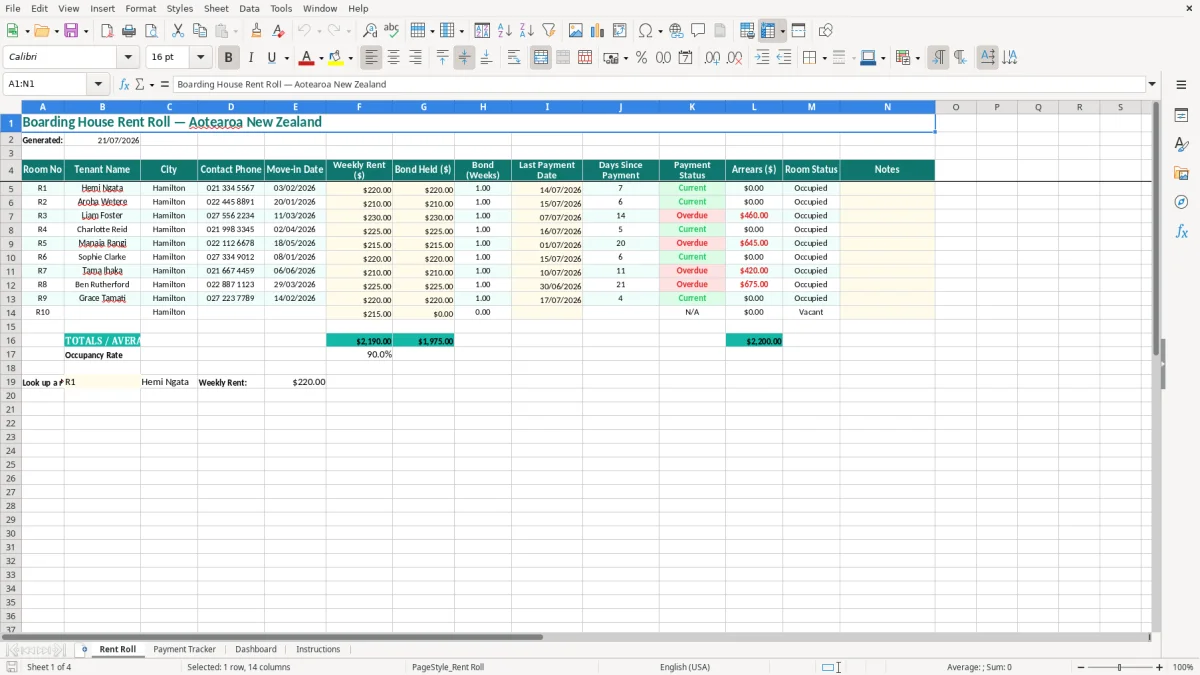
The Rent Roll sheet is the main register, with example Hamilton tenants and currency and date formatting already applied. Image 1 shows the 14-column layout, while the Payment Tracker, Dashboard and Instructions sheets provide supporting views for following up payments and understanding the workbook.
Use it for a small boarding house where you need a clear weekly snapshot without setting up property-management software. Enter your own rooms and tenants, then update payment information as money arrives.
The key benefits of this Excel template
- Rent roll records room numbers, tenant names, cities, phone numbers and move-in dates in one searchable table.
- Shows weekly rent and bond held in dollars, with a separate Bond (Weeks) field for checking the amount against the agreed arrangement.
- Makes overdue follow-up quicker by displaying the last payment date, days since payment, payment status and arrears.
- Separates occupied and vacant rooms through the Room Status column, helping you see available capacity before advertising.
- Provides a Payment Tracker sheet for monitoring incoming rent rather than relying on bank statements alone.
- Uses a Dashboard sheet to turn the rent information into a quick operational view for the property owner or manager.
- Includes an Instructions sheet so another person can take over weekly updates without rebuilding the workbook.
Step-by-step guide
- Open the Rent Roll sheet and review the existing example rows. Replace the sample Hamilton tenant details with your own room and occupant information.
- Enter a room number, tenant name, city, contact phone and move-in date for each occupied room. Keep one room per row so the register remains easy to filter and check.
- Enter the agreed Weekly Rent ($) and Bond Held ($), then complete Bond (Weeks). For example, $220.00 held against $220.00 weekly rent equals 1 week.
- After each rent payment, update Last Payment Date and the matching payment information on the Payment Tracker sheet. Do this on the same day as your bank reconciliation.
- Review Days Since Payment, Payment Status and Arrears ($) at least once a week. Follow up exceptions promptly and record useful context in Notes.
- Change Room Status when a room becomes vacant or occupied. Check the Dashboard before making occupancy or cash-flow decisions.
- Read the Instructions sheet before adding columns, changing formulas or sharing the workbook. Save a dated copy after each weekly or monthly review.
Included features
Rent Roll sheet with Room No, Tenant Name, City, Contact Phone and Move-in Date columns.
Financial fields for Weekly Rent ($), Bond Held ($), Bond (Weeks) and Arrears ($), formatted as New Zealand dollar amounts.
Payment monitoring fields for Last Payment Date, Days Since Payment and Payment Status.
Room Status and Notes columns for distinguishing occupied rooms, vacancies and follow-up actions.
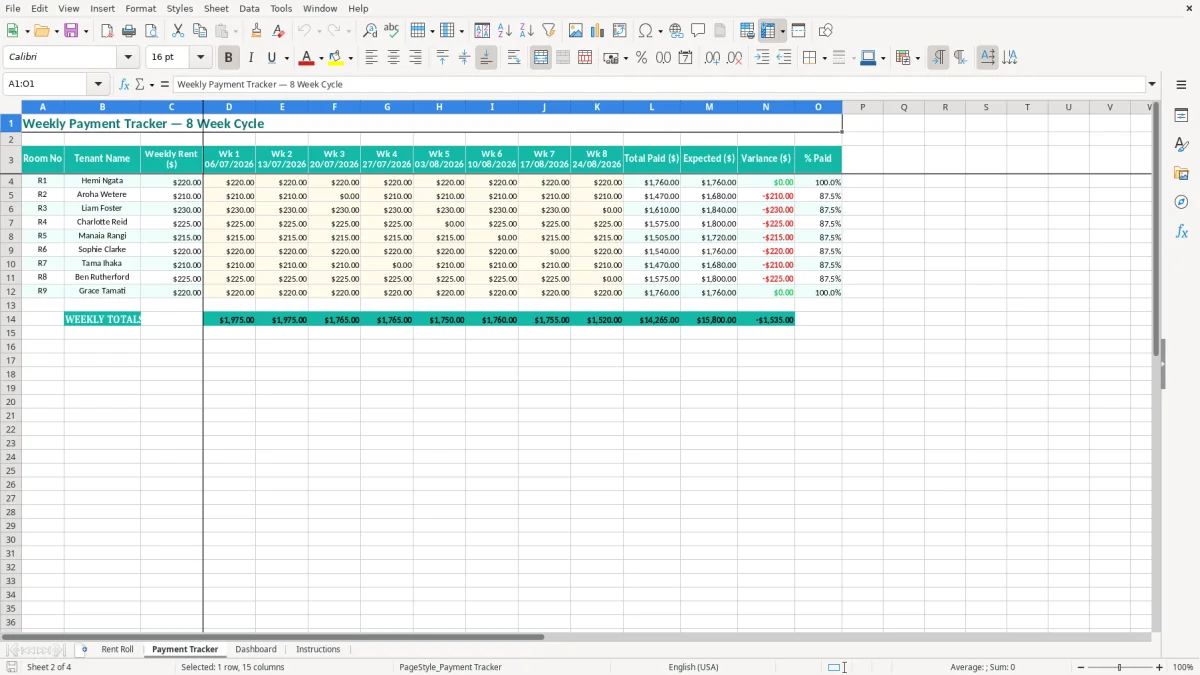
Payment Tracker sheet for recording or reviewing rent payment activity.
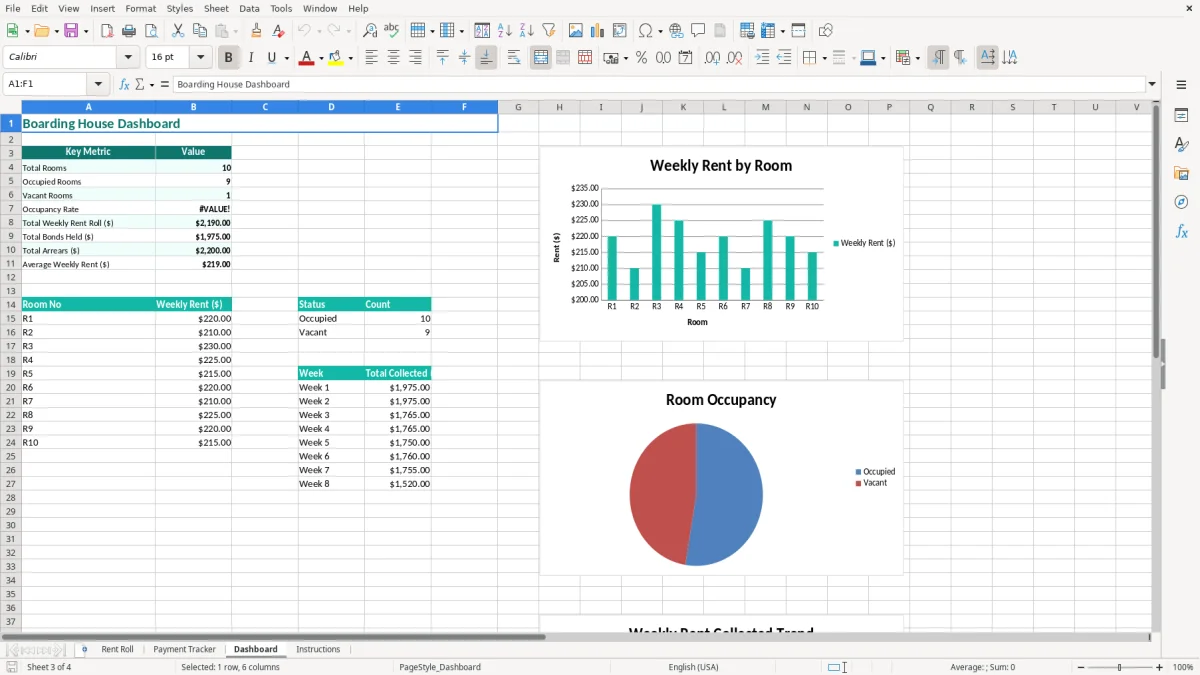
Dashboard sheet for a concise visual summary of the workbook's rent information.
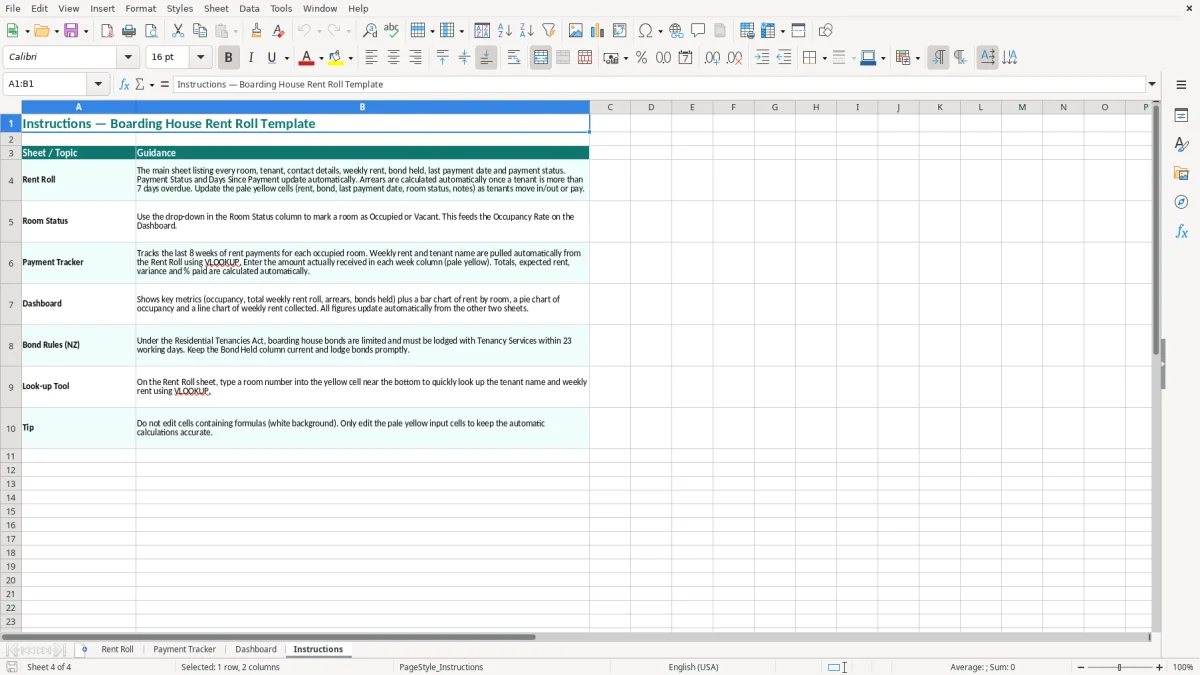
Instructions sheet explaining the intended way to enter and maintain the template.
Who uses a boarding house rent roll in New Zealand
A weekly tool for a hands-on operator
A boarding house owner with 8 rooms often has a different problem from a residential landlord with one tenancy. Several people may pay on different days, rooms can turn over quickly, and a missed $220 payment can be hidden among ordinary bank transactions. A rent roll gives you a room-by-room view rather than a list of deposits with no context.
This workbook suits a sole owner checking the property after work, a property manager handling a small Hamilton or Christchurch boarding house, or an office administrator updating records for an owner who lives elsewhere. The first sheet has 14 visible columns, including tenant contact details, payment timing, arrears and room status, so the weekly review starts with operational facts.
Useful at the pay-and-follow-up points
Set a fixed review day that matches your payment pattern. If most residents pay every Friday, check the Rent Roll on Monday morning and compare the Last Payment Date with the expected payment. A tenant paying $210 weekly who has not paid for 2 weeks represents $420 to follow up, not merely a blank cell on a spreadsheet.
The Payment Tracker is useful when payments arrive in several instalments or through different bank references. The Dashboard is better for a quick owner update: after entering 10 rooms at an average $225 per week, the gross scheduled rent is $2,250 per week before vacancies, arrears or other adjustments. Image 2 shows the second sheet, while images 3 and 4 show the Dashboard and Instructions sheets.
At month-end and room turnover
At the end of each month, review occupied rooms against the bank and note any agreed repayment arrangements. When a resident leaves, retain the historical record as required, update the room status, and use the next row or a dated copy for the incoming occupant rather than overwriting information you may need later.
That same month-end review also needs a separate withholding tax record for any resident deductions, so the payroll-style details stay aligned with the room-by-room history.
What New Zealand rules apply to boarding house records
Boarding house tenancy requirements
The Residential Tenancies Act 1986 applies specific rules to boarding house tenancies, generally where 6 or more tenants live in a building under separate agreements with a landlord. Keep the written tenancy information, rent records, notices and bond details together. This spreadsheet is an administration aid; it does not replace the tenancy agreement, house rules or required notices.
A landlord can generally charge a bond of up to 4 weeks' rent and must lodge it with Tenancy Services within 23 working days of receiving it. For a room at $220 per week, the maximum bond is $880. The Bond Held ($) and Bond (Weeks) columns make that comparison visible, but you still need the official bond lodgement process and receipts.
Rent, payment and privacy records
Rent in advance is generally limited to 2 weeks. Boarding house rent increases require at least 60 days' written notice, subject to the applicable agreement and legislation. Use Last Payment Date and Notes to retain a clear payment trail, but do not use Notes for unnecessary sensitive information such as medical details or personal disclosures.
The Privacy Act 2020 and its 13 information privacy principles apply to tenant information. Phone numbers, payment history and arrears are personal information, so restrict workbook access, use a strong password when sharing electronically, and remove old copies securely. A privacy breach that creates a risk of serious harm may need to be notified to the Office of the Privacy Commissioner and affected people.
GST and income records
Residential rent is generally exempt from GST, but boarding house accommodation can have different GST treatment depending on the arrangement and whether the activity is a taxable supply. Do not simply add 15% to room rent. If your taxable turnover exceeds $60,000 in any 12-month period, GST registration is compulsory for taxable activities.
Keep rent, bond and expense records for 7 years under Inland Revenue requirements. A 31 March balance date is standard for many New Zealand businesses, and the rent roll should reconcile to your profit and loss records rather than being treated as the accounts themselves.
The rent roll should feed into company tax return workings rather than being treated as the accounts themselves.
The boarding house rent errors that create expensive follow-up
Confusing bond money with rent
The most serious error I see is treating every bank deposit as income. A $660 deposit could be three weeks of $220 rent, a $440 bond plus $220 rent, or a mixture of rent and a contribution for damage. If the operator enters it as weekly rent without checking, the arrears figure becomes unreliable and the bond ledger can be wrong by hundreds of dollars.
Use the Bond Held ($) and Bond (Weeks) fields for the amount actually held, then keep rent payments separate in the Payment Tracker. Never reduce a bond because of an intended deduction before the tenancy has ended and the correct process has been followed.
Letting the payment date go stale
A rent roll only helps if Last Payment Date is updated. Suppose the last date remains 07/07/2026 when the current date is 21/07/2026: a $230 weekly room may already be one or two payments behind, depending on the agreed due date. A manager who checks only the total bank balance can miss a $460 arrears problem until the tenant has moved out.
Days Since Payment and Payment Status are prompts, not evidence of a breach. Check the bank transaction, the agreed due date and any approved arrangement before contacting the tenant. Record a short factual note, such as a promised payment date, rather than an accusation.
Overwriting room history
Replacing one tenant's name with the next person's name destroys the evidence of who occupied the room and when. That makes bond reconciliation, dispute responses and year-end income checking much harder. For a 12-room house with 3 changes each month, 36 overwritten records in a year can leave a sizeable hole in the paper trail.
Avoid changing formulas or inserting random columns into the middle of the register. Save a dated copy, retain the completed rows, and use Notes for a concise explanation of unusual payments. Also check that Room Status is changed when someone leaves; otherwise an apparently full house can include a vacancy and overstate expected weekly rent.
Make the rent roll part of your weekly property routine
Attach it to the bank reconciliation
Choose one repeatable time, such as Monday at 9:00 am, and open the workbook beside the bank statement. Match each payment to a room, update Last Payment Date, enter the Payment Tracker detail, and then scan Payment Status and Arrears ($). For 10 rooms, this should be a focused 15-minute task rather than a Friday afternoon reconstruction.
Use the workbook as a control list, not as a second unverified bank account. If the Dashboard says scheduled weekly rent is $2,250 but only $2,030 has arrived, investigate the $220 difference before assuming it is a vacancy or a missed payment.
Keep entries consistent
- Use one date format, DD/MM/YYYY, for move-in and payment dates.
- Enter amounts as numbers, such as $210.00, rather than typing words into money fields.
- Use the same room numbering convention, such as R1, R2 and R3, across Rent Roll and Payment Tracker.
- Write brief Notes entries with dates, for example payment arrangement agreed 18/07/2026.
Keep the original file protected and save a copy such as boarding-house-rent-roll-2026-07-21.xlsx after the weekly review. Limit access to the owner and authorised manager because tenant phone numbers and arrears details are private.
Know when Excel has reached its limit
Excel is a sensible starting point for one small property and 6 to 20 rooms. Move to software such as Xero, MYOB or dedicated property-management software when you have several houses, more than 50 occupants, automatic receipts, multiple users or frequent payment allocations that are taking over an hour each week.
Until then, the best routine is simple: update payments immediately, review exceptions weekly, reconcile totals monthly, and archive a dated copy at year-end. That discipline matters more than adding extra columns that nobody maintains.
Common questions about this template
The Rent Roll sheet tracks Room No, Tenant Name, City, Contact Phone, Move-in Date, Weekly Rent ($), Bond Held ($), Bond (Weeks), Last Payment Date, Days Since Payment, Payment Status, Arrears ($), Room Status and Notes. The workbook also contains Payment Tracker, Dashboard and Instructions sheets.
Yes. It is designed as a practical record for a New Zealand boarding house, with DD/MM/YYYY dates and New Zealand dollar formatting. It does not replace a compliant tenancy agreement, bond lodgement, required notices or advice about the Residential Tenancies Act 1986.
Enter the amount actually held in Bond Held ($) and the equivalent number of weeks in Bond (Weeks). A bond is generally limited to 4 weeks' rent, so a room at $220 per week would have a maximum bond of $880. Lodge the bond with Tenancy Services within 23 working days where required.
Do not automatically add GST to boarding house rent. Residential rent is generally exempt, while some boarding house arrangements can be treated differently under the GST rules. If your taxable turnover exceeds $60,000 in 12 months, registration is compulsory for taxable activities; check the exact accommodation arrangement before filing a GST return.
Update it whenever a payment arrives, then complete a full review at least weekly. Match the bank transaction to the room, update Last Payment Date and the Payment Tracker, and check Arrears ($) and Payment Status before contacting a tenant.
You can extend the Rent Roll for your own property, but first read the Instructions sheet and preserve the existing column structure. Save a dated backup before adding rows or changing formulas, and retain historical tenant and payment records instead of overwriting a previous occupant.
Download
File format
Excel (.xlsx)
Compatible software
Excel, Google Sheets, LibreOffice
Price
Free