
Rugby Subs Fees Tracker Excel – Free Template (2026)
Accounting & GST
Queenstown Short Stay Income Tracker Excel Spreadsheet NZ
Track Queenstown short-stay bookings, income, expenses, GST, occupancy and net profit with this practical NZ Excel template.
2026-08-04
392 downloads
4.8/5 average rating
Download template
Managing a Queenstown short-stay property involves more than recording booking revenue. Cleaning, platform commissions, rates, repairs, consumables and GST can all affect your actual return. This New Zealand-focused Excel template gives holiday-home owners and accommodation managers a practical way to organise booking-level financial information throughout the year.
Record each stay, compare income with direct operating costs, and review the net result in NZD. The familiar spreadsheet format is easy to update and can be adapted for Airbnb, Booking.com, Expedia, direct reservations and other booking channels.
The key benefits of this Excel template
- See the income and expenses associated with every individual booking.
- Track accommodation revenue, cleaning fees and other guest charges in NZD.
- Compare platform commissions and operating costs across booking channels.
- Review GST-related information alongside booking and financial records.
- Monitor nights stayed, occupancy status and seasonal booking patterns.
- Use booking notes to record discounts, guest requests, late checkouts and special circumstances.
Step-by-step guide
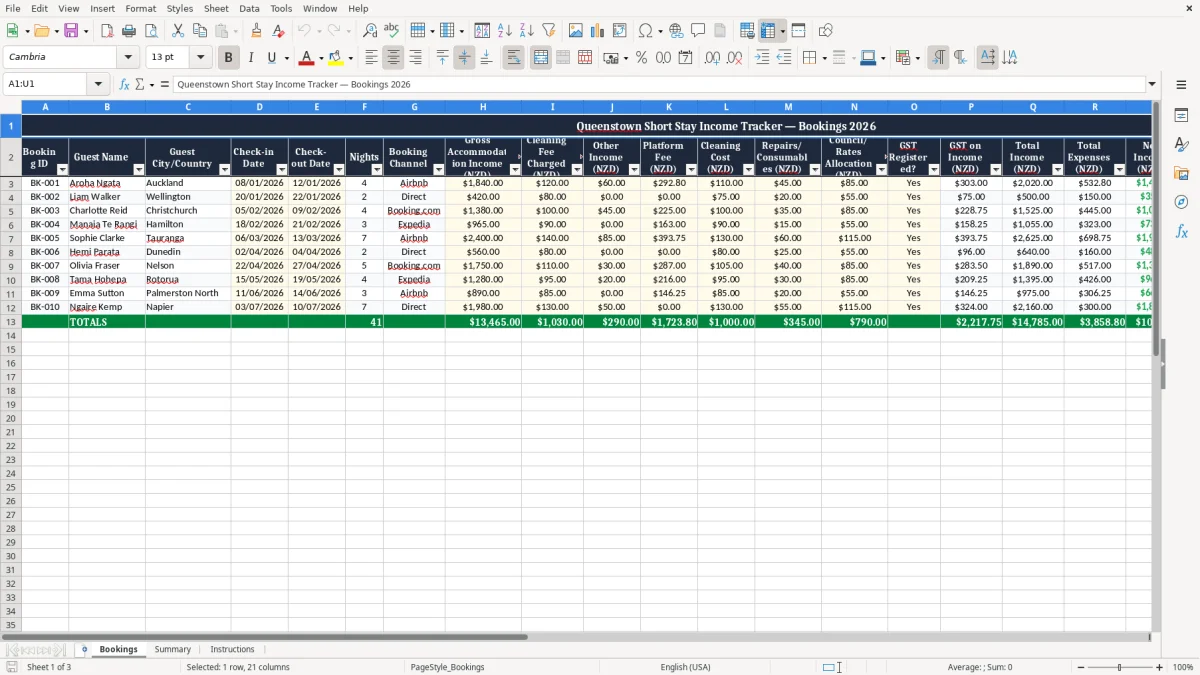
Enter one booking per row and assign a unique booking ID. Add the guest name, city or country, check-in date, check-out date and booking channel. Record gross accommodation income, cleaning fees charged and any additional income, then enter platform fees, cleaning costs, repairs, consumables and the relevant council or rates allocation.
Mark whether the booking relates to a GST-registered activity and review the GST on Income field. Check the calculated total income, total expenses and net income columns to understand the contribution of each stay. Continue adding rows as new reservations are received, and use the Notes column for information that may help explain unusual amounts.
If you manage more than one property, add a property identifier or maintain a separate workbook for each listing. This template supports internal monitoring and record keeping; confirm GST treatment, deductible expenses, rates allocations and other tax matters with current Inland Revenue guidance or a qualified New Zealand adviser.
Included features
Booking ID, guest name and guest city or country fields.
Check-in date, check-out date and nights information.
Booking channel field for Airbnb, Booking.com, Expedia, direct bookings and other sources.
Income fields for accommodation, cleaning fees and other charges.
Expense fields for platform fees, cleaning, repairs, consumables and council or rates allocations.
GST Registered?, GST on Income, total income, total expenses, net income, occupancy status and notes fields.
Track Queenstown holiday rental income in one workbook
Queenstown short-stay accommodation can generate bookings from several channels, with each platform presenting information in a different format. A central Excel tracker helps bring those records together. Use one row for every reservation and enter the accommodation amount, cleaning fee charged and any other income connected with the stay.
You can also record the guest location, booking dates and channel, giving you useful context when reviewing results. Keeping the information in NZD makes comparisons easier for a New Zealand property owner or manager. The workbook is suitable for a holiday apartment, guest house, bach, townhouse or other visitor accommodation operation.
It can also support a direct-booking process where payment and guest information are managed outside a major platform. Rather than relying only on monthly payout statements, booking-level records help explain how total revenue was created. For example, a high-value reservation may include a longer stay, a late checkout or an additional service.
Recording those details separately makes the figures easier to understand later. The Notes column can capture discounts, early arrivals, extra linen, repeat-guest arrangements or unusual booking conditions. This is particularly useful when a bank deposit does not clearly identify the underlying reservation.
Add new rows as bookings are confirmed and update the workbook when dates, charges or costs change. The result is a straightforward operational record that supports regular reviews of revenue, stay length and channel performance without requiring specialist accounting software.
Consistent entries also make it easier to compare Queenstown’s busy summer period with winter ski demand, school holidays, event weekends and quieter dates. Keep supporting invoices, receipts and platform statements with the workbook so every amount can be checked when required.
Understand short-stay expenses and net income
Gross booking revenue does not show the complete financial result of a Queenstown short-stay property. Platform commissions, cleaning payments, maintenance work, replacement items and property-related allocations can reduce the amount retained by the owner. This spreadsheet includes separate fields for common booking-level expenses so you can compare income with the costs associated with providing the stay.
Enter the platform fee charged by Airbnb, Booking.com, Expedia or another service. Record the cleaning cost paid to a cleaner or cleaning company, even when a cleaning fee was charged to the guest. Add repairs and consumables such as minor maintenance, toiletries, linen items or other supplies used for the accommodation.
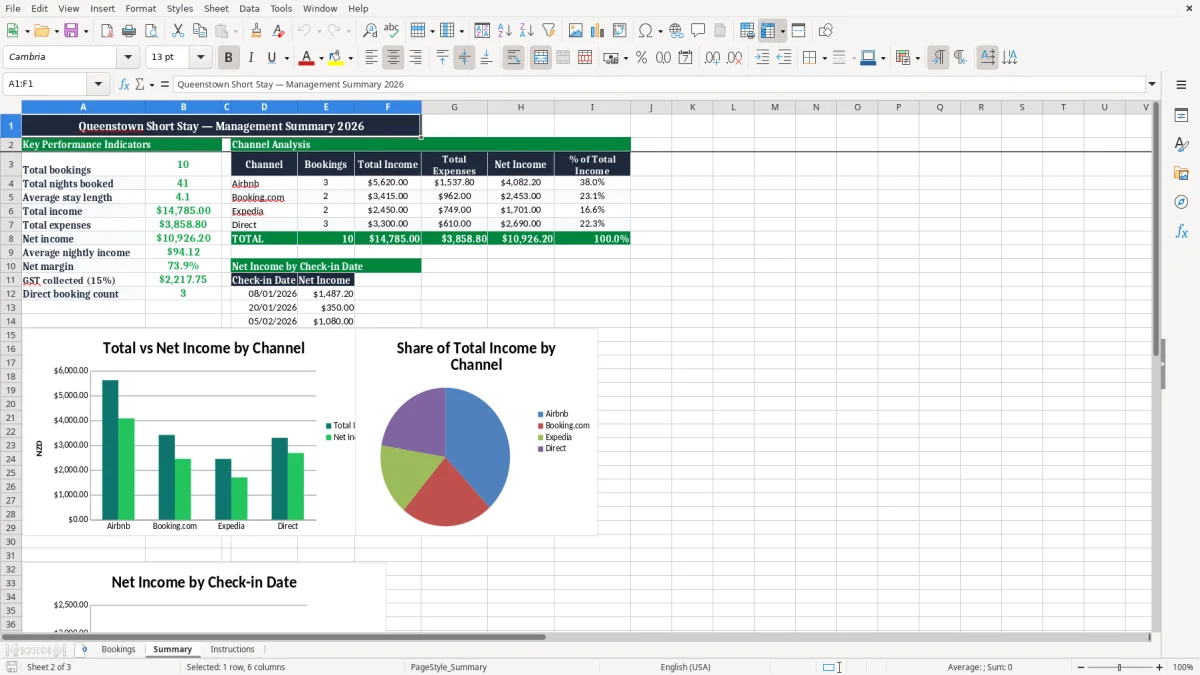
The council or rates allocation field provides a place to record an amount you use for internal monitoring, where appropriate. After the entries are completed, review total income, total expenses and net income. These figures can help identify whether a booking was profitable after direct costs, rather than judging performance from the nightly rate alone.
Comparing several rows may reveal useful patterns. A channel with strong booking volume may also have higher commissions, while direct bookings may produce lower fees but require more administration. Short winter stays might have different cleaning economics from longer summer reservations.
The template does not determine which costs are deductible or how a cost should be allocated for tax purposes. It is a practical tracking tool, not a substitute for professional advice.
Keep invoices, receipts and platform statements with your records, and ask a qualified New Zealand accountant how the figures should be treated for your circumstances. Reviewing these figures regularly can also help with pricing decisions, minimum-stay rules, cleaning charges and maintenance budgets.
Those records also make year-end filing easier, especially when the numbers need to flow into an income tax return.
Use GST and occupancy information for better reviews
New Zealand short-stay operators may need to consider GST registration and the way accommodation income is reported. The template includes a GST Registered? field and a GST on Income column so relevant information can be kept beside each booking.
This makes it easier to identify which rows require attention during a monthly or annual review. The spreadsheet is not an official Inland Revenue calculator and does not decide whether GST applies, how much should be returned or which expenses can be claimed. GST treatment can depend on the structure of the activity, registration status, supplies and other facts.
Use current Inland Revenue information and professional advice when making tax decisions. Occupancy information provides another useful management view. Check-in and check-out dates and nights stayed help you assess how much of the available calendar is being used.
Over time, you can compare busy summer periods, winter ski demand, school holidays, event dates and quieter months. This may support decisions about minimum stays, cleaning charges, pricing, availability and promotional offers. A booking record can also provide context for gaps between reservations.
For example, an unoccupied night may result from a maintenance closure, owner use, a blocked calendar or normal market demand. Keep those explanations in the Notes column where they are relevant. Regular reviews are more useful than entering data only at year end.
Set aside time each week or month to reconcile booking details with platform statements, invoices and bank activity. Accurate, timely records can make it easier to spot missing income, duplicate expenses and unusual changes before they become difficult to investigate. Use occupancy results alongside net income rather than treating full calendars as the only measure of success.
That same review cycle also feeds a room income schedule for tracking who paid, what was due and which vacancies need follow-up.
A practical Excel template for Queenstown accommodation
This Queenstown short-stay income tracker is designed for owners and managers who want a clear, flexible workbook rather than a complicated system. Excel makes it easy to add rows, filter bookings, sort by date or channel and adjust the layout to suit a particular property. You can keep a separate copy for each listing or add a property identifier when managing several Queenstown accommodations.
The supplied structure covers the main booking details, income categories and operating costs that many short-stay businesses review. It is also flexible enough to support direct bookings alongside platform reservations. Use the Booking ID as a reference when matching a reservation to a payout, invoice or guest communication.
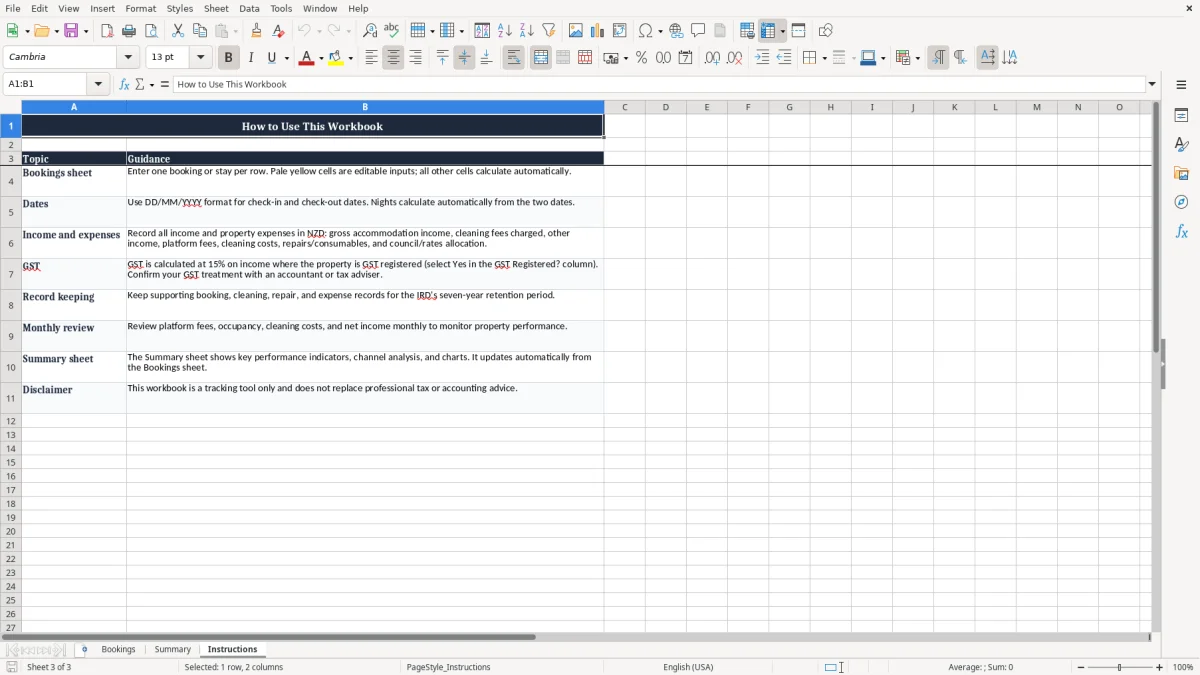
Use Notes to explain refunds, discounts, cancelled services, guest-paid extras or costs that do not follow the normal pattern. Consistent entry practices are important. Record amounts in NZD, use the same date format, and enter zero where a category does not apply rather than leaving uncertainty about whether the field was reviewed.
Save regular backup copies and protect the workbook if several people have access to it. The template can support conversations with a bookkeeper or accountant because it brings operational information into a consistent format. It should still be checked against source documents, including platform reports, cleaning invoices, repair receipts, rates information and bank records.
If your business has complex ownership, mixed private and income use, multiple properties or changing tax obligations, obtain tailored advice. Used as part of a broader record-keeping process, this spreadsheet can help you understand booking performance and make more informed decisions about your Queenstown short-stay operation. Update it consistently throughout the year so seasonal comparisons and year-end preparation are based on complete information.
Common questions about this template
It is suitable for owners and managers of Queenstown holiday homes, apartments, baches, visitor accommodation and other short-stay properties who want to track booking income and expenses in Excel.
Yes. The Booking Channel field can be used for Airbnb, Booking.com, Expedia, direct bookings or any other source of reservations.
Yes. It includes GST Registered?
and GST on Income fields. Use the information as part of your records and confirm the correct treatment for your circumstances with a qualified New Zealand tax adviser.
Yes. Separate fields are provided for cleaning costs, repairs and consumables, platform fees, and council or rates allocations.
Yes, but add a property or listing identifier if you combine several properties in one worksheet. Alternatively, keep a separate copy for each property.
No. It is an Excel tracking and record-keeping template, not official tax software or tax advice. Check current New Zealand requirements and obtain professional advice when needed.
Download
File format
Excel (.xlsx)
Compatible software
Excel, Google Sheets, LibreOffice
Price
Free