
Rugby Treasurer Report Excel Template – Free (2026)
Accounting & GST
Rugby Subs Fees Tracker Excel - Free Template
Track rugby club members, GST, fees, payments, levies and outstanding balances with a New Zealand Excel spreadsheet for treasurers.
2026-10-06
477 downloads
4.8/5 average rating
Download template
This rugby club subs and fees tracker is an Excel spreadsheet for recording members, age grades, annual subscriptions, GST, payment plans, levies, credits and payments. It contains a Member Fees register, a Summary Dashboard and an Instructions sheet for the 2026 season.
Enter details in the pale yellow cells on Member Fees and let the formulas calculate GST, fees including GST, balances, payment status, total amount due and collection percentage. The dashboard gives your committee a quick view of members, money collected and overdue amounts.
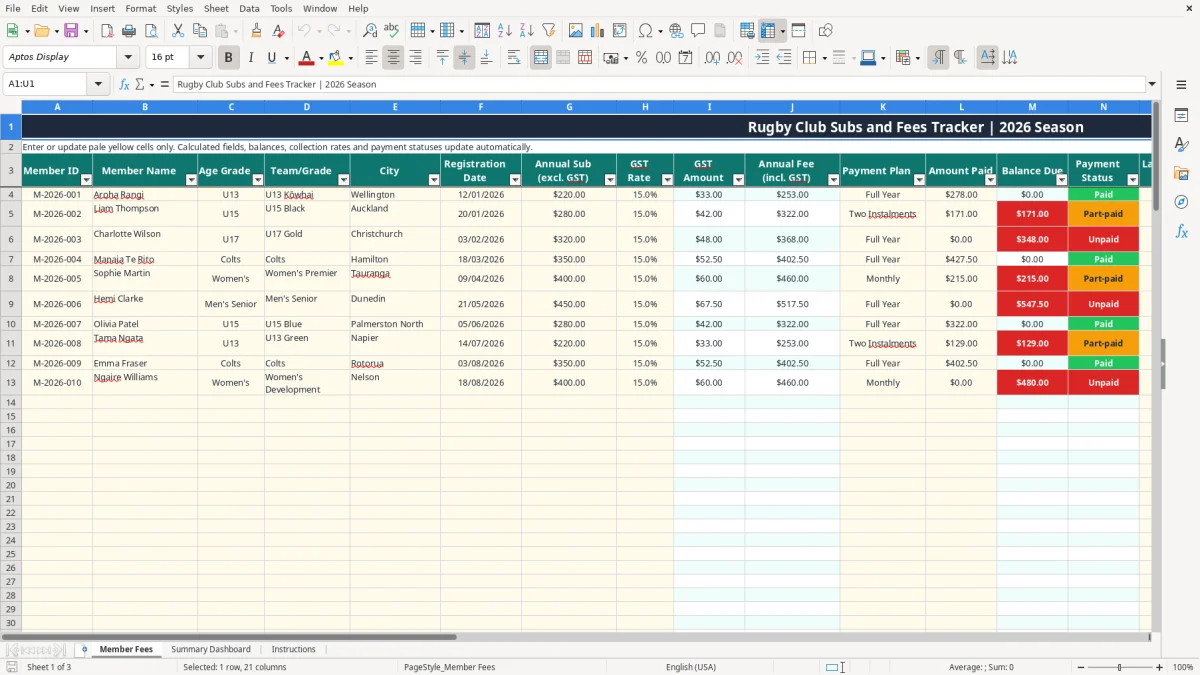
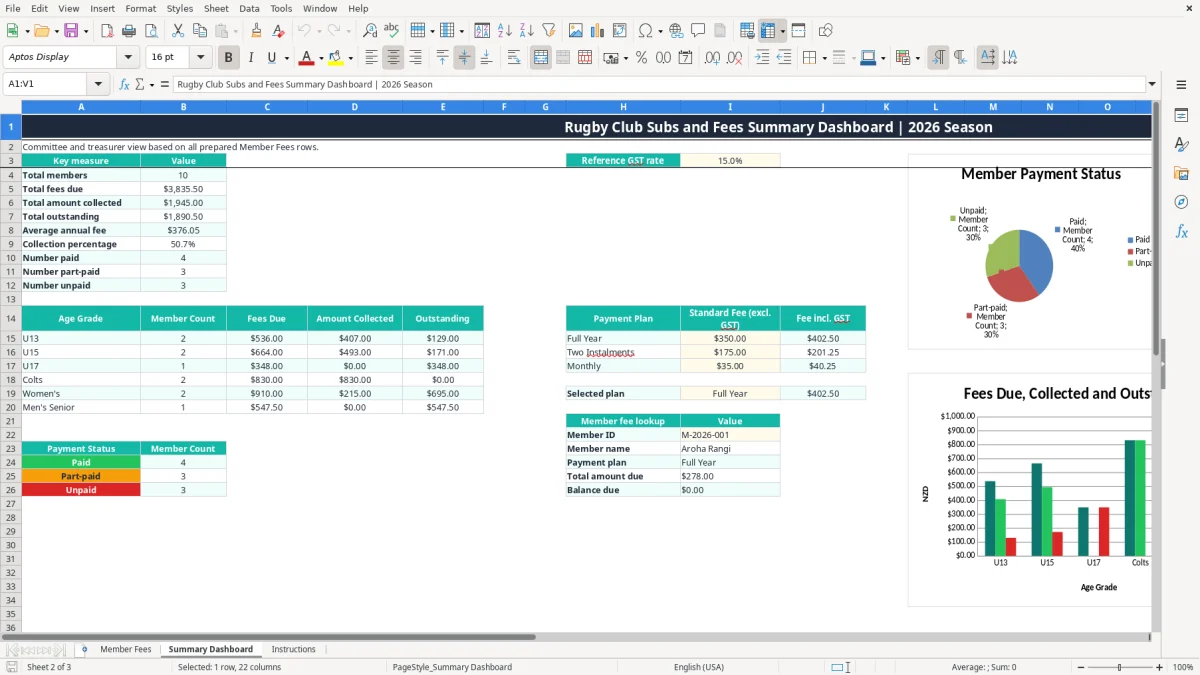
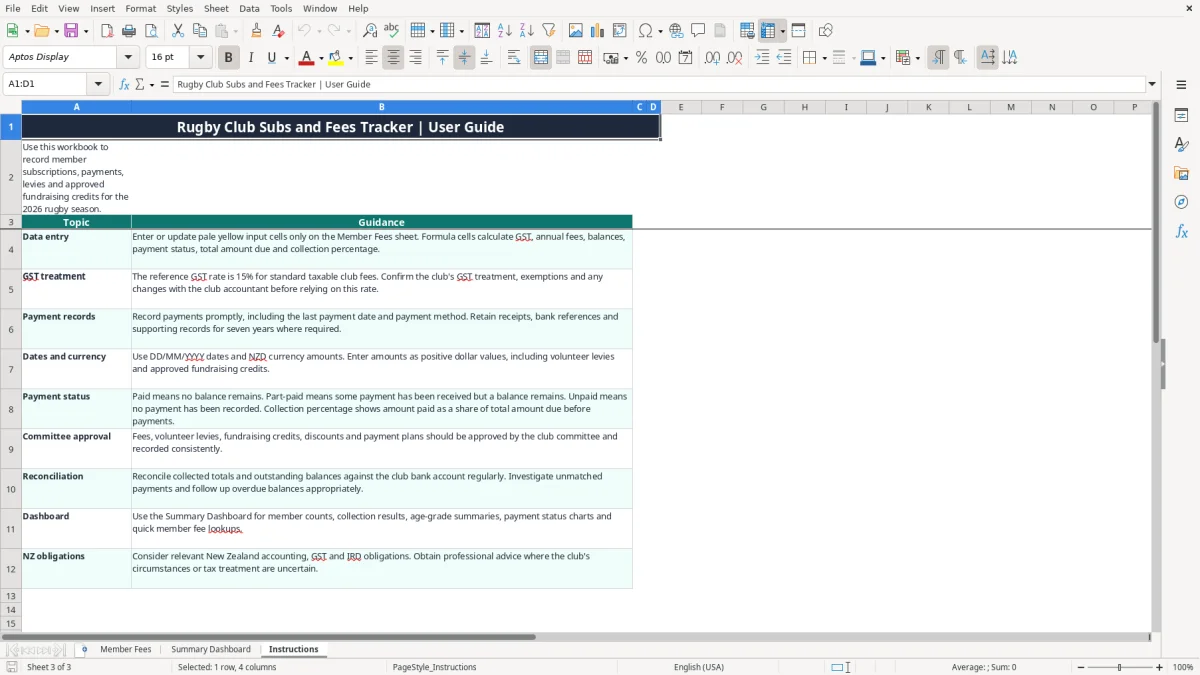
Image 1 shows the 21-column Member Fees register, image 2 shows the dashboard with its summary tables and charts, and image 3 shows the user guidance. Prepared rows run from row 4 to row 103, giving you space for 100 member records.
The key benefits of this Excel template
- Record up to 100 member records in one filtered register, from Member ID and name through to notes.
- Calculate a 15% reference GST amount and annual fee including GST automatically from the entered subscription.
- See each member's balance due after payments, volunteer levies and fundraising credits.
- Separate Paid, Part-paid and Unpaid members automatically so follow-up is quicker.
- Compare total fees due, amount collected, outstanding balances and collection percentage on one dashboard.
- Review age-grade totals for U13, U15, U17, Colts, Women's and Men's Senior groups.
- Use the payment-plan and member-fee lookup areas to check Full Year, Two Instalments and Monthly arrangements.
Step-by-step guide
- Open the Instructions sheet first and read the guidance on data entry, GST treatment, payment records, dates and reconciliation.
- On Member Fees, enter a Member ID, member name, age grade, team or grade, city and registration date in the pale yellow input cells.
- Enter the annual subscription excluding GST and the GST rate. The GST Amount and Annual Fee including GST fields calculate automatically.
- Select a payment plan and record every amount received, including the last payment date and payment method. Add volunteer levies and approved fundraising credits where applicable.
- Use the Notes column for a bank reference, receipt detail, payment arrangement or follow-up note. Do not overwrite calculated columns I, J, M, N, S or T.
- Open Summary Dashboard to review total members, fees due, money collected, outstanding balances, payment status and age-grade results. Use the Member ID lookup to check an individual record.
- Reconcile the collected total to the club bank account regularly, investigate differences and save a backup before making major changes.
Included features
Member Fees sheet with columns for Member ID, Member Name, Age Grade, Team/Grade, City and Registration Date.
Fee calculation fields for Annual Sub excluding GST, GST Rate, GST Amount and Annual Fee including GST.
Payment tracking for plan, amount paid, last payment date and payment method, with dropdown lists for consistent entry.
Automatic Balance Due, Payment Status, Total Amount Due and Collection % calculations across 100 prepared rows.
Volunteer Levy, Fundraising Credit and Notes fields for club-approved additions, reductions and explanations.
Summary Dashboard with member counts, fee totals, collection results, status counts, age-grade summaries and payment-plan fee references.
Two dashboard charts: payment status counts and age-grade fees due, amounts collected and outstanding.
Who uses a rugby club fees spreadsheet in New Zealand
A volunteer treasurer usually opens this workbook when registrations arrive at the start of the season, while a club secretary or team manager may update member details during the week. It suits a community rugby club with junior grades, Colts, Women's teams and Men's Senior players rather than a household budget or a general invoice list.
Useful at registration time
Suppose a Hamilton club has 4 grades and 86 registered players. The treasurer can enter each member once, select the relevant age grade and team, and record whether the family has chosen Full Year, Two Instalments or Monthly payment. The prepared range supports 100 records, so this example leaves 14 rows for late registrations.
The Member Fees sheet, shown in image 1, keeps the operational information together. Its columns run from Member ID and Member Name through to city, registration date, fee amounts, payment details, levies, credits and notes. The auto-filter on row 3 is useful when the treasurer wants to isolate U15 members or find everyone using Automatic payment.
What the committee can see
At the monthly committee meeting, the Summary Dashboard in image 2 turns the register into figures: total members, total fees due, total collected, total outstanding, average annual fee and collection percentage. It also counts Paid, Part-paid and Unpaid members, then breaks the position down by six age-grade categories.
For example, if 20 U13 players have total amounts due of $7,000 and $5,950 has been collected, the dashboard shows $1,050 outstanding for that grade. That is more useful than relying on a pile of receipts or a team manager's memory when the club is budgeting for grounds, kit and referee costs.
Keeping committee decisions visible
The Notes column can record an agreed payment arrangement, while the Instructions sheet in image 3 reminds users that fees, levies, credits, discounts and payment plans should be approved consistently by the committee. That gives the next volunteer a clear trail when roles change mid-season.
GST and record-keeping rules for club subscriptions
The workbook uses a 15% reference GST rate for standard taxable club fees. That rate is visible on the Member Fees sheet and on the Summary Dashboard, where the reference rate can be reviewed. A $280 annual subscription excluding GST produces $42.00 GST and a $322.00 annual fee including GST.
Check whether the club is registered
GST registration is compulsory when taxable turnover exceeds $60,000 in any 12-month period. A registered club generally charges GST on taxable supplies and files a GST return monthly, two-monthly or six-monthly according to its filing arrangement. The $60,000 test is about taxable turnover, not simply the number of members.
Do not assume every club receipt has the same treatment. Membership subscriptions, fundraising, sponsorship, grants and activities can have different tax characteristics. The Instructions sheet expressly says to confirm the club's GST treatment, exemptions and changes with the club accountant before relying on the reference rate.
Supporting records matter
Inland Revenue expects business and tax records to be retained for 7 years where the requirement applies. Keep registration evidence, payment confirmations, bank references, approved fee schedules and supporting records alongside the spreadsheet. The Amount Paid field is not a substitute for a bank reconciliation or a receipt trail.
For example, a club with 100 members paying $350 excluding GST has $35,000 of standard fees and $5,250 GST at 15%, before levies or credits. If the club is GST-registered, the treasurer must reconcile the spreadsheet totals to the bank and include the correct taxable supplies in the relevant return rather than treating the dashboard as an IRD filing.
Use the spreadsheet as a register, not a tax opinion
A club may be an incorporated society, company or another structure, and its wider obligations can include an IRD number, annual accounts and other tax records. The workbook calculates the reference figures entered by the user; it does not determine whether a particular subscription is taxable or prepare a GST return. For most clubs, a two-monthly reconciliation is a better practical control than waiting six months and discovering a large unexplained difference.
Where rugby club fee collection falls over
The biggest problems I see at clubs are not usually caused by difficult Excel formulas. They come from payments being recorded against the wrong child, family discounts being agreed verbally, or a treasurer entering a bank total without keeping the member-level detail needed to explain it later.
One family, several players
A parent may pay $600 for two children but reference only one Member ID. If the treasurer puts the whole amount against one player, the first record may show an overpayment while the second remains Unpaid. The dashboard can then report an inaccurate collection percentage and the family may receive an unnecessary reminder.
Use separate member records and put the allocation explanation in Notes. A $322 annual fee with a $30 volunteer levy and a $5 fundraising credit creates $347 total amount due; a payment of $200 should leave $147 outstanding and show Part-paid, not Paid.
GST and credits entered inconsistently
Another common error is typing a GST-inclusive subscription into the Annual Sub excluding GST column. At $350 including GST, the GST-exclusive amount is $304.35 and GST is $45.65, not $350 plus another 15%. Entering the wrong basis over 60 members can distort the club's records by hundreds or thousands of dollars.
Fundraising credits cause a similar problem when one team records them as negative payments and another records them in the credit column. The workbook's Total Amount Due formula uses the approved Fundraising Credit field, while Amount Paid is reserved for money actually received. Mixing the two makes follow-up and reconciliation unnecessarily difficult.
Unmatched bank deposits
A bank statement might show $1,050 received on a Saturday, but without Member IDs or payment references the treasurer cannot confidently split it between five families. Ten minutes spent matching deposits each week is cheaper than rebuilding six months of records before the AGM.
Also watch for a zero payment accidentally left blank, a missed last payment date and a stale payment status after a manual overwrite. The conditional formatting helps draw attention to issues, but it cannot identify a family from an anonymous bank deposit or correct a value entered in the wrong column.
Make the tracker part of your club's weekly routine
A spreadsheet works when one person owns the update routine. Tie the Member Fees check to a fixed event, such as Monday morning after the weekend bank transactions or the committee meeting before training. Five or ten minutes of regular entry is easier than trying to reconstruct a season's payments from internet banking in March.
A simple weekly process
- Download or review the latest bank transactions and match each payment to a Member ID.
- Update Amount Paid, Last Payment Date and Payment Method on Member Fees.
- Record an approved Volunteer Levy or Fundraising Credit in its own column, not as a payment.
- Review Unpaid and Part-paid members, then add a short follow-up note.
- Check the Summary Dashboard collection percentage and outstanding total against the bank reconciliation.
For example, if 4 payments of $171 arrive after a junior instalment reminder, enter $684 across the relevant member rows and confirm that the dashboard's collected total rises by exactly $684. That small check catches a duplicated entry quickly.
Keep entries consistent
Use the dropdowns rather than typing variations such as Womens, Women and Women's. The workbook provides lists for age grade, team or grade, city, payment plan and payment method, and it accepts a GST rate from 0 to 1. Keep dates in DD/MM/YYYY format and amounts as positive NZD values, as instructed on image 3.
Protect a clean master copy and save a dated backup after each committee reconciliation. Do not insert formulas over columns I, J, M, N, S or T; these are calculated fields for GST, annual fee, balance, status, total due and collection percentage.
Know when Excel is no longer enough
This workbook is a sensible starting point for a club with up to 100 prepared member rows and a straightforward fee process. Once the club has several hundred members, online registrations, recurring payment imports, multiple seasons or complex family billing, move the source of truth to software such as Xero or MYOB and retain this workbook as an export or committee report.
Common questions about this template
The Member Fees sheet has prepared operational rows 4 to 103, giving you space for 100 member records. The workbook is not a confirmed unlimited-capacity database, so a club with more than 100 members should extend the formulas and validation carefully or move to dedicated membership software.
Yes. Enter the Annual Sub excluding GST and GST Rate, and the GST Amount and Annual Fee including GST calculate automatically. The workbook uses a 15% reference GST rate, but the Instructions sheet says to confirm the club's actual GST treatment before relying on it for tax reporting.
Total Amount Due is the annual fee including GST plus the Volunteer Levy less the Fundraising Credit. Amount Paid is tracked separately. Balance Due then shows the amount still owing after payment, with a floor of zero in the formula.
The status is calculated from Balance Due and Amount Paid. It shows Paid when no balance remains, Unpaid when no payment has been recorded, and Part-paid when some payment has been recorded but a balance remains.
Yes. Dropdown lists are provided for age grade, team or grade, city, payment plan and payment method. The available payment methods include Internet banking, Credit card, EFTPOS, Cash, Automatic payment and Cheque. You can also record the last payment date and add detail in Notes.
The dashboard shows total members, total fees due, total amount collected, total outstanding, average annual fee, collection percentage and counts of Paid, Part-paid and Unpaid members. It also summarises six age grades, references three payment plans, includes a member fee lookup and displays two charts.
Download
File format
Excel (.xlsx)
Compatible software
Excel, Google Sheets, LibreOffice
Price
Free