
Chippy Timesheet Wages Excel – Free Template (2026)
Payroll & HR
Patrol Roster Excel - Free Template
Surf lifesaving patrol roster Excel template for NZ clubs, with member qualifications, attendance, hours, follow-up flags and summary charts.
2026-10-30
493 downloads
4.8/5 average rating
Download template
This surf lifesaving patrol roster Excel template records each member's shift, beach, start and finish time, role, qualification, attendance and patrol notes. It includes a 100-row Patrol Roster, a Summary dashboard with three charts, and Lists & Instructions for maintaining the member register and dropdown lists.
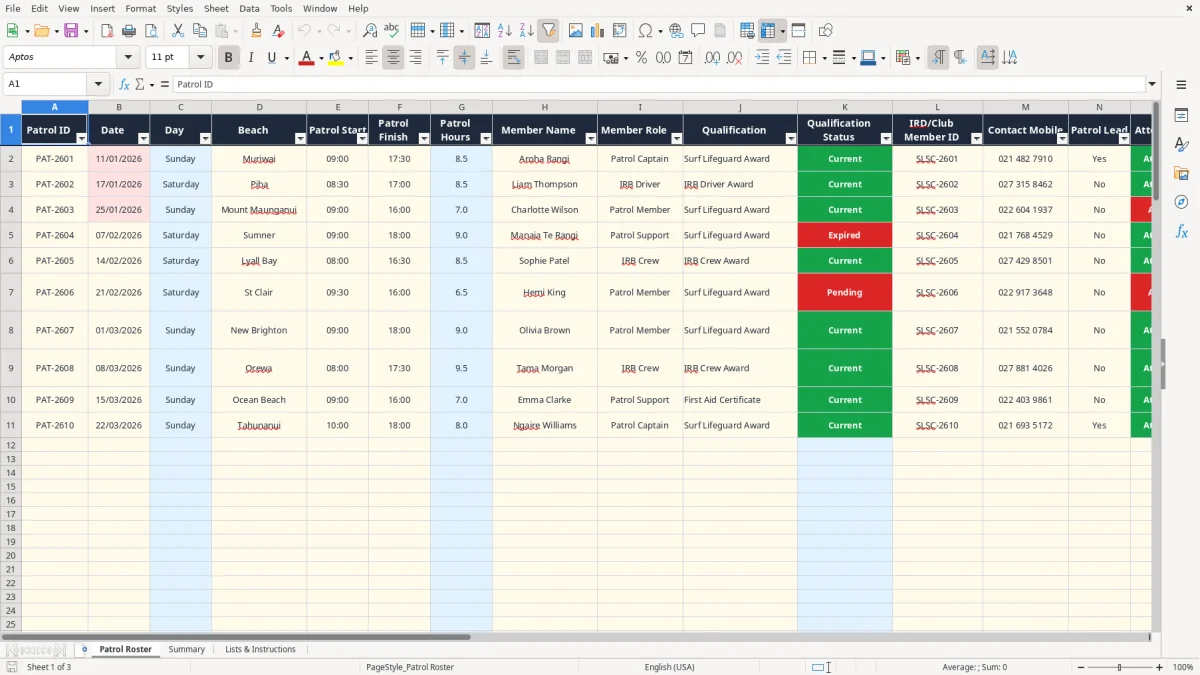
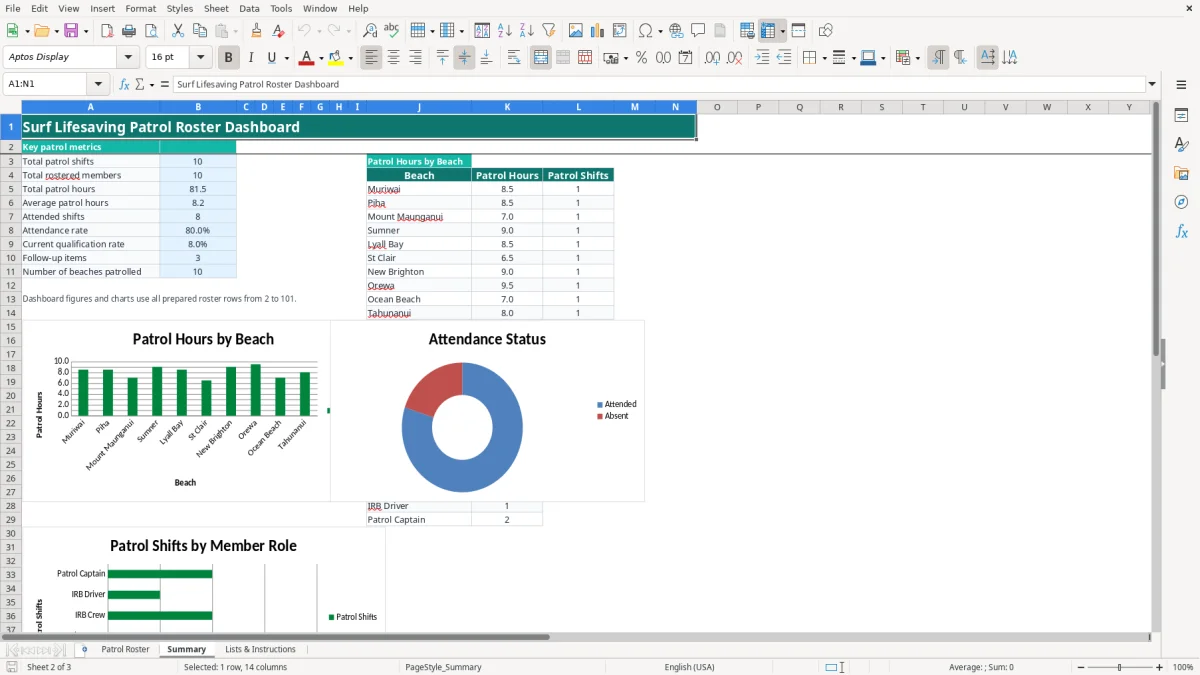
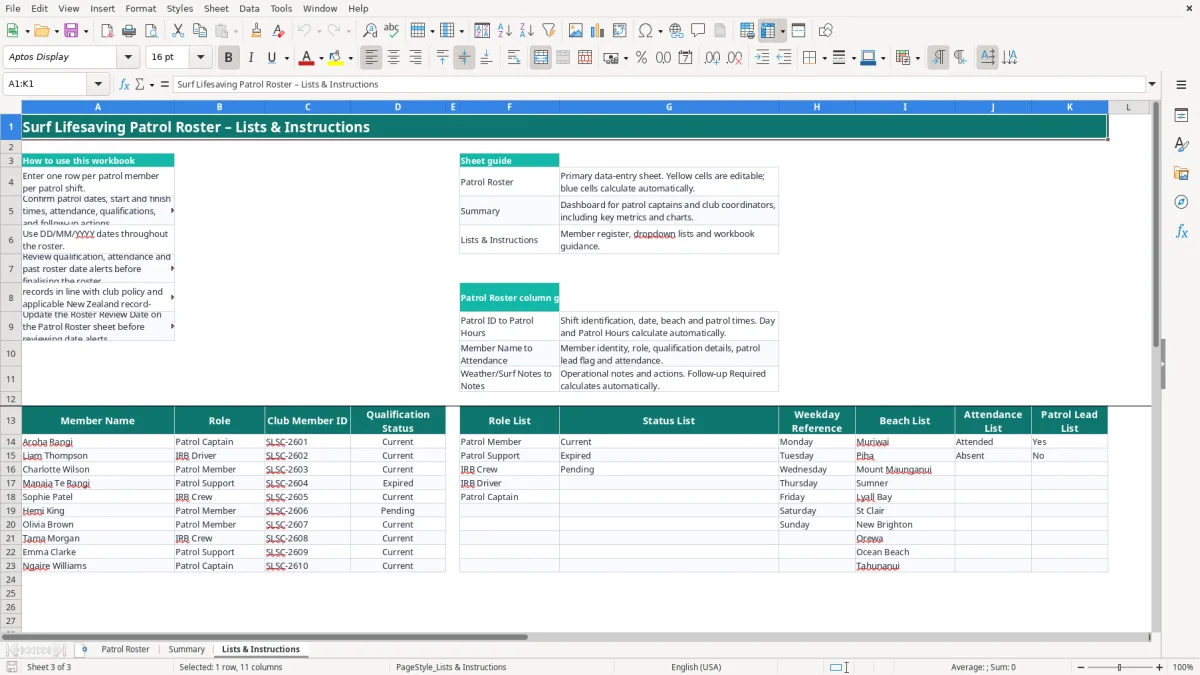
It suits a New Zealand surf club coordinating weekend patrols, holiday cover or several beaches. Image 1 shows the main data-entry sheet, image 2 shows the calculated dashboard, and image 3 explains the workbook and holds the supporting lists.
The key benefits of this Excel template
- Record one row per patrol member per shift, with space for 100 prepared roster rows.
- Calculate the weekday automatically from the date using the weekday reference list.
- Calculate patrol hours from start and finish times, including shifts that cross midnight.
- Use dropdowns for beaches, members, roles, patrol lead status and attendance.
- Match each member to the register and flag a qualification that is not Current.
- Highlight shifts needing action when attendance is Absent or qualification status is not Current.
- Review total shifts, members, hours, attendance and beach activity on one Summary dashboard.
Step-by-step guide
- Open Lists & Instructions and check the member register, roles, qualification statuses, beaches and weekday reference values.
- Enter one row per member per shift on Patrol Roster. Add the Patrol ID, date, beach, patrol times and member name in the editable cells.
- Select the member's role, qualification, patrol lead status and attendance from the available lists, rather than typing different spellings.
- Add the club member ID, mobile number, weather or surf notes, operational notes and the Roster Review Date where required.
- Check the calculated Day, Patrol Hours, Qualification Status and Follow-up Required columns. A follow-up flag of Yes needs review before the roster is finalised.
- Open Summary to check the totals and charts for beaches, attendance and member roles. The dashboard uses the prepared roster rows 2 to 101.
- Save a controlled copy for the season and restrict access to member contact details in line with club policy.
Included features
Patrol Roster table with fields from Patrol ID and Date through to Weather/Surf Notes, Follow-up Required and Notes.
Automatic Day and Patrol Hours calculations across rows 2 to 101.
VLOOKUP qualification checking against the member register, returning Current, Expired or Check member.
Automatic follow-up logic that checks qualification status and attendance.
Summary dashboard with total shifts, rostered members, hours, attendance rate, current qualification rate and follow-up items.
Three charts covering patrol hours by beach, attendance status and patrol shifts by member role.
Lists & Instructions sheet with editable guidance, member register, role list, status list, beach list and attendance values.
Who uses a patrol roster in New Zealand
A surf club patrol captain usually needs this roster before the weekend, while a club coordinator may update it after every patrol. It is useful for a single beach such as Muriwai or Piha, and for clubs coordinating several locations including Mount Maunganui, Sumner, Lyall Bay, New Brighton, Orewa, St Clair or Tahunanui.
Image 1 shows the Patrol Roster sheet laid out as a table. The visible columns run from Patrol ID, Date, Day and Beach through Patrol Start, Patrol Finish and Patrol Hours, then Member Name, Member Role, Qualification, Qualification Status, club member ID, Contact Mobile, Patrol Lead, Attendance, Weather/Surf Notes, Follow-up Required, Notes and Roster Review Date.
One row means one person on one shift
The workbook instructions use one row per patrol member per patrol shift. A Saturday patrol with six members therefore needs six rows, not one row with six names. That structure lets the Summary sheet count attended shifts, total hours and activity by role without trying to split names from one cell.
For example, a club entering Aroha Rangi's 09:00 to 17:30 Muriwai patrol records 8.5 hours. Liam Thompson's 08:30 to 17:00 Piha shift records the same 8.5 hours, while Charlotte Wilson's absent Mount Maunganui row remains visible for replacement-cover follow-up.
Useful before and after patrol
Before the patrol, the captain can check names, roles, qualification status and contact numbers. Afterward, attendance, weather or surf conditions and operational notes give the coordinator a practical record of what happened, rather than just a list of names.
New Zealand records and safety responsibilities
This spreadsheet is an operational roster, not proof that a person is legally or operationally cleared to patrol. The club still needs to apply its Surf Life Saving New Zealand requirements, local operating procedures and beach risk controls. The Qualification Status column is a prompt to check the club register; it does not independently verify an award or renewal.
New Zealand clubs should handle member names, mobile numbers and qualification information carefully under the Privacy Act 2020. The Act contains 13 information privacy principles. Limit access to people who need the roster, avoid leaving printed contact lists unattended, and securely dispose of outdated copies under the club's retention policy.
Keep the roster evidence usable
The Lists & Instructions sheet specifically tells you to maintain member and incident records in line with club policy and applicable New Zealand record-retention requirements. Keep the workbook's dates in DD/MM/YYYY format, and use the Roster Review Date to show when a review was undertaken. A review on 01/02/2026 should not be confused with a patrol date such as 11/01/2026.
The Health and Safety at Work Act 2015 places duties on organisations conducting work, including clubs acting as a PCBU where the Act applies. This workbook records attendance and notes, but it is not an incident register, hazard register or substitute for reporting a notifiable event to WorkSafe New Zealand.
Apply a clear checking rule
For a six-person patrol, check all six rows before the shift starts. If five rows show Current and one shows Expired, do not treat the 83.3% figure as approval; use the individual flag to resolve that person's deployment. The safest stance is to use the spreadsheet for visibility and the club's approved qualification and risk process for the decision.
Where patrol rosters fall over on busy beaches
The most expensive roster errors are usually small data-entry failures that surface when the beach is busy. A member is recorded as Attended when they left early, an IRB Driver is entered under the wrong role, or an absent volunteer is not followed up before the next patrol. Those errors can leave the captain chasing cover on a Sunday morning instead of confirming it on Friday.
Time and attendance errors
Patrol Hours calculates from the start and finish cells. Entering 17:00 instead of 07:00 creates a very different shift, while leaving either time blank leaves the hours result blank. A 09:00 to 17:30 patrol should be 8.5 hours; if the dashboard shows 85 hours for ten similar rows, check whether a time was entered as text or a date was accidentally included.
Do not overwrite the blue calculated cells with typed numbers. The workbook uses IF, MOD and the time values to calculate hours, so replacing a formula can silently break the Summary totals for that row.
Qualification and follow-up traps
Member names are checked against the register with VLOOKUP. Typing Liam Thompson as Liam Thomson will return Check member rather than a qualification status. The Follow-up Required formula returns Yes when the qualification is not Current or attendance is not Attended, so an absent member such as Charlotte Wilson should be dealt with before the next roster.
A roster with 20 shifts and 2 absent records has a 90% attendance rate, but that headline does not tell you which two people need contact. Use the detailed rows first, then the dashboard. In practice, a clear action note such as Confirm replacement cover is more useful than relying on a percentage alone.
Make the spreadsheet part of the weekly patrol routine
The roster works best when it is attached to an existing club routine. Set the next weekend's roster after the previous patrol debrief, then make a second check at the patrol briefing. For a 12-member roster, a five-minute name and qualification check is far quicker than rebuilding cover after the flags are due to go up.
Use a fixed review sequence
- Update the member register before adding new names to the roster.
- Enter dates and times first, then use the dropdowns for beach, member, role, lead and attendance.
- Review every Follow-up Required value of Yes before publishing the shift.
- Enter surf conditions and actions while they are fresh, not at the end of the season.
Image 3 gives the workbook guidance and explains that yellow cells are editable while blue cells calculate automatically. Keep that distinction intact. On the Summary sheet, compare the number of patrol shifts with the actual plan; 30 prepared rows may represent only 10 patrols if each patrol has three members.
When to move beyond Excel
This file is a good fit for a club managing up to 100 prepared roster rows and a straightforward member list of 10 entries. If you are regularly coordinating several hundred members, multiple roster versions, automated availability, qualifications held in another system or live access from phones at the beach, move to a club management or rostering system such as Xero or MYOB only where its workflow suits the club; neither is a dedicated patrol-safety platform.
Until then, keep one controlled master file, use a dated copy for each review cycle and avoid emailing unprotected versions containing mobile numbers. The spreadsheet should support the captain's routine, not become a second unverified record beside the club's official safety and incident systems.
Common questions about this template
The Patrol Roster sheet has prepared operational rows 2 to 101, giving 100 rows. Enter one row for each member assigned to each patrol shift, so a five-member patrol uses five rows.
Day is calculated from Date, Patrol Hours is calculated from Patrol Start and Patrol Finish, Qualification Status is looked up from the member register, and Follow-up Required checks qualification status and attendance.
It returns Yes when the member's qualification status is not Current or attendance is not Attended. It is an action prompt, not a substitute for the club's qualification, deployment or safety decision.
Yes. Add the member to the register or add a beach to the supporting list on Lists & Instructions, then use the relevant dropdown on Patrol Roster. Keep names consistent so the VLOOKUP qualification check works correctly.
It calculates total patrol shifts, rostered members, total and average patrol hours, attended shifts, attendance rate, current qualification rate, follow-up items and number of beaches. It also contains charts for beach hours, attendance and member roles.
No. It records patrol operations, attendance, weather or surf notes and follow-up actions. Maintain separate incident and hazard records where required, and follow the club's procedures under the Health and Safety at Work Act 2015 and Privacy Act 2020.
Download
File format
Excel (.xlsx)
Compatible software
Excel, Google Sheets, LibreOffice
Price
Free
Category
Payroll & HR
7 templates available