
Chippy Timesheet Wages Excel – Free Template (2026)
Payroll & HR
IR330 tax code declaration tracker Excel - Free Template
Track IR330 forms, tax codes, IRD numbers, verification dates and late flags for NZ payroll.
2026-06-18
130 downloads
4.8/5 average rating
Download template
This IR330 tax code declaration tracker Excel template is for NZ payroll teams to record each employee’s declaration, tax code, IRD number, verification date, and any late or missing form in one place. It gives you a clean register plus a dashboard so you can see who is still outstanding before the next pay run.
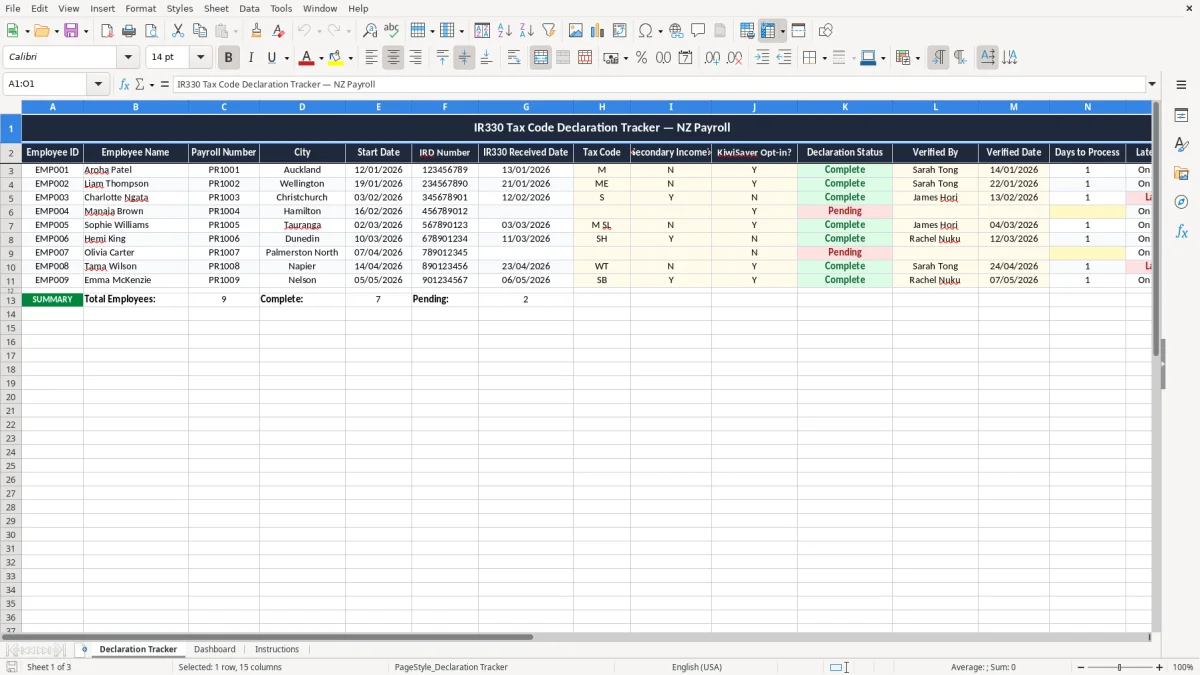
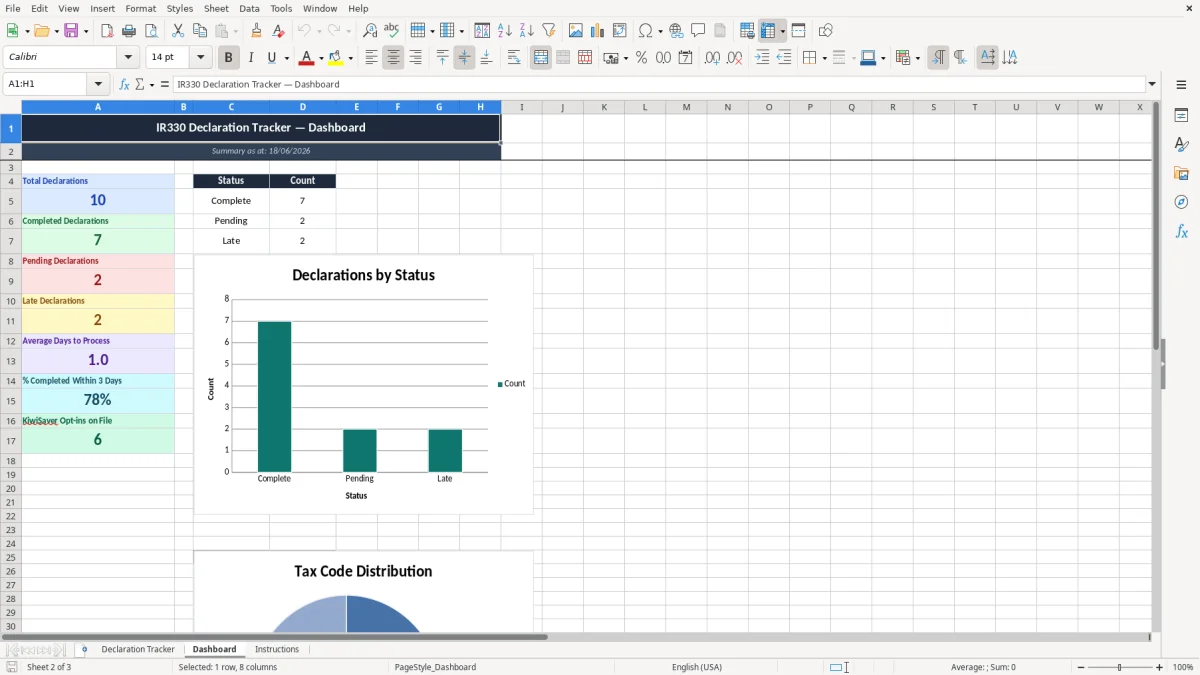
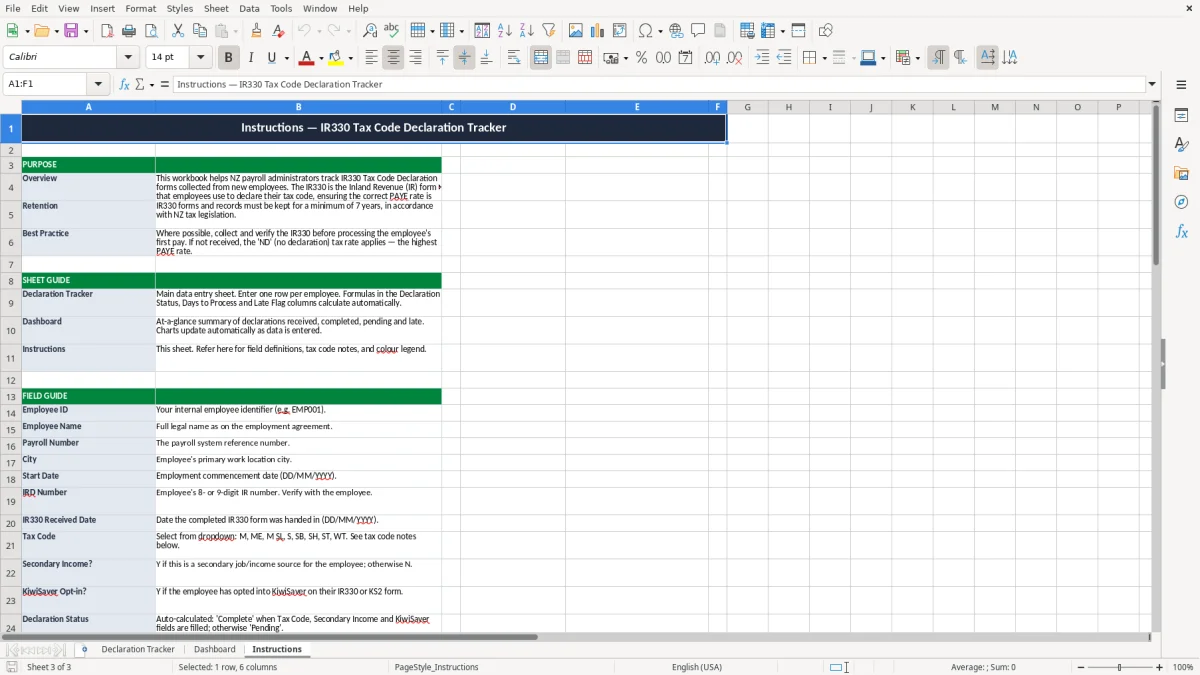
The file has three sheets: Declaration Tracker, Dashboard, and Instructions. Image 1 shows the tracker table, image 2 shows the summary dashboard, and image 3 gives you the setup notes.
The key benefits of this Excel template
- Keeps every employee’s IR330 status in one register, so you can check 20 staff in under a minute.
- Tracks IRD number, tax code, and verified date side by side, which cuts follow-up calls before payday.
- Shows Days to Process and Late Flag, so you can spot overdue forms before they delay PAYE filing.
- Helps you see which starters still need a declaration, useful when you onboard 3 new staff in the same week.
- Dashboard totals give a quick count of received, pending, and late declarations without manual tallying.
- Works well for a small firm with 8 to 30 employees where payroll admin is usually handled by one person.
- Makes audit checks easier because every record has a verified by name and verified date.
Step-by-step guide
- Enter each employee on the Declaration Tracker sheet. Add the employee ID, name, payroll number, city, start date, and IRD number first.
- Record when the IR330 was received and select the tax code and yes/no fields for secondary income and KiwiSaver opt-in. That gives you a full snapshot for payroll.
- Fill in the verified by and verified date fields once you have checked the form. The sheet then calculates the days to process and late flag for you.
- Review the Dashboard sheet before each pay run. Use it to see how many declarations are received, pending, or overdue.
- Update the tracker whenever someone starts, changes tax code, or hands in a new form. If you wait until month-end, the late list gets messy fast.
- Use the Instructions sheet if you want a quick reminder of what each field means and how to keep the register tidy.
Included features
15-column declaration register with employee details, dates, tax code, and status fields.
Days to Process and Late Flag columns to highlight slow turnarounds.
Yes/no tracking for secondary income and KiwiSaver opt-in.
Verification fields for the person who checked the form and the date it was confirmed.
Dashboard summary sheet for quick counts and payroll oversight.
Colour-coded formatting that separates input fields from status fields.
Instruction sheet for setup and daily use.
How payroll teams use an ir330 tracker in New Zealand
If you run payroll for a small company, this tracker becomes useful the moment a new starter lands on Monday and wants paid on Friday. A Hamilton plumbing firm with 12 staff can use it to log the IR330, the tax code, and the IRD number before the first pay run.
It also suits a sole trader who has just taken on a casual helper for 3 shifts a week, or a bookkeeper handling a 25-person roster where forms come in by email, paper, and text. The sheet gives you one place to see what is complete and what still needs chasing.
What the tracker sheet shows
Image 1 shows a 15-column table on the Declaration Tracker sheet. You enter employee ID, name, payroll number, city, start date, IRD number, IR330 received date, tax code, secondary income, KiwiSaver opt-in, declaration status, verified by, verified date, days to process, and late flag.
Why that matters on pay day
If 4 forms are missing on the Tuesday before payday, you do not want to find out while finalising PAYE. A simple register stops that scramble, especially when one person is doing payroll, rosters, and holiday pay at the same time.
What IRD expects you to keep for payroll records
Inland Revenue expects payroll records to be kept for 7 years, and that includes the information behind the IR330 decision: tax code, IRD number, start date, and the date you verified the form. If you are ever asked why someone was put on a particular code, your register is the trail.
For employees with secondary income, the tax code choice matters because the wrong code can leave a gap in deductions. A worker on $1,200 a week who should have been coded for secondary employment can end up under-deducted for months if nobody checks the form at the start.
How it fits with payroll filing
The tracker supports your normal payday filing process, including the IR348 employer monthly schedule where relevant in payroll systems that still reference it in reporting workflows. It does not replace payroll software, but it does keep the source documents aligned with what you file.
Why the dates are worth recording
A verified date and a days-to-process field give you a measurable record. If a form sat for 9 days before being actioned, you can see where the delay happened instead of guessing after the fact.
Where IR330 tracking goes wrong in small firms
The biggest mess is starting someone on the wrong tax code because the form is still sitting in a ute glovebox or buried in an inbox. If you have 10 staff and 2 starters are missing declarations, the fix can mean redoing a pay run, reversing deductions, and explaining it to the employee.
Another common problem is not matching the IRD number to the right person. A single digit mistake can send the record to the wrong worker’s file, and that creates headaches when you later try to reconcile deductions or answer a query from Inland Revenue.
What the late flag is really saving you
A late declaration is not just untidy. If the form sits unresolved for 14 days and payroll runs weekly, you may carry the wrong code through two pay periods, which means more correction work and a higher chance of a gross-up or under-deduction issue.
The cost of relying on memory
One office manager can remember 5 starters without trouble, but not 18 across a busy month. Once the notes spread across email, paper, and messenger apps, you lose the audit trail and spend extra time rebuilding it when someone asks for proof.
That same need for a clean audit trail carries into the company tax return workings, where every adjustment has to be traced back to the figures used in the filing.
How to make the tracker part of every pay cycle
The easiest way to keep this alive is to tie it to the payroll routine you already do. Set one fixed time each week, such as Thursday at 3pm before the pay run, and update the declaration status before you approve wages.
Small habits that stick
- Copy the prior week’s entries if you are onboarding several casuals in one go.
- Use the status column to catch anything still pending before the PAYE cut-off.
- Check the dashboard while you are doing the roster or timesheets, so the tracker is part of the same routine.
When the spreadsheet is no longer enough
If you are handling 40 or more staff, or you need direct links to payroll and rostering software, move the process into Xero or MYOB. The spreadsheet is best when you need a clear manual control, not when the business has outgrown simple checking.
At that point, the next check is an employer schedule reconciliation so the manual review still matches what will be filed through payroll.
Common questions about this template
It is the form an employee uses to tell you which tax code to apply in payroll. You use it with the employee’s IRD number, start date, and any secondary income details so the right deductions are made from the first pay.
It suits anyone running NZ payroll for 1 to 50 staff, especially small firms where one person is managing onboarding, wages, and filing. It is handy when you have multiple starters in the same week and need a quick status check.
The sheet includes employee ID, employee name, payroll number, city, start date, IRD number, IR330 received date, tax code, secondary income, KiwiSaver opt-in, declaration status, verified by, verified date, days to process, and late flag.
The dashboard gives you a quick summary of the tracker data so you can see what is received, pending, and late without counting rows yourself. That is useful when you are doing payroll on a tight deadline and need the position in one glance.
Keep payroll records, including the information behind tax code decisions, for 7 years. That gives you a clear paper trail if you need to check how a code was applied months or years later.
Update it as soon as a new starter hands in a form, changes tax code, or confirms secondary income status. If you wait until the end of the month, you are more likely to miss a pay run and create extra correction work.
Download
File format
Excel (.xlsx)
Compatible software
Excel, Google Sheets, LibreOffice
Price
Free
Category
Payroll & HR
6 templates available